
Timesheet Software for UK Hospitality

Hospitality staff work variable hours, late nights and weekends, and often cover more than one role in a single venue. TimeTally is time and attendance software for hospitality. Staff log their hours from any phone. Managers approve those hours from theirs. You get one record of who worked when, across one venue or six. Accurate hours matter for payroll, for compliance, and for controlling labour costs. Approved timesheets export straight to Xero, QuickBooks, or CSV. From £3 per employee per month.

Hospitality timesheet showing shift hours, breaks and area worked for the week
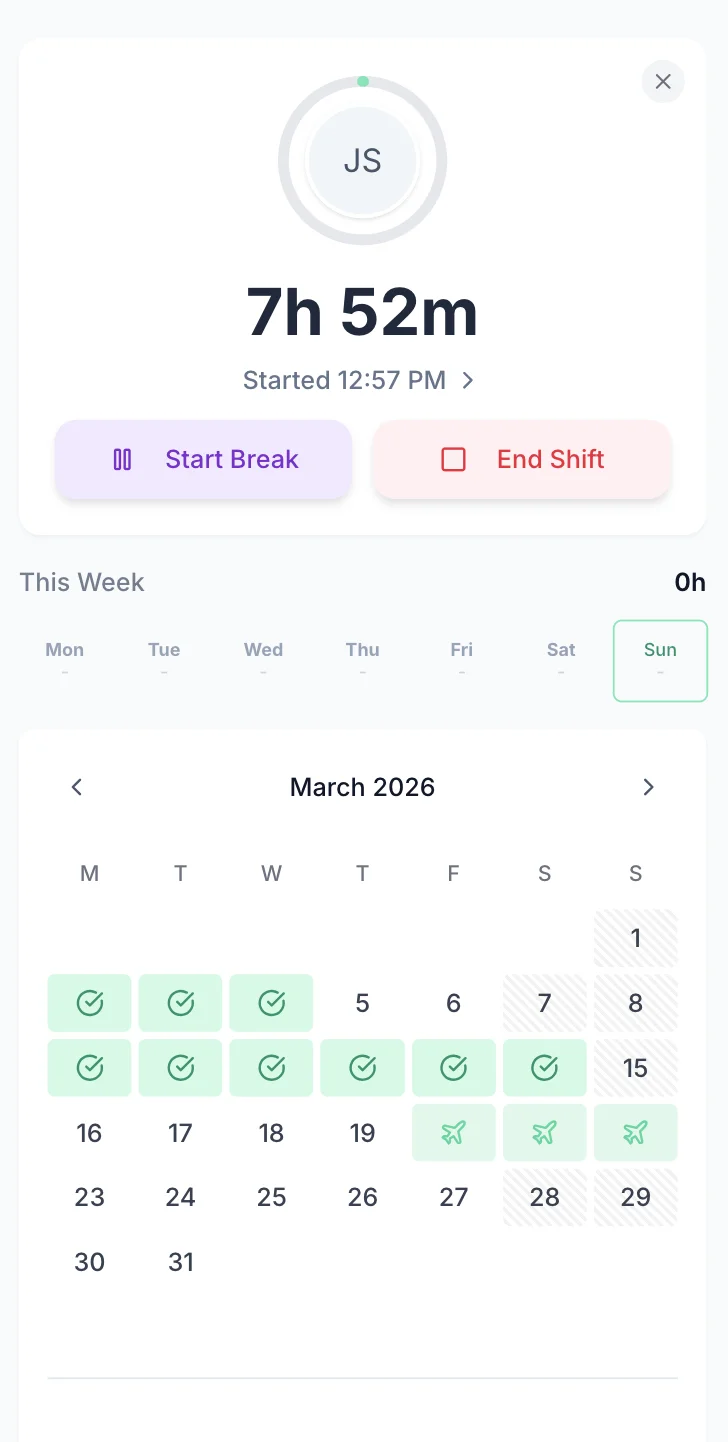
Hospitality staff clocked in on their phone

The app is simple to use, reliable, and makes managing staff records straightforward. The system has saved us a significant amount of administration time.

CLI ManchesterJordan Ingoe, CLI Manchester

Simple Timesheets That Fit Between Services

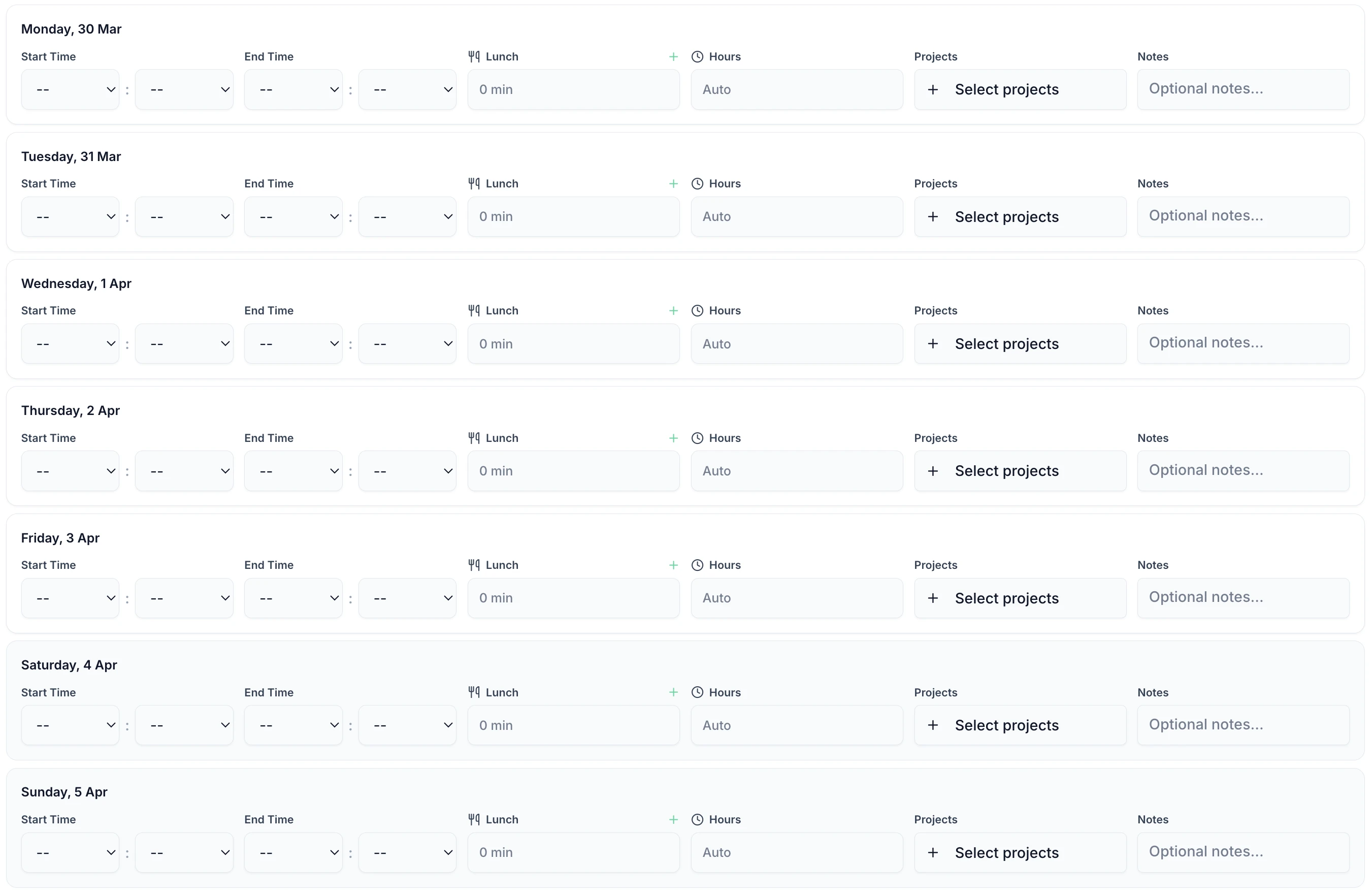
A shift takes under 60 seconds to record. Staff enter a start time, an end time and any breaks, then submit the week for approval. It runs in any phone browser, so there is nothing to install, and it works the same on a shared tablet behind the bar or in the back office.

TimeTally timesheet entry screen showing shift hours and break tracking
  • The Whole Week on One Screen

    Every shift from Monday to Sunday

  • Start, Finish and Break

    Or enter the total hours instead

  • Breaks Deducted Automatically

    Unpaid breaks come off the shift total

  • Tag the Area Worked

    Kitchen, bar, front of house, housekeeping

  • Notes on a Shift

    Record why a service ran past close

  • Running Weekly Total

    Hours update as each shift is entered

Every hospitality time tracking scenario, handled

Tap any card for the detail.

Start your free trial

14-day free trial · No credit card needed

What it does in service

What TimeTally Does for Hospitality Teams

TimeTally records the hours your staff work and sends the approved totals to payroll. Here is what it does for hotels, venues, restaurants and caterers.

Shift Hour TrackingHourly Rates & OvertimeLate Night & Split ShiftsDepartment & Area TrackingPayroll ExportMobile Access — No App Download
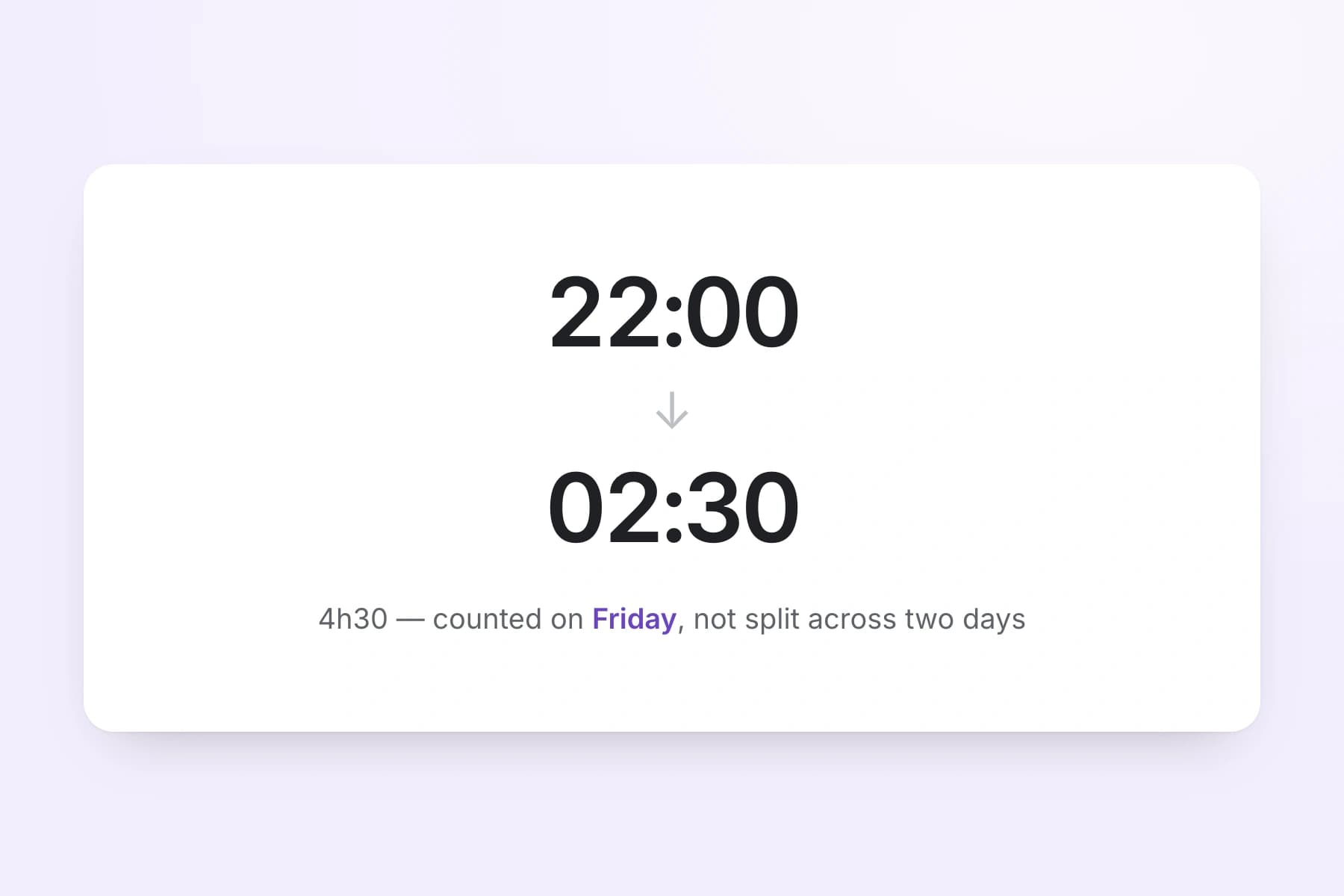
  1. Staff submit their shift start and end times at the end of each week. This works for any pattern — early mornings, late nights, weekends, or variable hours. Overnight shifts that cross midnight are handled correctly. Total hours and overtime are calculated automatically.

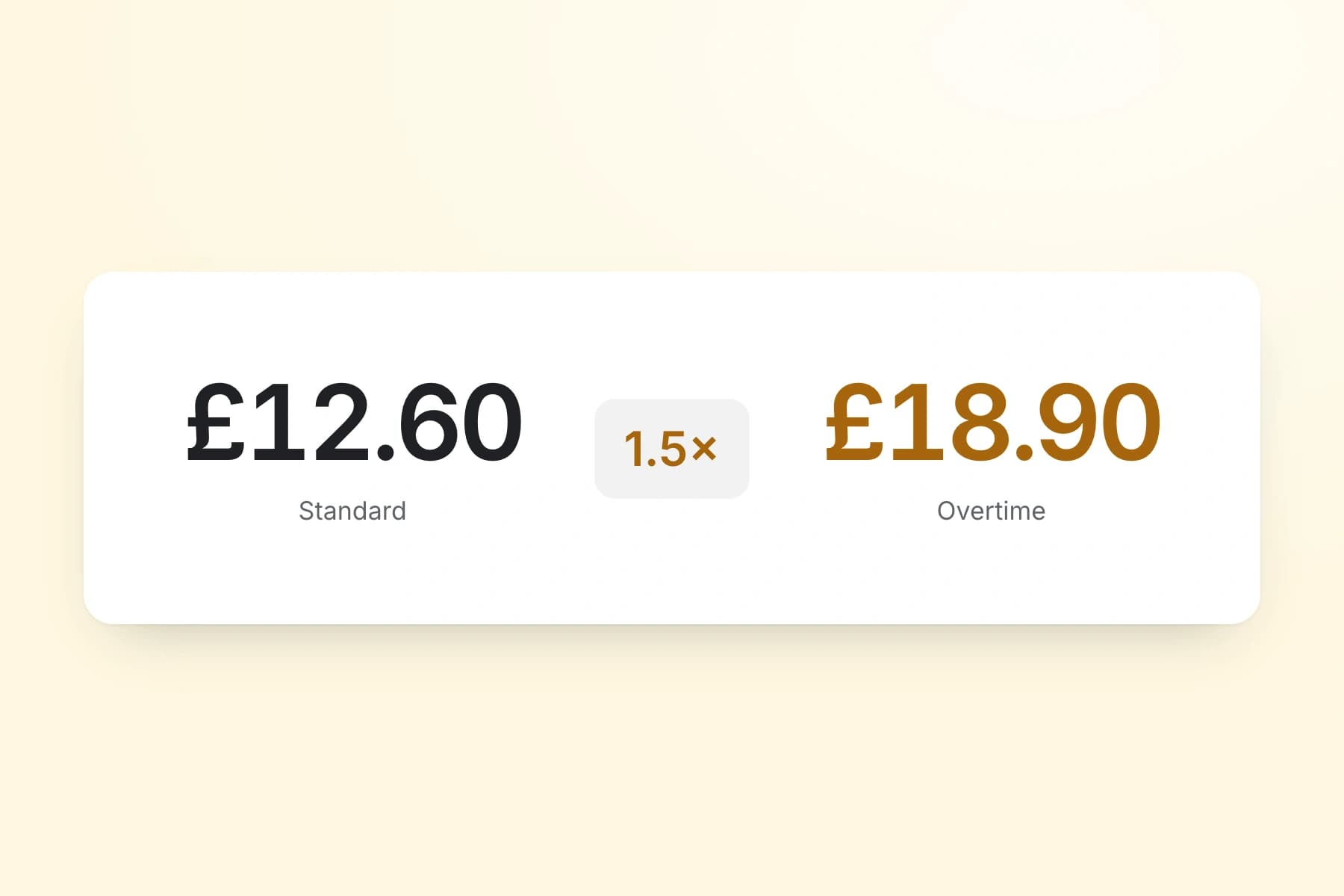
  2. Set an hourly rate and overtime rate for each staff member. When timesheets are submitted, TimeTally calculates standard pay and overtime pay automatically. You can set daily or weekly overtime thresholds to match your business rules. Learn more about how overtime is calculated.

  3. Hotel night porters and late-night restaurant shifts that run past midnight are tracked correctly. For split shifts (breakfast service then dinner), staff simply log separate timesheet entries for each portion. Total hours across all entries are added up automatically.

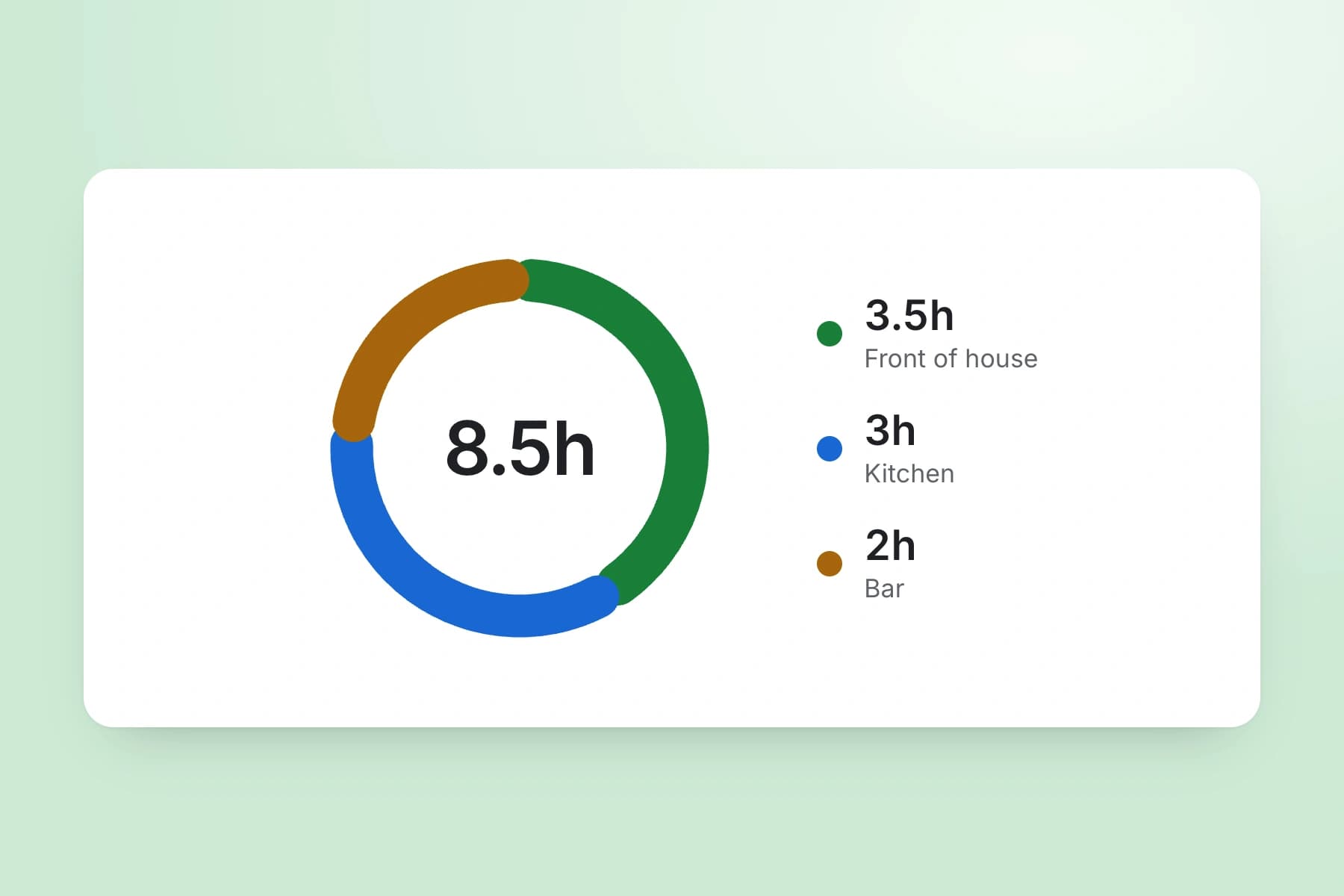
  4. Use TimeTally's project tracking to assign hours to specific areas — front of house, kitchen, housekeeping, bar, events. If a member of staff works across two areas in a shift, they can split their hours accordingly. Reports show total hours and costs per area.

  5. Export approved timesheets to Xero, QuickBooks, or CSV with one click. The export includes employee names, standard hours, overtime hours, pay amounts, and break deductions. No manual re-entry needed.

  6. TimeTally works in any mobile browser. Staff do not need to download an app or install anything on personal devices. They can bookmark the page or use a shared tablet. It is a hospitality employee time tracking app that needs nothing installed on anybody's phone. There is also a native iOS app for those who prefer it. See our shift management page for more on managing hospitality schedules.

Explore time trackingEmployee time tracking software

Approve a Week of Split Shifts From a Phone

Venue managers approve or reject timesheets from a phone, a tablet or a desktop. Each week arrives already totalled, with standard hours separated from overtime and the hours split across the areas that person covered. Approved and exported are tracked as separate states, so a week signed off at the venue cannot go into the payroll file twice when head office runs it.

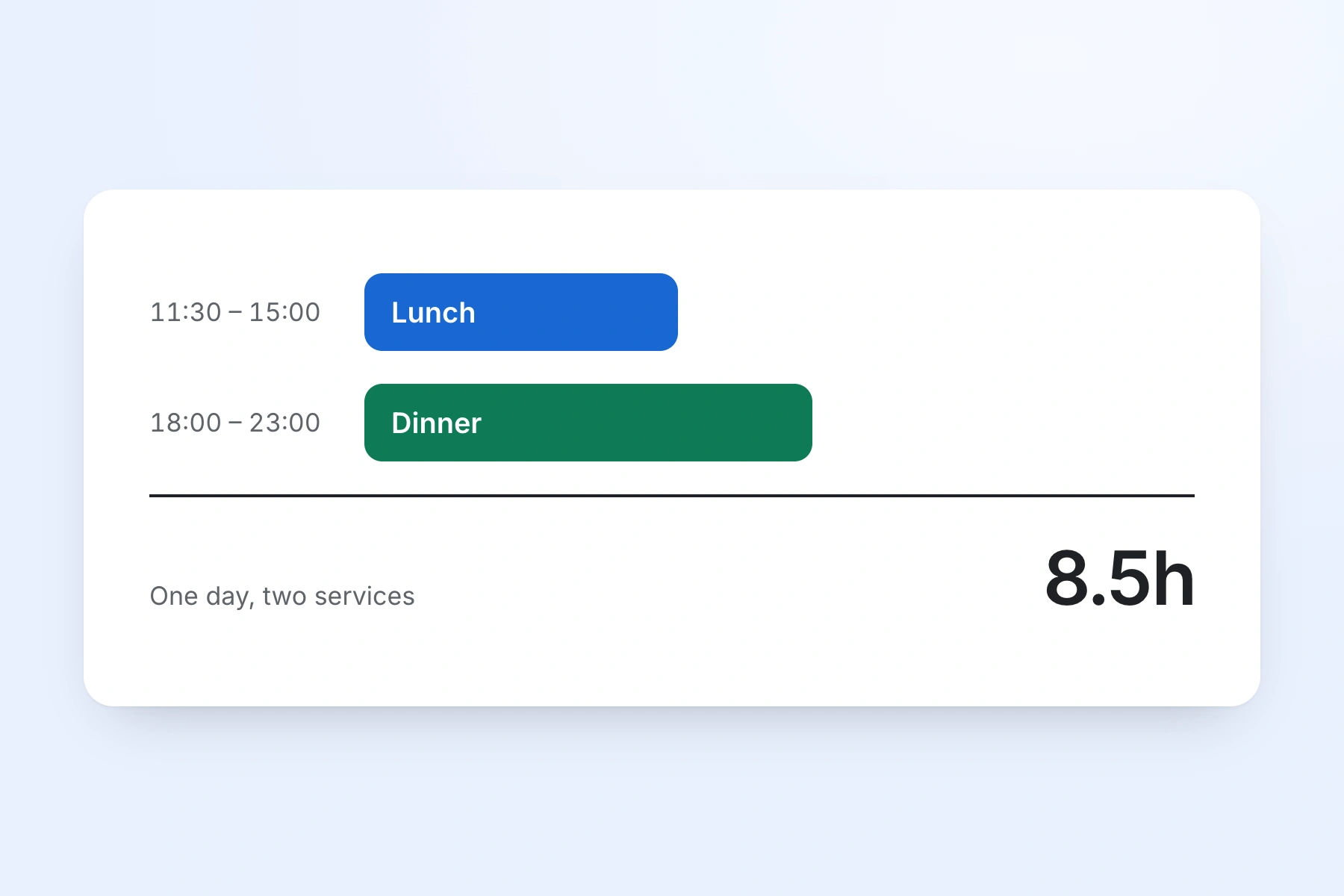
  • A split shift is two entries on one day. The lunch service and the dinner service each carry their own start, finish and break, and the day totals what was actually worked.
  • Open a day to see what a pay query turns on: the unpaid break, the second shift, the area the hours went to, and any note left about a service that overran.
  • Pay rates are permission-based. A duty manager can approve a whole team's hours without seeing what any of them are paid.
  • Send a reminder to anyone still outstanding in one tap. It arrives as a notification in their app.
Overnight shifts calculatedPhone, tablet or desktop
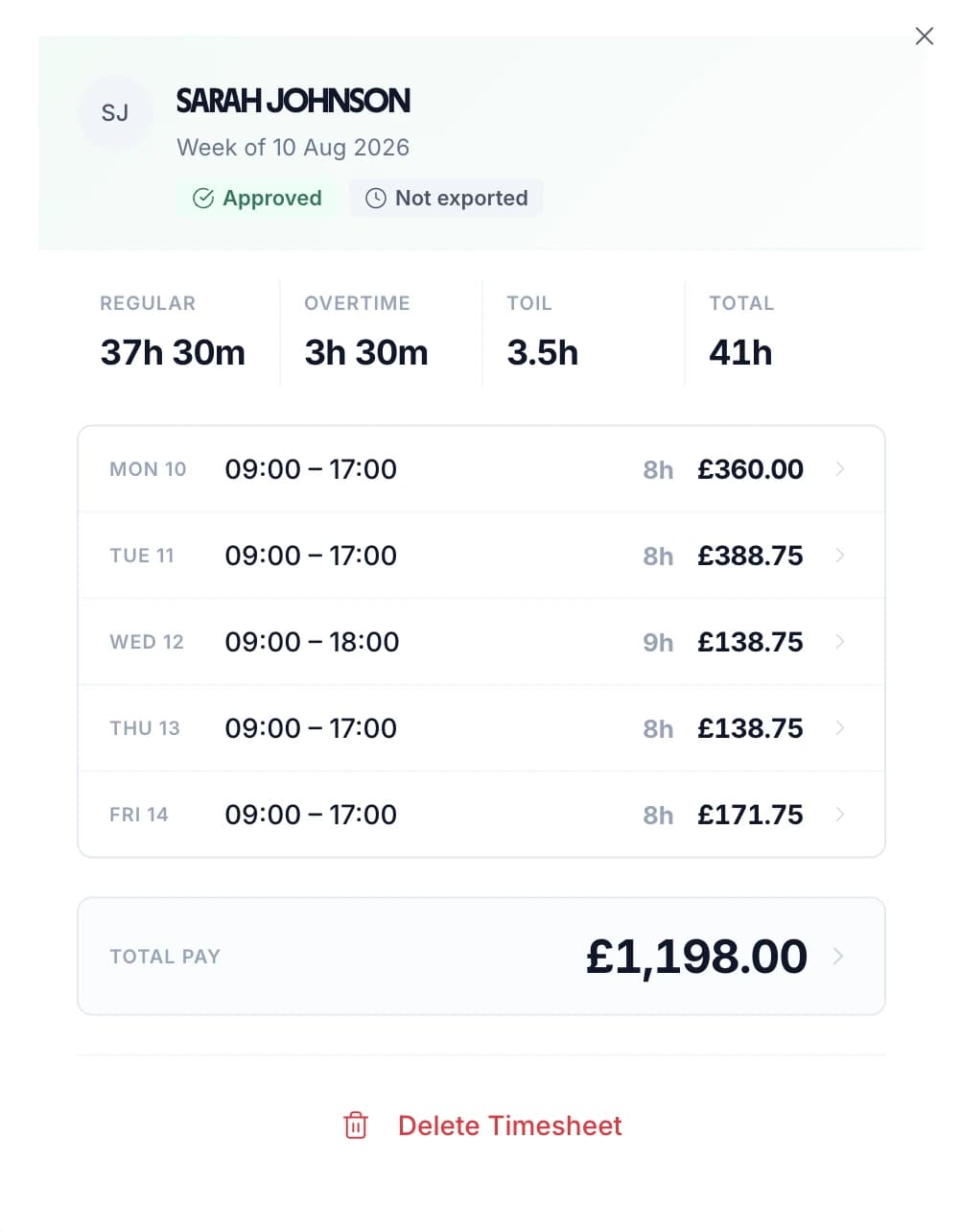
Approved weekly hospitality timesheet showing split shifts, overtime and pay per day

Every Person's Submitted Hours in One List

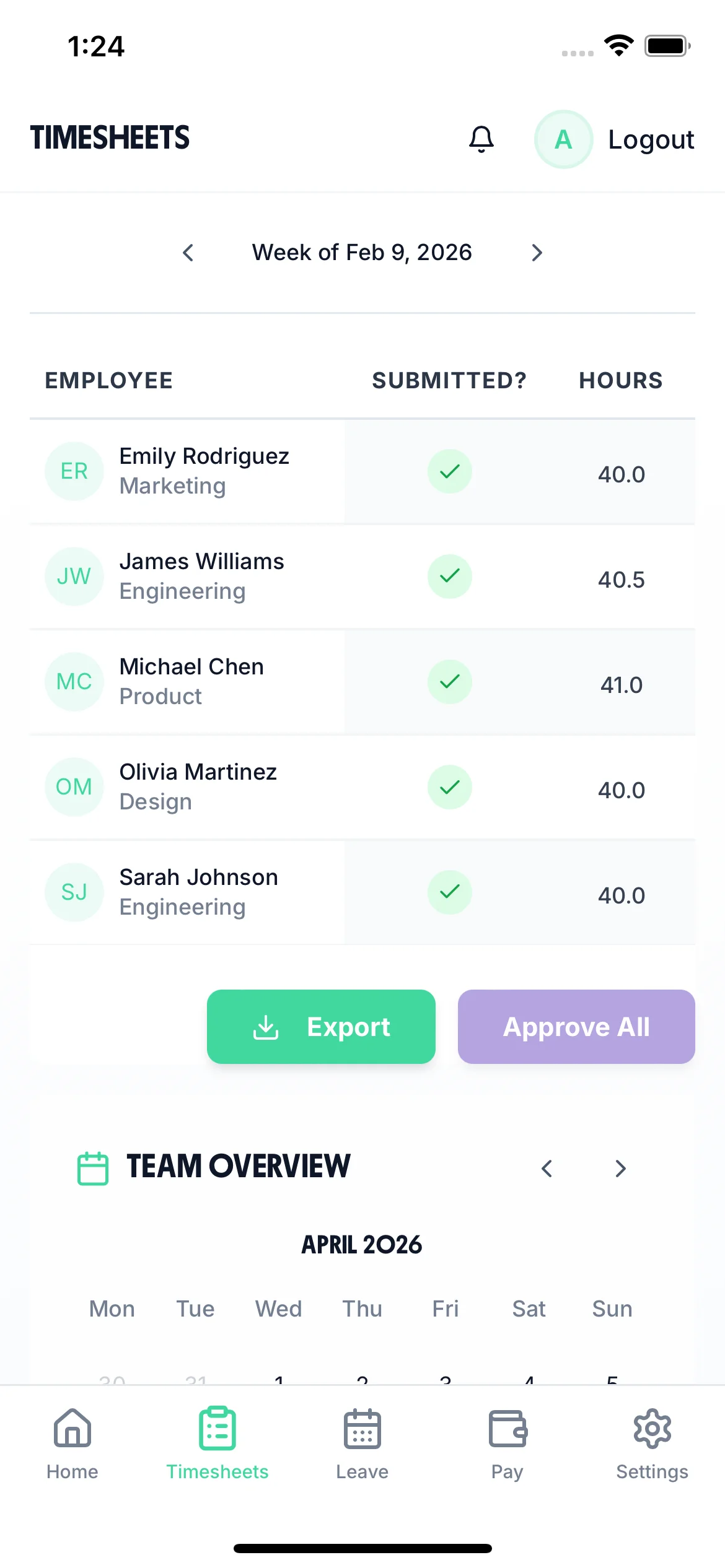
The timesheet screen lists everyone on the team for the week you are looking at, with their total hours and whether their sheet is in. A duty manager can see who still owes hours without ringing round the venue, and can work down the list from a phone.

  • Move between weeks with the arrows at the top of the list. The names, the totals and the submitted marks all follow the period on screen.
  • Each row carries one person, their total hours for that week, and a tick once the sheet is in. Open a row to see the day-by-day hours behind the total.
  • Approve everyone still outstanding for that week in a single action, or open one person and approve or reject their days on their own.
  • A rejection carries a written reason, so a member of staff who booked hours to the wrong area knows what to correct and resubmit.
  • Export sits under the list, so the same screen that signs the week off is the screen that sends it to payroll.
Approve one or approve allWorks on a phone
Manager view on a phone listing each hospitality worker's weekly hours and whether their timesheet is submitted

Watch a Manager Approve a Week and Send It to Payroll

A short loop of the manager's month view. A shift is clocked and written up. The finished week lands in the Timesheet Requests panel, where the manager approves it. Time-off requests sit in the panel beside it. The approved hours are then exported to payroll with the regular hours, the overtime and the pay for each member of staff.

All Departments
Jun 2026
M
T
W
T
F
S
S
M
T
W
T
F
S
S
M
T
W
T
F
S
S
M
T
W
T
F
S
S
M
T
AR1

Amelia Roberts

Kitchen

JK2

James Kelly

Front of house

PS3

Priya Shah

Kitchen

MP4

Maya Patel

Front of house

TW5

Tom Wilson

Bar

Timesheet Requests

3
AR

Amelia Roberts

37h 30m · Week of Jun 15

JK

James Kelly

38h 30m · Week of Jun 8

Time-off Requests

2
PS

Priya Shah

3d · Annual Leave

MP

Maya Patel

2d · Sick Leave

AR

Amelia Roberts

Monday 15 June · 09:00

AR

0h 00m

09:00 – 17:00

Break
End Done

Timesheet submitted

Week of Jun 15

AR

Amelia Roberts

Kitchen

Week of Jun 15, 2026

Mon15
09:00–17:00·30m

7h 30m

Tue16
09:00–17:00·30m

7h 30m

Wed17
09:00–17:00·30m

7h 30m

Thu18
09:00–17:00·30m

7h 30m

Fri19
09:00–17:00·30m

7h 30m

Submit Timesheet Submitted

Payroll Export

Week of Jun 15, 2026 · 5 employees

Employee
Reg. pay
Overtime
Total
AR

Amelia Roberts

37.5h

£281.25

£281.25

JK

James Kelly

40h

£300.00

£22.50

2h

£322.50

PS

Priya Shah

32h

£240.00

£240.00

MP

Maya Patel

38h

£285.00

£285.00

TW

Tom Wilson

40h

£300.00

£45.00

4h

£345.00

Total · 5 employees

£1,406.25

£67.50

£1,473.75

Confirm Export Exported!

Track Hours Across Multiple Hospitality Sites

Hotel groups, venues and multi-site operators run everything from one account. Two settings do most of the work: tagging each shift with the area it was worked in, and the team calendar a manager watches during service.

Tag every shift with the venue it was worked in.

Hotel groups, multi-site operators and contract caterers rarely run one building. Every member of staff sits in one account, and each shift is tagged with the area it was worked in. The riverside kitchen and the town-centre bar then come out as separate lines in the same report.

Areas nest, so a venue can sit above its own kitchen, bar and housekeeping. Someone who covers two sites in a week splits their hours across both when they submit, and the labour cost lands against each. An area can carry its own rate for the person working it: an hourly uplift, or a flat fee for a function.

There is one limit to know about. TimeTally holds a single staff list rather than a login per site. Anyone with manager access sees the whole team, so a general manager cannot yet be restricted to their own venue.

See who is on, who is off, and whose hours are missing.

One calendar carries the shifts on the rota, approved holiday and absence, and the timesheets waiting to be signed off. If your team clock in rather than filling in a form, it also shows who is on the clock now and what time they started.

It refreshes about once a minute, and again when you return to the tab. A manager who leaves it open on the office screen is looking at tonight's floor. Approve a timesheet, reject one with a reason, or send a reminder to anyone who has not submitted, without leaving the grid.

More on how timesheet approvals work

Used Across UK Hospitality Settings

TimeTally handles time tracking for hospitality of any size, from a single site to an operator running several. Download our shift rota template for planning rotas.

Hotels & B&Bs

Front desk, housekeeping, hotel restaurants, night porters — and one set of hours per person however many departments they cover.

Restaurants & Pubs

Fine dining, casual dining, pubs and bars — restaurant employee time tracking with split shifts, late finishes and variable weekly hours all handled.

Cafes & Coffee Shops

Independent cafes, coffee chains, bakeries, delis — early starts, part-time rotas and students who work around term time.

Catering & Events

Event catering, contract caterers, wedding venues, corporate events — casual staff who work one Saturday and none the next.
Why it matters

Why Hospitality Businesses Need Accurate Timesheets

TimeTally is a timesheet tool, not a hospitality management platform — but accurate hour records are the foundation of paying staff correctly, staying compliant with employment law, and managing labour costs.

Hospitality is one of the UK's most labour-intensive sectors. Variable shift patterns, zero-hour contracts, seasonal staff, and late-night working all make it difficult to track hours accurately using paper timesheets or spreadsheets. When hours are wrong, payroll is wrong — and in an industry where margins are tight, that matters.

The Working Time Regulations 1998 limit average weekly working hours to 48 (calculated over a 17-week reference period) and require at least 11 consecutive hours of rest between shifts. Workers on shifts over 6 hours are entitled to a 20-minute uninterrupted break. These rules apply to hotels, restaurants, cafes, and catering companies alike — including staff on zero-hour contracts.

The Employment (Allocation of Tips) Act 2023 requires employers to distribute tips, gratuities, and service charges fairly and to keep records for three years. While TimeTally does not have a dedicated tips tracking feature, staff can use the notes field on timesheet entries to record tip amounts — giving you a basic written record alongside hours worked.

Employers must also ensure that total pay divided by total hours never falls below the National Minimum Wage (£12.21/hour for workers aged 21+ from April 2025). Inaccurate hour records make it impossible to verify this. HMRC can investigate and issue penalties where employers cannot demonstrate NMW compliance.

Accurate timesheets are not glamorous, but they underpin everything: correct pay, legal compliance, labour cost visibility, and trust with staff. In an industry with high turnover, getting the basics right helps retain the people you have.

UK Compliance
UK Compliance

How TimeTally Helps with UK Hospitality Compliance

TimeTally is a timesheet tool, not a compliance system — but accurate timesheet records are the foundation of meeting your legal obligations. Here is how the data TimeTally captures supports compliance.

Working Time Regulations

TimeTally records all hours worked, including overtime and night shifts. This gives you the data you need to monitor the 48-hour weekly average (over a 17-week reference period), 11-hour rest between shifts, and the 20-minute break entitlement for shifts over 6 hours. You can export this data at any time if HMRC or the HSE request records.

National Minimum Wage

Accurate hours tracking ensures your effective hourly rate does not fall below the National Minimum Wage (£12.21/hour for workers aged 21+ from April 2025). This is especially relevant in hospitality where unpaid overtime or incorrect break deductions could push the rate below the legal minimum.

Tips Act Record-Keeping

The Employment (Allocation of Tips) Act 2023 requires employers to keep tip records for three years. TimeTally does not have a dedicated tips feature, but staff can use the notes field on timesheet entries to record tip amounts alongside their hours. This provides a basic record, though you may need a separate system for detailed tronc management.

HMRC Record-Keeping

HMRC requires employers to keep records of hours worked for at least two years. TimeTally stores all timesheet data digitally with timestamps and approval records — a complete audit trail that you can export whenever needed.

Holiday Entitlement

All UK workers get 5.6 weeks statutory holiday (28 days for full-time), and that includes anyone on a zero-hours contract. For staff whose hours change week to week, TimeTally can accrue leave from hours actually worked rather than from a fixed allowance — the accrual rate is set per organisation and defaults to 12.07%, the standard figure for variable-hours workers. Pro-rata for part-time patterns and mid-year starters is handled the same way.

Break Tracking

Under UK law, workers on shifts over 6 hours are entitled to a 20-minute uninterrupted break. Use our break time compliance calculator to check your obligations. TimeTally tracks breaks separately and deducts them from total hours, so you have a record that breaks were taken and payroll figures are accurate.

Simple, Transparent Pricing

One price. Every feature. No surprises.

£3/employee/month

Billed monthly, incl. VAT. Cancel anytime.

Shift hour tracking including late nights and split shifts
Hourly rates and overtime calculation
Department and area tracking
Payroll export to Xero, QuickBooks, or CSV
Mobile access — no app download needed
Get Started

In short

What is hospitality time and attendance software?

Hospitality time and attendance software records the hours each member of staff actually works: the start, the finish and the breaks. Those hours can then be paid correctly and checked against working time rules. TimeTally does this for UK hotels, restaurants, pubs, cafes and caterers from £3 per employee per month. Staff log a shift from any phone browser or the iOS app, tag it to an area such as the kitchen or the bar, and submit the week for approval. Managers approve from their own phone. Shifts that run past midnight are calculated correctly. Breaks come off the total automatically. Approved hours export to Xero, QuickBooks or CSV for payroll. It is the hour record underneath payroll in the hospitality industry. It is not a rota system, an EPOS, or a tronc scheme.

Price
£3 per employee a month
Logging
Any phone browser, or the iOS app
Tags to
An area: kitchen, bar, front of house
Exports to
Xero, QuickBooks, CSV
Does not do
Tips, tronc or EPOS

Frequently Asked Questions

Can hospitality staff use TimeTally without downloading an app?

Yes. TimeTally works in any mobile browser — no app download or installation needed. Staff can bookmark the page on their phone or use a shared tablet behind the bar or in the kitchen. There is also a native iOS app on the App Store for those who prefer it.

How does TimeTally handle late-night shifts that cross midnight?

TimeTally handles overnight shifts correctly. If a bartender starts at 6pm and finishes at 2am, the system calculates 8 hours without any issues. Start and end times can cross midnight. Total hours and overtime are calculated automatically.

Can staff log split shifts (breakfast and dinner service)?

Yes. Staff create separate timesheet entries for each portion of a split shift — for example, one entry for 7am-11am breakfast service and another for 5pm-10pm dinner service. TimeTally adds up all entries for the day and week automatically. There is no specific split shift mode; it is simply multiple entries per day.

Does TimeTally track tips or manage a tronc scheme?

TimeTally does not have a dedicated tips tracking feature or tronc management system. However, staff can use the notes field on each timesheet entry to record tip amounts alongside their hours. This gives you a basic written record. If you need detailed tronc administration, you would need a separate system for that.

How does TimeTally work with zero-hour contracts?

TimeTally works well for zero-hour and casual staff. They log whatever hours they actually work each week. Holiday entitlement is calculated pro-rata based on hours worked — zero-hour workers are legally entitled to 5.6 weeks statutory holiday. TimeTally handles this calculation automatically.

Can I set different pay rates for different staff?

Yes. Each staff member has their own hourly rate and overtime rate. When timesheets are submitted, TimeTally calculates standard pay and overtime pay based on these individual rates. You can update rates at any time from the employee settings.

Can staff assign hours to different areas (kitchen, front of house, etc.)?

Yes. TimeTally has project tracking where you can create areas like kitchen, front of house, bar, housekeeping, or events. Staff assign their hours to the relevant area when submitting their timesheet. Reports show total hours and costs per area.

How do holiday requests work?

Staff tap 'Book Time Off', select their dates, and submit. Their manager gets a notification and can see the team calendar to check for clashes before approving. Remaining holiday allowance is shown in real time. Statutory entitlement (5.6 weeks) is calculated automatically, including pro-rata for part-time and zero-hour staff.

What payroll systems does TimeTally export to?

TimeTally exports to Xero, QuickBooks, and CSV/Excel. The export includes employee names, standard hours, overtime hours, pay amounts, and break deductions. Most payroll systems can import CSV files if a direct integration is not available.

Can I track staff hours across more than one hospitality site?

Yes. All your venues live in one TimeTally account and hours are tagged with the area they were worked in, so a hotel with a restaurant and a spa — or an operator running three pubs — gets hours and labour cost per site in the same report. Areas nest, so a venue can sit above its own kitchen, bar and housekeeping, and staff who cover two sites in a week split their hours across both when they submit. One thing to be aware of: it is a single staff list rather than a login per site, and manager access is not currently restricted to one venue, so anyone with manager permissions sees the whole team.

What can a manager see in real time?

The team calendar is the manager dashboard. It shows the rota, approved holiday and absence, timesheets waiting to be approved, and — for teams using clock-in rather than the weekly form — who is on the clock right now and the time they started. It refreshes roughly once a minute and again whenever you return to the tab, so a screen left open in the office stays current through service. Managers can approve, reject with a reason, or send a reminder to anyone who has not submitted, without leaving that view.

Is TimeTally a real-time clock-in/clock-out system?

Not by default, no. Most hospitality teams run TimeTally as weekly timesheet entry rather than as a live clock-in/clock-out system. Staff record their hours at the end of each week (or day, depending on your preference). Staff enter start times, end times, and breaks for each shift, then submit for manager approval. This approach is simpler and works well for hospitality teams where staff may not have easy access to a terminal at the start of every shift. If you would rather have a live clock in and clock out with a running timer, that mode exists as well: you can set which one your venue uses, allow both, or let each member of staff choose.

Still have a question? See all FAQs

Try TimeTally Free for 14 Days

No credit card required. Set up your hospitality team in 10 minutes. Start recording staff hours across every venue and exporting approved hours to payroll.

FREE 14-day trial · No credit card required · Cancel anytime

Support that answers

A real person replies within 24 hours. No ticket queues, no bots.

UK GDPR compliant

A UK company, ICO regulated. Your data encrypted and never sold.