Rota Planning
Rota PlannerSchedule shifts and manage your teamTime & Attendance
Time TrackingTimesheets, clocking in, and moreView all features One plan · £3 per employee per month
Free Hourly Rate Calculator
Convert between annual salary and hourly rate in seconds. Enter your salary or hourly rate and we'll calculate daily, weekly, and monthly pay figures — free for UK employers and employees.
Standard UK full-time is 37.5–40 hours/week
£32,000 ÷ 2,080 hours/year = £15.38/hour (40 hours/week × 52 weeks)
Then £3 per employee per month. No card needed.
Your pay at other hours
On £32,000 a year over 52 weeks, your 40 hours a week make each hour worth £15.38. Work 45 hours for the same salary and it drops to £13.68. That is why unpaid overtime lowers your real hourly rate.
From a calculator to a payroll run
This calculator gives you the numbers. TimeTally tracks hours, approvals, and pay automatically — so you never need to calculate it manually again. From £3/employee/month.
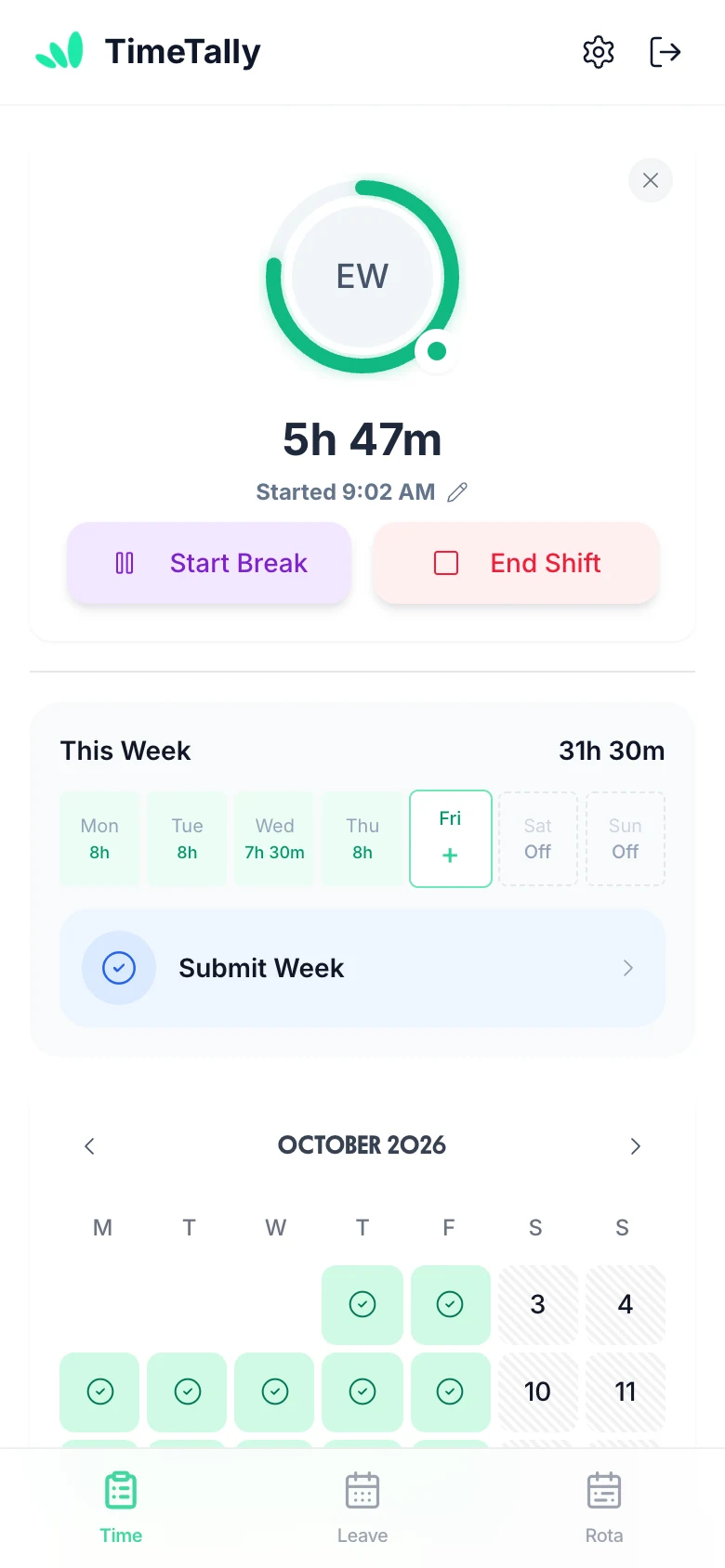
Staff submit timesheets via the iPhone or Android app, or web. Clock in/out is tracked automatically. Regular and overtime hours are separated — no paper forms, no chasing.
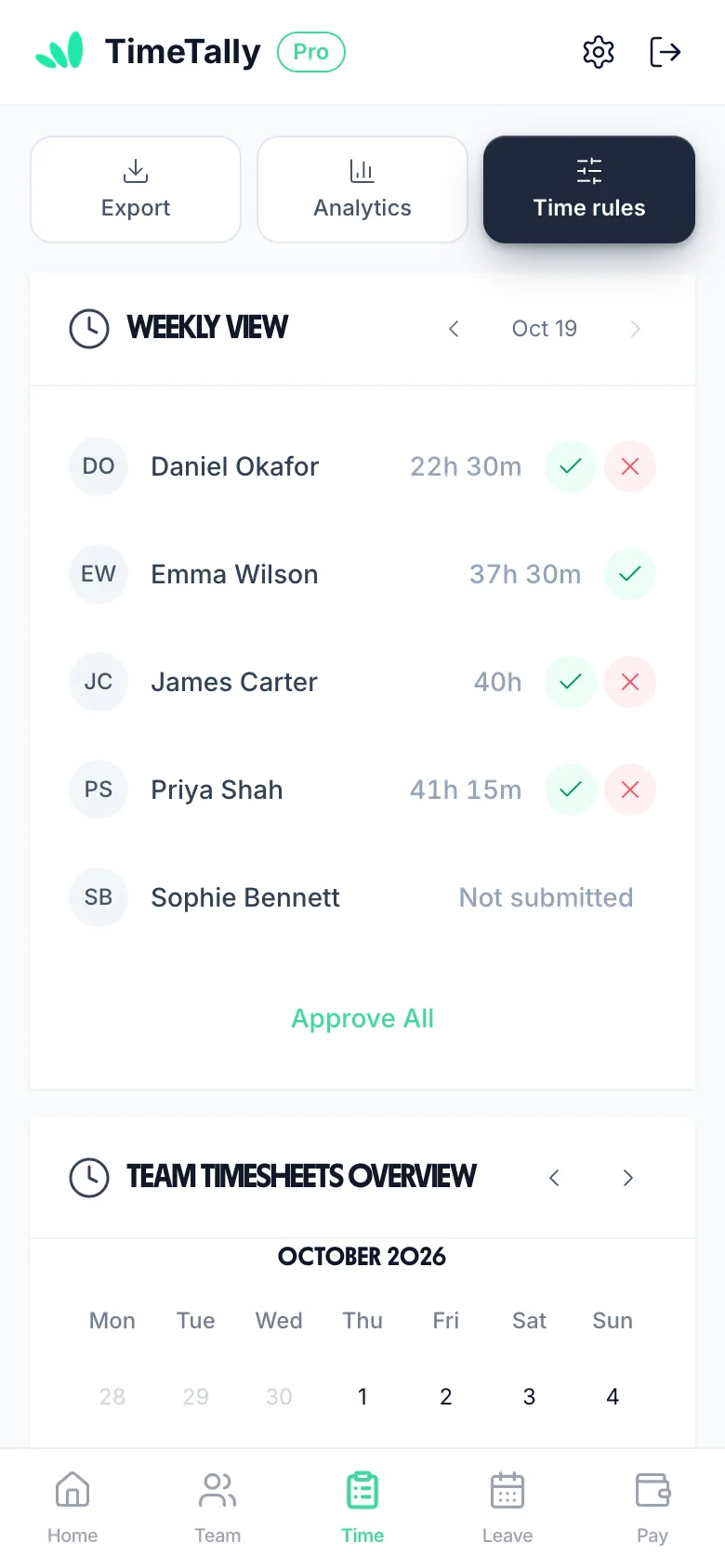
All pending timesheets land in your dashboard. Approve or reject with a single tap. Every decision is timestamped — full audit trail for every timesheet.
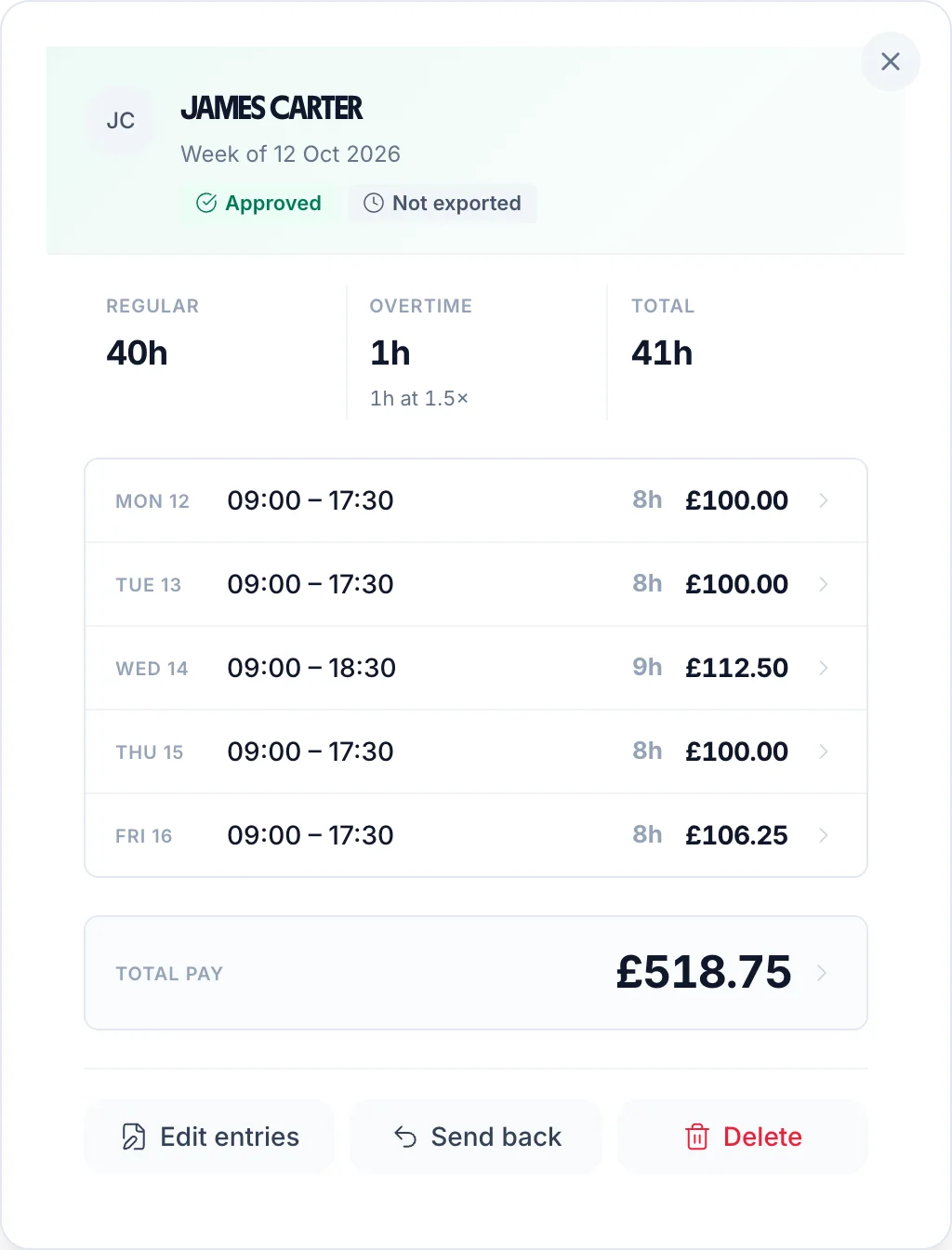
Pay is calculated directly from approved timesheets. Overtime rates applied automatically. Regular and overtime hours separated — no manual adjustments, no errors.
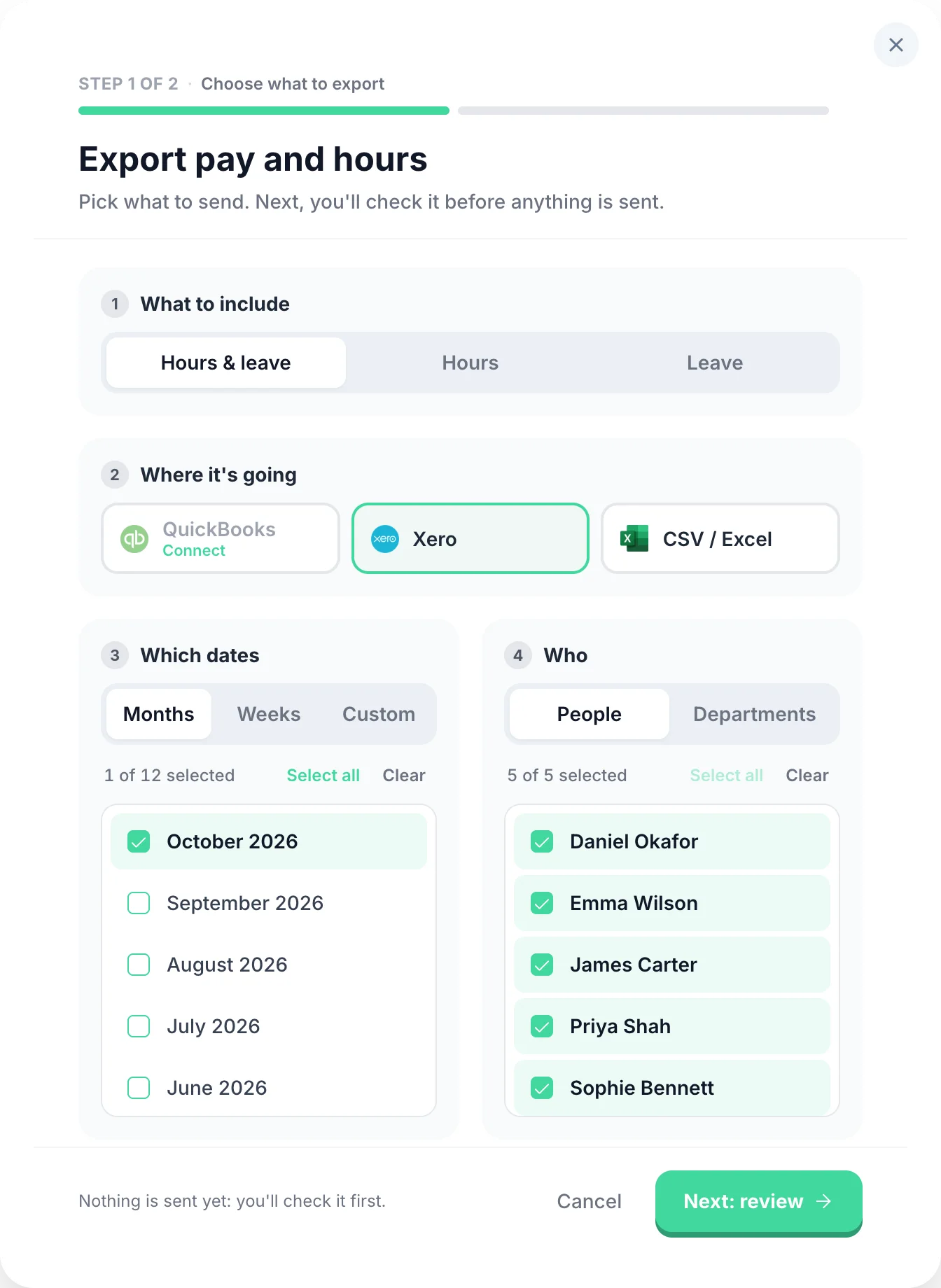
Approved timesheets feed directly into your payroll export. Direct integration with Xero and QuickBooks — no manual data entry, no missed overtime.
Select any feature for the detail.
Overtime that works itself out.
Two triggers: threshold overtime kicks in once an employee exceeds a set number of hours per day or week. Time-of-day overtime pays a premium for hours worked in a specific window (e.g. after 6pm or before 6am), regardless of total hours. Two pay methods: a rate multiplier (e.g. 1.5×) or a fixed hourly rate for overtime hours. Stack multiple rules, build tiers, and configure each employee independently.
Know exactly where the hours went.
Entirely optional — only enable it if you need it. When on, employees split their hours across projects when submitting (e.g. 3h on Client A, 4h on internal work). You can set project pay for the worker: an hourly rate on top of or instead of their usual rate, or a flat fee per entry (useful for callouts or site visits). Managers get a clear breakdown of where time is actually going.
Offer time off instead of overtime pay.
An optional alternative to paying overtime — enable it only if you want to offer time off in lieu instead of (or alongside) extra pay. Set a TOIL conversion rate (e.g. 1h overtime = 1.5h leave) and overtime hours automatically accrue as a TOIL balance — no manual tracking. TOIL is kept separate from annual leave so it never eats into holiday entitlement. Employees book it the same way they book any other leave.
Approve a whole week from your phone.
Managers approve or reject timesheets from any device — phone, tablet, or desktop. Rejections include a written reason so employees know exactly what needs fixing and can resubmit. Managers can see who has not submitted for the period, and are emailed as each timesheet comes in. Pay totals are calculated automatically from approved hours — no manual maths at payroll time.
Clock in, or fill in a form.
Two submission modes — employees use whichever fits their workflow. Clock-in mode starts a live timer the moment they begin their shift. The timer runs in the background even if the app is closed, so no hours are lost. Form mode lets them enter start time, end time, and breaks at the end of the day or week. Both work on mobile and desktop.
Every hour costed at the right rate.
Set each employee's own hourly rate and pay totals are calculated automatically from their approved hours. Scope managers to their department so they only ever see their own team's data. Want to keep salaries private? Hide pay rates and totals from managers entirely — they see hours, but never figures. Full control over who sees what.
Straight into Xero or QuickBooks.
Send approved timesheets to payroll in a few taps. Export to CSV, Xero, or QuickBooks — filter by date range, employee, or department, and choose exactly which columns to include. You can combine timesheet and leave data in a single export so your payroll software gets everything it needs in one file.
Real reviews from TimeTally customers
TimeTally has been excellent for our business. The app is simple to use, reliable, and makes managing staff records straightforward. The system has saved us a significant amount of administration time. Highly recommended for any business looking for an easy-to-use workforce management solution.
 Jordan IngoeCLI Manchester
Setup was dead simple and the team just got on with it. Got everyone up and running in an afternoon with no help needed. Does everything we need for timesheets and holidays without the faff.
Has completely changed how I handle timesheets. Used to dread it every week — now it takes me minutes. Really easy to get around and my staff picked it up straight away.
Started using it just for rotas but quickly realised it does loads more. The timesheets and leave management are great, and it even handles TOIL and overtime which I wasn't expecting. Use it for everything now.
Meet TimeTally
TimeTally automatically tracks hours, calculates pay at each employee's hourly rate, and exports to payroll. Explore all features or see how it works.
£3/employee/month
No credit card required · Set up in minutes · Cancel anytime
See what we offer

Everything you need to know about hourly rate calculations in the UK. For related topics, try our overtime pay calculator or holiday calculator.
Divide your annual salary by the total hours you work per year. For example, a £30,000 salary with 37.5 hours per week over 52 weeks is £30,000 ÷ (37.5 × 52) = £30,000 ÷ 1,950 = £15.38 per hour. The calculator above does this instantly — just enter your salary and hours.
Use your contracted hours, not the hours you actually work. Full-time in the UK is typically 37.5 hours (7.5 hours per day, Monday to Friday) or 40 hours. If you regularly work unpaid overtime, your effective hourly rate will be lower than this calculation shows.
First convert to an hourly rate (salary ÷ total annual hours), then multiply by your working hours per day. For a £30,000 salary working 7.5 hours per day: hourly rate = £15.38, so day rate = £15.38 × 7.5 = £115.38. For freelancers and contractors, day rates are often set higher to cover tax, insurance, and absence of employment benefits.
Yes. When you receive an annual salary, it includes 5.6 weeks of statutory paid holiday (28 days for a standard 5-day week). If you use 52 weeks in the calculation, the holiday pay is already included in the annual salary figure. If you only work 46 or 47 weeks per year due to unpaid leave, use the actual weeks worked to get a more accurate hourly rate.
Overtime is usually calculated as a multiple of your base hourly rate. Common rates are 1.5x (time and a half) or 2x (double time). If your hourly rate is £15.38, time and a half would be £23.07 per overtime hour. Use our overtime pay calculator to work out the total for any combination of regular and overtime hours.
The National Minimum Wage sets a floor below which no employer can legally pay. From 1 April 2026, the rates are: £12.71 for workers aged 21 and over, £10.85 for ages 18-20, and £8.00 for under-18s and apprentices. Convert any salary to an hourly rate and check it exceeds the minimum for the employee's age group. Always check gov.uk/national-minimum-wage-rates for the current rates.
IR35 (off-payroll working rules) can significantly affect a contractor's effective hourly rate. If caught by IR35, contractors are taxed similarly to employees but without employment rights. This can reduce take-home pay by 25-30% compared to working outside IR35. Contractors need to factor in their tax position when quoting day or hourly rates.
Salary sacrifice (for pensions, cycle-to-work, or childcare vouchers) reduces your gross salary. If you sacrifice £2,000/year into a pension, calculate your hourly rate on the reduced salary (£28,000 instead of £30,000). Your effective hourly rate drops, but you gain the tax and National Insurance savings on the sacrificed amount.
For part-time employees, the formula is the same: annual salary ÷ total annual hours. A part-time employee earning £15,000 working 20 hours per week for 52 weeks: £15,000 ÷ (20 × 52) = £15,000 ÷ 1,040 = £14.42 per hour. Part-time employees must receive the same hourly rate as comparable full-time employees (pro rata principle).
From an hourly rate: weekly pay = hourly rate × hours per week; monthly pay = (hourly rate × hours per week × 52) ÷ 12. For example, £15/hour × 37.5 hours = £562.50/week. Annual = £562.50 × 52 = £29,250. Monthly = £29,250 ÷ 12 = £2,437.50. The calculator above shows hourly, daily, and annual figures automatically.
Still have a question? See all FAQs →
Book a DemoSet a rate per employee once and let approved hours do the maths every week.
Each employee's rate applied to their approved hours, with totals ready for payroll.
Track hours and differing rates across agency and temporary staff in one place.
A straightforward weekly submission view with hours and pay totalled automatically.
Export hours and pay to Xero, QuickBooks or CSV in a few clicks.
Calculate 1.5x and 2x overtime rates for UK workers
Check National Minimum Wage compliance by age group
Calculate total hours from clock in/out times
Track employee hours at each person's hourly rate
Calculate annual leave for full-time and part-time workers
Calculate SSP entitlement for employees
TimeTally records clock-ins, breaks and overtime, applies each person's rate, and exports approved hours straight to payroll.
See time tracking14-day free trial · No credit card needed · Cancel anytime