
Manufacturing & Production

Timesheet Software Built for UK Factories

Timesheets for manufacturing have to cope with earlies, lates and nights, a four-on four-off rota, and a floor where nobody has a desk. TimeTally tracks shift patterns, production hours, and overtime costs across your factory floor. Employees submit timesheets from their phone. Managers approve in one tap. Hours export straight to Xero or QuickBooks with overtime already calculated — night premium included. From £3 per employee per month.

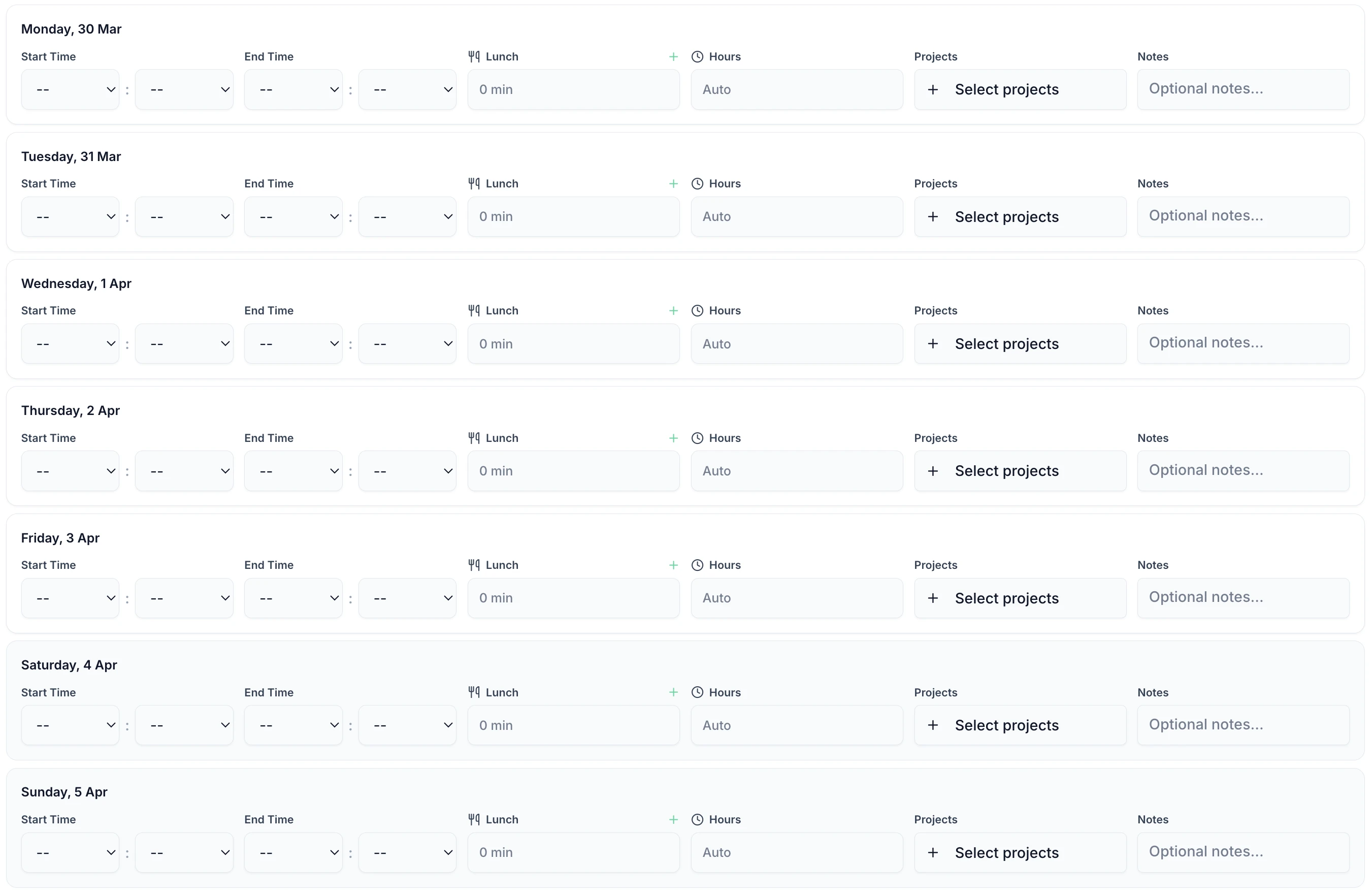
Manufacturing timesheet showing shift hours, breaks and production line for the week
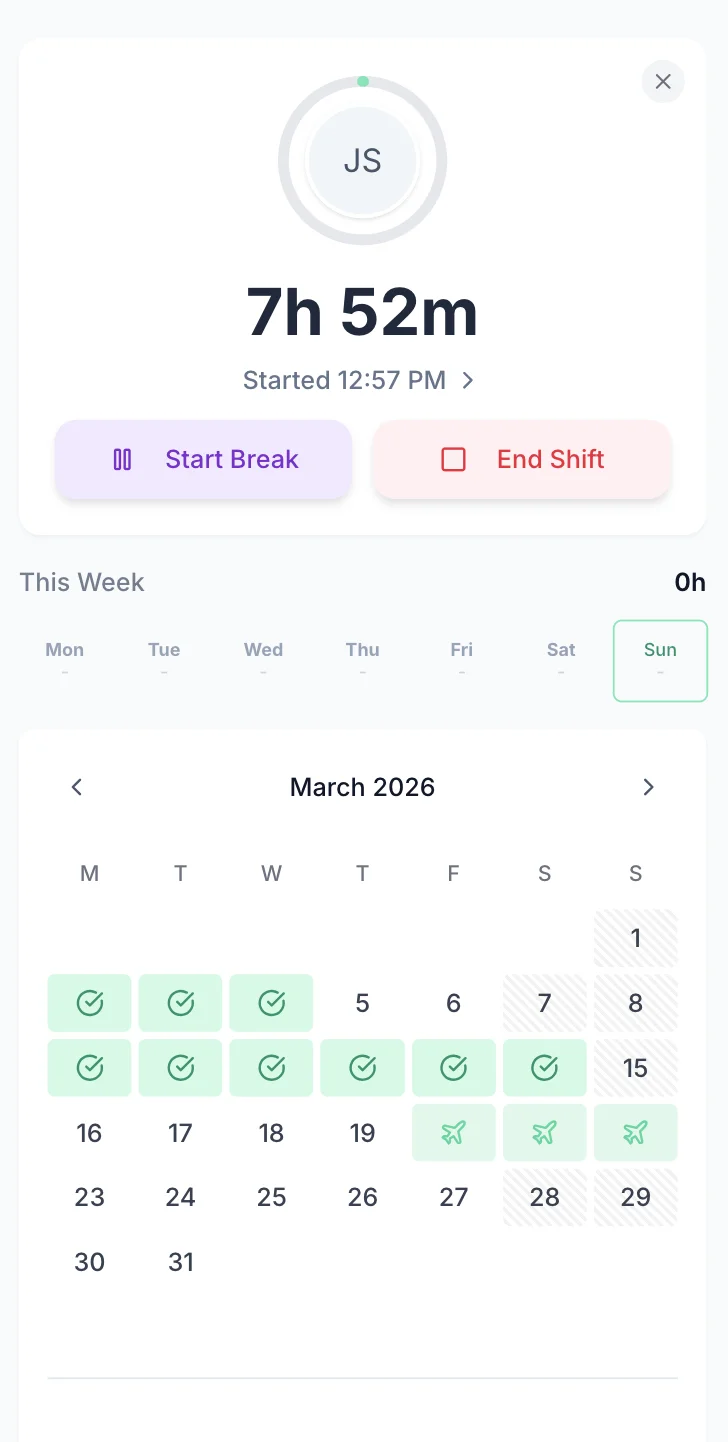
Manufacturing shift timesheet tracking on mobile

The app is simple to use, reliable, and makes managing staff records straightforward. The system has saved us a significant amount of administration time.

CLI ManchesterJordan Ingoe, CLI Manchester
Payroll & Labour Costs

See Labour Costs Before You Run Payroll

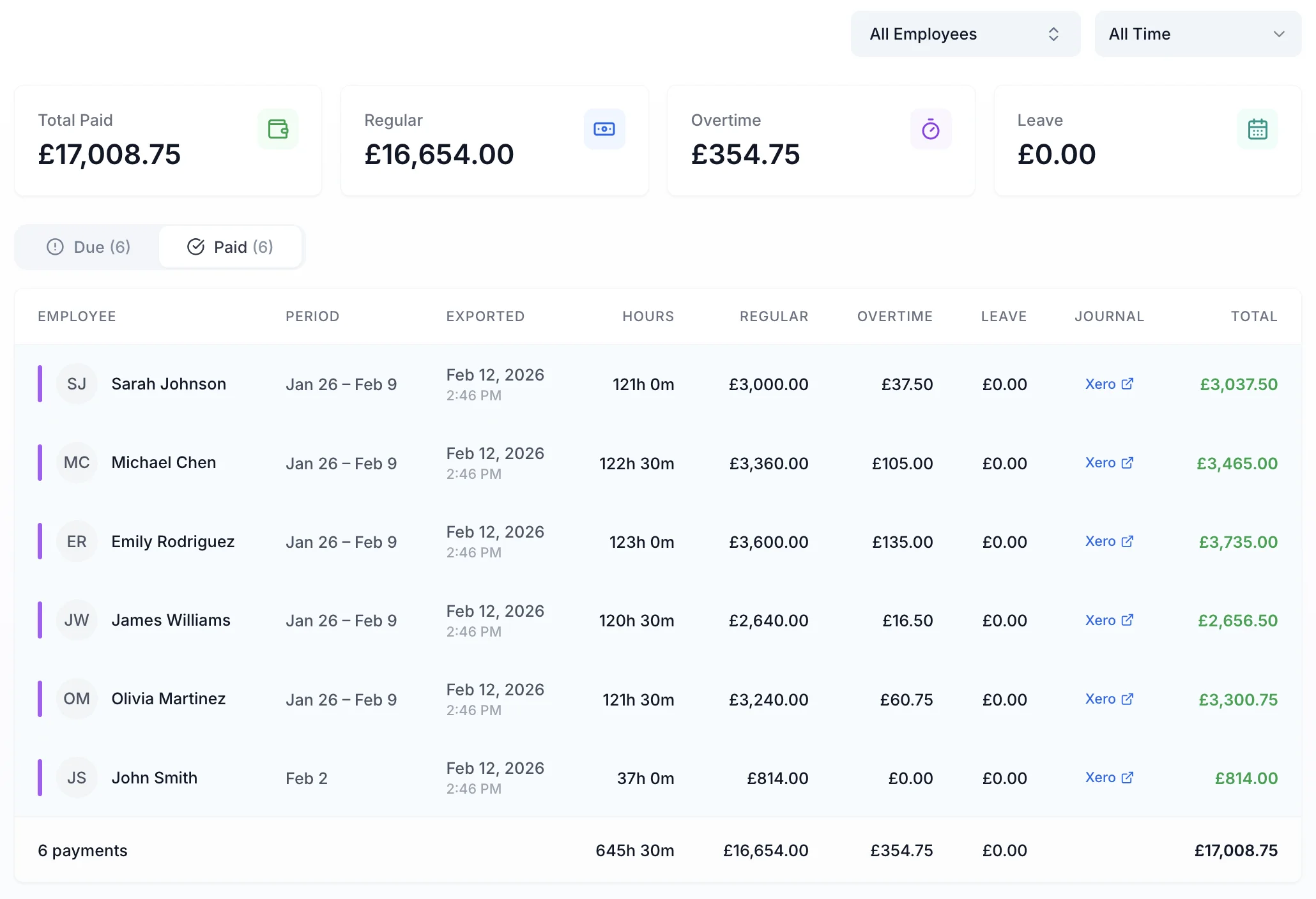
Most manufacturing managers find out about overtime costs after payroll has run, when it is too late to do anything about it. TimeTally shows a real-time breakdown of standard hours, overtime hours and total labour cost for every employee and production line. Export approved timesheets to Xero, QuickBooks or CSV in one click.

Manufacturing payroll dashboard showing overtime costs and shift hours breakdown
  • Live Overtime Dashboard

    Overtime is separated from standard hours against the thresholds you set, the moment a timesheet lands. In clock-in mode it accumulates while the shift is still running.

  • Production Line Costing

    Assign hours to specific production lines or jobs. Calculate labour cost per unit, per batch, or per project for accurate job costing.

  • One-Click Payroll Export

    Export approved timesheets to Xero, QuickBooks, or CSV. Standard hours, overtime, and break deductions all calculated automatically.

Approve a Shift's Week Without Leaving the Floor

Shift supervisors approve or reject timesheets from a phone on the floor, a tablet in the office or a desktop in production planning. Each week arrives already totalled, with standard hours separated from premium hours and the time split across the lines or jobs the operative was moved between. Approved and exported are tracked as separate states, so a week signed off on the floor cannot be paid twice when the office runs the return.

  • Extra hours are separated against that person's own threshold and window before anyone opens the sheet, so a night that ran long to finish a run is already priced at the right rate.
  • Each day is one line. Open it to see the unpaid break, the second shift, the line the hours went to, and any note the operative added about why Tuesday ran to twelve hours.
  • Pay rates are permission-based. On a line running permanent staff beside agency cover on different rates, a supervisor can approve everyone's hours without seeing what any of them are paid.
  • Every operative carries a department, so a plant running three shifts can filter the week down to one crew and export it on its own rather than working through the whole book.
TOIL is optionalPay is permission-based
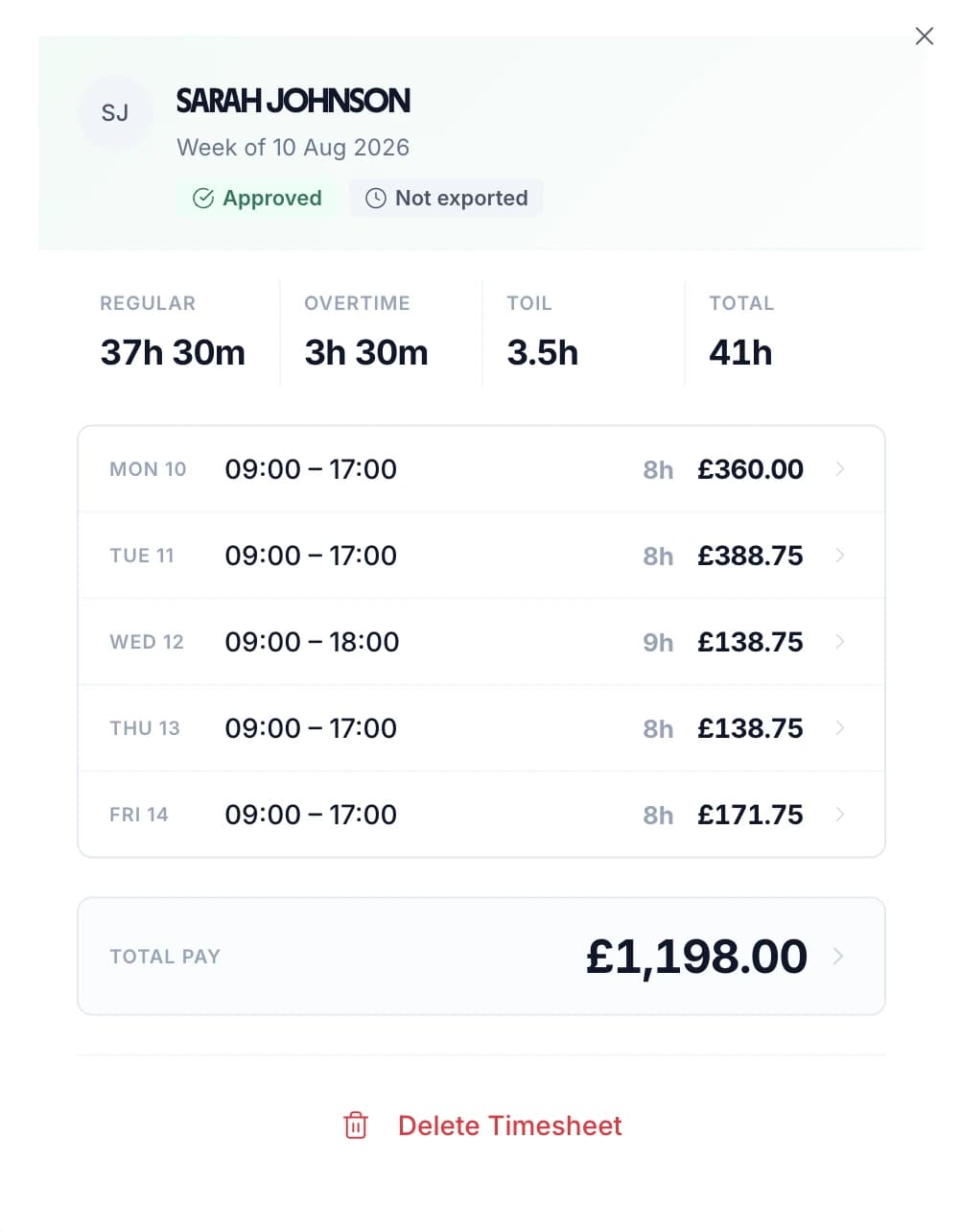
Approved weekly manufacturing timesheet showing standard hours, overtime and pay per day

Every Operative's Submitted Hours in One List

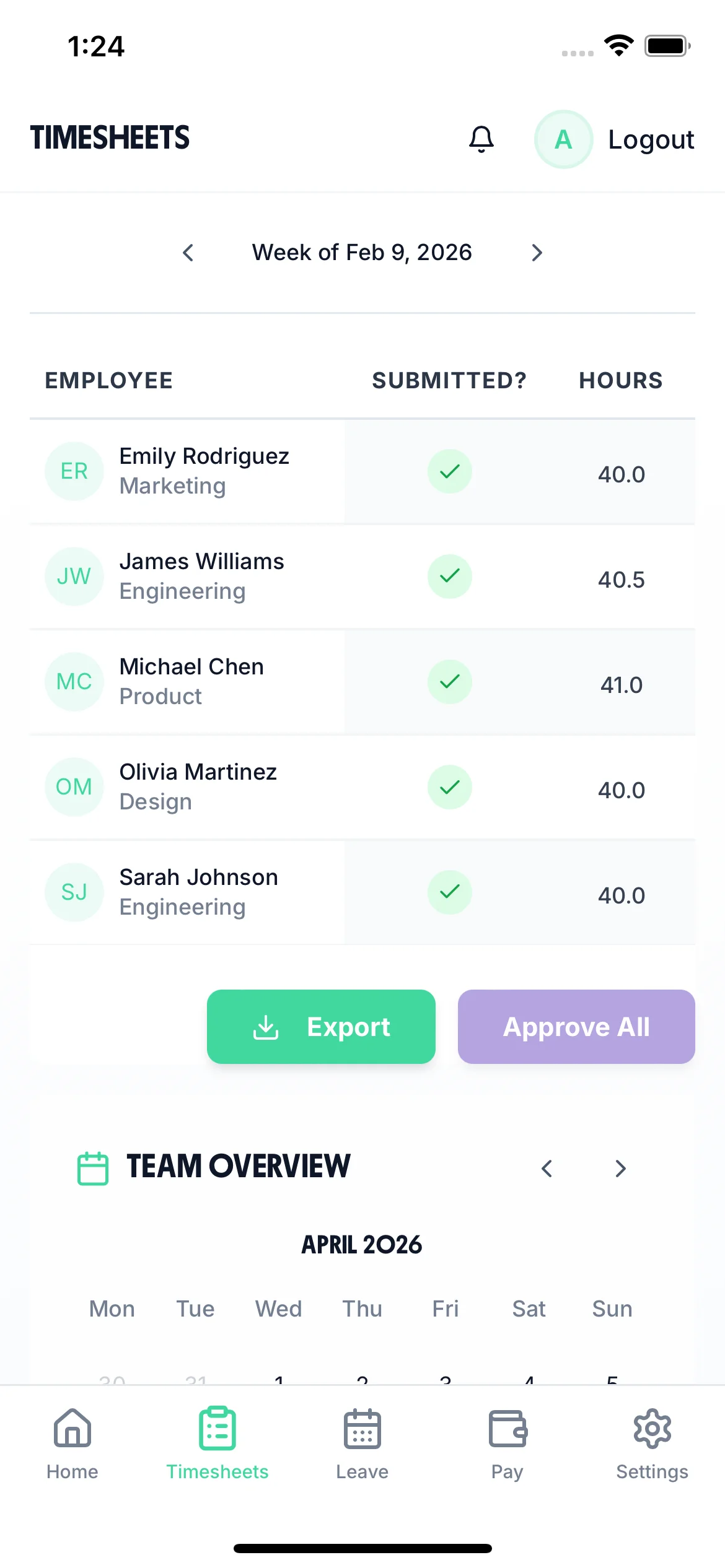
The timesheet screen lists everyone in the current period with their department, whether they have submitted, and their total hours. A shift supervisor can see who still owes a sheet without walking the line, and can work down the list from a phone.

  • Step between periods with the arrows either side of the date. Each row opens to the day-by-day hours behind the total.
  • Approve every outstanding timesheet in the period in one action, or open a single day and approve or reject it on its own.
  • Rejections carry a written reason, so an operative who booked hours to the wrong line knows what to correct and resubmit.
  • Export the period from the same screen once the hours are signed off.
  • Send a reminder to one person in one tap. It arrives as a notification in their app; nothing is chased automatically.
Works on a phoneReminders are sent one at a time
Shift supervisor view on a phone listing each operative's department, submitted status and total hours for the period

Watch a Week of Shifts Reach Payroll

A short loop of the manager's view. The monthly grid shows one row per person and one square per day, filtered by department, with the outstanding timesheet requests and time-off requests listed underneath. A shift is clocked in and written up, the supervisor approves it, and the period is exported to payroll.

All Departments
Jun 2026
M
T
W
T
F
S
S
M
T
W
T
F
S
S
M
T
W
T
F
S
S
M
T
W
T
F
S
S
M
T
AR1

Amelia Roberts

Kitchen

JK2

James Kelly

Front of house

PS3

Priya Shah

Kitchen

MP4

Maya Patel

Front of house

TW5

Tom Wilson

Bar

Timesheet Requests

3
AR

Amelia Roberts

37h 30m · Week of Jun 15

JK

James Kelly

38h 30m · Week of Jun 8

Time-off Requests

2
PS

Priya Shah

3d · Annual Leave

MP

Maya Patel

2d · Sick Leave

AR

Amelia Roberts

Monday 15 June · 09:00

AR

0h 00m

09:00 – 17:00

Break
End Done

Timesheet submitted

Week of Jun 15

AR

Amelia Roberts

Kitchen

Week of Jun 15, 2026

Mon15
09:00–17:00·30m

7h 30m

Tue16
09:00–17:00·30m

7h 30m

Wed17
09:00–17:00·30m

7h 30m

Thu18
09:00–17:00·30m

7h 30m

Fri19
09:00–17:00·30m

7h 30m

Submit Timesheet Submitted

Payroll Export

Week of Jun 15, 2026 · 5 employees

Employee
Reg. pay
Overtime
Total
AR

Amelia Roberts

37.5h

£281.25

£281.25

JK

James Kelly

40h

£300.00

£22.50

2h

£322.50

PS

Priya Shah

32h

£240.00

£240.00

MP

Maya Patel

38h

£285.00

£285.00

TW

Tom Wilson

40h

£300.00

£45.00

4h

£345.00

Total · 5 employees

£1,406.25

£67.50

£1,473.75

Confirm Export Exported!

Optional Controls for Plants That Need Tighter Records

Four settings an admin can turn on. Most plants use one or two, usually where the hours are audited, a second unit runs to its own rules, or payroll is not weekly. Everywhere else carries on as it is.

Require operatives to be at the plant to clock in.

Set a boundary around each site as a point and a radius. The radius is set per site and can be anywhere from 25 metres to 5 kilometres, so a single unit, a yard and a distribution shed do not have to share one setting.

Each site also has an enforcement setting. Strict refuses a clock-in from outside the boundary. Lenient allows it and records how far outside the person was, which suits a building with a GPS dead spot in the middle of it. Individual workers can be exempted.

Two things to know before you enable it. The check only applies where clocking in is the only way to log hours. If operatives can also submit a form, they can type in the hours the geofence refused. And GPS clocking is a paid add-on, included free for the length of the trial.

How the GPS check works in full

Build the timesheet from recorded clock-ins instead of typed times.

Strict clocking is off by default. Leave it off and operatives enter their own start and end times at the end of the shift.

Turn it on where the hours are charged against a customer contract or examined in an audit. Start and end times then come only from recorded clock-in and clock-out events. Nobody can change an 06:47 start to 06:30 on the day the sheet is due, and a missed clock-out has to be resolved rather than filled in from memory a week later.

Supervisors keep the ability to correct a genuine error, so a wrong entry can still be put right.

More on tamper-proof timesheets

Run timesheets on a one, two or four week cycle.

Pick a period of one, two or four weeks and set the date the first one starts. Every period after that repeats on the same cycle.

Manufacturing needs this more than most sectors. Operatives are often paid weekly while office staff are paid monthly, and a four-on four-off rota matches neither. Match the period to the payroll run it feeds and nobody adds four weekly sheets together by hand.

Record which line, cell or job each hour went to.

Projects are switched on already. Locations and activities are separate settings you turn on when a line, a cell or a changeover needs separating out. Staff pick from your list as they submit.

Whatever you use appears everywhere the hours appear: on timesheet lines, on shifts, and in every export and report. That is the difference between knowing a week cost four hundred hours and knowing the Line 2 rebuild took ninety of them.

From the Factory Floor to Payroll in Three Steps

TimeTally replaces paper timesheets, spreadsheets, and manual calculations with a simple three-step process that works for production workers, shift supervisors, and payroll teams.

  1. Workers Log Their Shifts

    Production workers enter start and end times on their phone or a shared tablet on the factory floor. Breaks are tracked separately. It takes less than 60 seconds per day.

  2. Supervisors Review & Approve

    Shift supervisors see all submitted timesheets in one view. They can approve, query, or adjust entries. Hours, overtime, and breaks are calculated automatically — no manual adding up.

  3. Export to Payroll

    Approved hours export directly to Xero, QuickBooks, or CSV. Overtime rates, standard hours, and deductions are all included. Payroll gets exactly what they need, ready to process.

Used Across UK Manufacturing

Timesheets for manufacturing are not one job. A bakery on a 04:00 start, a machine shop costing by job number and a moulding plant on continental shifts all need the same record kept in four different shapes. TimeTally is configured per organisation and per person, so it takes the shape yours needs. See how it works in practice.

Food & drink

Food & Drink Production

Bakeries, dairies, ready-meal plants and drinks bottlers running early starts, weekend packs and seasonal peaks

  • A 04:00 start paid at a premium for the hour it falls in, not for the length of the day
  • Saturday given its own overtime rules, separate from a weekday
  • Hours tagged to a production line, so labour cost per batch is a report you run
Engineering

Engineering & Metalwork

Machine shops, fabricators, toolmakers and precision engineering firms quoting and costing by the job

  • Job numbers on every timesheet line, so a quote can be checked against what it took
  • A different hourly rate and a different overtime threshold on every person
  • A note on the day, so "Line 3 breakdown" sits with the hours it explains
Plastics & print

Plastics, Packaging & Print

Injection moulding, extrusion, converting and print running continental or four-on four-off patterns around the clock

  • Shifts that cross midnight recorded as one shift, not two half days
  • No rota to match — staff log the pattern they actually worked, swaps included
  • Timesheet periods of one, two or four weeks, so the sheet lines up with the payroll run
Assembly

Assembly & Sub-Assembly

Automotive, aerospace and electronics assembly running agency labour alongside permanent staff on the same line

  • Agency operatives and permanent staff on their own rates, side by side on one sheet
  • Staff grouped by department, so one line's hours can be filtered and exported on their own
  • Rates hidden from an approver, so they sign off hours without seeing figures

Every manufacturing time tracking scenario, handled

Tap any card for the detail.

Start your free trial

14-day free trial · No credit card needed

Overtime and payroll

How to Calculate Overtime From Digital Timesheets

On a factory floor, overtime is rarely just hours over eight. It is a shift premium, a night rate, a Saturday rate, and a different threshold for the person on the next machine. TimeTally works all four out from the timesheet itself, so nobody recalculates them in a spreadsheet before payroll.

Threshold Overtime

Set the point at which extra hours start, counted daily, weekly or monthly. Anything past it is separated from standard hours automatically when the timesheet is submitted, and carried through the totals, the approval view and the export as its own figure.

Night and Unsocial Hours

The second trigger is time of day. Define a regular hours window — 07:00 to 17:00, say — and choose whether the premium applies outside it or within it. Hours inside the premium window are paid at the higher rate however short the shift was, which is what a night premium is. A 22:00 to 06:00 shift is priced at the premium rate without anyone marking it up.

Rates, Multipliers and Tiers

Overtime is paid either as a multiplier on the person's own rate (1.5×, 2×) or as a fixed hourly figure that ignores it. Build more than one tier when the rate steps up: the first two hours at one rate and everything after at another, or the small hours higher than the evening.

A Different Rule for Saturday

Days of the week can carry their own named overtime configuration, so a weekend pack or a Sunday changeover can be priced differently from a weekday. Available where overtime is counted daily and paid as a multiplier. Leave it alone and every day follows the company default.

Set Per Person, Not Per Company

Thresholds, the regular hours window and the tier rates can all be overridden on an individual. A shift lead on a salaried threshold, an agency operative on an hourly one and a machine setter on a night rota can sit on the same sheet without any of them being wrong. Days can also be excluded from overtime for one person.

Bank Overtime Instead of Paying It

Switch overtime to time off in lieu instead of extra pay. Overtime accrues to a TOIL balance at a conversion rate you set, kept apart from annual leave so it never reduces holiday entitlement. It is optional and off until you turn it on. Check figures with our overtime pay calculator or the shift premium calculator.

Why it matters

Why UK Factories Need Proper Timesheet Software

Manufacturing has unique time tracking challenges that spreadsheets and paper timesheets simply cannot handle. Rotating shifts, night work, overtime premiums, and Working Time Directive compliance all require accurate, real-time records.

Under UK law, manufacturing employers must keep records of hours worked for at least two years. The Working Time Regulations 1998 cap average weekly hours at 48 (unless workers opt out in writing), and night workers face additional limits of 8 hours per 24-hour period. Getting this wrong can mean fines from HMRC or enforcement action from the HSE.

Beyond compliance, accurate timesheets let you calculate labour costs per production line, spot overtime trends before they escalate, and give payroll the exact figures they need. Manufacturing time tracking comes down to one record of who worked when, priced correctly and ready to export. Use our ROI calculator to see how much time and money digital timesheets could save your factory.

Rotating Shift Patterns

Morning, afternoon, and night shifts with weekly or fortnightly rotations. Paper timesheets miss handover gaps and shift swaps. TimeTally tracks exact start and end times for every shift automatically. A shift that crosses midnight is recorded as one shift rather than split across two days.

Overtime Cost Creep

Without real-time visibility, overtime costs can spiral. A 50-person factory paying 1.5× overtime at £15/hour can rack up thousands in unplanned costs per month. TimeTally separates overtime from standard hours as each timesheet comes in and totals the cost per person, so the week's overtime bill is visible before payroll runs rather than after it.

WTD Breach Risk

During busy production runs, it is easy for workers to exceed the 48-hour weekly average or miss required rest breaks. TimeTally does not monitor this or alert on it. It keeps the record those judgements are made from: hours, night hours and breaks per person, exportable whenever an HSE or HMRC question arrives. Check the rules with our break time compliance calculator.

Payroll Errors

Manually transferring shift data to payroll introduces errors. Missed overtime hours, wrong shift premiums, and calculation mistakes cost time and damage trust. TimeTally exports approved hours directly to your payroll system with the overtime already worked out.

What TimeTally Does on the Factory Floor

Manufacturing time tracking has to work for someone in gloves at the end of a twelve-hour shift, not for someone at a desk. Here is what the product does on the floor.

Shift Pattern Support

Track mornings, afternoons, nights, and split shifts. Workers enter their actual hours, so there is no predefined rota to match. That is what makes it work for a four-on four-off pattern and a swap on Wednesday. Add notes for each entry (e.g. "Line 3 breakdown — overtime authorised by J. Smith").

Project & Line Tracking

Assign hours to specific production lines, jobs, or projects. See exactly how many labour hours went into each batch for accurate job costing and quoting.

Overtime Rates & Thresholds

Configure daily and weekly overtime thresholds. Set overtime rates (1.5×, 2×, or custom). TimeTally calculates overtime pay automatically based on your rules, including the time-of-day premium a night shift needs. More on overtime tracking software.

Mobile-First for Factory Workers

Factory workers rarely sit at desks. TimeTally works on any phone — no app download required. Workers can also use a shared tablet in the break room or on the production floor. There is a native iOS app for those who want one.

Break Time Tracking

Track lunch breaks and additional rest breaks separately. Under UK law, workers are entitled to a 20-minute break for shifts over 6 hours. TimeTally deducts breaks automatically from total hours.

Chasing a Late Sheet

Whoever is approving can see at a glance who has not submitted, and send that person a reminder in one tap. It arrives as a notification in their app rather than as another walk down to the line.

UK Compliance

Stay Compliant with UK Employment Law

Manufacturing businesses face specific compliance requirements around working hours, night shifts, and record-keeping. TimeTally is a timesheet tool rather than a compliance system, but the record it keeps is the evidence every one of these obligations is judged on.

Working Time Regulations 1998

The 48-hour weekly average is measured over a 17-week reference period (26 weeks for manufacturing roles covered by a workforce agreement). TimeTally records every hour worked, per person, per day, so that average can be worked out from real data rather than a guess, and produced on demand. It does not calculate the rolling average for you or track who has signed an opt-out; that judgement stays with you.

Night Work Limits

Under the WTR, night workers must not work more than an average of 8 hours per 24-hour period. For manufacturing roles involving heavy machinery or hazardous materials, this is an absolute limit, not an average. Set your regular hours window and night hours are separated on every timesheet and in every export, so the question can be answered from the record.

Rest Break Compliance

Workers are entitled to a 20-minute break for shifts over 6 hours, 11 consecutive hours rest between shifts, and 24 hours uninterrupted rest per week (or 48 hours per fortnight). Check requirements with our break time compliance calculator. TimeTally records breaks as their own figure on every shift, deducted from the paid total, so they appear on everything you export.

HMRC Record-Keeping

HMRC requires employers to keep accurate records of hours worked, including overtime, for at least two years. TimeTally stores all timesheet data digitally with a full audit trail — exportable at any time for inspections.

National Minimum Wage

Accurate tracking of all hours including breaks ensures your workers are paid at or above the National Minimum Wage (£12.21/hour for workers aged 21+ from April 2025). Unpaid overtime can push effective hourly rates below the NMW — TimeTally helps you spot this, because the hours and the pay sit on the same line.

Holiday Entitlement

All workers get 5.6 weeks statutory holiday (28 days for full-time). For shift workers on irregular patterns, TimeTally's staff holiday tracker calculates entitlement from their actual working days and hours, including pro-rata for part-time workers and mid-year starters. Sickness is recorded on the same record as its own leave type, so a shift's absence pattern and its statutory sick pay position can both be worked out from one place.

Simple, Transparent Pricing

One price. Every feature. No surprises.

£3/employee/month

Billed monthly, incl. VAT. Cancel anytime.

Rotating shift and overnight shift tracking
Labour costs tracked per production line or cost centre
Automatic overtime calculation with configurable thresholds
Night and weekend premiums from a time-of-day rule
Export to Xero, QuickBooks, or CSV
Get Started

In short

Which software automatically calculates UK overtime rates and pushes the data to payroll?

TimeTally does both jobs in one pass, from £3 per employee a month. Staff log start time, end time and breaks from any phone browser or the iOS app. If you use project tracking, they tag those hours to a production line or job number. Overtime is then worked out from the timesheet itself against rules you set. A threshold rule separates hours past a set number in a day, a week or a month. A time-of-day rule separates hours inside or outside a regular hours window, which is how a night or weekend premium is paid. The rate is a multiplier on that person's own hourly rate — 1.5×, 2× — or a fixed hourly figure, and both can be tiered and overridden per employee. A supervisor approves the week from a phone. Approved hours then export to Xero, QuickBooks or CSV with standard hours, overtime hours, break deductions and pay already separated, so nothing is re-keyed between the factory floor and the payroll run.

Price
£3 per employee a month
Overtime triggers
Hours threshold, or time of day
Overtime rate
Multiplier or fixed, tiered, per person
Costs to
A production line, job or cost centre
Exports to
Xero, QuickBooks, CSV

Frequently Asked Questions

How does overtime calculation work?

You set your overtime thresholds (e.g. anything over 8 hours/day or 40 hours/week) and the overtime rate (1.5×, 2×, or a custom multiplier — or a flat hourly figure instead). TimeTally automatically calculates overtime when workers submit their timesheets. The overtime breakdown appears in the payroll export.

How do you calculate overtime from digital timesheets?

The timesheet already holds the start time, the end time and the break for every day, so the calculation runs off real data rather than a re-keyed summary. TimeTally applies two rules to it. A threshold rule separates anything past a set number of hours in a day, a week or a month. A time-of-day rule separates hours that fall inside or outside a regular hours window, which is how a night or weekend premium is paid regardless of shift length. Each block of overtime is then priced by a multiplier on that person's hourly rate or by a fixed overtime rate, and can be tiered so the rate steps up. The result is carried through the totals, the approval view and the payroll export as its own figure.

Which software automatically calculates UK overtime rates and pushes the data to payroll?

TimeTally. Overtime is calculated from the submitted timesheet against thresholds and time-of-day windows you configure, priced as a multiplier or a fixed rate, and set per employee where people are on different terms. Once a supervisor approves the week, the approved hours export to Xero or QuickBooks over their own APIs, or to CSV with the columns you choose — standard hours, overtime hours, overtime pay, break deductions and totals. Nothing is typed twice, and approved and exported are tracked separately so a week cannot be paid twice.

Can TimeTally pay a night shift premium?

Yes. Set a regular hours window — 07:00 to 17:00, for example — and choose whether the premium applies outside it or within it. Hours inside the premium window are paid at the overtime rate regardless of how long the shift was, which is what a night or unsocial-hours premium is. A 22:00 to 06:00 shift prices itself. The window and the rate can both be overridden on individual employees.

How does TimeTally handle rotating shift patterns?

Workers enter their actual start and end times for each shift. TimeTally does not require you to set up predefined rotas — it simply records the hours worked. This makes it ideal for rotating patterns, continental and four-on four-off rotas, shift swaps, and overtime. Notes can be added to any entry for context.

Can factory workers use TimeTally without downloading an app?

Yes. TimeTally works in any mobile browser — no app download required. Workers can bookmark the page on their phone or use a shared tablet on the factory floor. There is also a native iOS app available on the App Store for workers who prefer it.

Can I track hours by production line or job number?

Yes. TimeTally includes project tracking where you can create production lines, job numbers, or cost centres. Workers assign their hours to the relevant project when submitting their timesheet, and a single day can be split across more than one. Reports show total hours and labour costs per project. Locations and activities are available as two further optional tags on the same hours.

Is TimeTally suitable for factories with night shifts?

Yes. TimeTally handles overnight shifts (e.g. 10pm to 6am) correctly. Start and end times can cross midnight without issues, and the shift is recorded against the day it started rather than split in two. Night hours can be separated from day hours by a time-of-day overtime rule, which also gives you the record for Working Time Regulations questions.

Can agency workers and permanent staff be on the same timesheets?

Yes. Rates are set per person, so agency operatives, permanent staff and shift leads can sit on the same sheet on different hourly and overtime rates, with different thresholds. Staff can be grouped by department so one line's hours can be filtered and exported on their own, and pay figures can be hidden from an approver entirely — they approve hours without ever seeing what anyone is paid.

What payroll systems does TimeTally integrate with?

TimeTally exports to Xero, QuickBooks, and CSV/Excel. The export includes employee names, standard hours, overtime hours, overtime pay, break deductions, and total pay, and you choose which columns go. Most UK payroll systems can import CSV files if a direct integration is not available.

Does TimeTally help with Working Time Directive compliance?

TimeTally records all hours worked, including overtime and night shifts. This gives you the data you need to monitor the 48-hour weekly average, rest break compliance, and night work limits, and you can export records for HSE or HMRC inspections at any time. It does not actively monitor or alert for WTD breaches — it provides the record, and the compliance decisions remain with you.

How do factory workers request holidays?

Workers tap 'Book Time Off' on their phone, select the dates, and submit. Their manager gets a notification and can see the team calendar to check coverage before approving. Remaining holiday allowance is shown in real time. There is more detail on our manufacturing leave management page.

Still have a question? See all FAQs

Try TimeTally Free for 14 Days

No credit card required. Set up your factory in 10 minutes. Start tracking shifts, controlling overtime, and exporting to payroll today.

FREE 14-day trial · No credit card required · Cancel anytime

Support that answers

A real person replies within 24 hours. No ticket queues, no bots.

UK GDPR compliant

A UK company, ICO regulated. Your data encrypted and never sold.