
Timesheet Software for UK Security Companies

TimeTally is timesheet software for UK security companies. Guards submit a security timesheet from their phone at the end of each shift. Every entry records start time, end time, breaks and the client site covered, so shift hours are tied to a contract and not just to a name. Managers approve the period and export it to Xero, QuickBooks, or CSV. Nights, weekends and overtime are calculated automatically. It is an employee hours tracker for security guards, not a guard management platform. From £3 per guard per month.

Security timesheet showing a guard's shift hours, breaks and client site for the week
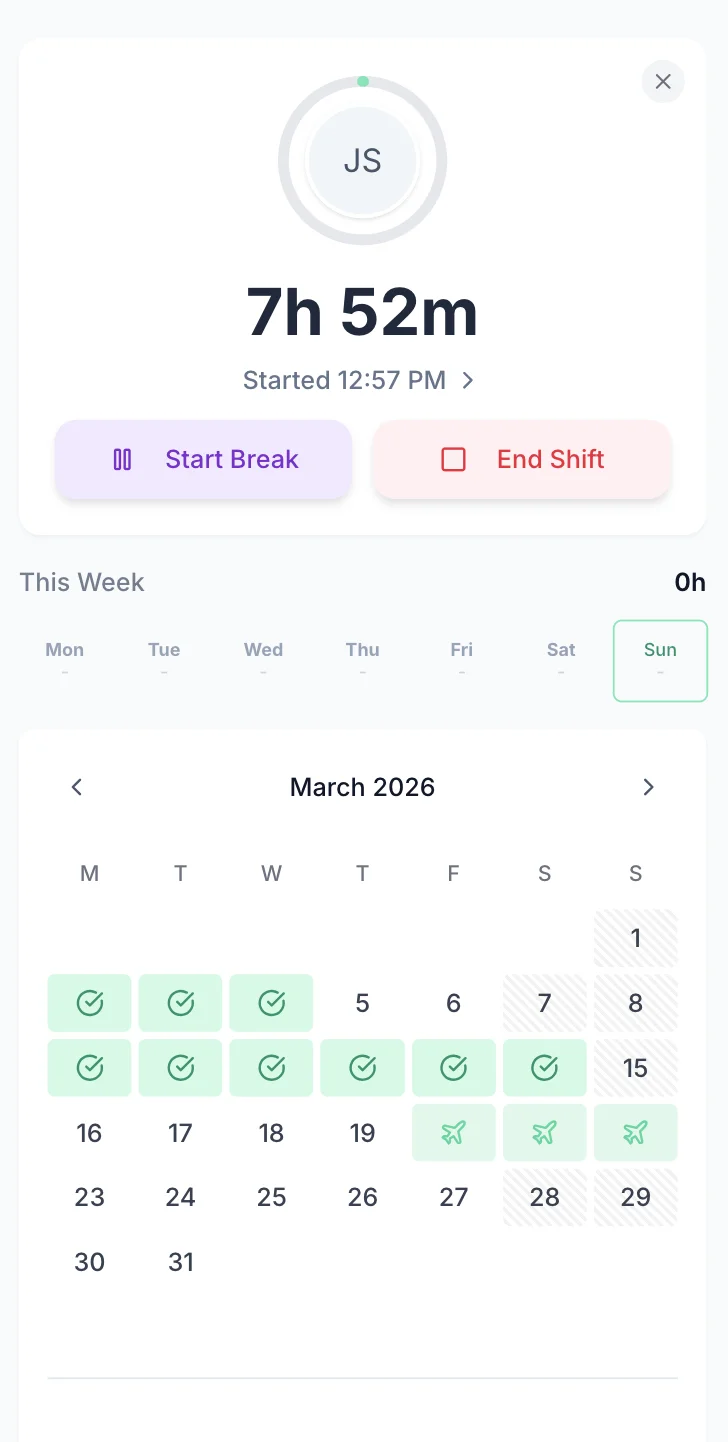
Security guard clocked in on a client site from their phone

The app is simple to use, reliable, and makes managing staff records straightforward. The system has saved us a significant amount of administration time.

CLI ManchesterJordan Ingoe, CLI Manchester

Simple Timesheets That Work Between Patrols

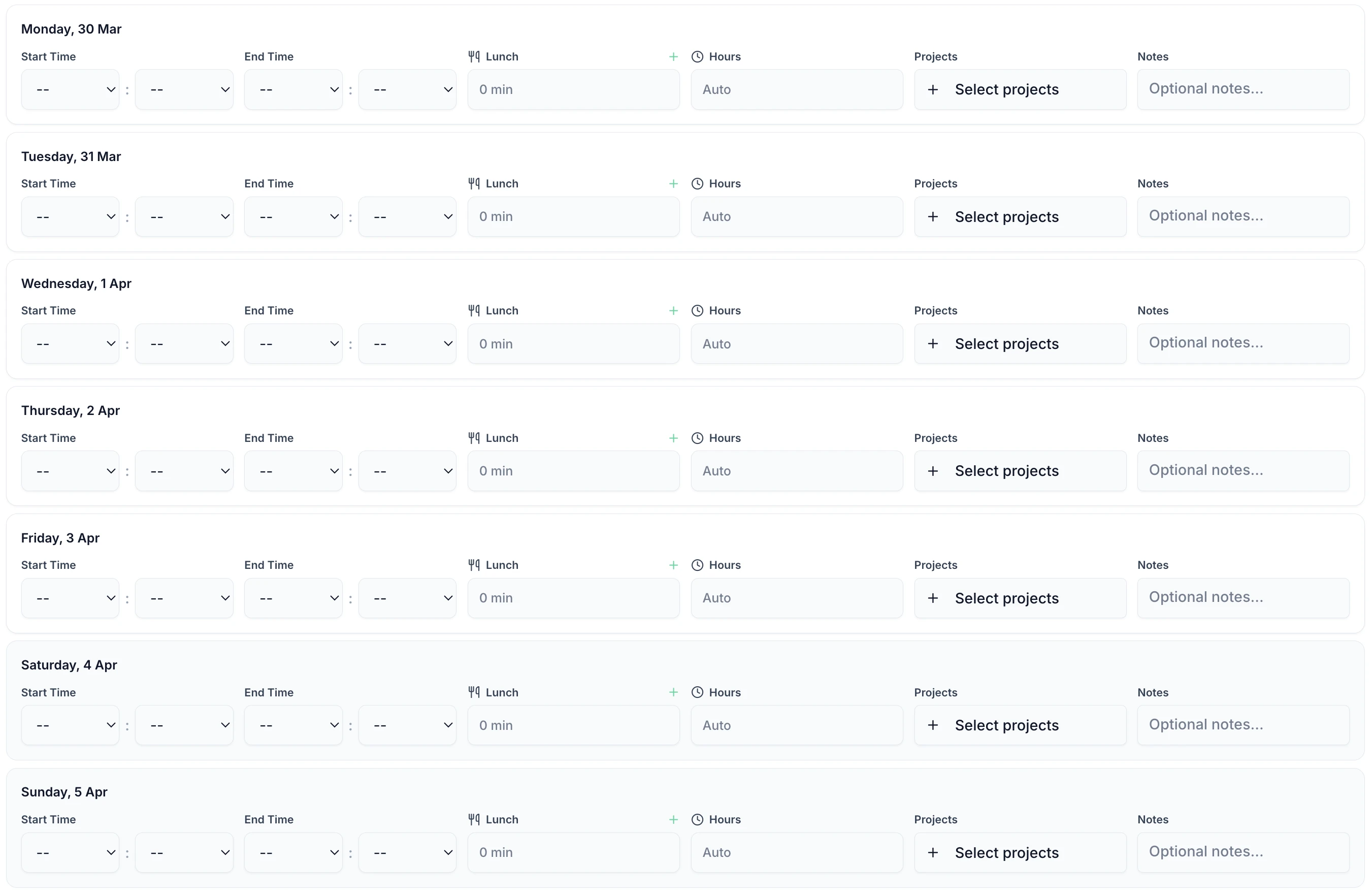
A daily entry takes under 60 seconds: start time, end time, breaks. It works in any phone browser and in the iOS app, so guards use the same security timesheet at a static site reception and in the van between patrol calls.

TimeTally timesheet entry screen showing shift hours and break tracking for security guards
  • Weekly Calendar View

    The whole guarding week on one screen

  • Flexible Time Entry

    Start and end times, or a total for the shift

  • Automatic Break Deduction

    Break minutes come off the paid total

  • Site & Contract Tracking

    Assign the hours to the site they were worked on

  • Shift Notes

    Record a late relief or an incident against the day

  • Instant Calculations

    Totals update as the guard types

Approve a Guard's Week in One Screen

Open a guard's week and the totals are already worked out: regular hours, overtime, TOIL and the pay that follows from them. Each day is one row with its start and end times. An operations manager signs the week off by reading it, not by checking it against a paper sheet. Approved and exported are separate states, so a week signed off on Monday cannot be paid twice when payroll runs on Thursday.

  • Overtime is split from regular hours against that guard's own threshold before anyone opens the week.
  • Open a day to see the unpaid break, the site the hours were tagged to, and any note the guard left about a late relief or an incident.
  • Pay is hidden from managers who are not allowed to see it. A site supervisor can approve a guard's hours without seeing the rate.
  • Approved weeks export to Xero, QuickBooks or CSV, and each one is marked once exported so it is not sent twice.
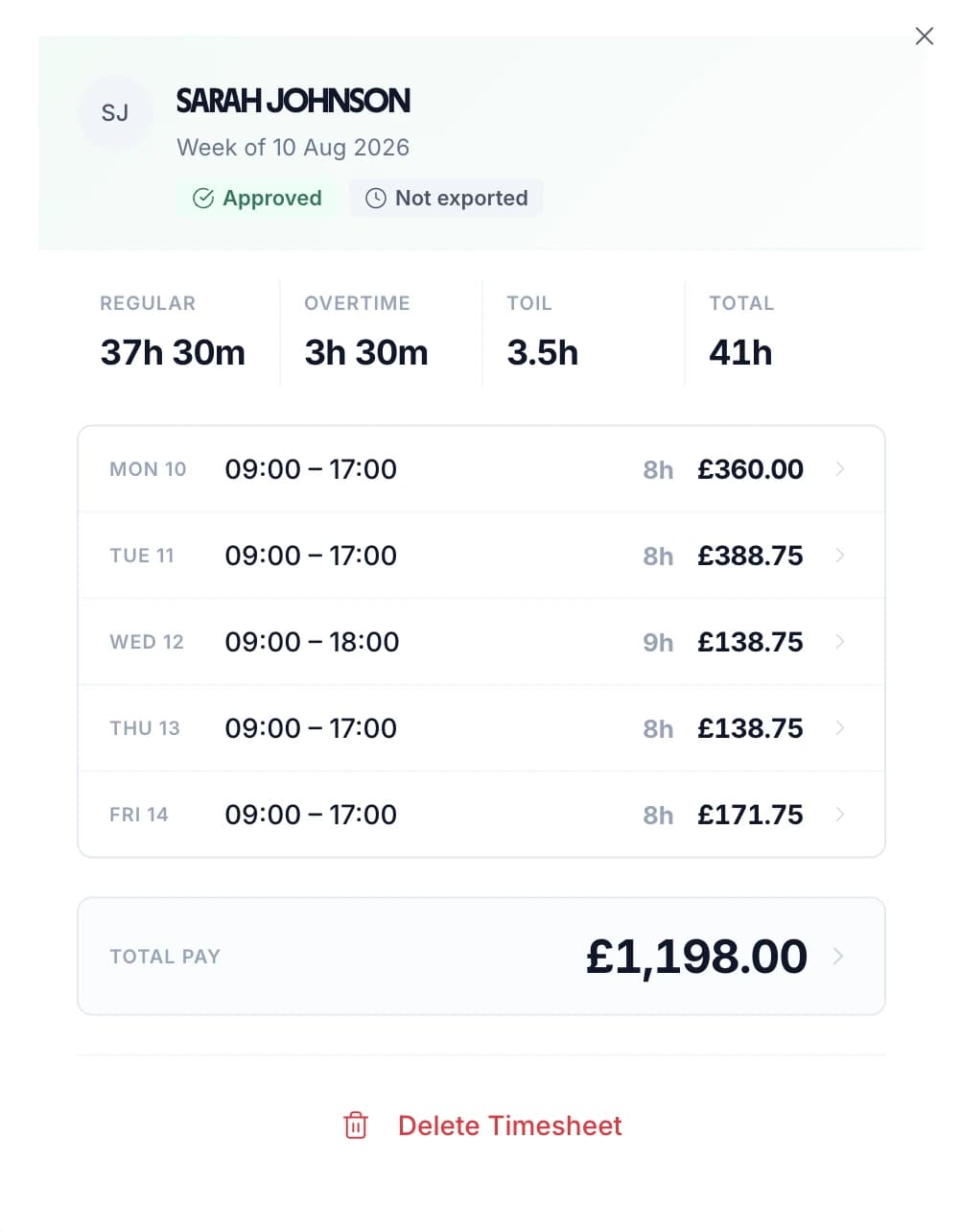
Approved weekly security timesheet showing regular hours, overtime, TOIL and pay for each day
On the gate and on the round

Used Across UK Security Operations

TimeTally works for any security company that needs to track guard hours and export them to payroll. A static site and a mobile patrol round use the same form. Only where it is filled in differs.

Static

Static Guarding

Office buildings, retail parks, warehouses, and residential estates

  • One geofence per static site, anywhere from 25 metres to 5 kilometres
  • Day relief and night relief on the same gate, costed separately
  • Every hour tagged to the contract it belongs to, not just to the guard
Patrol

Mobile Patrols

Guards covering multiple client sites across a shift or week

  • One shift split across every site the round covered
  • Each guard gated only to the sites they are assigned to
  • Hours and cost reported per site, so a patrol round is priced from real figures
Nights

Night Security

Overnight patrols, lone workers, and out-of-hours site security

  • A 22:00 to 06:00 shift is recorded as eight hours, not a negative total
  • A night premium paid on hours inside the window, whatever the weekly total
  • Lone workers on sites with no signal write the shift up once they are back online
Events

Event Security

Temporary deployments for concerts, festivals, and corporate events

  • Add crew for a weekend and remove them when the deployment ends
  • One event as one project, so the labour cost lands in a single place
  • A different day rate per guard on the same deployment
Team Timesheets

Every Guard's Submitted Hours in One List

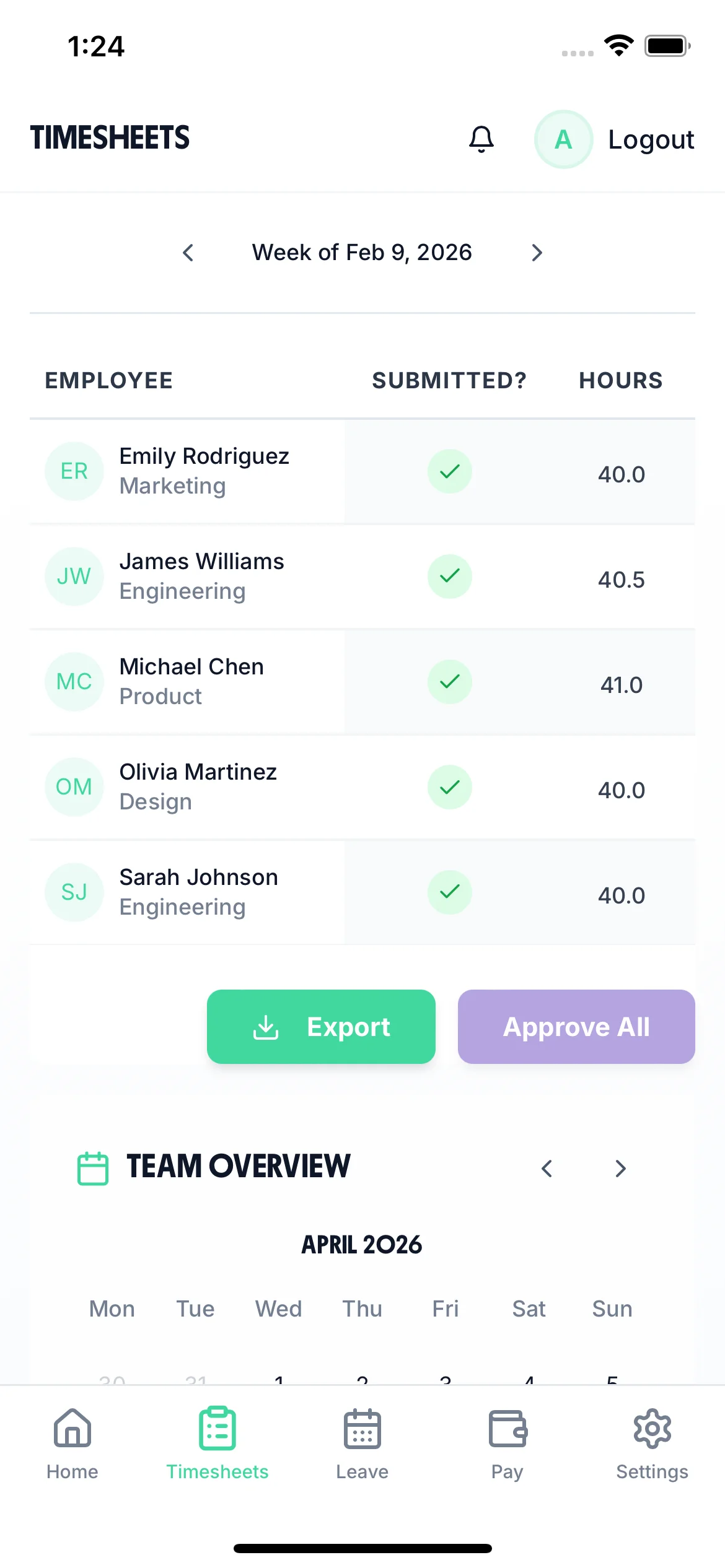
One screen shows the whole roster for the period: who has submitted, who has not, and the hours each guard has claimed. Step between periods with the arrows. Approve guards one at a time or approve the period in a single action, then export it to payroll. The screen is the same on a phone, so a mobile supervisor can clear a week from the van.

  • Outstanding sheets are obvious, so you chase the guards who have not submitted instead of ringing round the whole roster.
  • A guard whose sheet is still open can be sent a reminder in one tap. It arrives as a notification in their app.
  • Tap a guard to open their week, check the days, and approve or send it back with a note.
Submitted or outstanding at a glanceSame screen on phone and desktop
Manager view on a phone listing each guard, whether they have submitted, and their hours for the week
Team Overview

See Who Is Working and Who Is Off

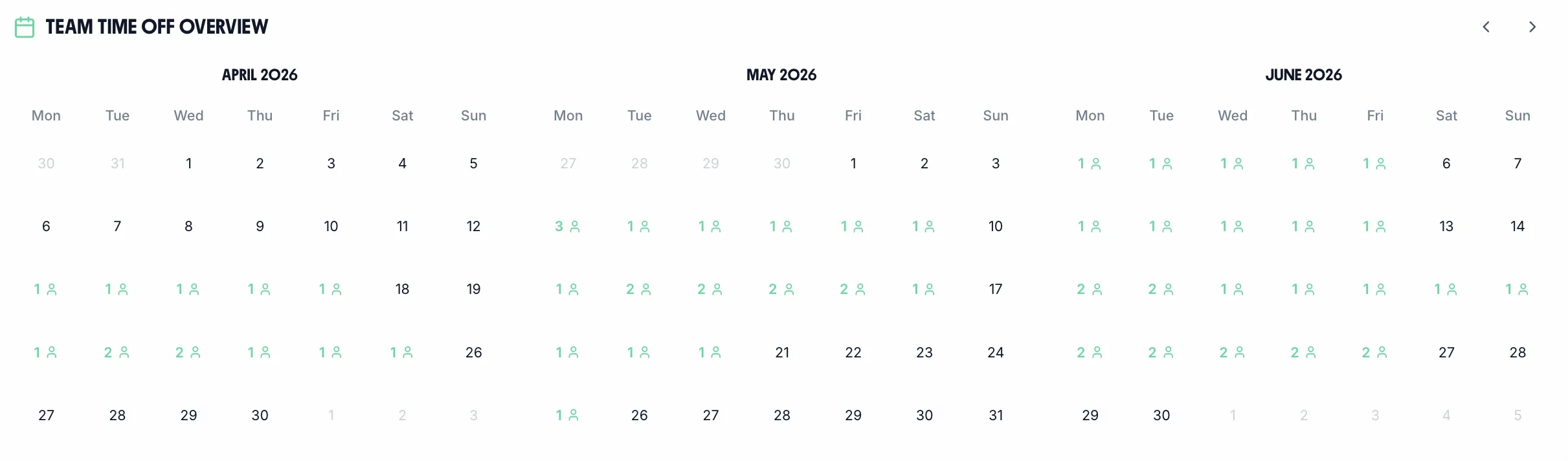
The team calendar gives managers a clear view of the entire team's status — submitted timesheets, approved holidays, and absences — all in one place. Use it to plan ahead and make informed decisions about approving leave requests.

Team calendar showing security guard availability and holidays
  • Coverage at a Glance

    See who is already off before you approve the next request

  • One-Tap Reminders

    Nudge a guard whose sheet is still outstanding without a phone call

  • Submitted and Approved

    Timesheet status sits beside leave, so nothing is chased twice

Optional Controls for Contracts That Need Proof

Every control below is optional and off until an admin turns it on. Switch one on for the contracts that need it — a client who wants evidence of attendance, an ACS audit, a site where the hours are being challenged. Your other contracts are unaffected.

Site check

Guards can only clock in once they are on the site they were booked for.

Each site gets its own radius, anywhere from 25 metres to 5 kilometres. A retail unit where the doorway is the whole post gets a tight one. A distribution park or an estate-wide patrol round gets a wide one. Guards are gated only to the sites they are assigned to. If a shift is booked at a site with its own geofence, that geofence is the one that applies.

Each site is set to strict or lenient. Strict refuses a clock-in from outside the radius. Lenient lets it through and records how far out the guard was, which suits a site with a dead spot by the gate.

Two limits. GPS site checks are a paid add-on, free for the length of the trial. And they only apply where clocking in is the only way to record hours: if the timesheet form is also available, a guard can type the hours the geofence refused.

How the GPS check works in full

Strict clocking

Lock hours to real clock-in and clock-out times.

Strict clocking is off by default. Left off, guards write up their own hours, which suits most contracts.

Turn it on for contracts where the hours are invoiced to a client or reviewed under the contract. Start and end times then come only from recorded clock-ins, so a 22:10 start cannot be entered as 22:00. A missed clock-out has to be closed at the time rather than back-filled a week later.

This is the closest TimeTally comes to time theft prevention software. The limit is worth stating: it removes hours that were typed generously, not hours that were never worked. Supervisors can still correct a genuine error, so the record stays accurate.

More on tamper-proof timesheets

Periods

Weekly, fortnightly or four-weekly timesheets.

Choose a period of one, two or four weeks and set the date the first period starts. Every period after that follows the same cycle.

Security payroll and client reporting rarely run on the same cycle. Guards are usually paid weekly or fortnightly while client contracts are reviewed monthly. Match the period to the payroll run it feeds and nobody adds four weeks of guarding shifts together by hand.

Breakdown

Tag every hour to a site, contract or activity.

Hours can be tagged with a project, a location and an activity, or all three. Projects are on already. Add locations and activities when a contract needs more detail — static cover, patrol and alarm response on the same account, for example.

Whatever you enable appears everywhere the hours do: on timesheet lines, on shifts, and in every export and report. Reports show hours and cost per tag, so a 240-hour week breaks down into the 96 the retail park took.

The Manager's View of a Timesheet Month

This is the screen a security operations manager works from. Every guard is a row and every day is a cell, so an unworked day or a missing sheet shows up without opening anything. Submitted weeks queue as timesheet requests, time-off requests sit next to them, and both are approved from the same screen. It is the live product, not a mock-up.

All Departments
Jun 2026
M
T
W
T
F
S
S
M
T
W
T
F
S
S
M
T
W
T
F
S
S
M
T
W
T
F
S
S
M
T
AR1

Amelia Roberts

Kitchen

JK2

James Kelly

Front of house

PS3

Priya Shah

Kitchen

MP4

Maya Patel

Front of house

TW5

Tom Wilson

Bar

Timesheet Requests

3
AR

Amelia Roberts

37h 30m · Week of Jun 15

JK

James Kelly

38h 30m · Week of Jun 8

Time-off Requests

2
PS

Priya Shah

3d · Annual Leave

MP

Maya Patel

2d · Sick Leave

AR

Amelia Roberts

Monday 15 June · 09:00

AR

0h 00m

09:00 – 17:00

Break
End Done

Timesheet submitted

Week of Jun 15

AR

Amelia Roberts

Kitchen

Week of Jun 15, 2026

Mon15
09:00–17:00·30m

7h 30m

Tue16
09:00–17:00·30m

7h 30m

Wed17
09:00–17:00·30m

7h 30m

Thu18
09:00–17:00·30m

7h 30m

Fri19
09:00–17:00·30m

7h 30m

Submit Timesheet Submitted

Payroll Export

Week of Jun 15, 2026 · 5 employees

Employee
Reg. pay
Overtime
Total
AR

Amelia Roberts

37.5h

£281.25

£281.25

JK

James Kelly

40h

£300.00

£22.50

2h

£322.50

PS

Priya Shah

32h

£240.00

£240.00

MP

Maya Patel

38h

£285.00

£285.00

TW

Tom Wilson

40h

£300.00

£45.00

4h

£345.00

Total · 5 employees

£1,406.25

£67.50

£1,473.75

Confirm Export Exported!

What TimeTally Does for Security Teams

TimeTally is a straightforward timesheet and holiday management tool. Here is what it does and how it helps security companies.

Shift Hour Tracking

Guards enter their shift start and end times. This works for any shift pattern — days, nights, 12-hour patrols, split shifts, or irregular rotas. Overnight shifts that cross midnight are handled correctly. Total hours and overtime are calculated automatically.

Hourly Rates & Overtime

Set an hourly rate and overtime rate for each guard. When timesheets are submitted, TimeTally calculates standard pay and overtime pay automatically. You can set daily or weekly overtime thresholds to match your contract terms, and a separate configuration for each day of the week where weekend guarding pays differently.

Site & Contract Tracking

Use TimeTally's project tracking to assign hours to specific client sites or contracts. If a guard works across two sites in a shift, they can split their hours accordingly. Reports show total hours and costs per site, which is useful for client billing. On a multi-site guarding contract, that shows which site took the hours rather than only the weekly total.

Overnight Shift Support

Night patrols that start at 8pm and finish at 6am are handled correctly — no manual workarounds needed. TimeTally calculates the full 10 hours across midnight. Overtime thresholds still apply as expected, and a night premium set as a time-of-day window pays for the hours inside it. More on night shift time tracking.

Payroll Export

Export approved timesheets to Xero, QuickBooks, or CSV with one click. The export includes guard names, standard hours, overtime hours, pay amounts, and break deductions. No manual re-entry needed.

Mobile Access — No App Download

TimeTally works in any mobile browser. Guards do not need to download an app or install anything on personal devices. They can bookmark the page on their phone. There is also a native iOS app for those who prefer it.

Why it matters

Why Security Companies Need Accurate Timesheets

Guards work across multiple client sites, often at night, and shift patterns change weekly. A firm holding three multi-site guarding contracts can have the same SIA-licensed guard on four postcodes in one week. Accurate hours matter for payroll, for client billing, and for your legal obligations as an employer.

The Working Time Regulations 1998 (WTR) limit average weekly working hours to 48, calculated over a 17-week reference period. Workers must receive at least 11 consecutive hours of rest between shifts and a 20-minute uninterrupted break for any shift exceeding 6 hours. Night workers — which includes most security guards on overnight patrols — face an additional limit of 8 hours per 24-hour period, averaged over a 17-week reference period. These rules apply regardless of whether your guards have opted out of the 48-hour limit, because the night work limit cannot be opted out of.

Security companies also operate under the Private Security Industry Act 2001, which requires all front-line operatives to hold a valid SIA licence. The Security Industry Authority (SIA) issues licences for manned guarding, door supervision, close protection, and other roles. Deploying a guard without a valid licence is a criminal offence carrying fines of up to £5,000. While TimeTally does not manage SIA licences or track expiry dates (you will need a separate system or process for that), accurate timesheet records showing which guards worked at which sites form part of the broader compliance picture.

For companies holding or working towards SIA Approved Contractor Scheme (ACS) status, auditable records of guard deployments and hours worked are a requirement. ACS auditors expect to see clear evidence of who worked where, for how long, and under what terms. Timesheet records are one piece of that puzzle.

On the payroll side, getting hours right is essential. Security contracts often involve different rates for day shifts, night shifts, weekends, and bank holidays. Missed overtime, incorrect break deductions, or misrecorded night shifts lead to underpayments and disputes. A security timesheet that separates those bands as the week is entered prevents most of those disputes. With staff turnover in security running higher than most sectors, paying people correctly and on time is one of the most practical retention tools available.

UK Compliance
UK Compliance

How TimeTally Helps with UK Employment Law

TimeTally is a timesheet tool, not a compliance system — but accurate timesheet records are the foundation of meeting your legal obligations as an employer. Here is how the data TimeTally captures supports your compliance requirements.

Working Time Regulations

TimeTally records all hours worked, including overtime and night shifts. This gives you the data you need to review the 48-hour weekly average (over a 17-week reference period), 11-hour rest between shifts, and the 8-hour night work limit. Night workers in security cannot opt out of the 8-hour average limit — it applies regardless. You can export this data at any time if HMRC or the HSE request records.

Rest Break Records

Under UK law, workers on shifts over 6 hours are entitled to a 20-minute uninterrupted break. TimeTally tracks breaks separately, so you have a record that breaks were taken. This is particularly important for lone workers on night shifts, where rest breaks are a health and safety obligation under the Health and Safety at Work Act 1974.

HMRC Record-Keeping

HMRC requires employers to keep records of hours worked for at least two years. TimeTally stores all timesheet data digitally with timestamps and approval records — a complete audit trail that you can export whenever needed.

National Minimum Wage

Accurate hours tracking ensures your effective hourly rate does not fall below the National Minimum Wage (£12.21/hour for workers aged 21+ from April 2025). This is especially relevant where unpaid overtime or incorrect break deductions could push the rate below the legal minimum.

Holiday Entitlement

All UK workers get 5.6 weeks statutory holiday (28 days for full-time). TimeTally's staff holiday tracker calculates entitlement automatically, including pro-rata for part-time guards and mid-year starters, and tracks remaining allowance in real time. Holiday sits in leave management, separate from timesheets, so booked leave and worked hours are never counted twice.

Site Deployment Records

TimeTally's project tracking shows which guards worked at which client sites, for how long, and at what cost. This is useful for client contract reporting and for companies working towards or maintaining SIA Approved Contractor Scheme (ACS) status, where auditable deployment records are expected.

Honest Positioning

What TimeTally Does — and What It Does Not

TimeTally is a timesheet and holiday management tool. It does a few things well. It is not a replacement for dedicated security management software, and we think it is important to be upfront about that.

What TimeTally Does

  • Records shift hours (start time, end time, breaks) submitted by guards from their phone
  • Records hours by clock in and clock out, by a timesheet filled in afterwards, or by letting each guard choose — one organisation-wide setting
  • Tracks which client site or contract each guard worked at using project tracking
  • Calculates standard pay and overtime pay based on individual hourly rates
  • Manages holiday requests, entitlement, and team calendar
  • Exports approved timesheets to Xero, QuickBooks, or CSV
  • Handles overnight shifts that cross midnight correctly
  • Allows notes on timesheet entries (useful for recording site details or incidents)
  • Sends a guard whose sheet is still outstanding a reminder, in one tap from the team calendar

What TimeTally Does Not Do

  • Does not track SIA licences, expiry dates, or send licence renewal alerts
  • Does not follow a guard's location continuously — the optional GPS check looks at where they are once at clock in and once at clock out, and nothing in between
  • Does not monitor Working Time Directive limits automatically or send breach alerts
  • Does not manage BS 7858 vetting records or pre-employment screening
  • Does not provide coverage alerts or staffing level warnings
  • Does not roster against a licence or a skill — rota planning and shift scheduling exist, but the rota planner will not stop you booking a guard whose SIA licence has lapsed
  • Does not provide guard patrol verification (checkpoint scanning, NFC tags, etc.)
  • Does not prove who was holding the phone — a geofence records where a clock-in happened, not who tapped it, so it does not stop buddy punching on its own

Simple, Transparent Pricing

One price. Every feature. No surprises.

£3/employee/month

Billed monthly, incl. VAT. Cancel anytime.

Guard hours tracked across multiple client sites
Overnight shift tracking with automatic midnight crossover
Automatic overtime calculation
Holiday requests and team calendar
Export to Xero, QuickBooks, or CSV
Get Started

GPS site checks are a paid add-on, free for the length of the trial.

In short

What is security timesheet software?

Security timesheet software records the hours each guard works on each client site, so those hours can be paid correctly and evidenced to the client. TimeTally does this for UK security companies from £3 per guard a month. Guards log start time, end time and breaks from any phone browser or the iOS app, or clock in and out if you prefer. Each entry is assigned to the site the guard covered, and the period is submitted for approval. Overnight shifts cross midnight without a workaround. Night and weekend premiums are calculated against the thresholds you set. Approved hours export to Xero, QuickBooks or CSV. An optional GPS check can require a guard to be on the assigned site before they clock in.

Price
£3 per guard a month
Logging
Any phone browser, or the iOS app
Costs to
A project per client site or contract
Exports to
Xero, QuickBooks, CSV
Supports
WTR, HMRC hour records and ACS deployment evidence

Frequently Asked Questions

Can guards use TimeTally without downloading an app?

Yes. TimeTally works in any mobile browser — no app download or installation needed. Guards can bookmark the page on their phone. There is also a native iOS app on the App Store for those who prefer it.

How does TimeTally handle overnight security shifts?

TimeTally handles overnight shifts correctly. If a guard starts at 8pm and finishes at 6am, the system calculates 10 hours without any issues. Start and end times can cross midnight. Total hours and overtime are calculated automatically.

Can I track which client site each guard worked at?

Yes. TimeTally has project tracking where you can create client sites or contracts. Guards assign their hours to the relevant site when submitting their timesheet. Reports show total hours and costs per site, which is useful for client billing and contract reporting.

Can I set different pay rates for different guards?

Yes. Each guard has their own hourly rate and overtime rate. When timesheets are submitted, TimeTally calculates standard pay and overtime pay based on these rates. You can update rates at any time from the employee settings.

Does TimeTally track SIA licences?

No. TimeTally does not track SIA licence numbers, expiry dates, or send renewal alerts. You will need a separate system or spreadsheet for SIA licence management. You can use the notes field on employee profiles to store licence numbers for reference, but TimeTally will not alert you when a licence is due to expire.

Does TimeTally help with Working Time Directive compliance?

TimeTally records all hours worked, including overtime and night shifts. This gives you accurate data to review the 48-hour weekly average, rest periods between shifts, and night work limits. However, TimeTally does not actively monitor WTD limits or send alerts for breaches — it provides the data, and compliance decisions remain with you.

Is TimeTally a clock-in/clock-out system?

It can be. Clock-in/clock-out is one of four options on an organisation-wide setting: clock in and out, fill in a timesheet for the period, both, or let each guard choose. Most security companies use the timesheet form, because guards often work sites with no signal. Where you need live clocking — a contract that requires evidence of attendance, or a site the client is questioning — switch that team to clock-in and the hours are then taken from recorded clock-ins.

Does TimeTally check that a guard was actually on site?

It can, as an optional GPS add-on that is free for the length of your trial. You define a site as a point and a radius — anywhere from 25 metres to 5 kilometres — and assign guards to it, and a guard has to be inside before they can clock in or out. Each site is set to strict (refuse) or lenient (allow, but record how far out they were). Two limits worth knowing: it only works where clocking in is the only way to record hours, because otherwise a guard can simply type the hours the geofence turned down; and it records where a phone was, not who was holding it, so it is not on its own a defence against buddy punching.

Can TimeTally stop time theft on a guarding contract?

Partly, and it is worth being precise about which part. Strict clocking removes rounded and retrospectively written hours: start and end times come only from real clock-ins, so a 22:10 start cannot become 22:00 across a month of nights. Add the GPS site check and a guard cannot start the clock from home or from the car on the way. No timesheet system can prove which person tapped the button, so none of this replaces supervision. It removes guesswork from the paperwork.

How do holiday requests work?

Guards tap 'Book Time Off', select their dates, and submit. Their manager gets a notification and can see the team calendar to check for clashes before approving. Remaining holiday allowance is shown in real time. Statutory entitlement (5.6 weeks) is calculated automatically, including pro-rata for part-time guards.

What payroll systems does TimeTally export to?

TimeTally exports to Xero, QuickBooks, and CSV/Excel. The export includes guard names, standard hours, overtime hours, pay amounts, and break deductions. Most payroll systems can import CSV files if a direct integration is not available.

Can I use TimeTally alongside our existing security management software?

Yes. TimeTally records the hours actually worked, which is often not what the deployment plan said — shift swaps, late reliefs, site changes, and the overtime a guard picks up when the relief is stuck in traffic. TimeTally handles the timesheet, holiday and payroll side, while your security management software keeps patrol verification, checkpoint scanning and SIA licence tracking.

Still have a question? See all FAQs

Try TimeTally Free for 14 Days

No credit card required. Set up your security team in 10 minutes. Start tracking guard hours and managing holiday requests.

FREE 14-day trial · No credit card required · Cancel anytime

Support that answers

A real person replies within 24 hours. No ticket queues, no bots.

UK GDPR compliant

A UK company, ICO regulated. Your data encrypted and never sold.