
Residential & Nursing Homes

Time and Attendance Software for UK Care Homes

TimeTally is care home timesheet software with the attendance record behind it. Care assistants, seniors and nurses record earlies, lates, long days, waking nights and sleep-ins from their own phone, in under a minute. The home manager sees who worked, for how long, and on which unit, then approves the week. Approved timesheets export to Xero, QuickBooks, or CSV. It costs £3 per staff member per month.

Care home timesheet showing shift hours, breaks and unit for the week
Care home staff timesheet tracking on mobile

The app is simple to use, reliable, and makes managing staff records straightforward. The system has saved us a significant amount of administration time.

CLI ManchesterJordan Ingoe, CLI Manchester

How Care Staff Record a Shift

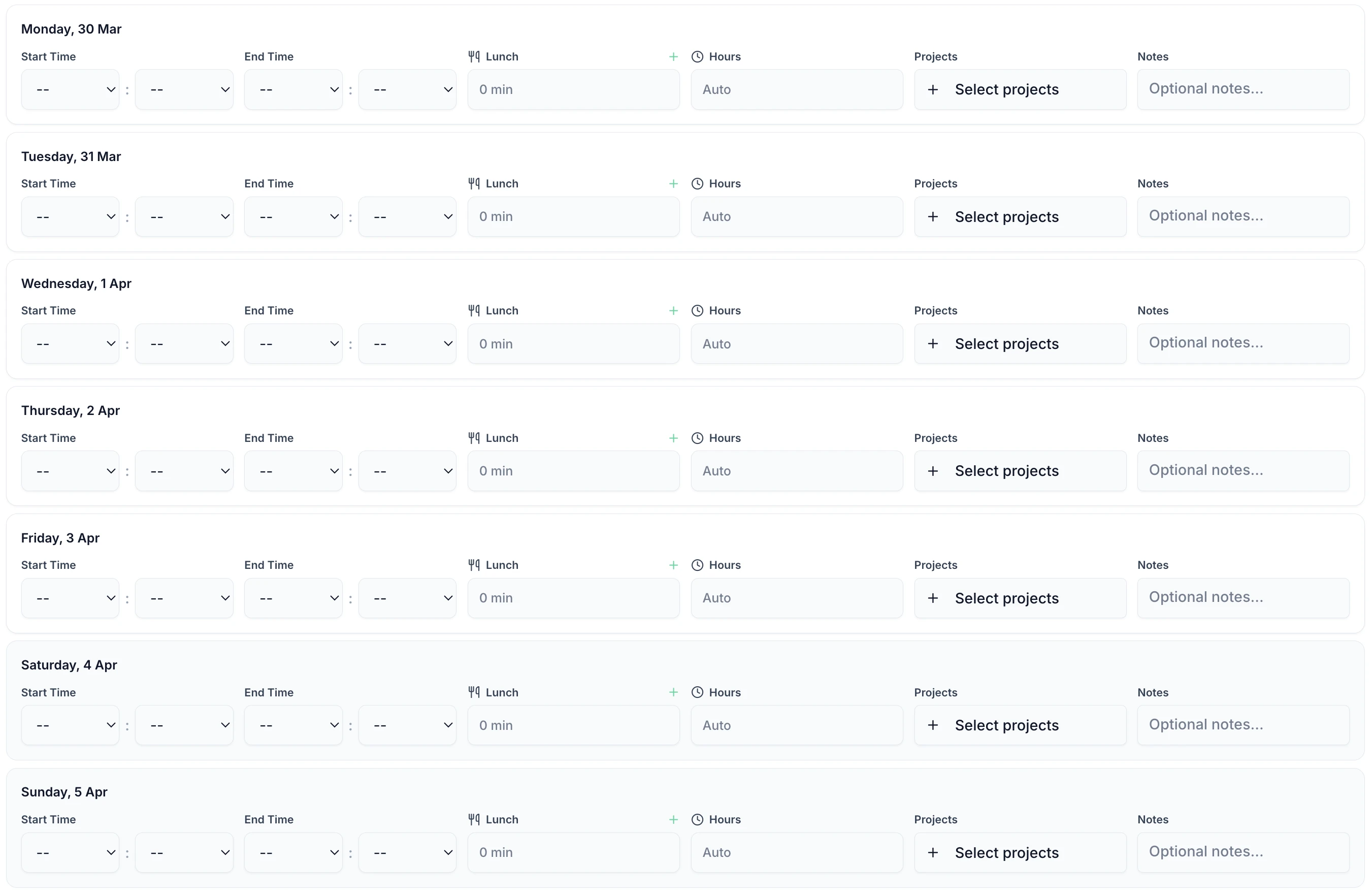
Care home timesheet software has to fit into a handover. A carer enters a start time, an end time and any breaks, then submits. That is the whole task. It runs in any phone browser, on a shared tablet in the staff room, or on the office desktop, and there is a native iOS app for staff who prefer one.

TimeTally timesheet entry screen showing shift hours and break tracking
  • Start, end and break times

    Staff enter a shift on a phone when it finishes, or fill in the whole week at once.

  • Overnight shifts stay one entry

    A 20:00 start and an 07:30 finish is recorded once and totals 11.5 hours.

  • A note on the shift

    Staff can say why a shift overran or a break was missed. The manager reads it before approving.

  • Optional split by unit or task

    Hours can be assigned to a unit, floor or activity if an admin has switched that on.

Approve Care Home Timesheets from One Screen

A home manager signing off thirty carers should not be reconciling paper against last month's rota. Open a week and it is already totalled: contracted hours, extra hours, and the units the carer covered. Approve or reject from any device. A rejection carries a written reason, so a carer who logged a night against the wrong date knows what to correct.

  • Extra hours are separated from contracted hours against each carer's own threshold. The carer who stayed an hour past handover is already costed when you open the week.
  • Every day is one line. Open a line to see what a pay query turns on: the break that was not taken, the second unit, and the note explaining why the shift ran over.
  • Pay is hidden unless the viewer has permission to see it. A deputy can approve their unit's hours without seeing what anyone is paid.
  • Anyone still outstanding can be sent a reminder in one tap. It arrives as a notification in their app, so chasing four late timesheets is not four phone calls.
  • Approved and exported are tracked separately, so a week signed off on the floor cannot go through payroll twice when the office runs the month.
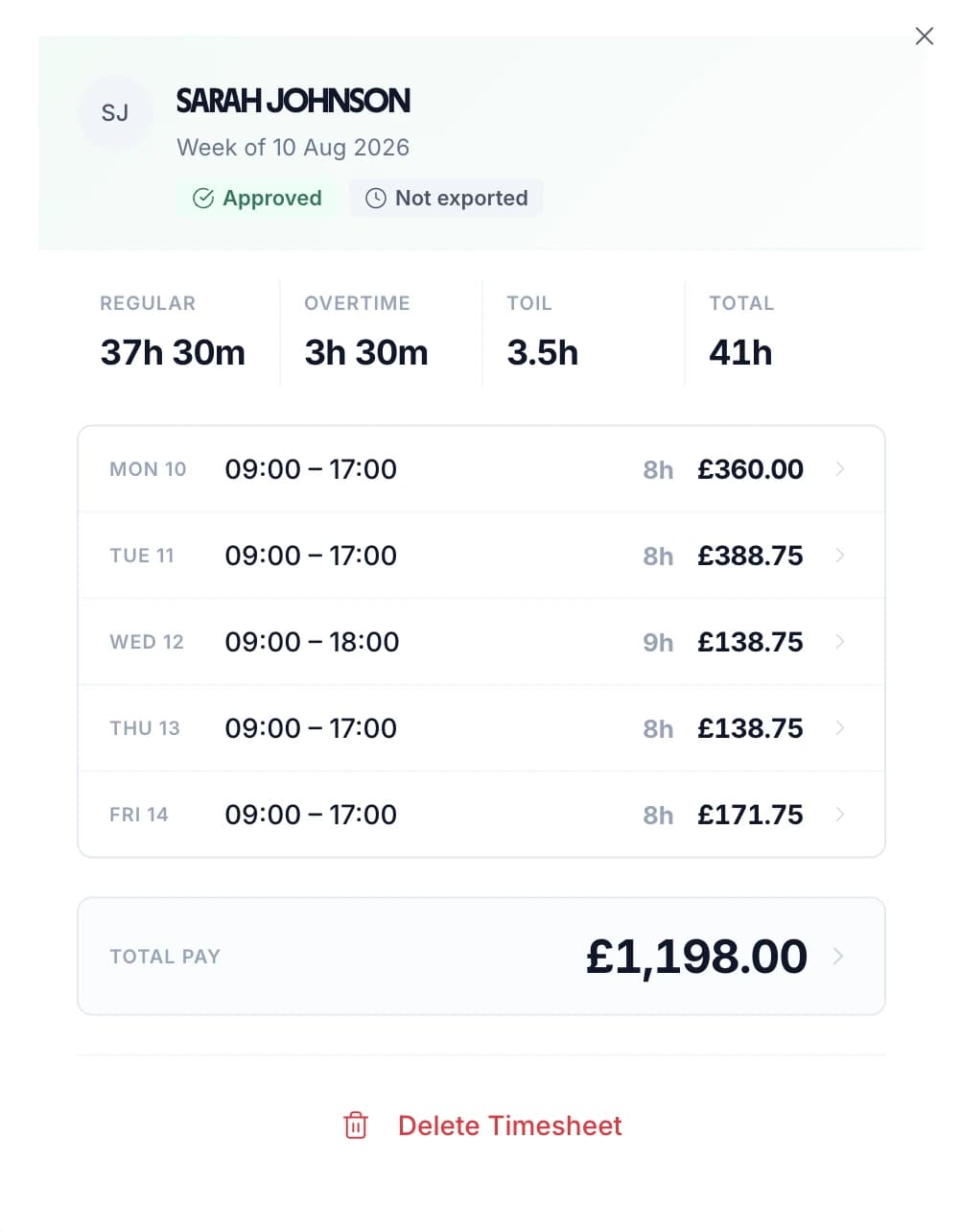
Care home manager's timesheet view showing each day, regular and overtime hours and pay for the week

Every Carer's Submitted Hours in One List

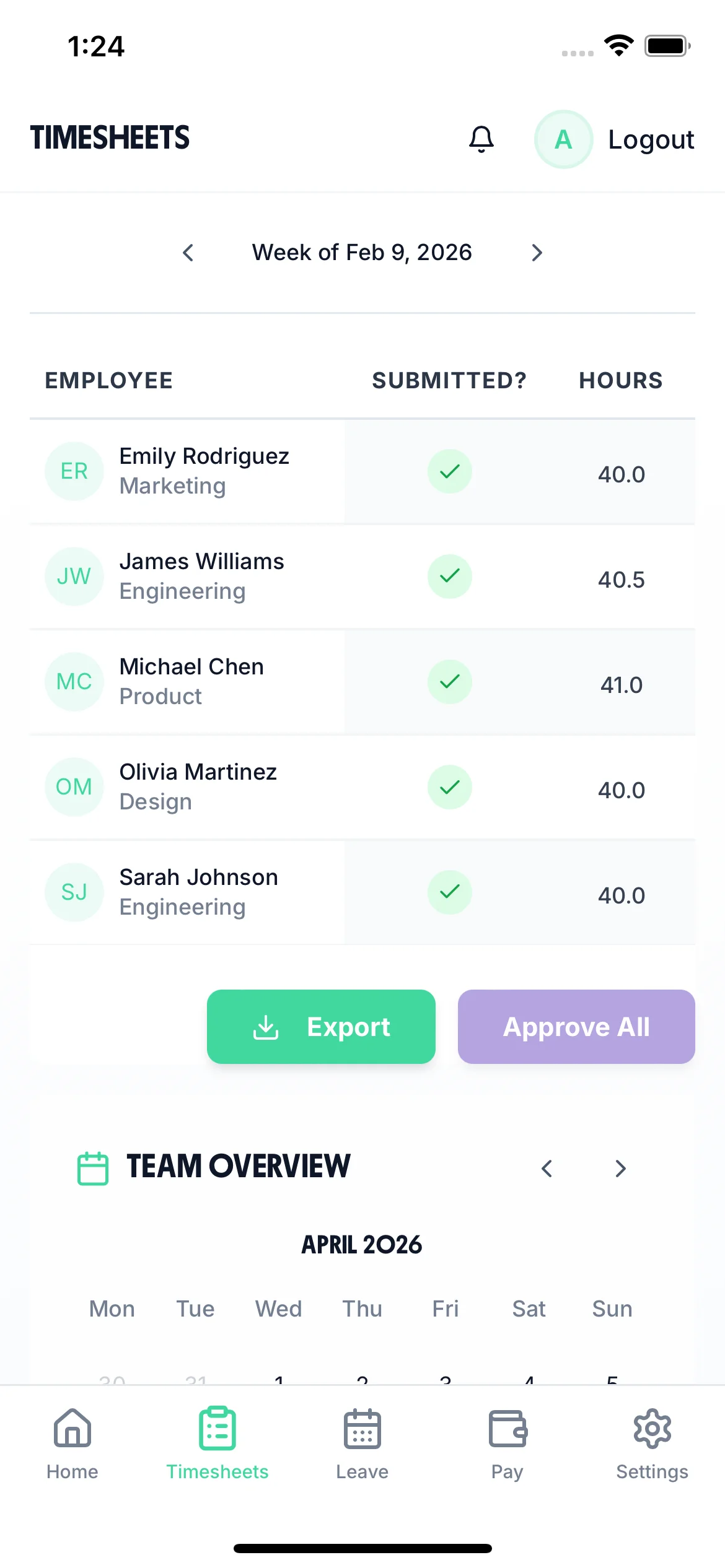
The manager's timesheet screen lists everyone in the home for the selected period, with their total hours beside their name and a badge saying whether the week is pending or approved. It works at phone width, so a home manager can clear the week from the floor instead of waiting until they are at a desk.

  • Approve a carer straight from the row, or approve everyone outstanding in one action.
  • Tap a name to open the week behind the total: each day, the breaks, the units and any note.
  • Step back through recent weeks to check what a carer was paid for last month.
  • Timesheet periods can run one, two or four weeks, so the list matches how the home pays.
  • Bank and agency carers appear in the same list as permanent staff, on their own rates.
Care home manager reviewing every carer's submitted hours on a phone

Give Each Unit, Floor or House Its Own Project

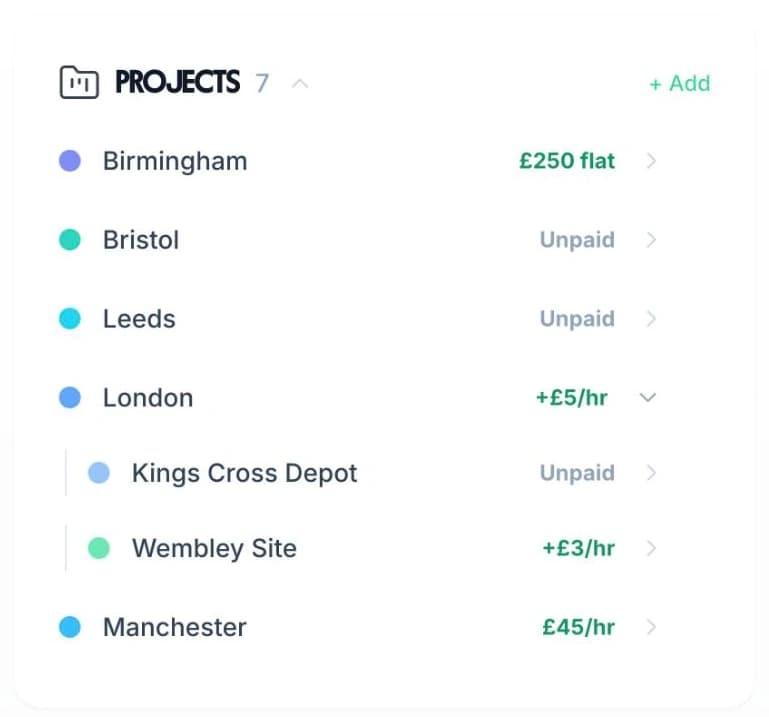
Projects are how hours are attributed inside a home. Create one for each unit, floor or house — or for each shift type — and staff pick from that list when they record a shift. Reports then return hours and cost per project instead of one figure for the whole home.

  • A carer who covers two units in one shift splits the hours between them.
  • A project can carry its own pay rate for the carer: a flat fee, an hourly rate on top, or an hourly rate instead of their normal one.
  • Projects can sit under a parent, so a floor can live inside the unit it belongs to.
  • Activities are a second, optional breakdown on the same entry: personal care, the medication round, handover, training.
Projects are on by defaultActivities are off until you switch them on
TimeTally Projects panel, where each unit or floor a care home creates can carry its own pay rate

See Who Is Working and Who Is Off

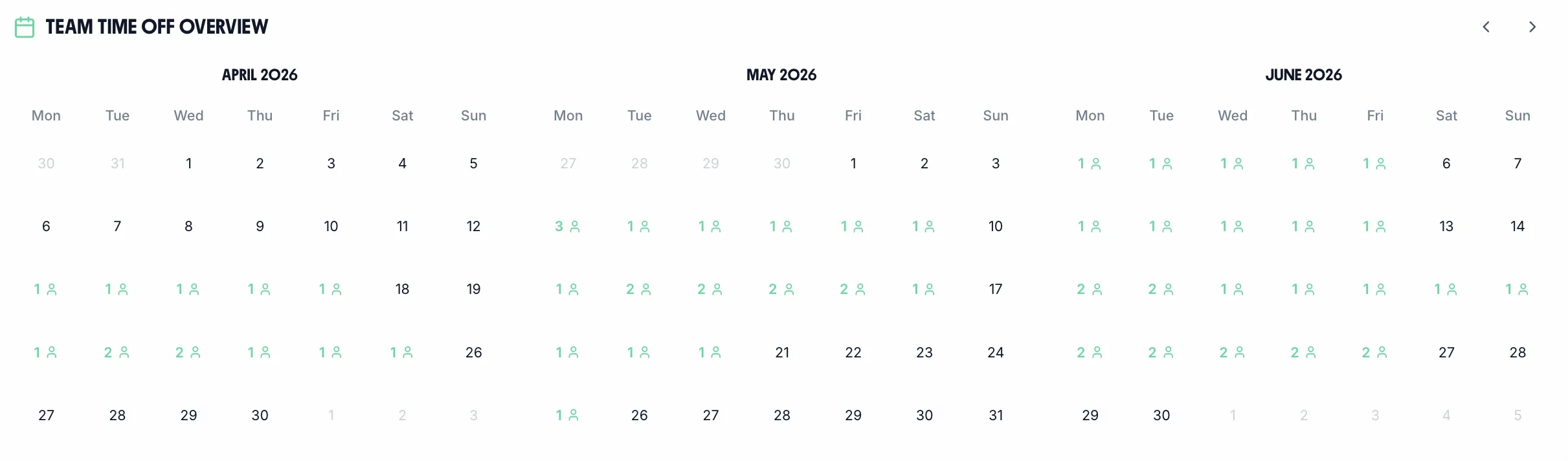
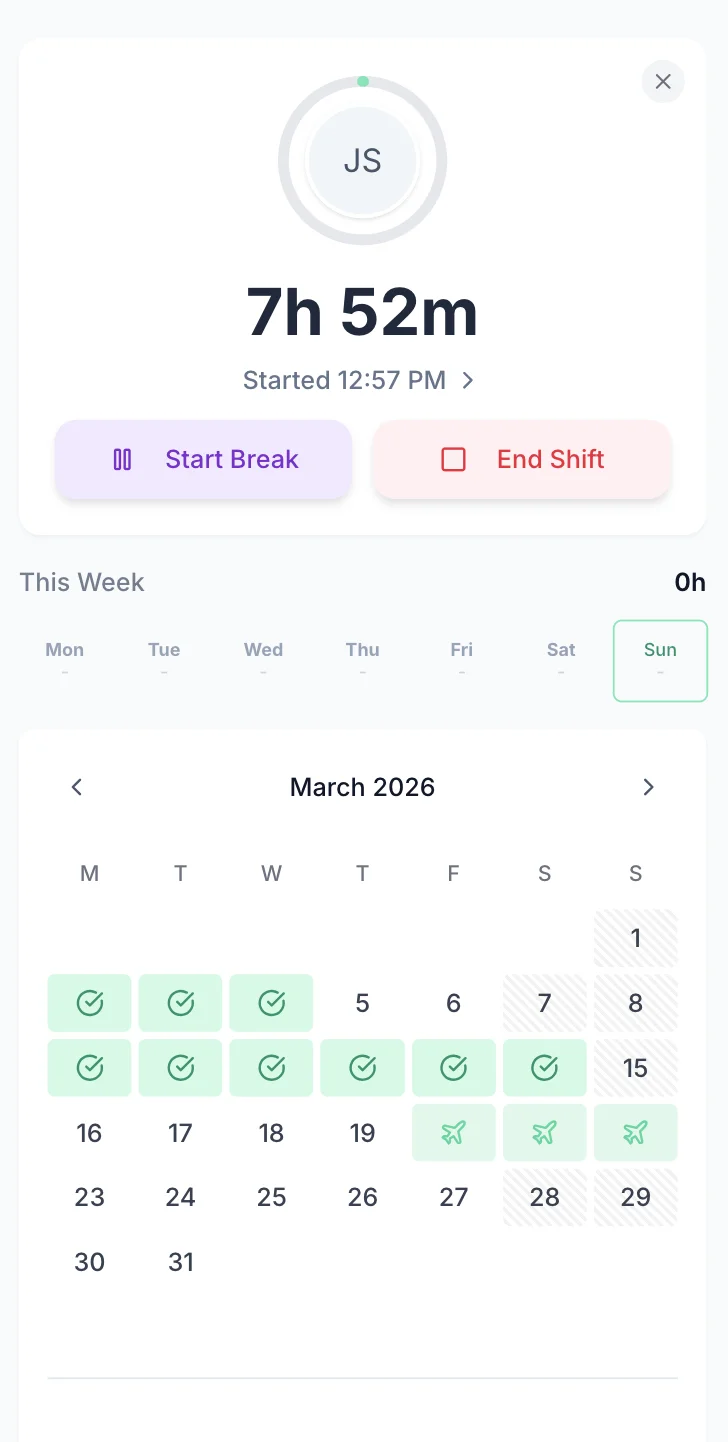
The team calendar shows the whole team's status in one place: submitted timesheets, approved holidays and absences. It is the view a home manager checks before agreeing to a swap, before booking agency cover, and before approving a week off in February when two seniors are already away. For entitlements, carryover and the leave year itself, see care home leave management. Remaining holiday entitlement is worked out for you either way.

Team calendar showing care home staff availability and holidays
  • Every carer on one screen

    See who is on shift, who is off, and whose timesheet has not arrived yet.

  • Check clashes before approving

    The calendar shows who else is already booked off that week.

  • Live clock-ins

    Anyone currently clocked in appears on the same view, refreshed about once a minute.

Days, waking nights and sleep-ins

Built for Care Home Shift Patterns

A care home rota is earlies and lates, long days, waking nights, sleep-ins and whatever agency cover the week needed. General time and attendance software handles two parts of that badly: shifts that cross midnight, and hours that belong to more than one unit. TimeTally handles both.

Nights

Overnight shifts are recorded once

A waking night from 20:00 to 07:30 is entered as one shift and totals 11.5 hours. TimeTally does not split it across two dates, so nobody has to add the halves back together on a Friday.

Overtime can be triggered by time of day as well as by total hours. Set a window such as 22:00 to 06:00 and hours inside it pay at the night rate, whether or not the carer passed a weekly threshold. The rate is a multiplier or a fixed hourly figure, and it is set per person. A senior on permanent nights and a bank carer covering one shift can be on different terms.

TimeTally has no dedicated sleep-in mode. Since Royal Mencap Society v Tomlinson-Blake, only the awake-and-working part of a sleep-in counts as working time. You decide which hours are payable, enter them, and label them with a project or an activity. TimeTally keeps the record; the judgement stays with the home.

Where the hours went

Hours split by unit and by task

Hours can be assigned to a unit, floor or house. A carer who spends four hours on the residential floor and three on the dementia unit records both against the same shift. Reports come back as hours and cost per unit rather than one number for the whole home. Projects are switched on by default, and a home that only wants a shift total can ignore them.

Activities are a second, optional breakdown on the same line. A shift can also be split by what the time was spent on: personal care, the medication round, handover, training. An activity can carry its own hourly uplift where a task is paid at a different rate. Both projects and activities are controlled by an admin in settings.

This turns a staffing question into a number. If one unit has needed an extra carer on every late shift for six weeks, the hours show it — in a format you can give to a commissioner or an inspector.

Used Across Residential and Home Care

TimeTally is not a full care home HR package. There is no recruitment, no training matrix and no supervision log. It does hours, attendance, absence and pay, and it does them for every service below.

Residential

Residential care homes

Care assistants and seniors work earlies, lates, long days and waking nights. Hours are recorded per shift and can be tagged to a floor, a unit or a house, so the record shows where the cover went rather than only how many hours the home used in total.

  • Earlies, lates, long days and waking nights
  • Hours tagged by unit, floor or house
  • One record per shift, whoever worked it
Nursing

Nursing homes

Registered nurses work alongside care staff on different rates, plus whatever bank and agency cover the week needed. Each person has their own hourly rate and their own overtime terms, so a booked agency shift and a substantive late are costed correctly in the same week.

  • A separate rate per person, not per grade
  • Bank and agency cover logged the same way
  • Rates can be hidden from whoever approves
Supported living

Supported living and small houses

Two- and three-person houses run sleep-ins and one-to-one hours, with a staff list that moves between them. Support workers record a shift from the house on their own phone, so nothing has to be handed in at an office. Support worker timesheets and the sleep-in hours beside them sit in the same record.

  • Sleep-in and waking hours recorded separately
  • One-to-one hours tagged as their own activity
  • Staff who cover two houses split the week
Home care

Home care and domiciliary agencies

Home health care time tracking has a different shape from a building: short calls, travel between them, and a round that can change on the morning. Carers enter start and end times per visit or per round from their phone. A project or an activity can carry the client, the round, or travel time paid at its own uplift.

  • Entered per visit or per round, from the phone
  • Travel can carry its own hourly uplift
  • Managers approve without anyone coming in

From Clock-Out to Payroll Export

The sequence below runs through one week in TimeTally. A carer clocks out and the shift lands on their timesheet. The manager approves the week from the calendar. The approved hours go into a payroll export. Nothing is retyped between those steps.

All Departments
Jun 2026
M
T
W
T
F
S
S
M
T
W
T
F
S
S
M
T
W
T
F
S
S
M
T
W
T
F
S
S
M
T
AR1

Amelia Roberts

Kitchen

JK2

James Kelly

Front of house

PS3

Priya Shah

Kitchen

MP4

Maya Patel

Front of house

TW5

Tom Wilson

Bar

Timesheet Requests

3
AR

Amelia Roberts

37h 30m · Week of Jun 15

JK

James Kelly

38h 30m · Week of Jun 8

Time-off Requests

2
PS

Priya Shah

3d · Annual Leave

MP

Maya Patel

2d · Sick Leave

AR

Amelia Roberts

Monday 15 June · 09:00

AR

0h 00m

09:00 – 17:00

Break
End Done

Timesheet submitted

Week of Jun 15

AR

Amelia Roberts

Kitchen

Week of Jun 15, 2026

Mon15
09:00–17:00·30m

7h 30m

Tue16
09:00–17:00·30m

7h 30m

Wed17
09:00–17:00·30m

7h 30m

Thu18
09:00–17:00·30m

7h 30m

Fri19
09:00–17:00·30m

7h 30m

Submit Timesheet Submitted

Payroll Export

Week of Jun 15, 2026 · 5 employees

Employee
Reg. pay
Overtime
Total
AR

Amelia Roberts

37.5h

£281.25

£281.25

JK

James Kelly

40h

£300.00

£22.50

2h

£322.50

PS

Priya Shah

32h

£240.00

£240.00

MP

Maya Patel

38h

£285.00

£285.00

TW

Tom Wilson

40h

£300.00

£45.00

4h

£345.00

Total · 5 employees

£1,406.25

£67.50

£1,473.75

Confirm Export Exported!

What TimeTally Records for a Care Home Team

A time, attendance and holiday tool. Here is exactly what it holds for a home, and what each part is for.

Shift Hour Tracking

Staff enter their shift start and end times. This works for any pattern a home runs: earlies, lates, long days, waking nights, or a rota that changes every week. Overnight shifts that cross midnight are handled correctly, so a 20:00 start and an 07:30 finish is one entry with the right total. Total hours and overtime are calculated automatically.

Hourly Rates & Overtime

Set an hourly rate and an overtime rate for each carer. Thresholds can be counted daily, weekly or monthly. Overtime can also be triggered by time of day, which is how a night or weekend premium is usually written. Pay it as a multiplier or as a fixed hourly figure, per person.

Break Tracking

Breaks are tracked separately. Under UK law, workers are entitled to a 20-minute uninterrupted break on shifts over 6 hours. Twelve-hour long days make this the entitlement most often left unrecorded. Use our break time compliance calculator to check your obligations. TimeTally records breaks and deducts them before hours are paid, so payroll figures are accurate.

Shift Type & Unit Tracking

Use project tracking to separate shift types — day, waking night, sleep-in — or to assign hours to a unit, a floor or a house. A carer who covers two units in one shift splits their hours between them. Activities add a second, optional breakdown for what the time was spent on, so a home that wants to know how long a medication round takes can measure it rather than estimate it.

Payroll Export

Export approved timesheets to Xero, QuickBooks, or CSV with one click. The export includes employee names, standard hours, overtime hours, pay amounts and break deductions. Filter it by date range, person or department, and choose which columns go. Hours and absence can come out in one file, so care home payroll is one run rather than two. There is no manual re-entry.

Mobile Access — No App Download

TimeTally works in any mobile browser. Staff do not need to download an app or install anything on a personal device. They can bookmark the page or use a shared tablet in the staff room. There is also a native iOS app for those who prefer one.

Why it matters

Why the Hours Record Matters in a CQC-Registered Home

TimeTally is a timesheet tool, not a care home management system. But the hours record is what a staffing question, a payroll query and an unannounced inspection all come back to.

The Working Time Regulations 1998 limit average weekly working hours to 48 (calculated over a 17-week reference period) and require at least 11 consecutive hours of rest between shifts. Night workers face a separate limit of 8 hours per 24-hour period. These rules apply to every care home in the UK, whether residential, nursing, or supported living. Keeping accurate records of hours worked is your first line of defence if the HSE ever asks questions.

CQC inspectors review staffing records as part of their assessments under the Health and Social Care Act 2008. Regulation 18 (Staffing) requires providers to deploy sufficient numbers of suitably qualified staff, and inspectors look for evidence that this is happening. Accurate, accessible timesheet records — showing who worked when, on which unit, and for how long — make that straightforward to demonstrate during an inspection, including an unannounced one.

The same records earn their keep a second time in payroll. Care staff work irregular patterns across earlies, lates, nights and weekends, with varying overtime. Missed overtime, an incorrect break deduction, or a night shift recorded against the wrong date all lead to underpayments. Adult social care has high vacancy rates, so paying staff correctly and on time is part of keeping the staff you have. Use our overtime pay calculator to sanity-check a rate before you set it.

Sleep-in shifts add another layer. Following the Supreme Court ruling in Royal Mencap Society v Tomlinson-Blake, sleep-in shifts only count as working time when the carer is awake and working. You can use TimeTally's project tracking or notes to distinguish waking hours from sleep-in periods. The tool records whatever you enter; categorising the time correctly is your decision.

UK Compliance

How TimeTally Helps with Care Home Compliance

TimeTally is a timesheet tool, not a compliance system. Accurate timesheet records are the foundation of meeting your regulatory obligations, and here is how the data TimeTally captures supports them.

Working Time Regulations

TimeTally records all hours worked, including overtime and night shifts. That gives you the data to review the 48-hour weekly average (over a 17-week reference period), 11-hour rest between shifts, and the 8-hour night work limit. Use our working hours calculator to check averages. You can export the data at any time if HMRC or the HSE request records. TimeTally does not monitor or alert for WTD breaches — it provides the data, and the compliance decisions remain with you.

CQC Staffing Records

CQC inspectors assess whether providers have sufficient staff under the Health and Social Care Act 2008. TimeTally provides a clear, exportable record of who worked when, for how long, and in which unit or shift type. That is more reliable than paper timesheets or handwritten rotas in a filing cabinet, and it can be produced during an unannounced inspection without anyone going to look for a folder.

Rest Break Records

Under UK law, workers on shifts over 6 hours are entitled to a 20-minute uninterrupted break. TimeTally tracks breaks separately, so you have a record that breaks were taken. Check your obligations with our break time compliance calculator. Twelve-hour shifts are common in care homes, which makes this record particularly worth having.

HMRC Record-Keeping

HMRC requires employers to keep records of hours worked for at least two years. TimeTally stores all timesheet data digitally with timestamps and approval records — a complete audit trail that you can export whenever needed.

National Minimum Wage

Accurate hours tracking keeps your effective hourly rate above the National Minimum Wage (£12.21/hour for workers aged 21+ from April 2025). This matters where unpaid overtime or an incorrect break deduction could push the rate below the legal minimum. It is also why the hours you count as payable on a sleep-in matter as much as the rate you pay for them.

Holiday Entitlement

All UK workers get 5.6 weeks statutory holiday (28 days for full-time). TimeTally calculates entitlement automatically, including pro-rata for part-time staff and mid-year starters, and tracks the remaining allowance in real time. Sickness is recorded on the same record as a separate leave type, so a home's absence pattern and its statutory sick pay position can both be worked out from one place.

Simple, Transparent Pricing

One price. Every feature. No surprises.

£3/employee/month

Billed monthly, incl. VAT. Cancel anytime.

Day, night, and waking night shift tracking
Automatic overtime and break calculation
Hours assigned by unit, floor, or shift type
Holiday requests and team calendar
Export to Xero, QuickBooks, or CSV
Get Started

In short

What is care home time and attendance software?

Care home time and attendance software records the hours care staff actually worked — earlies, lates, long days, waking nights and the breaks in between. Those hours can then be paid correctly and produced when an inspector asks who was on the floor. TimeTally does this for UK residential, nursing, supported living and home care services from £3 per staff member a month. Staff enter start time, end time and breaks from any phone browser or the iOS app, tag the hours to a unit, floor or task if the home uses that, and submit the week. The home manager approves from a phone or a desktop. Overtime is calculated against the thresholds and night windows you set. Approved hours export to Xero, QuickBooks or CSV. Because the record is digital rather than a folder of paper, the same data answers a Regulation 18 staffing question, a Working Time Regulations query and a payroll dispute.

Price
£3 per staff member a month
Logging
Any phone browser, or the iOS app
Nights
Overnight shifts stay one entry
Costs to
A unit, floor, house or task
Exports to
Xero, QuickBooks, CSV
Supports
CQC, WTR and HMRC hour records

Frequently Asked Questions

Can care staff use TimeTally without downloading an app?

Yes. TimeTally works in any mobile browser — no app download or installation needed. Staff can bookmark the page on their phone or use a shared tablet in the staff room. There is also a native iOS app on the App Store for those who prefer it.

How does TimeTally handle night shifts?

TimeTally handles overnight shifts correctly. If a carer starts at 8pm and finishes at 6am, the system calculates 10 hours without any issues. Start and end times can cross midnight. Total hours and overtime are calculated automatically, and an overtime window can cross midnight too — so a night premium running 22:00 to 06:00 is priced without anyone splitting the shift in two.

Can I track sleep-in shifts separately from waking nights?

TimeTally does not have a dedicated sleep-in tracking mode. However, you can use the project tracking feature to create separate categories for 'sleep-in' and 'waking night', or use notes on timesheet entries to record the distinction. The tool records the hours you enter — categorising them is up to you, which after the Mencap ruling is where the decision belongs anyway.

Is TimeTally home care employee monitoring software?

Not in the surveillance sense, and it is worth being clear about that. TimeTally has no screen monitoring, no keystroke logging and no activity tracking of any kind. What it holds is what the carer enters or clocks: the start of a shift, the end of it, breaks, and optionally the unit, client or task the hours went to. There is a separate paid GPS add-on that can require a clock-in to happen inside an area you have drawn, and it only has any effect where the organisation is set to clock-in-only entry — it does not follow anyone between calls, and it will not stop a colleague clocking someone in. If you need monitoring beyond an accurate hours record, TimeTally is not the tool.

Does TimeTally help with CQC compliance?

TimeTally records who worked when and for how long, which you can export as evidence for CQC inspections. This supports your obligations under Regulation 18 (Staffing). However, TimeTally is a timesheet tool, not a CQC compliance system — it does not assess staffing adequacy or generate compliance reports. It gives you accurate data that you can present to inspectors.

Does TimeTally monitor Working Time Directive limits?

No. TimeTally records all hours worked, which gives you the raw data to check against the 48-hour weekly average, rest periods, and night work limits. But it does not actively monitor these limits or send alerts when staff approach them. You would need to review the data yourself or export it to check compliance.

Can I set different pay rates for different staff?

Yes. Each staff member has their own hourly rate and overtime rate. When timesheets are submitted, TimeTally calculates standard pay and overtime pay based on these rates. You can update rates at any time from the employee settings. Overtime can be paid as a multiplier or as a fixed hourly figure, and the threshold can be counted daily, weekly or monthly.

Can staff assign hours to different units or floors?

Yes. TimeTally has project tracking where you can create units, floors, or shift types. Staff assign their hours to the relevant project when submitting their timesheet. Reports show total hours and costs per project.

How long is one timesheet in TimeTally?

A timesheet covers one week by default. An admin can change the timesheet period to two weeks or four weeks in Employer Settings, and set the date the first longer period begins. Timesheets before that date stay as they are. Choose the length that matches your payroll run so a manager is approving the same period they pay.

Is there a way to see how long care staff spend on particular tasks?

Yes, if you switch it on. Activities are an optional second dimension alongside projects, so a shift can be split by what it was spent on — personal care, the medication round, handover, training — while still totalling the same hours. An activity can carry its own hourly uplift where a task is paid differently. Activities are off by default; an admin turns them on in Employer Settings, and a home that only wants a shift total never sees them.

How do holiday requests work?

Staff tap 'Book Time Off', select their dates, and submit. Their manager gets a notification and can see the team calendar to check for clashes before approving. Remaining holiday allowance is shown in real time. Statutory entitlement (5.6 weeks) is calculated automatically, including pro-rata for part-time carers.

What payroll systems does TimeTally export to?

TimeTally exports to Xero, QuickBooks, and CSV/Excel. The export includes employee names, standard hours, overtime hours, pay amounts, and break deductions. You can filter by date range, person or department, choose which columns go, and include leave in the same file. Most payroll systems can import CSV files if a direct integration is not available.

Does TimeTally work for bank and agency staff?

Yes. You can add any staff member to TimeTally with their own hourly rate. Bank staff and agency workers can log their hours the same way permanent carers do. You could use project tracking to distinguish between permanent, bank, and agency hours if needed.

Does it work for domiciliary and home care as well as a building?

Yes. Home care timesheets have a different shape — short calls, travel between them, and a round that changes on the morning — but they are still start times, end times and breaks. Carers log a visit or a whole round from their phone without passing an office, a project or activity can carry the client or the round, and travel time can be given its own hourly uplift where you pay for it. Managers approve remotely.

Still have a question? See all FAQs

Try TimeTally Free for 14 Days

No credit card required. Set up your care home team in 10 minutes. Start tracking shift hours and managing holiday requests.

FREE 14-day trial · No credit card required · Cancel anytime

Support that answers

A real person replies within 24 hours. No ticket queues, no bots.

UK GDPR compliant

A UK company, ICO regulated. Your data encrypted and never sold.