Rota Planning
Rota PlannerSchedule shifts and manage your teamTime & Attendance
Time TrackingTimesheets, clocking in, and moreView all features One plan · £3 per employee per month
Healthcare Providers
Healthcare staff work irregular shifts, nights, weekends, and overtime — and tracking those hours accurately matters for both payroll and compliance. TimeTally is healthcare online timesheet software: it gives your team a simple way to log shift hours from their phone, and gives you a clear record of who worked when. As digital timesheet software for healthcare it replaces the paper sheet on the ward noticeboard, not the roster you already run. Approved timesheets export straight to Xero, QuickBooks, or CSV. From £3 per staff member per month.
A shift takes under 60 seconds to record. Enter start time, end time and breaks, then submit the period. Online timesheets for healthcare run in any phone browser, so there is nothing to install and nothing to hand in at the end of a twelve-hour day. Staff can also sign in with their own login on a shared tablet in the staff room. It replaces the paper sheet on the ward clipboard, not the roster you already run.
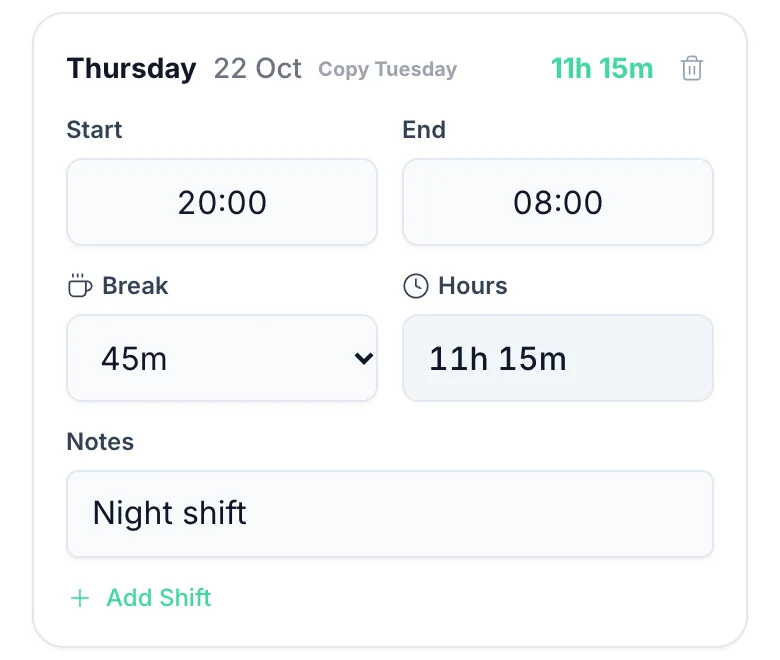
Nights that cross midnight
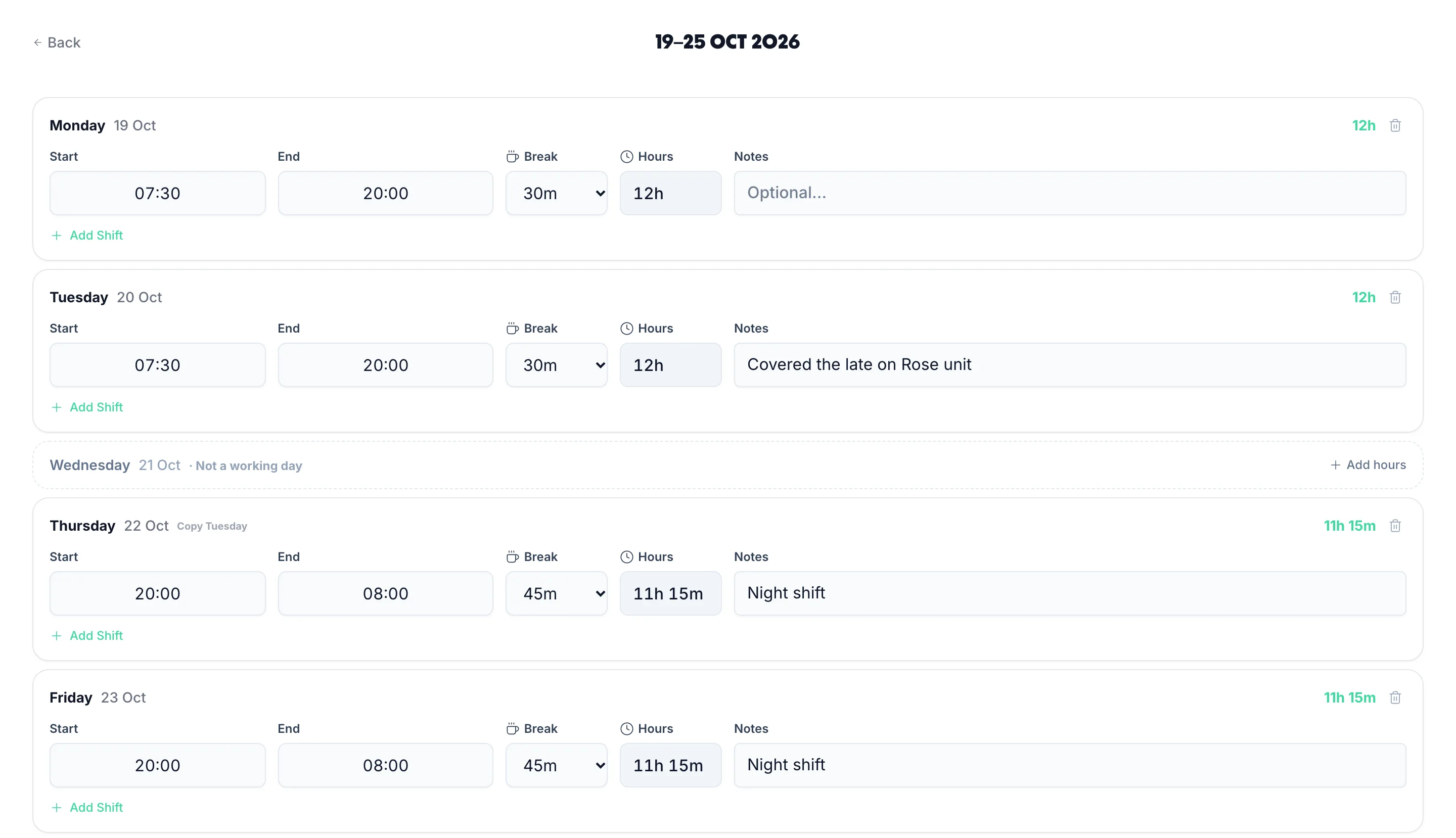
A shift that starts at 20:00 and ends at 06:00 is recorded as 10 hours. Start and end times can cross midnight without a workaround.
Breaks recorded separately
Unpaid breaks are entered on their own line and deducted from the day's total before pay is calculated.
Any phone, or a shared tablet with each person's own login
It runs in a mobile browser, so there is nothing to install on a personal phone. There are also iOS and Android apps.
The shifts healthcare timesheet software has to get right, and how TimeTally records them.
A long day across two wards
Bank and agency nurses clock in on their own phones. Tag each shift to the ward, home or client, and the timesheet shows the hours worked at each one.
Home care time tracking: a morning of visits
GOV.UK counts “travelling from one work assignment to another” as working time for minimum wage; travel between home and work isn't. Record travel between clients as its own activity so it is on the timesheet and in the pay.
A sleep-in, with the time awake as entries
Shifts that cross midnight are handled. For sleep-ins, time asleep at the workplace doesn't count for minimum wage when you provide somewhere to sleep; record the time staff are awake and working as its own entry. TimeTally has no sleep-in rate or allowance of its own.
£3per person a month
NHS trusts usually run ward staffing on dedicated e-rostering systems. TimeTally is built for independent clinics, care homes, care agencies and GP practices, at £3 per person a month.
Minimum wage rules for travel and sleep-in time: GOV.UK, working hours for minimum wage. Planning the shifts too? See rota software for healthcare.
From the shift to payroll
A short loop of the timesheet screens. Hours are entered day by day, breaks are deducted from the total, and the completed period is submitted for a ward manager to approve. Then the approved hours go to payroll: healthcare time and attendance kept in one record, from the first clock-in to the pay run.
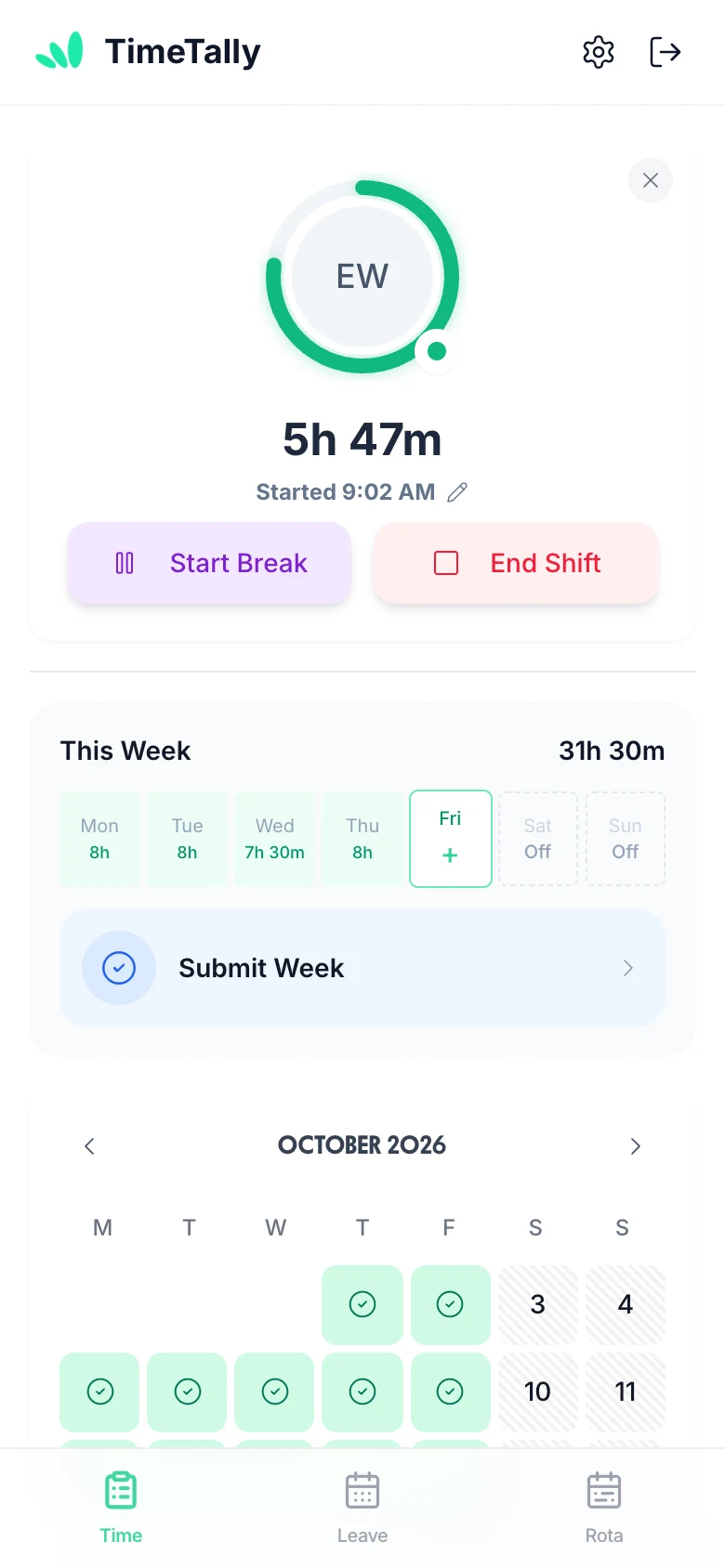
Ward managerOpens one person's week
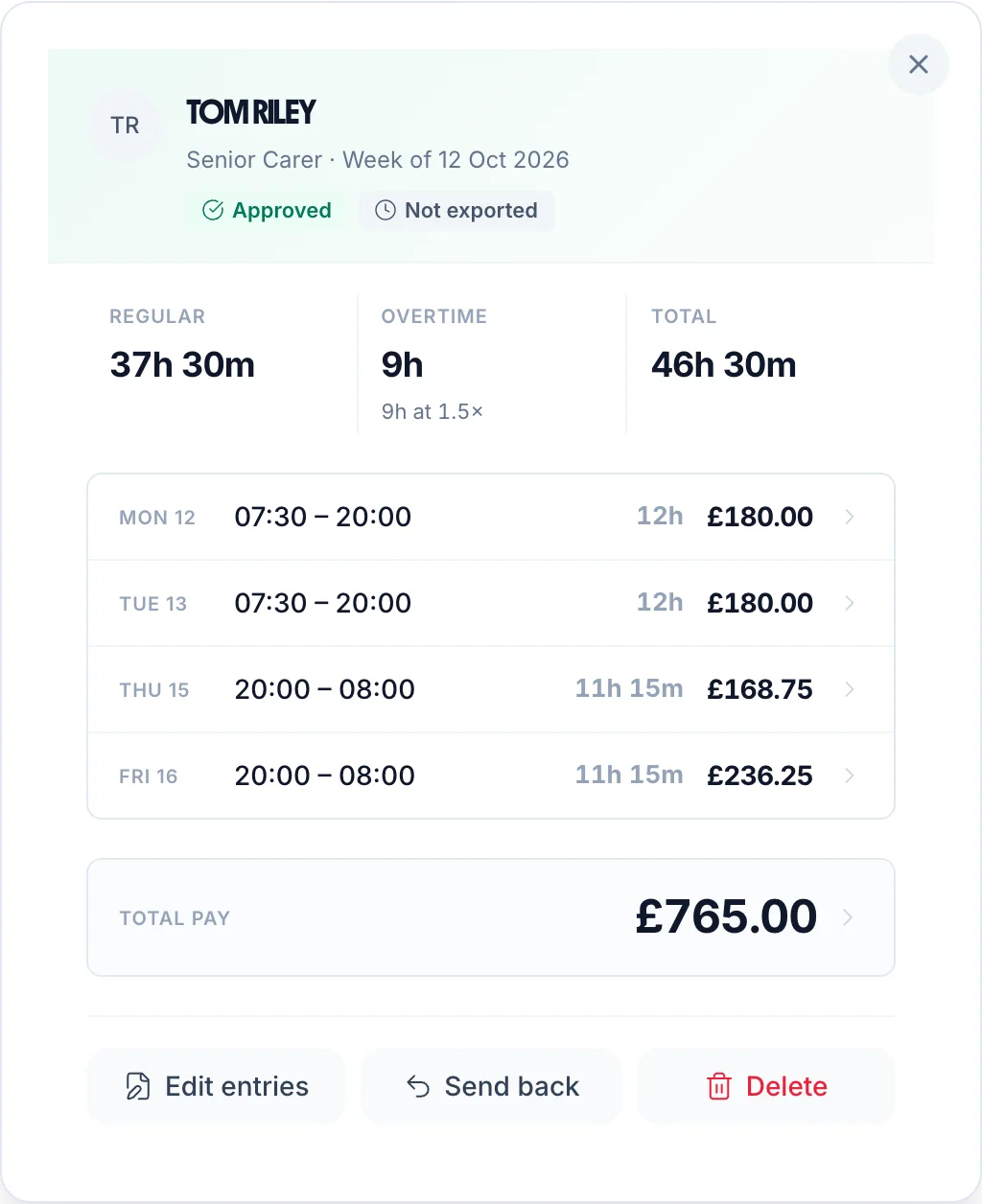
Ward managers approve or reject timesheets from a phone, a tablet or a desktop. Each week arrives already totalled, with contracted hours separated from overtime and split by the wards or rounds someone covered. Approved and exported are tracked separately: each week shows whether it has gone to payroll, and exporting one again asks first, so a week signed off on the ward isn't paid twice by mistake when the payroll office runs the return.
Ward managerWorks down the list
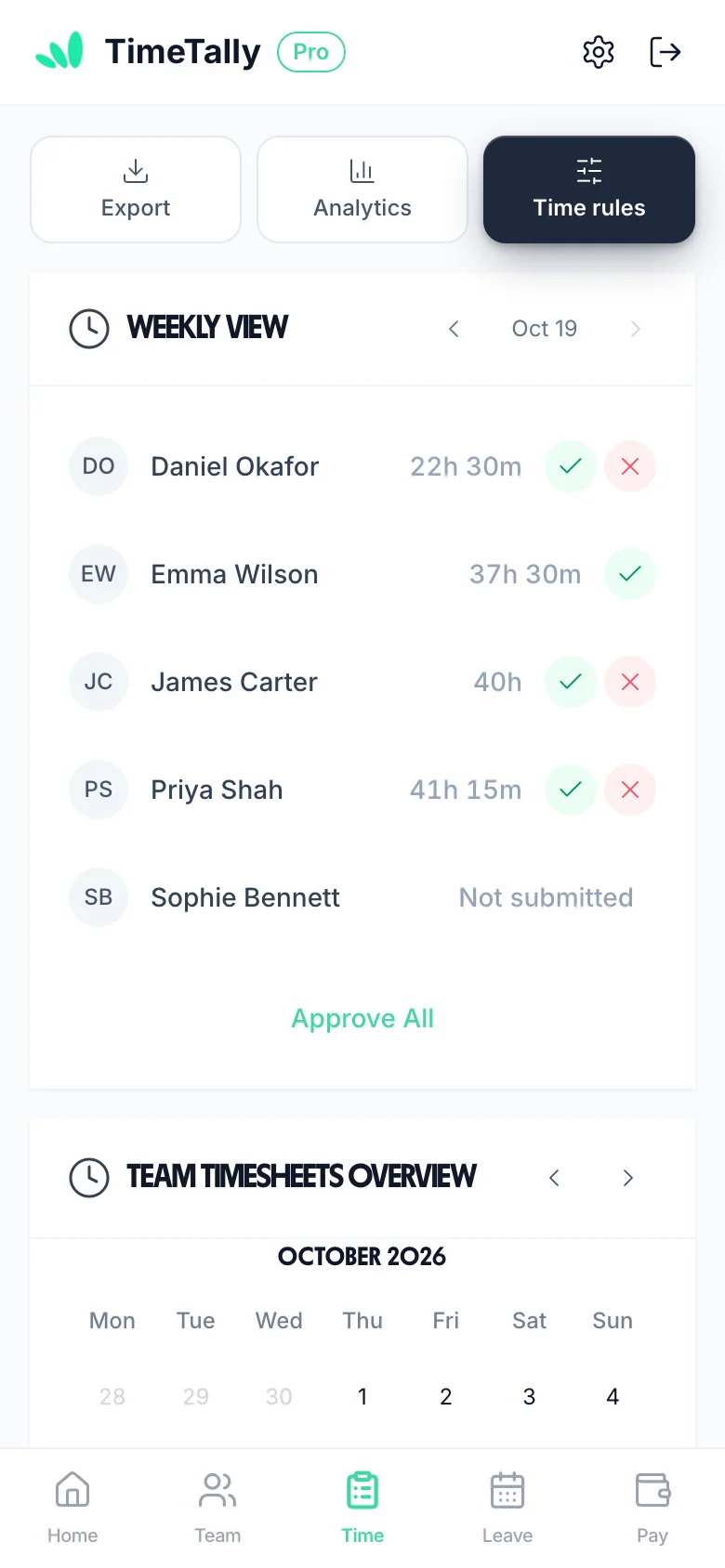
The timesheet screen lists everyone on the ward for the current period with their total hours and their status: not submitted, submitted, approved or rejected. A ward manager can see who still owes a sheet without ringing round at the end of a shift, and can work down the list from a phone, a tablet or a desktop.
Payroll officeAt the pay run
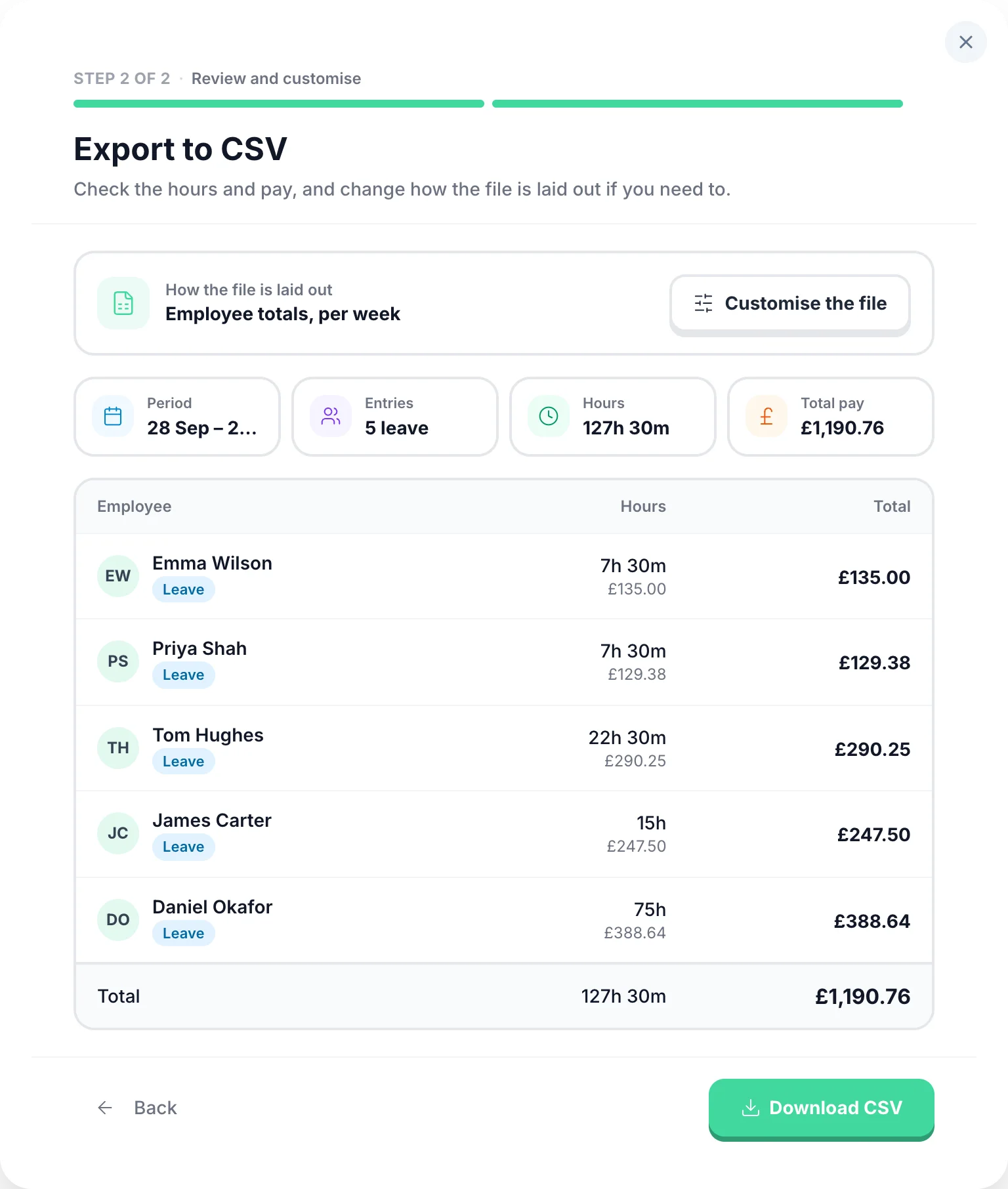
Pick the dates, the people or a department, check every figure, then export: a journal to Xero or QuickBooks, or a CSV laid out for any other payroll. Hours and leave can go in the same file.
Overtime and TOIL
A carer who works two long days and two nights is past their contracted hours by Friday. TimeTally splits the week as the hours come in: everything up to their threshold is regular, the rest is overtime, paid at the rate you set or banked as time off in lieu if you use TOIL.
An example week. Overtime can be counted by the day, the week or the month, against each person's own threshold, in tiers if you need them. TOIL is off until you switch it on; you set its rate and can cap the balance. See overtime tracking or work it out with the TOIL calculator.
9h overtime
Paid
£202.50
9h × £15.00 × 1.5
Banked as TOIL
13h 30m
9h × 1.5 in time off
Real reviews from TimeTally customers
The app is simple to use, reliable, and makes managing staff records straightforward. The system has saved us a significant amount of administration time.
 Jordan IngoeCLI Manchester
Setup was dead simple and the team just got on with it. Got everyone up and running in an afternoon with no help needed. Does everything we need for timesheets and holidays without the faff.
Has completely changed how I handle timesheets. Used to dread it every week — now it takes me minutes. Really easy to get around and my staff picked it up straight away.
Started using it just for rotas but quickly realised it does loads more. The timesheets and leave management are great, and it even handles TOIL and overtime which I wasn't expecting. Use it for everything now.
Tap any feature for the detail.
Overtime calculated against each person's own threshold.
There are two overtime triggers and healthcare uses both. Threshold overtime starts once someone passes a set number of hours in a day or a week — time-and-a-half after a twelve-hour long day is a threshold rule. Time-of-day overtime pays a premium for hours inside a window regardless of the daily total, which is what a night shift or a weekend unsocial-hours rate needs. Choose how it is paid: a rate multiplier such as 1.5x, or a fixed hourly rate. Rules stack into tiers, and every person is configured independently, so a registered nurse, a healthcare assistant and a bank shift can each have their own threshold.
Hours costed to the ward or department they were worked on.
Project tracking is on by default and can be switched off. When it is on, staff split their hours across wards, departments or sites as they submit — four hours on the medical ward, three covering recovery. A ward can also carry its own pay rate: an hourly rate, or a flat fee per entry, which is how agencies handle a booked visit. Reports then show hours and cost per ward, which is the figure a staffing conversation turns on.
Bank overtime as time off in lieu instead of paying it.
TOIL is an optional alternative to paying overtime. Enable it if you want to offer time off in lieu instead of, or alongside, extra pay. Set a conversion rate — one hour of overtime becomes 1.5 hours of leave, for example — and overtime accrues as a TOIL balance automatically. The ninety minutes someone stayed to finish handover is banked rather than lost. TOIL is held separately from annual leave, so it never reduces holiday entitlement. Staff request it the same way they request any other leave.
Ward managers approve the week from any device.
Ward managers approve or reject from any device: a phone between patients, a tablet at the nurses' station, a desktop in the office. Rejections can carry a written reason, so someone who logged a night shift against the wrong date knows what to correct. The approvals screen shows who has not submitted yet, so a missing sheet is spotted before payroll, not after. Pay totals are calculated from approved hours, so nothing is re-keyed between the ward and the payroll run. Approved and exported are tracked separately, and exporting a week again asks first, so a signed-off week isn't paid twice by mistake.
Clock in at the start of a shift, or fill the sheet in later.
There are two submission modes and you can use both. Clock-in mode starts a live timer when a shift begins, and the timer keeps running with the app closed, so a phone left in a locker records the full shift. Form mode lets someone enter start, end and break times at the end of the day or the week, which suits a community nurse driving between visits. Both work on mobile and desktop, so different settings in the same organisation can use different modes.
Each staff member on their own hourly rate.
Each person has their own hourly rate — substantive, bank and agency staff all differ, often on the same shift. Pay totals are calculated automatically from approved hours. Group staff by department so you can export one team's hours at a time. On a mixed unit you can also hide rates and pay totals from managers entirely: they approve hours without seeing any figures.
Export approved hours to Xero, QuickBooks or CSV.
Send approved timesheets to payroll in a few taps. Export to CSV, Xero, or QuickBooks, filtered by date range, person, or department, with control over which columns are included. You can combine timesheet and leave data in a single export, so the payroll run gets the hours and the absences in one file instead of two.
Four settings an admin can turn on. Most providers use one or two, usually where staff work away from a base or the hours are billed to a commissioner. Everything else carries on as it is.
£1 add-on · free in the trial
Set a boundary around each site as a point and a radius. The radius is set per site and can be anywhere from 25 metres to 5 kilometres, so a single care home and a community round covering a whole town do not have to share a setting. Add sites as contracts start and deactivate them when they end.
Each site also has an enforcement setting. Strict refuses a clock-in from outside the boundary. Lenient allows it and records how far outside the person was, which suits a rural round with poor GPS reception. Individual staff can be exempted.
Two things to know before you enable it. The check only applies where clocking in is the only way to log hours — if staff can also submit a form, they can type in the hours the geofence refused. And GPS clocking is a paid add-on, included free for the length of the trial.
Off by default
Strict clocking is off by default. With it off, staff type their own start and end times.
Turn it on where the hours are billed to a commissioner or checked in a framework audit. Start and end times then come only from recorded clock-in and clock-out events. A carer cannot change a 07:40 start to 07:30 on the day the sheet is due, and a missed clock-out has to be resolved rather than filled in from memory a week later.
Managers can still correct a genuine mistake, so the record stays accurate.
Weekly by default
Choose a period of one, two, three or four weeks, or a calendar month, then set the date the first period runs from. Every period after that follows the same cycle.
This matters in healthcare because the two halves of the payroll rarely run to the same clock. Bank and agency shifts are usually paid weekly while substantive staff are paid monthly. Match the period to the run it feeds and no one adds four weekly sheets together by hand.
Projects on by default
Projects are switched on already, and that is the field most providers use for a ward, a unit or a client. Locations and activities are separate settings you turn on when a contract needs the work broken down further. Staff pick from your list as they submit.
Whatever you use appears everywhere the hours appear: on timesheet lines, on shifts, and in every export and report. That is the difference between knowing a week cost forty hours and knowing recovery took twelve of them.
On the ward and in the community
TimeTally works for any healthcare provider that needs to track staff hours and manage holiday requests — as nurse timesheet software on a ward, and as online timesheet software for nurses working bank or agency shifts across several of them. You may also want to explore our shift rota template for planning.
Private hospitals, diagnostic centres, dental and physio practices
Residential care, nursing homes, supported living. See our care home page
Home care agencies, community nursing, visiting carers — a digital timesheet system for care agencies whose staff never pass an office
General practices, walk-in centres, out-of-hours services
See TimeTally in action
Build next week's rota, staff clock in against the shifts you assigned, and approved leave feeds straight back into the plan. One system, no re-keying between them.
Why it matters
UK healthcare has some of the most complex time tracking requirements of any sector. Shift patterns change weekly, staff cover multiple wards or sites, overtime is common, and regulators expect clear records. Healthcare digital timesheet software earns its place by keeping that record without adding anything to anyone's shift.
The Working Time Regulations 1998 limit average weekly working hours to 48 (calculated over a 17-week reference period) and require at least 11 consecutive hours of rest between shifts. Night workers face a separate limit of 8 hours per 24-hour period. These rules apply to NHS trusts, private clinics, GP surgeries, and domiciliary care agencies alike.
Beyond the Working Time Directive, CQC inspectors review staffing records as part of their assessments under the Health and Social Care Act 2008. They look for evidence that providers have sufficient, suitably qualified staff to deliver safe care. Accurate, accessible timesheet records make it straightforward to demonstrate this during inspections.
For payroll, getting shift hours right is critical. Missed overtime, incorrect break deductions, or misrecorded night shifts lead to underpayments and erode trust with staff. Use our overtime pay calculator to verify rates. With workforce shortages across UK healthcare, retaining staff partly depends on paying them correctly and on time.
UK compliance
TimeTally is a timesheet tool, not a compliance system — but accurate timesheet records are the foundation of meeting your regulatory obligations. Here is how the data TimeTally captures supports your compliance requirements.
TimeTally records all hours worked, including overtime and night shifts. This gives you the data you need to monitor the 48-hour weekly average (over a 17-week reference period), 11-hour rest between shifts, and the 8-hour night work limit. You can export this data at any time if the HSE or your local council request records.
CQC inspectors assess whether providers have sufficient staff under the Health and Social Care Act 2008. TimeTally provides a clear, exportable record of who worked when, for how long, and in which department. This is far more reliable than paper timesheets or rotas stored in filing cabinets.
Under UK law, workers on shifts over 6 hours are entitled to a 20-minute uninterrupted break. TimeTally tracks breaks separately, so you have a record that breaks were taken. This is particularly important in healthcare where long shifts are common.
HMRC requires employers to keep records of hours worked and pay to show the minimum wage was paid: for six years when they were made on or after 1 April 2021. TimeTally keeps every timesheet with the time it was submitted and approved, and you can export the hours whenever needed.
Accurate hours tracking ensures your effective hourly rate does not fall below the National Minimum Wage (£12.71/hour for workers aged 21+ from April 2026). This is especially relevant where unpaid overtime or incorrect break deductions could push the rate below the legal minimum.
All UK workers get 5.6 weeks statutory holiday (28 days for full-time). TimeTally keeps each person's allowance and what is left of it; pro-rata for part-time staff and mid-year starters is switched on for each person by an admin. Sickness is recorded against the same record as a separate leave type, so a ward's absence pattern and its statutory sick pay position can both be worked out from one place.
TimeTally is a straightforward timesheet and holiday management tool. Nurse online timesheet software has to record a long day accurately and then stay out of the way. Here is what it does and how it helps healthcare providers.
Staff enter their shift start and end times. This works for any shift pattern — days, nights, long days, split shifts, or irregular rotas. Overnight shifts that cross midnight are handled correctly. Total hours and overtime are calculated automatically.
Set an hourly rate and overtime rate for each staff member. When timesheets are submitted, TimeTally calculates standard pay and overtime pay automatically. You can set daily or weekly overtime thresholds to match your organisation's rules.
Record the break minutes on every shift, so you can check the 20-minute rest break. Under UK law, workers are entitled to a 20-minute uninterrupted break for shifts over 6 hours — use our break time compliance calculator to check. TimeTally records breaks and deducts them from total hours so payroll figures are accurate.
Use TimeTally's project tracking to assign hours to specific wards, departments, or sites. If a nurse works across two wards in a shift, they can split their hours accordingly. Reports show total hours and costs per department. Online timesheet software for nursing agencies can use the same field for the client or site a shift was booked for.
Export approved timesheets to Xero, QuickBooks, or CSV in two steps: pick what to send, check it, then export. The export includes employee names, standard hours, overtime hours, pay amounts, and break deductions. No manual re-entry needed.
TimeTally works in any mobile browser. Staff do not need to download an app or install anything on personal devices. They can bookmark the page, or use the iOS or Android app. Each person signs in to their own account.
One price for the whole product. GPS clock-in is £1 extra per employee.
Billed monthly. Cancel anytime.
A real person replies within 24 hours. No ticket queues, no bots.
A UK company, ICO regulated. Your data encrypted and never sold.
In short
Healthcare timesheet software records the hours clinical and support staff actually worked, including nights, long days, overtime and the breaks in between. TimeTally does this for UK healthcare providers from £3 per staff member a month. Staff log start time, end time and breaks from any phone browser or the iOS or Android app, assign the hours to a ward or department if you use that, and submit the period for approval. Ward managers approve or reject from any device. Overtime is calculated against the thresholds you set, and approved hours export to Xero, QuickBooks or CSV for payroll. Because the record is digital rather than paper, the same data answers a CQC staffing question or a Working Time Regulations query.
Yes. TimeTally works in any mobile browser — no app download or installation needed. Staff can bookmark the page on their phone, or sign in with their own login on a shared tablet in the staff room. There are also iPhone and Android apps for those who prefer one.
TimeTally handles overnight shifts correctly. If a nurse starts at 8pm and finishes at 6am, the system calculates 10 hours without any issues. Start and end times can cross midnight. Total hours and overtime are calculated automatically.
Yes. Each staff member has their own hourly rate and overtime rate. When timesheets are submitted, TimeTally calculates standard pay and overtime pay based on these rates. You can update rates at any time from the employee settings.
Yes. TimeTally has project tracking where you can create wards, departments, or sites. Staff assign their hours to the relevant project when submitting their timesheet. Reports show total hours and costs per project.
TimeTally records all hours worked, including overtime and night shifts. This gives you accurate data to monitor the 48-hour weekly average, rest periods between shifts, and night work limits. You can export records at any time for inspections. However, TimeTally does not actively monitor or alert for WTD breaches — it provides the data, and compliance decisions remain with you.
Yes. TimeTally records actual hours worked, not planned rotas. Staff enter what they actually worked, which may differ from the planned rota due to shift swaps, overtime, or late starts. This gives you an accurate record of hours worked alongside your rota system.
Staff tap 'Book Time Off', select their dates, and submit. Their manager is emailed and can see who else is off on the team overview before approving. Staff see the allowance they have left as they book. Each person's allowance is set once, and a part-time allowance can be worked out from their working week.
TimeTally exports to Xero, QuickBooks, and CSV/Excel. The export includes employee names, standard hours, overtime hours, pay amounts, and break deductions. Most payroll systems can import CSV files if a direct integration is not available.
Yes — it works as a digital timesheet system for care agencies as well as for ward-based teams. Domiciliary carers can log their hours from their phone between visits. They enter start and end times for each shift and can use project tracking to record which client or location they worked at. Managers approve timesheets remotely.
TimeTally uses Supabase (built on PostgreSQL) with row-level security, encrypted connections, and secure authentication. All data is stored in the cloud, hosted in the EEA (Ireland), and accessible only to authorised users within your organisation.
Still have a question? See all FAQs →
Book a DemoGuides and tools for UK healthcare providers
No credit card required. Set up your healthcare team in 10 minutes. Start tracking shift hours and managing holiday requests.
FREE 14-day trial · No credit card required · Cancel anytime