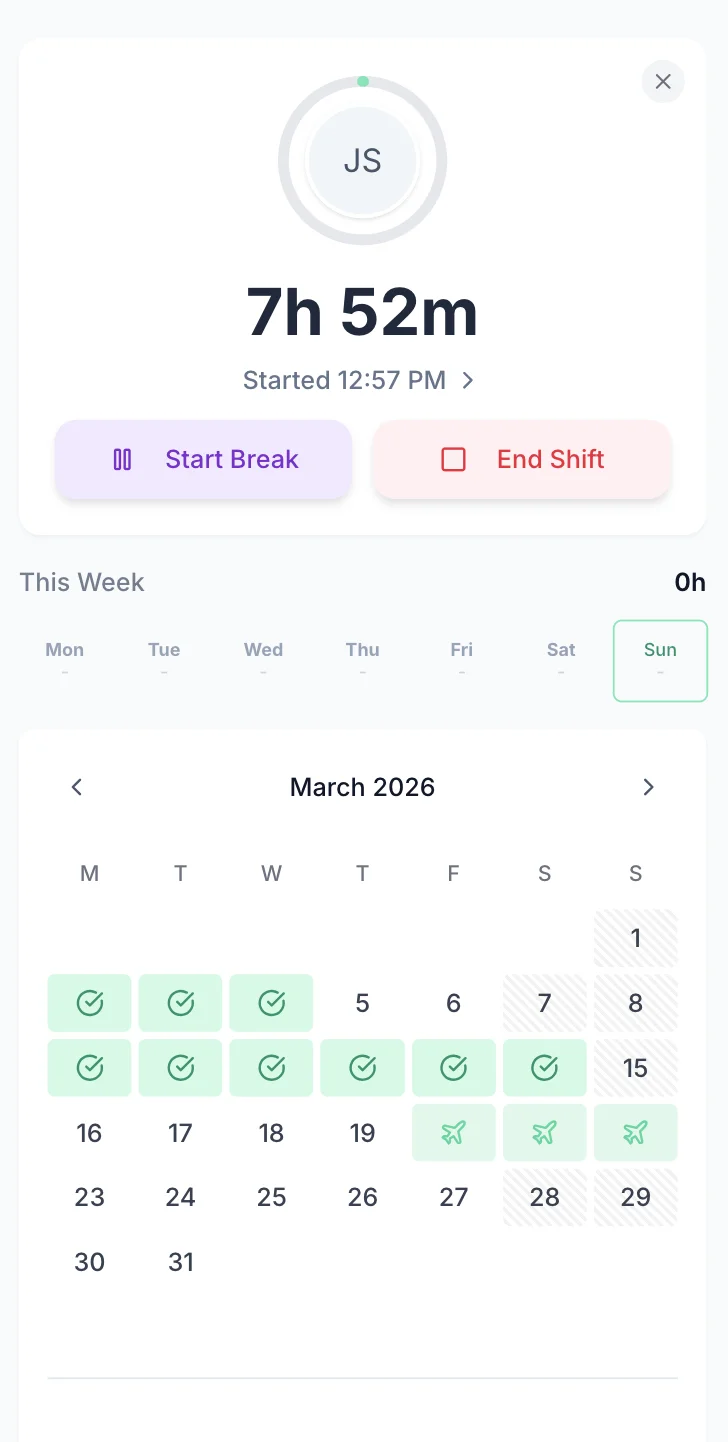

FM engineers move between sites daily, work overtime on callouts, and split hours across multiple contracts. Tracking that accurately on paper or in spreadsheets is painful. TimeTally gives your team a simple way to log hours by site from their phone, and gives you a clear record for payroll and client billing. Approved timesheets export straight to Xero, QuickBooks, or CSV. From £2 per employee per month.
Facilities management involves engineers working across multiple client sites, often with different contract rates and overtime arrangements. Without accurate time records, billing disputes and payroll errors are inevitable.
The Working Time Regulations 1998 apply to FM workers just as they do elsewhere, but FM presents particular challenges. Engineers who handle emergency callouts on top of regular schedules can easily exceed the 48-hour weekly average (calculated over a 17-week reference period). Mobile workers travelling between sites must still receive 11 consecutive hours of rest between shifts. Night workers undertaking out-of-hours maintenance are subject to the 8-hour limit per 24-hour period. Without reliable timesheet data, it is difficult for FM employers to demonstrate compliance.
TUPE (Transfer of Undertakings (Protection of Employment) Regulations 2006) is a fact of life in facilities management. When contracts change hands, the incoming employer inherits the workforce, and the outgoing employer must provide detailed employee liability information — including hours worked, pay rates, and holiday entitlement. FM companies that rely on paper timesheets or scattered spreadsheets often struggle to compile this data under the tight 28-day disclosure deadline. Digital timesheet records make the TUPE information obligation considerably less painful.
For mobile FM workers, the question of whether travel time between sites counts as working time has been clarified since the Tyco ruling (CJEU, 2015). Where engineers have no fixed place of work and travel directly from home to client sites, that travel time is working time under the WTR. This matters both for the 48-hour limit and for National Minimum Wage calculations — if travel time pushes effective hourly pay below £12.21/hour (April 2025 rate for workers aged 21+), the employer is in breach.
Accurate, site-level timesheet records also underpin client billing. When you manage 10, 20, or 50+ contracts, each with different hourly rates and overtime terms, manual tracking leads to under-billing and disputes. Having approved, exportable records by site gives clients the transparency they expect and protects your revenue.
TimeTally works for any FM company that needs to track staff hours across sites and manage holiday requests.
Mechanical, electrical, plumbing, and HVAC maintenance teams
Cleaning, catering, security, and grounds maintenance staff
Integrated facilities management companies covering multiple service lines
Field engineers covering reactive and planned maintenance across multiple sites
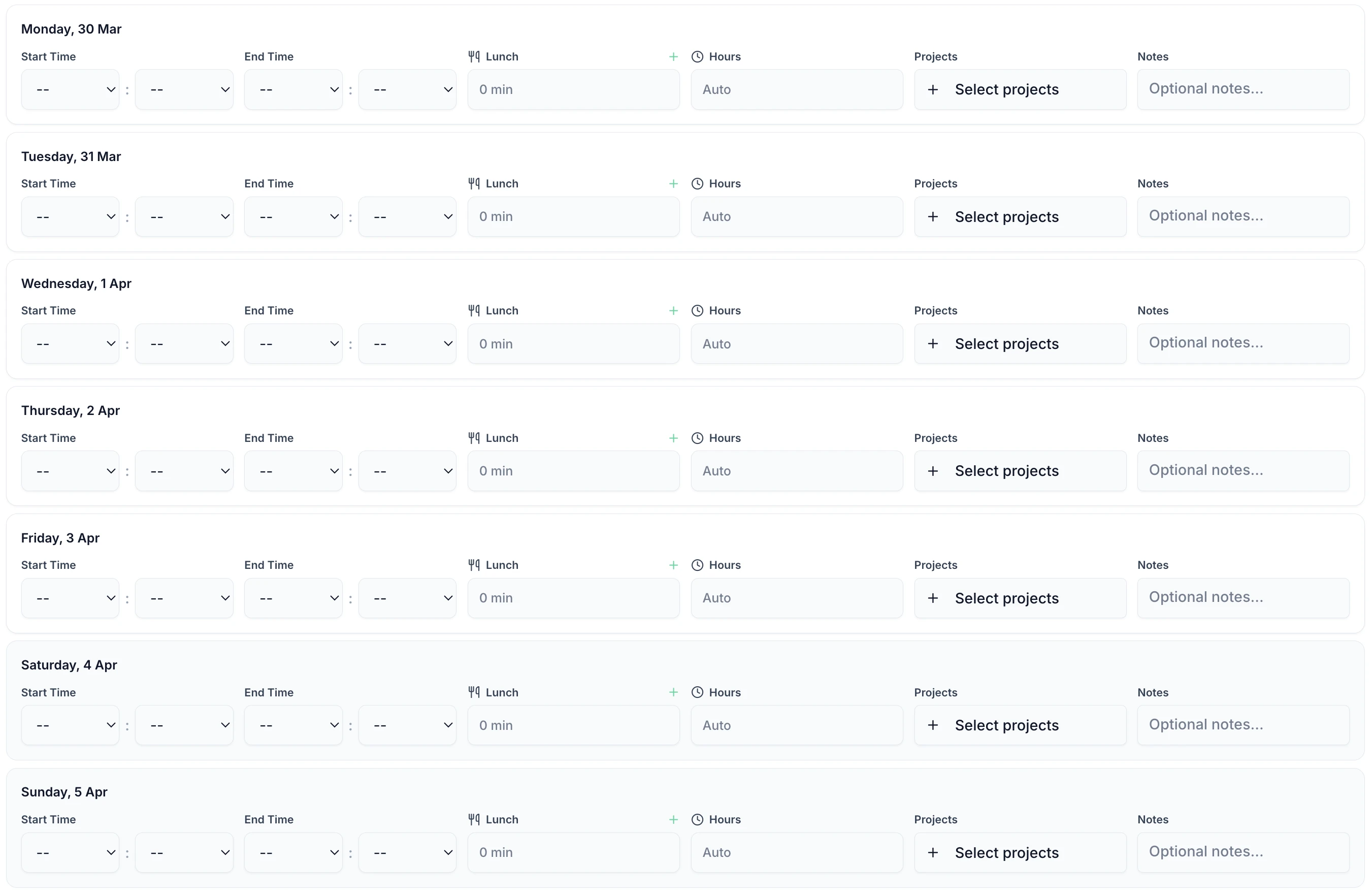
FM engineers are busy. TimeTally takes less than 60 seconds per day. Enter start time, end time, breaks, and select the site — that is it. Works on any phone between jobs.

TimeTally is a straightforward timesheet and holiday management tool. Here is what it does and how it helps facilities management companies.
Engineers enter their start and end times for each shift. Using TimeTally's project tracking, they select the client site or contract they worked on. If an engineer works at two sites in one day, they submit separate entries for each. Reports show total hours and costs per site, which makes client billing straightforward.
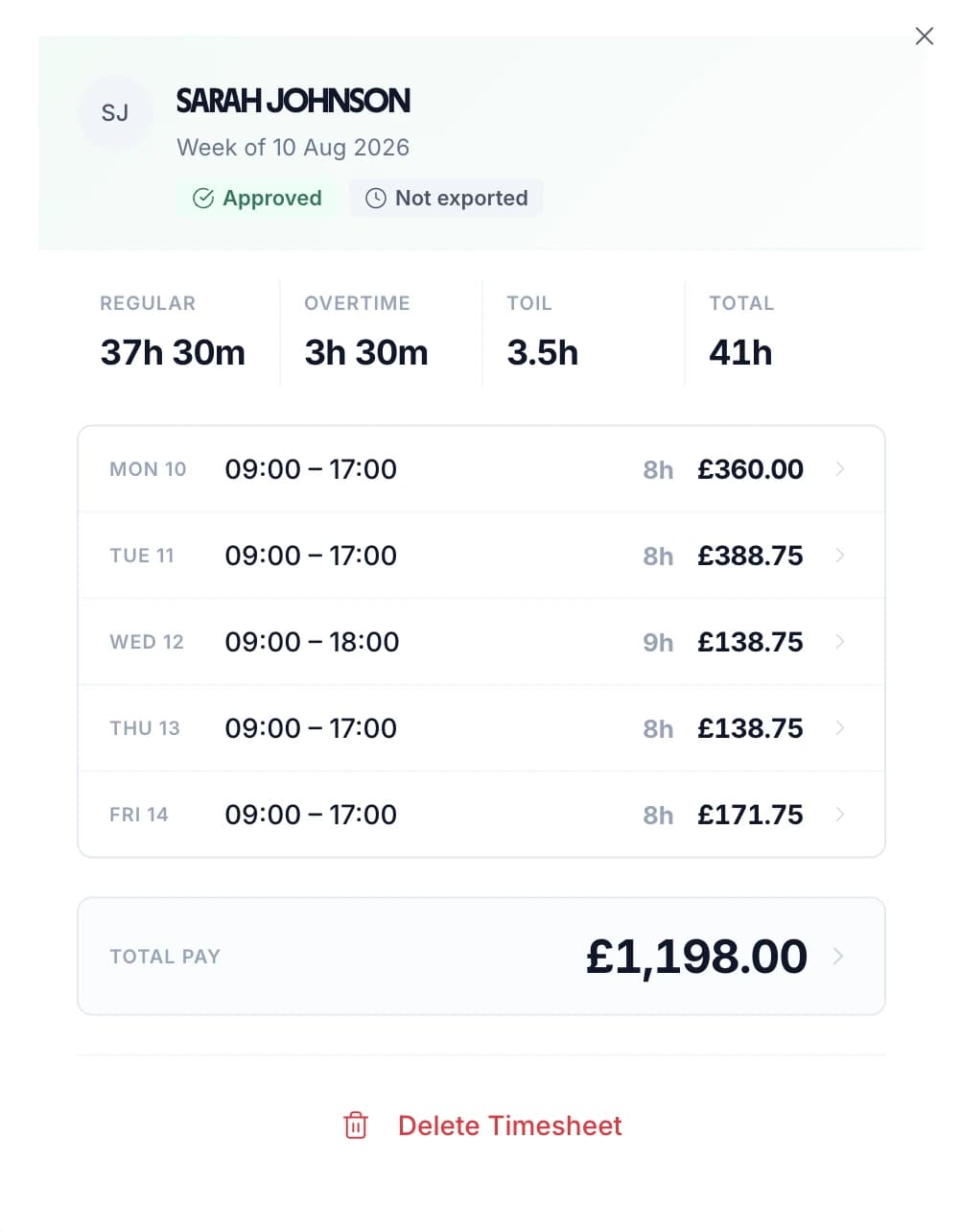
Set an hourly rate and overtime rate for each employee. TimeTally calculates standard pay and overtime pay automatically when timesheets are submitted. You can configure daily or weekly overtime thresholds — useful for engineers whose callout hours push them over their regular contracted hours.
Track breaks separately from working time. Under UK law, workers on shifts over 6 hours are entitled to a 20-minute uninterrupted break. TimeTally records breaks and deducts them from total hours automatically, so payroll figures are accurate and you have a record of breaks taken.
Create projects for each client site or contract. Engineers tag their hours to the correct project when submitting timesheets. You can see total hours per contract, compare across sites, and export by project for client invoicing. Each project can have its own notes and description.
Export approved timesheets to Xero, QuickBooks, or CSV with one click. The export includes employee names, standard hours, overtime hours, pay amounts, and break deductions. No manual re-entry into your payroll or accounting system.
TimeTally works in any mobile browser. Engineers do not need to download an app or install anything on personal devices. They can bookmark the page on their phone. There is also a native iOS app for those who prefer it.
Managing holiday requests for mobile engineers by email or WhatsApp is slow and error-prone — especially when you need to check who else is off before approving. TimeTally lets engineers request time off from their phone. Managers see the team calendar and approve or decline with one tap. Remaining holiday entitlement is calculated automatically. See our dedicated facilities management leave tracking page for more detail.
Engineers select dates and submit from their phone. Managers get a notification and can see who else is off before approving.
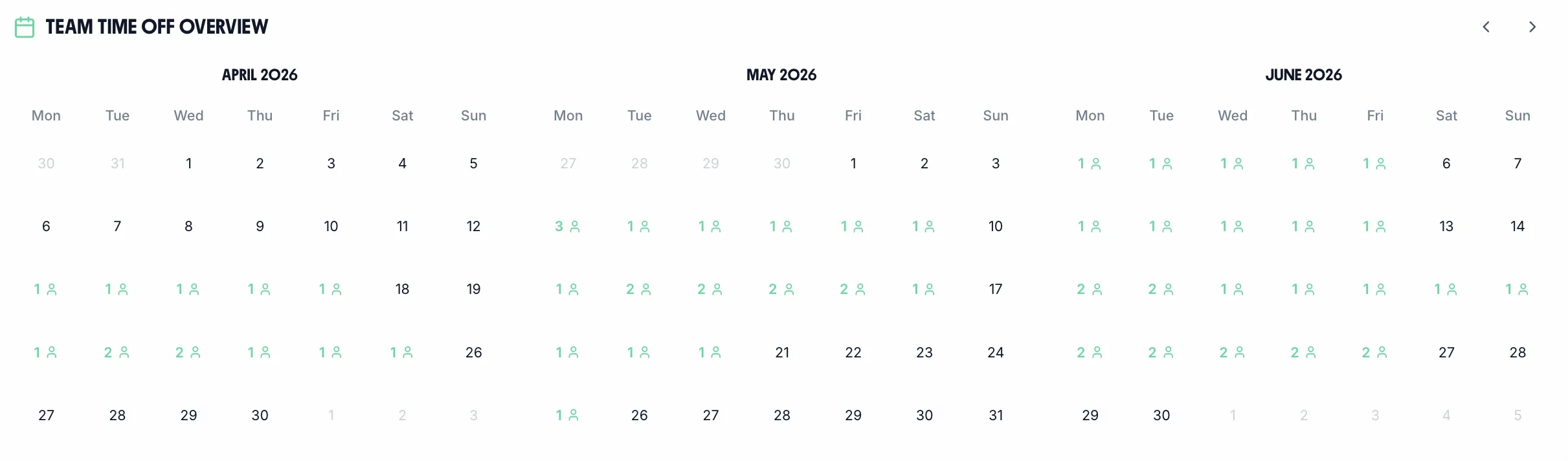
See your whole team's availability at a glance. Check for clashes before approving requests — useful when you need to ensure coverage across sites.
Statutory holiday allowance (5.6 weeks) is calculated automatically, including pro-rata for part-time staff and mid-year starters. UK bank holidays are pre-loaded.
Create categories for annual leave, sick leave, compassionate leave, or any other type. Each with its own colour and allowance.

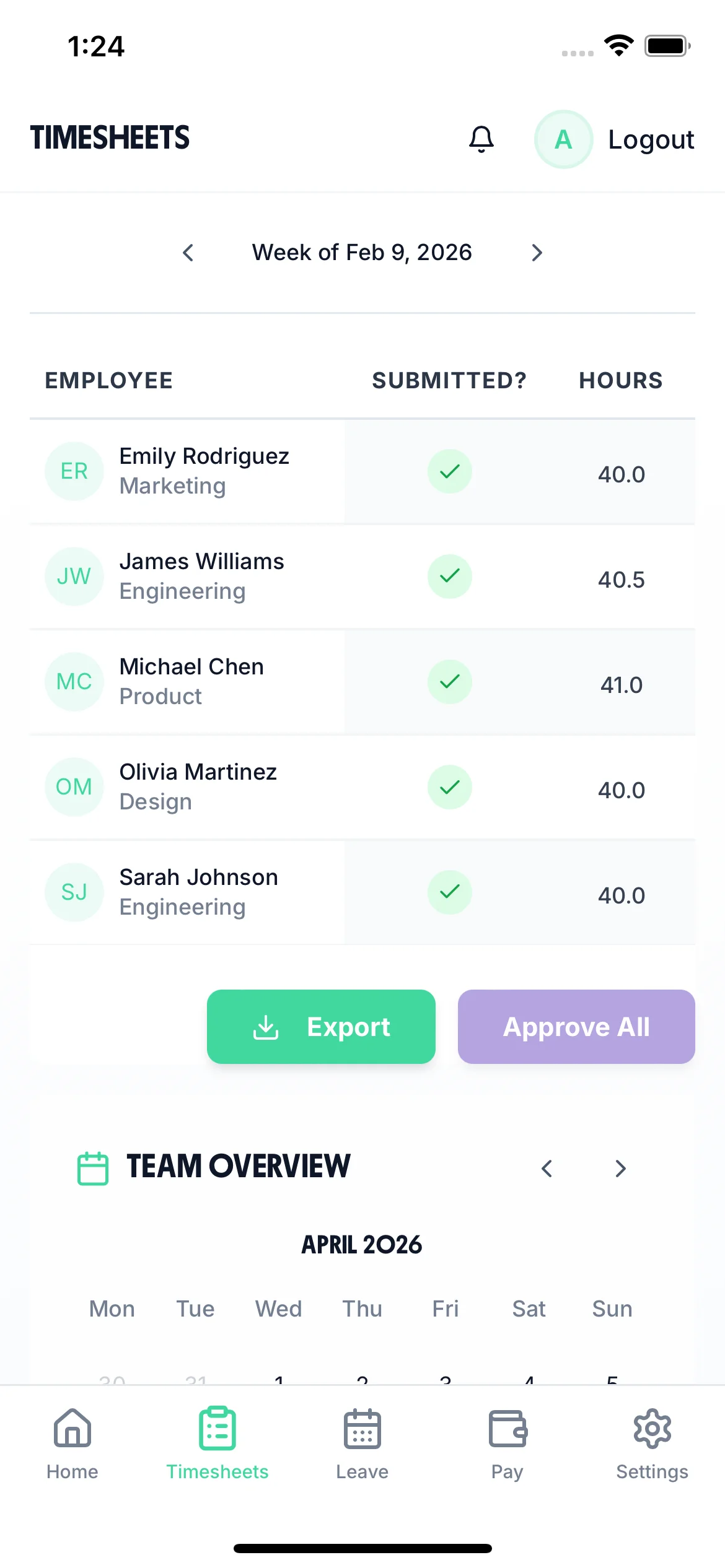
The team calendar gives managers a clear view of the entire team — submitted timesheets, approved holidays, and absences — all in one place. When managing engineers across multiple sites, knowing who is available before approving holiday requests helps you avoid coverage gaps.

TimeTally is a timesheet and holiday management tool. It does specific things well. It is not a CAFM system or a job management platform. Here is an honest breakdown.
In short: TimeTally replaces paper timesheets and spreadsheets. If you need a full CAFM system (Planon, Concept, or similar), TimeTally is not that. But if your FM company needs a simple, affordable way to record hours by site, manage holidays, and export to payroll, it does that job well at £2 per employee per month.
TimeTally is a timesheet tool, not a compliance system — but accurate timesheet records are the foundation of meeting your regulatory obligations. Here is how the data TimeTally captures supports FM-specific compliance requirements.
TimeTally records all hours worked, including overtime. This gives you the data you need to monitor the 48-hour weekly average (over a 17-week reference period), the 11-hour rest requirement between shifts, and the 8-hour night work limit. For FM engineers handling emergency callouts on top of their regular schedules, having this data in one place is particularly important. You can export records at any time if HMRC or the HSE request them.
When FM contracts change hands, the TUPE Regulations 2006 require the outgoing employer to provide employee liability information to the incoming employer at least 28 days before the transfer. TimeTally stores historical timesheets, pay rates, overtime records, and holiday balances digitally — making it straightforward to compile the required data rather than digging through filing cabinets.
Since the Tyco ruling, travel time for mobile workers without a fixed place of work counts as working time. FM engineers who travel directly between home and client sites fall into this category. TimeTally lets engineers record travel time as a separate entry with notes, so you have the data to assess whether total working hours (including travel) comply with the WTR and NMW requirements.
Accurate hours tracking ensures your effective hourly rate does not fall below the National Minimum Wage (£12.21/hour for workers aged 21+ from April 2025). Use our overtime pay calculator to check rates. This is relevant for FM workers where unpaid overtime, unrecorded travel time, or incorrect break deductions could push the effective rate below the legal minimum.
HMRC requires employers to keep records of hours worked for at least two years. TimeTally stores all timesheet data digitally with timestamps and approval records — a complete audit trail that you can export whenever needed.
All UK workers receive 5.6 weeks statutory holiday (28 days for full-time). TimeTally calculates entitlement automatically, including pro-rata for part-time staff and mid-year starters. When TUPE transfers occur, accrued but untaken holiday transfers with the employee — having accurate records avoids disputes during handover.
One price. Every feature. No surprises.
Billed monthly. Cancel anytime.
No credit card required
Yes. TimeTally has project tracking where you create a project for each client site or contract. Engineers select the relevant project when submitting their timesheet. Reports show total hours and costs per project, which you can export for client billing.
Yes. Each employee has their own hourly rate and overtime rate. When timesheets are submitted, TimeTally calculates standard pay and overtime pay based on these individual rates. You can update rates at any time from the employee settings.
You set a daily or weekly overtime threshold for each employee. Any hours beyond the threshold are calculated at the overtime rate automatically. If an engineer works 8 regular hours and then does a 3-hour callout, and the daily threshold is 8 hours, those 3 hours are recorded at the overtime rate.
Yes. TimeTally works in any mobile browser — no app download or installation needed. Engineers can bookmark the page on their phone. There is also a native iOS app on the App Store for those who prefer it.
No. TimeTally records hours worked and which project (site) the hours are assigned to. It does not track GPS location, provide live engineer status, or offer real-time tracking. Engineers self-report their hours and site assignments.
No. TimeTally is a timesheet tool, not an SLA monitoring system. Engineers can record the times they started and finished work, and add notes to entries (for example, noting a callout), but there is no automated SLA tracking, response time monitoring, or compliance alerting.
When contracts change hands under TUPE, the outgoing employer must provide employee liability information. TimeTally stores historical timesheets, pay rates, overtime records, and holiday balances digitally, making it easier to compile the required data. However, TimeTally does not automate the TUPE process itself — it provides the underlying records.
TimeTally exports to Xero, QuickBooks, and CSV/Excel. The export includes employee names, standard hours, overtime hours, pay amounts, and break deductions. Most payroll systems can import CSV files if a direct integration is not available.
Yes. You can add both employees and subcontractors to TimeTally with different hourly rates. Each person submits their own timesheets, and you approve them through the same workflow. However, TimeTally treats everyone as a team member — there is no separate contractor-specific workflow or invoicing feature.
TimeTally uses Supabase (built on PostgreSQL) with row-level security, encrypted connections, and secure authentication. All data is stored in the cloud and accessible only to authorised users within your organisation.
Guides and tools for UK facilities management companies
UK legal requirements for tracking staff hours
Read guideComplete guide to WTD compliance for UK employers
Read guideTimesheet tracking for cleaning teams across multiple client locations
Learn moreTimesheet software for security guards working across multiple sites
Learn moreTrack hours by site and project for construction teams
Learn moreFree downloadable shift rota template for FM teams
View resource