
Healthcare Providers

Timesheet Software for UK Healthcare

Healthcare staff work irregular shifts, nights, weekends, and overtime — and tracking those hours accurately matters for both payroll and compliance. TimeTally is healthcare online timesheet software: it gives your team a simple way to log shift hours from their phone, and gives you a clear record of who worked when. As digital timesheet software for healthcare it replaces the paper sheet on the ward noticeboard, not the roster you already run. Approved timesheets export straight to Xero, QuickBooks, or CSV. From £3 per staff member per month.

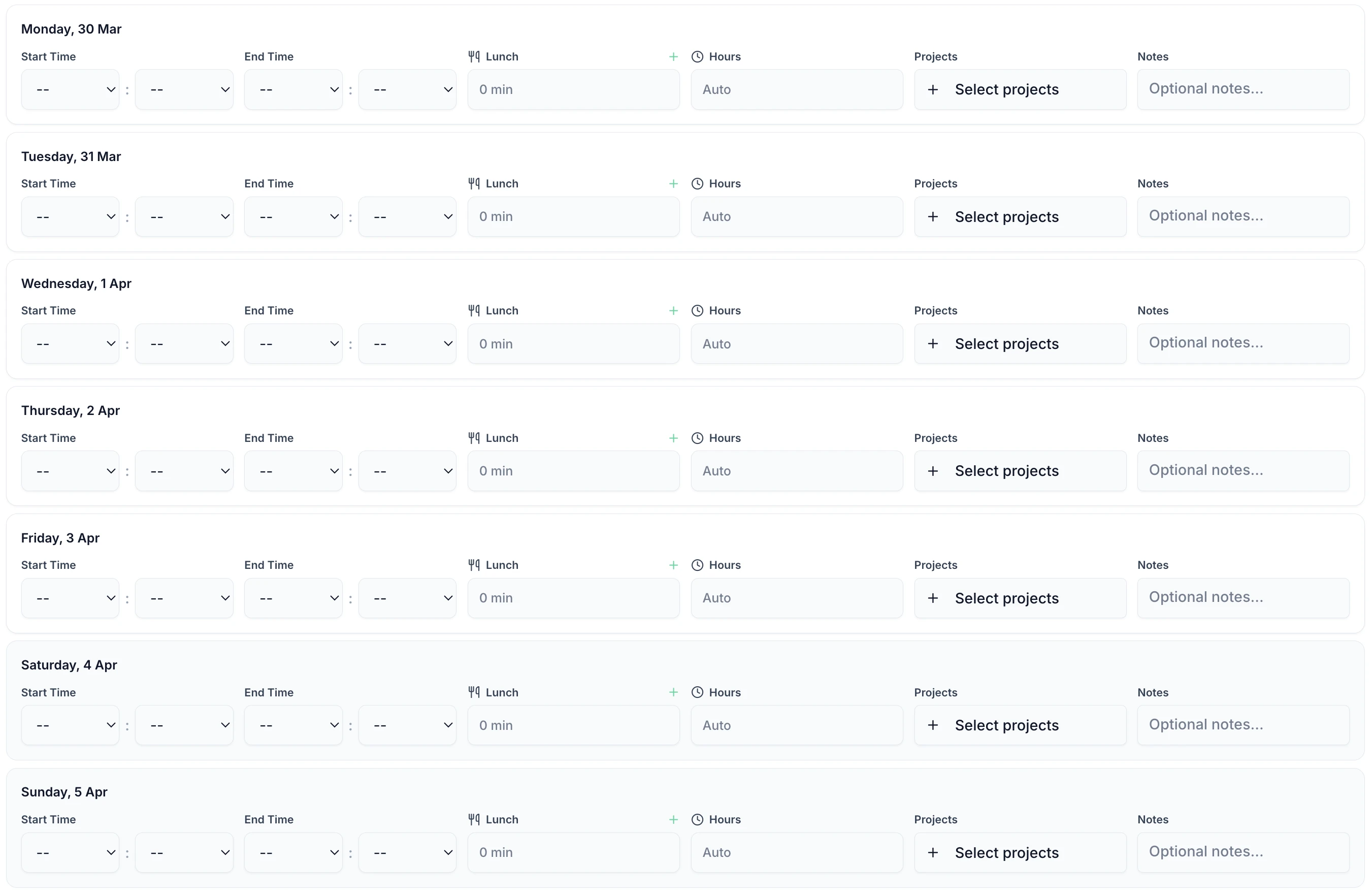
Healthcare timesheet showing shift hours, breaks and department for the week
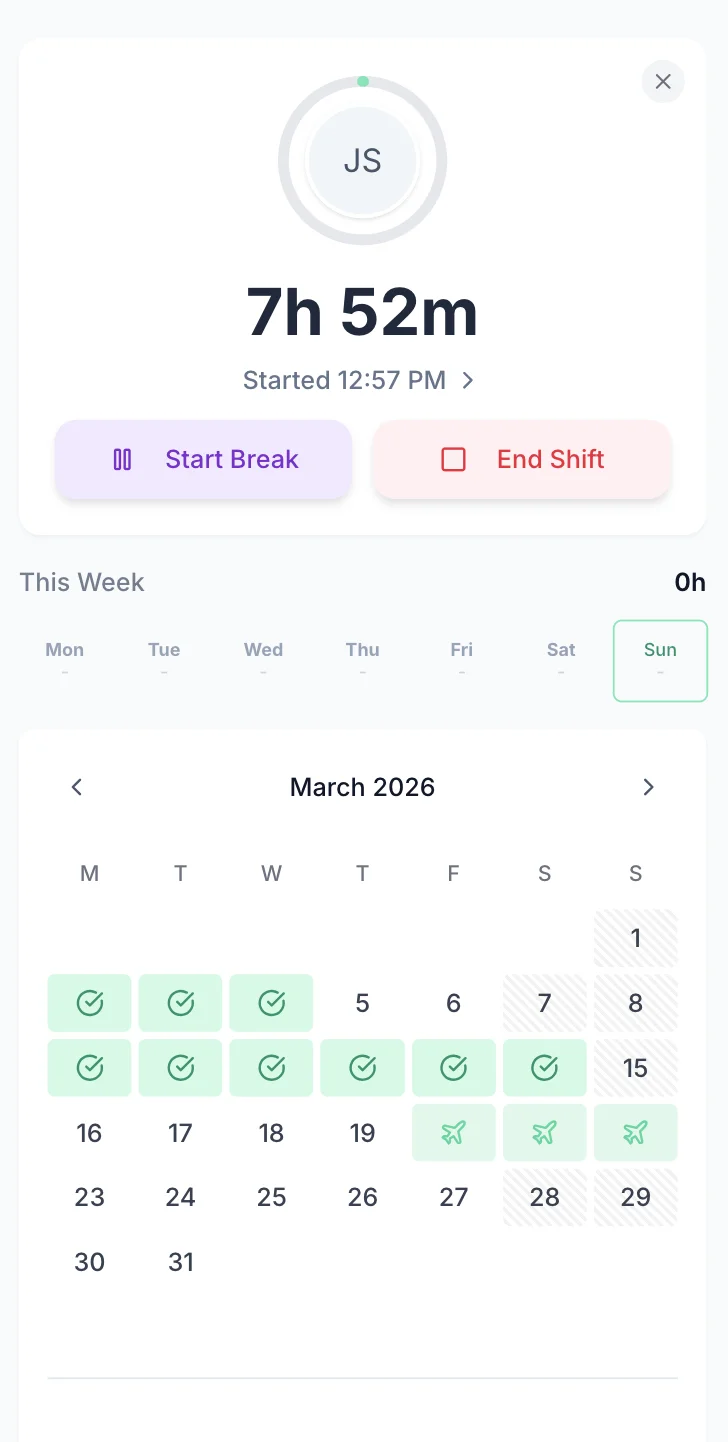
Healthcare staff clocked in on their phone

The app is simple to use, reliable, and makes managing staff records straightforward. The system has saved us a significant amount of administration time.

CLI ManchesterJordan Ingoe, CLI Manchester

Simple Timesheets That Fit Between Patient Care

A shift takes under 60 seconds to record. Enter start time, end time and breaks, then submit the period. Online timesheets for healthcare run in any phone browser, so there is nothing to install and nothing to hand in at the end of a twelve-hour day. Staff can also use a shared tablet in the staff room. It replaces the paper sheet on the ward clipboard, not the roster you already run.

TimeTally timesheet entry screen showing shift hours and break tracking
  • Nights that cross midnight

    A shift that starts at 20:00 and ends at 06:00 is recorded as 10 hours. Start and end times can cross midnight without a workaround.

  • Breaks recorded separately

    Unpaid breaks are entered on their own line and deducted from the day's total before pay is calculated.

  • Any phone, or a shared tablet

    It runs in a mobile browser, so there is nothing to install on a personal phone. There is also an iOS app.

Approve a Ward's Week in One Read

Ward managers approve or reject timesheets from a phone, a tablet or a desktop. Each week arrives already totalled, with contracted hours separated from overtime and split by the wards or rounds someone covered. Approved and exported are tracked separately, so a week signed off on the ward cannot be paid twice when the payroll office runs the return.

  • Overtime is calculated against that person's own threshold before anyone opens the week. A nurse who stayed past handover or a carer who covered a late call is already costed.
  • Each day is one line. Open it to see the unpaid break, the second visit, the ward the hours went to, and any note the person added about why a shift overran.
  • Pay rates are permission-based. On a unit running substantive staff beside agency cover on different rates, a ward manager can approve everyone's hours without seeing what any of them are paid.
  • Rejections carry a written reason, so someone who logged a night shift against the wrong date knows what to correct.
TOIL is optionalPay is permission-based
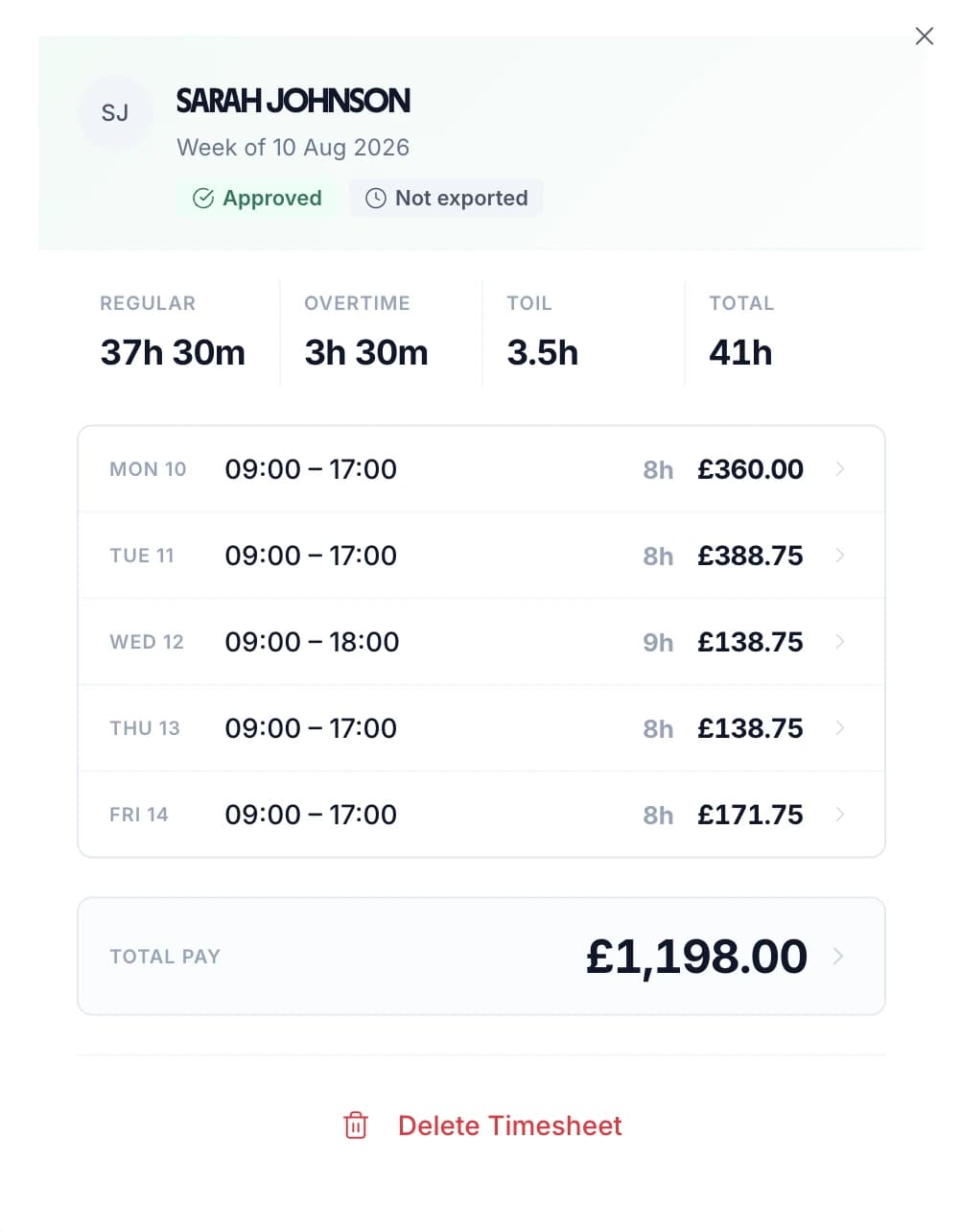
Approved weekly healthcare timesheet showing contracted hours, extra hours and pay per day

Every Person's Submitted Hours in One List

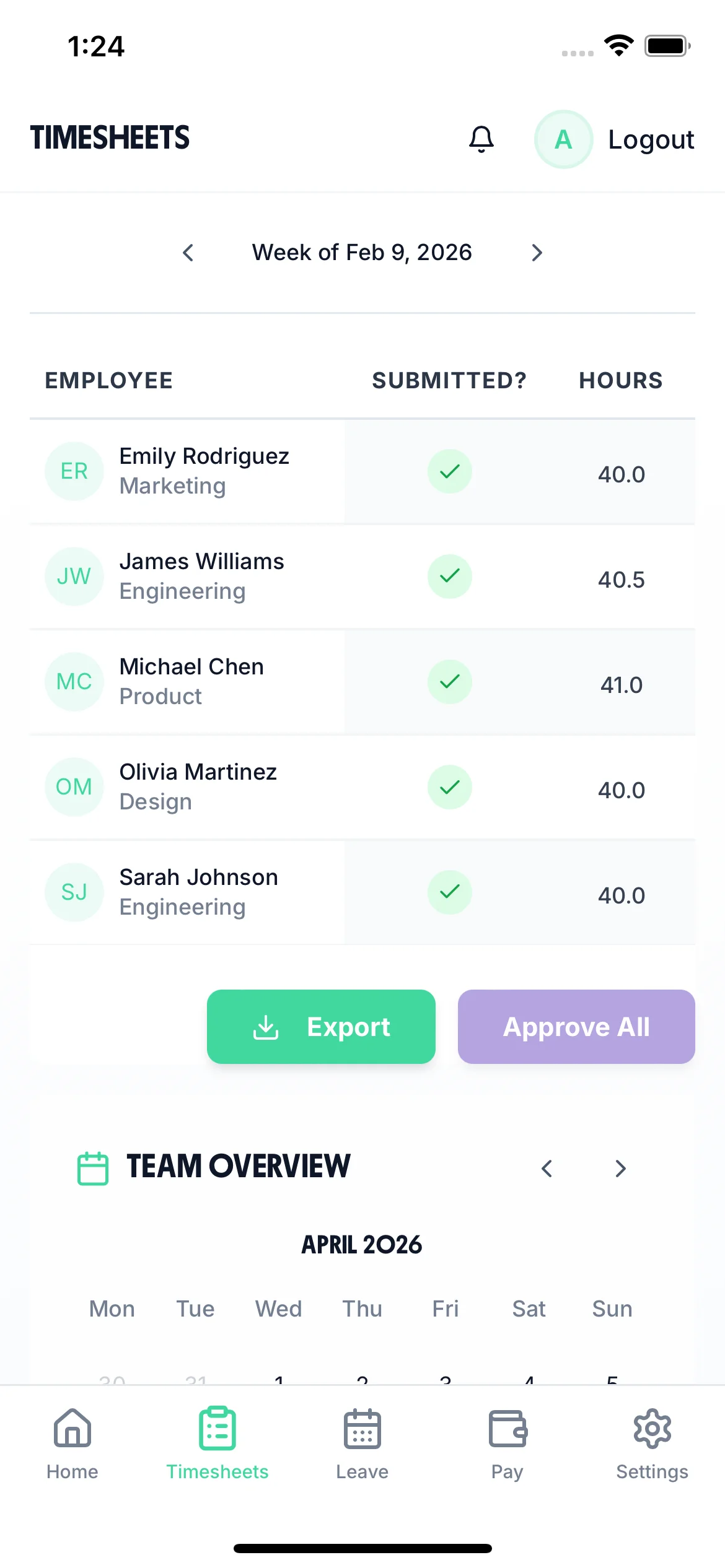
The timesheet screen lists everyone on the ward for the current period with their total hours and their status: not submitted, submitted, approved or rejected. A ward manager can see who still owes a sheet without ringing round at the end of a shift, and can work down the list from a phone.

  • View the whole team for the period, or filter to one person. Each row opens to the day-by-day hours behind the total.
  • Approve a person's outstanding days for the period in one action, or open a single day and approve or reject it on its own.
  • Rejections carry a written reason, so a healthcare assistant who logged a shift against the wrong ward knows what to correct and resubmit.
  • Send a reminder to a specific person in one tap. It arrives as a notification in their app — nothing is chased automatically, you choose who gets it.
Phone, tablet or desktopReminders are sent by hand
Ward manager view on a phone listing each healthcare worker's submitted hours and approval status

Watch a Timesheet Go From Shift to Approved

A short loop of the timesheet screen. Hours are entered day by day, breaks are deducted from the total, and the completed period is submitted for a ward manager to approve.

All Departments
Jun 2026
M
T
W
T
F
S
S
M
T
W
T
F
S
S
M
T
W
T
F
S
S
M
T
W
T
F
S
S
M
T
AR1

Amelia Roberts

Kitchen

JK2

James Kelly

Front of house

PS3

Priya Shah

Kitchen

MP4

Maya Patel

Front of house

TW5

Tom Wilson

Bar

Timesheet Requests

3
AR

Amelia Roberts

37h 30m · Week of Jun 15

JK

James Kelly

38h 30m · Week of Jun 8

Time-off Requests

2
PS

Priya Shah

3d · Annual Leave

MP

Maya Patel

2d · Sick Leave

AR

Amelia Roberts

Monday 15 June · 09:00

AR

0h 00m

09:00 – 17:00

Break
End Done

Timesheet submitted

Week of Jun 15

AR

Amelia Roberts

Kitchen

Week of Jun 15, 2026

Mon15
09:00–17:00·30m

7h 30m

Tue16
09:00–17:00·30m

7h 30m

Wed17
09:00–17:00·30m

7h 30m

Thu18
09:00–17:00·30m

7h 30m

Fri19
09:00–17:00·30m

7h 30m

Submit Timesheet Submitted

Payroll Export

Week of Jun 15, 2026 · 5 employees

Employee
Reg. pay
Overtime
Total
AR

Amelia Roberts

37.5h

£281.25

£281.25

JK

James Kelly

40h

£300.00

£22.50

2h

£322.50

PS

Priya Shah

32h

£240.00

£240.00

MP

Maya Patel

38h

£285.00

£285.00

TW

Tom Wilson

40h

£300.00

£45.00

4h

£345.00

Total · 5 employees

£1,406.25

£67.50

£1,473.75

Confirm Export Exported!
On the ward and in the community

Used Across UK Healthcare Settings

TimeTally works for any healthcare provider that needs to track staff hours and manage holiday requests — as nurse timesheet software on a ward, and as online timesheet software for nurses working bank or agency shifts across several of them. You may also want to explore our shift rota template for planning.

  • Private Clinics

    Private hospitals, diagnostic centres, dental and physio practices

  • Care Homes

    Residential care, nursing homes, supported living. See our care home page

  • Domiciliary Care

    Home care agencies, community nursing, visiting carers — a digital timesheet system for care agencies whose staff never pass an office

  • GP Practices

    General practices, walk-in centres, out-of-hours services

Every healthcare time tracking scenario, handled

Tap any card for the detail.

Start your free trial

14-day free trial · No credit card needed

Optional Controls for Rounds and Contracts That Need Tighter Records

Four settings an admin can turn on. Most providers use one or two, usually where staff work away from a base or the hours are billed to a commissioner. Everything else carries on as it is.

Require staff to be on site to clock in.

Set a boundary around each site as a point and a radius. The radius is set per site and can be anywhere from 25 metres to 5 kilometres, so a single care home and a community round covering a whole town do not have to share a setting. Add sites as contracts start and deactivate them when they end.

Each site also has an enforcement setting. Strict refuses a clock-in from outside the boundary. Lenient allows it and records how far outside the person was, which suits a rural round with poor GPS reception. Individual staff can be exempted.

Two things to know before you enable it. The check only applies where clocking in is the only way to log hours — if staff can also submit a form, they can type in the hours the geofence refused. And GPS clocking is a paid add-on, included free for the length of the trial.

How the GPS check works in full

Take start and end times from clock-ins only.

Strict clocking is off by default. With it off, staff type their own start and end times.

Turn it on where the hours are billed to a commissioner or checked in a framework audit. Start and end times then come only from recorded clock-in and clock-out events. A carer cannot change a 07:40 start to 07:30 on the day the sheet is due, and a missed clock-out has to be resolved rather than filled in from memory a week later.

Managers can still correct a genuine mistake, so the record stays accurate.

More on tamper-proof timesheets

Set the timesheet period to one, two or four weeks.

Choose a period of one, two or four weeks, then set the date the first period runs from. Every period after that follows the same cycle.

This matters in healthcare because the two halves of the payroll rarely run to the same clock. Bank and agency shifts are usually paid weekly while substantive staff are paid monthly. Match the period to the run it feeds and no one adds four weekly sheets together by hand.

Tag hours by ward, location and activity.

Projects are switched on already, and that is the field most providers use for a ward, a unit or a client. Locations and activities are separate settings you turn on when a contract needs the work broken down further. Staff pick from your list as they submit.

Whatever you use appears everywhere the hours appear: on timesheet lines, on shifts, and in every export and report. That is the difference between knowing a week cost forty hours and knowing recovery took twelve of them.

Why it matters

Why Healthcare Providers Need Accurate Timesheets

UK healthcare has some of the most complex time tracking requirements of any sector. Shift patterns change weekly, staff cover multiple wards or sites, overtime is common, and regulators expect clear records. Healthcare digital timesheet software earns its place by keeping that record without adding anything to anyone's shift.

The Working Time Regulations 1998 limit average weekly working hours to 48 (calculated over a 17-week reference period) and require at least 11 consecutive hours of rest between shifts. Night workers face a separate limit of 8 hours per 24-hour period. These rules apply to NHS trusts, private clinics, GP surgeries, and domiciliary care agencies alike.

Beyond the Working Time Directive, CQC inspectors review staffing records as part of their assessments under the Health and Social Care Act 2008. They look for evidence that providers have sufficient, suitably qualified staff to deliver safe care. Accurate, accessible timesheet records make it straightforward to demonstrate this during inspections.

For payroll, getting shift hours right is critical. Missed overtime, incorrect break deductions, or misrecorded night shifts lead to underpayments and erode trust with staff. Use our overtime pay calculator to verify rates. With workforce shortages across UK healthcare, retaining staff partly depends on paying them correctly and on time.

What TimeTally Does for Healthcare Teams

TimeTally is a straightforward timesheet and holiday management tool. Nurse online timesheet software has to record a long day accurately and then stay out of the way. Here is what it does and how it helps healthcare providers.

Shift Hour Tracking

Staff enter their shift start and end times. This works for any shift pattern — days, nights, long days, split shifts, or irregular rotas. Overnight shifts that cross midnight are handled correctly. Total hours and overtime are calculated automatically.

Hourly Rates & Overtime

Set an hourly rate and overtime rate for each staff member. When timesheets are submitted, TimeTally calculates standard pay and overtime pay automatically. You can set daily or weekly overtime thresholds to match your organisation's rules.

Break Tracking

Track lunch breaks and additional rest breaks separately. Under UK law, workers are entitled to a 20-minute uninterrupted break for shifts over 6 hours — use our break time compliance calculator to check. TimeTally records breaks and deducts them from total hours so payroll figures are accurate.

Ward & Department Tracking

Use TimeTally's project tracking to assign hours to specific wards, departments, or sites. If a nurse works across two wards in a shift, they can split their hours accordingly. Reports show total hours and costs per department. Online timesheet software for nursing agencies can use the same field for the client or site a shift was booked for.

Payroll Export

Export approved timesheets to Xero, QuickBooks, or CSV with one click. The export includes employee names, standard hours, overtime hours, pay amounts, and break deductions. No manual re-entry needed.

Mobile Access — No App Download

TimeTally works in any mobile browser. Staff do not need to download an app or install anything on personal devices. They can bookmark the page or use a shared tablet. There is also a native iOS app for those who prefer it.

UK Compliance

How TimeTally Helps with UK Healthcare Compliance

TimeTally is a timesheet tool, not a compliance system — but accurate timesheet records are the foundation of meeting your regulatory obligations. Here is how the data TimeTally captures supports your compliance requirements.

Working Time Regulations

TimeTally records all hours worked, including overtime and night shifts. This gives you the data you need to monitor the 48-hour weekly average (over a 17-week reference period), 11-hour rest between shifts, and the 8-hour night work limit. You can export this data at any time if HMRC or the HSE request records.

CQC Staffing Records

CQC inspectors assess whether providers have sufficient staff under the Health and Social Care Act 2008. TimeTally provides a clear, exportable record of who worked when, for how long, and in which department. This is far more reliable than paper timesheets or rotas stored in filing cabinets.

Rest Break Records

Under UK law, workers on shifts over 6 hours are entitled to a 20-minute uninterrupted break. TimeTally tracks breaks separately, so you have a record that breaks were taken. This is particularly important in healthcare where long shifts are common.

HMRC Record-Keeping

HMRC requires employers to keep records of hours worked for at least two years. TimeTally stores all timesheet data digitally with timestamps and approval records — a complete audit trail that you can export whenever needed.

National Minimum Wage

Accurate hours tracking ensures your effective hourly rate does not fall below the National Minimum Wage (£12.21/hour for workers aged 21+ from April 2025). This is especially relevant where unpaid overtime or incorrect break deductions could push the rate below the legal minimum.

Holiday Entitlement

All UK workers get 5.6 weeks statutory holiday (28 days for full-time). TimeTally calculates entitlement automatically, including pro-rata for part-time staff and mid-year starters, and tracks remaining allowance in real time. Sickness is recorded against the same record as a separate leave type, so a ward's absence pattern and its statutory sick pay position can both be worked out from one place.

Simple, Transparent Pricing

One price. Every feature. No surprises.

£3/employee/month

Billed monthly, incl. VAT. Cancel anytime.

Shift hour tracking including nights and weekends
Hourly rates and overtime calculation
Break tracking and payroll export
Ward and department tracking
Mobile access — no app download needed
Get Started

In short

What is healthcare timesheet software?

Healthcare timesheet software records the hours clinical and support staff actually worked, including nights, long days, overtime and the breaks in between. TimeTally does this for UK healthcare providers from £3 per staff member a month. Staff log start time, end time and breaks from any phone browser or the iOS app, assign the hours to a ward or department if you use that, and submit the period for approval. Ward managers approve or reject from any device. Overtime is calculated against the thresholds you set, and approved hours export to Xero, QuickBooks or CSV for payroll. Because the record is digital rather than paper, the same data answers a CQC staffing question or a Working Time Regulations query.

Price
£3 per staff member a month
Logging
Any phone browser, or the iOS app
Costs to
A ward, department or site
Exports to
Xero, QuickBooks, CSV
Supports
CQC, WTR and HMRC hour records

Frequently Asked Questions

Can healthcare staff use TimeTally without downloading an app?

Yes. TimeTally works in any mobile browser — no app download or installation needed. Staff can bookmark the page on their phone or use a shared tablet in the staff room. There is also a native iOS app on the App Store for those who prefer it.

How does TimeTally handle night shifts?

TimeTally handles overnight shifts correctly. If a nurse starts at 8pm and finishes at 6am, the system calculates 10 hours without any issues. Start and end times can cross midnight. Total hours and overtime are calculated automatically.

Can I set different pay rates for different staff?

Yes. Each staff member has their own hourly rate and overtime rate. When timesheets are submitted, TimeTally calculates standard pay and overtime pay based on these rates. You can update rates at any time from the employee settings.

Can staff assign hours to different wards or departments?

Yes. TimeTally has project tracking where you can create wards, departments, or sites. Staff assign their hours to the relevant project when submitting their timesheet. Reports show total hours and costs per project.

Does TimeTally help with Working Time Directive compliance?

TimeTally records all hours worked, including overtime and night shifts. This gives you accurate data to monitor the 48-hour weekly average, rest periods between shifts, and night work limits. You can export records at any time for inspections. However, TimeTally does not actively monitor or alert for WTD breaches — it provides the data, and compliance decisions remain with you.

Can I use TimeTally alongside our existing rota system?

Yes. TimeTally records actual hours worked, not planned rotas. Staff enter what they actually worked, which may differ from the planned rota due to shift swaps, overtime, or late starts. This gives you an accurate record of hours worked alongside your rota system.

How do holiday requests work?

Staff tap 'Book Time Off', select their dates, and submit. Their manager gets a notification and can see the team calendar to check for clashes before approving. Remaining holiday allowance is shown in real time. Statutory entitlement (5.6 weeks) is calculated automatically.

What payroll systems does TimeTally export to?

TimeTally exports to Xero, QuickBooks, and CSV/Excel. The export includes employee names, standard hours, overtime hours, pay amounts, and break deductions. Most payroll systems can import CSV files if a direct integration is not available.

Is TimeTally suitable for domiciliary care agencies?

Yes — it works as a digital timesheet system for care agencies as well as for ward-based teams. Domiciliary carers can log their hours from their phone between visits. They enter start and end times for each shift and can use project tracking to record which client or location they worked at. Managers approve timesheets remotely.

How does TimeTally keep our data safe?

TimeTally uses Supabase (built on PostgreSQL) with row-level security, encrypted connections, and secure authentication. All data is stored in the cloud and accessible only to authorised users within your organisation.

Still have a question? See all FAQs

Try TimeTally Free for 14 Days

No credit card required. Set up your healthcare team in 10 minutes. Start tracking shift hours and managing holiday requests.

FREE 14-day trial · No credit card required · Cancel anytime

Support that answers

A real person replies within 24 hours. No ticket queues, no bots.

UK GDPR compliant

A UK company, ICO regulated. Your data encrypted and never sold.