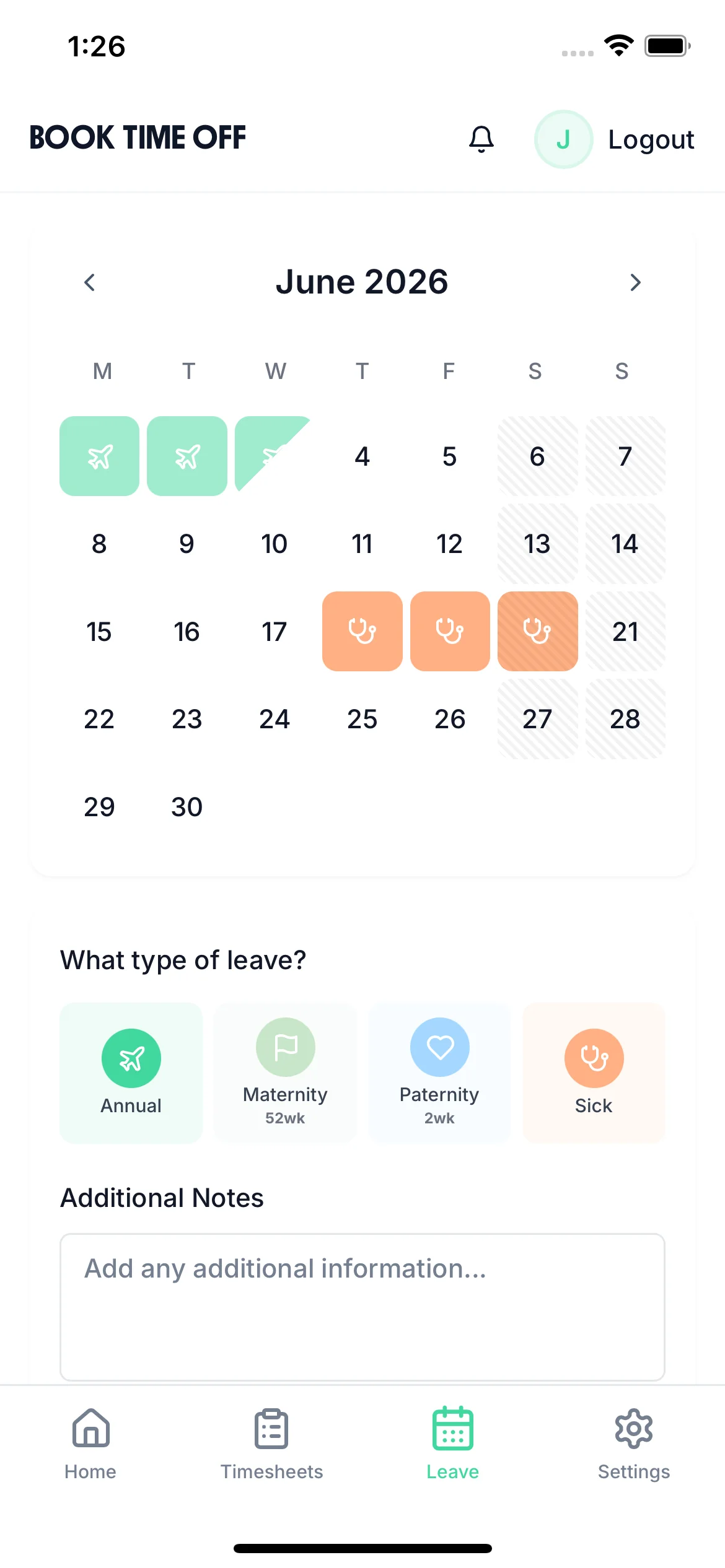

Employee selecting and booking holiday leave on the TimeTally mobile app

Employee Holiday Tracker for UK Small Businesses

The employee holiday tracker that handles everything — request approvals, annual leave allowances, pro-rata calculations, and UK bank holidays. Automatically calculates UK statutory entitlement so you never have to do it manually.

5.0 on the App Store
Back

Book Time Off

Jul 2026

MTWTFSS12345678910111213141516171819202122232425262728293031

Aug 2026

MTWTFSS12345678910111213141516171819202122232425262728293031

Sep 2026

MTWTFSS123456789101112131415161718192021222324252627282930

3 days selected· excl. weekends

Family holiday, flights booked ✈️

Submit Request
Submitted

Leave Allowance

18

days left

Annual Leave Balance

18 days

Annual Leave Used

7 days

All Departments
Jun 2026
M
T
W
T
F
S
S
M
T
W
T
F
S
S
M
T
W
T
F
S
S
M
T
W
T
F
S
S
M
T
AR1

Amelia Roberts

Kitchen

JK2

James Kelly

Front of house

MP3

Maya Patel

Front of house

PS4

Priya Shah

Kitchen

TW5

Tom Wilson

Bar

Timesheet Requests

1
TW

Tom Wilson

37h 30m · Week of Jun 1

Time-off Requests

2
MP

Maya Patel

3d · Annual Leave

PS

Priya Shah

5d · Annual Leave

MP

Maya Patel

Front of house

Pending Approved
Annual Leave
3days

From

Thu, Aug 14

2026

To

Mon, Aug 18

2026

Notes

Family holiday, flights booked

Approve Approved
Reject

Every leave scenario, handled

Click any feature to learn more.

Start your free trial

14-day free trial · No credit card needed

One-Click Approvals for Managers

When an employee submits a leave request, managers get an email notification and can approve or decline in one click — no login required. Employees are notified the moment a decision is made.

Approve from email or the app

No need to log in — managers click approve directly from the notification email and the request is handled.

See the full context before deciding

The approval screen shows the employee's remaining balance, who else is off on those dates, and any clashes — so managers can make an informed decision.

Instant employee notification

Employees receive an email the moment their request is approved or declined — no chasing, no uncertainty.
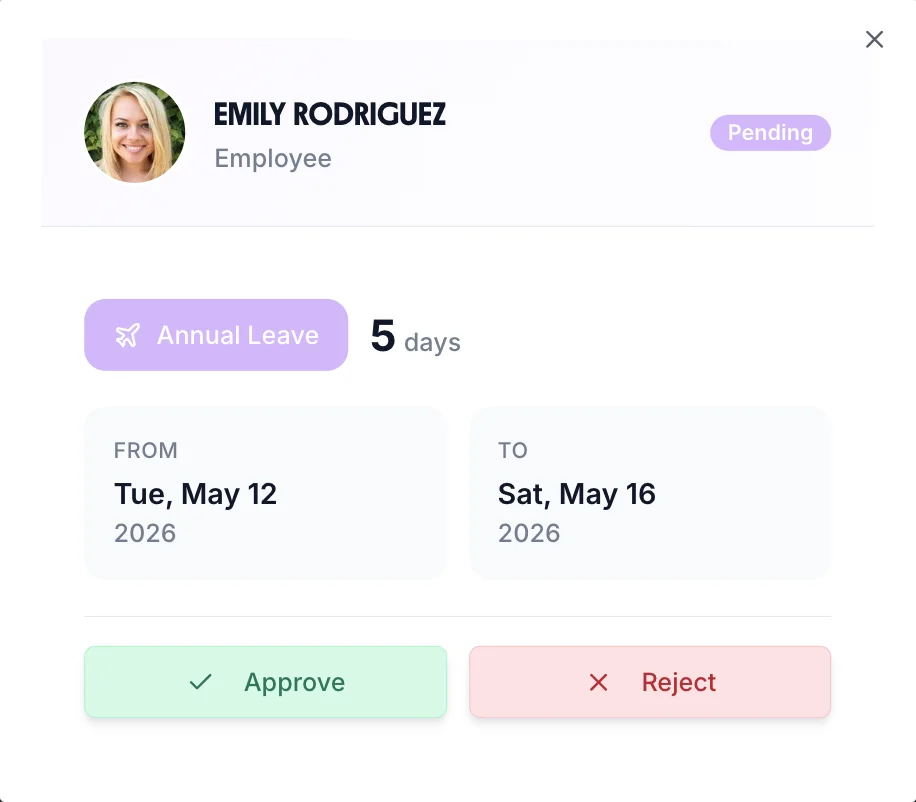
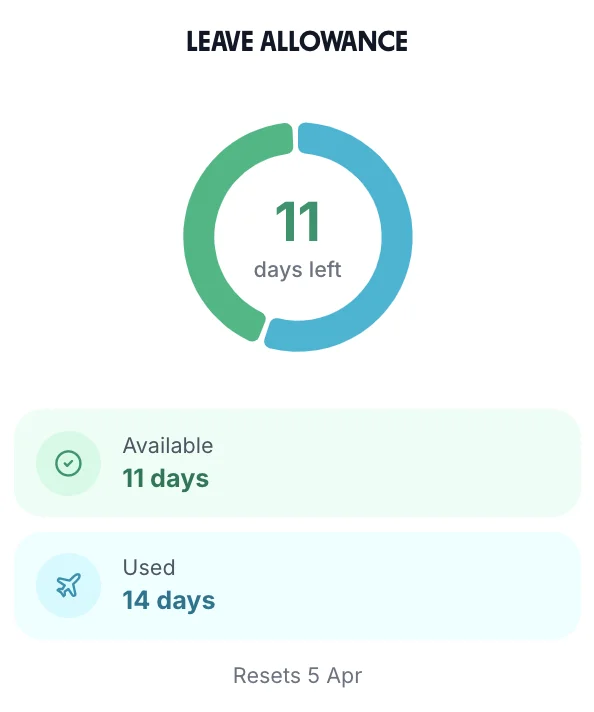
Manager approving a holiday leave request in TimeTally

Automatic Pro-Rata for Part-Time Staff

Stop manually calculating holiday entitlement. TimeTally automatically handles pro-rata calculations for part-time workers, mid-year starters, and employees on varied contracts.

Part-time pro-rata

Automatically calculates entitlement based on contracted hours — 3 days/week gives 16.8 days, handled correctly every time.

Mid-year starters

Employees who join partway through the leave year get the correct proportional entitlement calculated automatically from their start date.

Bank holiday options

Choose whether UK bank holidays are included in or added on top of the statutory 28-day entitlement — and it handles England, Scotland, and Northern Ireland separately.

Employee leave balance view showing entitlement, taken, and remaining days after pro-rata calculation

Know Who's Off Without Asking

The "Who's Off" widget gives managers and employees an instant view of who's absent each day of the week — no digging through calendars or sending round an email.

Daily absence at a glance

See exactly who's on leave each day this week — updated in real time as requests are approved.

Prevent understaffing

Spot days when multiple people are off simultaneously and arrange cover before it becomes a problem.

Visible to the whole team

Employees can also see who's off so they know who to contact — reducing interruptions for managers.

Who's off this week widget showing team absences at a glance

Employees Book Their Own Holiday

Staff check their remaining allowance and submit a holiday request from their phone in seconds. No forms to fill in, no emails to the office, and no one asking you how many days they have left.

Live balance on their phone

Every employee sees days taken, days remaining, and days already booked — updated the instant a request is approved.

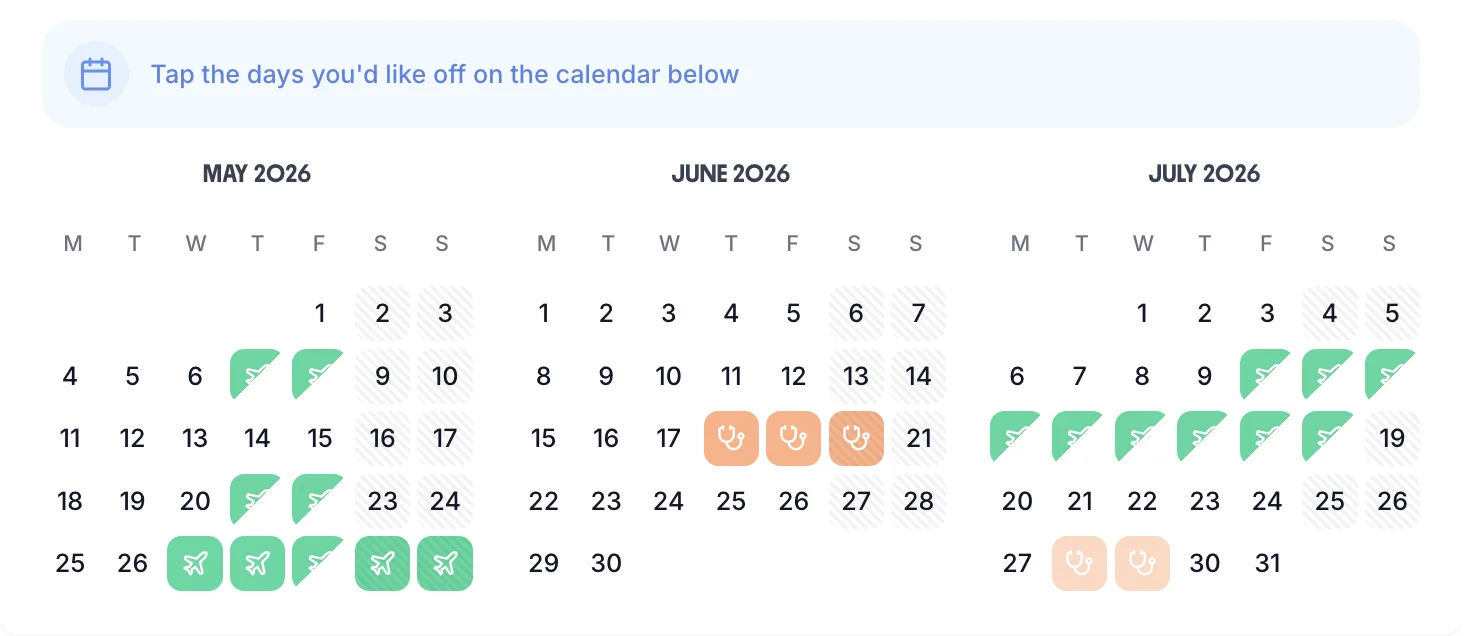
Half days and part days

Book a morning or an afternoon without it costing a full day — balances deduct in half-day increments automatically.

A record of every request

Requests, approvals, and rejections are all timestamped and kept — so there is never a dispute about what was asked for or agreed.

Employee selecting the days they want off on the TimeTally booking calendar, including half days

Track More Than Just Annual Leave

Annual leave is only part of the picture. Set up your own leave types — sick, unpaid, compassionate, parental, study — each with its own balance and approval rules, so every absence is recorded in one place.

Create any leave type you need

Name it, give it a colour, decide whether it is paid, and set an allowance — or leave it uncapped for types like unpaid leave.

Sick leave kept separate

Sickness never comes out of the holiday allowance. Track it against its own balance and spot absence patterns before they become a problem.

TOIL and overtime in the same place

Hours banked as time off in lieu appear alongside holiday, so staff can see everything they are owed in one balance view.

Holiday Data Your Payroll Can Actually Use

At the end of every pay run you need to know who was off, what it was for, and how much is left. Export it in one click instead of rebuilding it from a spreadsheet each month.

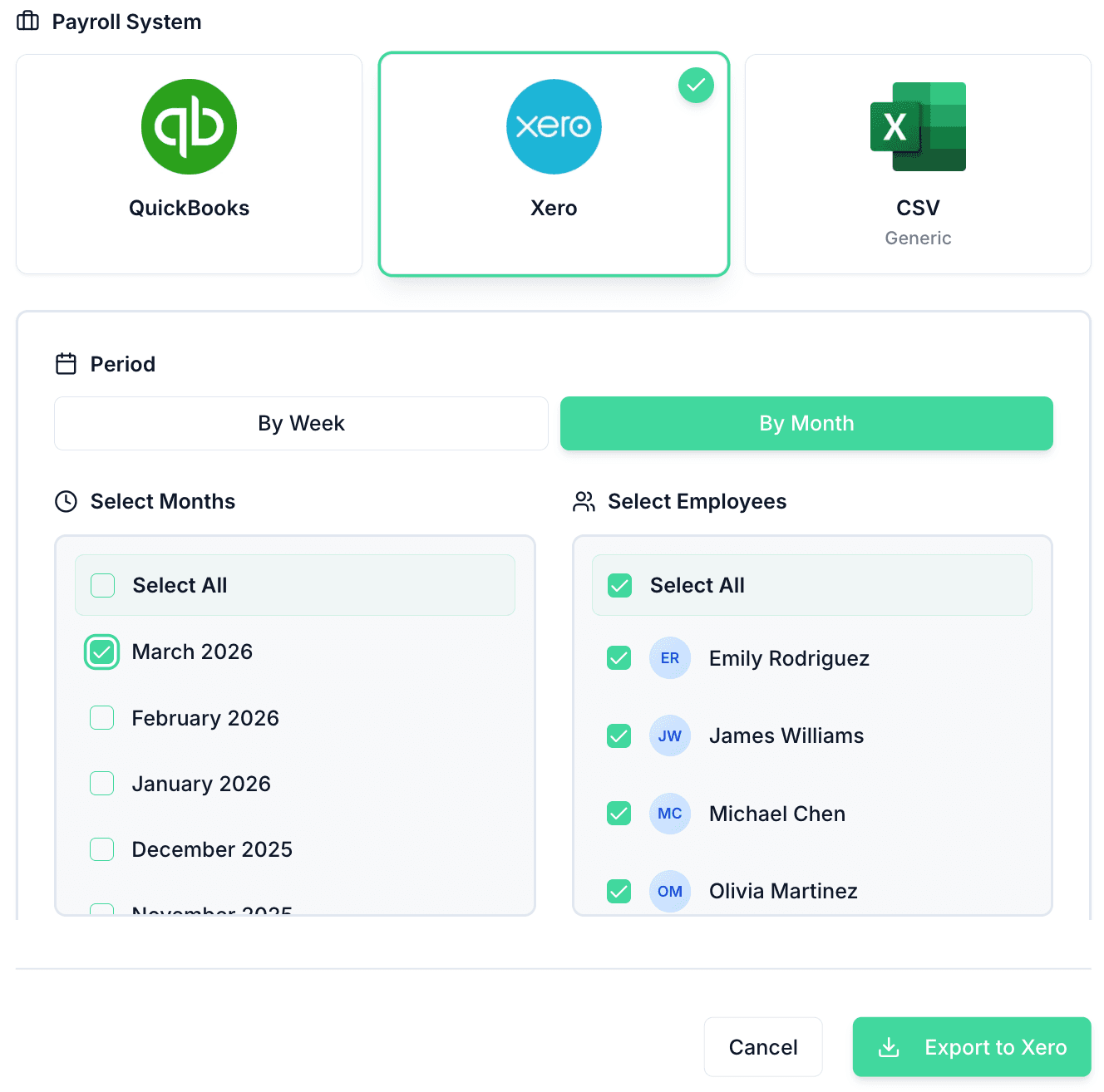
One-click export

Send leave and hours straight to Xero, QuickBooks, or CSV — no re-keying, no transcription errors.

Year-end carry-over handled

Set how many days can roll into the next leave year and TimeTally applies it automatically when the year resets.

Records if you are ever asked

Every request, approval, and balance change is stored — the audit trail you need if entitlement is ever queried or disputed.

Exporting holiday and hours data to payroll from TimeTally

See Your Whole Team's Leave at a Glance

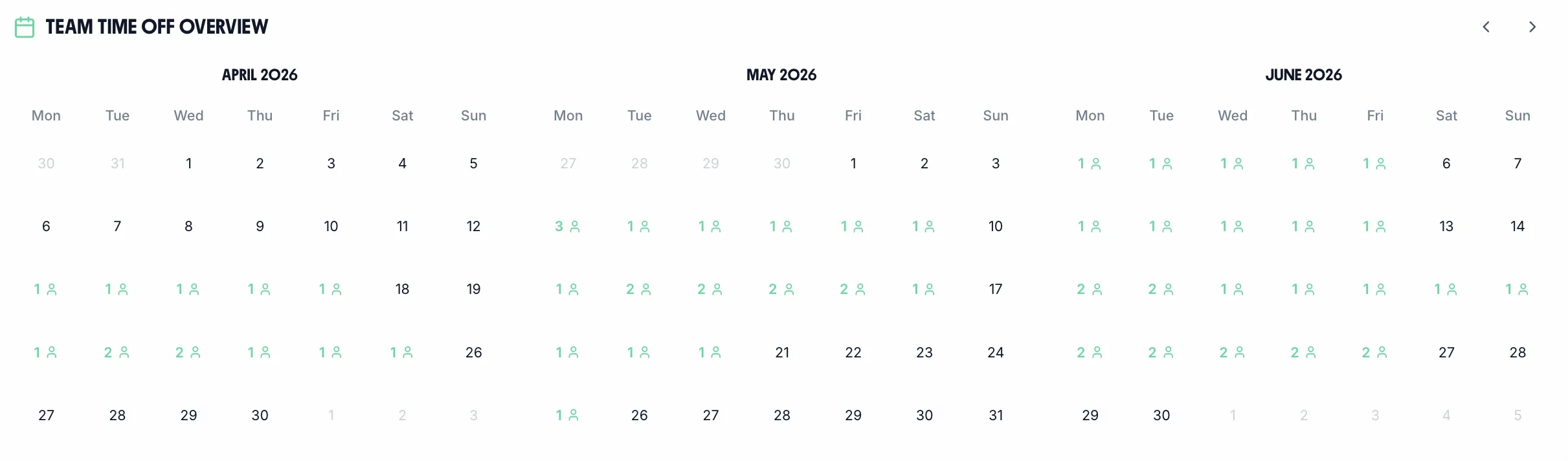
The team calendar is central to effective holiday management — see everyone's approved leave so you can plan around absences, avoid clashes, and ensure adequate cover at all times.

Team holiday calendar showing all employee leave across the month

Spot clashes before they happen

See at a glance when multiple people have requested the same dates so you can flag conflicts before approving.

Plan cover weeks ahead

Managers can see the full leave picture well in advance so the right people are always available.

All leave types colour-coded

Holiday, sick, TOIL, and other leave types are shown in different colours so the calendar is easy to read.

Every absence type. One tracker.

🏖️

Annual Leave

Track statutory and contractual holiday entitlement, carry-over, and pro-rata calculations.

🤒

Sick Leave

Record self-certified and doctor-certified sick leave. Track Bradford Factor scores automatically.

TOIL

Accrue, request, and track time off in lieu from overtime and on-call callouts.

❤️

Compassionate Leave

Create custom leave types for compassionate, bereavement, and other special circumstances.

👶

Parental Leave

Track maternity, paternity, and shared parental leave alongside regular annual leave.

Custom Leave

Any custom leave type you need — configured with its own rules, entitlement, and approval flow.

TimeTally has been excellent for our business. The app is simple to use, reliable, and makes managing holidays, absences, and staff records straightforward. The system has saved us a significant amount of administration time and gives both managers and employees clear visibility of leave balances and requests. Highly recommended for any business looking for an easy-to-use workforce management solution.

CLI Manchester

Jordan Ingoe, CLI Manchester

Support that answers

A real person replies within 24 hours. No ticket queues, no bots.

UK GDPR compliant

A UK company, ICO regulated. Your data encrypted and never sold.

The essentials

What a Proper Employee Holiday Tracker Does

Most businesses manage employee holidays in a spreadsheet or shared calendar. It works until it doesn't — when balances go wrong, requests get missed, or someone books leave during a busy period. A dedicated employee holiday tracker solves all of this automatically.

01

Annual Leave Allowances — Always Accurate

Every employee's annual leave allowance is calculated automatically from their contract. Full-time staff get 28 days (5.6 weeks), part-time workers get the correct pro-rata amount, and mid-year starters get a proportional entitlement from their start date. No manual calculations, no spreadsheet errors.

Employees can check their remaining balance at any time from their own dashboard or the iOS app — reducing the most common question managers field each week.

02

Bank Holidays — Handled for Every Region

UK bank holidays are different in England and Wales, Scotland, and Northern Ireland. Your employee holiday tracker needs to handle this automatically — and TimeTally does. You choose whether bank holidays count towards or are added on top of the 28-day statutory entitlement.

Part-time staff who don't work on bank holiday dates are never penalised — their entitlement is adjusted automatically to reflect their actual working pattern.

03

Team Visibility — Know Who's Off and When

The team calendar shows all approved employee holidays at a glance. Managers can see potential clashes before approving new requests, and employees can check who else is off before submitting leave.

No more discovering that three people are off at the same time — the calendar makes it impossible to miss.

04

Holiday and Sickness — Tracked Separately

Annual leave and sick leave stay separate with their own balances and approval workflows. Track all absence types — including TOIL, compassionate leave, and maternity leave — alongside employee holiday in a single system.

Bradford Factor scores are calculated automatically for persistent short-term sickness, giving managers the data they need for absence reviews.

05

Leave Year & Carryover — That Runs Itself

Set your leave year dates, configure carryover allowances, and TimeTally handles the rest. Balances reset automatically at year end — no manual adjustments needed.

Configurable carryover limits. Set a maximum number of days that can carry over into the next leave year, with an optional expiry date for carried-over days. Custom leave year dates. Not all businesses run April to April. Set any leave year start date that works for your organisation.

Automatic year-end reset. Balances reset on the leave year boundary — carried-over days applied, expired days removed, everything recalculated.

06

Employees Always Know Their Balance

The most common question managers hear is "how many days do I have left?" TimeTally answers it automatically — employees see their live balance before every request.

Live balance before booking. Employees see their remaining entitlement before submitting — so they never over-request or accidentally underclaim. Full leave history. A complete record of all leave taken, pending requests, and upcoming approved time off — visible to employees and managers.

Manager override. Managers can manually adjust balances when needed — to grant extra days for long service or correct an error.

Staff holiday tracking: what every UK employer needs to know

Beyond tracking who's off when, UK employers must navigate complex regulations around holiday pay, carry-over rules, and record-keeping obligations under the Working Time Regulations 1998.

01

Working Time Regulations record-keeping

Under the Working Time Regulations 1998, employers must keep adequate records of workers' working time to demonstrate compliance with the 48-hour weekly limit and holiday entitlement. Employment tribunals expect digital records showing when holiday was requested, approved, and taken. A staff holiday tracker provides the audit trail HMRC and tribunals require, with timestamped approvals that paper records cannot match.

02

Holiday pay on termination — the final calculation

When an employee leaves, any accrued but untaken holiday must be paid out in their final wage packet at their normal rate of pay. The calculation uses the employee's pro-rated entitlement up to their leaving date minus days already taken. For irregular-hours workers, the 12.07% accrual method applies. Staff holiday trackers automate this calculation, reducing disputes and ensuring compliance with the Employment Rights Act 1996.

03

Carry-over rules changed in 2024

Since January 2024, workers can carry over up to four weeks' statutory holiday if prevented from taking it due to long-term sickness or if the employer failed to recognise their right to paid leave. Previously, unused leave expired at year-end. This change under the Working Time Regulations means staff holiday trackers must now handle complex carry-over scenarios and expiry dates for carried leave, particularly for employees returning from extended sick leave.

04

Bank holiday substitution for shift workers

Shift workers who regularly work on bank holidays are entitled to substitute days off if bank holidays are part of their statutory entitlement. Employers cannot simply exclude shift workers from bank holiday benefits. A staff holiday tracker should flag when a shift worker works a bank holiday and automatically add a substitute day to their allowance, ensuring compliance without manual tracking.

05

Holiday accrual during sick leave

Employees continue to accrue statutory holiday during periods of sick leave, including long-term sickness. They cannot be required to take holiday while off sick unless they request it. When they return, the accrued holiday must be available to take. For employees on long-term sick leave, this can create significant accrual — staff holiday trackers must continue calculating entitlement throughout absence periods.

06

Enforcement — penalties for non-compliance

Employment tribunals routinely award compensation for employers who fail to provide adequate paid holiday. Claims can go back two years, and awards include the unpaid holiday pay plus interest. HMRC can investigate under National Minimum Wage legislation if holiday pay calculations push workers below NMW. A robust staff holiday tracker provides the documentation to defend against claims and demonstrates good-faith compliance with statutory obligations.

Swipe to see more

Holiday Tracking That Works for Every Team

Whether you're managing five people or five hundred, TimeTally makes holiday tracking accurate, visible, and effortless.

Small Teams (1–10)

Holiday tracker for small teams

Small teams often track holiday in a shared spreadsheet — until someone books dates that clash, or leave entitlements get miscalculated. TimeTally replaces the spreadsheet with an automatic system: employees request leave in the app, managers approve in one tap, and balances update instantly.

  • No spreadsheet required
  • Instant balance updates
  • One-tap approval for managers
Growing Businesses (11–50)

Holiday tracker for growing businesses

As teams grow, informal holiday tracking leads to overspend, under-entitlement disputes, and payroll errors. TimeTally enforces leave policies automatically — correct entitlements per employee, carryover caps at year end, and bank holiday allocations all calculated without manual intervention.

  • Leave policy enforcement
  • Carryover cap at year end
  • Bank holidays auto-calculated
Multi-Site Businesses

Holiday tracker for multi-site businesses

Multi-site businesses need visibility across all locations before approving leave — a request that's fine at one site may leave another site understaffed. TimeTally's team calendar shows absence across every site in one view, so area managers can make informed decisions before approving.

  • Cross-site absence calendar
  • Location-level headcount view
  • Area manager approval hierarchy
Shift & Hourly Teams

Holiday tracker for shift workers

Shift worker holiday tracking is complicated by variable hours, part-time patterns, and the need to show leave impact on rota coverage. TimeTally integrates holiday tracking directly with the rota so that approved leave is immediately visible to whoever builds next week's shifts — no double entry, no gaps in cover.

  • Leave visible in rota builder
  • Part-time pro-rata auto-calculated
  • Variable hours holiday accrual

Simple, Transparent Pricing

One price. Every feature. No surprises.

£2/employee/month

Billed monthly. Cancel anytime.

Holiday tracking & leave management
Pro-rata and bank holiday calculations
All leave types (sick, TOIL, maternity, etc.)
Bradford Factor absence scoring
Leave carryover policy management
One-click manager approvals
Team calendar overview
iOS app for staff and managers
Timesheet management included
Xero and QuickBooks export

Frequently Asked Questions

Everything you need to know about tracking staff holiday and annual leave in the UK.

What is the best employee holiday tracker for small businesses?
TimeTally is the employee holiday tracker built specifically for UK small businesses. It combines holiday tracking with time tracking in one tool for just £2 per employee per month. It automatically calculates statutory entitlement, handles part-time pro-rata, and includes bank holidays — no spreadsheets needed.
How much does a holiday tracker cost?
TimeTally costs £2 per employee per month with no setup fees or hidden costs. This includes both holiday tracking and timesheet management. There's a free 14-day trial with no credit card required. Standalone holiday trackers like Timetastic charge similar amounts but don't include time tracking.
Can I track part-time and full-time employees in one system?
Yes. TimeTally automatically calculates pro-rata holiday entitlement based on each employee's working pattern. Full-time employees get 28 days, while part-time workers get a proportional amount (e.g., 3 days per week = 16.8 days). You can manage everyone in the same system.
Does TimeTally calculate UK bank holidays automatically?
Yes. TimeTally includes all UK bank holidays and lets you choose whether they're included in or added to the statutory 28-day entitlement. It also handles the difference between England & Wales, Scotland, and Northern Ireland bank holidays.
Can employees see their own holiday balance?
Yes. Every employee gets their own dashboard showing remaining holiday balance, pending requests, and upcoming approved leave. This eliminates the most common question managers hear: 'How many days do I have left?'
How does TimeTally handle mid-year starters?
TimeTally automatically pro-rates holiday entitlement for employees who start partway through the leave year. Just enter their start date and the system calculates the correct proportional entitlement based on the remaining days in the leave year.
Does TimeTally support leave carryover?
Yes. You can configure carryover policies per leave type — including maximum days allowed to carry over and an expiry date for carried-over days. TimeTally applies the rules automatically at the start of each new leave year.
Can I track sick leave separately from holiday?
Yes. Sick leave and holiday are tracked completely separately with their own balances and approval workflows. You can also track Bradford Factor scores to identify absence patterns over time, which is useful for managing persistent short-term sickness.
What leave types does TimeTally support?
TimeTally supports all standard UK leave types including annual leave, sick leave, TOIL (Time Off in Lieu), compassionate leave, maternity leave, paternity leave, shared parental leave, and unpaid leave. Each has its own balance tracking and approval workflow.
Does TimeTally work alongside our existing payroll software?
Yes. TimeTally integrates directly with Xero and QuickBooks. Approved leave is reflected in timesheet records that export to payroll automatically — so your payroll software always has the correct hours without manual reconciliation.

Still have a question? See all FAQs

Ready for an Employee Holiday Tracker That Works?

Join hundreds of UK small businesses — from cleaning companies to charities and pubs and restaurants — that use TimeTally to track leave, approve requests, and stay compliant with employment law.