

A GPS Clock In App That Knows They're Actually On Site

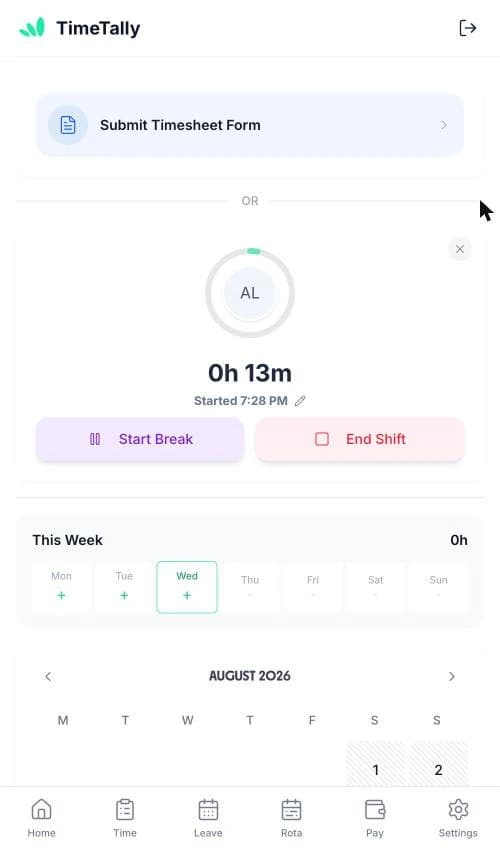
Pin every site on a map, choose how far around it counts, and your team can only clock in and out when they are really there. The check runs on our servers rather than on the phone, so it cannot be talked round. It sits on top of the ordinary clock in app — same one tap to start a shift, same automatic timesheet at the end of it.

5.0 on the App Store
TimeTally clock in screen on a phone with the shift timer running

The app is simple to use, reliable, and makes managing holidays, absences, and staff records straightforward. The system has saved us a significant amount of administration time.

CLI ManchesterJordan Ingoe, CLI Manchester

How GPS Clocking In Works

Three decisions per site, and you are done. There is no hardware to fit, no beacon to install and nothing for your team to learn — the clock in button behaves exactly as it did before.

  • Pin the site

    Search an address or postcode, or drop the pin where you are standing. Name it something your team will recognise — Head Office, Riverside Depot

  • Choose the radius

    Anywhere from 25 metres to 5 kilometres, and 100 metres to start with. Phone GPS lands within 10–50m, so a tighter ring risks refusing people who really are there

  • Let the server decide

    The app shows the distance before anyone presses the button, but the decision is made on our servers using the position sent with the event — not on the handset

Where they clocked in, settled before payroll ever sees it

A geofence is only useful if it is honest about its own limits. Here is exactly what TimeTally checks, what it refuses, and what it deliberately leaves alone.

The geofence

A circle round the site, and a number you choose.

Each work location is a point on the map plus a radius. Inside it, clocking in behaves normally. Outside it, the site's own rule decides what happens next.

Somebody standing well inside a large depot is on site even when a different site's centre happens to be nearer. TimeTally judges by which area actually contains them, not by which pin is closest — the alternative refuses people who are demonstrably at work.
Per site · block or flag

Stop them, or just tell you about it.

Block them and nobody clocks in or out until they are on site. Allow, but flag it and they clock in as normal while you see it happened away from site.

It is set per location, not per company, so the fixed office can be strict while the site with the notorious signal black spot is lenient.

A lenient clock-in still records how far away they were, and still says so to their manager. Nothing is lost by being generous.

When it says no

Three reasons, never just “computer says no”.

Too far from site tells them how far, and from which site. That one is solved by travelling.

No usable location means the phone gave us nothing to check. That one is solved by sharing it.

A fix too vague to trust means the phone offered a position it could only place to within a few hundred metres. That one is solved by stepping outside, not by walking to work — which is why we keep it separate from the first.

What it does not do

It checks two moments, and it does not follow anyone.

A location is read when someone clocks in and when they clock out. That is the entire list. Breaks and shift start and end are recorded but never location-checked, and nothing reads a position while a shift is running.

Nor does it stop buddy punching. A geofence knows where a phone was, not who was holding it, so a colleague on site can still clock a friend in. What it stops is clocking in from home, from the car, or from anywhere that is not work — which is the problem most businesses actually have.

If the worry is the number rather than the place, tamper-proof timesheets stop hours being typed in afterwards. Most teams that turn one on turn on both.

The Rules, In Full

The things worth knowing before you switch it on, rather than after.

It needs clocking in to be the only way to log hours

Location checks only apply when everyone in the organisation records time by clocking in and out. Leave the manual hours form switched on as well and the geofence becomes decoration — whatever it turns away, the form quietly grants. TimeTally enforces that condition rather than letting you configure something that does nothing, and offers to make both changes together when you turn it on.

Nobody is checked until you assign them

Turning the master switch on changes nothing by itself. An employee is only location-checked once they are assigned to a work location, or once they are working a shift at a Location that has a geofence. Everyone else clocks in exactly as before, and their phone is never asked for a position — so no permission prompt appears for people the feature does not apply to.

Individuals can be exempted, immediately

There is a per-person exemption for field staff, and for anyone whose phone cannot get a reliable location. It takes one switch and applies straight away, so a driver stuck outside a depot with no signal is unblocked in seconds rather than at the end of the week. Exempt people keep clocking in normally; they are simply not checked.

A shift can override where someone normally works

Put a shift at a Location with a geofence and that becomes the site they have to be at for that shift, whatever they are normally assigned to. A per-shift switch turns the requirement off again for site visits, deliveries, or a day somewhere the signal is known to be poor. And if you move a shift while someone is mid-way through it, their clock-out is still judged against where they clocked in — nobody gets stranded by an admin change.

Verified Clock-Ins Become An Ordinary Timesheet

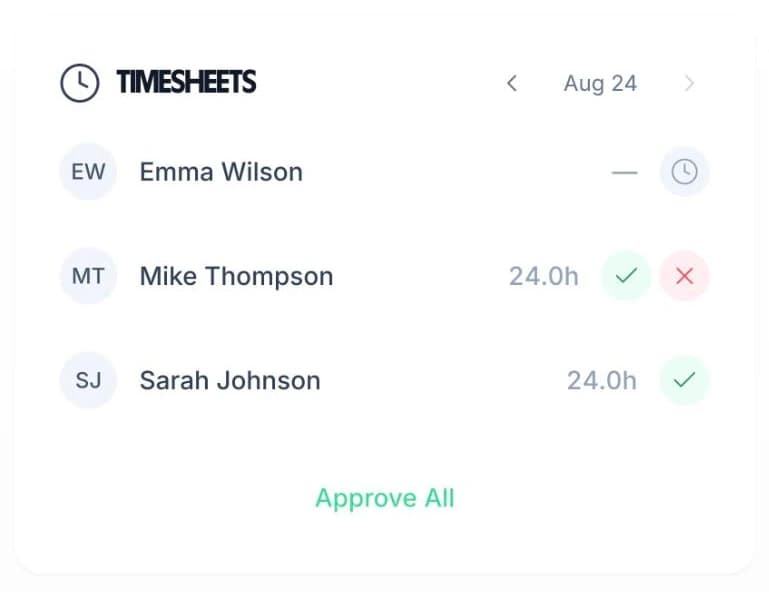
Once the location check has passed, nothing downstream changes. The clock-in and clock-out become hours, the hours become a weekly timesheet, and the timesheet goes to a manager for approval and then to payroll. The geofence is a gate at the front, not a different product behind it.

Managers get a clocking history that opens on the exceptions — refused attempts and off-site clock-ins — rather than on a wall of normal days. On a quiet week there is nothing in it, which is the point.

Hours from the clock Manager approval Exceptions first Payroll export
Weekly hours in TimeTally with one-tap manager approval

GPS Clock In Pricing

Free for the whole of your trial, so you can test the radius on a real phone at a real site before you decide.

£4/employee/month

The £3 base price plus £1 for GPS clocking. Billed monthly, incl. VAT. Cancel anytime.

Unlimited work locations, each with its own radius
Block or flag, chosen per site
Per-person exemptions for field staff
Geofences on individual shifts, with a per-shift override
Manager clocking history, exceptions first
Everything in the £3 plan — clock in, timesheets, approvals, leave
Start free

Not sure you need the location check? The standard clock in app is included in the £3 — see the full pricing page.

Who Actually Needs A GPS Clock In App

Geofencing earns its keep when work happens somewhere specific and nobody senior is standing there to see it start.

Cleaning Services

GPS clock in for cleaning companies

Cleaners move between client sites with nobody supervising the start of a shift. A geofence on each client address turns arrival into a record, which is also the evidence you invoice against.

  • A radius per client site
  • Proof of attendance for the client
  • Lenient sites for awkward basements

Cleaning company time tracking

Care Homes

GPS clock in for care homes and domiciliary care

Safe staffing evidence depends on knowing who was in the building, not just who said they were. Location-checked clock-ins give an inspection-ready record without anyone filling in a form.

  • Exact arrival times, tied to the site
  • Full history of refused and off-site attempts
  • Exemptions for community staff

Care home time tracking

Security

GPS clock in for security companies

Guarding is paid by presence at a named site, often overnight and often alone. Tying the clock-in to the site removes the argument about whether a shift was covered before it starts.

  • Site-tied start and finish times
  • Works across rotating site assignments
  • Per-shift geofence for one-off cover

Security company timesheets

Facilities Management

GPS clock in for facilities and maintenance teams

Engineers cover a portfolio of buildings and rarely two in the same order. Put the geofence on the shift rather than the person and each visit is checked against the building it was actually booked for.

  • Geofence follows the shift, not the person
  • Escape hatch for unplanned call-outs
  • One dashboard across every building

Facilities management time tracking

Logistics

GPS clock in for depots and transport

Depot start times drive everything downstream, and a driver clocking in from the road costs you the whole schedule. A lenient depot geofence flags it without stopping the run.

  • Depot-anchored start times
  • Flag rather than block, so nothing stalls
  • Night shifts handled across midnight

Logistics time tracking

Agency & Temp Staff

GPS clock in for agency workers

Temporary staff are placed somewhere new most weeks and have no habit to fall back on. A geofence on the placement removes the guesswork about whether they turned up at the right address.

  • Per-placement work locations
  • No hardware at the client's site
  • Hours evidenced for client billing

Agency worker time tracking

In short

What is a GPS clock in app?

A GPS clock in app checks where an employee is at the moment they clock in or out, and compares it with the work locations you have set up. In TimeTally you pin each site on a map and choose a radius from 25 metres to 5 kilometres; a clock-in from outside it is either blocked or allowed and flagged, per site. The decision is made on our servers, not the phone, a location is read only at clock-in and clock-out, and people can be exempted individually. It is a £1 per employee a month add-on to the £3 plan, free for the whole trial.

Price
£1 per employee a month extra
Radius
25 m to 5 km, per site
Off site
Block, or allow and flag
Checked at
Clock-in and clock-out only
Trial
Free throughout

GPS Clock In App — Frequently Asked Questions

What is a GPS clock in app?

A GPS clock in app checks where an employee is when they clock in and out, and compares it against the sites you have set up. In TimeTally you pin each work location on a map and choose how far around it counts — anywhere from 25 metres to 5 kilometres. If someone tries to clock in outside that radius, the app either blocks them or lets them through and flags it for their manager, depending on how you set that site up.

Does GPS clocking in track employees all day?

No. TimeTally reads a location at two moments only: when someone clocks in and when they clock out. There is no background tracking, no route history, and no location taken while a shift is running. Breaks and shift start/end events are not location-checked at all. If nobody in your organisation is assigned to a work location, the app never asks the browser for a position in the first place, so no location permission prompt appears.

How accurate does the GPS need to be?

Phone GPS is typically accurate to somewhere between 10 and 50 metres, which is why the default radius is 100 metres. Anything under 50 metres risks blocking people who genuinely are on site. Each work location also has its own accuracy threshold, so if a phone can only place someone to within, say, 300 metres, TimeTally refuses to guess — it says the fix was too vague rather than pretending it knows.

Can an employee fake their GPS location?

The check that matters does not run on the phone. TimeTally's app shows a distance before you press the button so nobody is left guessing, but that reading is advisory and is discarded the moment the server answers. The decision itself is made by the database, using the position submitted with the clock event, and it is the database that refuses the record. A client-side check is worth exactly as much as the honesty of whoever opened developer tools, so we do not rely on one.

What happens if someone has no signal or denies location access?

They are told which of three things went wrong, because the remedy is different for each. Too far from site means travel to site. No usable location means share it, or step outside. A location that is too imprecise to trust means try again in the open rather than travel anywhere. Managers can also exempt an individual from location checks entirely — that setting exists for field staff and for anyone whose phone cannot get a reliable fix.

Do I have to block people who are off site?

No, and plenty of businesses do not. Each work location is set to one of two behaviours. Block them means they cannot clock in or out until they are on site. Allow, but flag it means they clock in normally and you see it happened away from site. The manager's clocking history opens on a Problems filter that shows exactly those two categories — refused attempts and off-site clock-ins — so a lenient site still gives you the evidence without stopping anyone working.

What if a shift is somewhere other than the usual site?

If you put a shift at a Location that has a geofence, that geofence is the one the employee has to be inside for that shift — even if they are normally assigned somewhere else, and even if they are assigned nowhere at all. There is also a per-shift escape hatch for a site visit, a delivery, or a day where the signal is known to be bad: the shift keeps its location but stops demanding anyone be inside it. And if a manager moves a shift while someone is already clocked in, their clock-out is still judged against where they actually clocked in.

Does GPS clocking in stop buddy punching?

Not on its own, and we would rather say so. A geofence answers where the phone was, not who was holding it — a colleague standing on site can still clock someone in. What it does stop is clocking in from home, from the car on the way, or from the pub down the road, which is the far more common problem. If your concern is the number itself rather than the place, strict clocking is the setting that stops hours being typed in after the fact, and the two work together.

How much does GPS clock in cost?

GPS clocking is £1 per employee per month on top of the £3 base price, so £4 per employee per month in total. It is included free for the whole of your trial, so you can set up your sites, test the radius on a real phone, and decide before paying for it. Everything else on this page — the clock in app itself, timesheets, approvals and leave — is in the £3.

Still have a question? See all FAQs

Put A Geofence Round Every Site This Afternoon

GPS clocking is free for the whole of your trial. Set up a site, walk to the edge of it, and see for yourself.

Support that answers

A real person replies within 24 hours. No ticket queues, no bots.

UK GDPR compliant

A UK company, ICO regulated. Your data encrypted and never sold.