

Tamper-Proof Timesheets Nobody Can Type Their Own Hours Into

Switch on strict clocking and start and end times come only from real clock-ins and clock-outs. Staff cannot type an hour, and cannot edit one afterwards. Managers still can, so a genuine mistake gets fixed rather than frozen — the record ends up accurate, not merely locked. It is free, it is off until you turn it on, and it needs no GPS and no location permission from anyone.

5.0 on the App Store
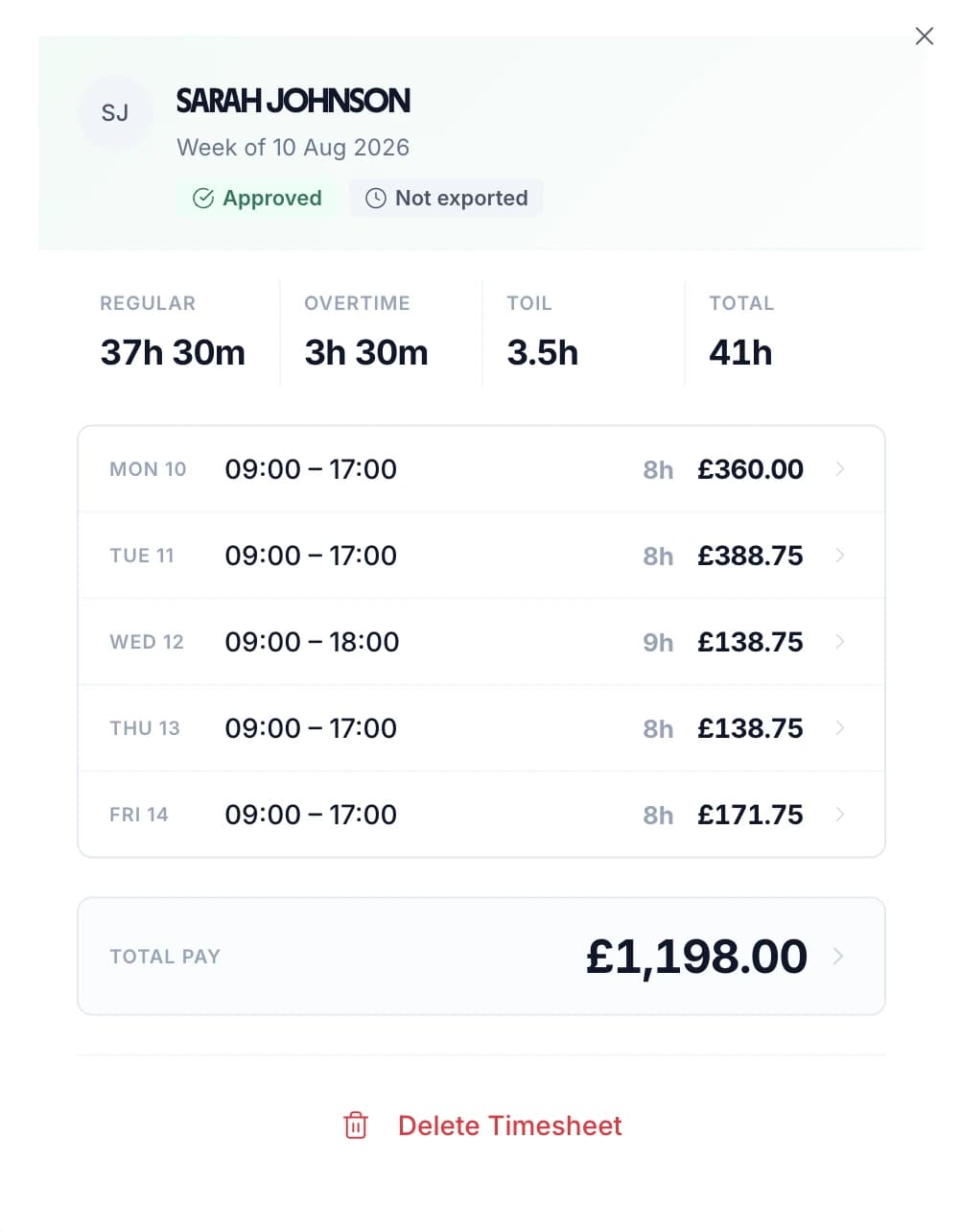
A week of approved hours in TimeTally, broken down day by day

The app is simple to use, reliable, and makes managing holidays, absences, and staff records straightforward. The system has saved us a significant amount of administration time.

CLI ManchesterJordan Ingoe, CLI Manchester

What Changes When Hours Stop Being Typed

None of this is about mistrust. It is about a timesheet that is evidence rather than a recollection — which is what you need when a pay query turns into a dispute months later.

"I definitely started at eight" — typed in on Friday, about Monday

Monday's start time is whatever the clock recorded on Monday morning

A forgotten clock-out quietly back-filled at the end of the week

Clock out now, or discard the shift. There is no third option

Hours nudged up ten minutes a day, invisible until you add up a year

Claim more than twenty minutes past what was clocked and the save is refused

A locked spreadsheet, unlocked by anyone who wants the password

Enforced in the database, so a hidden button is not the protection

Corrections made silently by whoever noticed first

Only a manager can correct an entry, deliberately, as an act of their own

Night shifts split across two days and counted wrong

Clock-ins pair with clock-outs across midnight and count as one block

What it does not do. Tamper-proof means the person being paid cannot change the number. It does not mean nobody can — a manager still can, and should be able to. It also does not stop somebody clocking in for a colleague: a clock event knows the account it came from, not who was holding the phone. If that is the worry, a GPS clock in app narrows it by requiring the tap to happen on site, and the two are designed to be used together.

How the hours are held to the clock

Four rules, all enforced by the database rather than by the interface. That distinction is the entire value of the feature: an interface can be worked around, and a constraint cannot.

The rule

Hours come from the clock, not the keyboard.

Start and end times are set at the moment somebody clocks in and clocks out. There is no field to type into, and no edit afterwards.

Every entry has to be backed by a real clock-out made in the last quarter of an hour. A timesheet line with no clock event behind it is not a timesheet line — it is a claim, and it is refused as one.
Twenty minutes

Strict, with enough slack to stay usable.

The hours claimed on an entry are measured against the time actually spent clocked in that day, paired clock-in to clock-out.

Twenty minutes of tolerance sits between the two, because clocking in is a human act and refusing a week over forty seconds of fumbling would make the feature unusable rather than strict.

Go past it and the save is refused with both numbers on screen — what was claimed, what was clocked. Nothing to argue about, because nothing is hidden.

Forgotten clock-outs

Close it now, or drop it. Nothing gets back-filled.

Everyone forgets eventually, and how a system handles that is what decides whether its records mean anything.

An employee gets two options: clock out now, which records the time as it really is, or discard the shift. Inventing a finish time on Friday for a Tuesday is not one of them.

If the true finish really was hours earlier, that is a correction, and corrections belong to a manager. The record shows what happened, including that somebody had to step in.

Managers

Accurate beats locked, every time.

Admins are exempt from the check on purpose. A system that cannot be corrected does not produce truthful records, it produces records nobody can fix — and then a spreadsheet appears beside it, which is worse than where you started.

Approving, submitting or reopening a timesheet never triggers any of this. The check only looks at entries whose hours actually changed, so ordinary week-end admin carries on untouched.

Everything then flows on as normal — approval, then payroll export. Nothing downstream knows or cares that the hours were locked.

Before You Switch It On

Everyone has to be clocking in and out

Strict clocking only applies when clocking in is the only way hours reach a timesheet. If your organisation also allows people to type their hours into a form, there is nothing to lock down — whatever the rule refuses, the form grants. TimeTally will offer to change the policy for you when you turn this on, and if the policy later moves away, the setting is shown as paused rather than quietly reported as protection you no longer have.

It is off until you turn it on

The default is off, and an organisation that never touches this setting behaves exactly as it always has: staff enter and edit their own hours as normal. Nothing about the timesheet, the approval flow or the payroll export changes for anyone who leaves it alone.

Individuals can be exempted

A per-person exemption exists for anyone who genuinely needs to enter their own hours — directors, contractors, anyone whose work does not fit a clock. It is writable by admins only, so it cannot become a self-service opt-out. Everyone not exempt is held to the clock; exempt people carry on as before.

It costs nothing

Strict clocking is included in the £3 per employee per month price, alongside clocking in, timesheets, approvals, overtime and leave. It is not an add-on and it does not require one. GPS clocking is the only paid extra on the platform, at £1 per employee per month, and this feature works perfectly well without it.

Why UK Employers Lock Their Timesheets

A timesheet is a legal record long before it is an admin task. What makes it useful in a dispute is not that it is neat, but that nobody with an interest in the answer could edit it.

  • Evidence that holds up

    Under the Working Time Regulations you have to keep adequate records of hours worked. Times set by the system carry weight a retyped spreadsheet never will — see our guide to UK working time compliance

  • Pay queries end quickly

    Most disagreements about a payslip are really disagreements about a start time. When the start time was recorded rather than remembered, the conversation is short

  • Small drift stops compounding

    Ten minutes a day is under an hour a week and a full working week a year, per person. It never looks like a problem on any single line, which is exactly why it survives

More on what the regulations actually require: UK working time compliance and timesheet approvals.

The Week Still Arrives As An Ordinary Timesheet

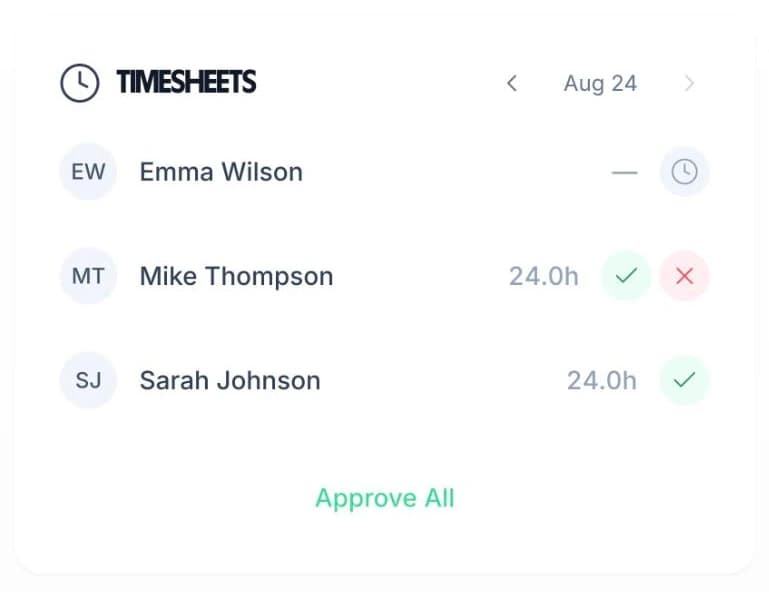
Locking the hours does not change what a manager gets on Monday morning. The same weekly view, the same day-by-day breakdown, the same one-tap approval. The only difference is that every figure in it was recorded rather than reported — so approving it is a check, not an act of faith.

Overtime, breaks and TOIL are all calculated from the same clock data, which means the totals reconcile with the times above them by construction rather than by anyone adding up.

Recorded, not reported Day-by-day breakdown One-tap approval Straight to payroll
Weekly hours in TimeTally with one-tap manager approval

In short

What are tamper-proof timesheets?

A tamper-proof timesheet is one where the hours come from the system rather than from the person being paid. With strict clocking switched on in TimeTally, start and finish times are set only by real clock-ins and clock-outs; staff cannot type a time or edit one afterwards, and a forgotten clock-out has to be closed now or discarded rather than back-filled later. Managers can still correct a genuine mistake. It needs no GPS and no location permission, individuals can be exempted, it is off by default, and it is included in the £3 per employee a month price.

Price
Included in the £3 plan
Hours from
Clock-ins and clock-outs only
Staff can edit
No
Managers can correct
Yes
Needs GPS
No

Tamper-Proof Timesheets — Frequently Asked Questions

What are tamper-proof timesheets?

A tamper-proof timesheet is one where the hours are recorded by the system rather than typed in by the person being paid for them. In TimeTally, switching on strict clocking means an employee's start and end times come only from real clock-ins and clock-outs. They cannot type a time, and they cannot edit one afterwards. The timesheet still looks and works the same — it is just no longer something anyone can write their own numbers into.

Can employees still edit their hours at all?

No. With strict clocking on, every route that would let an employee set their own hours is closed, and it is closed in the database rather than by hiding a button. That matters, because a hidden button is only hidden until someone opens developer tools. If the hours on an entry do not line up with what was actually clocked, the save is refused outright with an explanation of why.

So the timesheet can never be corrected?

It can, by a manager. Admins are deliberately exempt from the check so a genuine fault — a phone that died, a clock-out nobody made — can be put right. That is the difference between a record that is accurate and one that is merely locked. What has changed is who can make the correction: the person accountable for the hours, rather than the person being paid for them.

What happens if someone forgets to clock out?

They get two honest options and no third. They can clock out now, which records the time as it actually is, or they can discard the shift. What they cannot do is quietly back-fill a finish time at the end of the week, which is the single most common way an ordinary timesheet stops reflecting reality. If the real finish time genuinely was hours earlier, that is a correction — and corrections go through a manager.

Does this work without GPS?

Yes, and that is deliberate. Strict clocking needs no geofence, no work locations and no location permission from anybody. The two features answer different questions: GPS asks where somebody was, strict clocking asks who set the number. Tamper-proof hours for desk-based staff need no map at all. They do work well together, and turning on GPS clocking will offer to turn this on too.

How does it handle night shifts and shifts that cross midnight?

Clock-ins are paired with clock-outs by time rather than by calendar date, looking a day either side of the entry, so a shift that starts at 22:00 and ends at 06:00 is measured as one eight-hour block rather than two broken ones. Pairing also stops at the next event of the opposite kind, so an abandoned clock-in cannot silently pair with a clock-out from the following night.

Is the comparison exact to the minute?

There is a twenty-minute tolerance, and it exists on purpose. Clocking in is a human act with a few seconds of fumbling either side, and refusing a timesheet over a rounding difference would make the feature unusable rather than strict. Claim more than twenty minutes beyond what was actually clocked and the entry is refused, with both figures shown so there is nothing to argue about.

Can I exempt certain people?

Yes. There is a per-employee exemption, writable by admins only, for anyone who genuinely needs to enter their own hours — a director, a contractor, someone whose work does not fit a clock. Exempt employees carry on entering hours normally while everyone else is held to the clock. It is a per-person decision, not an all-or-nothing one.

Does it stop buddy punching?

No, and no software that reads a clock event honestly can claim otherwise — a colleague can still tap the button for someone who is not there. Strict clocking stops hours being invented at a keyboard, which is a different and much more common problem. Pairing it with a GPS clock in app narrows the gap further, because the clock-in then has to happen at the site as well.

How much does it cost?

Nothing extra. Strict clocking is included in the £3 per employee per month price along with clocking in, timesheets, approvals and leave. It is off by default, so nothing changes until you decide to turn it on. GPS clocking is the only paid extra, at £1 per employee per month, and this feature does not require it.

Still have a question? See all FAQs

Make This Week's Timesheets The Last Ones Anyone Types

Strict clocking is one switch, it is included in the price, and you can turn it off again just as easily.

Support that answers

A real person replies within 24 hours. No ticket queues, no bots.

UK GDPR compliant

A UK company, ICO regulated. Your data encrypted and never sold.