
Holiday tracking for UK teams of 5 to 200

Leave Management for UK Small Businesses

Purpose-built leave tracking for teams of 5–200. No spreadsheets, no complexity — just simple holiday and absence management that works from day one. Import your staff list from a CSV, set the allowance and the leave year, and your team can book from their phones the same afternoon. £3 per employee per month, with small business timesheets included at no extra cost.

5.0 on the App Store
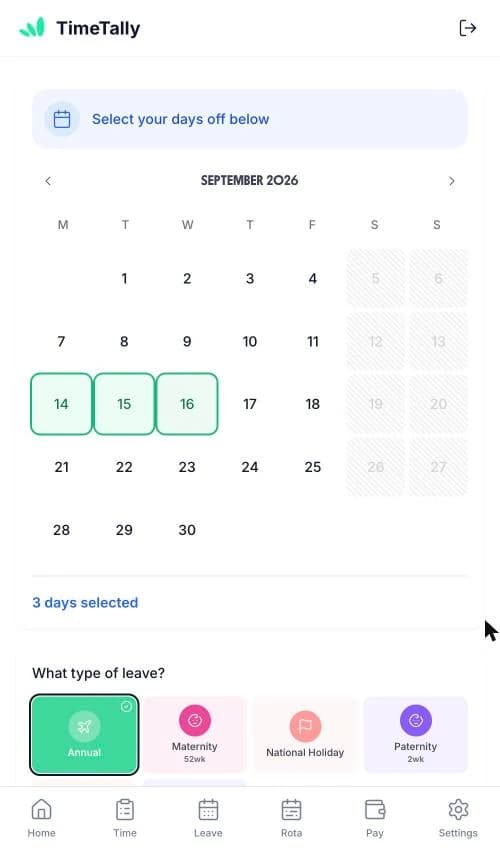
An employee selecting days off and a leave type on their phone

The app is simple to use, reliable, and makes managing holidays, absences, and staff records straightforward. The system has saved us a significant amount of administration time.

CLI ManchesterJordan Ingoe, CLI Manchester

Staff Book Their Own Time Off in a Few Taps

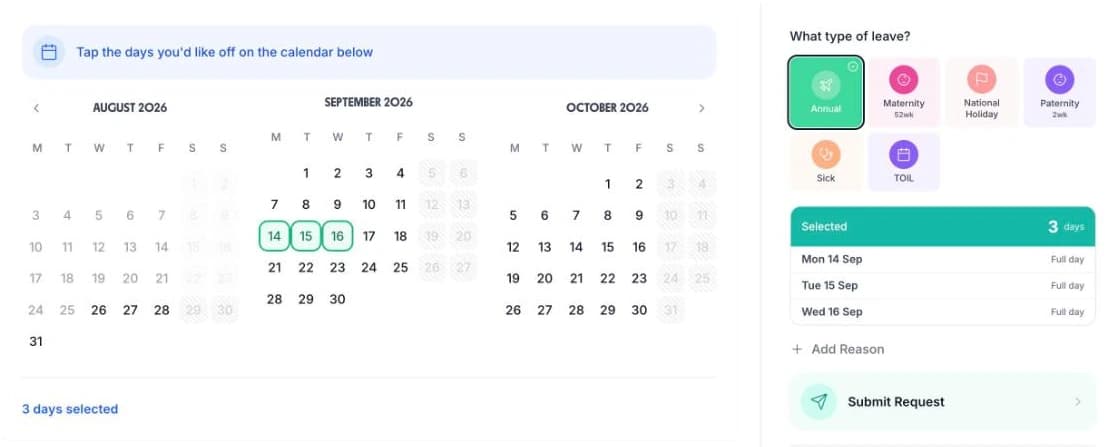
Nobody in a small business wants to keep the holiday spreadsheet. Staff pick their dates, choose the leave type and submit. Their remaining holiday balance is on the same screen and the request lands ready to approve. See how leave requests work end to end.

Booking time off in TimeTally: three months of dates, the leave type grid, and a submit button
  • Three months on one screen

    Staff see this month and the two after it without changing view

  • Tap the days you want

    Selected dates are counted as you go, and weekends are excluded

  • Pick the leave type

    Annual, sick, maternity, paternity, TOIL, or a type you added yourself

  • Add a reason, then submit

    The request reaches the manager with the dates and the type already on it

Approve Leave in Seconds, Not Days

When an employee submits a holiday request, TimeTally emails the manager straight away with a Review Request button. Pending requests sit in one list, each row showing who asked, the dates, how many days it comes to and which leave type it is. A tick approves it and a cross declines it. No more missed messages or verbal requests that get forgotten.

  • Approve from your phone or your laptop

    The notification email opens the leave queue in a browser, so an owner can clear it between jobs rather than waiting until they are back at a desk.
  • See the full picture before deciding

    Open a request to see the person, their job title, the leave type, the dates, the day count and any reason they wrote. The three-month team calendar sits on the same page, so you can check who else is already booked off.
  • Instant employee notification

    Employees receive an email the moment their request is approved or declined — no chasing, no uncertainty. A decline can carry a written reason, and they can resubmit without starting again.
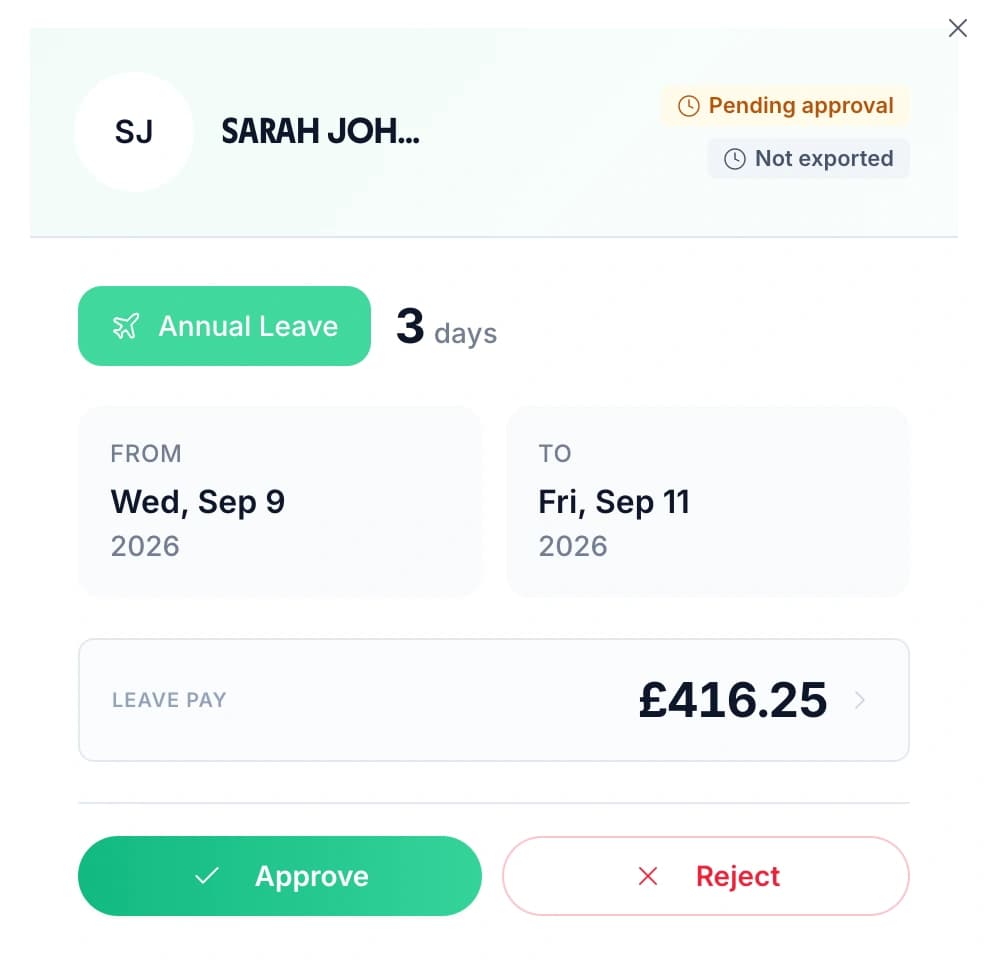
A business owner approving a three-day annual leave request, showing the dates, the leave pay and Approve and Reject buttons

Manage Leave from Anywhere

Small business owners don’t sit at a desk all day. With the TimeTally iOS app, you can approve requests, check team availability, and manage leave from anywhere.

  • Staff request leave from their phone

    No more texts or WhatsApp messages. Employees submit requests through the app — managers are notified instantly.
  • Team overview at a glance

    See all pending requests, who’s off this week, and current balances — without needing to be in the office.
  • Spot clashes before approving

    The team calendar sits on the same page as the pending requests, so you can see who is already booked off before you answer. TimeTally shows you the clash; it does not cap how many people can be off at once.
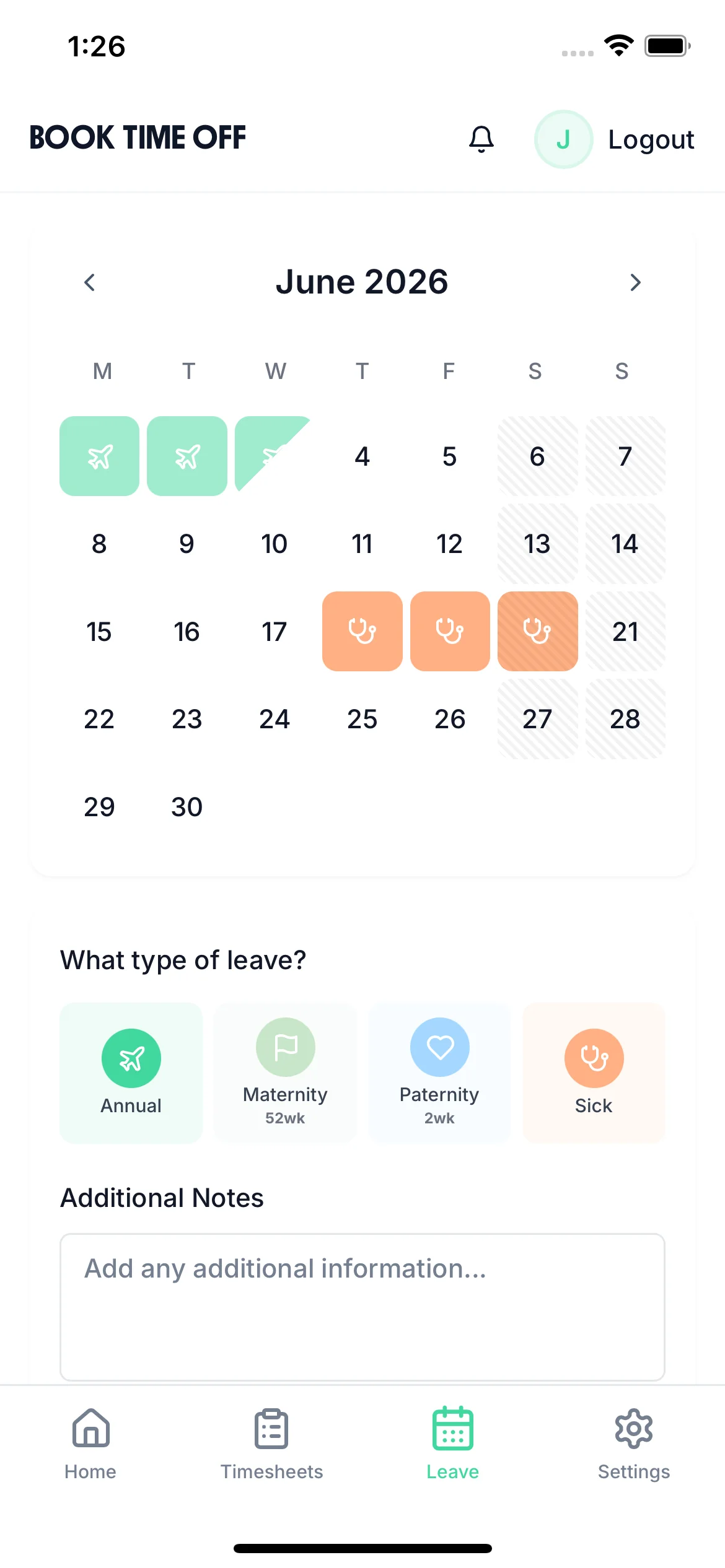
A member of staff picking days off and a leave type on their phone

Pro-Rata and UK Compliance, Built In

Stop manually calculating holiday entitlement. TimeTally automatically handles part-time workers, mid-year starters, and UK bank holiday rules — so every employee always gets the right allowance.

  • Part-time pro-rata

    You set the full-time allowance for your business — TimeTally starts at 25 days plus 8 bank holidays — and each person's share is worked out from their contracted hours. Somebody on three days a week gets three fifths of it. Check a figure with the pro-rata holiday calculator below.
  • Mid-year starters and leavers

    Employees who join partway through the leave year get the correct proportional entitlement calculated automatically from their start date, and a leaver's used and remaining days are on the record when you work out their final pay.
  • UK bank holidays handled

    Choose once, for the whole business, whether UK bank holidays sit inside the annual allowance or are added on top of it. TimeTally blocks them out automatically using the right set for England and Wales, Scotland or Northern Ireland, and you can turn that off.
  • Accrual set per person, not per company

    Upfront for a salaried manager, monthly or daily for a contracted supervisor, or hours worked at 12.07% for someone on irregular hours, whose leave builds up as their timesheets are approved. All of them sit on one staff list. Use the zero-hours holiday calculator to check an irregular-hours figure by hand.
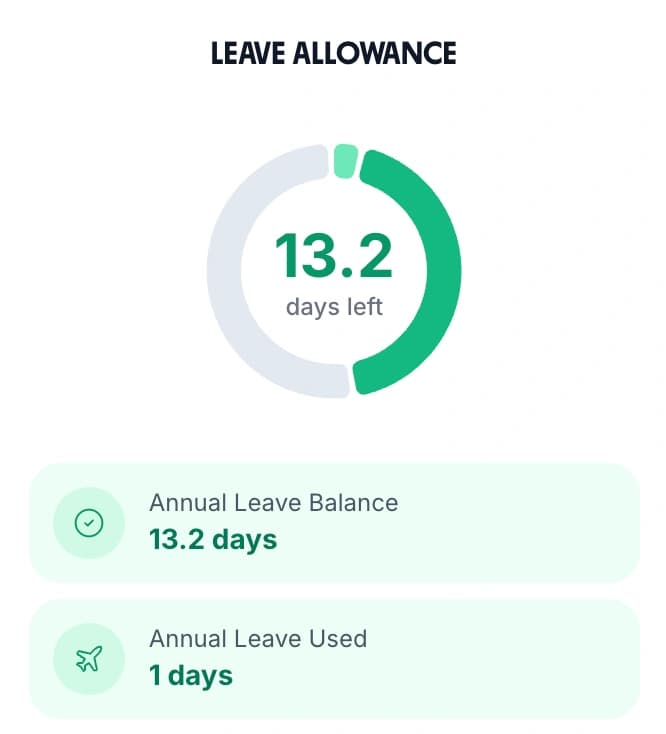
An employee's leave allowance card showing the days left, the annual leave balance and the days already used

See Your Whole Team’s Leave at a Glance

One calendar view shows who’s off, who’s requested time off, and where you might have cover gaps. No more guessing or checking a shared spreadsheet.

  • Spot clashes before they happen

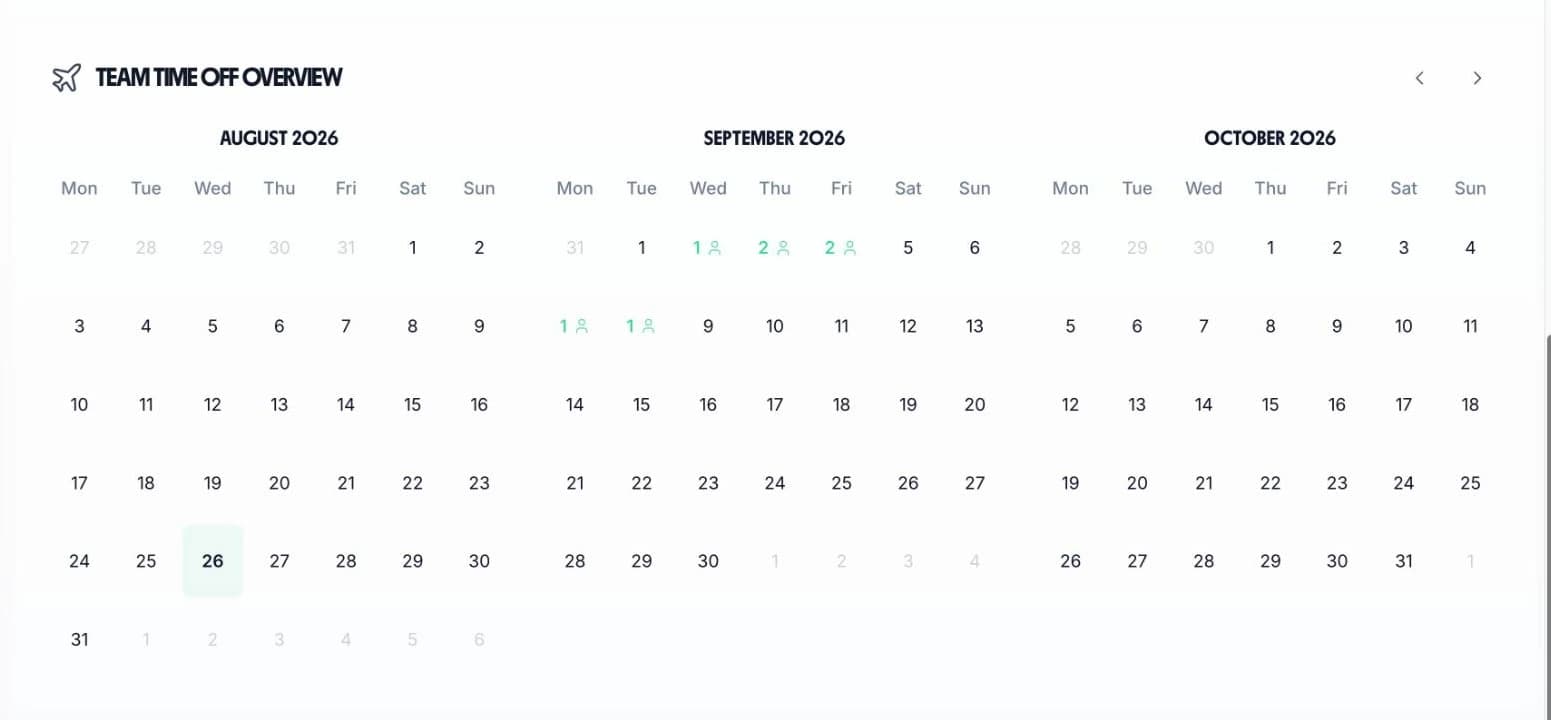
    Approved and pending leave are both drawn on the calendar, so you can see that two people have asked for the same week before you answer either of them
  • Plan cover weeks ahead

    Managers see the full leave picture well in advance so the right people are always available
  • All leave types colour-coded

    Holiday, sick leave, TOIL, and other types are shown in different colours so the calendar is easy to read
  • Book a shutdown week for everyone at once

    Pick the dates, tick every employee, and TimeTally books the lot as already approved. Non-working days cost nothing, and anyone short of allowance is named and skipped rather than pushed negative
Three month team calendar showing how many staff are booked off on each day

Every leave scenario a small business has to handle

Tap a card to read the detail.

Start your free trial

14-day free trial · No credit card needed

The Whole Process, Start to Finish, in Thirty Seconds

A short loop of the real screens. An employee taps three days in August, chooses Annual Leave and sends the request. It arrives in the manager's time-off queue, opens for the detail, and is approved. That is the entire workflow a small business needs.

Back

Book Time Off

Jul 2026

MTWTFSS12345678910111213141516171819202122232425262728293031

Aug 2026

MTWTFSS12345678910111213141516171819202122232425262728293031

Sep 2026

MTWTFSS123456789101112131415161718192021222324252627282930

3 days selected· excl. weekends

Family holiday, flights booked ✈️

Submit Request
Submitted

Leave Allowance

18

days left

Annual Leave Balance

18 days

Annual Leave Used

7 days

All Departments
Jun 2026
M
T
W
T
F
S
S
M
T
W
T
F
S
S
M
T
W
T
F
S
S
M
T
W
T
F
S
S
M
T
AR1

Amelia Roberts

Kitchen

JK2

James Kelly

Front of house

MP3

Maya Patel

Front of house

PS4

Priya Shah

Kitchen

TW5

Tom Wilson

Bar

Timesheet Requests

1
TW

Tom Wilson

37h 30m · Week of Jun 1

Time-off Requests

2
MP

Maya Patel

3d · Annual Leave

PS

Priya Shah

5d · Annual Leave

MP

Maya Patel

Front of house

Pending Approved
Annual Leave
3days

From

Thu, Aug 14

2026

To

Mon, Aug 18

2026

Notes

Family holiday, flights booked

Approve Approved
Reject

Getting Off the Spreadsheet Takes an Afternoon

Most of TimeTally works out of the box. These are the two jobs worth doing properly on the day you switch, and neither needs an HR department or an IT department.

Getting started

Import the staff list you already keep in a spreadsheet.

Upload a CSV with a name column and an optional email column. The header row can name them in any order, and if there is no header TimeTally takes the first column as the name and the second as the email. Blank rows, malformed addresses and duplicates are flagged on screen before anybody is created.

The setup wizard then walks through the leave year, the yearly entitlement, the accrual method, the leave policies and the notification settings in that order. At the end you choose between a demo organisation seeded with sample employees and jumping straight into your own.

Switching partway through a leave year is the awkward case, and it is handled: a manager can adjust any employee's balance by hand, so the days somebody has already taken this year carry across from the old planner without recreating a single booking.

Where a holiday spreadsheet stops working

Leave year and policies

Set your leave year, then decide what carries over.

The leave year runs January to December unless you change it. Set any reset date you like and the new year starts the day after it, which suits a business running April to April.

Carryover is off by default. Turn it on and you can cap the number of days that carry, and set an expiry so carried days are used in the first quiet weeks of the year rather than saved for August.

Negative balances are off by default too. Turn them on, with a limit, for the new starter who joins in November and has a week booked at Christmas before they have earned it.

How leave years, carryover and balances work

UK compliance

Everything a Small Business Needs

One tool replaces the spreadsheet, the WhatsApp group, and whatever else you’ve been patching together. Here is what it covers, and what it leaves to your payroll.

Set up in minutes

Add your team, set entitlements and working patterns, and go live. No IT department needed — most businesses are tracking leave within an hour. The setup wizard covers the leave year, the yearly entitlement, the accrual method and the leave policies in order, and you can upload the whole staff list as a CSV instead of typing it in.

All UK leave types included

Annual leave, sick leave, TOIL, compassionate leave, and maternity and paternity leave — all tracked separately with their own balances. Add your own types on top with any name, and set each one as paid or unpaid and as deducting from the annual balance or holding its own.

Carryover policies

Set maximum carryover days and expiry dates. Balances reset automatically at year end — no manual adjustments needed. Carryover is off until you switch it on, and the same is true of letting somebody book past a zero balance, which has its own limit.

Timesheets included

Get timesheet management and leave tracking in one tool. No need to pay for two separate systems, and no second bill: hours, leave and the rota all sit in the same £3 per employee per month.

UK compliance built in

Every UK worker is entitled to 5.6 weeks of paid holiday, which is 28 days on a five-day week. You set the full-time allowance for your business — TimeTally starts at 25 days plus 8 bank holidays — and it works out every part-time share and every mid-year start date from that figure. The Working Time Regulations guide covers the rules behind it.

Payroll exports

Export approved leave data via CSV or sync directly with Xero and QuickBooks — no manual reconciliation. Approved paid leave goes into the same journal as the approved hours, and days already exported are marked so nothing is sent twice.

What TimeTally does not do

It does not calculate holiday pay from a 52-week average of earnings, and it does not pay Statutory Sick Pay — both are payroll jobs. Use the statutory sick pay calculator to check an SSP figure. It does not chase anyone automatically either: there is no scheduled reminder, only a manual nudge you send to one person. And there are two access levels, admin and employee, with nothing in between, so anyone you make an admin sees the whole business's leave.

Simple, Transparent Pricing

One price. Every feature. No surprises.

£3/employee/month

Billed monthly, incl. VAT. Cancel anytime.

10 employees = £30/month • 50 employees = £150/month

Holiday tracking & leave management
Pro-rata and bank holiday calculations
All leave types (sick, TOIL, maternity, etc.)
Carryover policy management
One-click manager approvals
Team calendar overview
iOS app for staff and managers
Timesheet management included
Xero and QuickBooks export
Approval-only managers are not billed
Get Started

No credit card required

In short

What is leave management software for a small business?

Leave management software for a small business records who has booked time off, how much holiday each person has left, and who is already off before a manager approves the next request. TimeTally does this for UK businesses with 5 to 200 staff from £3 per employee per month. You import the team from a CSV, set the allowance and the leave year, and staff book from the iOS app or any browser in hours, half days or full days. Managers approve or decline in one tap, with a written reason on anything sent back, and the employee is emailed either way. Entitlement is pro-rated automatically for part-time patterns and mid-year starters, and the accrual method is set per person rather than per company. Bank holidays block out for England and Wales, Scotland or Northern Ireland. Timesheets and the rota are included in the same price.

Price
£3 per employee a month
Team size
5 to 200 employees
Setup
CSV import, live in an hour
Booking
iOS app or any browser
Includes
Timesheets and rota at no extra cost

Frequently Asked Questions

How quickly can I set up leave management for my small business?

Most small businesses are fully set up within an hour. Add your employees, set their entitlements and working patterns, and you're ready to start managing leave. The setup wizard walks you through the leave year, the yearly entitlement, the accrual method and the leave policies in order, and you can import your whole staff list from a CSV of names and email addresses. No IT support needed — if you can use email, you can set up TimeTally.

What size team is TimeTally designed for?

TimeTally works brilliantly for businesses with 5 to 200 employees. Whether you're a small shop with 5 staff or a growing company with 150, the system scales with you. Add or remove employees anytime without changing your plan.

How much does leave management software for a small business cost?

TimeTally is £3 per employee per month, billed monthly and including VAT. A business with 10 staff pays £30 a month and a business with 50 staff pays £150 a month. There are no setup fees, no minimum contract and no tiers. Managers who only approve leave and timesheets, without ever submitting their own, are not billed at all. Timesheet tracking and rota planning are included in the same price, and there is a 14-day free trial.

Does TimeTally handle UK holiday entitlement correctly?

TimeTally is built for UK businesses. Every UK worker is entitled to 5.6 weeks of paid holiday, which is 28 days for someone on a five-day week. You set the full-time allowance for your business — TimeTally starts at 25 days plus 8 bank holidays and an admin can change either figure — and TimeTally then works out each person's share of it from their working pattern and their start date. Bank holidays block out automatically for England and Wales, Scotland or Northern Ireland, and you choose for the whole organisation whether they sit inside the allowance or on top of it.

What HR software helps a small UK business manage holiday pay accruals for part-time staff?

TimeTally does the accrual side of it. Set an accrual method for each person rather than for the whole company: upfront gives a salaried employee their full allowance on day one, monthly and daily build it up through the year, and hours worked earns leave at a rate you set — 12.07% by default — every time one of their timesheets is approved. That last method is the one for irregular-hours staff under the rules that apply to leave years starting on or after 1 April 2024. Part-time staff on a fixed pattern are handled by contracted hours per day of the week instead, which pro-rates the allowance without any manual maths. What TimeTally does not do is calculate holiday pay from a 52-week average of earnings — that is a payroll calculation and stays with your payroll. Use the pro-rata holiday calculator or the zero-hours holiday calculator to check a figure by hand.

Can I track sick leave and other absence types?

Absolutely. TimeTally lets you create unlimited custom leave types — sick leave, TOIL, compassionate leave, unpaid leave, and anything else your business needs. For each type you set its name, its colour and its icon, whether it is paid or unpaid, and whether it comes off the annual leave balance or sits in its own pot.

Is timesheet tracking included or does it cost extra?

Timesheet tracking is included in the standard £3/employee/month price. You get timesheet management, leave tracking, and scheduling all in one tool — no need to pay for separate systems.

Can I replace my spreadsheet with TimeTally?

That's exactly what TimeTally is designed for. Add your employees, configure their entitlements, and TimeTally takes over the calculations, tracking, and record-keeping you've been doing manually. Most businesses save several hours per week. You can paste or upload your existing staff list as a CSV — a name column and an optional email column, in any order — and TimeTally flags duplicates and invalid addresses before it creates anybody. If you are switching partway through a leave year, a manager can adjust each person's balance by hand so the figures carry across from the old planner.

Is there a free staff leave planner Excel template I can download instead?

A spreadsheet planner works while you have a handful of people and one person maintaining it. It stops working when two people book the same week, when somebody joins in September, or when you need to prove what was approved a year later. Our comparison of TimeTally and Excel sets out where the spreadsheet breaks down. If what you actually need is a written policy rather than a planner, the annual leave policy template is free and covers the leave year, notice periods, carryover and bank holidays.

What should a paid time off policy for a small business cover?

At a minimum: when your leave year starts and ends, the full-time allowance and how it is pro-rated for part-time staff, whether bank holidays are inside that allowance or added on top, how much notice somebody has to give, who approves requests, and what happens to unused days at year end. TimeTally holds each of those as a setting rather than as a paragraph nobody reads, so the policy and the software say the same thing. Our free annual leave policy template gives you the wording to start from.

How do I handle unpaid time off in a small business?

Create a leave type, mark it unpaid, and give it its own pot rather than deducting from annual leave. Staff request it the same way they request holiday and it shows on the team calendar in its own colour, so a fortnight of unpaid leave is visible for cover planning without quietly reducing anyone's paid entitlement. There is no statutory right to general unpaid leave in the UK, so what you grant and on what terms is your policy to set — write it down and keep the record.

Can employees see their own holiday balance?

Yes. Every employee gets their own dashboard showing remaining holiday balance, pending requests, and upcoming approved leave. They also see a projected balance once the days they have already booked are taken off. This eliminates the most common question managers hear: 'How many days do I have left?'

Does TimeTally support leave carryover?

Yes. Carryover is off by default. Turn it on for your organisation and you can cap the maximum number of days that carry into the next leave year, and set an expiry so carried-over days have to be used within a set number of days after the year starts. TimeTally applies the rules automatically at the start of each new leave year.

Is there a simple leave management system for a small business?

Yes. TimeTally is a leave management system for small business teams of roughly 5 to 200 people, at £3 per employee per month. Simple leave tracking is the whole point: staff book from a three-month calendar, a manager approves, and the balance updates. There is no HR module to configure and no minimum contract.

Do you have a paid time off policy for a small business, or an unpaid time off policy?

TimeTally holds whatever policy you set rather than imposing one. A paid time off policy for small business teams usually starts with an annual allowance — the default is 25 days plus 8 bank holidays — and let it accrue upfront, monthly or daily. An unpaid time off policy for small business staff is handled as a custom leave type marked unpaid, so the days are recorded and reported without touching the paid balance. Absence tracking covers both from the same screen.

Still have a question? See all FAQs

Leave Management by Sector

The settings that matter change with the trade. Each of these covers the accrual, cover and bank holiday rules that particular industry runs into.

Your Team Deserves Better Than a Spreadsheet

Join UK small businesses that switched from spreadsheets to simple, proper leave management — in less than an hour.

No credit card required · Free 14-day trial · Cancel anytime