Track TOIL accrual, requests, and balances digitally. Employees earn time off in lieu when they work overtime, request it like annual leave, and managers approve with full team visibility.
No more spreadsheets, informal agreements, or disputed balances. TimeTally gives every employee and manager an accurate, real-time record of TOIL entitlements and bookings.
Tap any card for the detail.
14-day free trial · No credit card needed
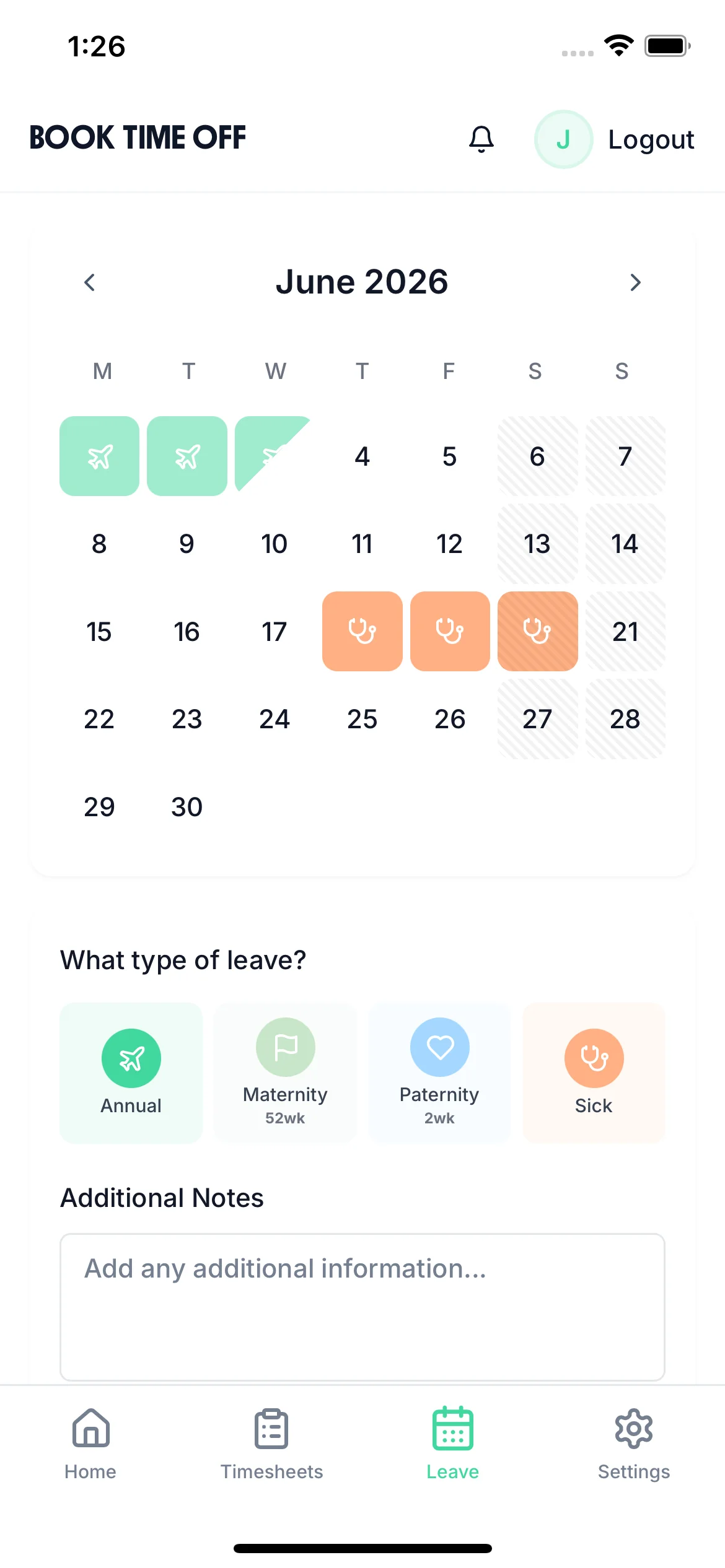
Once TOIL is accrued, employees submit requests through the TimeTally app — selecting dates, seeing their available balance, and submitting for manager approval. The same familiar flow as booking annual leave. Rota coverage and leave management are visible to managers in the same view.
Request from any device
iOS app or web browser — employees submit TOIL requests wherever they are
Live balance shown at request
Employees see exactly how much TOIL they have before choosing dates
Manager approval with team view
Managers check who else is off before approving — maintaining adequate cover
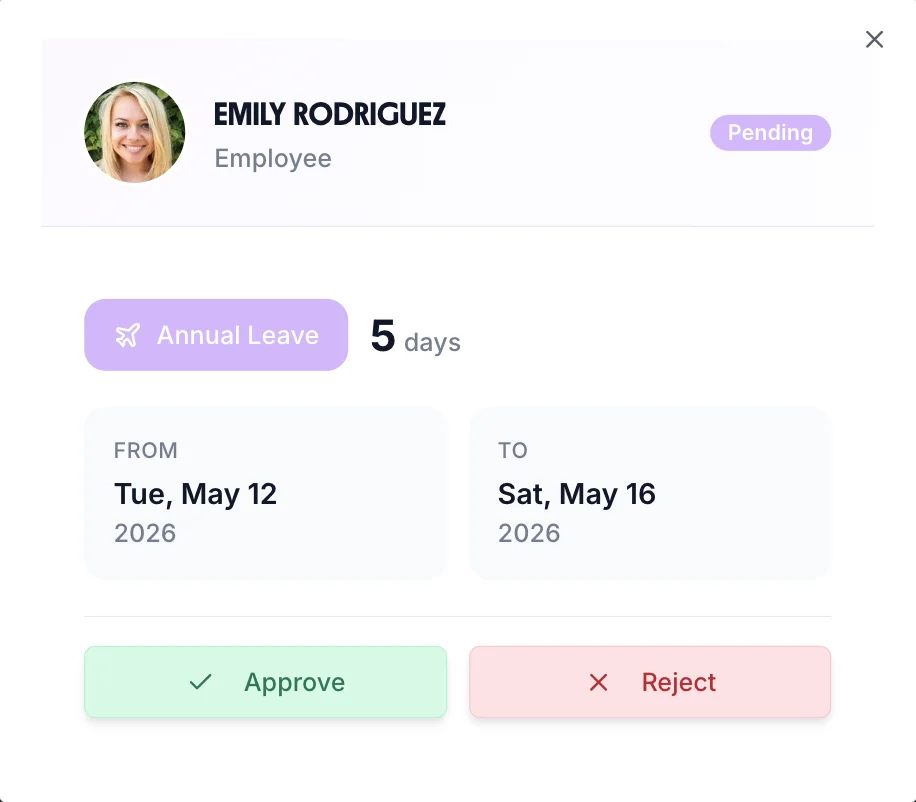
TOIL bookings appear alongside annual leave and sick leave on the team calendar. Managers always know who's off and why — and can check cover before approving more requests. Approved hours export directly to payroll without manual data entry.
No switching between systems — all absence in one calendar view
Every employee's TOIL balance is always up to date — no manual calculations
Every TOIL accrual and request is permanently recorded — no disputes about balances

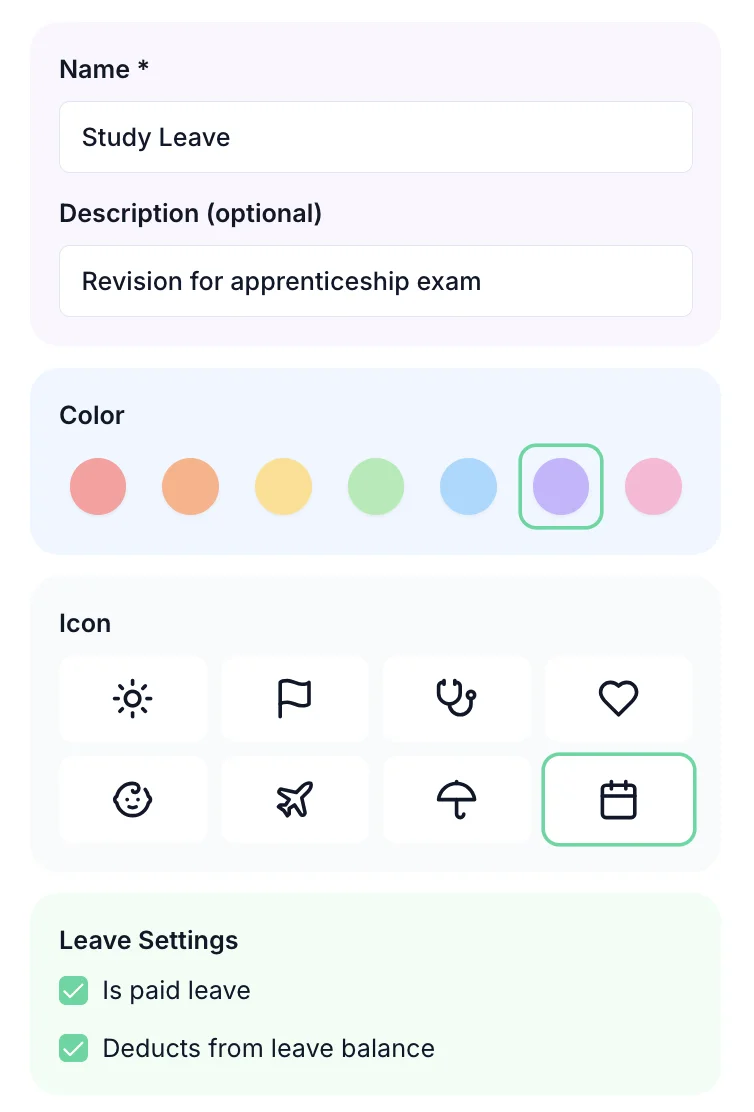
Set your accrual rate (e.g. 1:1 or 1.5:1), maximum balance cap, and expiry period. Create multiple TOIL types for different overtime scenarios — each with its own rate, colour, and expiry rules.
Also track paid overtime separately from TOIL — both managed within the same timesheet system.
TOIL explained
What TOIL is, how it is calculated, how it compares to paying overtime, and the policy decisions worth settling in writing.
Time off in lieu — usually shortened to TOIL, and sometimes called a day in lieu or lieu leave — is paid time off granted to an employee in exchange for extra hours they have already worked, instead of paying them overtime. An employee who works four hours beyond their contracted week might take those four hours back as time off on an agreed later date.
There is no statutory right to TOIL in UK employment law. It exists only where an employer offers it, which means it has to be written into the employment contract or a standalone TOIL policy. Without that written basis, an employee working additional hours has no automatic entitlement to take the time back — and equally, an employer cannot force TOIL on someone in place of contractual overtime pay.
TOIL is also entirely separate from statutory annual leave. The 5.6 weeks of statutory holiday every UK worker is entitled to cannot be reduced or substituted by TOIL, and TOIL balances sit alongside holiday balances rather than inside them.
TOIL accrues at whatever rate your policy specifies. The most common arrangement is 1:1 — one hour of extra work earns one hour off. Some employers mirror their overtime premiums instead, accruing at 1.5:1 for weekend or unsocial hours so that six hours worked on a Saturday earns nine hours of TOIL.
Worked example
An employee contracted to 37.5 hours works 43 hours in a week — 5.5 extra hours.
The complication is rarely the arithmetic — it is keeping a running balance accurate across a whole team as hours are earned, approved, taken and expired. You can work single figures out with our free TOIL calculator, or read the full UK guide to TOIL for the wider rules.
Both compensate the same extra hours; they differ in what the employee receives and what the employer carries on its books.
| Time off in lieu | Overtime pay | |
|---|---|---|
| Employee receives | Paid time off at a later date | Additional pay in the next payroll run |
| Cost to employer | No immediate cash cost; carried as a liability | Immediate cash cost |
| Statutory right | None — contractual only | None, unless in the contract |
| On termination | Unused balance usually paid out | Already settled |
| Main risk | Balances build up and go untaken | Costs rise during busy periods |
Most employers start with a TOIL spreadsheet or a paper TOIL form, and it works while the team is small. It stops working for predictable reasons: the sheet records hours earned far more reliably than hours taken, so balances drift upward. Nobody notices when TOIL passes its expiry date. Two managers approve time off against the same balance. And when someone disputes what they are owed, there is no audit trail showing who approved which hours and when.
By the time a balance is questioned, the evidence needed to settle it usually no longer exists. If you would rather formalise your policy first, start from our free TOIL policy template.
Eight decisions worth settling in writing before TOIL becomes a source of disputes.
TOIL accrues on extra hours worked beyond an employee's contracted hours. Some employers only count hours worked above a minimum threshold. The definition of what qualifies must be set out clearly in the TOIL policy.
Best practice is to obtain prior manager approval before extra hours are worked. Retrospective approval creates disputes about whether the additional hours were authorised in the first place and whether TOIL is actually owed.
Employers should cap the maximum TOIL an employee can accumulate — for example, 2 days — to prevent large balance liabilities. Setting expiry dates ensures time off is taken promptly rather than accruing indefinitely.
There is no statutory right to TOIL instead of overtime pay — it is purely a contractual arrangement. Employers can choose to offer TOIL, overtime pay, or give employees the option to choose between the two.
TOIL is separate from statutory annual leave. Employers should define whether unused TOIL carries over at the end of the leave year or expires. There is no statutory obligation to carry TOIL over into the next year.
If an employee leaves with unused TOIL, whether it must be paid out depends on the contract wording. Good practice — and often the legally safest approach — is to pay out any outstanding TOIL balance on termination.
TOIL accrues on hours worked above contracted hours. For zero-hours workers, the policy must define what constitutes 'normal' hours before TOIL can begin to accrue — otherwise disputes about entitlement are likely.
Maintain a running TOIL balance for each employee showing when TOIL was earned, approved, and taken. Accurate records protect both employer and employee in the event of a dispute about hours worked or balances owed.
Swipe for more →
Where time off in lieu is most common, and what tends to go wrong in each sector.
Long site days and weather-driven schedules mean hours swing week to week. TOIL is often preferred to overtime pay on fixed-price contracts, but hours logged on site rarely make it back to the office the same week — so balances are reconstructed from memory weeks later.
Shift overruns at handover are routine and rarely planned. Because cover is legally required, taking TOIL back is harder than earning it, so balances build faster than they are used and become a significant liability across a large rota.
Late finishes, event work and seasonal peaks generate extra hours in bursts. High staff turnover makes accurate balances essential — unused TOIL is usually payable on termination, and disputes surface exactly when someone is leaving.
Production overruns and shift extensions are common, often with premium rates attached. Where TOIL accrues at 1.5:1 to mirror an overtime premium, manual tracking errors compound quickly across a large workforce.
Stocktakes, deliveries and trading peaks push staff past contracted hours. With many part-time contracts, the accrual baseline differs per employee — the detail most spreadsheets get wrong.
Late reliefs and covering an absent guard mean unplanned extra hours are the norm. Lone or remote working makes an auditable record of who approved which hours particularly important when a balance is challenged.
Whatever the sector, the failure mode is the same: hours earned get recorded, hours taken do not, and nobody can prove what was approved. See how overtime tracking and TOIL work together in one timesheet.
One price. Every feature. No surprises.
Time off in lieu (TOIL) is compensatory time off given to employees who work beyond their contracted hours instead of, or in addition to, overtime pay. Under UK employment law, there is no statutory right to TOIL — it must be agreed in the employment contract or a workplace policy. When agreed, employees accrue TOIL at a set rate (e.g. 1:1) and can take it as time off at a later agreed date.
Employees log their actual hours in TimeTally's timesheet. When hours exceed their contracted amount, the excess can be submitted for TOIL accrual by the employee or manager. Once approved, the TOIL hours are added to the employee's TOIL balance automatically.
Yes. Employees submit TOIL requests through the same request flow as annual leave — they select the dates, the system shows their available TOIL balance, and the manager approves or declines. TOIL bookings appear on the team calendar alongside annual leave.
Yes. Your TOIL policy settings let you define a maximum balance cap — for example, employees can hold a maximum of 40 hours TOIL. You can also set an expiry period, so TOIL must be taken within a set number of months of being accrued.
TimeTally is a leave and timesheet management system, not a payroll system. However, you can export employee hours and TOIL data in CSV format, or integrate directly with Xero and QuickBooks for payroll processing. Your payroll provider handles how TOIL appears on payslips.
Outstanding TOIL balances at the point of employment termination are a liability — they are typically paid out as additional wages, calculated using the employee's daily rate. TimeTally's accurate balance records make this calculation straightforward at the point of departure.
No. There is no statutory right to time off in lieu under UK employment law. TOIL exists only where an employer chooses to offer it, and it must be set out in the employment contract or a written TOIL policy to be enforceable. Equally, an employer cannot impose TOIL in place of overtime pay if the contract entitles the employee to be paid for additional hours.
Yes, unless your contract or your employer's TOIL policy gives you a contractual right to it. Because TOIL is not a statutory entitlement, an employer can decline to offer it at all, or can approve TOIL accrual while still controlling when it is taken — in the same way annual leave requests can be declined for business reasons. Where a written policy does exist, the employer must follow it consistently.
It expires only if your policy says so. Many UK employers set an expiry window — commonly three to six months from the date the hours were worked — to stop balances building up indefinitely and to encourage staff to take the time back while cover is easier to arrange. Without a stated expiry, TOIL generally continues to accrue and remains owed to the employee.
Both compensate for hours worked beyond contracted hours. Overtime pay settles the debt in cash in the next payroll run. TOIL settles it in time off at a later date, which means no immediate cash cost to the employer but an ongoing liability on the books until the time is taken. Neither is a statutory right in the UK — both depend on what the contract says.
TOIL accrues on hours worked above contracted hours, so the policy has to define what 'normal' hours are before accrual can begin. That is straightforward for part-time staff with fixed contracted hours. For zero-hours workers there is no baseline by default, so the policy must set one explicitly — otherwise disputes about when TOIL starts accruing are very likely.
No. TOIL is entirely separate from the 5.6 weeks of statutory annual leave every UK worker is entitled to. TOIL cannot be used to reduce or substitute statutory holiday, and taking TOIL does not draw down the annual leave balance. In TimeTally the two are tracked as separate balances so they can never be confused.
Still have a question? See all FAQs
A real person replies within 24 hours. No ticket queues, no bots.
A UK company, ICO regulated. Your data encrypted and never sold.
