
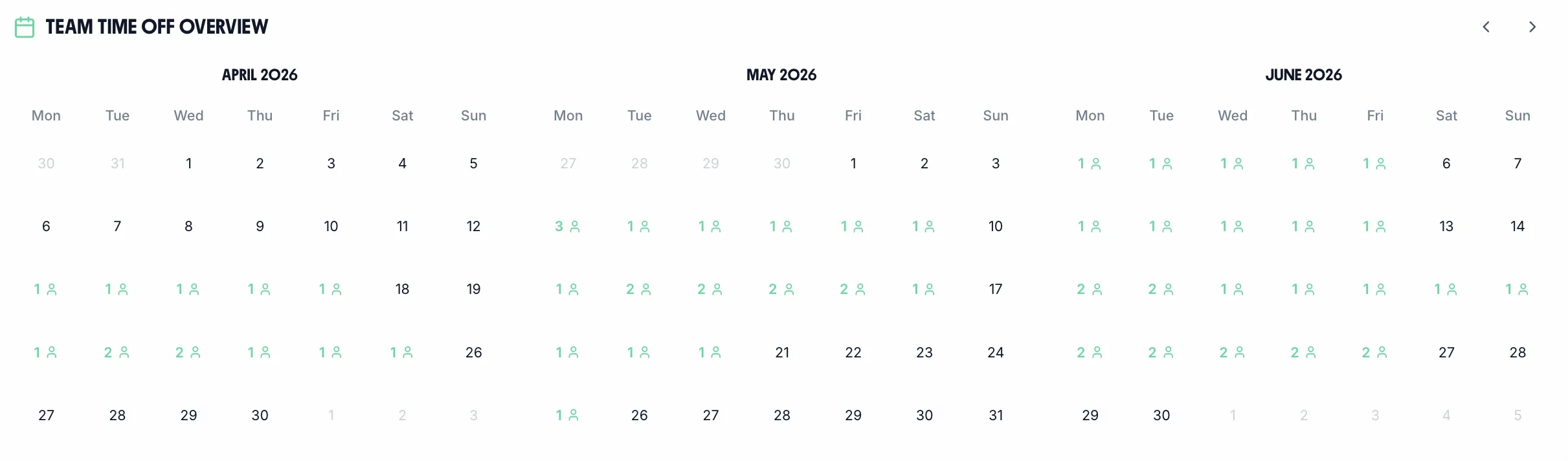
Team calendar overview
The team calendar shows all approved leave, pending requests, and bank holidays in one view. Plan coverage, spot clashes, and ensure you're never caught short.
Bank holidaysClash detectionCoverage planningDepartment filter

Track annual leave, sick leave, TOIL, maternity & paternity, and more — all in one place.
“TimeTally has been excellent for our business… makes managing holidays, absences, and staff records straightforward… gives both managers and employees clear visibility of leave balances and requests.”
 Jordan IngoeCLI Manchester
Tap a card to read the detail.
14-day free trial · No credit card needed
From request to payroll export in four steps.
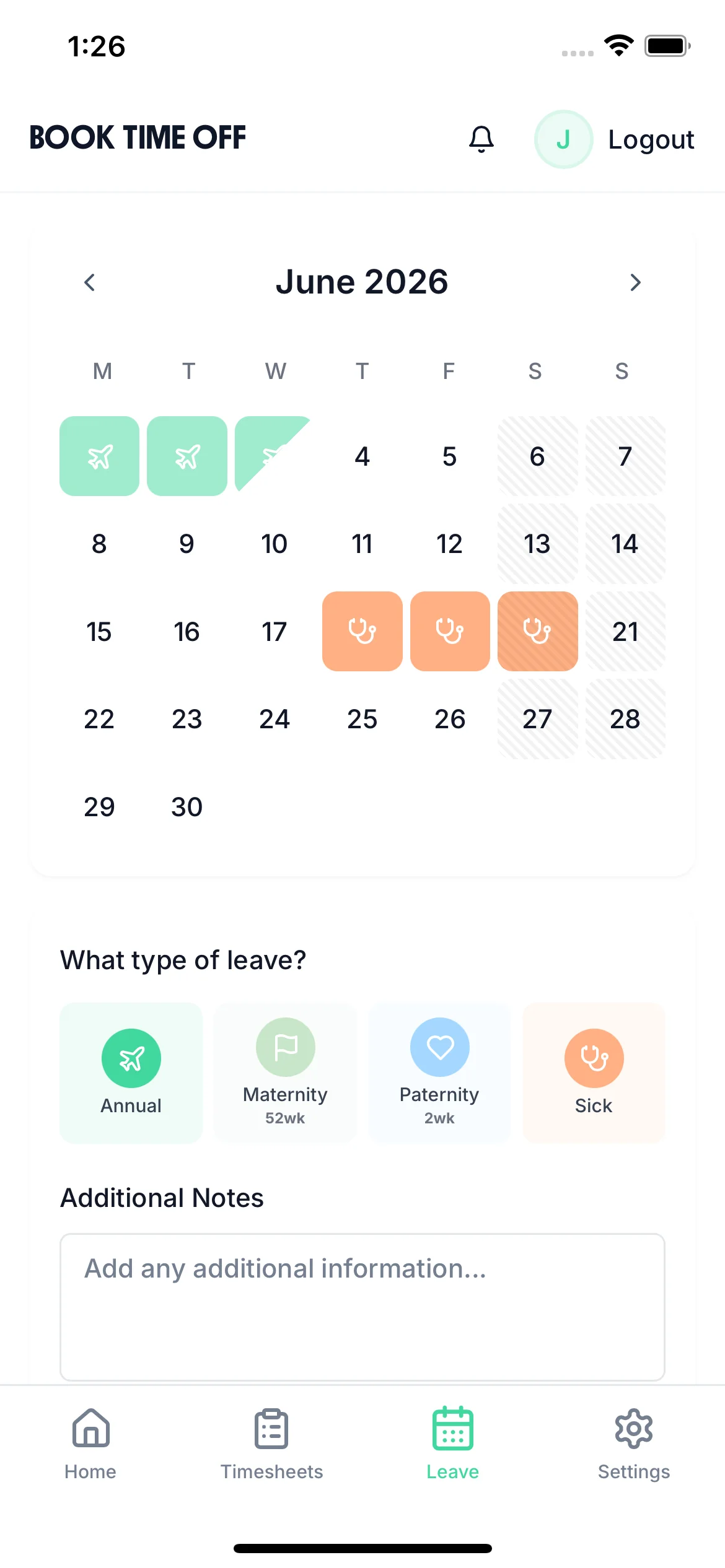
Employee picks a leave type, selects dates, and submits in under 30 seconds.
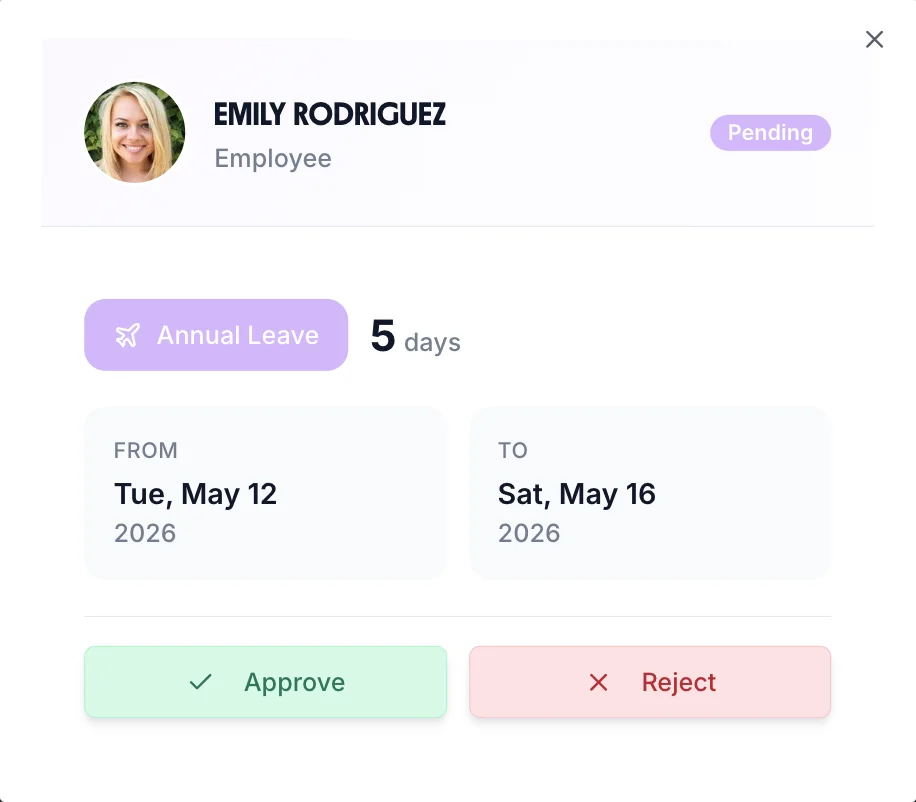
Manager gets notified and approves with one tap — with full visibility of the team calendar.
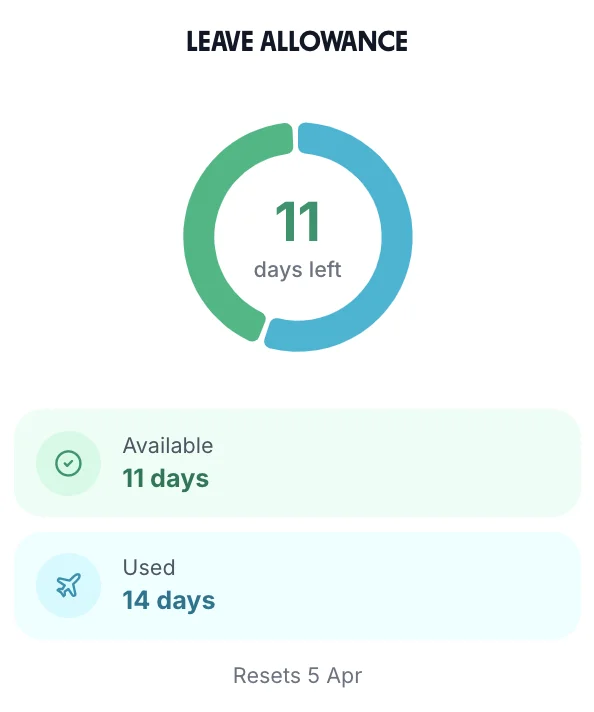
Balances update automatically. Entitlement, taken, and remaining days are always accurate.
At month end, export approved leave to Xero, QuickBooks, or CSV in one click.
Employees request time off in seconds — no forms, no emails, no chasing managers
The team calendar shows all approved leave, pending requests, and bank holidays in one view. Plan coverage, spot clashes, and ensure you're never caught short. Part of TimeTally's complete holiday management software — combine with our employee scheduling tools for full workforce planning.
The team calendar shows all approved leave, pending requests, and bank holidays in one view. Plan coverage, spot clashes, and ensure you're never caught short.
Employees submit leave requests online. Managers get notified instantly and approve or reject with one tap — no more email chains or paper forms getting lost. Works seamlessly with our timesheet approval software.
The "Who's Off" widget gives managers instant visibility into upcoming absences. No more surprises — know exactly who's available before planning meetings, approving requests, or scheduling shifts.

From annual leave to TOIL to compassionate leave — every absence type tracked with full UK compliance built in.
No more asking managers how many days are left. Every employee has a live view of their entitlement, days taken, and remaining balance — updated automatically every time leave is approved.
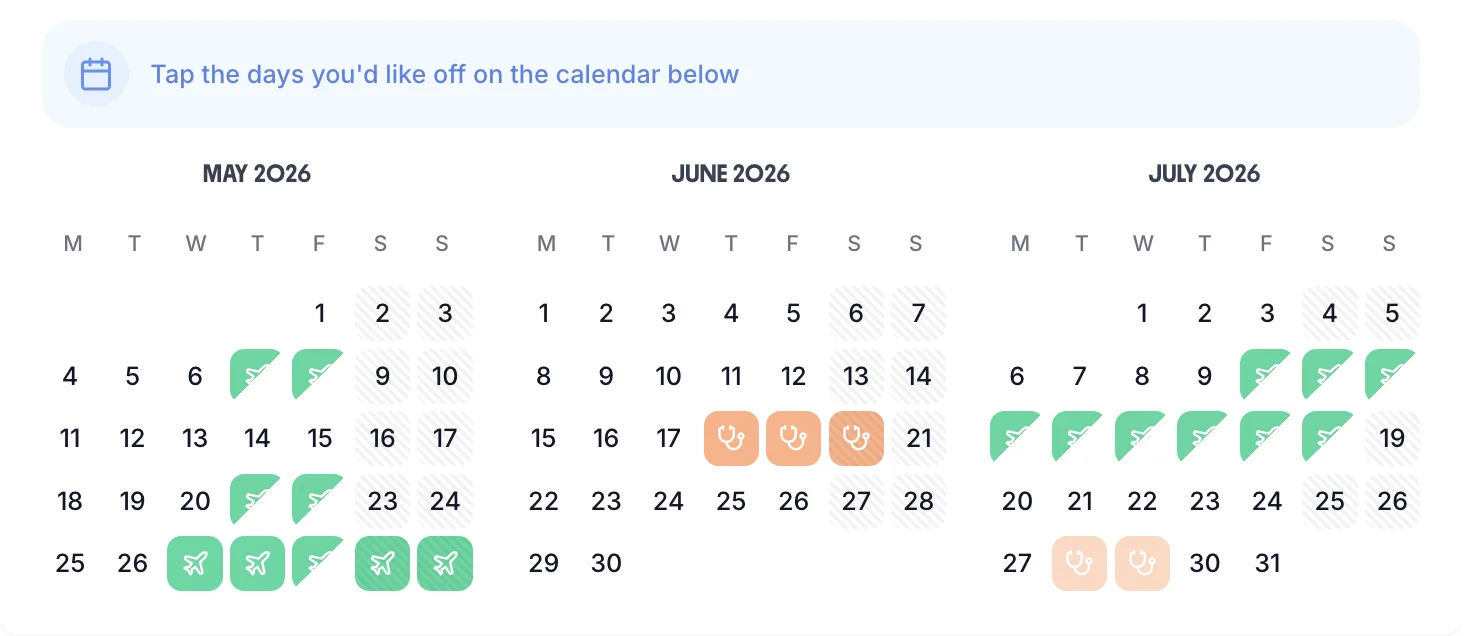
Employees pick their dates, choose a leave type, and submit a request in under 30 seconds. The calendar shows who else is already off so clashes are spotted before they happen.
Not every business allocates leave the same way. TimeTally supports three accrual methods so you can match how your company actually works.
Upfront allocation
Full entitlement available from day one of the leave year. The most common approach for full-time, permanent staff.
Monthly accrual
Leave builds up each month (e.g. 2.33 days/month). Ideal for new starters, probation periods, or businesses that prefer gradual accrual.
Daily accrual
Entitlement accrues for each day worked — perfect for zero-hours contracts, casual workers, and the 12.07% method required since April 2024.
Need help choosing? Read our holiday entitlement guide or try our pro-rata calculator.
These are the leave tracking headaches our customers had before switching to TimeTally.
"I emailed you about my holiday two weeks ago..."
All requests in one place — nothing gets lost
"How many days do I have left?"
Employees check their own balance anytime
"Nobody told me half the team was off on Friday"
Team calendar shows clashes before you approve
"The spreadsheet formula is wrong again"
Pro-rata and part-time entitlement calculated automatically
"We don't have a proper record of sick days"
Every absence type tracked with a full audit trail
"Leave is in one spreadsheet, time tracking in another"
One platform for leave, time tracking, and payroll export
One price. Every feature. No surprises.
Billed monthly, incl. VAT. Cancel anytime.
Dedicated leave tracking tools handle time off well, but if you also track hours worked, you need a second tool. Two systems, two logins, two bills. TimeTally gives you both time tracking and leave tracking for £3/employee. See how we compare in our comparison matrix.
Getting leave entitlement wrong can lead to employment tribunal claims and HMRC penalties. TimeTally handles the complexity so you don't have to.
All UK workers are entitled to 5.6 weeks of paid holiday per year. For someone working 5 days a week, that's 28 days (which can include bank holidays). Part-time workers get the same 5.6 weeks, pro-rated to their hours.
The statutory minimum of 5.6 weeks equates to 28 days for a 5-day-per-week employee. This can include bank holidays.
A 3-day-per-week employee gets 16.8 days, not 28. TimeTally calculates this automatically based on each employee's working pattern.
Set the working pattern once and TimeTally handles the rest — including mid-year starters and leavers.
Need to calculate entitlement? Use our free UK holiday entitlement calculator to work out exactly how many days your employees are owed.
Try itMost UK businesses start by tracking leave in spreadsheets, emails, or paper forms. Here is what changes when you switch to dedicated leave tracking software.
Shared spreadsheet with formulas that break
Automatic entitlement calculations that update in real time
Email chains asking "how many days do I have left?"
Employees check their own balance on their phone
Manager manually checking for clashes
Team calendar shows all leave at a glance before approving
Paper forms that get lost in a drawer
Digital audit trail of every request and decision
Calculating pro-rata entitlement by hand
Automatic pro-rata for part-time staff, mid-year starters, and leavers
Separate sick leave log in a different file
All leave types — annual, sick, TOIL, maternity — in one system
No idea who is off until someone doesn't show up
"Who's Off" widget shows upcoming absences on the dashboard
Typing leave data into payroll manually each month
One-click export to Xero, QuickBooks, or CSV
5.6
weeks statutory leave entitlement for full-time UK workers
12.07%
accrual rate for irregular-hours workers under UK law since April 2024
£3
per employee per month (incl. VAT) — leave tracking and time tracking included
30s
average time to submit a leave request on the iOS app
Not all leave trackers are built the same. If you are evaluating leave tracking software for a UK business, here is what matters — and TimeTally has all of it.
UK statutory entitlement (5.6 weeks) calculated automatically
Pro-rata calculations for part-time and mid-year starters
Bank holidays for England, Wales, Scotland, and Northern Ireland
12.07% accrual method for irregular-hours workers
Multiple leave types with individual allowances
Team calendar with clash detection
Mobile app for requesting leave on the go
Approval workflow with instant notifications
Payroll export to Xero, QuickBooks, or CSV
Timesheet tracking included at no extra cost
No per-feature pricing — one plan with everything
TOIL tracking and carryover policy management
Managing employee leave involves more than counting days. Here is what UK employment law requires — and how leave tracking software handles it automatically.
UK law allows employees to carry over up to 4 weeks of the EU-derived holiday entitlement if they were unable to take it due to sickness or family leave. Beyond that, employers can operate a use-it-or-lose-it policy — but only if employees were given a genuine opportunity to take their leave. Leave tracking software gives managers the visibility to prompt employees before the year end.
When an employee resigns or is dismissed, any accrued but untaken annual leave must be paid out at their normal rate of pay. Employers can also require leave to be taken during a notice period with the correct advance notice. Leave tracking software maintains a real-time balance of accrued and taken leave, making final settlement calculations straightforward.
Since April 2020, employees who lose a child under 18 are entitled to two weeks of statutory parental bereavement leave. There is no statutory right to paid compassionate leave for other bereavements — but most employers offer it contractually. Tracking compassionate leave separately ensures employees are not forced to use holiday entitlement for a bereavement.
Employees are entitled to Statutory Sick Pay (SSP) of £116.75 per week (2025/26 rate) for up to 28 weeks. Tracking absence patterns matters: the Bradford Factor helps managers identify persistent short-term sickness early. TimeTally logs all absences centrally, giving HR a clear record for compliance and absence management conversations.
Time Off In Lieu (TOIL) allows employees to take time off instead of receiving overtime pay — popular in healthcare, retail, and hospitality. Managing TOIL manually is notoriously difficult: balances drift and disputes arise. TimeTally's TOIL tracker maintains a live balance per employee, automatically updating when overtime is worked and when TOIL is taken.
The Employment Rights Act 2025 introduced day-one rights for paternity and parental leave, strengthened protections for workers returning from maternity leave, and new obligations around flexible working requests. Leave management software built for UK compliance can be updated quickly as legislation changes — unlike spreadsheets.
Swipe to see more →
In short
Leave tracking software holds every employee's allowance, takes their requests, routes them to a manager, and keeps the balances right — so nobody maintains a spreadsheet and nobody asks how many days they have left. TimeTally tracks annual leave, sick leave, TOIL, maternity and paternity and any leave type you create, works out pro-rata entitlement for part-time staff and mid-year starters, handles bank holidays for England & Wales, Scotland and Northern Ireland, applies your carry-over rules at year end, and exports to Xero, QuickBooks or CSV. £3 per employee a month, on the web and the iOS app.
Leave tracking software is a digital system that records and manages every type of employee time off — annual leave, sick leave, maternity, paternity, TOIL, and more. It replaces spreadsheets and paper forms with online requests, automated approval workflows, real-time balance tracking, and a team calendar. Good leave tracking software also handles UK statutory entitlement calculations automatically.
TimeTally is purpose-built for UK businesses. Unlike generic leave trackers, it automatically handles UK statutory entitlement (5.6 weeks), pro-rata calculations for part-time workers, bank holidays for England & Wales, Scotland, and Northern Ireland, and the 12.07% accrual method for irregular-hours workers. It also includes timesheet tracking at no extra cost, so you don't need two separate systems.
TimeTally costs just £3 per employee per month with no setup fees or hidden costs. This includes leave tracking, timesheet tracking, team calendars, and custom leave types. Many standalone leave trackers charge similar amounts but don't include time tracking. There's a free 14-day trial with no credit card required.
Yes. TimeTally supports unlimited custom leave types including annual leave, sick leave, maternity leave, paternity leave, compassionate leave, TOIL (time off in lieu), unpaid leave, study leave, and any other category you need. Each type can have its own colour, icon, and individual allowance per employee.
Absolutely. TimeTally automatically calculates the statutory minimum of 5.6 weeks (28 days for full-time workers). It handles pro-rata entitlement for part-time employees, mid-year starters, and leavers. It also supports the 12.07% accrual method for irregular-hours and part-year workers introduced in April 2024.
Yes. TimeTally has a native iOS app and a fully responsive web app. Employees can request leave, check their balance, and view who else is off — all from their phone. Managers receive instant notifications and can approve or reject requests with one tap.
TimeTally automatically pro-rates holiday entitlement based on each employee's working pattern. For example, a 3-day-a-week worker gets 16.8 days instead of 28. For irregular-hours and zero-hours workers, it uses the 12.07% accrual method as required by UK law since April 2024. Try our free zero-hours holiday calculator to see how this works, or read about the Employment Rights Act 2026 changes affecting irregular workers.
Leave tracking software focuses on recording who is off, when, and how many days they have left — the balances, the calendar, the audit trail. "Leave management" is sometimes used as a broader umbrella term that also implies policy design and HR process consulting. TimeTally is leave tracking software: balances, requests, approvals, and a team calendar, done properly, at £3 per employee a month — without the overhead of a full HR management suite.
You won't need to — TimeTally includes both leave tracking and timesheet tracking in one system for one price. This means employees log hours and request leave in the same app, and managers approve everything from a single dashboard. No more juggling two separate tools.
Still have a question? See all FAQs →
Real reviews from TimeTally customers
“Setup was dead simple and the team just got on with it. Got everyone up and running in an afternoon with no help needed. Does everything we need for timesheets and holidays without the faff.”
S.M.
“Has completely changed how I handle timesheets. Used to dread it every week — now it takes me minutes. Really easy to get around and my staff picked it up straight away.”
J.T.
“Started using it just for rotas but quickly realised it does loads more. The timesheets and leave management are great, and it even handles TOIL and overtime which I wasn't expecting. Use it for everything now.”
R.K.

Leave tracking and time tracking in one simple tool, built for UK businesses.
Cancel anytime. No setup fees.
From the blog
UK Annual Leave Entitlement Guide
Statutory minimums, bank holidays, pro-rata, and carry-over rules explained
How to Calculate Holiday Entitlement
Full-time, part-time, zero-hours, and mid-year starter calculations
How to Manage TOIL in the UK
Time off in lieu rules, accrual, expiry, and employer best practices
Spreadsheet vs Leave Tracking Software
When spreadsheets stop working and what to move to instead
Maternity & Paternity Leave UK Guide
SMP/SPP rates, eligibility, KIT days, and shared parental leave explained
Managing Staff Leave in the UK
Approval workflows, clashing requests, and keeping cover through busy periods
The system covers everything. These pages go deeper on the ones people ask about most.
Bereavement and emergency leave, recorded consistently.
Learn moreKeep unpaid absence distinct so it never distorts pay or entitlement.
Learn moreOne view of who is off and what everyone has left.
Learn moreEntitlement that recalculates for staff whose hours change.
Learn moreEvery sector handles leave differently — shift cover, seasonal peaks, and statutory rules all vary. These pages cover the specifics.
Leave management for care homes
Leave management for charities
Leave management for construction
Leave management for education
Leave management for facilities management
Leave management for healthcare
Leave management for hospitality
Leave management for logistics
Leave management for manufacturing
Leave management for pubs & restaurants
Leave management for small business
A real person replies within 24 hours. No ticket queues, no bots.
A UK company, ICO regulated. Your data encrypted and never sold.