
Holiday and shift leave for UK manufacturing

Leave Management for the Factory Floor

Manage annual leave and shift cover for manufacturing teams that run 24/7. This is leave management for manufacturing that starts with the rota: operatives on continental and 4-on-4-off patterns book in hours or half days rather than whole days, and you can price a day off from the shift that was actually rostered. Book the plant shutdown for the whole workforce in one action, track TOIL earned on overtime, and see who is already off before you sign the next request. It works alongside your manufacturing timesheets in the same £3 per employee per month. Replace paper forms with proper leave management.

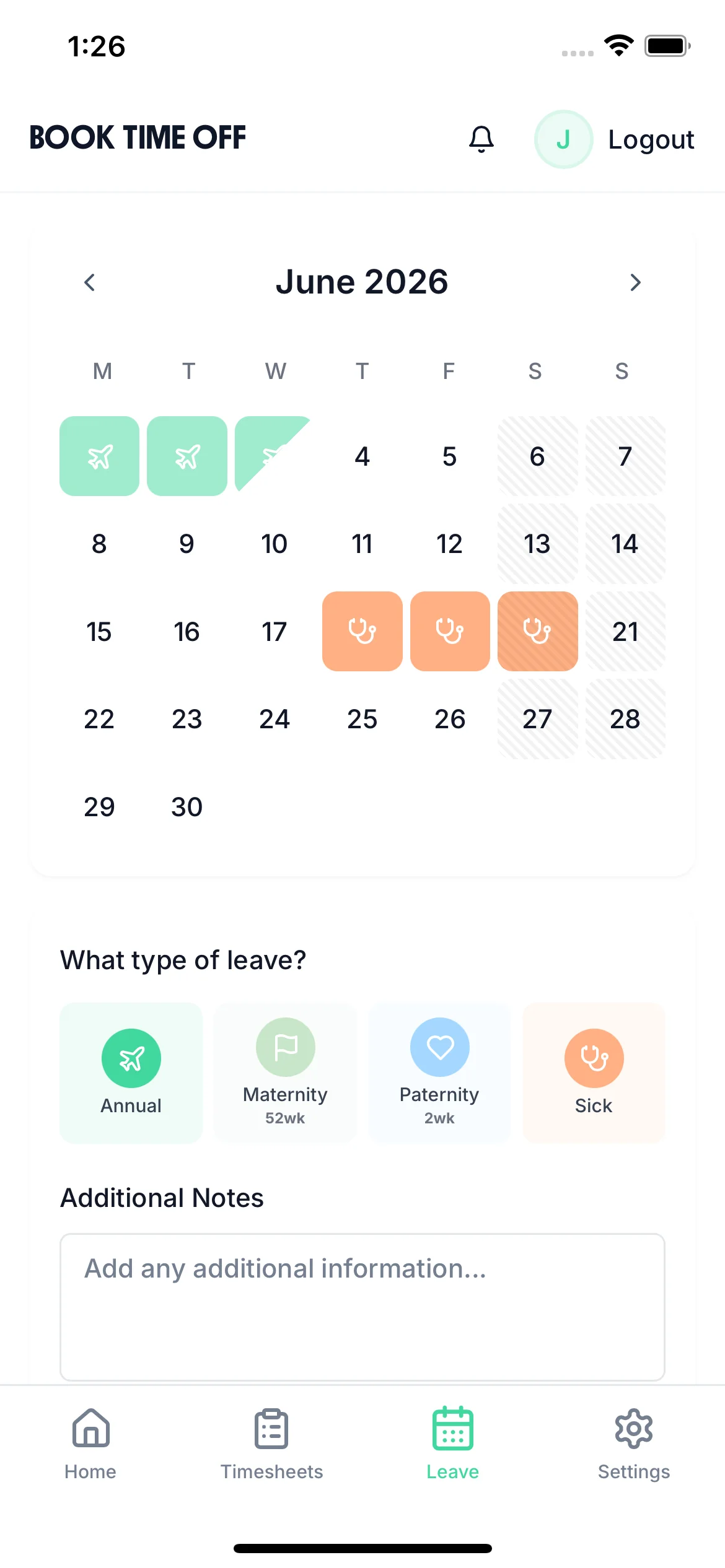
A production operative selecting days off and a leave type on their phone

The app is simple to use, reliable, and makes managing holidays, absences, and staff records straightforward. The system has saved us a significant amount of administration time.

CLI ManchesterJordan Ingoe, CLI Manchester

Select shutdown and holiday dates visually

Shutdowns at Christmas, Easter or planned maintenance are booked from a visual calendar, so operatives see which days are going and how much holiday entitlement is left for the rest of the year.

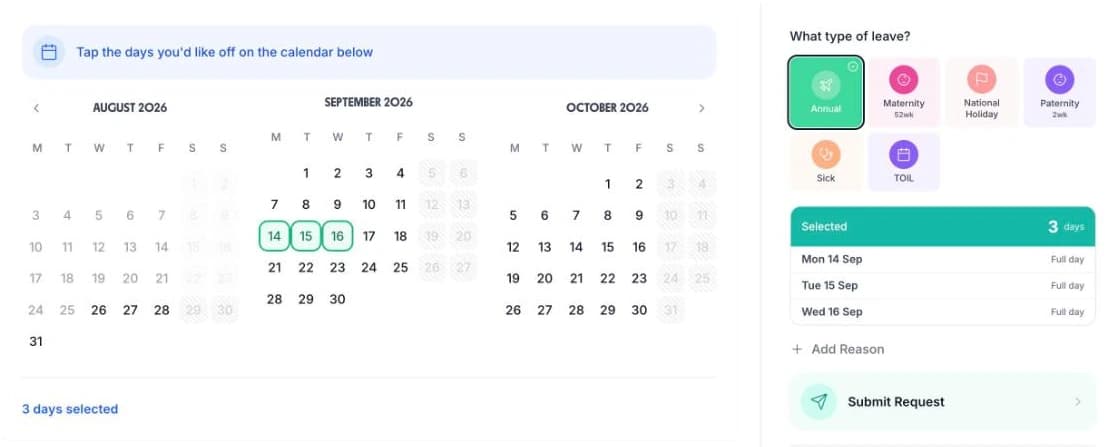
Booking time off in TimeTally: three months of dates, the leave type grid, and a submit button
  • Three months at once

    The shutdown weeks and the run of shifts either side of them are on one screen

  • Tap the days you want

    Selected dates are counted as you go, and days that person is not rostered on cost nothing

  • Pick the leave type

    Annual, sick, maternity, paternity, TOIL, or a shutdown type you added yourself

  • Add a reason, then submit

    The request reaches the manager with the dates, the leave type and the day count on it

Approve Production Leave Requests From One List

Pending requests sit in one list on the manager's dashboard. Each row shows who asked, the dates, how many days it comes to, and which leave type it is — annual leave, sick leave, TOIL, or a type you added yourself. A tick approves it and a cross declines it, so a shift lead can clear the queue on a phone before handover.

  • Open a request to see the full detail before deciding: the person, their job title, the leave type, the day count and any reason they added.
  • A rejection can carry a written reason. An operative who asked for the week of a line changeover knows why, and can resubmit for a different week without starting again.
  • Every request, approval, rejection and deletion is logged, which settles the “I put that form in weeks ago” argument on the shop floor.
  • Managers can book leave on behalf of anyone, for the operative who hands a request to the shift lead rather than filing it themselves.
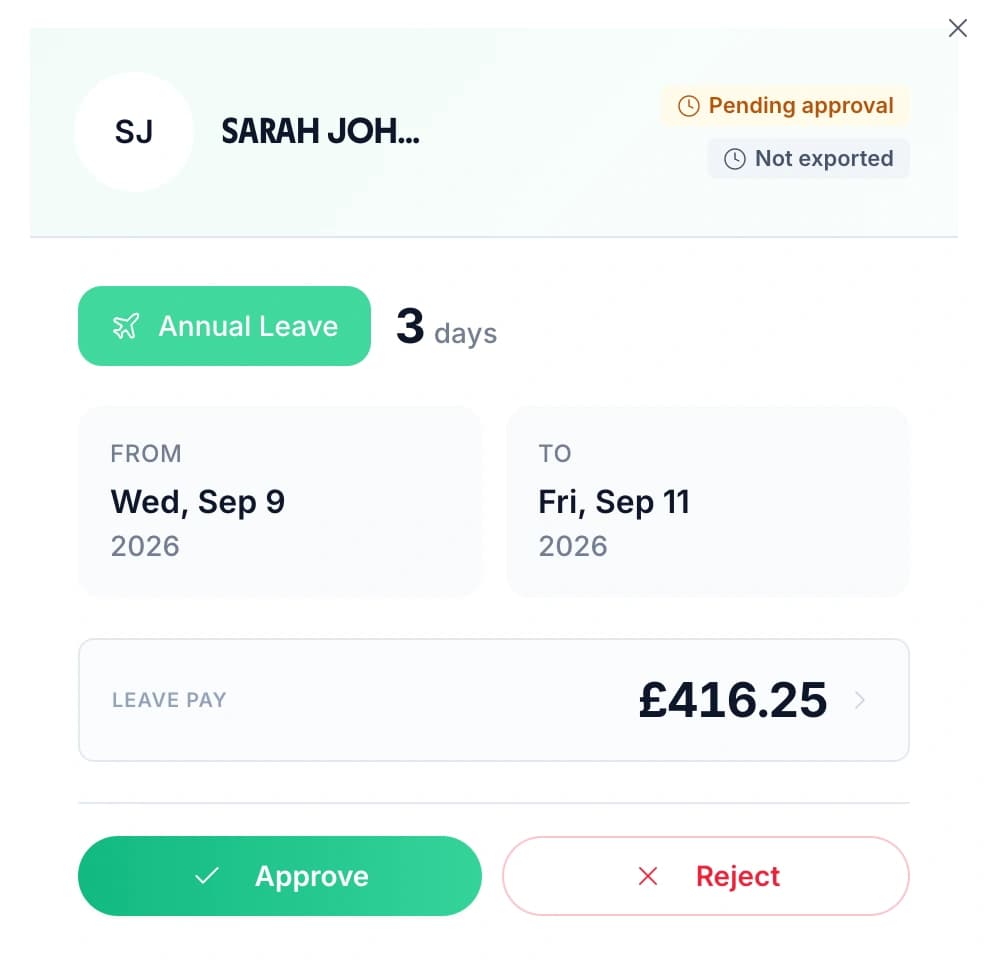
A production manager approving a three-day annual leave request, showing the dates, the leave pay and Approve and Reject buttons

Set the Days and Hours Each Operative Actually Works

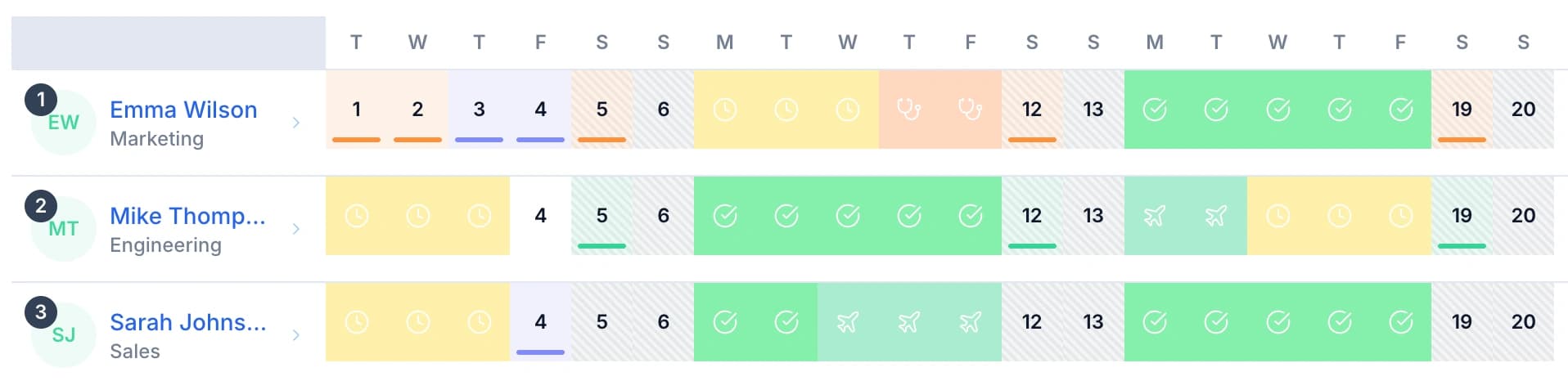
Set the working pattern for each operative one weekday at a time. Every day of the week carries its own Work toggle, so a continental crew who work Saturdays and Sundays are set up that way, and a fitter on Monday to Friday is not. Underneath it you set the hours in their working day — 7.5 by default — and you can set different hours for specific days.

A week off is not five days on a rotating shift. Work out what a rotation actually produces with the shift pattern calculator or the continental shift pattern guide before you set the pattern up.

  • Days they do not work cost nothingAn operative who books a fortnight off is only charged for the shifts inside it, not for the days the pattern already had them off
  • Deduct the hours, not a flat dayChoose whether a day off costs a whole day of allowance or the hours that person actually works, measured against your standard working day
  • Or price it from the rotaIf you build the shift rota in TimeTally, a day off can cost the paid hours of that day's shift, less any unpaid break
  • Rounded to the half dayBalances are held to the nearest half day, so a fortnight of twelve-hour shifts does not leave a trail of unusable fractions
Staff rows across a fortnight, each with its own pattern of worked days, booked leave and sickness

See who is off across all production teams

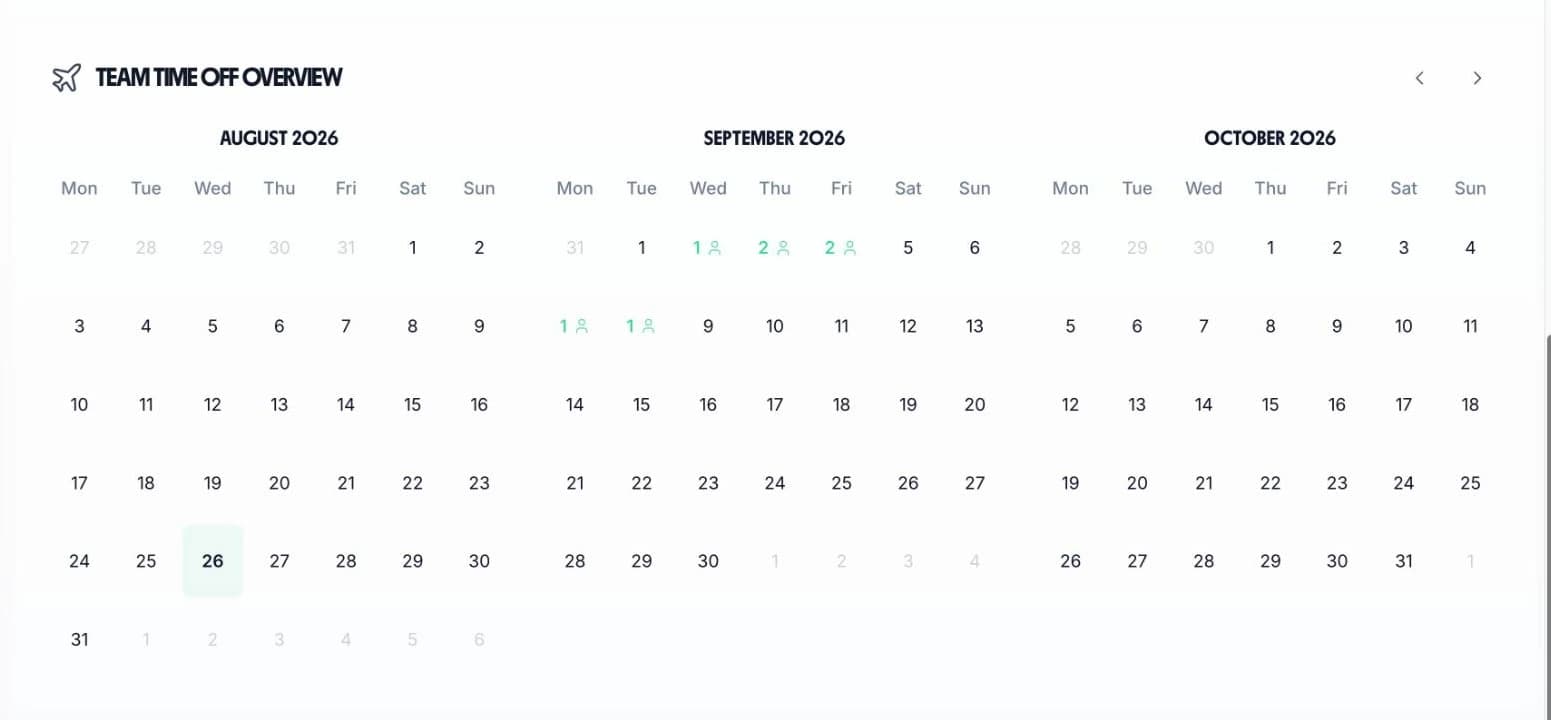
The team calendar gives production managers a single view of all leave across the factory floor. See annual leave, TOIL, and sickness side by side so you can plan staffing levels and maintain line coverage.

  • Production line visibility

    See who is off across each production line or department to ensure minimum staffing levels are always met
  • Shutdown dates highlighted

    Factory shutdown periods are visible on the calendar so everyone can plan their remaining leave accordingly
  • Prevent understaffed shifts

    Check the calendar before approving leave to make sure production lines remain adequately staffed
  • Approve from anywhere

    View the team calendar and approve requests via the iOS app — managers do not need to be at a desk
Three month team calendar showing how many production staff are booked off on each day

Every leave scenario a 24/7 manufacturer has to handle

Tap a card to read the detail.

Start your free trial

14-day free trial · No credit card needed

Watch a Leave Request Go From Phone to Approved

A short loop of the leave screens. An operative taps the days they want, picks Annual Leave and submits. The request then appears in the manager's time-off queue, is opened for the detail, and is approved.

Back

Book Time Off

Jul 2026

MTWTFSS12345678910111213141516171819202122232425262728293031

Aug 2026

MTWTFSS12345678910111213141516171819202122232425262728293031

Sep 2026

MTWTFSS123456789101112131415161718192021222324252627282930

3 days selected· excl. weekends

Family holiday, flights booked ✈️

Submit Request
Submitted

Leave Allowance

18

days left

Annual Leave Balance

18 days

Annual Leave Used

7 days

All Departments
Jun 2026
M
T
W
T
F
S
S
M
T
W
T
F
S
S
M
T
W
T
F
S
S
M
T
W
T
F
S
S
M
T
AR1

Amelia Roberts

Kitchen

JK2

James Kelly

Front of house

MP3

Maya Patel

Front of house

PS4

Priya Shah

Kitchen

TW5

Tom Wilson

Bar

Timesheet Requests

1
TW

Tom Wilson

37h 30m · Week of Jun 1

Time-off Requests

2
MP

Maya Patel

3d · Annual Leave

PS

Priya Shah

5d · Annual Leave

MP

Maya Patel

Front of house

Pending Approved
Annual Leave
3days

From

Thu, Aug 14

2026

To

Mon, Aug 18

2026

Notes

Family holiday, flights booked

Approve Approved
Reject

Manufacturing leave management challenges

Manufacturing holidays have to fit around a production schedule that does not stop. Here is why production teams switch to a dedicated absence management system. Running warehousing or a fleet rather than a plant? The logistics leave and timesheet page is the better fit.

24/7

Shift operations

Many factories run round-the-clock. Managing leave across day, night, and rotating shifts requires a system that tracks working patterns accurately.

  • Set the days and the hours each operative works, one weekday at a time
  • Choose whether a day off costs a flat day or the hours that person actually works
2-3

Shutdowns per year

Christmas, Easter, and summer shutdowns need to be deducted from allowances. Without a system, tracking remaining entitlement is a spreadsheet nightmare.

  • Select every employee, pick the dates, pick the leave type, and book the shutdown in one action
  • Anyone who is not rostered on those days is left out of the booking automatically
5-10%

Maximum off per shift

Production lines need minimum staffing levels. Approving leave without seeing the full picture risks understaffed shifts and missed output targets.

  • The team calendar shows who is already approved off before you decide on the next request
  • TimeTally does not enforce a staffing limit for you — the decision stays with the manager
TOIL

Overtime compensation

Workers earn time off in lieu for overtime but TOIL is tracked separately in notebooks or spreadsheets. A single system keeps everything visible.

  • Approving a timesheet adds the overtime on it to that person's TOIL balance, at a rate you set
  • TOIL is a leave type of its own, so it is booked and approved like annual leave
5.6

Weeks statutory entitlement

UK law requires 5.6 weeks of paid holiday. You set the full-time allowance for your site and TimeTally works out each person's share of it from their working pattern and their start date.

  • The default is 25 days plus 8 bank holidays, and an admin can change either figure
  • Mid-year starters and leavers are pro-rated from their start date
£3

Per employee per month

TimeTally costs just £3 per employee per month. For a factory with 50 workers, that is £150 per month — less than the cost of one staffing mistake.

  • Timesheet tracking is included in the same price, and TOIL accrual depends on it
  • No setup fee, no minimum contract, and a free 14-day trial

The Two Leave Settings a Production Manager Actually Changes

Most of TimeTally works out of the box. These two are worth ten minutes on the day you set it up, because they are the two that 24/7 manufacturing sites get wrong.

Leave basis

Deduct the hours that were rostered, not a flat day.

Settings has one control called “Leave is based on” with three options. Working pattern — deduct a full day is the default: a day off always costs one day of allowance whatever hours are worked that day. Working pattern — deduct the hours worked charges the hours that person works that day against your standard working day. Rota — deduct the hours rostered charges the paid hours of that day's shift, less any unpaid break.

On the rota basis a twelve-hour night shift costs 1.6 days against a 7.5-hour standard day, and a four-hour day costs 0.53. That is the setting a continental or 4-on-4-off site wants, because a rota can run a 2-week, 4-week or monthly cycle that a flat seven-day working pattern cannot express. A day with no shift assigned falls back to a full day.

Two limits worth stating plainly. The rota option needs the Rota feature switched on, and it applies to new bookings only — leave already booked keeps the amount it was booked at.

How the shift rota works

Leave year, carryover and negative balances

Start the leave year on your own shutdown year, then decide what carries.

The leave year runs January to December unless you change it. Set any reset date you like and the year starts the day after it, which suits a site whose year turns with the summer shutdown rather than with the calendar.

Carryover is off by default. Turn it on and you can cap the number of days that carry, and set an expiry so carried days are used before the next peak run rather than saved for the middle of one.

Negative balances are off by default too. Turn them on, with a limit, for the operative who starts in October and has to take the two-week December shutdown before they have earned it. Without that, a bulk shutdown booking skips anyone who is short and tells you who it skipped.

Leave is also measured in days, half days or hours, set once for the whole site. How leave years, carryover and balances work

Shift-accurate pro-rata for every worker

Manufacturing workers on rotating shifts, 4-on-4-off, or continental patterns need accurate leave calculations. TimeTally works out the correct pro-rata entitlement based on each individual's contracted hours — including mid-year starters and leavers. No more manual spreadsheet calculations. Use the working hours calculator to total what a rotation comes to before you enter it.

  • Works with any shift pattern4-on-4-off, continental, three-shift rotation, or standard day shifts — TimeTally handles them all using working hours as the foundation
  • Mid-year starters calculated automaticallyWhen a new worker joins the factory floor in September, their entitlement for the remainder of the leave year is calculated instantly
  • Built for the Working Time RegulationsUK law sets 5.6 weeks of paid holiday. You set the allowance for your site — 25 days plus 8 bank holidays to start — and TimeTally shares it out across full-time and part-time manufacturing workers
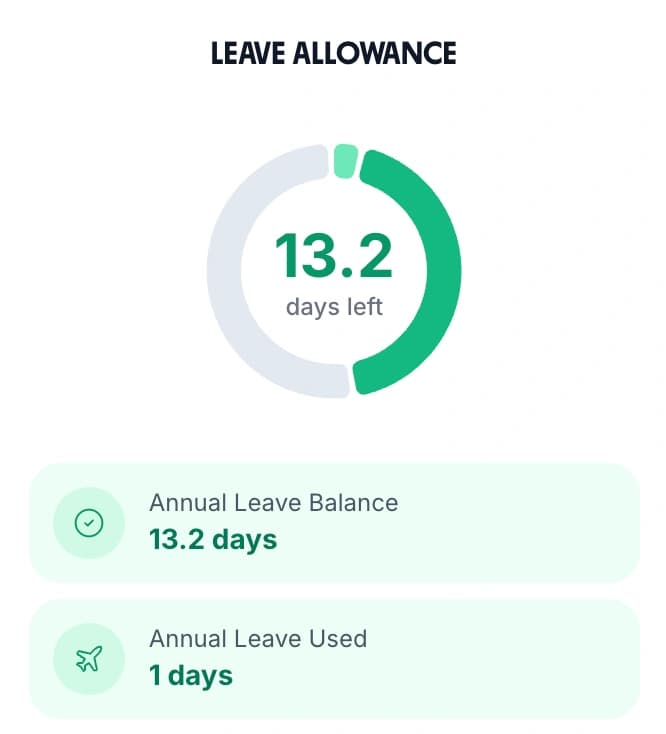
An employee's leave allowance card showing the days left, the annual leave balance and the days already used

Export leave data straight to payroll

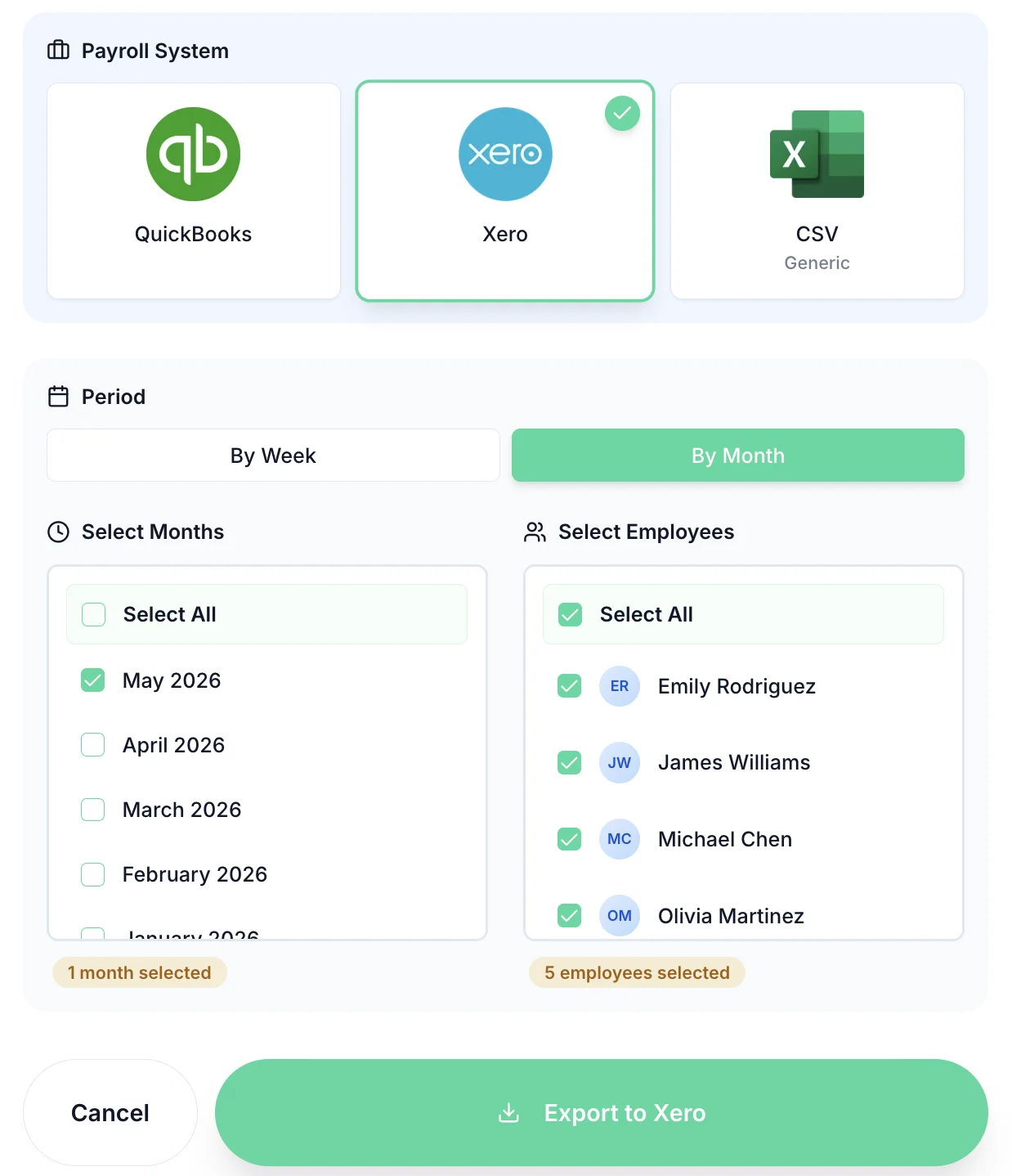
At month end, export all approved leave, sickness absence, and TOIL data in one click. TimeTally integrates with Xero, QuickBooks, and CSV export so your payroll team gets accurate data without re-keying information from paper records.

For manufacturing businesses running complex shift patterns, having accurate leave data flowing directly to payroll eliminates errors and saves hours of admin time every pay cycle.

  • Choose what goes in the export: timesheets, leave, or both across the same date range.

Tip: Use TimeTally alongside your timesheet software to export both hours worked and leave taken in a single payroll run.

Payroll export modal for manufacturing leave data in TimeTally
UK compliance

Holiday Compliance on a 24/7 Manufacturing Site

TimeTally is a leave tracking tool, not a compliance system. It keeps the record that every one of these obligations rests on. Here is what the data supports on a production site, and what it does not do.

Statutory Entitlement

Every worker in a UK factory gets 5.6 weeks of paid holiday, which is 28 days for someone on a five-day week. You set the full-time allowance for your site; TimeTally starts at 25 days plus 8 bank holidays, and an admin can change either figure. TimeTally then works out each person's share of it from their working pattern and their start date. It does not decide the statutory figure for you.

Shift Patterns and What a Day Off Costs

A rotating pattern is the reason a flat day of allowance is the wrong unit. Each person has a working pattern with a Work toggle per weekday and their own hours per day, and the site chooses whether a day off costs a full day, the hours that person works, or the hours rostered on the shift rota. Check what a rotation produces with the shift pattern calculator, the continental shift pattern guide, or the working hours calculator.

The Plant Shutdown

A shutdown is booked leave, not a blackout. Create a leave type for it, select every employee, pick the dates, and submit one booking; the button tells you how many people it is booking for. Anyone not rostered on those days is excluded, and anyone short of allowance is skipped and named unless negative balances are turned on. You choose whether the type comes off annual leave or sits in its own pot.

Bank Holidays and Continuous Operation

There is no right to a paid day off on a bank holiday in the UK, which is why a continuous-operation plant runs them. TimeTally uses the correct bank holiday set for England, Scotland, Wales or Northern Ireland, blocks them out automatically unless you turn that off, and lets you decide at organisation level whether they sit inside the annual allowance or on top of it. Whether bank holidays are deducted can also be switched off for an individual. Days worked in lieu go on a custom leave type or on the TOIL balance.

Sickness and Irregular Hours

Sick leave is one of the six leave types TimeTally seeds, so an operative ringing in at 5am is recorded rather than remembered, and absence patterns are visible across every line. For agency-pattern and irregular-hours workers, leave can accrue at a percentage of the hours actually worked — 12.07% by default. Check a figure with the zero-hours holiday calculator. TimeTally does not calculate or pay Statutory Sick Pay: use the statutory sick pay calculator and the sick leave tracker for that.

What TimeTally Does Not Do

It does not cap how many people may be off at once — there is no minimum-staffing rule, so line cover is a judgement the manager makes from the calendar. It does not calculate holiday pay from a 52-week average of earnings; that is a payroll job. It does not chase anyone automatically: there is no scheduled reminder, only a manual nudge you send to one person. And there are two access levels, admin and employee, with no per-line or per-department level in between, so anyone you make an admin sees the whole site's leave.

Simple, Transparent Pricing

One price. Every feature. No surprises.

£3/employee/month

Billed monthly, incl. VAT. Cancel anytime.

Shift-accurate leave calculations
TOIL and shutdown tracking
Unlimited leave types
Timesheet tracking included
Get Started

No credit card required

In short

What is leave management software for manufacturing?

Leave management software for manufacturing records who has booked time off, how much holiday each person has left, and who is already off before a manager approves the next request. TimeTally does this for UK production sites from £3 per employee per month. Each operative has a working pattern with a Work toggle for every day of the week and their own hours per day, so a continental or 4-on-4-off crew is set up as they actually work. A day off can cost a flat day, the hours that person works, or the hours rostered on the shift rota — a twelve-hour night shift costs 1.6 days against a 7.5-hour standard day. Leave is booked in hours, half days or full days from the iOS app or any browser. Managers approve or reject in one tap, with a written reason on anything sent back. The plant shutdown is booked once for every employee at the same time. Overtime on an approved timesheet converts to TOIL at a rate you set. Timesheet tracking is included in the same price.

Price
£3 per employee a month
Booking
iOS app or any browser
Units
Hours, half days, full days
Shift patterns
Priced from the rostered shift
Shutdown
Booked for everyone at once
Includes
Timesheets at no extra cost

Frequently Asked Questions

How does TimeTally handle leave during planned factory shutdowns?

You create a custom leave type for the shutdown, then book it for everyone at once. In the Book Leave for Employee screen a manager selects every employee — there is a Select all control — picks the shutdown dates, picks the leave type, and submits; the button confirms how many people it is booking for. Anyone who is not rostered on those days, or who already has leave booked on them, is left out automatically. You decide when you create the type whether it comes off the annual leave allowance or sits in its own pot, and employees can see exactly how much holiday they have left for the rest of the year. TimeTally does not have a separate blackout or closure-date feature: a shutdown is booked leave, entered once for the whole workforce.

Can TimeTally manage leave for workers on rotating shift patterns?

Yes. TimeTally calculates leave in days, half days or hours, which means it handles rotating shift patterns correctly. Whether your workers are on a 4-on-4-off, continental shifts, or a standard three-shift pattern, leave is tracked accurately against each individual's working days. There are three ways to price a day off, set in Settings under Leave Tracking: deduct a full day, deduct the hours that person works that day, or — if you build the rota in TimeTally — deduct the hours rostered for that date. On the rota basis a day off costs the paid hours of that day's shift, less any unpaid break, so a twelve-hour night shift costs 1.6 days against a 7.5-hour standard day rather than one. Rotas can run 2-week, 4-week or monthly cycles that a flat seven-day working pattern cannot express, which is exactly why that option exists.

How does TimeTally ensure production line coverage when staff take leave?

The team calendar shows all approved leave across your production teams in a single view. Before approving a request, managers can see at a glance how many people are already off and whether minimum staffing levels will be met. This prevents the situation where too many operators are off on the same shift. The check is the manager's to make: TimeTally shows who is off, it does not refuse a request on your behalf.

Can TimeTally track TOIL (time off in lieu) for overtime worked?

Yes, and most of it is automatic. TOIL is one of the leave types TimeTally seeds, and it carries its own balance in hours. When a manager approves a timesheet, the overtime on that timesheet is added to the employee's TOIL balance at a rate you set — one hour of TOIL per hour of overtime by default. You can also credit TOIL by hand from the balance screen. Employees then request TOIL days off just like annual leave. You can set TOIL to expire a fixed number of months after it was earned, at the end of the leave year, or never. Every transaction is recorded with a full audit trail. TOIL needs timesheets, leave and overtime tracking all switched on, and it is turned off automatically for anyone accruing leave per hour worked.

How does TimeTally handle seasonal demand periods when leave needs to be restricted?

TimeTally allows managers to review and decline leave requests during peak production periods. A rejection can carry a written reason, so an operative who asked for a week in the middle of a changeover knows why and can resubmit for a different week. During busy periods, managers have full visibility of who has already been approved so they can make fair and consistent decisions. There is no automatic cap on how many people may be off at once — TimeTally shows you the picture and you make the call.

Is TimeTally compliant with UK employment law for manufacturing workers?

TimeTally keeps the record that your obligations under the Working Time Regulations rest on. UK law sets 5.6 weeks of paid holiday a year for a worker on a fixed week. You set the full-time allowance for your site — TimeTally starts at 25 days plus 8 bank holidays, and an admin can change either figure — and TimeTally works out each person's share of it from their working pattern and their start date. It handles pro-rata entitlement for part-time workers and mid-year starters, bank holiday inclusion or exclusion, and it stores every request, approval and rejection with a timestamp. It does not decide the statutory figure for you, and it does not calculate holiday pay from a 52-week average of earnings — that stays with payroll.

Still have a question? See all FAQs

Better leave management for your manufacturing teams.

Try TimeTally free for 14 days. Manage shift leave, track TOIL, handle shutdown periods, and keep your production lines staffed — all in one simple tool.

No credit card required · Free 14-day trial · Cancel anytime