Shift planning for UK shops and store groups

Retail Rota Software for UK Shops and Stores

Retail rotas move with trading. A quiet February week and the week before Christmas are not the same shape, and neither is rebuilt from scratch. Build one good trading week on the grid, save it as a template, and copy it forward. Every day carries an Hours row and a wage Cost row, so a store manager can read the cost of a week before publishing it. Shift planning sits alongside time tracking and leave tracking in the same £3 per employee per month.

Week of 16 June

All departments
Publish Rota Published
Employee
Mon16
Tue17
Wed18
Thu19
Fri20
Sat21
Sun22
AR

Amelia

Kitchen

Open

Open

Evening

Close

Open

JK

James

Front of House

Close

Early

Mid

Open

Open

Early

PS

Priya

Kitchen

Leave

Mid

Close

Open

Early

MP

Maya

Front of House

Early

Close

Leave

Mid

Close

TW

Tom

Bar

Open

Open

Mid

Open

Close

Templates

Open
Close
Mid
Early
Evening

Rota Published!

Your team has been notified

Shift Templates

New Template New Template

Open

09:00–17:00

Close

12:00–20:00

Mid

10:00–18:00

Early

06:00–14:00

Evening

17:00–22:00

New

New Template

Evening

Start

17:00

End

22:00
Save Template Saved!

Shift Swap Request

Awaiting your approval

JK

James K.

Open · Thu

PS

Priya S.

Early · Sat

Approve Approved!

Shifts published!

Week of 16 Jun

Swap approved

James ↔ Priya

Evening added

Wed · 17:00–22:00

9:41

16 Jun – 22 Jun

this week · 40h

Mon

16

Tue

17

Wed

18

Thu

19

Fri

20

Sat

21

Sun

22

This week

40h total

Mon, 16 Jun

09:00–17:00

8h

Open

Tue, 17 Jun

09:00–17:00

8h

Open

Wed, 18 Jun

Today

17:00–22:00

8h

Evening

Thu, 19 Jun

12:00–20:00

8h

Close

Fri, 20 Jun

09:00–17:00

8h

Open

The app is simple to use, reliable, and makes managing holidays, absences, and staff records straightforward. The system has saved us a significant amount of administration time.

CLI ManchesterJordan Ingoe, CLI Manchester

The trading week on one grid, with the wage cost under it

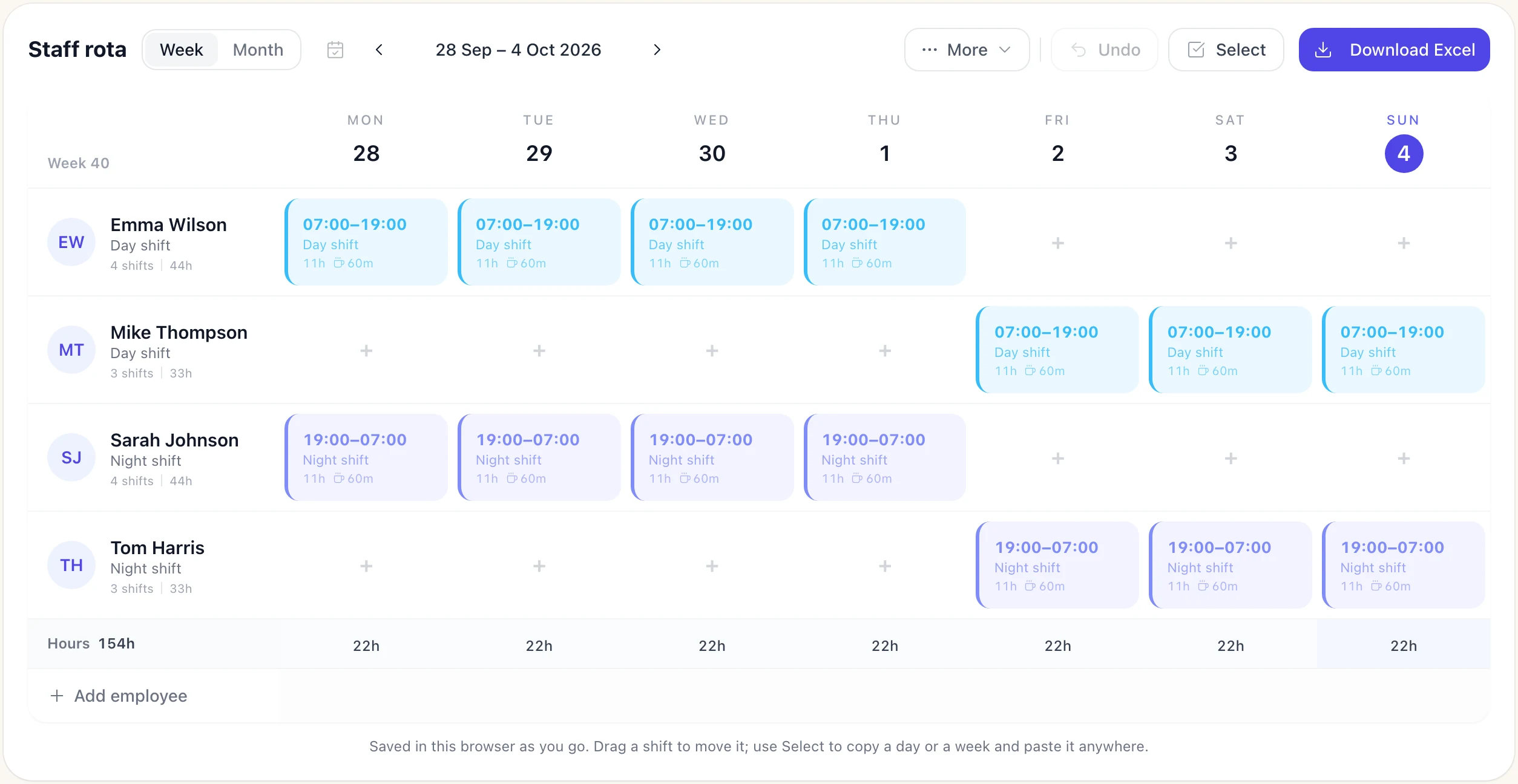
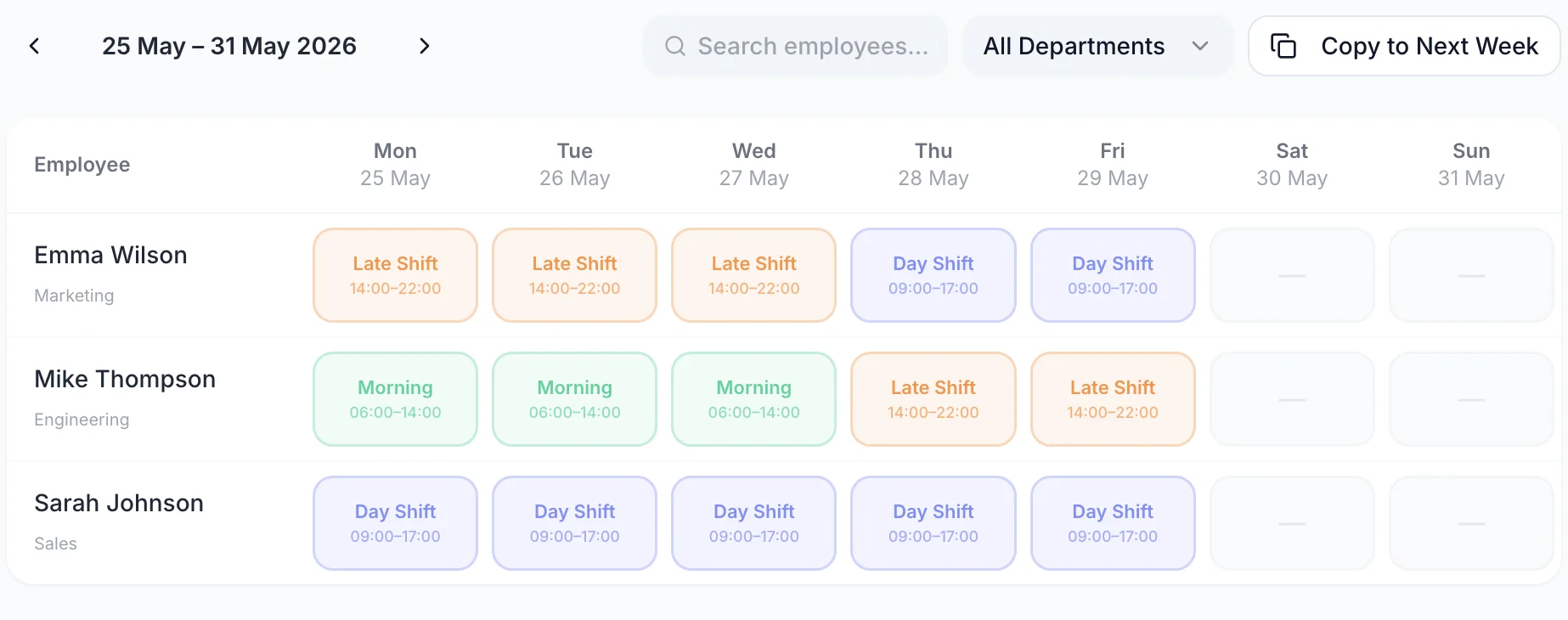
One row for each member of staff, one column for each trading day. Click an empty cell to add a shift, drag a shift to a different day, or drop it onto another name to hand it over. The two rows along the bottom are the ones store managers watch: rostered hours per day, and what those hours cost.

A week of the rota with one row per person and a shift on each day they are working
  • One row per person, one column per day

    Job title and the week's hours sit next to each name, so a thin Saturday is visible before anyone clocks on

  • Shifts carry their own break

    Each shift shows its name, its start and finish and the unpaid break that comes off the paid hours

  • Hours and Cost per trading day

    A wage cost under every column and a total for the week, both updating as you build the rota

  • Week view and month view

    Build in the week, then switch to the month to look across the whole of a peak trading period

Save your trading hours as shift templates

A shop runs the same handful of shifts most weeks. Morning 06:00–14:00 for the delivery and the shop-floor reset, Day Shift 09:00–17:00 for the tills, Late Shift 14:00–22:00 to close. Save each one once as a shift template with its own colour, then drag the template onto any cell to assign it. You stop typing start and finish times, and the shift names stay consistent across every week and every store.

  • A colour per shift type

    Openers, mids and closers read as three colours across the week, so a day with no closer is visible without reading a single time
  • Breaks and job roles on the template

    A template carries its unpaid break minutes and can carry a job role and a location, so the shift lands complete rather than half filled in
  • Split shifts on one day

    A shift can hold more than one block of time, for the assistant who opens the shop and comes back for the evening rush
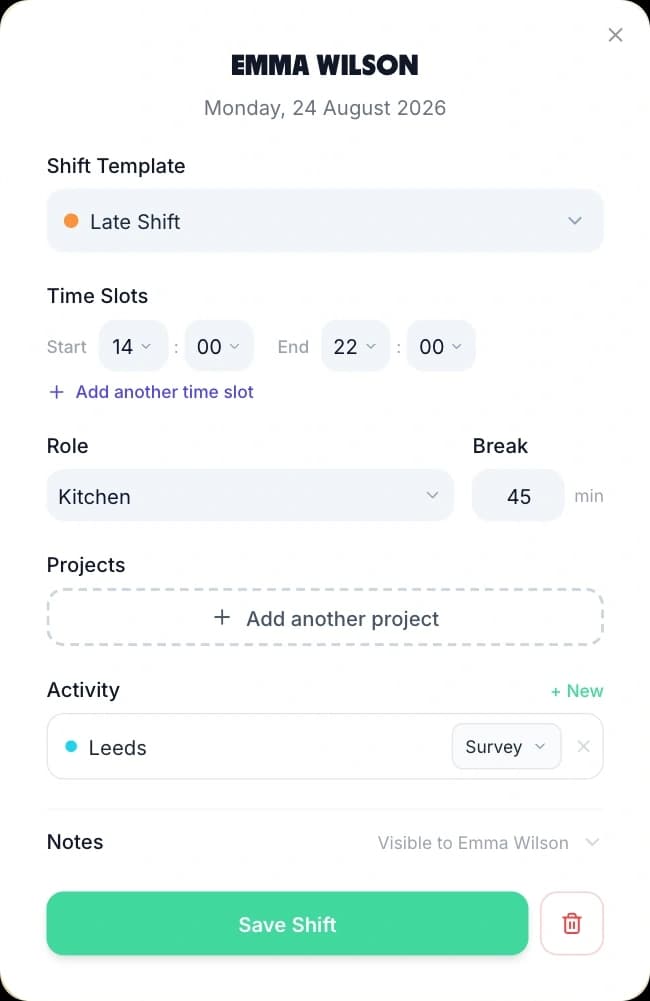
Creating a shift from a saved template: the template picker, start and end times, role, break and a Save Shift button

A retail rota app your staff read on the shop floor

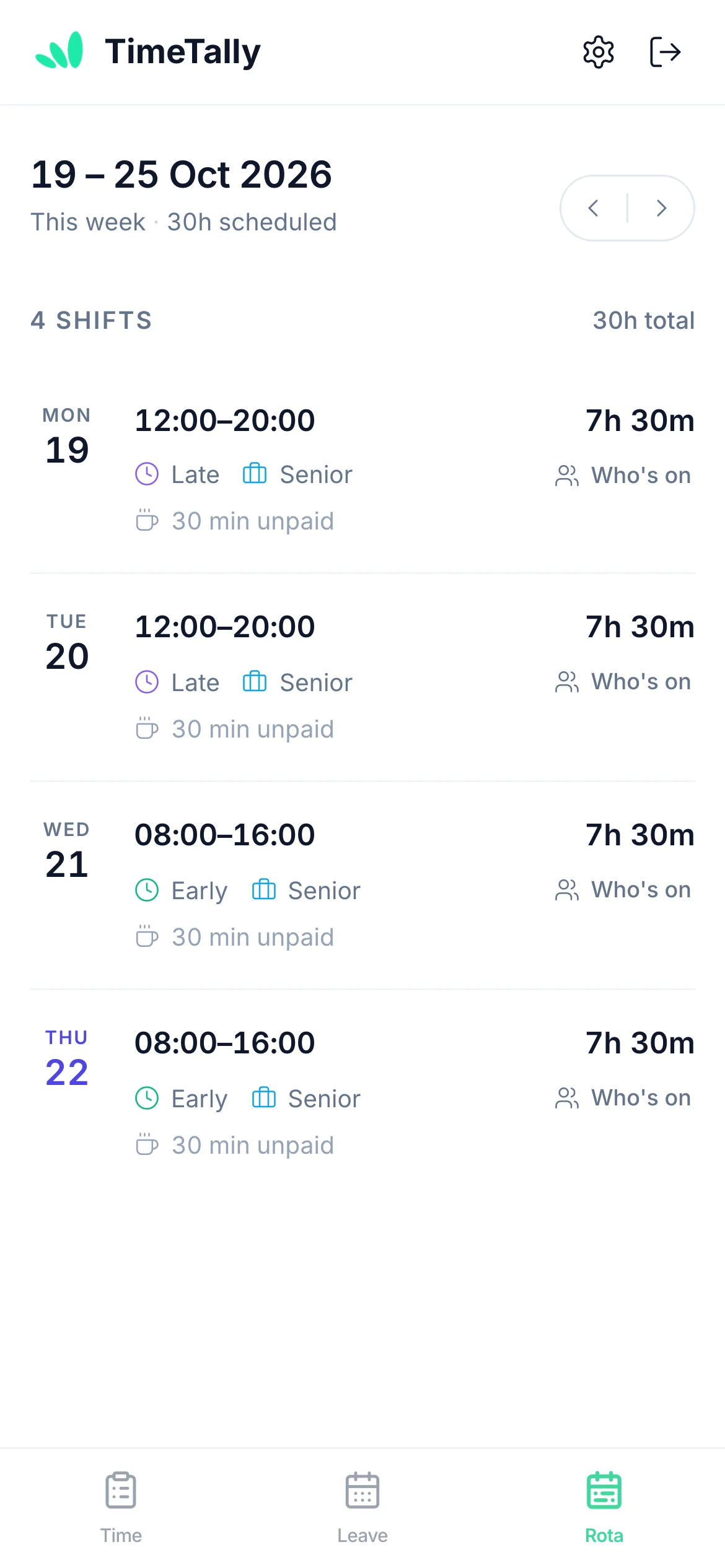
Publish the week and every assigned member of staff sees their own shifts, in the app and in any browser. Each one shows the date, the hours, the shift name, the job role, which rota it belongs to and the unpaid break, with the paid hours on the right. A photograph of a printed rota in a group chat goes out of date the moment a shift moves; this does not.

  • A week you have not published stays hidden. Staff see that the rota is not out yet rather than a draft you are still moving people around on.
  • Publishing does not email anyone by itself. TimeTally asks whether you want to notify the team, and the email reaches only staff who have rota notifications switched on.
  • Staff can optionally be shown who else is on a shift with them. That is off until an admin turns it on, so a shop that would rather not publish the whole line-up does not have to.
  • Two people can agree a swap between themselves in the app. The request goes to a manager to approve or decline, and shift swaps are on by default.
A member of staff viewing their upcoming shifts on their phone

Look across a whole peak period in month view

Week view is for building. Month view is for checking. Switch the grid to the month and the same rows run across every day of it, with the Hours and Cost rows totalling the month instead of the week. This is where a thin week in the middle of the Christmas run-up shows itself, and where a run of leave that has all landed in the same fortnight becomes obvious.

  • Cover across the whole month

    Every person, every day, in one grid — the view to open before you agree the December rota with an area manager
  • The month's wage cost

    The Hours and Cost rows follow the range on screen, so switching to the month gives you the month's figures
  • Publishing stays weekly

    Publishing from month view publishes each week the month touches, because a week is the unit staff see
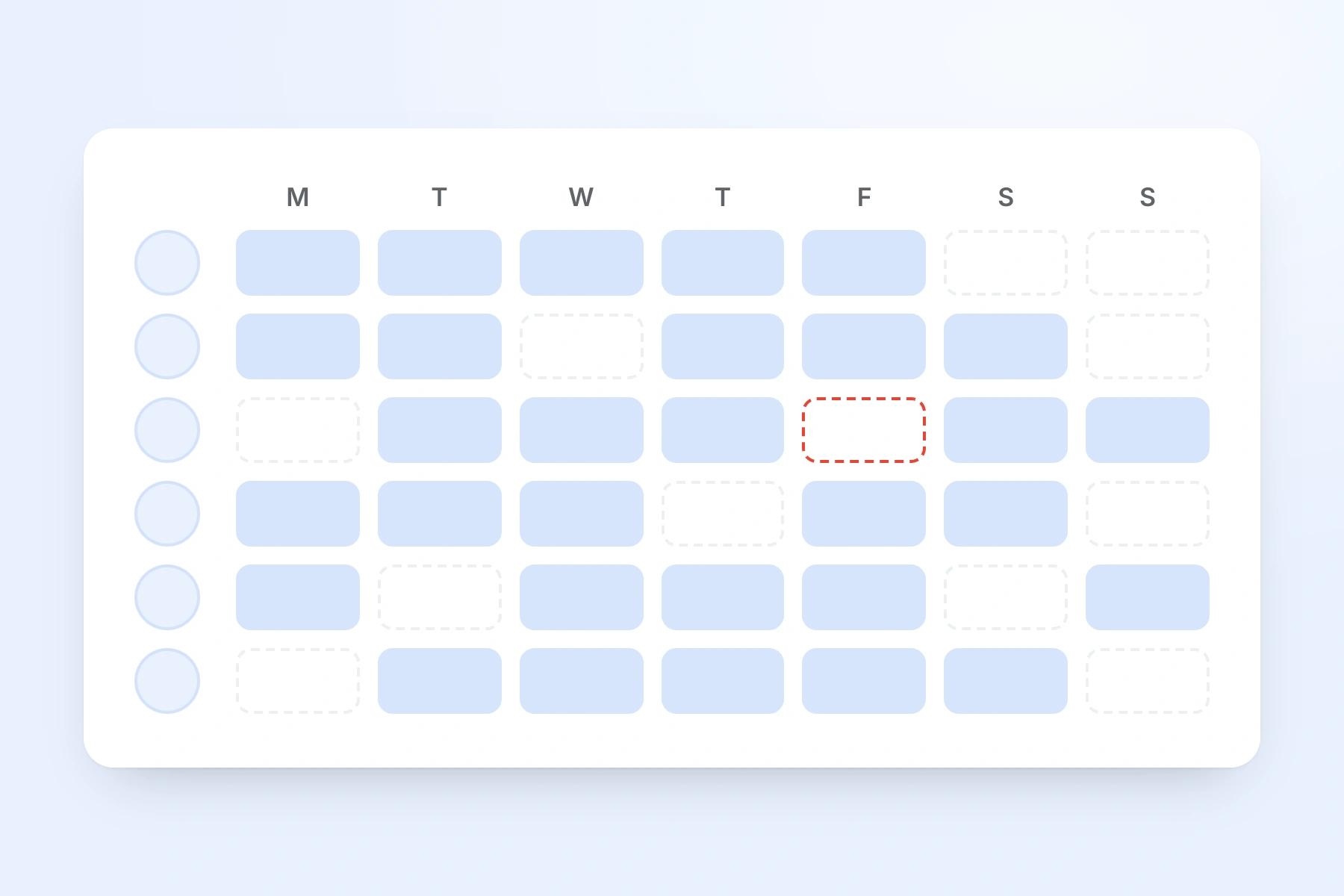
A week of shifts across the whole team, one row per person, with an unfilled shift outlined in red

Build one trading week, then reuse it all season

Most weeks in a shop are a variation on a week you have already built. The rota menu is where that repetition gets handled: save the week you are looking at as a named template, apply a saved week onto a future one, or push this week forward onto the next. Everything else on the menu — print, export, analytics — works on the same week.

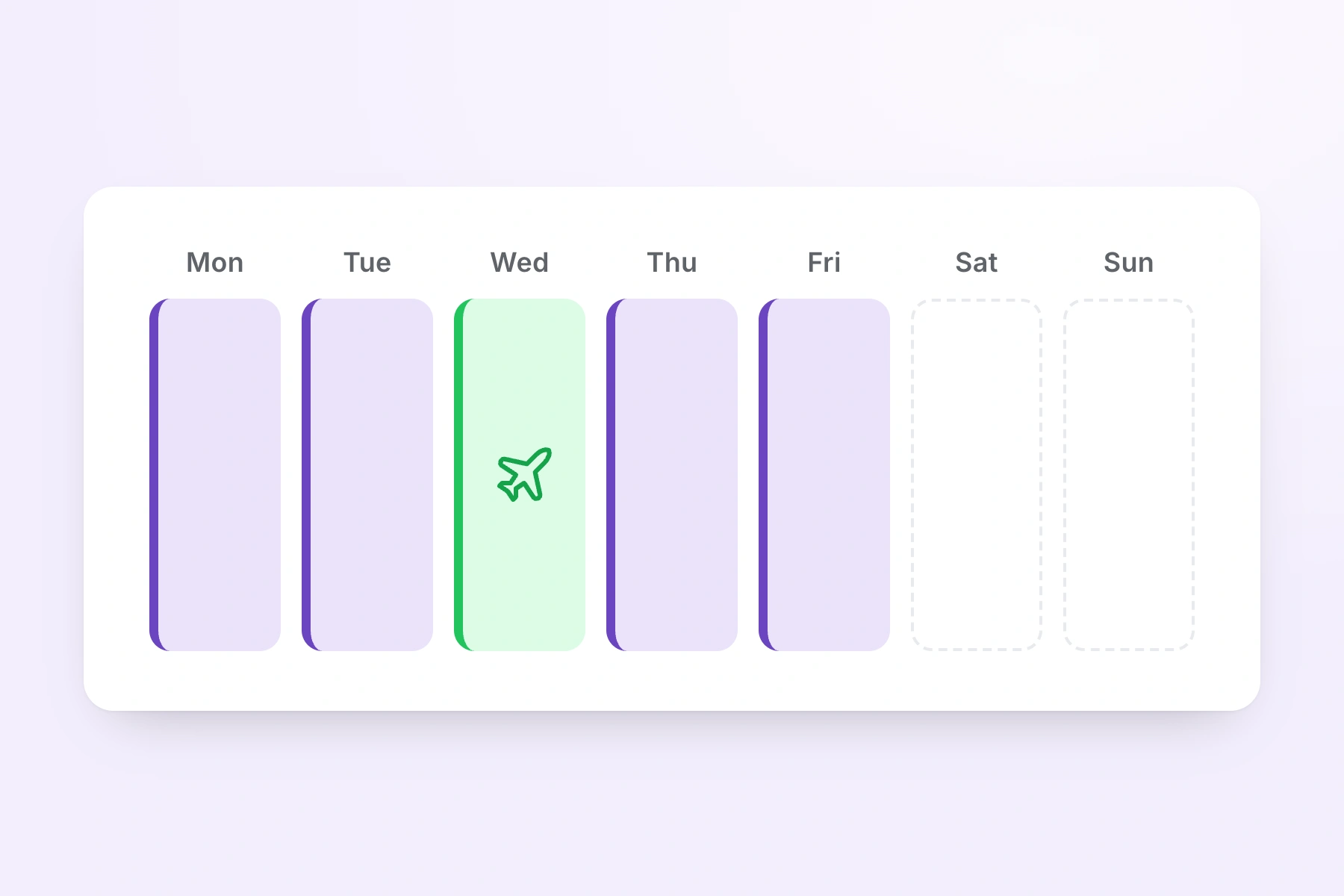
A week of shifts with one day showing booked annual leave in place of a shift
  • Save week as template

    Store a whole trading week — every shift, on every person, on every day — under a name you choose

  • Apply week template

    Drop a saved week onto any future week; TimeTally shows what it will do before it writes anything

  • Copy to next week

    Push the week you are looking at onto the next one, skipping any day a person is already rostered

  • Print rota and export hours

    Print the week for the stockroom wall or export the hours as CSV for payroll, both from the same menu

Working out what a week should cost before you build it? The rota cost calculator does that on its own, and the shift pattern calculator works out how many people a repeating pattern needs.

Everything a retail rota has to handle

Click any feature to learn more.

Drag & Drop Scheduling
Start your free trial

14-day free trial · No credit card needed

What makes a retail rota different

Shops do not schedule the way an office does. Trading hours are long, the week changes shape four or five times a year, and a large part of the team is part-time. These are the four things a shop rota has to survive.

Peaks

Black Friday and the Christmas run-up

Peak trading is not a different rota, it is the same rota with more people on it. Build a normal week first, save it as a template, then apply it to the peak weeks and add the extra cover on top.

  • A saved week template can be applied to any future week, because its shifts are stored as day offsets rather than dates
  • Month view shows the whole of December in one grid, so you can see which weeks are still thin
Hours

Part-time, student and seasonal staff

A Saturday-only sales assistant, a student on twelve hours and a full-time supervisor all sit on the same grid. Nobody has a contracted pattern the rota has to obey — you put each person on the shifts you need them for.

  • Every shift is assigned to one person on one day, so nothing has to be a repeating contract
  • A shift can be split into more than one block on the same day, for a staff member who covers the open and then comes back for close
Stores

Groups running more than one shop

Create a named rota per store and switch between them from the dropdown at the top of the grid. A person can belong to more than one, which is how a Saturday assistant shared between two branches works.

  • If someone is already rostered on another store's rota that day, the cell shows that rota's name and refuses the assignment
  • That block is the honest version of double-booking protection: TimeTally stops the second shift rather than warning you after the fact
Cost

Wage cost against the trading week

A store manager working to a wage budget needs the number before the rota is published, not after payroll has run. The Cost row is on the grid while you are still moving shifts around.

  • Cost is paid minutes after the unpaid break, multiplied by each person's hourly rate
  • The same figures flow through to analytics, the CSV export and the printed rota, so the grid and the reports agree

The Two Rota Settings a Retailer Changes on Day One

The rota is off until you turn it on, and the wage cost row is governed separately from the rota itself. Both are worth five minutes before you invite a single store manager.

Turning the rota on

The rota is off until an admin switches it on.

Rota planning is opt-in. A retailer using TimeTally for hours and holiday only never sees the grid, and no member of staff gets a rota tab they do not need. Switch it on in Settings and the rota appears for the whole organisation.

Two staff-facing switches sit alongside it and they default in opposite directions, which is worth knowing before anyone asks. Shift swaps are on: two people can agree a swap between themselves and send it to a manager. Showing colleagues on a shift is off: staff see their own shifts and nobody else's until you decide otherwise.

A shop that wants every change to go through the store manager turns swaps off. A shop where the team need to know who they are working the Saturday with turns colleagues on. Neither is assumed.

Who sees the wage cost

Give a store manager the rota without giving them the rates.

The Cost row needs two things to be true. The Pay feature has to be enabled for the organisation, and the admin looking at the rota has to have pay visibility. Both are real switches, and they are independent of each other.

That second one is set per person when you invite them. A store manager invited with pay details hidden gets the full rota — the grid, the templates, publishing, swaps, the Hours row — and no hourly rates and no Cost row. An area manager invited without that restriction sees the money.

One limit to state plainly. TimeTally has two access levels, admin and employee, and there is no per-store or per-region admin. Anyone you make an admin can see every store's rota, whether or not they can see the rates on it.

How rotas, publishing and shift templates work

Why Rota Software for Retail Has to Follow Trading Patterns

A rota tool built for a five-day office assumes a stable week. Retail does not have one. Here is what actually changes across a shop's year, and how the rota handles each of them.

The Week Has Four or Five Shapes, Not One

A quiet week in February, a school-holiday week, the week of a promotion, Black Friday week and the week between Christmas and New Year are five different rotas. They are not, however, five different problems. Build each one properly once, save it as a week template with a name you will recognise in nine months, and apply it when that shape comes round again. The template stores each shift as a day offset rather than a date, which is why it can be dropped onto any future week and land on the right days.

Trading Hours Are Longer Than Anyone's Shift

A shop trading 09:00 to 20:00 needs at least two shifts to cover the day and usually three. Shift templates hold those patterns so you are not retyping 06:00–14:00 every Monday, and each template carries the unpaid break that comes off the paid hours. Because every template has its own colour, the pattern of openers, mids and closers reads as a block of colour across the week, and a day with nobody on the close stands out before anyone has read a time.

Most of the Team Is Part-Time

Students, Saturday staff, parents on school hours and seasonal cover are the bulk of a shop's headcount, and none of them work a repeating five-day week. TimeTally does not ask anyone for a contracted pattern before it will let you roster them. Each shift is assigned to one person on one day, and the week's rostered hours appear beside each name so you can check them against whatever that person's contract says. If someone needs to work the open and then come back for close, a single shift can hold two blocks of time on the same day.

Peak Is Volume, Not a New System

The mistake retailers make with scheduling software is treating the Christmas rota as a separate exercise. It is the ordinary rota with more names on it and more hours in it. Copy the week forward, add the temporary staff to the rota's member list, drag the extra shifts on, and read the Cost row to see what the additional cover has done to the week. There is no peak mode to configure and nothing to unwind in January.

Holiday Requests Do Not Stop for Trading

Approved annual leave, sick leave and TOIL show on the rota grid in the same view as the shifts, so a store manager building next week is looking at both at once. When a manager approves leave for someone who is already rostered, TimeTally lists the shifts that now need cover and shows who is free to take each one — people on that shift's own rota first, everyone else one click further on. Choosing a name reassigns the shift and marks the week as having unpublished changes, exactly as dragging the shift would.

The Wage Cost Is a Planning Number, Not a Report

A wage report that arrives after the month has closed tells a store manager what they cannot now change. The Cost row is on the grid while the rota is still a draft, so an extra Saturday closer is a decision with a visible price attached. The figure uses paid minutes after the unpaid break against each person's hourly rate, and the same numbers reach analytics, the CSV export and the printed rota — so the version on the wall and the version in the spreadsheet agree.

What TimeTally does and does not do

Where a Retail Rota Tool Stops and a Manager Starts

TimeTally is a rota and hours tool, not a workforce management platform. It keeps a complete record and shows you the numbers. It does not make scheduling decisions for you, and the pages that claim otherwise are usually selling something bigger.

No Automatic Rota Generation

TimeTally will not build a rota for you. There is no auto-fill, no demand forecasting from till data, and no algorithm that decides how many sales assistants a Thursday needs. What it removes is the repetition: templates for shifts, templates for whole weeks, and copy-forward for the week you have already built. The judgement about who should be on the shop floor stays with the person who knows the shop.

No Union-Rule or Statutory-Rest Engine

There is no rule builder for collective agreements, no eleven-hour rest check between shifts, no weekly maximum, and no alert when a rota would breach the Working Time Regulations. A retailer bound by a union agreement that has to be validated automatically needs a platform built for it. TimeTally gives you the underlying record instead: every shift with its start, finish and unpaid break, the week's rostered hours beside each name, and an hours export for anyone checking the pattern. Use the shift pattern calculator to work out how many people a rotating pattern needs before you commit to it.

No Staff Availability Submissions

Staff cannot tell TimeTally which days they would prefer to work. There is no availability screen and no preferences form — every competitor has one and TimeTally does not, so it is worth being clear. What staff can do is book leave, which then appears on the rota grid before you assign anyone, and request a swap with a named colleague once the week is out. Everything else comes to the store manager the way it always did.

No Per-Store Access Level

TimeTally has two roles, admin and employee. There is no regional admin, no store-scoped manager and no department-level permission, so an admin at one shop can open every other shop's rota. The switch that does exist is pay visibility, set per person when you invite them, which hides hourly rates and the Cost row from an admin who should not see them. For a group where that is not enough separation, running a separate organisation per store is the honest workaround.

No Minimum-Staffing Enforcement

You cannot tell TimeTally that a Saturday needs four people on the floor and have it refuse to publish a rota with three. There are no blackout dates and no cover thresholds. The month view and the Hours row are what make a thin day visible, and the one thing TimeTally does refuse is a genuine clash: if a person is already rostered on another store's rota that day, the cell will not take a second shift.

What It Does Keep

Every shift, with who was on it, the times, the job role, the location and the unpaid break. Which weeks were published and when. Which swaps were requested and who approved them. Approved leave against the same calendar. The hours each person was rostered for and, where pay is enabled, what those hours cost. If a rota is ever disputed, the record is in one place rather than in a photograph on somebody's phone. A blank staff rota template is there if you want to start on paper first.

Simple, Transparent Pricing

One price for every shop. A single store with 18 staff pays £54 a month. A five-store group with 60 staff pays £180.

£3/employee/month

Billed monthly, incl. VAT. Cancel anytime.

Rota planning for every store on one account
Shift templates and reusable week templates
Per-day hours and wage cost on the grid
Timesheets and leave tracking included
Get Started

No credit card required · See the full pricing page

In short

What is retail rota software?

Retail rota software plans which member of shop staff works which shift, publishes that plan so the team can see it, and shows a manager what the week costs before it goes out. TimeTally does this for UK shops and multi-store retail groups from £3 per employee per month. You drag trading-hours shift templates onto a week grid, save a whole week as a reusable template, or copy this week onto the next. Every day carries an Hours row and a wage Cost row, calculated from each person's hourly rate after the unpaid break. Approved annual leave, sick leave and TOIL appear on the same grid as the shifts. Publishing is per week, and staff then see their own shifts in the app or any browser. Each store can have its own named rota, and a person rostered at one shop cannot be assigned to another on the same day. TimeTally does not generate rotas automatically, does not take availability submissions from staff, and does not enforce union rules or statutory rest.

Price
£3 per employee a month
Publishing
One week at a time
Reuse
Shift and week templates
Cost row
Per day, before you publish
Stores
A named rota for each

Frequently Asked Questions

What are the most efficient rota tools for high-volume retail during UK peak seasons?

The tools that save the most time in a high-volume shop are the ones that stop you rebuilding the same week twice. In TimeTally there are four. Shift templates hold your trading-hours patterns — Morning 06:00–14:00, Day Shift 09:00–17:00, Late Shift 14:00–22:00 — and you drag one onto a cell instead of typing times. Week templates save an entire week's rota, every shift on every person, under a name; applying it to a future week is one action. Copy to next week pushes the week you are looking at forward by seven days and skips any day a person is already rostered on. Month view puts the whole peak period in one grid so you can see which weeks are still short of cover. A realistic peak workflow is: build one good trading week in late October, save it as a template, apply it to every week from Black Friday to the January sales, then add the extra hours on top. TimeTally does not generate a rota for you and does not predict how many staff a day needs — there is no forecasting engine and no auto-fill. What it removes is the retyping.

How do you manage on-call and standby shift rota planning for UK retail groups?

TimeTally has no dedicated on-call or standby mode, and it is worth saying so plainly rather than implying otherwise. What retail groups do instead is model standby as its own shift template. Create a template called Standby or Cover, give it the hours the person needs to be reachable for and a colour that stands out from the trading shifts, then drag it onto the grid like any other shift. Standby then behaves like a real shift everywhere else: it appears on the person's own list in the app once the week is published, it counts in that day's Hours row, and it costs whatever their hourly rate says it costs. If standby is paid at a different rate to shop-floor hours, TimeTally will not price it differently — there is one hourly rate per person, so a separate standby rate has to be handled in payroll. TimeTally also does not page anyone or escalate a call-out. It records who was on standby and when, which is the part that usually gets lost.

Is there a low-cost rota platform with union-rule and statutory-rest support for UK and European retailers?

TimeTally is low-cost — £3 per employee per month with every feature included — but it does not have a union-rule engine and it does not enforce statutory rest. There is no rule builder for collective agreements, no eleven-hour rest check between shifts, no weekly maximum, and no alert when a rota would breach the Working Time Regulations. If a rota needs to be validated against a union agreement or blocked when it breaks a rest rule, TimeTally is the wrong tool and you should look at a workforce management platform built for that. What TimeTally does give you is the record those rules are argued from: every shift with its start, finish and unpaid break, the hours each person is rostered for that week shown next to their name, a month view for spotting a run of long weeks, and an hours export for anyone who needs to check the pattern. The numbers are all there. The judgement stays with the manager.

Can store staff see the rota on their phone?

Yes. Once you publish a week, every member of staff assigned to it sees their own shifts in the TimeTally retail rota app and in any browser. Each shift shows the date, the times, the shift name, the job role, which rota it belongs to and the unpaid break. Publishing is per week, so a week you are still working on stays hidden — staff see "this week's rota isn't published yet" rather than a half-finished draft. Publishing does not email anyone on its own: after you publish, TimeTally asks whether you want to notify the team, and the email goes only to staff who have rota notifications switched on in their own settings.

How do we build one rota across several stores?

Create a separate named rota for each store and switch between them from the dropdown at the top of the grid. Each rota has its own member list, so a store's grid shows only the people who work there. Someone who covers two branches can be a member of both and will appear on both grids. If they are already rostered on another store's rota on a given day, that cell shows the other rota's name in a dashed outline and will not accept a second shift, so the same person cannot be put on two shop floors at once. One thing to be clear about: TimeTally has two access levels, admin and employee. There is no per-store admin, so anyone you make an admin can see every store's rota, not just their own.

Does the rota software work for part-time and student staff on different contracted hours?

Yes. TimeTally does not require anyone to have a fixed weekly pattern for the rota to work. Every shift is assigned to one person on one day, so a student doing two evenings, a Saturday-only assistant and a full-time supervisor all sit on the same grid without special handling. Each person's rostered hours for the week are shown next to their name, which is the number to check against a contracted minimum. A shift can also be split into more than one block on the same day, for someone who opens the shop, goes to a lecture and comes back for close.

Can we see the wage cost of a week before we publish it?

Yes, and it is the reason most store managers keep the rota open while they build it. Under the grid there is an Hours row and a Cost row, one figure per trading day plus a total for the range on screen. The cost is calculated from each person's hourly rate against the paid minutes on their shifts, with the unpaid break already deducted, so the figure is what you will actually pay rather than gross rostered hours. Two conditions have to be met for the row to appear: the Pay feature has to be switched on for the organisation in Settings, and the person looking has to be an admin whose pay visibility has not been turned off. That second switch is deliberate — you can give a store manager the rota without giving them everyone's hourly rate.

Does approved holiday show on the retail rota?

Yes. Approved annual leave, sick leave and TOIL appear on the rota grid alongside the shifts, in the same view, so you are not cross-referencing a separate holiday system while you build the week. If you approve a leave request for someone who is already rostered on those days, TimeTally lists the shifts that now need cover and offers you the colleagues who are free to take each one — people on that shift's own rota first, everyone else behind a click. Choosing someone reassigns the shift exactly as dragging it across the grid would.

What does retail rota software cost for a shop?

TimeTally is £3 per employee per month with every feature included and no setup fee. A single shop with 18 staff on the books pays £54 a month. A five-store group with 60 staff pays £180 a month. That price covers the rota, timesheets, leave tracking and the payroll exports — there is no separate scheduling tier. There is a free 14-day trial, and the rota itself is off until you switch it on, so an organisation using TimeTally for hours and holiday only never sees it.

Still have a question? See all FAQs

Put next week's shop rota together in one sitting.

Try TimeTally free for 14 days. Build the trading week from templates, copy it forward for peak, read the wage cost before you publish, and let every member of staff check their own shifts from their phone.

No credit card required · Free 14-day trial · Cancel anytime