

See Your Rota Labour Costs Before You Publish

TimeTally works out your rota labour costs while you build the week. Under the grid, a Cost row shows what each day's shifts cost at each person's hourly rate, and what the week costs in total. Set your wage budget as an alert, and TimeTally warns you before you publish a week that goes over it. Rota, timesheets and leave, in one app.

14-day free trial · No card needed

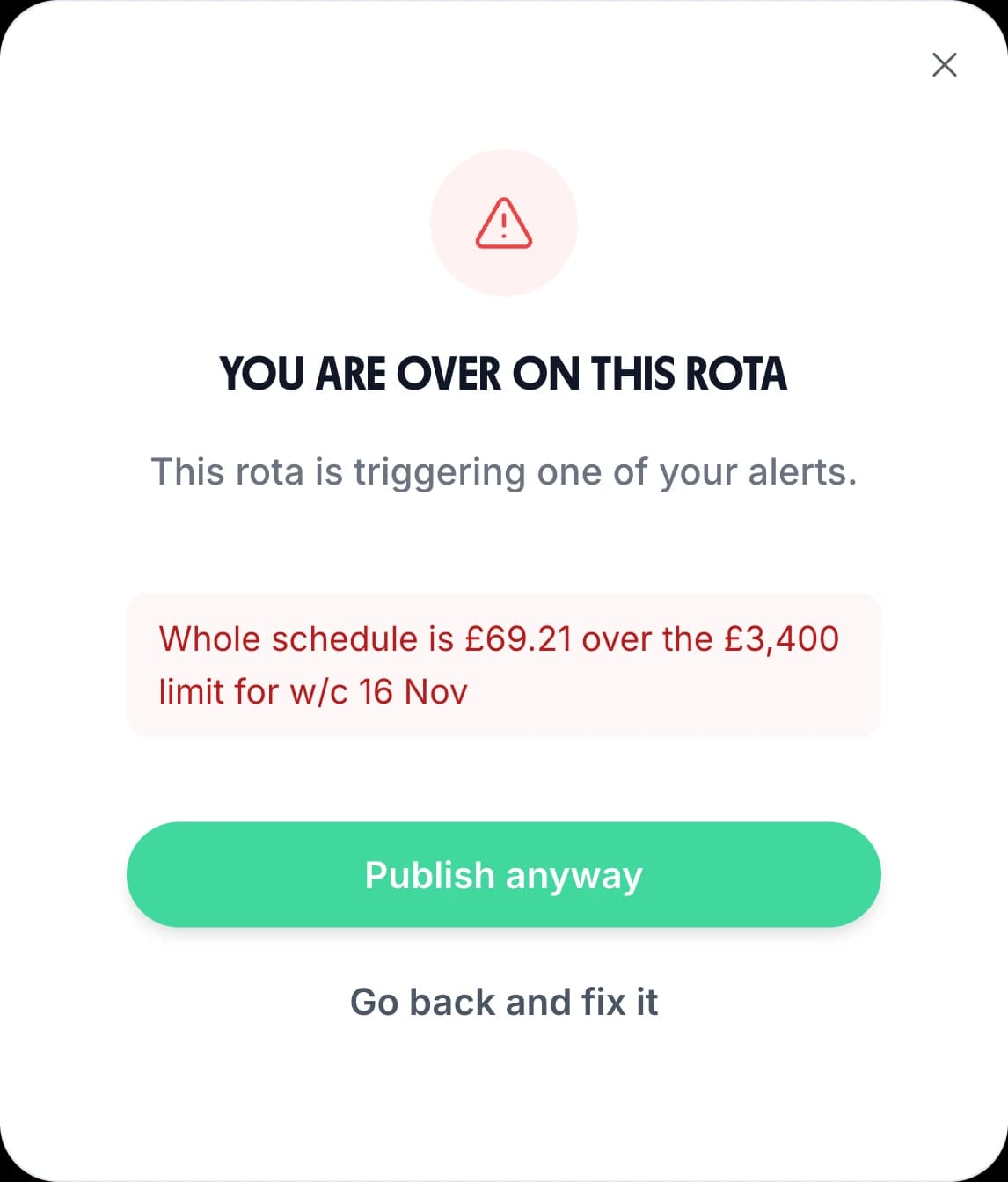
The warning TimeTally shows before publishing a week over budget: You are over on this rota, Whole schedule is £69.21 over the £3,400 limit for w/c 16 Nov, with Publish anyway and Go back and fix it

“The app is simple to use, reliable, and makes managing holidays, absences, and staff records straightforward. The system has saved us a significant amount of administration time.”

CLI ManchesterJordan Ingoe, CLI Manchester

The Wage Cost of Every Day, Under the Rota

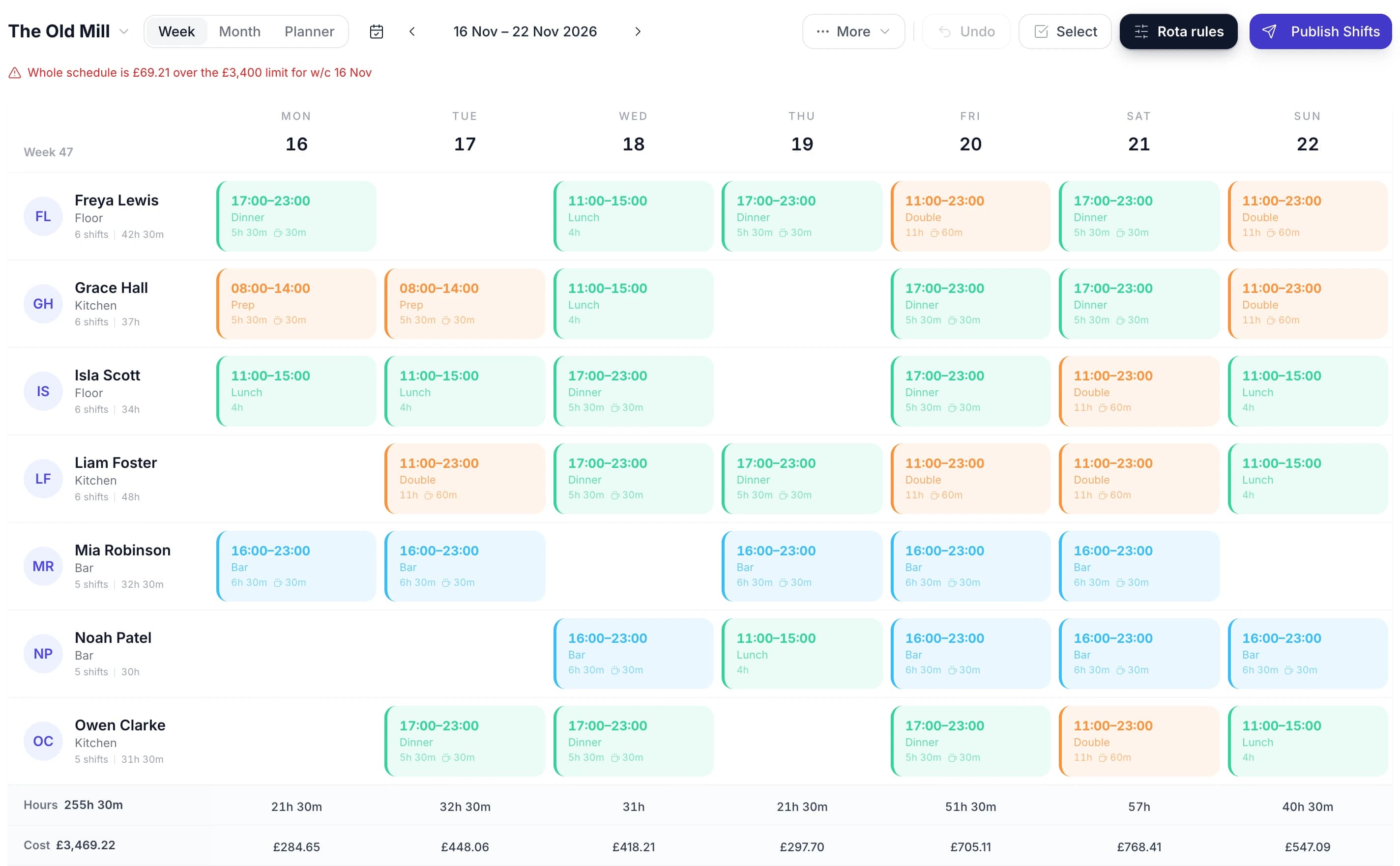
Add a shift, move it to another day or hand it to someone else, and the Cost row changes as you do it. You see what Saturday costs while you are still deciding who works it, not when the pay run comes out.

A week of the TimeTally rota for a pub's kitchen, bar and floor staff, with the alert Whole schedule is £69.21 over the £3,400 limit, an Hours row of 255h 30m and a Cost row of £3,469.22 under the grid, and a cost figure under each day
  • Paid hours, not rostered hours

    Each shift's unpaid break comes off before it is priced. If your organisation pays breaks, the whole shift counts.

  • Each person's own hourly rate

    Cost is paid hours × that person's rate. Someone with no rate set adds their hours but nothing to the cost.

  • Totals follow the filter

    Filter the grid by location, project, shift template or role and the two rows count only the shifts left on screen.

  • A total for the range

    The figure beside the word Cost is the whole week, or the whole month in month view, for the schedule you have open.

Keep Rota Labour Costs Inside Your Wage Budget

Three steps, set up once. After that the rota checks itself every time you open it.

  • Add hourly rates

    Set each person's rate on their profile, or everyone's at once under Pay rates. Settings tells you how many people still have no rate

  • Set a budget alert

    For example: the whole schedule, cost goes over £3,400 per week. Add hours and staffing alerts in the same place

  • Build, check, publish

    Breaches show above the grid as you build. Press Publish and any that are left are listed before the rota goes out

A Wage Budget Alert Before You Publish

Open Rota rules, then Alerts. Each alert is one line: what to watch, over or under, which measure, the amount, and per day, week or month.

Watch the whole rota, a team or a person

An alert can watch the whole schedule, one department, any department, one named person or any employee. It can apply to one schedule or to all of them, so a group of sites can have a budget each and one for the lot.

Cost, hours or staff on shift

Measure wage cost in pounds, paid hours, or the number of people on shift. Alert when it goes over or falls under your figure, per day, week or month. Under is useful too: a Saturday with too few people on is a problem of its own.

A red line above the grid

Every breach is listed above the rota while you build it, in plain words, and goes away when you fix it. Alerts count the whole rota, so filtering the grid can't hide an overrun.

A warning, never a block

Press Publish on a rota that is still over and TimeTally says “You are over on this rota” and lists each breach. Choose Publish anyway or Go back and fix it. A week can be over for a good reason, such as cover for sickness.

Examples: how alerts would read on the week shown above

  • Whole schedule is £69.21 over the £3,400 limit for w/c 16 Nov
  • Whole schedule is £68.41 over the £700 limit for Sat 21 Nov
  • Whole schedule has 4 staff on Mon 16 Nov — under the 5 staff minimum

The Month's Wage Bill in Month View

Switch the rota to Month and the Cost row totals the whole month, with each day's cost to the nearest pound. It is the view to check before you agree a busy month's staffing, or when your budget is set monthly. Monthly cost alerts work the same way.

Each schedule has its own Hours and Cost rows, so a second site or a separate kitchen rota is priced on its own.
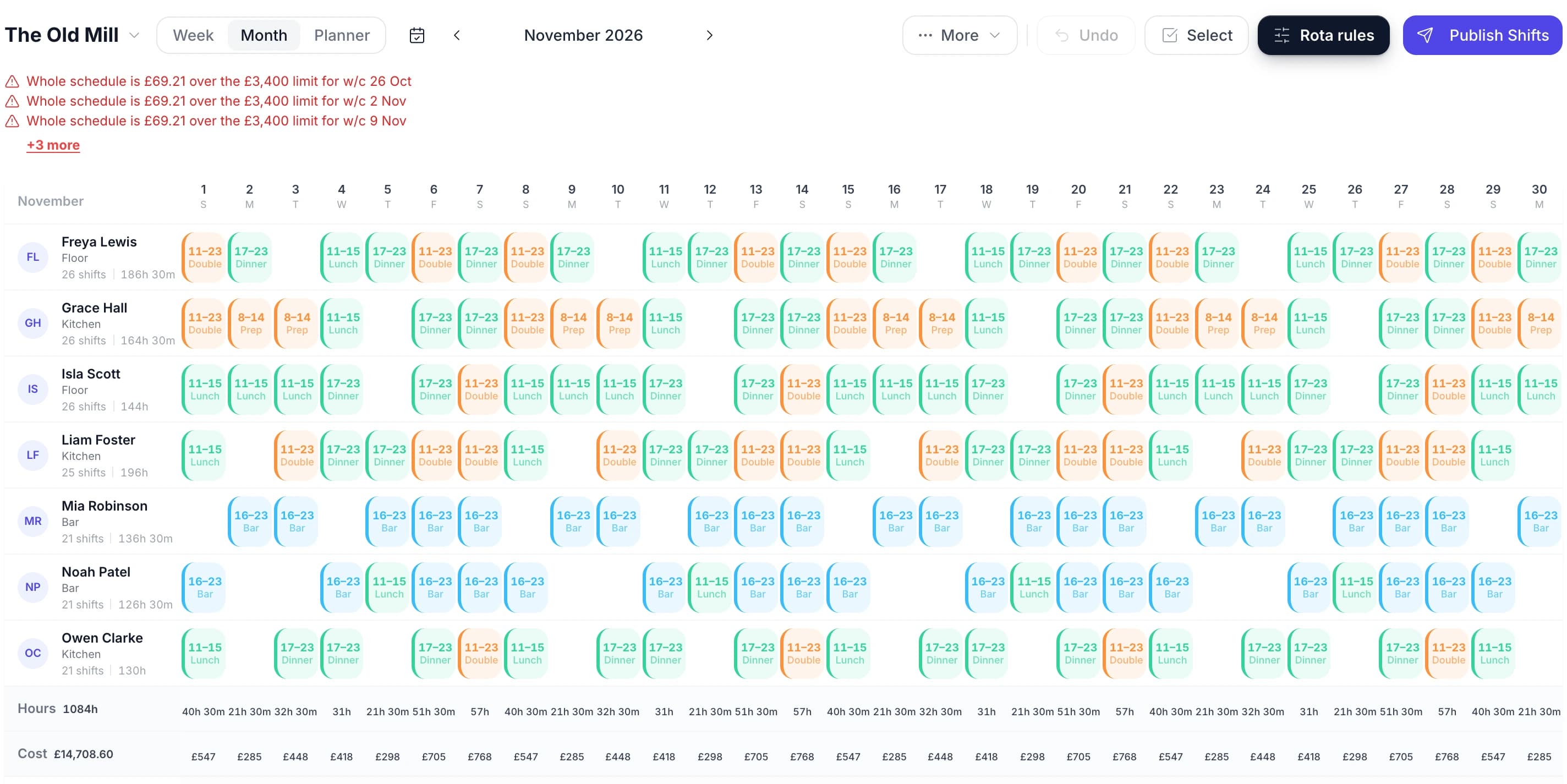
The TimeTally rota in month view for November 2026, with the weekly wage alerts above it, Hours 1084h and Cost £14,708.60, and a whole-pound cost under each day

Planned Cost on the Rota, Actual Pay From Timesheets

The rota's cost is what you planned. What you pay depends on what people actually worked. In TimeTally, staff clock in or fill in their timesheet in the same app, and you approve it.

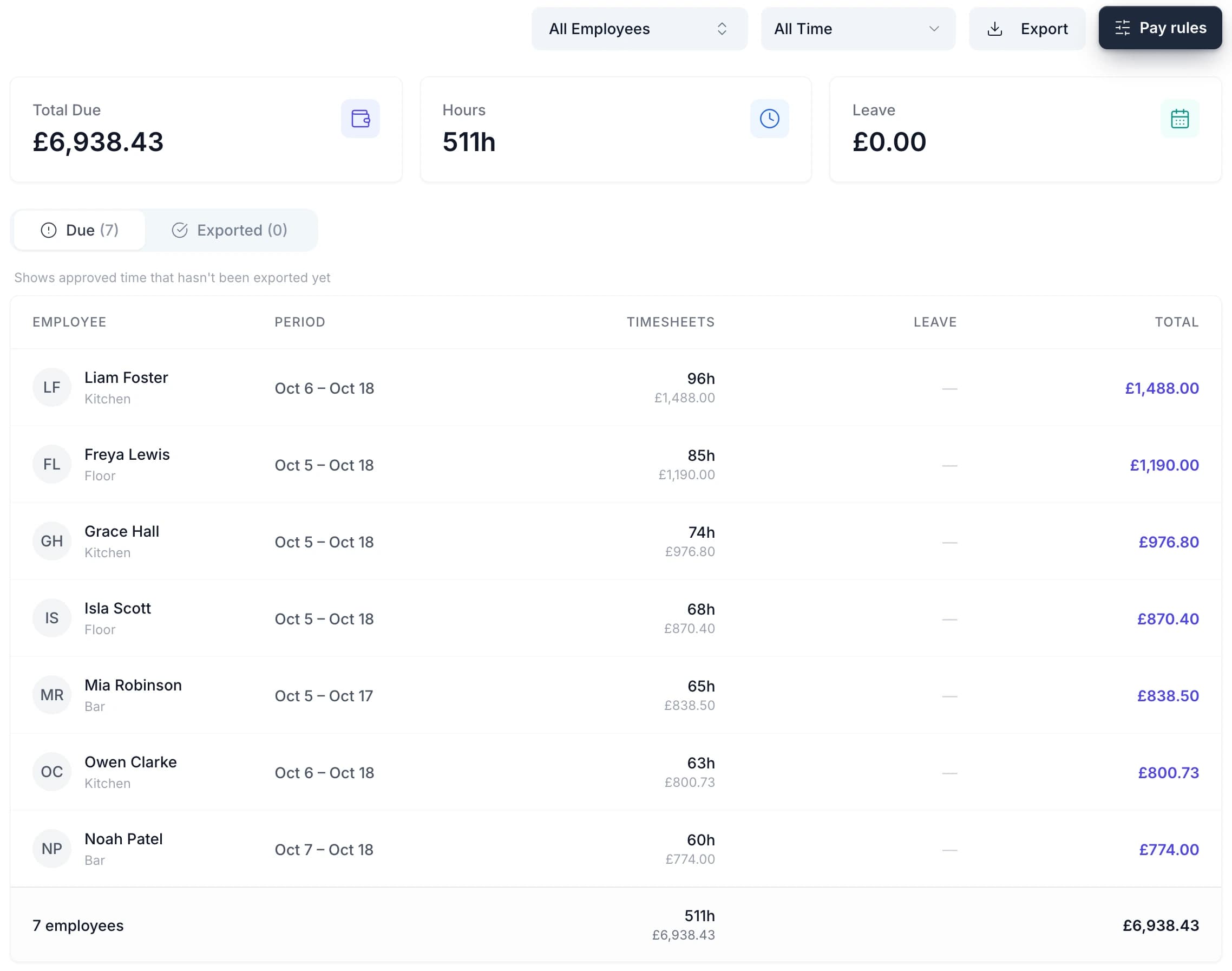
The Pay page then prices the approved hours: regular pay, overtime at its rate and paid leave, per person. Export it to Xero, QuickBooks or a CSV file. See timesheets with payroll and payroll integrations for that side.

There is no automatic planned-versus-actual report. You put the rota's weekly figure beside the Pay page's, and both come from the same rates.

The TimeTally Pay page: £6,938.43 due for 511 hours of approved timesheets, with each employee's period, hours and pay

What the Rota Cost Counts, and Who Sees It

Only people allowed to see pay

The Cost row shows once pay is switched on for your organisation. Turn off Allow them to see pay for a manager and they can still build and publish the rota, without seeing the Cost row, cost alerts or anyone's rate. Employees never see it.

Hourly rates only

The cost comes from hourly rates. A salaried person with no rate adds hours but no cost, so give them an hourly equivalent if you want them in the figure.

Wages, not employer costs

The figure is paid hours at each person's rate. Employer National Insurance, pension contributions and paid holiday are not in the Cost row.

Labour cost by person, role or site

Rota rules, then Reports, shows the cost of any date range: in total, per person, and by role, location, schedule and shift template. Download every shift with its rate and cost as a CSV.

Want to try the sum by hand first? The free rota cost calculator prices a week from staff, hours and rates. To turn the weekly figure into a share of takings, read our guide to labour cost percentage.

Pricing

One price per employee. The rota, its wage costs and alerts, timesheets, pay and leave are all included.

£3/employee/month

After a 14-day free trial, no credit card required. GPS clock-in is an optional £1 extra.

Hours and wage cost under every day of the rota
Cost, hours and staffing alerts, checked before you publish
Rota reports by person, role and location, with CSV export
Timesheets and clock-in, priced on the Pay page
Export to Xero, QuickBooks or CSV
Holiday and leave tracking in the same app
Start free

See the full pricing page.

In short

What are rota labour costs?

Rota labour costs are the wages a rota commits you to: each shift's paid hours multiplied by the hourly rate of the person working it. In TimeTally, the rota shows this under every day as you build it, with a total for the week or month. Unpaid breaks come off first. You can set a wage budget as an alert per day, week or month, for the whole schedule, a department or a person. Breaches show above the grid and again before you publish, as a warning rather than a block. Managers who aren't allowed to see pay don't see the cost. After the week, approved timesheets price actual pay for Xero, QuickBooks or CSV. It costs £3 per employee per month after a 14-day free trial.

Cost shown
Per day, week and month
Priced from
Paid hours × hourly rate
Budget
Alerts, before you publish
Actual pay
Approved timesheets
Price
£3 per employee a month

Rota Labour Costs — Frequently Asked Questions

What tools help me compare my weekly wage spend against my budget, using my rota and payroll data?

TimeTally prices the rota as you build it: a Cost row under the grid shows each day's wage cost and the total for the week, from each person's hourly rate. Set a cost alert for your weekly wage budget and the rota flags any week that goes over it, again before you publish. After the week, approved timesheets price what people actually worked, including overtime and paid leave, and export to Xero, QuickBooks or CSV. There is no automatic planned-versus-actual report: you compare the rota's figure with the Pay page yourself.

What rota tools help UK small businesses reduce overtime costs?

Seeing the cost before the week starts is the main one. In TimeTally, set an hours alert on any employee, for example over 40 hours a week, and anyone rostered past it is listed above the grid and again before you publish. The Cost row shows what adding or removing a shift does to the day's wage bill. Once the week is worked, overtime is worked out from timesheets under your own rules, paid or banked as time off in lieu. TimeTally does not build or optimise the rota for you.

How do I work out the labour cost of a shift?

Take the paid hours, which is the shift length less any unpaid break, and multiply by the person's hourly rate. A 09:00 to 17:00 shift with a 30-minute unpaid break is 7h 30m, so at £12.50 an hour it costs £93.75. TimeTally does this for every shift on the rota and adds them up per day and per week. Employer costs such as National Insurance and pension contributions are not included.

Can I set a wage budget for each department?

Yes, as an alert. An alert can watch the whole schedule, one department, any department, one person or any employee, and compare hours, staff on shift or wage cost against your figure per day, week or month. It can apply to one schedule or all of them. Departments come from each employee's profile.

Does going over budget stop me publishing the rota?

No. TimeTally warns, it never blocks. When you press Publish on a rota that is breaking an alert, a dialog lists every breach, with Publish anyway and Go back and fix it. A week can be over budget for a good reason, such as cover for sickness, and you still need to send it out.

Can I hide wage costs from a manager?

Yes. Turn off Allow them to see pay for that manager. They can still build and publish the rota, but the Cost row, cost alerts and hourly rates are hidden from them. Hours and staffing alerts still show. Employees never see the cost of the rota.

Does the rota cost include holiday pay and overtime?

The Cost row prices shifts, so paid holiday on the rota is not in it. Overtime is in it only if your organisation pays from rota shifts instead of timesheets, an option for teams that don't use time tracking. For most teams, the Pay page is where actual pay is worked out: approved hours, overtime at its rate and paid leave.

How does TimeTally handle salaried staff in the rota cost?

TimeTally prices the rota from hourly rates. A salaried person with no hourly rate adds their hours to the Hours row but nothing to the Cost row. If you want them in the figure, give them an hourly equivalent of their salary. Settings shows how many people still have no rate, so nobody is left out by accident.

Still have a question? See all FAQs

Know Next Week's Wage Bill Before It Goes Out

Add your team and their hourly rates in the trial, build next week's rota, and set one budget alert.

No credit card required · Free 14-day trial · Cancel anytime

Support that answers

A real person replies within 24 hours. No ticket queues, no bots.

UK GDPR compliant

A UK company, ICO regulated. Your data encrypted and never sold.