Shift planning for hotels, venues and hospitality groups

Hospitality Rota Software for UK Hotels and Venues

A hospitality staff rota is never finished when you publish it. A function gets confirmed on a Wednesday, a chef calls in on a Friday, and the week you sent out on Sunday is already wrong. TimeTally is hospitality scheduling and rota software built around that: publish a week at a time, let front of house and kitchen agree swaps between themselves, and copy a good week forward instead of rebuilding it. Rota planning sits alongside time tracking and leave tracking in the same £3 per employee per month.

Week of 16 June

All departments
Publish Rota Published
Employee
Mon16
Tue17
Wed18
Thu19
Fri20
Sat21
Sun22
AR

Amelia

Kitchen

Open

Open

Evening

Close

Open

JK

James

Front of House

Close

Early

Mid

Open

Open

Early

PS

Priya

Kitchen

Leave

Mid

Close

Open

Early

MP

Maya

Front of House

Early

Close

Leave

Mid

Close

TW

Tom

Bar

Open

Open

Mid

Open

Close

Templates

Open
Close
Mid
Early
Evening

Rota Published!

Your team has been notified

Shift Templates

New Template New Template

Open

09:00–17:00

Close

12:00–20:00

Mid

10:00–18:00

Early

06:00–14:00

Evening

17:00–22:00

New

New Template

Evening

Start

17:00

End

22:00
Save Template Saved!

Shift Swap Request

Awaiting your approval

JK

James K.

Open · Thu

PS

Priya S.

Early · Sat

Approve Approved!

Shifts published!

Week of 16 Jun

Swap approved

James ↔ Priya

Evening added

Wed · 17:00–22:00

9:41

16 Jun – 22 Jun

this week · 40h

Mon

16

Tue

17

Wed

18

Thu

19

Fri

20

Sat

21

Sun

22

This week

40h total

Mon, 16 Jun

09:00–17:00

8h

Open

Tue, 17 Jun

09:00–17:00

8h

Open

Wed, 18 Jun

Today

17:00–22:00

8h

Evening

Thu, 19 Jun

12:00–20:00

8h

Close

Fri, 20 Jun

09:00–17:00

8h

Open

The app is simple to use, reliable, and makes managing holidays, absences, and staff records straightforward. The system has saved us a significant amount of administration time.

CLI ManchesterJordan Ingoe, CLI Manchester

The whole service week on one grid, with the wage cost under it

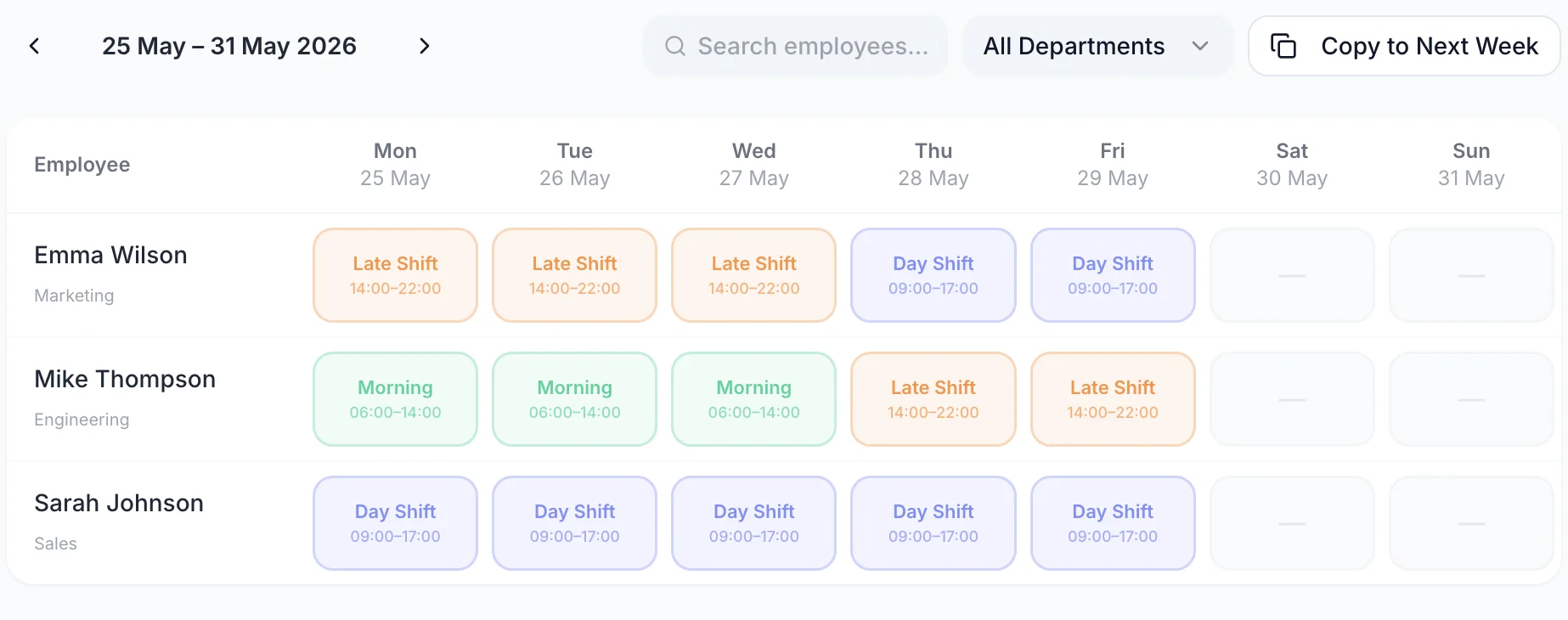
One row for each member of staff, one column for each day. Click an empty cell to add a shift, drag a shift to another day when the booking moves, or drop it onto a different name to hand it over. The two rows along the bottom are the ones a general manager watches: hours rostered per day, and what those hours cost.

A week of the rota with one row per person and a shift on each day they are working
  • One row per person, one column per day

    Kitchen, bar and front of house sit on the same grid, each name carrying its job title and the hours that person is rostered for that week

  • Every shift carries its own break

    A shift shows its name, its start, its finish and the unpaid break that comes off the paid hours, so a 12-hour service day is not read as 12 paid hours

  • Hours and wage cost per service day

    A cost figure under every column and a total for the week, both moving as you add cover for a function or take a shift off a quiet Tuesday

  • Another venue's rota blocks the cell

    If a chef is already rostered on a second site that day, the cell names that rota in a dashed outline and refuses the shift rather than double-booking them

Let the team sort a swap, and still approve it

The swap that actually happens in hospitality happens between two people who already know they can cover for each other. TimeTally puts that exchange in the app instead of the group chat, and still gives a manager the final say. A member of staff picks one of their own shifts and a named colleague, and either offers one of that colleague's shifts in return or hands theirs over with nothing back. The colleague accepts or declines. Only then does it reach a manager.

  • Three stages, one queue

    Requested, accepted by the colleague, then approved or rejected by a manager with a reason. Nothing on the rota moves until the last of those.
  • It refuses a swap that no longer works

    If the shift has been reassigned since, the offered shift has been deleted, or the other person is now rostered that day, approval fails and tells the manager which of those it was.
  • It warns before it goes out

    A member of staff who has approved leave on the day of the shift they would be picking up is told so before the request is sent.
  • Swaps are on unless you turn them off

    A venue that would rather every change went through the head of department switches them off in one place, for the whole organisation.
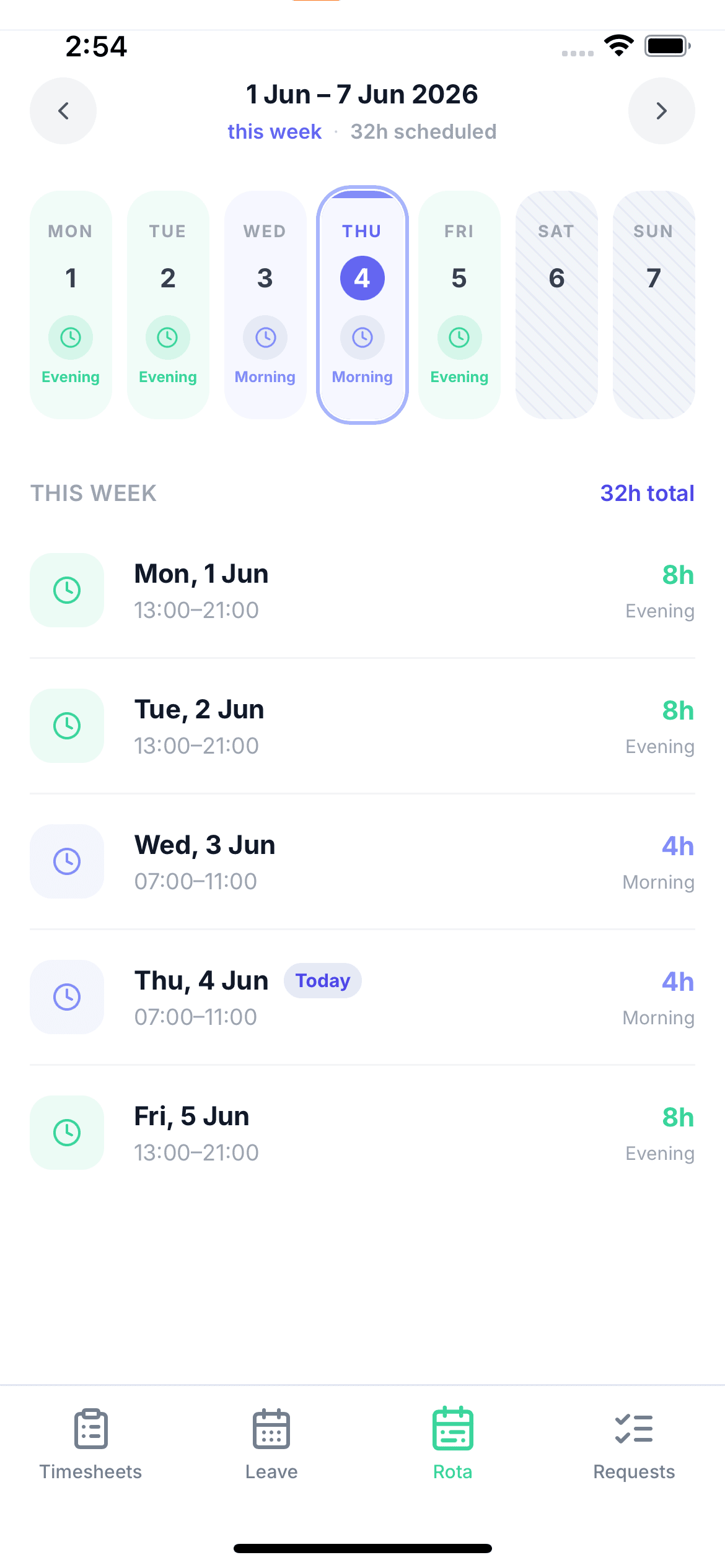
A member of staff viewing their upcoming shifts on their phone

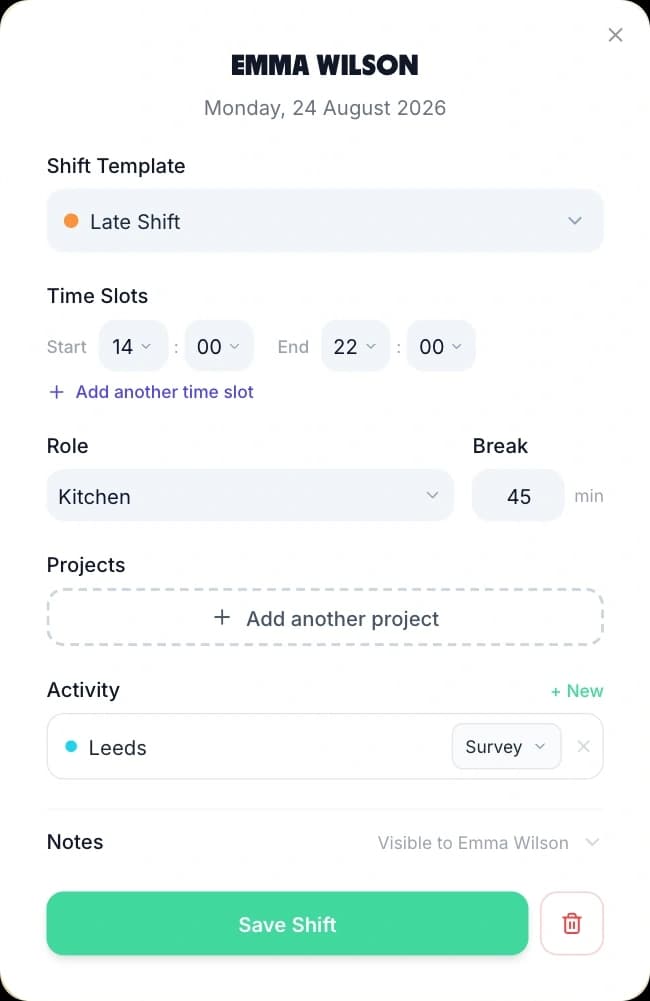
Save each service as a shift template

A venue runs the same handful of shifts most weeks. Breakfast 06:00–14:00 for the kitchen and the front desk, Day 09:00–17:00, Late 14:00–22:00 to close the bar, Night 22:00–06:00 for the porter. Save each one once as a shift template with its own colour, then drag the template onto any cell to assign it. You stop typing start and finish times, and the shift names stay the same across every week and every venue in the group.

  • A colour per service

    Breakfast, lunch, dinner and night read as four colours across the week, so a Saturday with nobody on close is visible without reading a single time
  • Breaks, roles and locations on the template

    A template carries its unpaid break minutes and can carry a job role and a location, so the shift lands complete rather than half filled in
  • Split shifts in a single cell

    One shift can hold more than one block of time, for the chef who works lunch service, goes home, and comes back for dinner
Creating a shift from a saved template: the template picker, start and end times, role, break and a Save Shift button

Read a whole conference season in month view

Week view is for building. Month view is for checking. Switch the grid to the month and the same rows run across every day of it, with the Hours and Cost rows totalling the month instead of the week. This is where a thin week in the middle of banqueting season shows itself, and where four housekeepers who have all booked the same fortnight in August become impossible to miss.

  • Cover across the whole month

    Every person, every day, in one grid — the view to open before you agree a season's staffing with an owner or an area manager
  • The month's wage cost

    The Hours and Cost rows follow the range on screen, so switching to the month gives you the month's figures rather than the week's
  • Publishing stays weekly

    Publishing from month view publishes each week the month touches, because a week is still the unit staff see
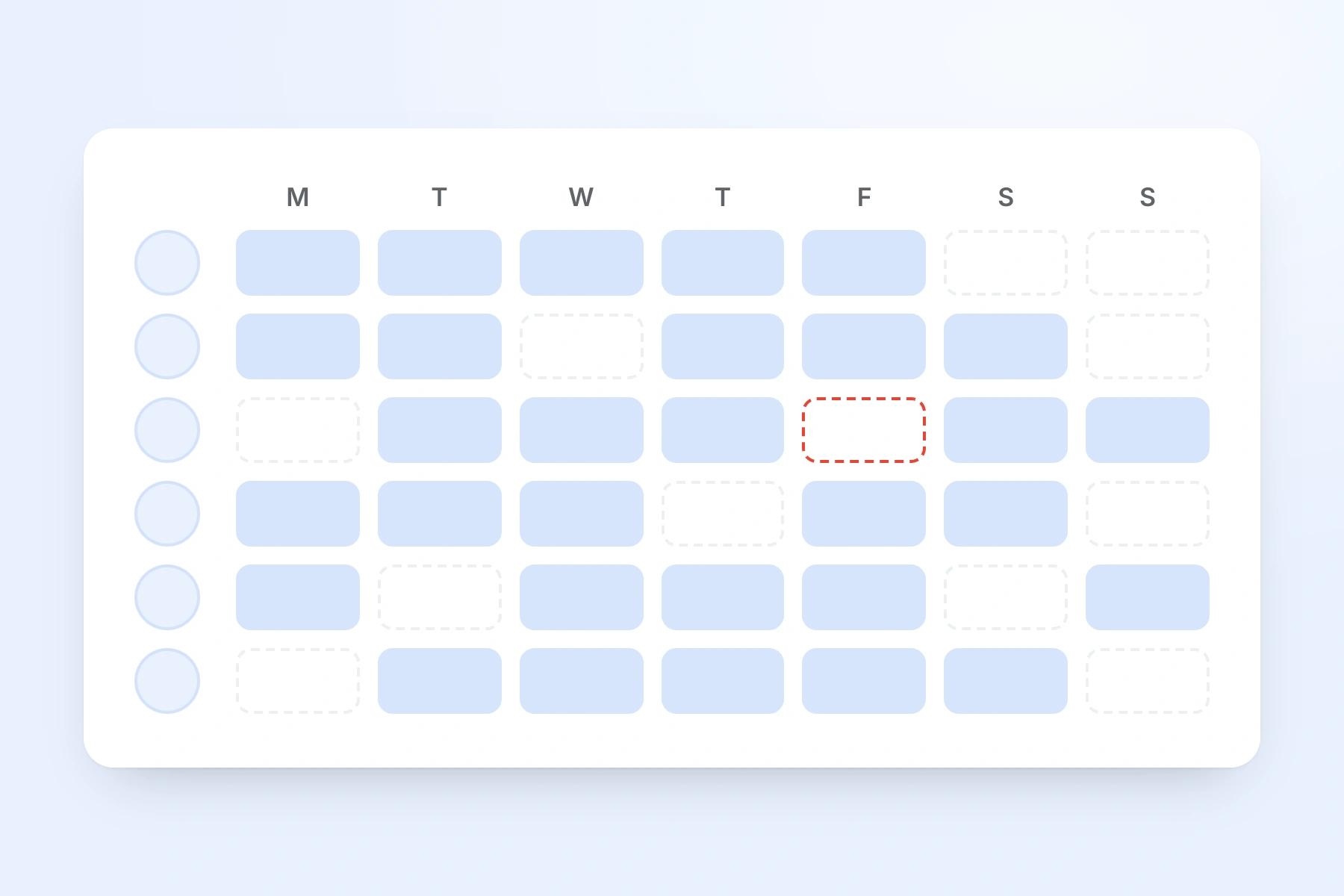
A week of shifts across the whole team, one row per person, with an unfilled shift outlined in red

Copy a good week forward instead of building it twice

Most weeks in a venue are a variation on a week you have already built. The rota menu is where that repetition is handled: save the week on screen as a named template, apply a saved week onto a future one, or push this week forward onto the next. Print, hours export and analytics work on the same week from the same menu.

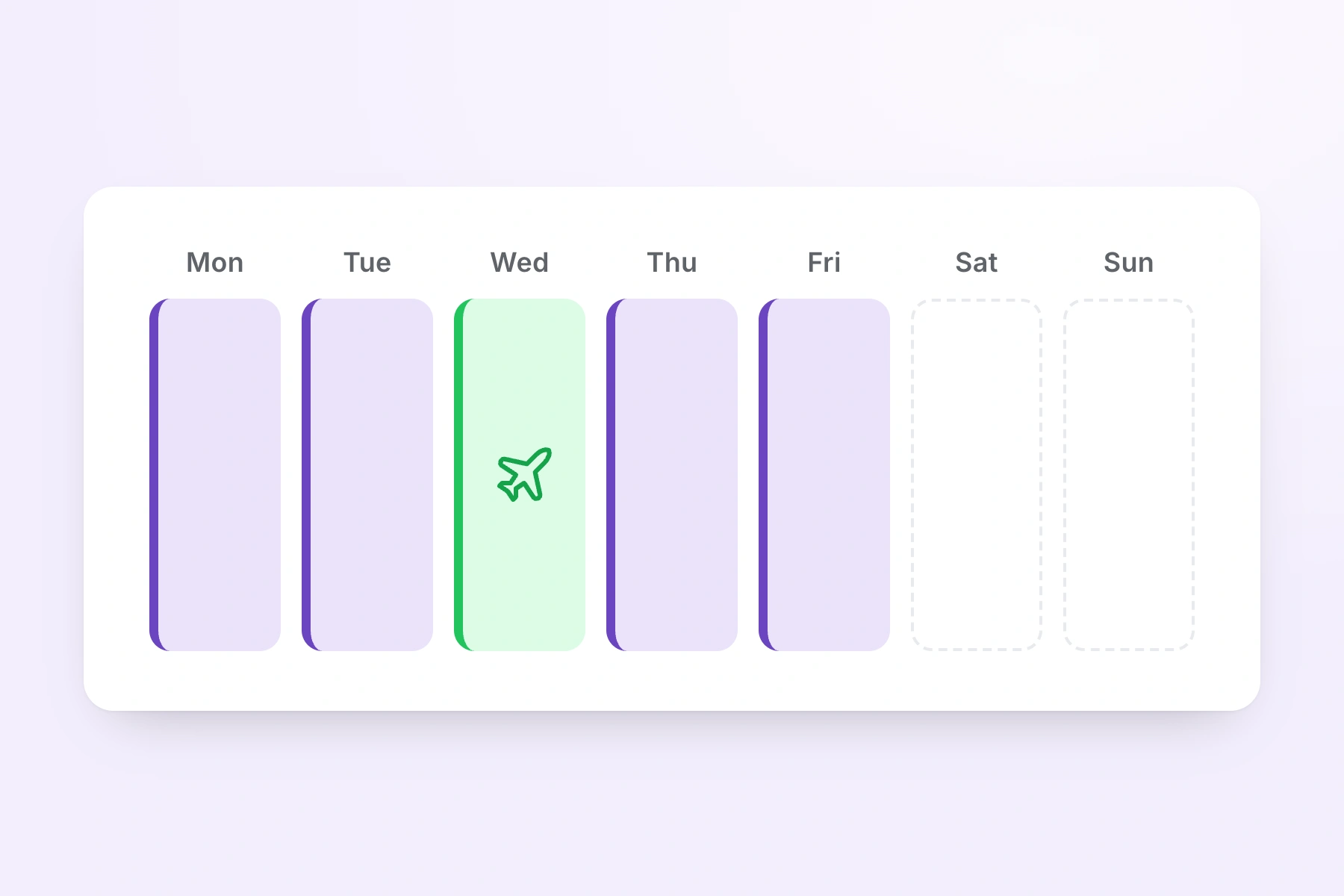
A week of shifts with one day showing booked annual leave in place of a shift
  • Save week as template

    Store a whole service week — every shift, on every person, on every day — under a name such as Summer Trading or Conference Week

  • Apply week template

    Drop a saved week onto any future week when that shape comes round again; TimeTally shows what it will do before it writes anything

  • Copy to next week

    Push the week on screen forward seven days, skipping any day a person already has a shift, so nobody is doubled up

  • Print rota and export hours

    Print the week for the pass or the back-of-house noticeboard, or export the hours as CSV for payroll, both from the same menu

Pricing a week before you build it? The rota cost calculator does that on its own, and the shift pattern calculator works out how many people a repeating pattern needs to cover it.

Everything a hospitality rota has to handle

Click any feature to learn more.

Drag & Drop Scheduling
Start your free trial

14-day free trial · No credit card needed

What makes a hospitality rota different

Hotels and venues do not schedule the way an office does. The day is longer than anyone's shift, the week changes after it is published, and a large part of the team is seasonal. These are the four things a hospitality rota has to survive.

Venues

Hotels and groups running more than one venue

Create a named rota for each venue — restaurant, bar, housekeeping, the second site — and switch between them from the dropdown above the grid. Each rota has its own member list, so a venue's grid shows only its own people.

  • A supervisor who covers two venues can be a member of both rotas and will appear on both grids without any extra setup
  • Rostered on one venue that day, they cannot be given a shift on another: the cell names the other rota and refuses
Services

Split shifts across lunch and dinner service

A single shift can hold more than one block of time on the same day. A chef de partie working 11:00 to 15:00 and back for 18:00 to 23:00 is one shift with two blocks, not two shifts fighting over the same cell.

  • Paid hours add up across every block on the shift, with the unpaid break taken off the total once
  • A shift that runs past midnight is measured correctly, so a night porter on 22:00 to 06:00 reads as eight hours rather than a negative number
Seasons

Conference season, summer trade and the Christmas run

A busy period is not a different rota, it is the same rota with more people on it. Build one good week for that shape of trade, save it as a week template, and apply it whenever the shape comes round again.

  • A week template stores each shift as a day offset rather than a date, which is why it can be dropped onto any future week
  • Month view puts the whole of a conference season in one grid, so a thin week in the middle of it is visible before it arrives
Cover

The Friday call that changes the week

Hospitality rotas change after they are published, and the useful question is what happens next. Staff can agree a swap between themselves, and approving a late leave request hands you the shifts that need cover.

  • A swap goes to the named colleague first and only reaches a manager once that colleague has accepted it
  • Approve leave for someone already rostered and TimeTally lists the affected shifts and who is free to cover

The Two Rota Settings a Venue Changes on Day One

The rota is off until you turn it on, and the two staff-facing switches beside it default in opposite directions. Both are worth five minutes before you invite a single head of department.

Swaps and who sees whom

Decide how much of the rota the team can move themselves.

Rota planning is opt-in. A venue using TimeTally for hours and holiday only never sees the grid, and no member of staff gets a rota tab they do not need. Switch it on in Settings and the rota appears for the whole organisation.

Two switches then sit beside it, and they default in opposite directions. Shift swaps are on: two people can agree a change between themselves and send it up for approval. Showing colleagues on a shift is off: staff see their own shifts and nobody else's until you decide otherwise.

A restaurant where the team need to know who they are working Saturday service with turns colleagues on. A hotel that wants every change to go through the duty manager turns swaps off. Neither is assumed for you, and both are one switch for the whole organisation rather than per venue.

Running more than one venue

A rota per venue is real. A manager who only sees one venue is not.

Multi-site operators are usually sold something vaguer than this, so here is the mechanism exactly. You create a separate named rota for each venue and each rota has its own member list. That is what gives you a grid per site, a person who can belong to two of them, and a cell that refuses a shift when someone is already rostered elsewhere that day.

What it does not give you is access scoping. TimeTally has two roles, admin and employee, and there is no per-venue or per-department admin. Anyone you make an admin can open every venue's rota in the organisation, not only their own.

The one restriction that does exist is pay visibility, set per person when you invite them. A restaurant manager invited with pay details hidden gets the whole rota — the grid, the templates, publishing, swaps, the Hours row — and no hourly rates and no Cost row. For a group where separating sites matters more than sharing one account, running an organisation per venue is the honest answer.

How rotas, publishing and shift templates work

Why a Hospitality Staff Rota Is Never Finished When You Publish It

Rota tools built for a five-day office assume the week stops changing once it is agreed. In a hotel or a restaurant it does the opposite. Here is what actually moves across a venue's week, and what handles each of them.

Bookings Land After the Rota Goes Out

A function confirmed on Wednesday for the following Saturday changes the shape of that Saturday. That is normal and no scheduling tool prevents it. What matters is how quickly the published week can absorb it. Dragging two extra shifts onto the grid takes seconds, the Hours and Cost rows move as you do it, and TimeTally marks the week as having changed since it was last published so you know there is something new to send out. The alternative — a rota printed on Sunday and amended in biro — is the version that ends in an argument about who was told what.

The Trading Day Is Longer Than Anyone's Shift

A hotel is open every hour of the day and a restaurant trading breakfast through to last orders needs at least three shifts to cover it. Shift templates hold those patterns so nobody retypes 06:00–14:00 every Monday, and each template carries the unpaid break that comes off the paid hours. Because every template has a colour, the run of breakfast, day, late and night reads as a block of colour across the week, and a night with nobody on the desk is visible before anyone has read a single time. A shift that runs past midnight is measured as crossing into the next day rather than backwards, so the night porter's 22:00 to 06:00 is eight hours everywhere it appears.

Split Shifts Are the Normal Case, Not the Exception

Kitchen brigades work lunch service, go home, and come back for dinner. In most scheduling tools that is two entries which have to be reconciled by hand at the end of the week. In TimeTally one shift can hold more than one block of time, so 11:00 to 15:00 and 18:00 to 23:00 sit in a single cell as one thing. Paid hours are summed across every block and the unpaid break is deducted once, which is what makes the weekly total beside that person's name and the day's wage cost both come out right. You can still create two separate shifts if you prefer to see them apart; the single split shift is simply tidier when you drag it to another day.

Most of the Team Is Seasonal or Part-Time

Students working two evenings, seasonal staff hired for the summer, casual banqueting staff called in for events, and a small permanent core are the shape of most venues. None of them work a repeating five-day week and TimeTally does not ask them to. Each shift is assigned to one person on one day, so nothing has to be modelled as a contract before you can roster it. Each person's rostered hours for the week appear beside their name, which is the number to check against whatever their contract actually says. Leisure and venue staff who cover events across more than one site are handled the same way: membership of more than one rota, and a cell that refuses a clash.

Holiday Requests Arrive During Peak Trade

Approved annual leave, sick leave and TOIL show on the rota grid in the same view as the shifts, so a manager building next week is looking at both at once. When leave is approved for someone already rostered, TimeTally lists the shifts that now need cover and shows who is free to take each one — people on that shift's own rota first, everyone else one click further on. Choosing a name reassigns the shift and marks the week as having unpublished changes, exactly as dragging it would. The holiday side of that is argued properly on the leave management for hospitality page rather than repeated here.

Rostered Hours Are Not Worked Hours

A rota is a plan. What the kitchen actually did on a Saturday that ran two hours late is a different record, and conflating the two is how payroll disputes start. TimeTally keeps them separate and in the same account: the rota holds what was planned, and timesheets hold what was worked, with clock-in on the phone if you want it. The wage cost row on the rota is therefore a planning figure, not a payroll figure. What actually gets paid comes from the hours side, which is covered on the hospitality timesheet software page.

What TimeTally does and does not do

Where Hospitality Rota Software Stops and a Manager Starts

Rota software for hospitality is routinely sold as more than it is. TimeTally is a rota and hours tool, not a workforce management platform. It keeps a complete record and shows you the numbers. It does not make the staffing decision for you, and a page that says otherwise is usually selling something considerably bigger.

No Automatic Rota Generation

TimeTally will not build a rota for you. There is no auto-fill, no forecasting of covers from booking or till data, and no algorithm that decides how many chefs a Thursday needs. What it removes is the repetition: templates for shifts, templates for whole weeks, and copy-forward for the week you have already built. The judgement about who should be on the pass stays with the person who knows the kitchen.

No Staff Availability Submissions

Staff cannot tell TimeTally which shifts they would prefer to work. There is no availability screen and no preferences form. Almost every competitor has one, which is exactly why it is worth stating plainly rather than leaving you to discover it. What staff can do is book leave, which then appears on the grid before you assign anyone, and request a swap with a named colleague once the week is published. Everything else reaches the duty manager the way it always did.

No Working Time or Rest-Break Enforcement

There is no eleven-hour rest check between a close and the next morning's breakfast shift, no weekly hours maximum, and no alert when a rota would breach the Working Time Regulations. A venue that needs a rota blocked when it breaks a rest rule needs a platform built for that. TimeTally gives you the record those rules are argued from instead: every shift with its start, finish and unpaid break, the week's rostered hours beside each name, month view for spotting a run of long weeks, and an hours export for anyone checking the pattern. Use the shift pattern calculator to work out how many people a rotating pattern needs before you commit to it.

No Per-Venue Access Level

TimeTally has two roles, admin and employee. There is no regional admin, no venue-scoped manager and no department-level permission, so an admin at the restaurant can open the hotel's rota. The switch that does exist is pay visibility, set per person when you invite them, which hides hourly rates and the Cost row from an admin who should not see them. For a group where that is not enough separation, running a separate organisation per venue is the workaround, at the cost of a single view across the group.

No Minimum-Staffing Rules and One Rate per Person

You cannot tell TimeTally that a Saturday dinner service needs six in the kitchen and have it refuse to publish a week with four. There are no cover thresholds and no blackout dates around a conference or a bank holiday. Month view and the Hours row are what make a thin day visible. TimeTally also holds one hourly rate per person, so an enhanced night rate, a service charge distribution or a banqueting premium is a payroll matter rather than something the rota's cost row can price.

What It Does Keep

Every shift, with who was on it, the times, the job role, the location and the unpaid break. Which weeks were published and when, and whether a week has changed since. Which swaps were requested, who accepted them and who approved them. Approved leave against the same calendar. The hours each person was rostered for and, where pay is enabled, what those hours cost. If a rota is ever disputed, that record is in one place rather than in a photograph on somebody's phone. A blank staff rota template is there if you would rather sketch the week on paper first.

Simple, Transparent Pricing

One price for every venue. A restaurant with 22 staff pays £66 a month. A hotel with 45 staff pays £135. A three-venue group with 90 staff pays £270.

£3/employee/month

Billed monthly, incl. VAT. Cancel anytime.

A named rota for every venue on one account
Shift templates, split shifts and reusable week templates
Staff-led shift swaps with manager approval
Timesheets and leave tracking included
Get Started

No credit card required · See the full pricing page

In short

What is hospitality rota software?

Hospitality rota software plans which member of staff works which shift in a hotel, restaurant, bar or venue, publishes that plan so the team can see it, and keeps working when the week changes after it has gone out. TimeTally does this for UK venues and hospitality groups from £3 per employee per month. You drag service shift templates onto a week grid, save a whole week as a reusable template, or copy this week onto the next. A single shift can hold two blocks of time for a split shift, and a shift running past midnight is measured correctly for a night porter. Publishing is per week, and staff then see their own shifts in the app or any browser. Two members of staff can agree a swap between themselves, which reaches a manager for approval only after the colleague has accepted it. Approved annual leave, sick leave and TOIL appear on the same grid as the shifts, and each day carries an hours total and a wage cost calculated after the unpaid break. Each venue can have its own named rota, and a person rostered at one venue cannot be assigned to another on the same day. TimeTally does not generate rotas automatically, does not take availability submissions from staff, and does not enforce Working Time rest rules.

Price
£3 per employee a month
Publishing
One week at a time
Swaps
Staff-led, manager approved
Split shifts
Two blocks, one shift
Venues
A named rota for each

Frequently Asked Questions

What is the best hospitality scheduling and rota software for a UK hotel or restaurant group?

The honest answer is that it depends on which problem you have. If your rota is broadly stable and the pain is that it changes late — a function gets confirmed on a Wednesday, a chef calls in on a Friday — then what matters is how fast a published week can be changed and how the change reaches the team. That is what TimeTally is built around. You publish a week at a time, so a week you are still working on stays hidden. Once it is out, two members of staff can agree a swap between themselves and it comes to you for approval rather than arriving as a WhatsApp message you have to remember. Approving a late holiday request hands you the shifts that now need cover along with the colleagues who are free to take each one. If instead your problem is forecasting covers from till data, validating a rota against a union agreement, or having software decide how many people a Saturday needs, TimeTally is not that tool and will not pretend to be. It costs £3 per employee per month with the rota, timesheets and leave tracking all included, so it is worth a 14-day trial on next week's rota before you commit to anything larger.

How does a hospitality staff rota handle split shifts?

A single shift in TimeTally can hold more than one block of time on the same day, which is exactly what a split shift is. A chef working 11:00 to 15:00 for lunch service and returning 18:00 to 23:00 for dinner is one shift with two blocks, sitting in one cell on the grid. Paid hours are added up across every block and the unpaid break is deducted once from the total, so the person's weekly hours and the day's wage cost are both right without anyone doing arithmetic. You can also do it the other way and create two separate shifts on the same day if you would rather see them as two entries. Both are supported; the single split shift is usually tidier because it stays as one thing when you drag it to another day or hand it to somebody else.

Can hotel staff see their rota and swap shifts on their phone?

Yes to both. Once you publish a week, everyone assigned to it sees their own shifts in the TimeTally app and in any browser — the date, the times, the shift name, the job role, which rota it belongs to, the unpaid break and the paid hours. A week you have not published stays hidden, so staff see that the rota is not out yet rather than a draft you are still moving people around on. Swaps run in three stages and this is worth understanding before you turn staff loose on it. A member of staff picks one of their own shifts and a named colleague, and either offers one of that colleague's shifts in exchange or hands theirs over with nothing back. The colleague sees the request and accepts or declines it. Only once they have accepted does it reach a manager, who approves or rejects it with a reason. Nothing on the rota moves until the manager says yes. Shift swaps are switched on by default and can be turned off for a venue that would rather every change went through the head of department.

Can I run a separate rota for each venue in a hospitality group?

Yes. Create a named rota for each venue — restaurant, bar, housekeeping, spa, the second site — and switch between them from the dropdown above the grid. Each rota carries its own member list, so a venue's grid shows only the people who work there, and someone who covers two venues can belong to both and appear on both. If they are already rostered on one venue's rota on a given day, the other venue's cell shows that rota's name in a dashed outline and will not accept a second shift, so the same person cannot be put on two floors at once. There is one limit to be clear about. TimeTally has two access levels, admin and employee, and there is no per-venue or per-department admin. Anyone you make an admin can open every venue's rota, not just their own. The switch that does exist is pay visibility, set per person, which hides hourly rates and the wage cost row from an admin who should not see them. For a group where that is not enough separation, running a separate TimeTally organisation per site is the honest workaround.

Does the rota software handle night porters and overnight shifts?

Yes. A shift whose finish time is earlier on the clock than its start time is treated as running past midnight rather than backwards, so a night porter on 22:00 to 06:00 is eight gross hours less the unpaid break. That figure is used consistently: the person's weekly hours beside their name, the day's Hours row, the wage cost row, the CSV export and the printed rota all take it from the same calculation, so none of them disagree. The shift sits in the cell for the day it starts, which is the convention most hotels already use on paper. There is no separate night-shift mode to configure and no premium night rate — TimeTally holds one hourly rate per person, so an enhanced overnight rate has to be handled in payroll.

How do you cover a shift when someone calls in sick on a Friday?

There are two routes and both keep the record straight. If the person is going to be off, log the absence as sick leave. TimeTally then lists the shifts they were rostered for that now need cover and offers you the colleagues who are free to take each one — people on that shift's own rota first, everyone else one click behind. Choosing a name reassigns the shift exactly as dragging it across the grid would, and the week is marked as having unpublished changes so you know to send it out again. If instead a colleague has already offered to take it, the swap route is faster: the two of them agree it in the app, and it arrives in your queue with both shifts shown side by side for approval. TimeTally will not find cover for you and it does not text anybody on your behalf. What it removes is the part where the change happens in a group chat and nobody updates the rota.

How far ahead can we build the hospitality rota?

As far ahead as you like. There is no limit on how many future weeks can hold shifts, and the practical constraint is how much of the future you actually know. Most venues build two to four weeks out. Where the tooling helps is beyond that: save a representative week as a week template and apply it to any future week, or use Copy to next week to push the current week forward seven days, skipping any day a person already has a shift. Month view is the check on a long build — the whole month across every person in one grid, with the Hours and Cost rows totalling the month rather than the week. Publishing stays weekly whichever view you build in, because a week is the unit staff see.

Does approved holiday show on the hospitality rota?

Yes. Approved annual leave, sick leave and time off in lieu appear on the rota grid alongside the shifts, in the same view, so you are not checking a holiday system in another tab while you build the week. This is worth being precise about, because rota tools often describe something else under the same heading. TimeTally does not take availability submissions from staff — there is no screen where a member of staff tells the system which shifts they would prefer. What appears on the grid is leave that has actually been booked and approved. Everything else remains the manager's decision.

Can we see what a week costs before we publish it?

Yes, and for a venue working to a wage percentage it is the reason to keep the rota open while you build. Under the grid sits an Hours row and a Cost row, one figure per day plus a total for the week or month on screen. Cost is each person's hourly rate against their paid minutes with the unpaid break already taken off, so the figure is what you will pay rather than gross rostered hours. Adding a second commis chef to a Saturday shows its price immediately. Two switches gate it: the Pay feature has to be enabled for the organisation, and the admin looking has to have pay visibility. That second switch is per person, so you can give a duty manager the whole rota without giving them everyone's rates.

What does hospitality rota software cost?

TimeTally is £3 per employee per month with every feature included and no setup fee. A restaurant with 22 staff on the books pays £66 a month. A hotel with 45 staff across housekeeping, front desk and F&B pays £135. A three-venue group with 90 staff pays £270. That covers the rota, timesheets, leave tracking and the payroll exports — there is no separate scheduling tier and no per-venue charge. There is a free 14-day trial, and the rota is switched off until an admin turns it on, so a venue using TimeTally for hours and holiday only never sees the grid.

Still have a question? See all FAQs

Get next week's rota out before service starts.

Try TimeTally free for 14 days. Build the service week from templates, copy it forward, read the wage cost before you publish, and let the team check their own shifts and agree swaps from their phones.

No credit card required · Free 14-day trial · Cancel anytime