
Leisure Rota Software for Gyms, Pools and Leisure Centres

TimeTally is leisure rota software for the teams that open early and close late: lifeguards, gym instructors, swim teachers, reception and duty managers. Build the week from shift templates, get a warning when a day is short of lifeguards, and publish it so everyone sees their shifts in the app. Clock-in, timesheets and holiday tracking for casual staff are in the same app, for £3 per employee per month.

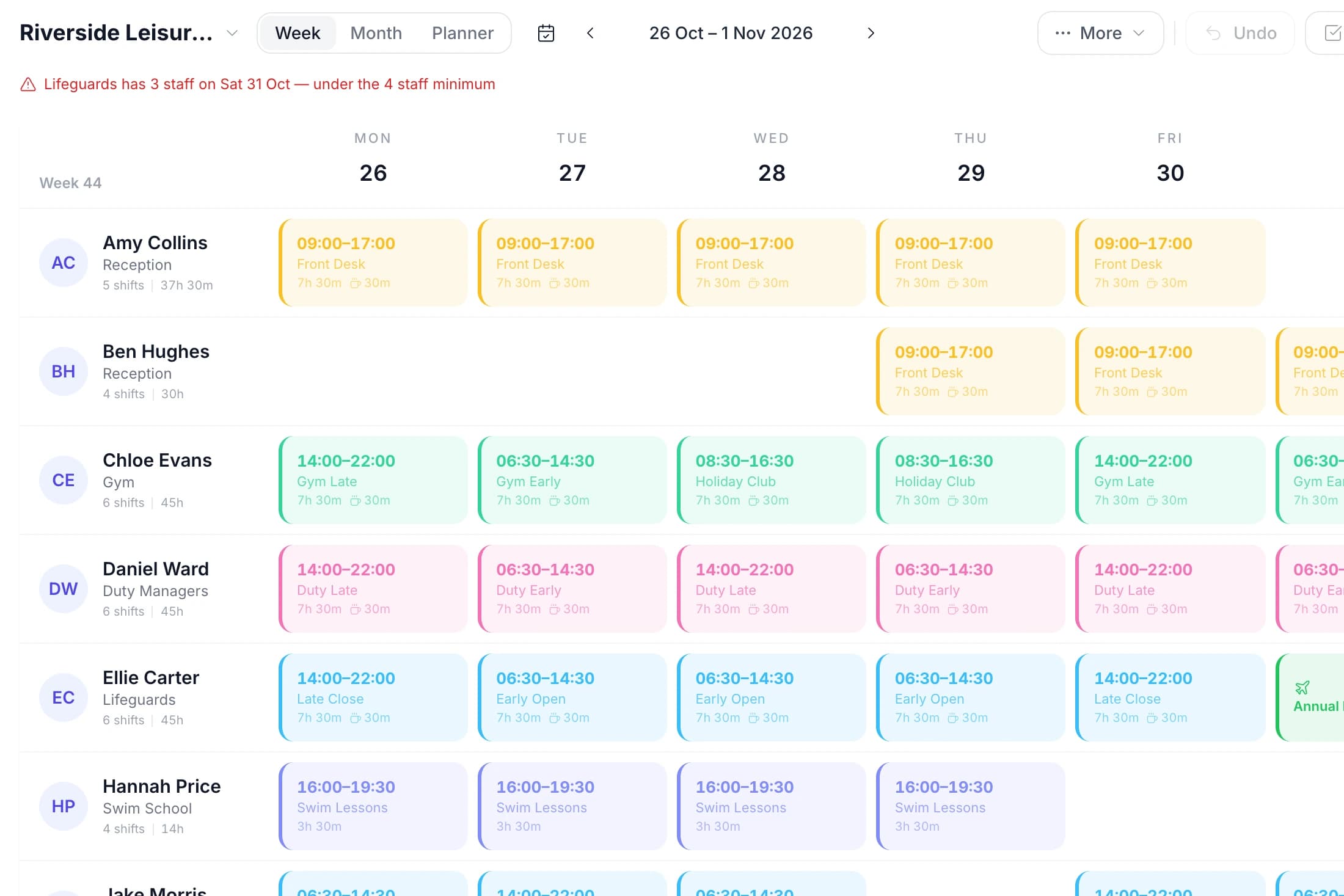
The TimeTally rota for Riverside Leisure Centre, 26 October to 1 November 2026: a row per member of staff with reception, gym, duty manager, lifeguard and swim lesson shifts, and the alert Lifeguards has 3 staff on Sat 31 Oct — under the 4 staff minimum
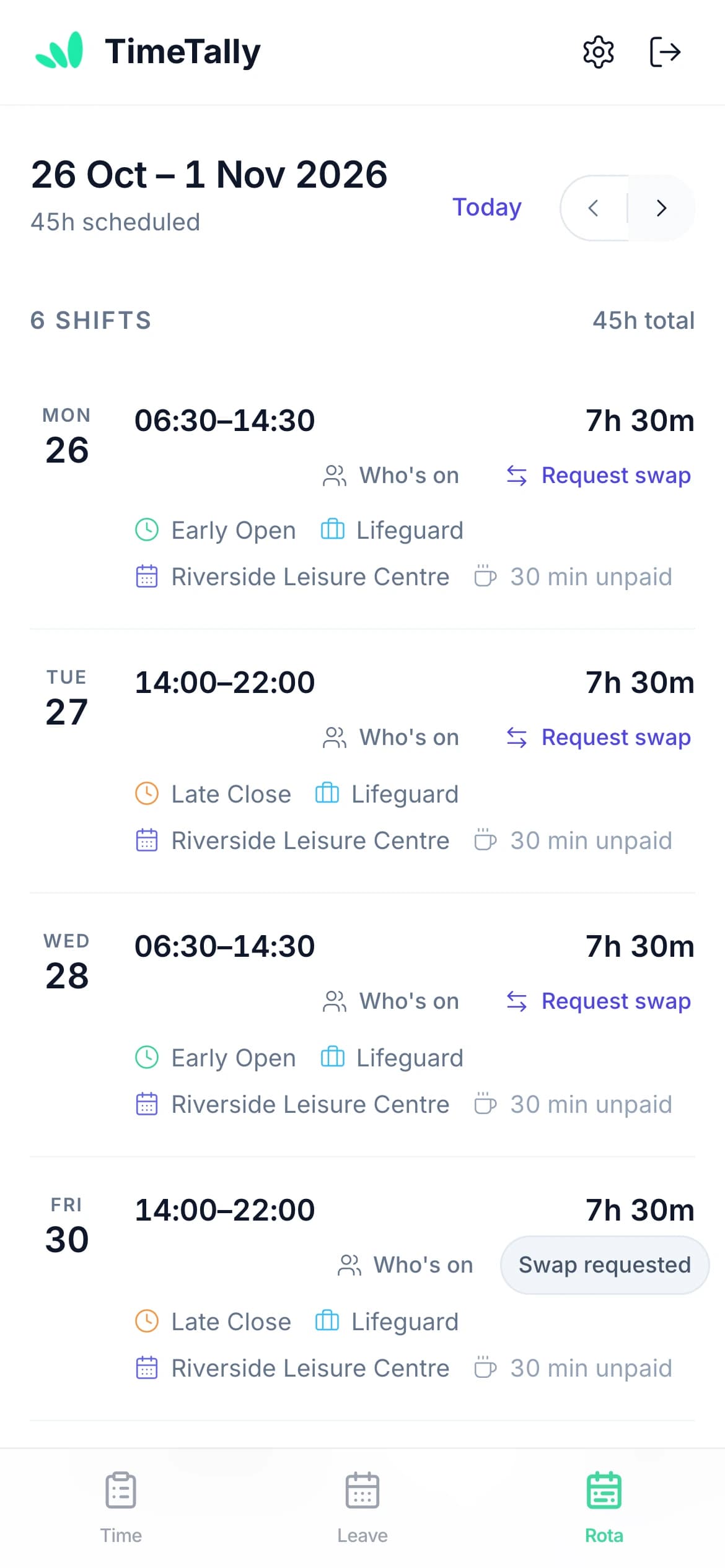
Jake Morris's week in the TimeTally app on an iPhone: Early Open and Late Close lifeguard shifts at Riverside Leisure Centre, 45 hours scheduled, with Who's on and Request swap on each shift

“The app is simple to use, reliable, and makes managing holidays, absences, and staff records straightforward. The system has saved us a significant amount of administration time.”

CLI ManchesterJordan Ingoe, CLI Manchester

Leisure rota software for the whole week, from early open to late close

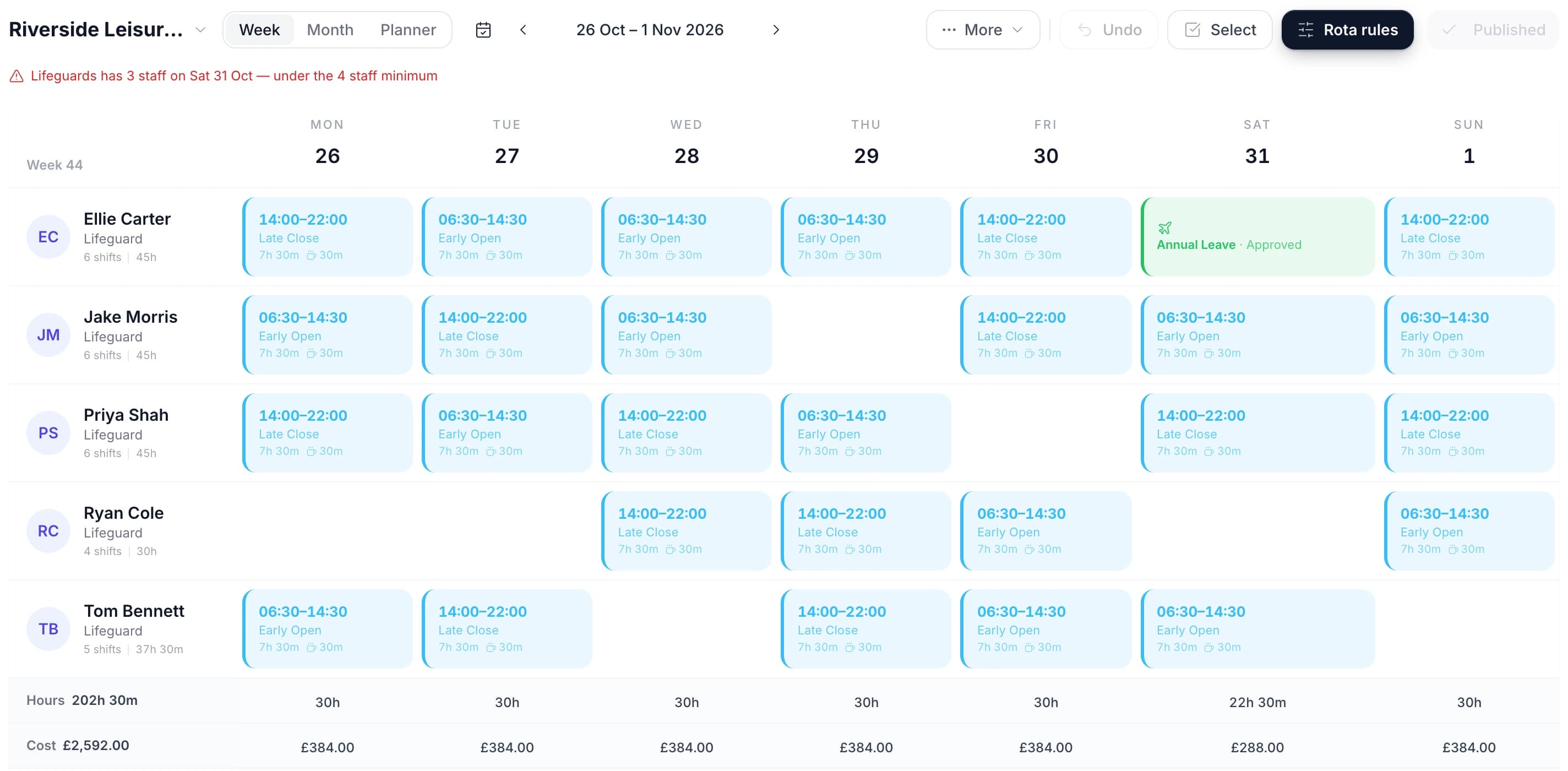
Each member of staff has a row and each day has a column. Click an empty cell to add a shift, drag a shift to another day, or drop it on another name to hand it over. The two rows along the bottom show the hours rostered each day and what they cost.

The TimeTally rota filtered to lifeguards for the half-term week: five lifeguards on Early Open and Late Close shifts, the alert Lifeguards has 3 staff on Sat 31 Oct, Ellie Carter's approved annual leave on Saturday, and Hours 202h 30m and Cost £2,592.00 under the grid
  • Every team on one grid

    Lifeguards, gym instructors, swim teachers and reception each have a row, with their job role and the hours they are rostered that week beside their name

  • Times and breaks on each shift

    A shift shows its name, start, finish and unpaid break, so a 06:30 open and a 22:00 close are both clear at a glance

  • Hours and wage cost per day

    The Hours and Cost rows under the grid change as you add or remove shifts, so you can see what an extra lifeguard on Saturday costs

  • A shift on another site blocks the cell

    If a swim teacher is already on the pool rota that day, the gym rota's cell names that rota and will not take a second shift

Get a warning when a day is short of lifeguards

Rota alerts check the rota for you. Set a rule such as "Lifeguards has fewer than 4 staff on shift a day" and any day that falls short shows a red line above the grid. The same warning appears before you publish.

  • Staff, hours or wage cost

    Alert on people on shift, hours or cost, going over or falling under, per day, week or month.
  • For a team, a person or the whole rota

    Apply a rule to one department, such as Lifeguards, to the whole schedule, or to one person for hours, such as anyone over 48 hours a week.
  • It warns, it does not block

    You can still publish a week that breaks a rule. The decision stays with the duty manager.
  • It counts people per day, not per hour

    A staffing rule counts everyone rostered that day. It does not check how many are poolside at 7am, or at each pool.
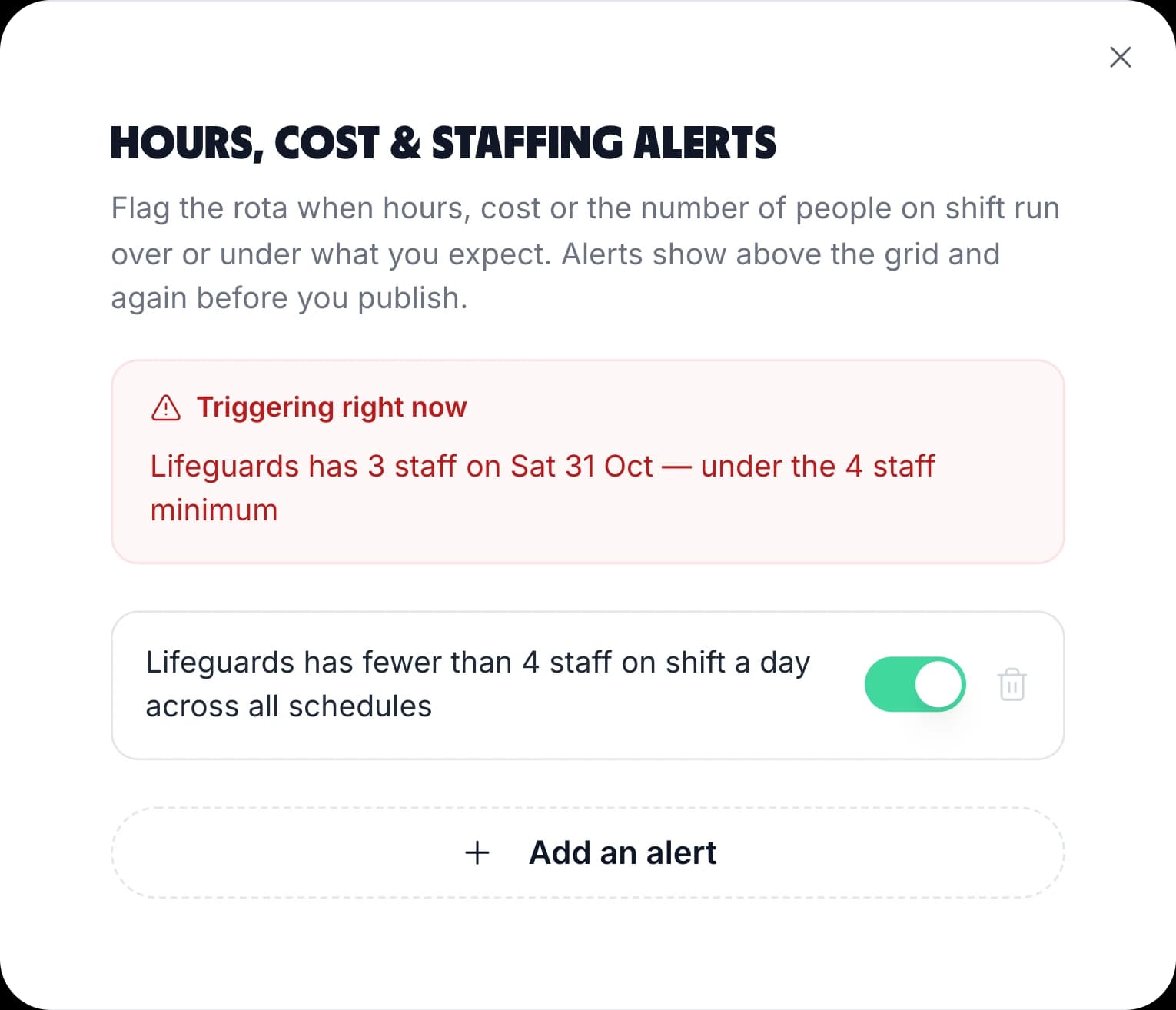
The hours, cost and staffing alerts window: Triggering right now, Lifeguards has 3 staff on Sat 31 Oct — under the 4 staff minimum, and the rule Lifeguards has fewer than 4 staff on shift a day across all schedules

Save your opening hours as shift templates

Most leisure sites run the same few shifts every week: an early open, a mid shift, a late close and the lesson blocks. Save each one as a shift template with its own colour and unpaid break, then drag it onto the grid instead of typing the times again.

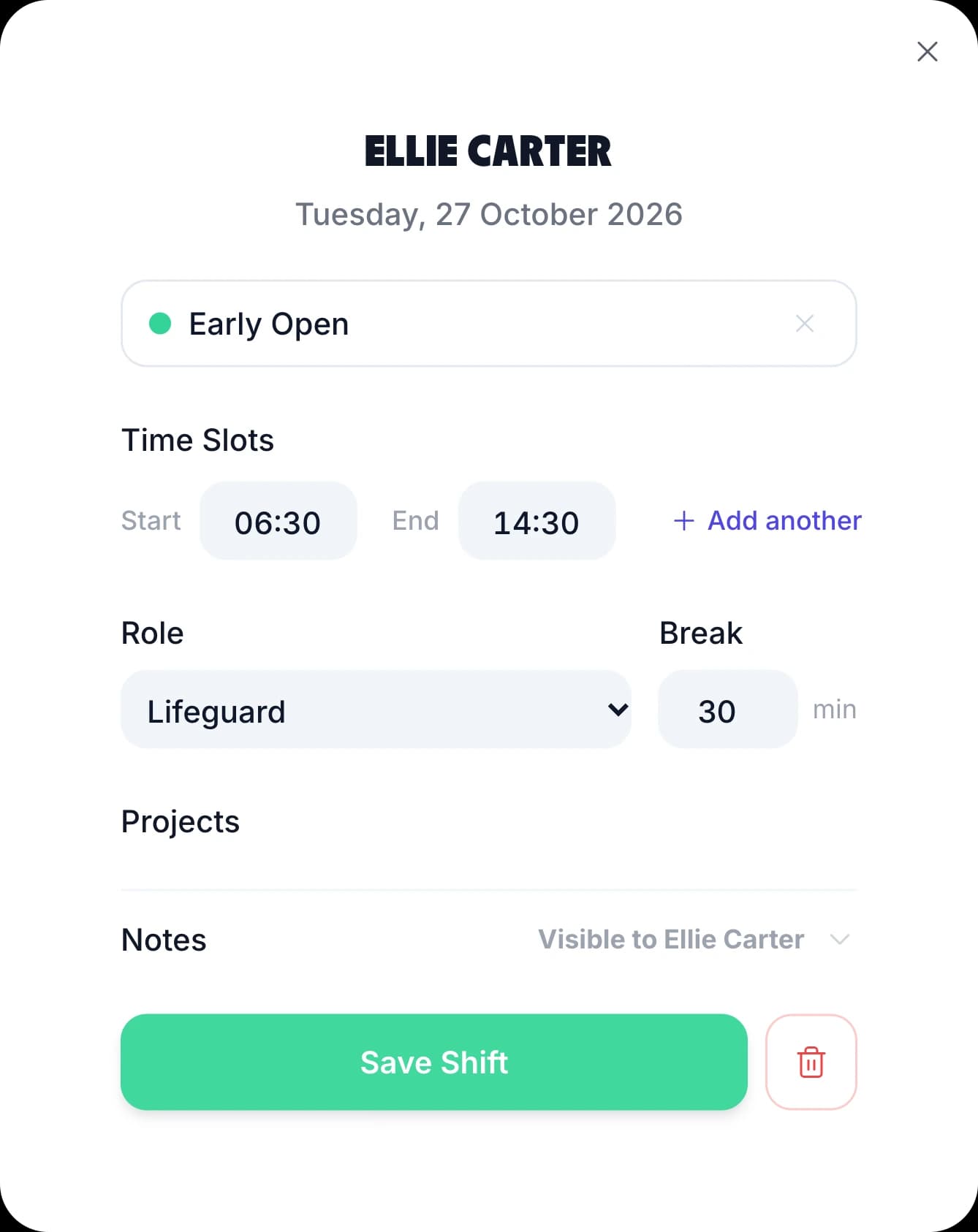
A shift can hold more than one time slot. A swim teacher on 07:00–09:00 and 16:00–19:00 is one shift in one cell, and their paid hours add up across both.

Colour per shift Split shifts Role per shift Unpaid breaks
The TimeTally shift form for Ellie Carter on Tuesday 27 October: the Early Open template, 06:30 to 14:30 with Add another time slot, the Lifeguard role, a 30 minute break, notes and Save Shift

Casual staff swap shifts in the app, and you approve

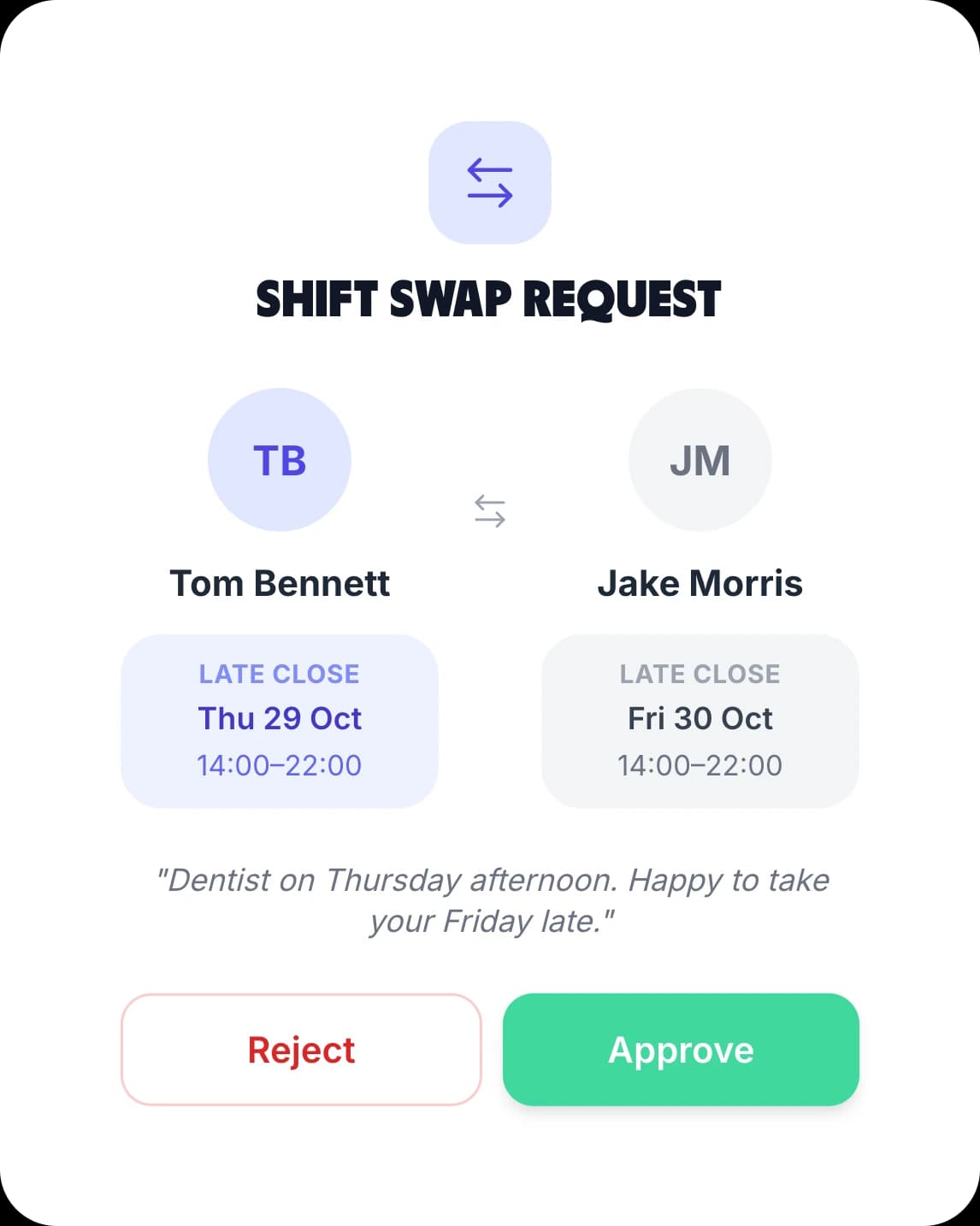
A member of staff picks one of their shifts and a colleague. They can swap it for one of the colleague's shifts or give it away. The colleague accepts or declines, and only then does it reach a manager to approve or reject. Nothing on the rota moves until the manager approves.

You can also let staff see who else is on with them. With "Who's on" turned on, staff see the colleagues rostered on the days they work, with their times and roles. It is off until you turn it on. The staff rota app page shows the phone side in full.

The manager's Shift Swap Request: Tom Bennett's Late Close on Thu 29 Oct for Jake Morris's Late Close on Fri 30 Oct, with Tom's note and Reject and Approve

Rota software for every kind of leisure business

A pool, a gym and a trampoline park all open long hours with a mix of qualified and casual staff. Here is how each one uses the same rota.

Pools

Swimming pool staff and lifeguard rotas

Put your lifeguards in a Lifeguards department and set an alert for fewer than the number you need on shift each day. A day that falls short shows a red line above the grid and again before you publish.

  • Give poolside shifts a Lifeguard role with its own colour, so gaps stand out across the week
  • A swim teacher who also lifeguards can work a Lifeguard shift on Monday and a lesson shift on Tuesday
Gyms

Gyms, studios and fitness clubs

The class timetable repeats every week, so the rota should too. Build one good week of instructor and front desk shifts, save it as a week template, and apply it to the weeks ahead.

  • Copy the week on screen forward by up to 13 weeks, skipping any day that already has a shift
  • Add a second time slot to a shift for an instructor who teaches early and again in the evening
Sites

Leisure centres, trusts and sports clubs

Run a separate rota for each site or area: the pool, the gym, the sports hall, a second centre. Each rota has its own members, and someone who works at two can be on both.

  • Limit a manager to their own team, and they can only add, move or remove shifts for the people they manage
  • Hide pay from a duty manager and they get the rota without hourly rates or the Cost row
Seasons

Activity centres, trampoline parks and holiday clubs

School holidays, half term and party weekends need more people than a quiet week in term. Keep a week template for each, and check the whole month in month view before it starts.

  • Seasonal and casual staff go on the rota shift by shift, with no fixed contract to set up first
  • The Hours and Cost rows total the month in month view, so a busy summer can be priced in advance

Hours and holiday for casual staff, in the same app

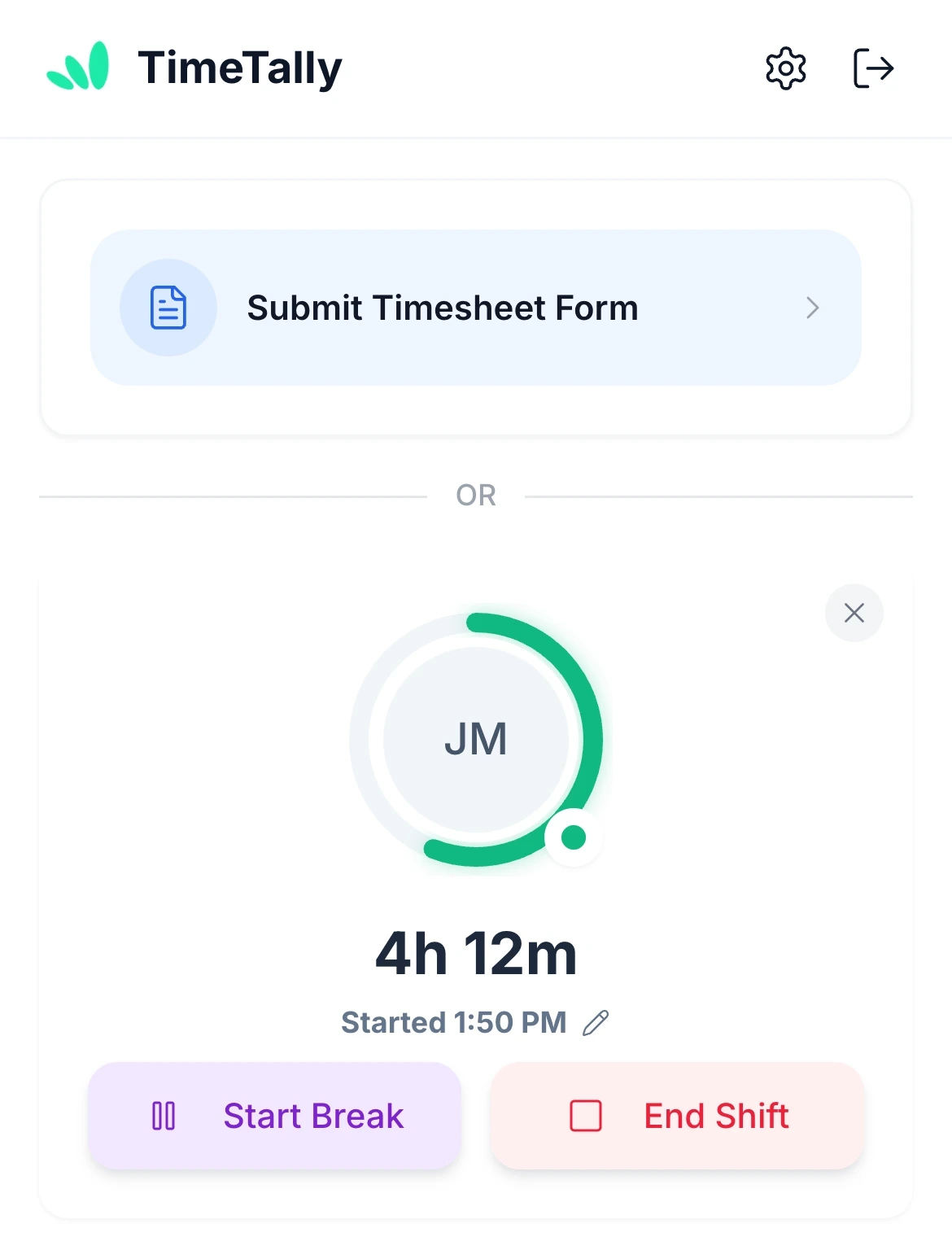
A rota is the plan. Staff clock in and out on their own phone, with breaks, and their hours go onto a timesheet for you to approve. There is no shared tablet or kiosk: everyone uses their own login. The clock in app page covers it in full.

Zero-hours and casual staff can build up holiday at 12.07% of the hours they work, and book it in the app. Work out a figure first with the zero-hours holiday calculator, or see how it all fits on the zero-hours contract software page.

Don't want clock-in? With time tracking turned off, you can pay staff the hours on the published rota instead.

Clock in on their phone Timesheet approval 12.07% holiday GPS clock-in, optional
Jake Morris clocked in on his phone in TimeTally: 4h 12m on shift since 1:50 PM, with Start Break and End Shift

See booked holiday while you build the rota

While you build

A warning before you roster someone on leave

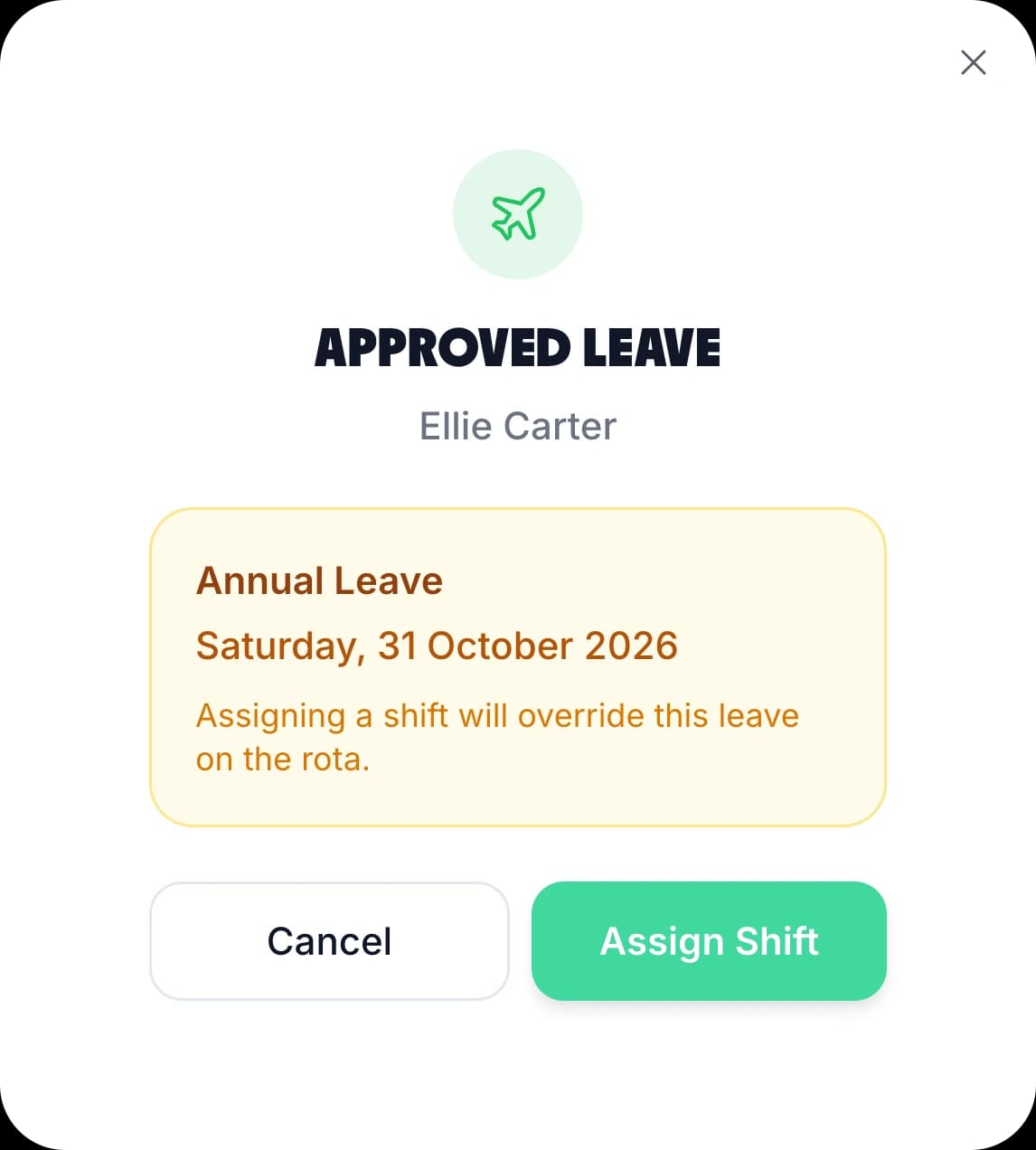
Approved and pending leave sit on the grid beside the shifts. Put a shift on a day someone has approved leave and TimeTally asks you to confirm first.

The Approved leave check in TimeTally: Ellie Carter, Annual Leave on Saturday 31 October 2026, Assigning a shift will override this leave on the rota, with Cancel and Assign Shift
When you approve

Cover their shifts in the same step

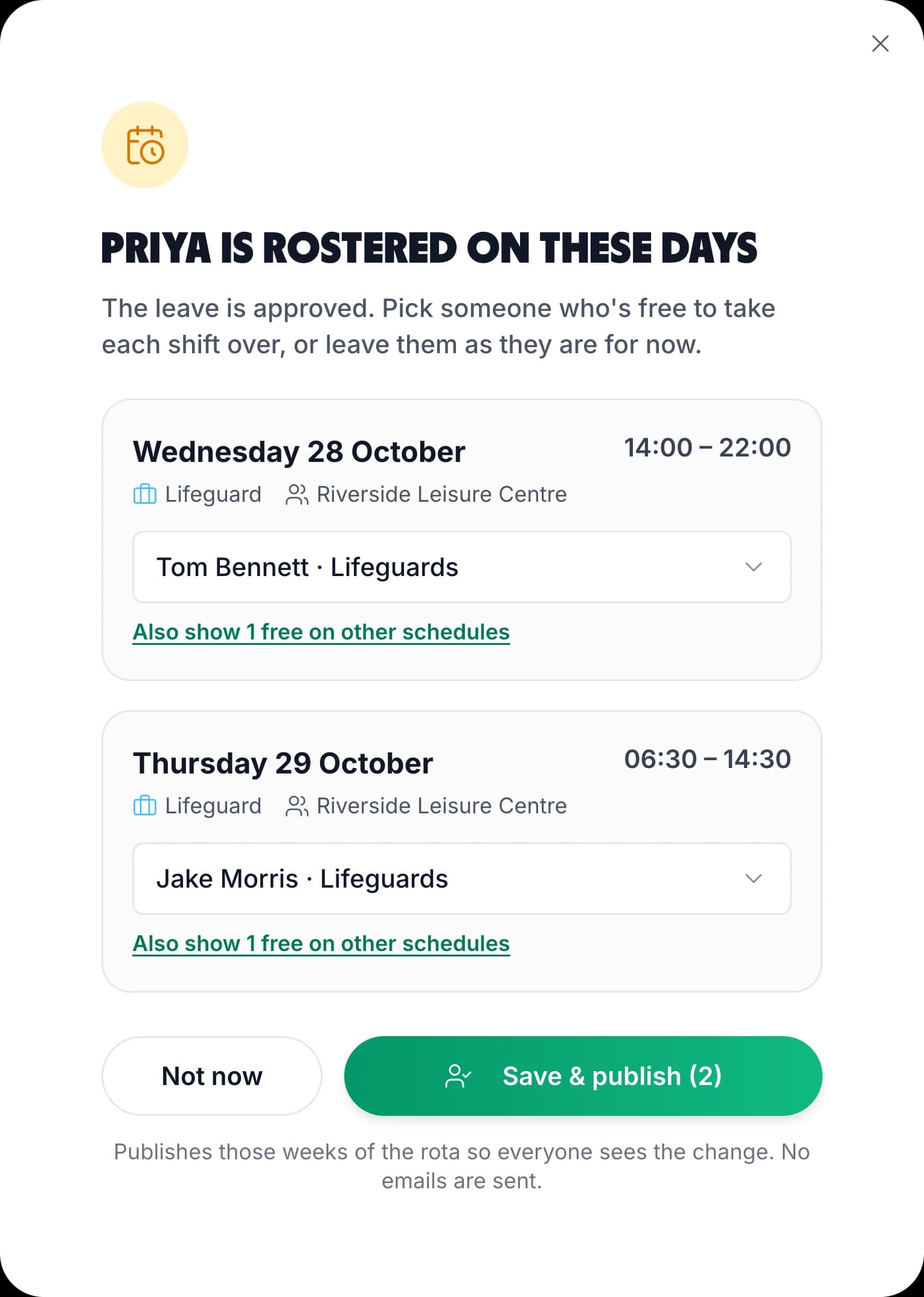
When you approve holiday for someone already on the rota, TimeTally lists the shifts that now need cover and who is free to take each one. Pick a name and the shift moves to them.

The Priya is rostered on these days window in TimeTally after her leave is approved: her Wednesday late and Thursday early lifeguard shifts, handed to Tom Bennett and Jake Morris, with Save and publish

What a Leisure Centre Rota Has to Cover

Leisure sites are open more hours than any one person works, and much of the team is part-time. These are the six things the rota has to handle, and how TimeTally handles each.

Early Opens and Late Closes

A centre open from 06:30 to 22:00 needs at least two shifts a day, more at weekends. Save the early, mid and late shifts as templates with their unpaid breaks, so the paid hours and the Cost row are right from the start. Each template has its own colour, so a late close with nobody on it is easy to spot.

A Duty Manager on Every Day

Put your duty managers in their own department and set an alert for fewer than two on shift a day. TimeTally flags any day below that, above the grid and before you publish. Check the times on the grid too, because the alert counts people on the day, not whether the open and the close are each covered.

A Class Timetable That Repeats

Classes and swimming lessons run at the same times each week. Save a week of instructor and swim teacher shifts as a week template and apply it to any future week, or copy the current week forward by up to 13 weeks. Days that already have a shift are left alone.

School Holidays and Holiday Clubs

Half term, the summer holidays and holiday clubs bring more visitors and more casual staff. Keep a separate week template for holiday weeks, and switch to month view to see every person across the whole month, with the Hours and Cost rows totalling the month.

Casual and Zero-Hours Staff

Students, casual lifeguards and party hosts rarely work the same days twice. Each shift is given to one person on one day, so there is no fixed contract to set up before you can roster them. Their rostered hours for the week show beside their name, ready to check against what they agreed.

Rostered Hours and Worked Hours

A lifeguard who stays an hour after close worked more than the rota says. TimeTally keeps both: the rota holds what was planned, and timesheets hold what was worked, from clock-in or typed in. Approved timesheets export to payroll. The rota's Cost row is a planning figure, and pay comes from the hours.

What TimeTally does not do

Before You Choose a Gym Staff Rota Tool

TimeTally is a rota, hours and holiday tool. Here is what it does not do, so you can decide before the trial.

No Qualification Tracking

TimeTally does not store lifeguard, first aid or instructor qualifications, and does not warn when one is about to expire. Keep that record separately. A Lifeguard job role on poolside shifts makes it easy to see who is booked for that work.

No Per-Hour Pool Ratios

Staffing alerts count the people rostered on a day, in a department or across the rota. They do not check cover hour by hour or for each pool, and they warn rather than stop you publishing. The times on each shift are on the grid for you to check.

No Availability or Open Shifts

Staff cannot submit the days they are free, and there are no open shifts for them to claim. You assign every shift. Staff can book holiday, which shows on the grid, and ask a colleague to swap once the week is published.

No Class Booking for Members

TimeTally is for your staff, not your members. It does not take class or swim lesson bookings and does not connect to a membership system. Keep your booking system for members and use TimeTally for the people who run the sessions.

Email, Not Push Notifications

When you publish a week, TimeTally asks whether to email the team, and staff who have rota emails turned on get one. Leave and timesheet decisions are emailed too. The app does not send push notifications.

Rest Breaks Are Yours to Check

The app does not warn when a late close is followed by an early open with less than 11 hours between them. An hours alert can flag anyone over 48 hours a week. The free rota maker flags short rests while you sketch a week, and the shift pattern calculator works out the hours in a repeating pattern.

Leisure Rota App Pricing

One price per employee. A gym with 18 staff pays £54 a month, a leisure centre with 40 staff pays £120, and a trust with 110 staff across three sites pays £330.

£3/employee/month

After a 14-day free trial, no card needed to start. Billed monthly. Cancel anytime.

A rota for each site or area, with shift and week templates
Staffing, hours and wage cost alerts
Shift swaps with manager approval
Clock-in, timesheets and payroll export
Holiday tracking, including 12.07% for casual staff
iPhone and Android apps for staff and managers
Start free trial

GPS clock-in is an optional £1 per employee per month · See the full pricing page

In short

What is leisure rota software?

Leisure rota software plans which member of staff works which shift at a gym, pool, leisure centre or activity centre, and shows each person their shifts. In TimeTally, you build the week from shift templates, save it as a week template and copy it forward. Rota alerts warn you when a day has fewer staff on shift than you set, for the whole rota or one department such as lifeguards. Staff see their shifts on their phone, swap shifts with a colleague and clock in. Approved holiday shows on the grid. Casual staff can build up holiday at 12.07% of the hours they work. It costs £3 per employee per month after a 14-day free trial.

Price
£3 per employee a month
Staffing alerts
Per day, team or rota
Swaps
Colleague accepts, manager approves
Staff app
iPhone, Android and web
Casual staff
Clock-in and 12.07% holiday

Leisure Rota Software: Frequently Asked Questions

What is the best rota software for leisure staff?

Look for software that handles early opens and late closes, warns you when a day is short of lifeguards, and lets casual staff see and swap shifts on their phone. TimeTally does those things and also records the hours worked and the holiday casual staff build up, in the same app. It costs £3 per employee per month with a 14-day free trial.

Can a rota make sure we always have enough lifeguards on?

TimeTally can warn you. Set an alert for fewer than, say, four people on shift a day in your Lifeguards department, and a day that falls short shows a red line above the grid and again before you publish. It counts the people rostered that day, not how many are on poolside at each hour or at each pool, so check the times on the grid as well. It warns and never stops you publishing.

Is there a leisure rota app for staff?

Yes. Staff download the TimeTally app on iPhone or Android, or use a browser, and see their own published shifts one week at a time. From the same app they can ask a colleague to swap a shift, clock in and out, and book holiday. When you publish a week, TimeTally asks if you want to email the team. There are no push notifications.

How do I make a rota for a leisure centre?

Add your staff and put them in departments such as Lifeguards, Gym and Reception. Save the shifts you run every week as shift templates, such as Early open 06:00–14:00 and Late close 14:00–22:00, and drag them onto the grid. When the week is right, save it as a week template, set your staffing alerts and publish it.

Can staff swap shifts with each other?

Yes. A member of staff picks one of their shifts and a colleague, and either swaps it for one of the colleague's shifts or gives it away. The colleague accepts or declines, then a manager approves or rejects it. Nothing on the rota changes until the manager approves. Swaps are on by default and can be turned off.

Does it track lifeguard qualifications like the NPLQ?

No. TimeTally does not store qualifications or warn when a certificate is about to expire, so keep that record separately. What you can do is give qualified staff a Lifeguard job role, so poolside shifts are booked under that role and are easy to see on the grid.

How do zero-hours and casual leisure staff get holiday?

Each person's holiday can build up at 12.07% of the hours they work, which is the usual method for staff with no fixed hours. The hours come from their approved timesheets, and they book holiday in the app. You can check a figure first with the free zero-hours holiday calculator.

How much does leisure rota software cost?

TimeTally is £3 per employee per month, with the rota, clock-in, timesheets and holiday included. A gym with 18 staff pays £54 a month and a leisure centre with 40 staff pays £120. GPS clock-in is an optional £1 per employee per month. There is a 14-day free trial and no card is needed to start.

Still have a question? See all FAQs

Get next week's leisure rota out today

Try TimeTally free for 14 days. Add your team, save your opening shifts as templates, set a staffing alert for your lifeguards and publish the week so everyone sees their shifts in the app.

No credit card required · Free 14-day trial · Cancel anytime