
Time and Attendance Software for UK Small Businesses

Staff clock in and out on their own phone or in a browser, with their breaks and the job they are on. Their hours become a timesheet for you to approve, overtime is worked out by your rules, and approved hours go to Xero, QuickBooks or a CSV for payroll. Holidays, sickness and the rota are in the same system.

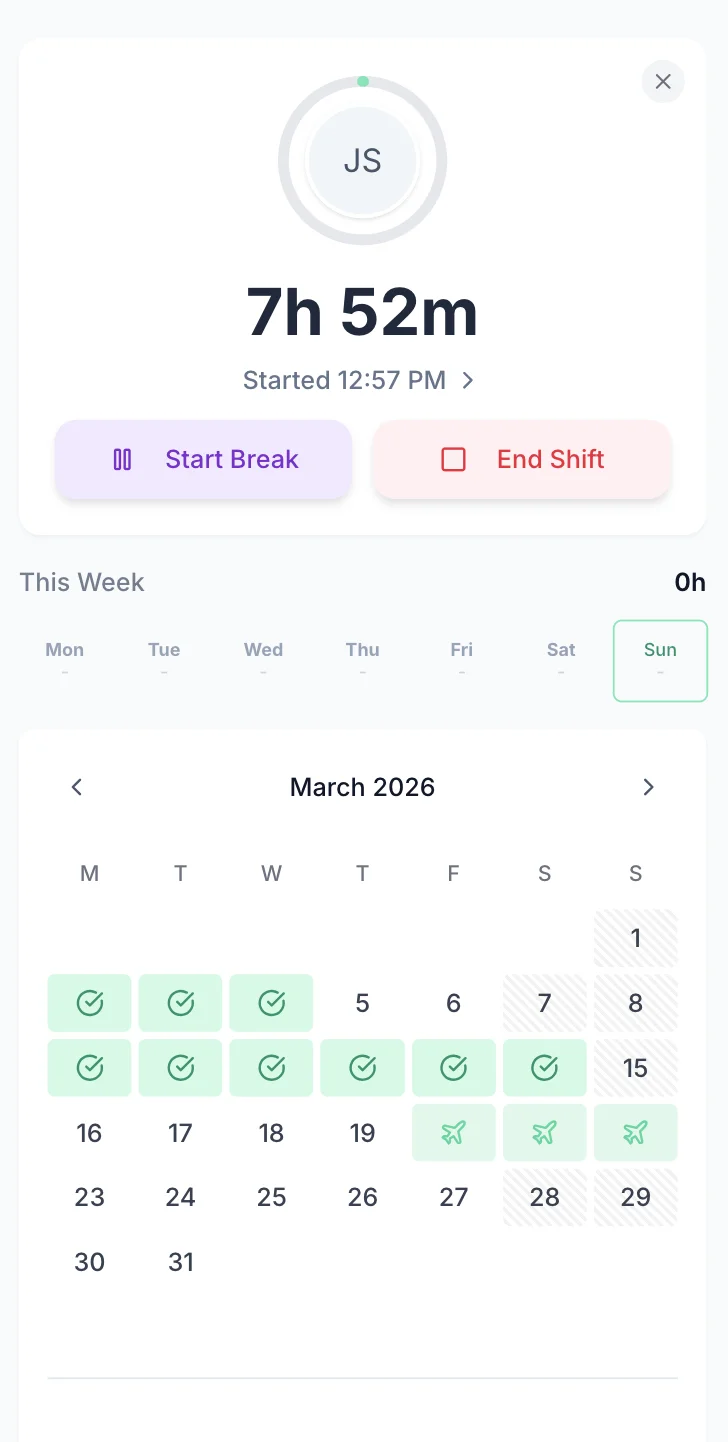
An employee clocked in on their phone: 7h 52m on the clock, with Start Break and End Shift buttons

“The app is simple to use, reliable, and makes managing holidays, absences, and staff records straightforward. The system has saved us a significant amount of administration time.”

CLI ManchesterJordan Ingoe, CLI Manchester

How Time And Attendance Works In TimeTally

One record runs from the moment someone clocks in to the moment their hours reach payroll. Nobody types the same hours twice.

  • Staff clock in

    On their phone or in a browser. Breaks and the project they are on are recorded as they go, or they fill in a timesheet form if you allow it

  • You approve the timesheet

    You get an email when a timesheet is submitted. Check the hours, edit an entry if needed, then approve or reject it

  • Hours go to payroll

    Approved hours, overtime and paid leave go to Xero or QuickBooks as a journal, or into a CSV for any other payroll

Time Clock Software On Every Phone

TimeTally is employee time clock software that replaces the clock on the wall, the clock cards and the signing-in book. Each person taps Start Shift on their own phone, Start Break and End Break when they stop, and End Shift when they go home. The times are stored on the server, not typed in afterwards.

They pick the project or site they are working on as they clock in, and can switch project mid-shift, so a day split across two jobs is split on the timesheet too. If they are on the rota, Start Shift uses the rostered time when they tap within fifteen minutes of it. Staff without a smartphone use any web browser.

Prefer to let people write their hours up? Choose clocking only, the timesheet form only, both, or let each person pick. The clock in app page covers the employee's side in full.
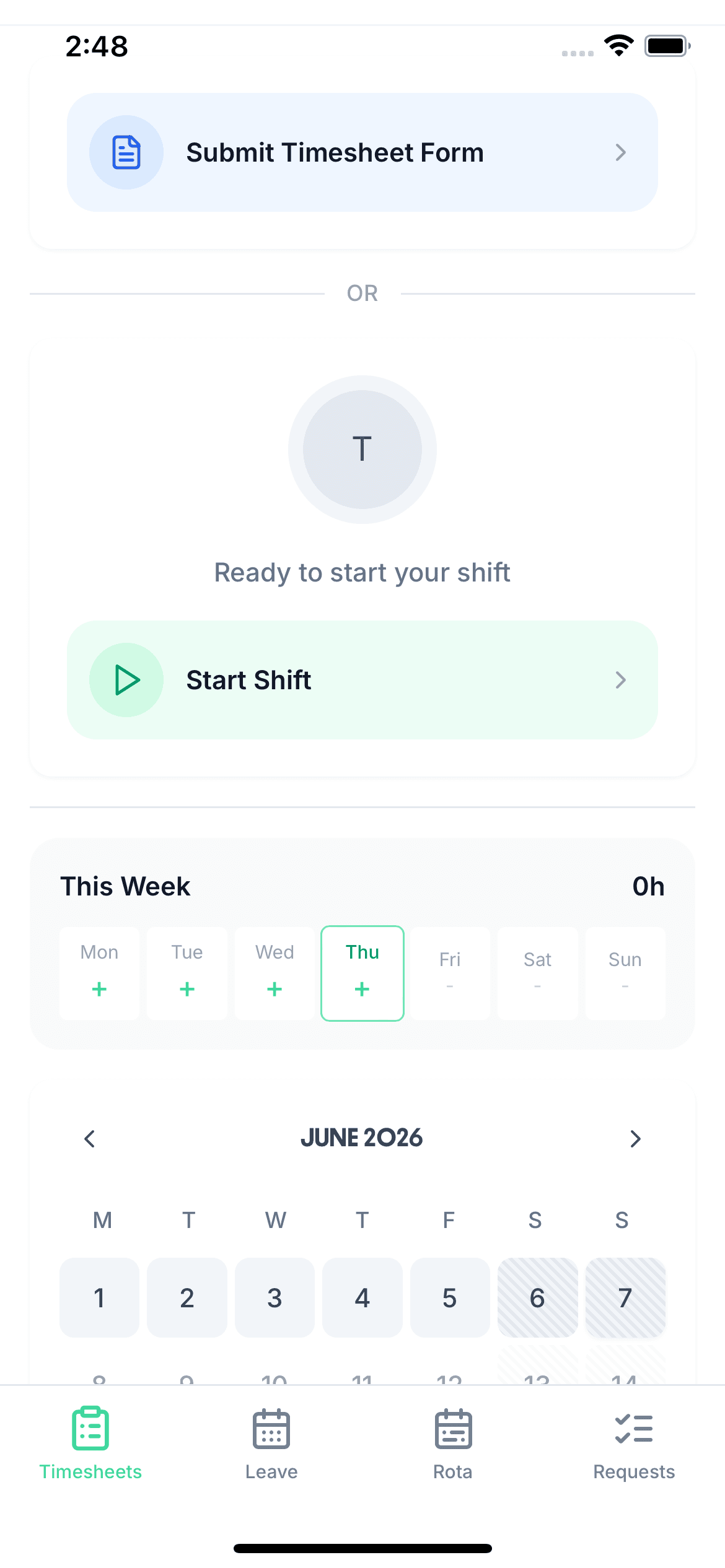
Start and end breaks Project at clock-in Switch project mid-shift Start from the rota
An employee's phone ready to clock in, with Submit Timesheet Form, Start Shift and this week's days

Attendance For The Whole Team On One Screen

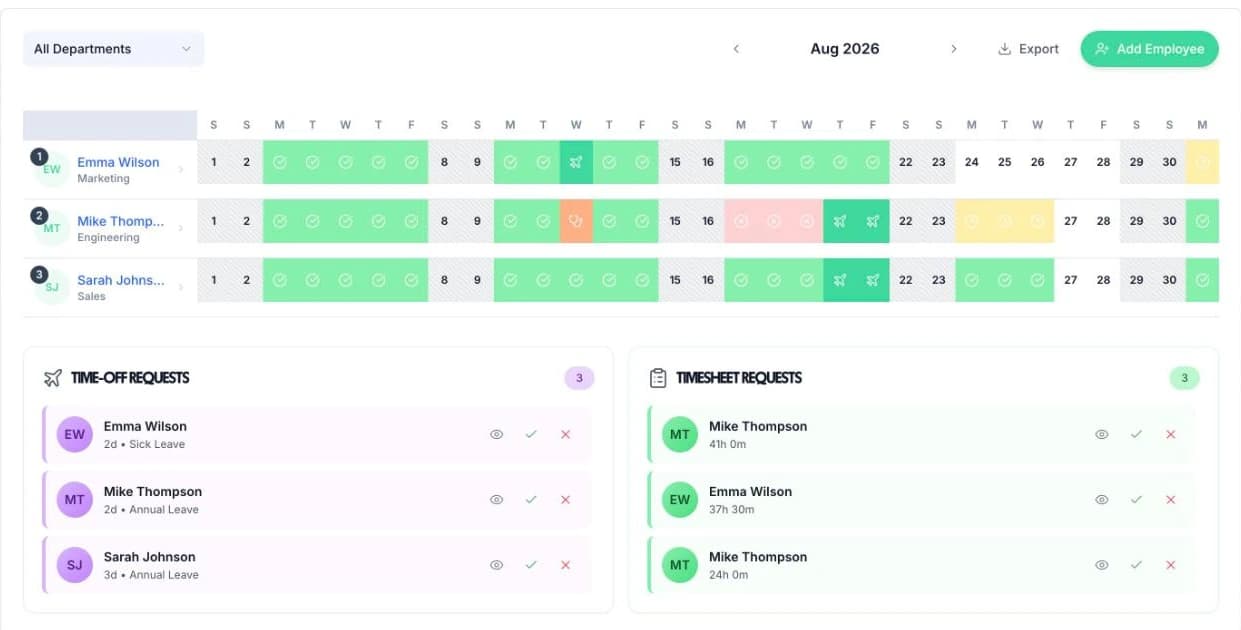
The manager's calendar shows every person for the month, one row each. Approved timesheets show a green tick, ones waiting for you an amber clock, and booked leave its own icon, so you can see who worked, who was off and what is still to approve.

Anyone clocked in right now gets a ring on today's cell. It fills as their shift goes on and turns amber once it runs past the expected length, which is also how you spot someone who forgot to clock out. Timesheet and time-off requests wait underneath, with approve and reject on each one.

Filter by department to see one team at a time. Holidays and sickness are booked through the leave tracking in the same app, so absence and hours sit on the same grid.

The manager's calendar in TimeTally: a month of approved and pending timesheets and leave for three employees, with Time-off Requests and Timesheet Requests below

Approve Timesheets With Overtime Already Worked Out

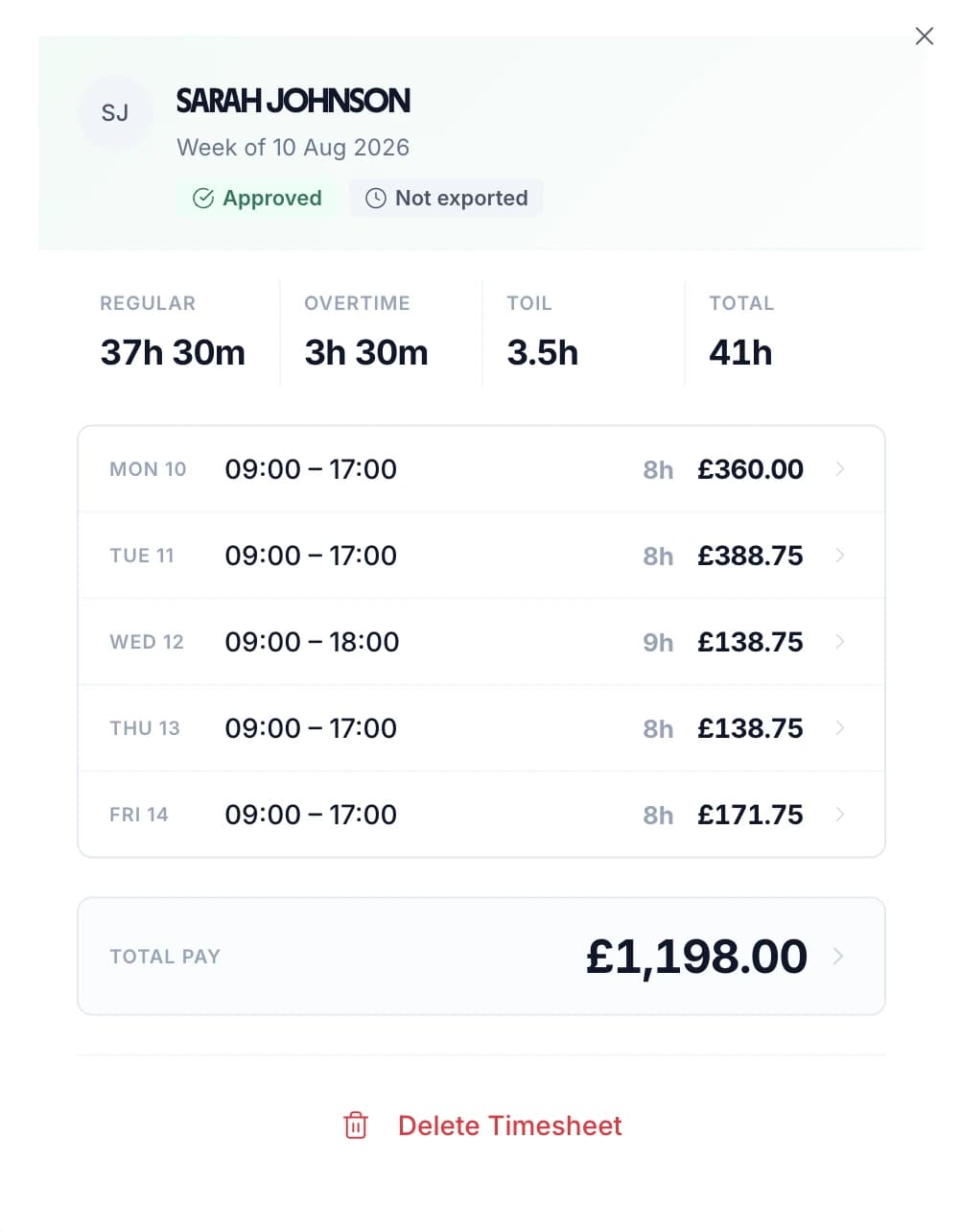
Open a timesheet and the week is laid out day by day, split into regular hours, overtime and TOIL, with the pay for each day if you can see pay. Edit an entry if something is wrong, then approve it, or reject it with an optional reason the employee sees on their timesheet.

Timesheets can run weekly, every two, three or four weeks, or by calendar month. Approve All clears a whole week at once, and if you would rather check only the exceptions, timesheets can approve themselves when they are submitted. Who approved each one, and when, is kept and can go in the export. More on timesheet approval.

An approved weekly timesheet for Sarah Johnson: 37h 30m regular, 3h 30m overtime, 41h total, with each day's hours and pay

See time and attendance in TimeTally

Build next week's rota, staff clock in against the shifts you assigned, and approved leave feeds straight back into the plan. One system, no re-keying between them.

Overtime Rules That Match Your Contracts

Choose how overtime is measured: after a set number of hours a day, a week or a month, after each person's own hours in their working pattern, or by time of day for hours worked outside set times. One rule runs at a time for the business, and you can change it for one person.

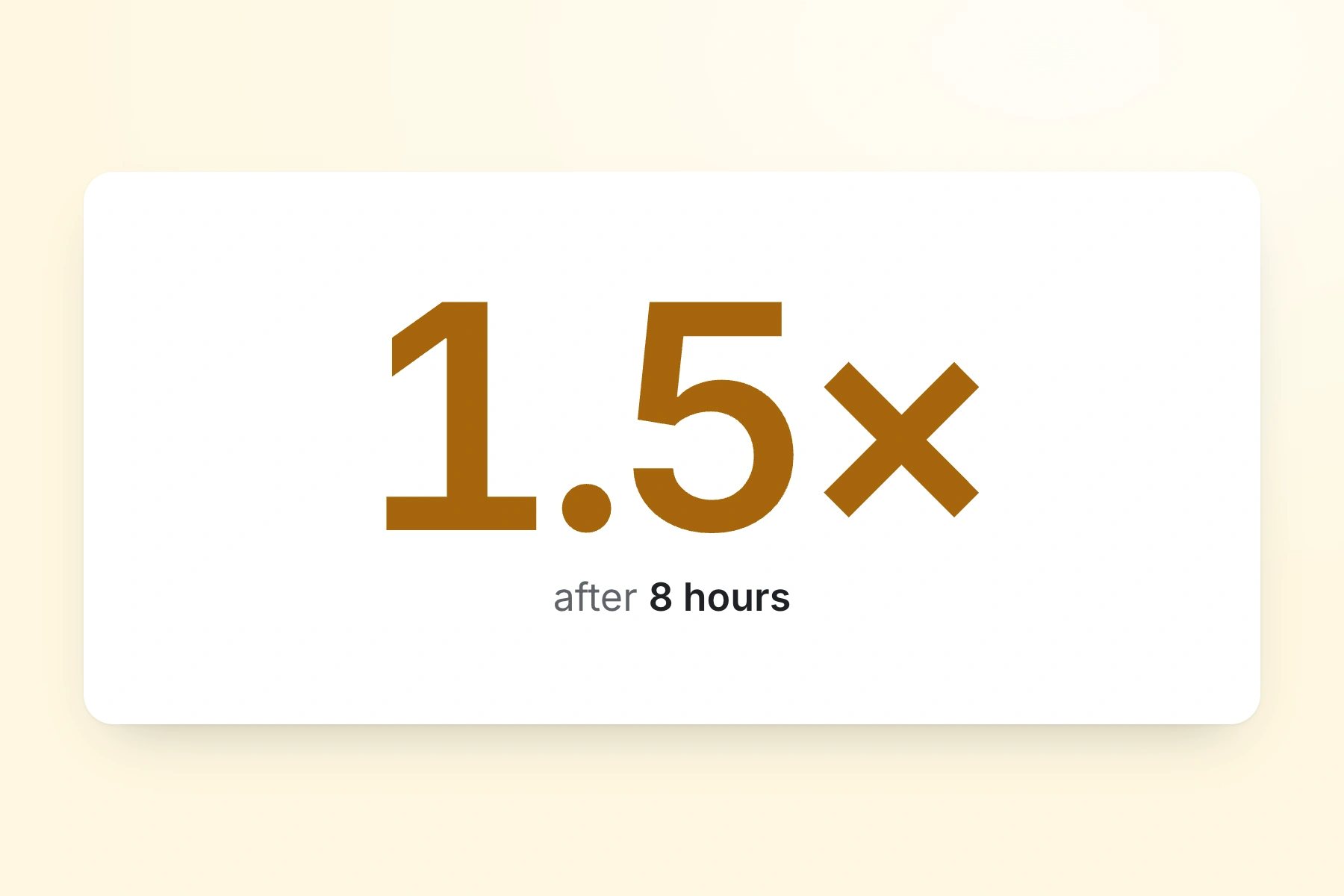
Set the rate as a multiplier from 1.0x to 3.0x, or as a fixed hourly rate, and add up to three levels, such as time and a half and then double time. One person can have their own rate. Overtime can be banked as TOIL instead of paid, with an optional limit after which it is paid. Breaks can count as paid or unpaid time.

The split appears on every timesheet you approve and in the CSV export. See overtime tracking for the details, or check a figure with the overtime pay calculator.

An overtime rule: 1.5x after 8 hours

Payroll And Time Clock Software In One Flow

When the timesheets are approved, export the period. TimeTally is Xero compatible: connect Xero and the wage cost for the period is posted as a manual journal. QuickBooks Online gets a journal entry the same way. See payroll integrations for how each one works.

For any other payroll software, download a CSV. Choose the columns: regular and overtime hours, overtime split by rate, pay, department, payroll reference and who approved it. Paid leave in the period comes out as its own rows, so holiday pay is not missed.

TimeTally is not a payroll itself. It does not work out tax or National Insurance and does not send anything to HMRC; it gets the hours right and hands them over.

Export to QuickBooks, Xero or a CSV that opens in Excel

Set How Strict Your Attendance Tracking Is

Start simple. Each of these is a setting you turn on when you need it.

Strict clocking

Hours come from clock-ins only. Staff cannot type or change their own start and end times.

GPS clocking, an optional extra

Set an area round each site and require people to be inside it to clock in. The phone's position is read once, at clock-in, clock-out and a project switch, never during the shift. £1 per employee per month.

Reminder emails for late timesheets

Off until you turn it on. Send a reminder on the last working day of the period at a time you choose, and again a set number of days after it ends, to everyone, to people who have not submitted, or to their managers.

Managers who only see their own team

Limit a manager to chosen departments, named people or projects. You can also hide pay from them, so they approve hours without seeing anyone's rate.

How GPS areas, blocking and flagging work: GPS clock in app.

Time And Attendance For Your Industry

The same system, set up for different kinds of business.

Healthcare

Healthcare timesheets

Shift staff clock in on their own phone, and a manager approves each week before payroll.

  • Hours from clock-ins
  • Approval before payroll
Construction

Construction timesheets

Clock in to a site, switch site mid-day, and add GPS to require people to be there.

  • Hours split by site
  • GPS areas per site
Hospitality

Hospitality time and attendance

Staff start the shift from the rota, and overtime is worked out by the day or the week.

  • Start from the rota
  • Breaks paid or unpaid
Education

Education timesheets

Support and casual staff record their hours on weekly or monthly timesheets.

  • Weekly or monthly
  • One department at a time

Time And Attendance Software Pricing

One price per employee, with clocking in, timesheets, overtime, the rota and leave all included.

£3/employee/month

After a 14-day free trial, no card needed to start. Billed monthly. Cancel anytime.

Clock in and out on iPhone, Android or the web
Weekly, multi-week or monthly timesheets with approval
Overtime and TOIL worked out by your rules
Export to Xero, QuickBooks or CSV
Leave booking and the rota in the same app
Managers set not to record their own hours are free
Start free

GPS clocking is an optional £1 per employee a month. Full details on the pricing page.

In short

What does time and attendance software do?

Time and attendance software records when each person works and when they are absent, and turns it into hours you can approve and pay. In TimeTally, staff clock in and out on their own phone or in a browser, with breaks and projects recorded as they go. Their hours become a weekly, multi-week or monthly timesheet. A manager approves it with overtime already worked out, and approved hours go to Xero, QuickBooks or a CSV. Holidays, sickness and the rota are in the same system. It costs £3 per employee per month after a 14-day free trial.

Clock in on
iPhone, Android and web
Timesheets
Weekly to monthly
Overtime
Day, week, month or pattern
Exports
Xero, QuickBooks, CSV
Price
£3 per employee a month

Time And Attendance Software — Frequently Asked Questions

What is time and attendance software?

Time and attendance software records when people start and finish work, their breaks and their absences, and turns that into hours you can approve and pay. In TimeTally, staff clock in and out on their phone or in a browser, the hours land on a timesheet for a manager to approve, overtime is worked out by your rules, and approved hours go to Xero, QuickBooks or a CSV for payroll. Holidays and sickness are booked in the same system.

Can TimeTally replace our time clock or clocking-in machine?

Yes. TimeTally is time clock software that runs on the phones your staff already carry, so there is no clock on the wall, no cards and no fobs. Each person taps Start Shift, takes breaks with Start Break and End Break, and taps End Shift. Anyone without a smartphone can clock in from any web browser.

Can several staff clock in on one shared tablet?

No. TimeTally has no kiosk or PIN-pad mode. Every person clocks in with their own login, on their own phone or in a browser. If one device is shared, each person signs in as themselves, and TimeTally stops the next person from picking up an open shift left by the last one.

Can I see who is clocked in right now?

Yes, on the manager's calendar. Anyone on the clock gets a ring on today's cell that fills as their shift goes on and turns amber once it runs past its expected length. It refreshes every minute. There is no separate live board, and TimeTally does not send lateness or no-show alerts against the rota.

Is TimeTally a Xero compatible time and attendance system?

Yes. Once you connect Xero, approved hours for the period are posted to Xero as a manual journal of the wage cost, and QuickBooks Online gets a journal entry in the same way. TimeTally does not push timesheets into Xero Payroll. For any other payroll software, download a CSV with the columns you choose, including overtime by rate and paid leave.

How does TimeTally work out overtime?

You pick how it is measured: after a number of hours a day, a week or a month, after each person's own hours in their working pattern, or by time of day. Set the rate as a multiplier from 1.0x to 3.0x or a fixed hourly rate, add up to three levels, and give one person their own rate if they need it. Overtime can be banked as TOIL instead of paid, with an optional limit after which it is paid.

Do staff have to be on site to clock in?

Only if you add GPS clocking, which costs £1 per employee per month. You set an area round each site, from 25 metres to 5 kilometres, and TimeTally reads the phone's position once when someone clocks in, clocks out or switches project. Each site either blocks people outside it or lets them in and flags it for you. Nobody is tracked while they work.

Does TimeTally run payroll or send anything to HMRC?

No. TimeTally gets the hours, overtime and paid leave right and hands them to your payroll. It does not work out tax or National Insurance and does not submit anything to HMRC. You can download your records as a workbook from Settings whenever you need them.

How much does time and attendance software cost?

TimeTally is £3 per employee per month after a 14-day free trial, with no card needed to start. That one price covers clocking in, timesheets, overtime, the rota and leave. GPS clocking is an optional £1 per employee per month. An admin or manager who is set not to record their own hours is not charged for.

Still have a question? See all FAQs

Try TimeTally Free For 14 Days

Have your team clock in for a week, approve the timesheets, and run the export. No card needed.

Support that answers

A real person replies within 24 hours. No ticket queues, no bots.

UK GDPR compliant

A UK company, ICO regulated. Your data encrypted and never sold.