
Digital timesheets · web, iPhone and Android

Digital Timesheets That Replace Paper Forever

Ditch paper timesheets and error-prone spreadsheets. Digital time tracking captures hours accurately at the point of work, eliminates manual data entry, and keeps a timestamped record of every week. Every hour logged is kept, exportable, and ready when HMRC asks.

Get StartedFree for 14 days. Your team fills in this week's timesheet on their phones — no paper, no card needed.14 days free · no card · £3 per employee
Trusted by hundreds of UK businessesBook a Demo
All Departments
Jun 2026
M
T
W
T
F
S
S
M
T
W
T
F
S
S
M
T
W
T
F
S
S
M
T
W
T
F
S
S
M
T
AR1

Amelia Roberts

Kitchen

JK2

James Kelly

Front of house

PS3

Priya Shah

Kitchen

MP4

Maya Patel

Front of house

TW5

Tom Wilson

Bar

Timesheet Requests

3
AR

Amelia Roberts

37h 30m · Week of Jun 15

JK

James Kelly

38h 30m · Week of Jun 8

Time-off Requests

2
PS

Priya Shah

3d · Annual Leave

MP

Maya Patel

2d · Sick Leave

AR

Amelia Roberts

Monday 15 June · 09:00

AR

0h 00m

09:00 – 17:00

Break
End Done

Timesheet submitted

Week of Jun 15

AR

Amelia Roberts

Kitchen

Week of Jun 15, 2026

Mon15
09:00–17:00·30m

7h 30m

Tue16
09:00–17:00·30m

7h 30m

Wed17
09:00–17:00·30m

7h 30m

Thu18
09:00–17:00·30m

7h 30m

Fri19
09:00–17:00·30m

7h 30m

Submit Timesheet Submitted

Payroll Export

Week of Jun 15, 2026 · 5 employees

Employee
Reg. pay
Overtime
Total
AR

Amelia Roberts

37.5h

£281.25

—

£281.25

JK

James Kelly

40h

£300.00

£22.50

2h

£322.50

PS

Priya Shah

32h

£240.00

—

£240.00

MP

Maya Patel

38h

£285.00

—

£285.00

TW

Tom Wilson

40h

£300.00

£45.00

4h

£345.00

Total · 5 employees

£1,406.25

£67.50

£1,473.75

Confirm Export Exported!

Loved by UK small businesses

Real reviews from TimeTally customers

TimeTally has been excellent for our business… The system has saved us a significant amount of administration time.
Jordan IngoeCLI Manchester
Setup was dead simple and the team just got on with it. Got everyone up and running in an afternoon with no help needed. Does everything we need for timesheets and holidays without the faff.
S.M.
Has completely changed how I handle timesheets. Used to dread it every week — now it takes me minutes. Really easy to get around and my staff picked it up straight away.
J.T.
Started using it just for rotas but quickly realised it does loads more. The timesheets and leave management are great, and it even handles TOIL and overtime which I wasn't expecting. Use it for everything now.
R.K.

Why Paper Timesheets Are Costing You More Than You Think

Paper timesheets aren't just inconvenient — they create real financial and legal risk. Switching to digital eliminates these problems entirely.

Paper Timesheets

  • Lost or damaged forms
  • Illegible handwriting errors
  • Manual data re-entry for payroll
  • No audit trail for disputes
  • Delay between work and payroll

Spreadsheet Timesheets

  • Formula errors in calculations
  • Version control nightmares
  • Emailing files back and forth
  • No mobile access
  • Still requires manual re-entry

TimeTally Digital Timesheets

  • Cloud-backed, never lost
  • Accurate digital entry
  • Payroll export in two steps: check, then send
  • Timestamped submissions and approvals
  • Approve from your phone

Everything You Need to Go Paperless

From entry to approval to payroll — every step is digital, accurate, and automatic.

Simple Digital Timesheet Entry For Any Team

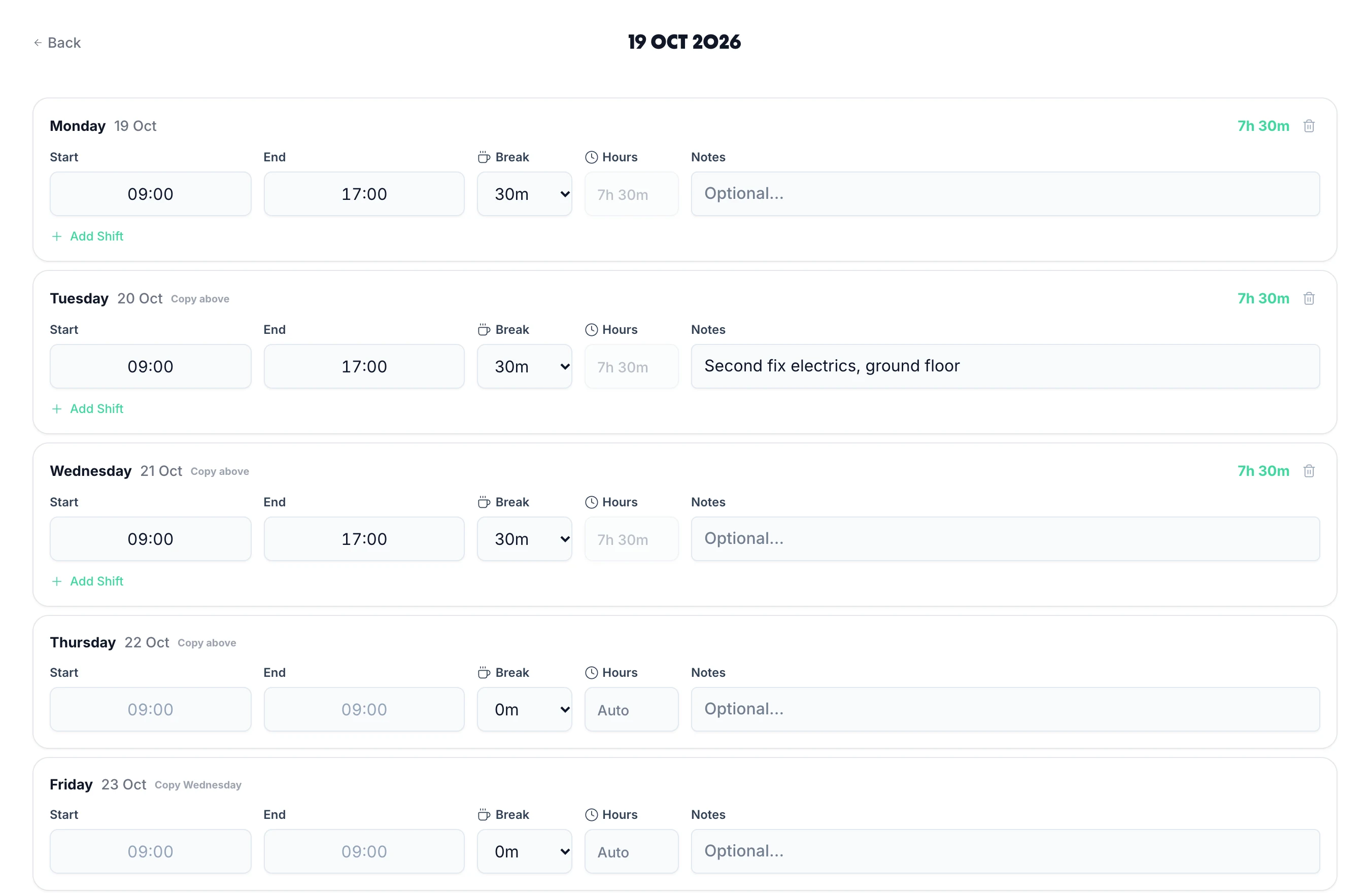
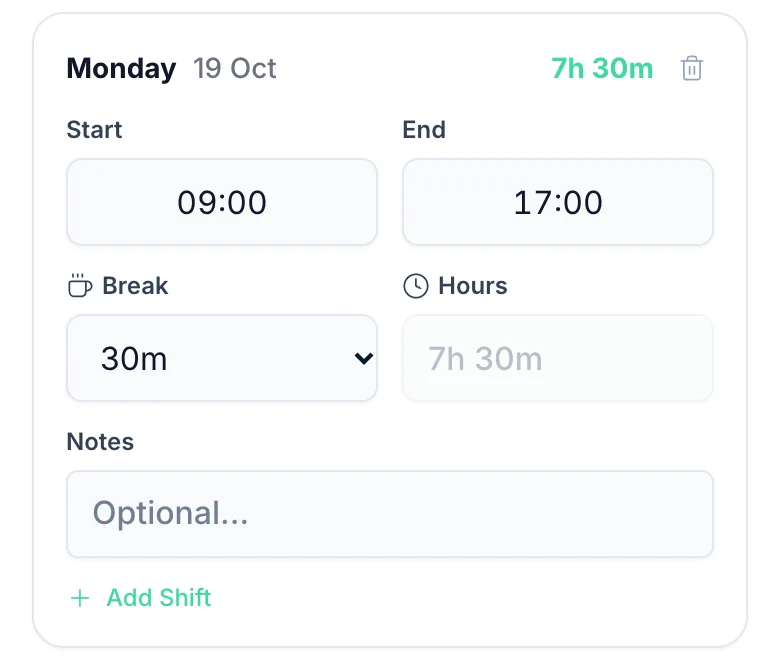
Employees log hours on a clean digital timesheet interface — add their start time, end time, break, and any notes. No training needed. The digital format means hours are calculated automatically, and the data is ready for manager approval the moment it's submitted.

  • Auto-calculated totals
  • Locked after approval
  • Mobile & desktop
  • Clean entry interface
Digital timesheet entry in TimeTally: each day with Start, End, Break, Hours worked out and Notes, Copy above beside each day
One day of the digital timesheet on a phone: Start 09:00, End 17:00, a 30m break, 7h 30m, Notes and Add Shift

Employees See Their Digital Timesheet Week At A Glance

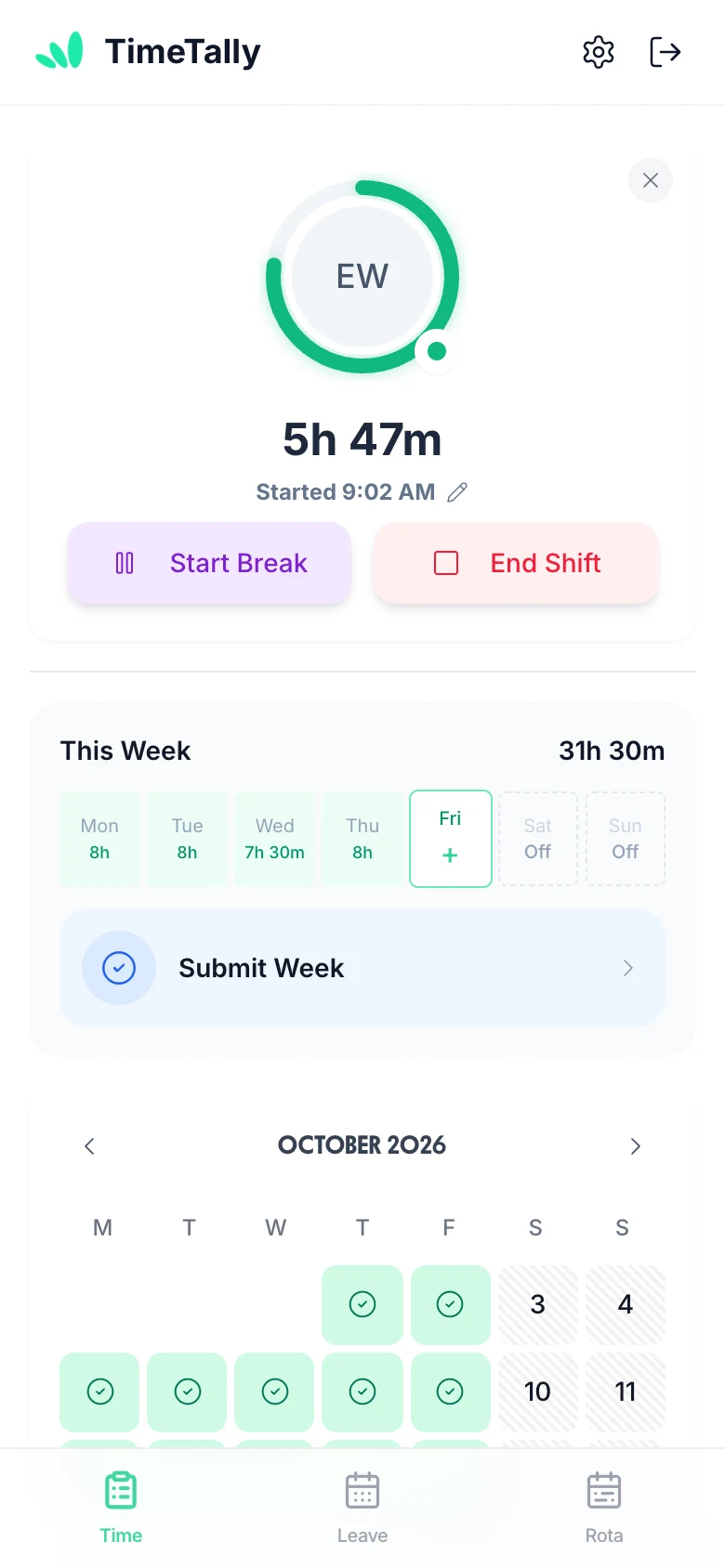
The employee digital timesheet view shows each day of the week with submission status, hours logged, and whether the week has been approved. Employees can track their own hours as they clock out and submit with confidence. Managers see the same data on their side — no information gaps, no back-and-forth emails. Integrates with leave management so leave days appear in the same weekly view.

  • Weekly calendar view
  • Submission status
  • Leave integrated
  • Updates as they clock out
An employee's week on her phone: on the clock for 5h 47m, This Week with Monday 8h, Tuesday 8h, Wednesday 7h 30m, Thursday 8h, 31h 30m, Submit Week, and October with approved days ticked

Digital Timesheets Flow Straight Into Payroll

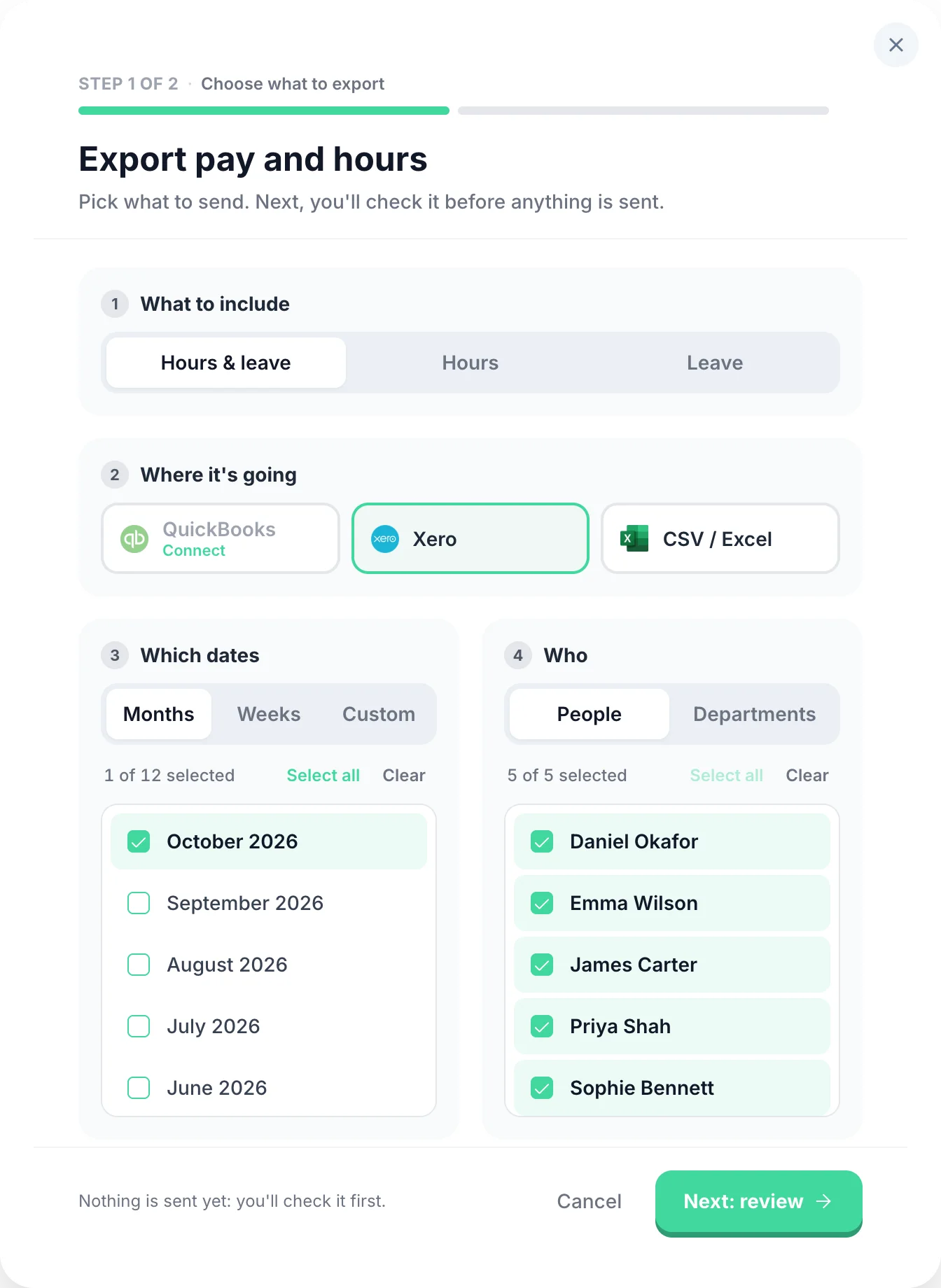
Once digital timesheets are approved, exporting to payroll takes two steps: choose who and which dates, then check what will be sent. Send approved hours to Xero, QuickBooks, or any UK payroll software via CSV. No re-keying, no manual totals, no risk of transcription errors between your timesheet system and your payroll provider.

  • Two-step export
  • Overtime tracking
  • Payroll period reports
  • Approve then export
The payroll export's first step in TimeTally: what to include (hours and leave), where it's going (QuickBooks, Xero or CSV / Excel), which dates and who

Every time tracking scenario, handled

Digital timesheets, and everything that comes with them.

  1. Clock In or Submit a Form

    Clock in, or fill in a form.

    Two submission modes — employees use whichever fits their workflow. Clock-in mode starts a live timer the moment they begin their shift. The timer runs in the background even if the app is closed, so no hours are lost. Form mode lets them enter start time, end time, and breaks at the end of the day or week. Both work on mobile and desktop.

  2. Approve & Reject Timesheets

    Approve a whole week from your phone.

    Managers approve or reject timesheets from any device — phone, tablet, or desktop. Rejections can include a written reason so employees know exactly what needs fixing and can resubmit. Managers can see who has not submitted for the period, and are emailed as each timesheet comes in. Pay totals are calculated automatically from approved hours — no manual maths at payroll time.

  3. Payroll Export

    Straight into Xero or QuickBooks.

    Send approved timesheets to payroll in a few taps. Export to CSV, Xero, or QuickBooks — filter by date range, employee, or department, and choose exactly which columns to include. You can combine timesheet and leave data in a single export so your payroll software gets everything it needs in one file.

  4. Overtime Rules

    Overtime that works itself out.

    Two triggers: threshold overtime kicks in once an employee exceeds a set number of hours per day or week. Time-of-day overtime pays a premium for hours worked in a specific window (e.g. after 6pm or before 6am), regardless of total hours. Two pay methods: a rate multiplier (e.g. 1.5×) or a fixed hourly rate for overtime hours. Stack multiple rules, build tiers, and configure each employee independently.

  5. TOIL (Time Off in Lieu)

    Offer time off instead of overtime pay.

    An optional alternative to paying overtime — enable it only if you want to offer time off in lieu instead of (or alongside) extra pay. Set a TOIL conversion rate (e.g. 1h overtime = 1.5h leave) and overtime hours automatically accrue as a TOIL balance — no manual tracking. TOIL is kept separate from annual leave so it never eats into holiday entitlement. Employees book it the same way they book any other leave.

  6. Pay Rates & Permissions

    Every hour costed at the right rate.

    Set each employee's own hourly rate and pay totals are calculated automatically from their approved hours. Scope managers to their department so they only ever see their own team's data. Want to keep salaries private? Hide pay rates and totals from managers entirely — they see hours, but never figures. Full control over who sees what.

  7. Project Tracking

    Know exactly where the hours went.

    Entirely optional — only enable it if you need it. When on, employees split their hours across projects when submitting (e.g. 3h on Client A, 4h on internal work). You can set project pay for the worker: an hourly rate on top of or instead of their usual rate, or a flat fee per entry (useful for callouts or site visits). Managers get a clear breakdown of where time is actually going.

The Business Case For Digital Timesheets

  • Hours back every payday

    Eliminating manual data entry from paper timesheets to payroll gives your payroll team back the hours it spent typing up and checking sheets every week

  • Fewer payroll errors

    Digital entry with automatic calculations removes the transcription errors that cause payroll disputes and underpayments

  • 100% paperless process

    From clock-in to payroll export, every step is digital. No printing, no filing, no physical storage of paper records

Affordable Digital Timesheet Software

One flat rate covers digital timesheets, leave management, approvals, and payroll export.

  • Free staff appsiPhone and Android, or any browser
  • No setup feesBilled monthly, cancel any time
  • 14-day free trialNo card needed to start

£3/employee/month

Billed monthly. Cancel anytime.

  • Digital timesheets on web, iPhone and Android
  • Clock in/out from any phone
  • Automatic hour and overtime calculations
  • Manager approval workflow
  • Digital leave and holiday management
  • Export to Xero, QuickBooks, or CSV
Get Started

Frequently Asked Questions

Switching from paper, the law, people without smartphones, overtime and paper saved.

Book a Demo

Still have a question? See all FAQs

What are digital timesheets?

Digital timesheets are electronic records of working hours captured via an app or web browser, replacing paper forms and spreadsheets. Employees log their start time, end time, and break digitally. The system calculates total hours automatically, routes them to a manager for approval, and sends the data to payroll. Digital timesheets are more accurate, faster to process, and leave a timestamped record that paper cannot match.

How do I switch from paper timesheets to digital?

Getting started with TimeTally takes about 10 minutes. Create your account, invite your employees by email, and they'll have access to their digital timesheet immediately. You can run paper and digital in parallel for the first week if you prefer, or switch fully on day one. Our support team is available to help with any questions during the transition.

Are digital timesheets legally valid in the UK?

Yes. Digital timesheet records are fully legally valid and work well for Working Time Regulations compliance. The Working Time Regulations 1998 require employers to keep 'adequate records' showing that workers are not exceeding the 48-hour weekly average. Digital records with timestamps and approvals are far more robust than paper records for this purpose.

Can digital timesheets reduce payroll errors?

Significantly. The main sources of payroll error from paper timesheets are illegible handwriting, incorrect manual calculations, and transcription errors when re-entering data into payroll software. Digital timesheets eliminate all three — hours are clearly entered digitally, totals are calculated automatically, and the export to payroll removes re-entry entirely.

Do digital timesheets work for employees without smartphones?

Yes. TimeTally works in any web browser on any computer, tablet, or phone — including older devices. Employees don't need a smartphone or to install an app. If an employee doesn't have their own device at work, they can log their timesheet from a shared computer or tablet at the end of their shift.

How does digital timesheet software handle overtime?

TimeTally calculates regular hours and overtime automatically from digital timesheet entries. You can set overtime thresholds (e.g., over 8 hours in a day or 40 hours in a week) and the system flags and calculates overtime separately. This feeds into the payroll export so overtime is paid correctly every time. Read our guide on how to calculate overtime in the UK for more detail.

What's the environmental benefit of digital timesheets?

A business with 20 employees printing weekly paper timesheets uses around 1,000 sheets of paper per year. Digital timesheets eliminate this entirely. Beyond paper, digital processes also eliminate the fuel and energy costs of physically collecting, transporting, and filing paper forms. It's a small but genuine contribution to reducing your business's environmental footprint.

Go Paperless With Digital Timesheets Today

Replace paper and spreadsheets with accurate digital timesheets.

14-day free trial · No credit card needed · Cancel anytime