Shift planning for UK guarding companies

Rota Software for Security Companies

Security rota software for UK guarding firms, from static sites to mobile patrols and event work. Save your 12-hour days and nights as shift templates, run a separate rota for each client site, and publish the guard rota to your officers a week at a time. Approved annual leave and sickness sit in the same grid as the shifts, so a gap on a night shift is visible before the week goes out rather than at 19:00 on the night. Built on the same staff rota software the rest of TimeTally uses, at £3 per employee per month with timesheets and leave included.

Week of 16 June

All departments
Publish Rota Published
Employee
Mon16
Tue17
Wed18
Thu19
Fri20
Sat21
Sun22
AR

Amelia

Kitchen

Open

Open

Evening

Close

Open

JK

James

Front of House

Close

Early

Mid

Open

Open

Early

PS

Priya

Kitchen

Leave

Mid

Close

Open

Early

MP

Maya

Front of House

Early

Close

Leave

Mid

Close

TW

Tom

Bar

Open

Open

Mid

Open

Close

Templates

Open
Close
Mid
Early
Evening

Rota Published!

Your team has been notified

Shift Templates

New Template New Template

Open

09:00–17:00

Close

12:00–20:00

Mid

10:00–18:00

Early

06:00–14:00

Evening

17:00–22:00

New

New Template

Evening

Start

17:00

End

22:00
Save Template Saved!

Shift Swap Request

Awaiting your approval

JK

James K.

Open · Thu

PS

Priya S.

Early · Sat

Approve Approved!

Shifts published!

Week of 16 Jun

Swap approved

James ↔ Priya

Evening added

Wed · 17:00–22:00

9:41

16 Jun – 22 Jun

this week · 40h

Mon

16

Tue

17

Wed

18

Thu

19

Fri

20

Sat

21

Sun

22

This week

40h total

Mon, 16 Jun

09:00–17:00

8h

Open

Tue, 17 Jun

09:00–17:00

8h

Open

Wed, 18 Jun

Today

17:00–22:00

8h

Evening

Thu, 19 Jun

12:00–20:00

8h

Close

Fri, 20 Jun

09:00–17:00

8h

Open

The app is simple to use, reliable, and makes managing holidays, absences, and staff records straightforward. The system has saved us a significant amount of administration time.

CLI ManchesterJordan Ingoe, CLI Manchester

Build the guard rota for the week on one grid

The rota is a grid: one row per officer, one column per day. Click an empty cell to put a shift on somebody. Drag a shift to a different day when a client moves a cover request, or drop it onto a different name to hand the post over. A week of continuous cover that took a morning in a spreadsheet takes a few minutes here, and the parts that never change are copied rather than retyped.

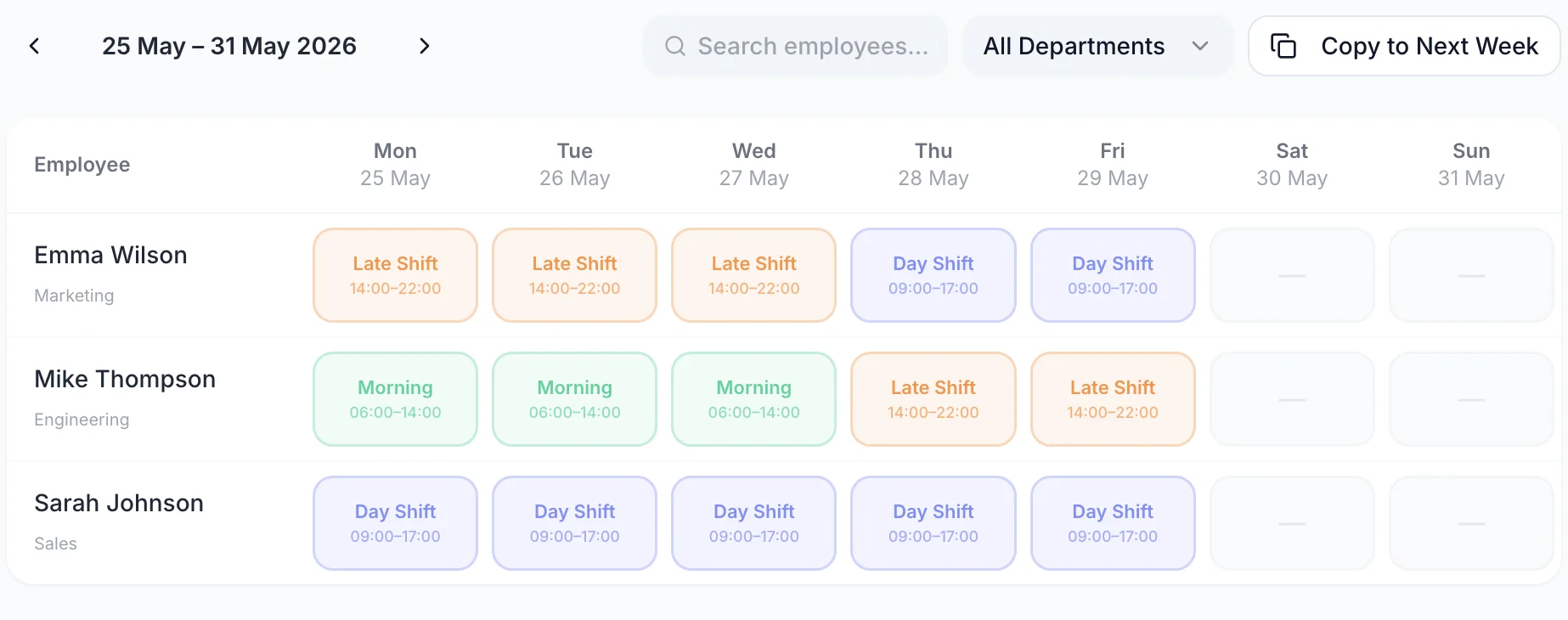
A week of the rota with one row per person and a shift on each day they are working
  • One row per officer, one column per day

    The job title and the week's rostered hours sit beside each name, so a light night is visible before the shift starts

  • Shifts carry their own times and break

    Each block shows its name, its start and finish and the unpaid break that comes off the paid hours

  • An empty cell stays visibly empty

    An uncovered Sunday night is drawn as a dashed outline rather than as blank space you scroll past

  • Week view and month view

    Build the week, then switch to the month to read a rolling pattern across a whole contract period

Save your 12-hour days and nights as shift templates

A guarding contract usually runs on two shifts and repeats them forever. Day 07:00–19:00, Night 19:00–07:00, and a Late or Twilight for the sites that need an evening overlap. Save each one once as a shift template with its own colour, then drag the template onto any cell instead of typing times again. The shift names then stay identical across every week and every contract, which is what makes a rota from March readable in September.

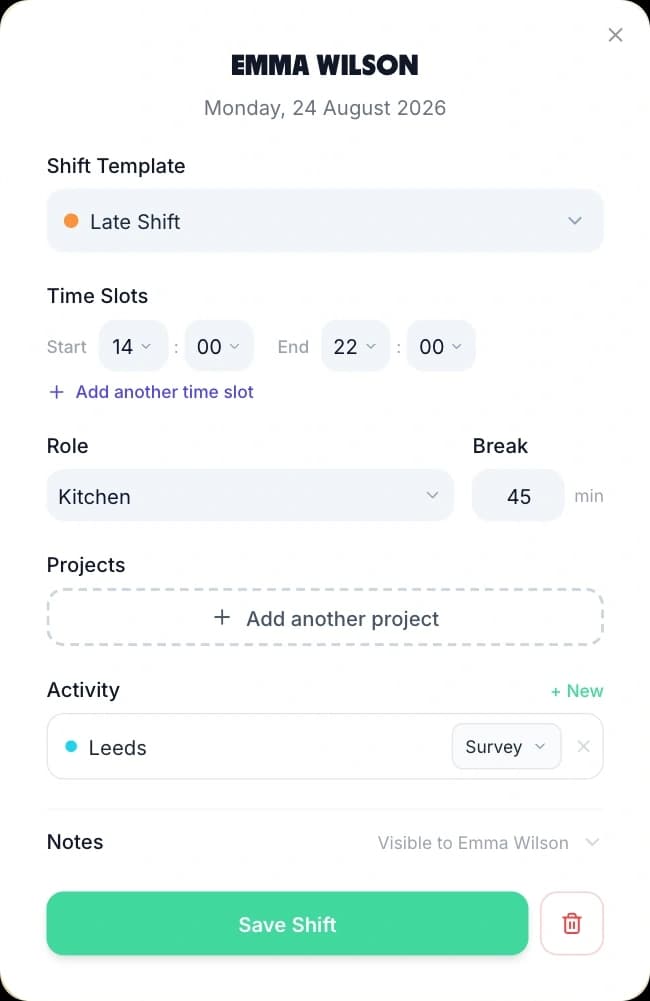
Creating a shift from a saved template: the template picker, start and end times, role, break and a Save Shift button
  • Overnight templates are allowed

    A 19:00 to 07:00 night saves as one shift on one date and drops onto the grid like any other, rather than splitting across two days

  • A colour per shift type

    Days and nights read as two bands across the week, so a night with nobody on it is visible without reading a single time

  • Break and role on the template

    A template carries its unpaid break minutes, its job role and its notes, so the shift lands complete rather than half filled in

  • More than one block on a day

    One shift can hold two time blocks, for a split duty such as a gate cover in the morning and a lock-up in the evening

A blank staff rota template is there if you would rather sketch a days-and-nights pattern on paper before building it.

A security officer rota your guards read on post

Publish the week and every officer assigned to it sees their own shifts, in the app and in any browser. Each one shows the date, the hours, the shift name, the job role, which rota it belongs to and the unpaid break, with the paid hours on the right. Officers are almost never in an office, and a rota pinned up in the control room is no use to a mobile patrol driver at three in the morning. This is the version they can check from the vehicle.

  • A week you have not published stays hidden. Officers see that the rota is not out yet rather than a draft you are still moving people around on.
  • Publishing does not email anyone by itself. TimeTally asks whether you want to notify the team, and the email reaches only officers who have rota notifications switched on — on by default, and theirs to turn off.
  • Officers can optionally be shown who else is rostered on a shift with them. That is off until an admin turns it on, which suits a firm that would rather not publish the whole line-up for a site.
  • Annual leave and TOIL are requested from the same app, so an officer coming off a run of nights books their days back without an email to the office.
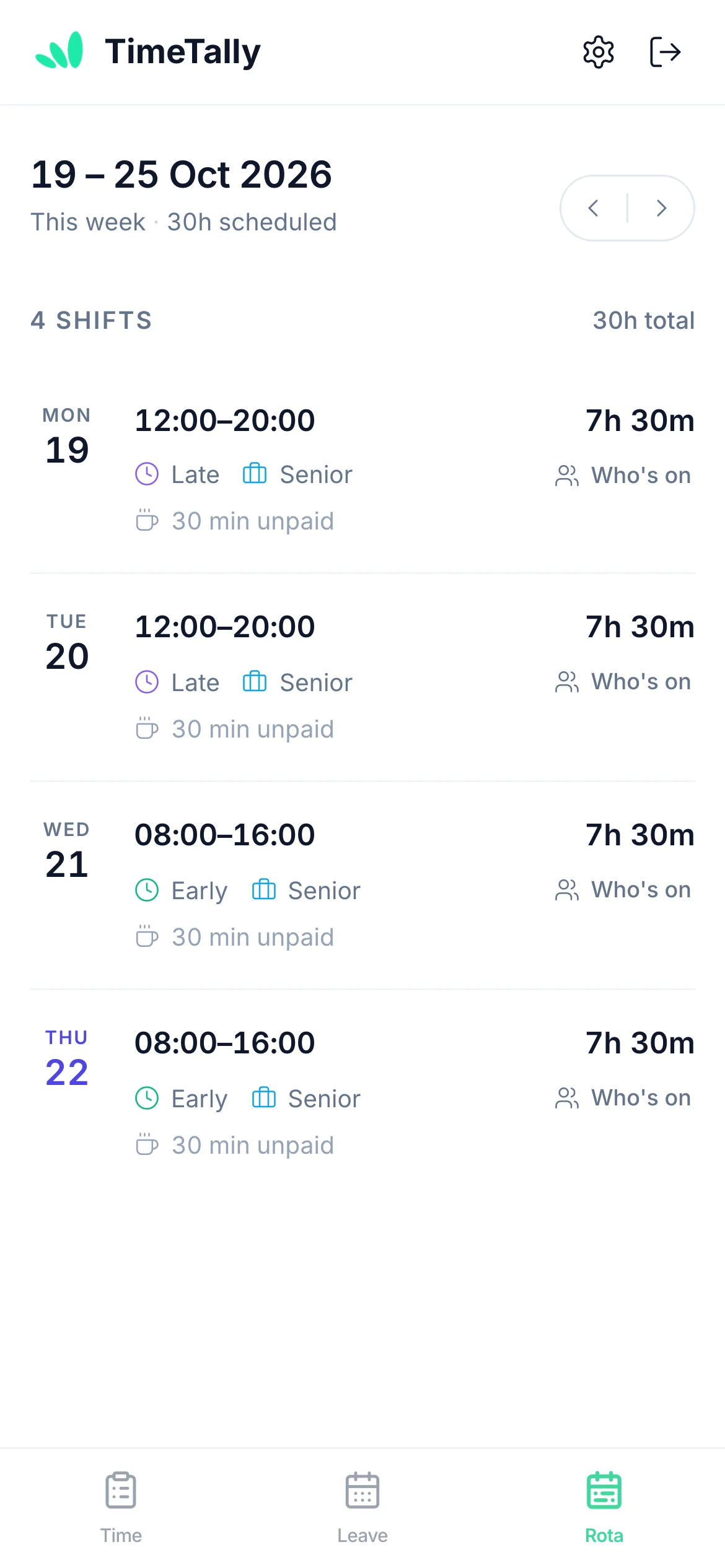
A member of staff viewing their upcoming shifts on their phone

Read a 24/7 security rota across the whole month

Week view is where the rota gets built. Month view is where a continuous pattern gets checked. Switch the grid to the month and the same officer rows run across every day of it, with the hours totals following the range on screen. A four-on-four-off cycle only makes sense over more than one week, and the fortnight where three officers on the same site have all booked leave is not visible from inside a single week.

  • The rolling pattern in one screen

    Every officer, every day, so a repeating days-and-nights cycle can be read as a pattern rather than checked week by week
  • Clustered leave shows up

    Approved leave is drawn in the same grid, so a run of requests that have all landed in the same fortnight becomes obvious
  • Publishing stays weekly

    Publishing from month view publishes each week the month touches, because a week is still the unit officers see
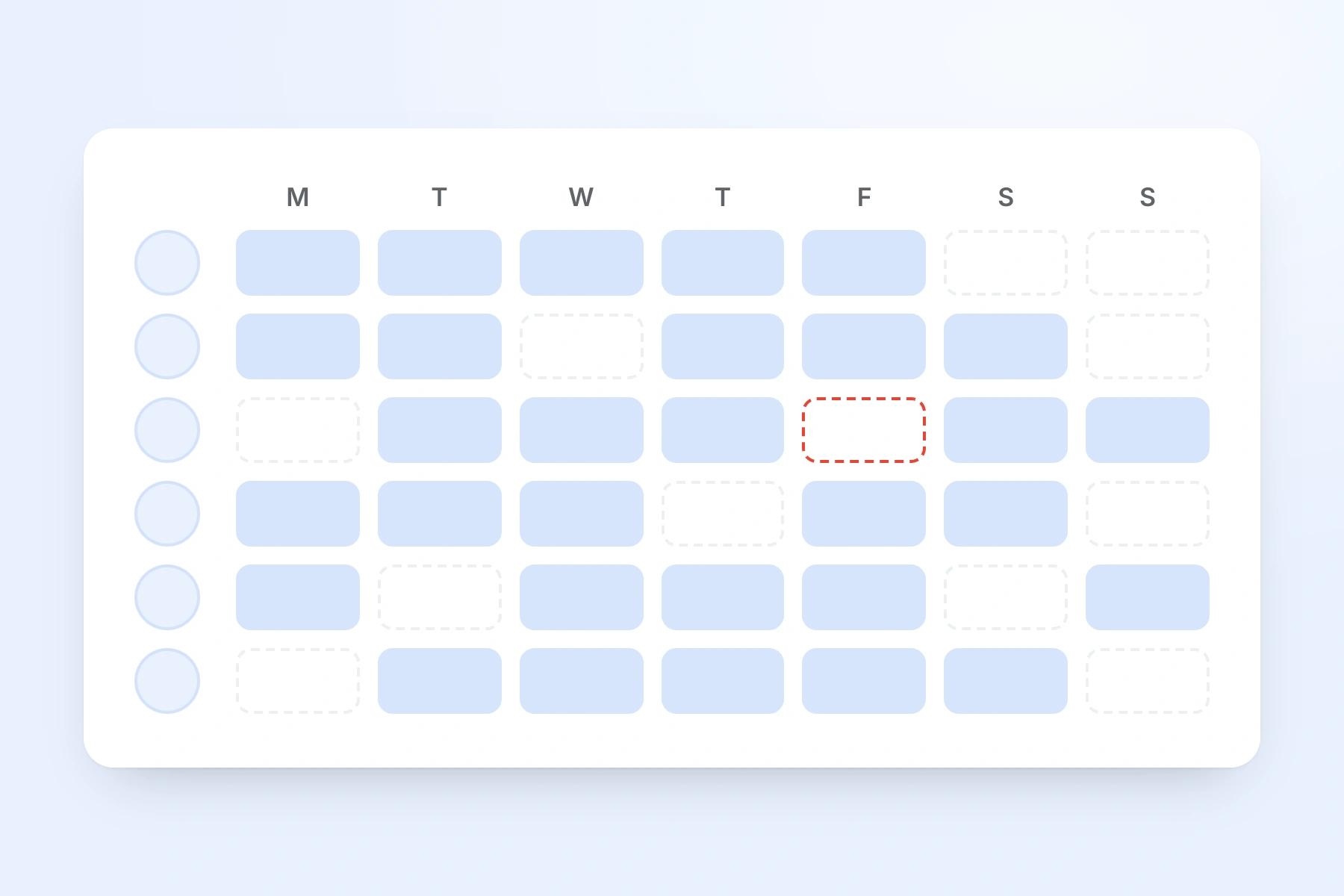
A week of shifts across the whole team, one row per person, with an unfilled shift outlined in red

Build one week of cover, then repeat it across the contract

A static guarding contract is the same week over and over. Two officers on days, two on nights, a supervisor across both, and the only thing that changes is who is on leave. The rota menu is where that repetition is handled: save the week on screen as a named template, apply a saved week onto a future one, or push this week forward onto the next. Print, export and analytics work on the same week.

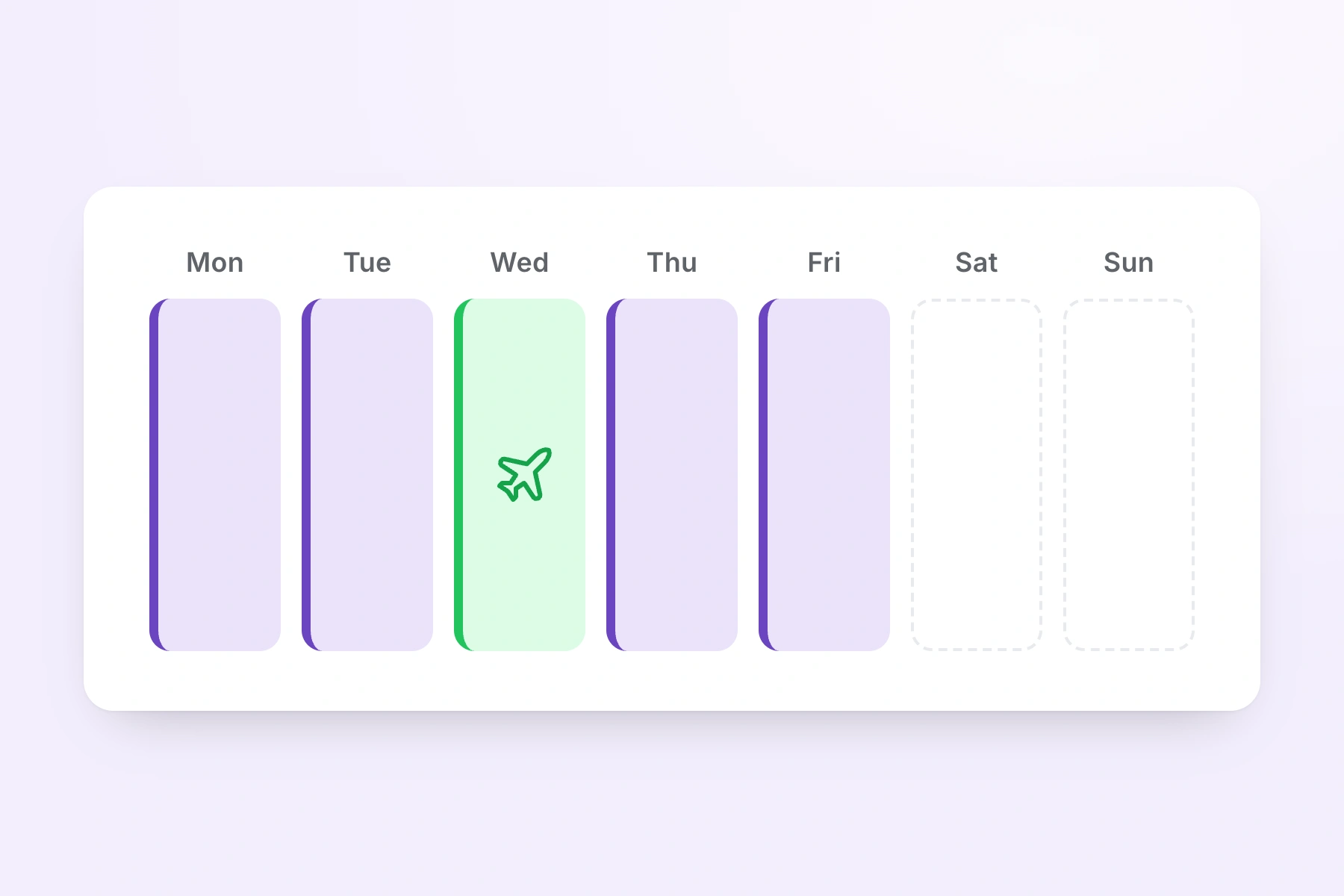
A week of shifts with one day showing booked annual leave in place of a shift
  • Save week as template

    Store one full week of cover — every officer, every shift, every day — under a name you will recognise later

  • Apply week template

    Drop a saved week onto any future week; TimeTally shows what it will write before it writes it

  • Copy to next week

    Push the week on screen forward by seven days, skipping any day an officer is already rostered

  • Print rota and export hours

    Print the week for the control room or export the hours as CSV for payroll, both from the same menu

Working out how many officers a rolling cycle actually needs? The shift pattern calculator produces the dates for a pattern such as four on, four off, and the rota cost calculator prices a week of cover before you commit to it.

Everything a security rota has to handle

Click any feature to learn more.

Drag & Drop Scheduling
Start your free trial

14-day free trial · No credit card needed

What makes a guarding rota different

Security is continuous-cover work. A site cannot be left unmanned, so the rota is not a plan for the week — it is a promise to a client that every hour of their contract has a name against it, nights and weekends included. These are the four things that promise puts on a scheduling tool. Holiday entitlement itself is a separate job, and the leave tracking software page covers accrual, carryover and balances.

Nights

12-hour days and nights that cross midnight

Most guarding contracts run on two 12-hour shifts. A 19:00 to 07:00 night is a single shift that crosses midnight, and it has to save as one block rather than as two half-shifts on two dates.

  • Shift templates are allowed to cross midnight — a Night 19:00 to 07:00 template saves and drops onto the grid like any other
  • Every template carries its own colour, so days and nights read as two bands across the week without reading a single time
  • The unpaid break sits on the template and on the job role, so a 12-hour night is not costed as 12 paid hours
Relief

Relief officers and short-notice cover

A guarding rota is only finished until somebody calls in. Relief officers go on the staff list like anyone else and can be members of every site rota they cover.

  • Approve a leave request and TimeTally lists the shifts that officer is already rostered on across the approved days
  • Against each shift it lists the colleagues who are genuinely free — no shift of their own that day and no leave of their own, pending requests included
  • Choosing a name rewrites the shift and publishes that week, so the relief officer sees it rather than a manager having to ring round
Sites

A separate rota for each client site

Create a named rota per contract or per site and switch between them from the dropdown above the grid. Each one keeps its own member list, so a site's grid shows only the officers who work it.

  • An officer who covers two contracts can be a member of both rotas and appears on each grid
  • If they are already rostered on another site's rota that day, the cell names that rota and refuses the second shift
  • Publishing is per rota and per week, so publishing one contract's week leaves another contract's draft untouched
Records

The record of who was on post

When a client queries a night, the question is who was rostered, for what hours, at which site. Every shift stores that against a named officer, and publishing is recorded per week.

  • A shift holds its date, its times, its job role, its unpaid break, the projects it is worked against and free-text notes
  • The week or month exports to CSV and prints, with the hours totals included
  • TimeTally does not raise a client invoice — it produces the hours the invoice is built from, and your billing stays where it is

The Two Rota Settings a Guarding Company Changes First

One of these is the feature security firms ask about before anything else, and the honest description of it is narrower than the sales version. The other decides how much control officers have over their own shifts. Both are worth ten minutes on the day you switch the rota on.

GPS at the post

Require a clock-in inside a radius of the site — and know exactly what that proves.

A site can be set up as a geofenced clock-in area with a radius you choose between 25 metres and 5 kilometres. When an officer clocks in, TimeTally takes their position once and checks it against that radius. A clock-in from the wrong side of town is rejected, and the position is stored against the clock event.

That is the whole of what it does, and the limits matter more here than in any other sector. There is no live map. There is no breadcrumb trail and no tracking between clock-in and clock-out. There are no patrol points to scan and no proof-of-presence checks during the shift. It also does not stop one officer clocking in for another: a phone inside the radius passes the check whoever is holding it.

Two practical conditions. GPS enforcement is a paid add-on at £1 per employee per month on top of the standard £3, and it applies only when the whole organisation is in clock-in-only mode — the default setting, where staff choose between clocking in and entering hours, does not qualify. If what you need is guard-tour scanning or live officer tracking, that is a different category of product and TimeTally is not one.

How clocking in and out works

Swaps and visibility

Decide whether officers can arrange swaps, and whether they can see who else is on.

Shift swaps are on by default. An officer picks a colleague and a shift in the app and sends the proposal. The colleague accepts it, and only then does it reach a manager, who sees both shifts and approves or rejects in one tap. Approving rewrites the rota, and nothing changes without that approval.

Plenty of guarding firms turn this off, because who covers a licensed post is often a contractual matter rather than something two officers settle between themselves. Turning it off is not cosmetic — the rule is enforced in the database as well as in the app, so it genuinely stops the requests instead of hiding the button.

Whether officers can see who else is rostered on a shift with them is a separate setting, and it is off by default. Turn it on where handover between a day and a night officer matters. Leave it off where a client would rather the full line-up for a site was not visible to everyone on it.

The rota as a whole is opt-in too. A new organisation starts with it switched off, so a firm using TimeTally for hours and holiday only never sees the grid until an admin turns it on.

Why Security Rota Software Has to Assume the Site Is Never Empty

A scheduling tool built for a five-day office assumes the building empties at six and nobody is needed until nine. Guarding assumes the opposite. Here is what that changes about the rota, and how each part is handled.

Every Hour Has to Have a Name Against It

An office rota can leave Tuesday afternoon light and absorb it. A guarding contract cannot: the client is buying continuous presence, and an uncovered night is a breach rather than an inconvenience. That is why the empty cell matters so much in this sector. TimeTally draws an uncovered day as a dashed outline rather than leaving it blank, so a hole in the cover reads as a hole rather than as white space. Filter the grid to a single job role and you can check the supervisor cover on its own, then switch back and check the officers. Nothing in TimeTally enforces a minimum — the check is a human one — but the grid is built so that the thing you are checking for is the thing that stands out.

Two Shifts Cover Twenty-Four Hours

The 12-hour shift is the sector's default because two of them tile a day exactly. The scheduling consequence is that half your shifts cross midnight, and a tool that stores a shift as a start time and an end time on the same date cannot hold a 19:00 to 07:00 night without splitting it. TimeTally allows a shift template to cross midnight, so the night saves as one block on one date and appears in one cell. The unpaid break lives on the template and on the job role, which is why a twelve-hour night is costed at its paid hours rather than at twelve.

The Same Week, Forever, With Exceptions

A static site rota is remarkably stable. The same four officers, the same days and nights, week after week, and the only variation is leave, sickness and the occasional client request. That shape is what week templates and copy-forward are for. Build one week properly, save it as a named week template, and apply it to any future week — the template stores each shift as a day offset rather than a date, so it lands correctly whenever you drop it. Copy to next week does the simpler version in one action and skips any day an officer is already rostered on, so it never doubles anybody up.

Static Guarding, Mobile Patrols and Events Are Different Shapes

A static post is a fixed 12-hour block at one address. A mobile patrol round is a shorter shift that touches several addresses in a night. Door supervision is late and concentrated on weekends. Event security is a burst of people for two days and then nothing. TimeTally handles all four the same way — a named rota, its own member list, its own shift templates — rather than offering a mode for each. For an event, create a rota for it, add the officers working it, drag the shifts on, publish, and archive it when the event is over. There is no event-specific object, and for most firms that is a feature rather than a gap.

Relief Is a Role, Not a Feature

Every guarding company runs a relief pool, and the pool is what makes continuous cover survive contact with reality. In TimeTally a relief officer is an employee like any other, added to the member list of every site they cover, appearing on each of those grids ready to be given a shift. When somebody drops out, open the site that is short and drop a relief name into the empty cell. Where the gap comes from approved leave, TimeTally goes further: approving the request lists the shifts that officer was rostered on and, against each one, the colleagues who have no shift and no leave of their own on that day, pending requests included. What it will not do is contact anybody automatically. There is no call-out cascade and no escalation list.

Lone Working Changes the Rota, Not the Software

A single officer on a night shift at an empty industrial site is lone working, and it carries obligations that a rota tool does not discharge. TimeTally holds no welfare-check timer, no duress alert and no automatic escalation if somebody fails to check in. What it does hold is the schedule those obligations attach to: who was on that site, for which hours, on which night, and — with the GPS add-on — whether their clock-in came from inside the site's geofence. Firms usually pair that with a control room process or a dedicated lone-worker device. Use the rota to make the lone shifts visible and the record complete; do not use it as the safety system.

Licensing and tracking

Where a Security Rota Tool Stops and an Operations Manager Starts

TimeTally is a rota and hours tool, not a guarding platform. It keeps a complete scheduling record and puts the week in front of you before you commit to it. It does not make cover decisions, and it does not do several things this sector will reasonably assume it does. Those are worth reading before you trial it rather than after.

No SIA Licence or Training Records

There is no SIA licence number field, no expiry date, no renewal reminder and no certification or training record anywhere in TimeTally. It will not warn you that an officer's licence lapses next month and it will not stop you rostering somebody whose licence has already expired. For a guarding company that is the biggest single gap on this page and it is stated first for that reason. Licence numbers and expiry dates need to sit in your HR system or in a spreadsheet the operations team owns, and the check before somebody goes on a licensable post stays manual. TimeTally covers the scheduling and the hours around that check, not the check itself.

GPS Is a Clock-In Check, Not Guard Tracking

The GPS feature takes an officer's position once, at the moment they clock in, and compares it against a geofence radius of between 25 metres and 5 kilometres set on the site. There is no live map, no breadcrumb trail, no tracking during the shift and no patrol-point scanning. It also does not stop one officer clocking in for another, because a phone inside the radius passes the check whoever is holding it. GPS enforcement is a paid add-on at £1 per employee per month and applies only when the organisation is in clock-in-only mode. A firm that needs proof of presence at patrol points through the night needs a guard-tour system alongside TimeTally, not instead of the rota.

No Minimum-Staffing Enforcement

You cannot tell TimeTally that a site needs two officers on every night and have it refuse to publish a week with one. There are no cover thresholds, no blackout dates, no ratio fields and no alert when a shift is short. The dashed empty cell, the per-day Hours row, the role filter and the month view are what make thin cover visible, and the one thing TimeTally does refuse is a genuine clash: an officer already rostered on another site's rota that day cannot be given a second shift. Everything else is a judgement, and it stays with the person who signs the rota off.

No Automatic Rota Generation

TimeTally will not build a rota for you. There is no auto-fill, no optimiser and no algorithm that decides who should be on the Tuesday night. What it removes is the retyping: shift templates for the day and night patterns, week templates for a whole week of cover, and copy-forward for the week you have already built. Nor does it collect availability. There is no form for officers to say which nights they can work and nothing in the system stores a preference — the only thing officers put into the rota is a leave request and a swap proposal, and both go to a manager.

No Per-Site or Per-Contract Access

TimeTally has two access levels, admin and employee. There is no site-scoped admin, no contract-level permission and no regional role, so an admin responsible for one contract can open every other contract's rota. The switch that does exist is pay visibility, set per person, which hides hourly rates and the wage cost row from an admin who should not see them — that is how a site supervisor gets the rota without getting everybody's rates. Where separation between contracts genuinely matters, running a separate organisation per contract is the honest workaround, and it is worth asking about before you buy rather than after.

What It Does Keep

Every shift, with the officer on it, the date, the times, the job role, the unpaid break and any notes. Which weeks were published on which rota and when, and whether a published week has since been edited. Which swaps were requested and who approved them. Approved leave and sickness against the same calendar. The hours each officer was rostered for and, where pay is enabled, what those hours cost. The week or month prints and exports to CSV with the totals included. When a client queries who was on a gate at 02:00 last Thursday, that record is in one place rather than in a photograph of a printed sheet. A blank staff rota template is there if you want to sketch a pattern on paper first.

Simple, Transparent Pricing

One price per officer, every feature included. A firm with 60 officers pays £180 a month. A contractor with 150 pays £450.

£3/employee/month

Billed monthly, incl. VAT. Cancel anytime.

A separate rota for every client site or contract
12-hour day and night shift templates that cross midnight
Week templates and copy-forward for a rolling pattern
Timesheets, leave and sickness included
Get Started

No credit card required · See the full pricing page

In short

What is rota software for security companies?

Rota software for security companies plans which officer covers which shift at which client site, publishes that plan so the team can see it, and keeps the record of who was rostered on each post. TimeTally does this for UK guarding firms at £3 per employee per month. You save 12-hour days and nights as shift templates — templates are allowed to cross midnight, so a 19:00 to 07:00 night is one shift on one date — and click them onto a week grid with one row per officer and one column per day. Each client site or contract can have its own named rota with its own member list, and an officer already rostered on one site cannot be assigned to another on the same day. Approved annual leave, sick leave and TOIL appear in the same grid as the shifts, and approving a leave request lists the shifts that need cover along with the colleagues who are free to take them. You publish a week at a time and choose whether to email the team. What it does not do is enforce a minimum: there is no cover threshold, no SIA licence expiry tracking and no automatic rota generation, so the decision that a week actually fills the contract stays with the operations manager.

Price
£3 per employee a month
Publishing
One rota, one week at a time
Nights
Templates may cross midnight
Sites
A named rota per client contract
Not included
SIA licence tracking

Frequently Asked Questions

Can security officers see their shifts on their phone?

Yes. Once you publish a week, every officer assigned to it sees their own shifts in the TimeTally app and in any browser. Each shift shows the date, the start and finish, the shift name, the job role, which rota it belongs to and the unpaid break. That matters more in guarding than in most sectors, because officers are rarely in an office and a printed rota on the control room wall is not something a mobile patrol driver can check at 03:00. Two things are worth being precise about. A week you are still building stays hidden — officers see that the rota is not out yet rather than a half-finished draft. And publishing does not notify anyone by itself: after you publish, TimeTally asks whether you want to email the team, and the email reaches only the officers who have rota notifications switched on. That preference is on by default and each officer can turn it off in their own settings.

How do we make sure every hour of a 24/7 contract is covered?

By reading the week before you publish it, because TimeTally will not read it for you. There is no minimum-staffing setting, no cover threshold and no alert that fires when a night is short, so nothing physically stops you publishing a week with a hole in it. What the grid does is make the hole visible. Every officer on the site rota has a row, every day has a column, and an uncovered cell is drawn as a dashed outline rather than left blank. Approved annual leave, sick leave and TOIL appear in the same grid on the days they fall, so you are not checking a holiday sheet in another tab. The Hours row under the columns totals the rostered hours per day and for the week. Filter the grid to a single job role and you can read the supervisor cover on its own. Month view puts the whole rolling pattern in one screen, which is where a thin fortnight shows itself. The judgement about whether that week actually fills the contract stays with the operations manager who signs it off.

Does TimeTally track SIA licence expiry dates?

No. TimeTally has no SIA licence field, no expiry date, no renewal reminder and no certification or training records of any kind. It will not stop you rostering an officer whose licence has lapsed, and it will not warn you that one expires next month. That is a real gap for a guarding company and it is better said plainly than discovered in month three. SIA licence numbers and expiry dates need to live in your HR system or in a spreadsheet the operations team keeps, and the check before you roster somebody onto a licensable post remains a manual one. What TimeTally covers is the scheduling and the hours: who is on which shift at which site, what they were rostered for, and what they actually worked once the timesheet is in.

Can we run a separate guard rota for each client site?

Yes. Create as many named rotas as you have contracts — one per client, one per site, or one per patrol round — and switch between them from a dropdown above the grid. Each rota carries its own member list, so a site's grid shows only the officers who work that site. An officer who covers two contracts sits on both member lists and appears on both grids. If they are already rostered on another rota on a given day, the cell shows that rota's name in a dashed outline and will not take a second shift, so the same person cannot be booked onto two sites at once. One limit to state clearly: TimeTally has two access levels, admin and employee. There is no per-site or per-contract admin, so anyone you make an admin can open every site's rota, not only their own.

How do we roster 12-hour day and night shifts?

Save each one as a shift template and click it onto the grid. A template holds a name, a start and end time, a colour, an unpaid break, a job role and free-text notes, and it is allowed to cross midnight — so a Night 19:00 to 07:00 saves as one shift on one date rather than as two fragments. Give Day and Night different colours and the shape of the week is legible at a glance: two bands, and any gap in either one stands out. A template can also hold more than one block of time on a single day, which is how a split duty such as an early gate cover and a late lock-up is recorded. Once the templates exist, building a week is dragging chips onto cells rather than typing 19:00 and 07:00 forty times.

Does the rota track where officers are, or confirm they are on site?

Only at the moment of a clock-in, and only if you buy the GPS add-on. This is the question guarding companies ask first, so here is exactly what it does. A site can be set up as a geofenced clock-in area with a radius you set between 25 metres and 5 kilometres. When an officer clocks in, TimeTally takes their position once, checks it against that radius, and stores it against the clock event. That is the whole of it. There is no live map, no breadcrumb trail, no continuous tracking between clock-in and clock-out, and no proof-of-presence patrol scanning. It also does not stop one officer clocking in for another — a phone inside the radius passes the check whoever is holding it. GPS enforcement is a paid add-on at £1 per employee per month, and it applies only when the organisation is in clock-in-only mode rather than letting staff choose between clocking in and entering hours. If you need patrol-point scanning or live officer tracking, that is a guard-tour system, and TimeTally is not one.

Can we manage relief officers and last-minute cover?

Yes, and it is the same mechanism the rest of the rota uses rather than a separate module. Relief officers are employees on the staff list, added to the member list of every site they cover, so they appear on those grids ready to be given a shift. When somebody drops out, open the site that is short and drop a relief name into the empty cell, then publish that week again — the week is flagged as having unpublished changes until you do. If the gap comes from approved leave, TimeTally does more of the work: approving a leave request lists the shifts that officer was already rostered on and, against each one, the colleagues who are genuinely free, meaning they have no shift of their own that day and no leave of their own including pending requests. Choosing somebody rewrites the shift and publishes the week. What it will not do is ring anybody. There is no call-out escalation, no automated cascade down a relief list, and no on-call paging.

Can officers swap shifts between themselves?

They can propose a swap, and a manager decides. An officer picks a colleague and a shift in the app and sends the request. The colleague accepts it first, and only then does it reach a manager, who sees both shifts side by side and approves or rejects it in one tap. Approving rewrites the rota, and nothing moves without that approval. Shift swaps are on by default and can be switched off for the whole organisation, which is the setting most guarding firms look at first — on a licensed post, who covers it is often a contractual matter rather than something two officers settle between themselves. Turning swaps off is enforced in the database as well as in the app, so it genuinely stops the requests rather than hiding the button. A separate setting controls whether officers can see who else is rostered on a shift with them, and that one is off by default.

What does security rota software cost for a guarding company?

TimeTally is £3 per employee per month with every feature included and no setup fee. A firm with 40 officers on the books pays £120 a month. A larger contractor with 150 officers and supervisors pays £450. That single price covers the rota, timesheets, annual leave, sickness and the payroll exports rather than a scheduling tier on top of an HR tier. There is a free 14-day trial and no minimum contract. The rota itself is switched off when you first sign up, so a company using TimeTally for hours and holiday only never sees the grid until an admin turns it on. The GPS clock-in add-on is the one thing charged separately, at £1 per employee per month.

Still have a question? See all FAQs

Publish next week's cover before you leave the control room.

Try TimeTally free for 14 days. Build the week from your own day and night templates, run a rota for every client site, arrange relief the moment leave is approved, and publish it to your officers — with timesheets and leave tracking included in the same £3.

No credit card required · Free 14-day trial · Cancel anytime