The 8 Best Timesheet Software Tools for UK Small Businesses (2026)
8 timesheet software tools for UK small businesses, compared on verified pricing, approvals, payroll export and apps. Honest picks by team size and need.
Our top pick
TimeTally is UK-built timesheet software with approvals, payroll export, rotas and leave in one £3 plan. See our employee timesheet software or compare employee time tracking software.

The right timesheet software saves hours every pay run and makes sure people are paid for the hours they actually worked. We compared eight tools UK small businesses shortlist most often, on prices and features checked against each vendor's own pricing page. If you're still on spreadsheets, read our guide on when to switch from Excel to timesheet software.
The short answer
For a UK team of 5–50 paying staff by the hour, TimeTally is our pick: £3 per employee per month covers timesheets, manager approval, overtime, rotas, leave and Xero or QuickBooks export, with no higher tier to unlock and no monthly minimum. If your team is shift-based and the rota comes first, Deputy is the strongest alternative at a similar per-user price (£2.93–£3.25), with a £20 monthly minimum. A team of five or fewer that only needs hours recorded can start free on Clockify, and teams under ten can use Connecteam's free plan. If you bill clients by the hour, look at Toggl Track or Harvest instead.
Try TimeTally free for 14 days →What to Look For in Timesheet Software
For UK small businesses, the essentials are:
- Easy time entry — clocking in on a phone, or filling a weekly timesheet, in under a minute
- Manager approval — so payroll only ever runs on hours someone has checked
- UK payroll export — Xero, QuickBooks or CSV, without retyping
- Overtime worked out for you — from your daily or weekly thresholds
- Mobile apps — for site-based and remote staff
- Records you can keep — HMRC expects pay records for at least 3 years; see our HMRC timesheet requirements guide
Timesheet Software Comparison Table
Entry plan for each tool, side by side. “Plan up” means the feature starts on that plan, not the cheapest one.
| Feature | TimeTally | Deputy | Clockify | Toggl Track | Harvest | Hubstaff | RotaCloud | Connecteam |
|---|---|---|---|---|---|---|---|---|
| Starting price | £3/user/mo | £3.25/user/mo (£20/mo min.) | $3.99/user/mo | $9/user/mo | $9/seat/mo | $4.99/user/mo (2-seat min.) | From £10/mo + £4.50/user for timesheets | $29/mo for 30 users |
| Free plan | No | No | Up to 5 users | Limited users | 1 seat, 2 projects | No | No | Up to 10 users |
| Timesheet approval | Standard plan up | Premium plan up | Enterprise plan | Team plan up | With T&A add-on | Paid plans | ||
| Leave / time off | Standard plan up | Starter plan up | Not listed | Team plan up | Separate HR hub | |||
| Rotas / scheduling | Pro plan up | Not listed | Not listed | Team plan up | ||||
| Payroll export | Xero, QuickBooks, CSV | Payroll integrations | QuickBooks (Standard up) | Not listed | Not listed | Team plan up | Sage 50, CSV, PayCaptain, Staffology | Paid plans |
| GPS clock-in | +£1/user/mo | Geofencing | Pro plan up | Not listed | Not listed | Add-on | Not listed | Paid plans |
| Mobile apps | iOS & Android | iOS & Android | iOS; Android on paid | iOS & Android |
Competitor prices and features were checked against each vendor's public pricing page on 2 October 2026, in the currency the vendor quotes (several price in US dollars only). Annual-billing prices are shown where a vendor discounts for them. Vendors change plans often — confirm current rates on their sites before buying.
The 8 Tools Reviewed
1. TimeTally
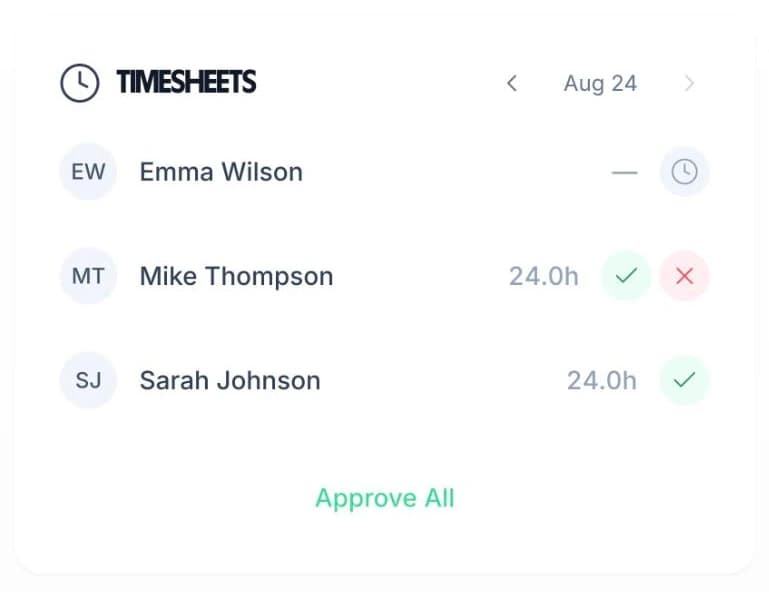
Staff clock in on the iOS or Android app, or fill in their timesheet, and TimeTally builds the week (or a longer timesheet period) for them. Managers see who hasn't submitted, are emailed as each timesheet comes in, and approve each person — or everyone at once. Overtime is worked out from your thresholds, and approved hours export to Xero, QuickBooks or CSV.
Rotas and leave are in the same plan, so the hours you pay, the shifts you planned and the holiday people booked all live in one place.
Strengths
- Timesheets, approvals, rotas and leave in one plan
- Xero, QuickBooks and CSV export
- Managers who only approve are free
- iOS and Android apps
Limitations
- No free plan (14-day trial)
- GPS clock-in is £1/employee/month extra
- No client invoicing — it pays staff, it doesn't bill clients
£3/employee/month — 14-day free trial, no card
See TimeTally's timesheet software →“The app is simple to use, reliable, and makes managing staff records straightforward. The system has saved us a significant amount of administration time.”
 Jordan Ingoe, CLI Manchester
2. Deputy
Shift scheduling with timesheets, time clocking and leave on every plan. Strong for hospitality and retail teams that build rotas first and pay from the clocked hours.
Pros
- • Rotas, time clock, timesheets and leave on every plan
- • Geofenced mobile clock-in
- • Lite plan is a similar price per user (£2.93 annual, £3.25 monthly)
- • Apps for phone, tablet and watch
Cons
- • £20/month minimum spend on monthly plans
- • Auto-approval and biometrics only from the Core plan
- • More set-up than an office team needs
Price: Lite £3.25/user/month (£2.93 billed annually), Core £4.25, Pro £6.50 (vendor pricing).
Best for: Shift-based teams that schedule first and want it all in one tool.
3. Clockify
The best-known free time tracker. The free plan now stops at 5 users, and approvals, time off and the QuickBooks integration start on the Standard plan.
Pros
- • Free for up to 5 users
- • Timer, manual entry, kiosk and browser extension
- • Time off and approvals on Standard
Cons
- • Approvals and time off are not on the free or Basic plans
- • No Xero export listed — QuickBooks only
- • GPS tracking only on the Pro plan
Price: Free (5 users); Basic $3.99, Standard $5.49, Pro $7.99 per user/month billed annually (vendor pricing).
Best for: Very small teams who want free tracking and can live without approvals.
4. Toggl Track
Polished project and billable-hours tracking for consultancies and agencies. Approvals sit on the Premium plan, so a team that needs sign-off pays the higher tier.
Pros
- • Excellent project and profitability reporting
- • iOS, Android, desktop apps and browser extensions
- • Time off and public holidays from Starter
Cons
- • Timesheet approvals only on Premium ($16/user/month annual)
- • No payroll integrations listed
- • Built around projects, not hourly-paid staff
Price: Starter $9, Premium $16 per user/month billed annually ($12 / $24 monthly) (vendor pricing).
Best for: Professional services firms tracking billable hours by project.
5. Harvest
Time tracking joined to invoicing and expenses. Useful if you bill clients for hours, less so for paying staff.
Pros
- • Invoicing and expenses built in
- • Simple, well-made time entry
- • Free plan for a single user
Cons
- • Timesheet approval only on the Enterprise plan
- • No leave or payroll features
- • Android app not on the free plan
Price: Teams $9/seat/month, Enterprise $14/seat/month (vendor pricing).
Best for: Freelancers and small agencies who invoice clients for time.
6. Hubstaff
Time tracking with activity monitoring — activity levels and screenshots from the entry plan. Aimed at remote teams; many UK workplaces find the monitoring heavy-handed.
Pros
- • Automated timesheets from tracked time
- • Multi-platform apps on every plan
- • 14-day trial, no card
Cons
- • Approvals, time off, scheduling and payroll only from the Team plan
- • Two-seat minimum and no free plan
- • Screenshots and activity tracking are central; GPS is a paid add-on
Price: Starter $4.99, Grow $7.50, Team $10 per user/month billed annually (vendor pricing).
Best for: Remote agencies that want activity monitoring as well as hours.
7. RotaCloud
A UK rota and leave tool. Clocking in and timesheets are a separate Time & Attendance add-on, so the timesheet cost sits on top of the rota plan.
Pros
- • UK-built, with free phone and chat support
- • Sage 50 payroll report with the Time & Attendance add-on
- • Rotas, holiday and absence on all plans
- • 30-day free trial
Cons
- • Timesheets need the £4.50/user/month Time & Attendance add-on
- • Priced by team band plus add-ons, harder to compare
- • SMS notifications cost extra
Price: Plans from £10/month for the smallest team band (annual) + £4.50/user/month for time and attendance (vendor pricing).
Best for: UK teams whose main job is the rota, with timesheets second.
8. Connecteam
An all-in-one app for deskless teams: time clock, scheduling, chat and forms. The free Small Business plan covers up to 10 users.
Pros
- • Free for up to 10 users
- • GPS stamps and geofences on paid plans
- • Payroll integrations from the Basic plan
- • Web, iOS and Android
Cons
- • Payroll integration not on the free plan
- • Time off sits in a separate HR hub
- • Priced in US dollars per hub
Price: Free (10 users); Basic $29/month for the first 30 users, then $0.80/user (vendor pricing).
Best for: Micro-teams under 10 wanting a free time clock, or deskless teams wanting chat too.
How to Choose
Ask yourself:
- Do you pay staff for hours, or bill clients for them? — Paying staff points to TimeTally, Deputy or RotaCloud; billing clients points to Toggl Track or Harvest.
- Do you need manager approval before payroll? — Check which plan it starts on: it is Standard on Clockify, Premium on Toggl Track and Enterprise on Harvest.
- What's your payroll software? — Check the export before you trial. Our TimeTally vs Clockify comparison goes deeper on one pairing.
- Do you need rotas and leave too? — Buying one tool instead of three is usually the biggest saving.
Every tool here has a free plan or a free trial. Test with a few employees for one full pay period before committing.
 TimeTally
Collect, Approve and Export Timesheets in One Place
Clock-in, approvals, overtime, rotas and leave for UK small businesses — £3 per employee per month.
Free for 14 days • No credit card required