
Staff app · iPhone, Android and web

The Employee Self-Service App For Shift Teams

Start free trialAdd your team, publish a week and let them book a day off. 14 days free, no card, then £3 per employee a month.14 days free · then £3 per employee

TimeTally is an employee self-service app for teams who work shifts. Staff check their rota, swap a shift, book holiday with their balance in front of them, and clock in or send their timesheet, all from their own phone. You approve what needs approving, and stop answering the same three questions.

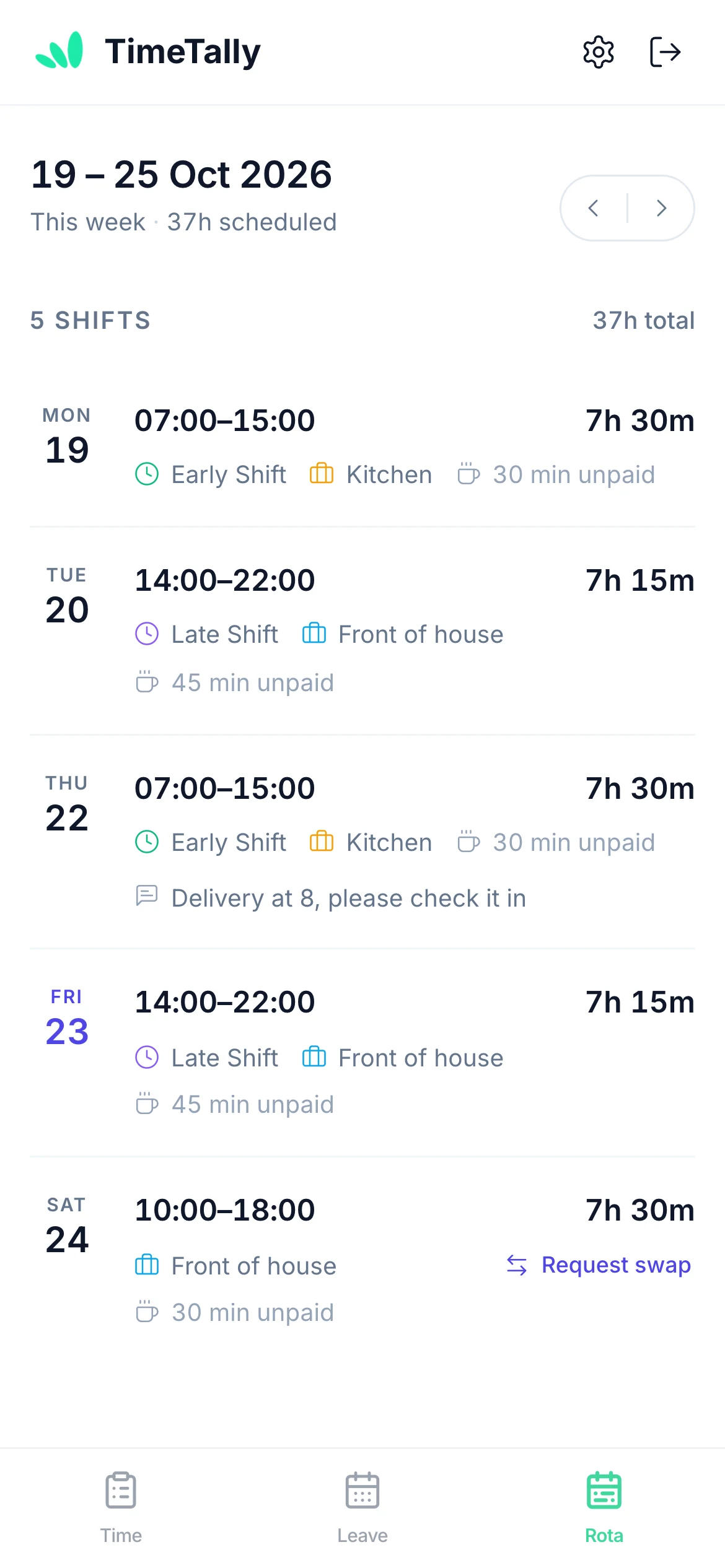
  • When am I working next week?In the Rota tab
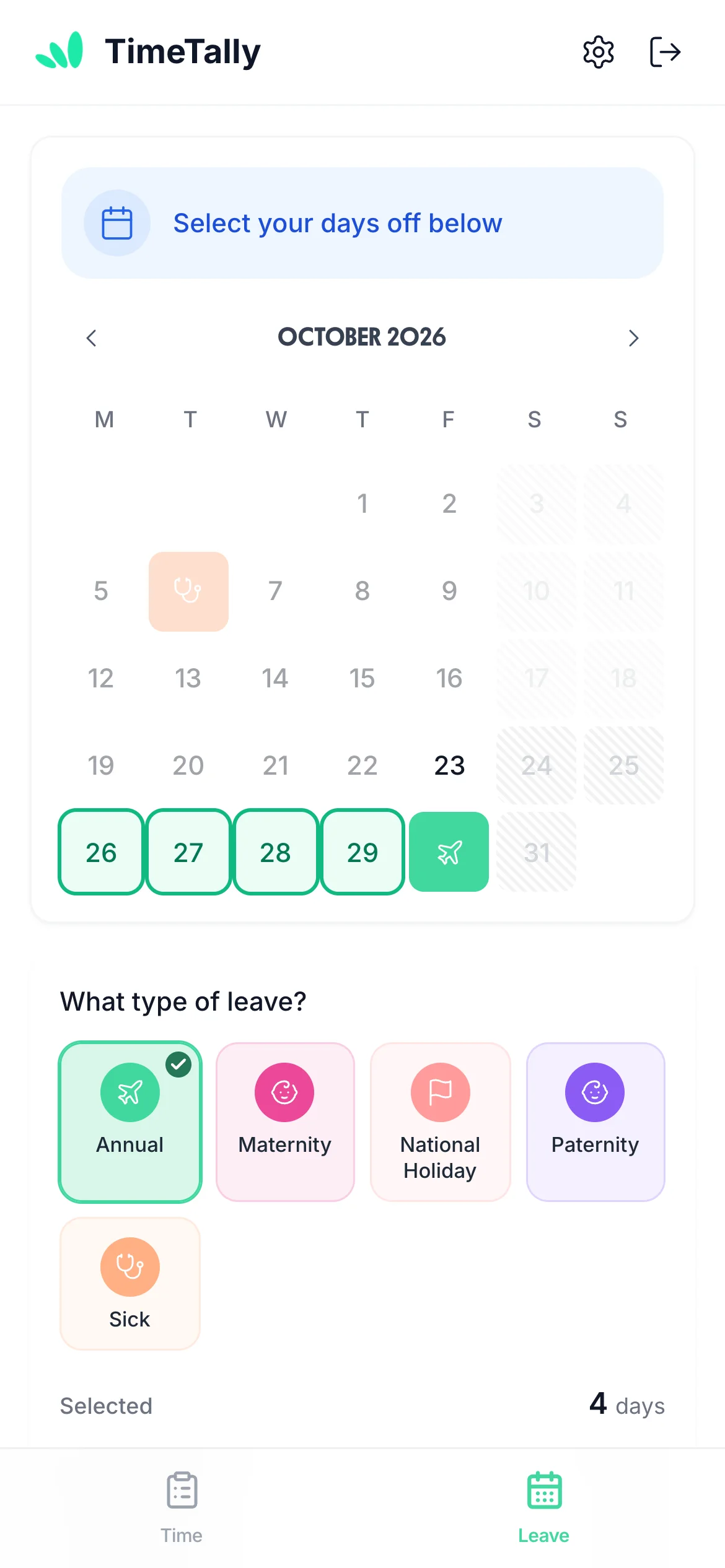
  • How much holiday have I got left?In the Leave tab
  • Did my hours go in?In the Time tab
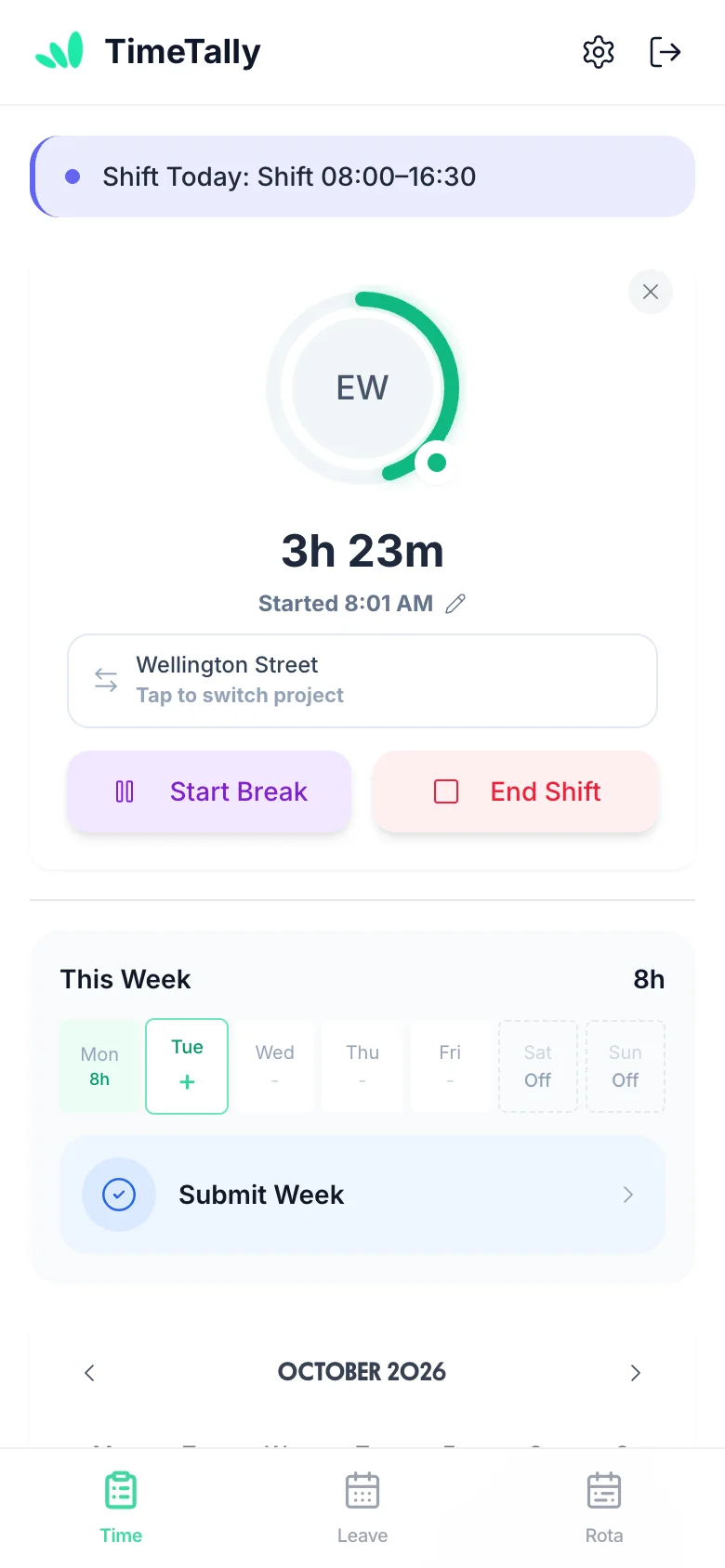
An employee's week in the TimeTally Rota tab: five shifts with times, hours and breaksThe TimeTally Leave tab on a phone: days picked on the calendar and Annual leave chosenClocked in on the TimeTally Time tab: a running timer, Start Break and End Shift, and this week's hours

What Staff Do Themselves, And What Still Comes To You

Self-service shouldn't mean losing control. Staff do the asking and the recording; anything that changes the rota, a balance or pay waits for you.

The jobYour staff, in the appYou
See their shiftsOpen the Rota tab: their published week, with times, breaks and your notes.Build and publish the week.
Change a shiftAsk a colleague to swap or take it.Approve once the colleague has said yes.
Book holidayPick the days, see their balance first, send it.Approve or reject, with a reason if you like.
Record their hoursStart Shift and End Shift, or fill in the timesheet, then submit the week.Approve it, then export to payroll.
Hear the answerAn email when their leave or timesheet is decided.Nothing to send: it goes when you decide.

Three Tabs, Everything Staff Need

The staff app has a Time, a Leave and a Rota tab. If you don't use one of them, it isn't there, for the whole team or for one person.

Time

Hours they record themselves

  • Start Shift, Start Break, End Break and End Shift on the phone
  • Or fill in the timesheet: start, end, break and notes, with + Add Shift for a split day
  • Submit the week, and take it back while it is still waiting
  • A rejected timesheet shows your reason, ready to fix and resubmit
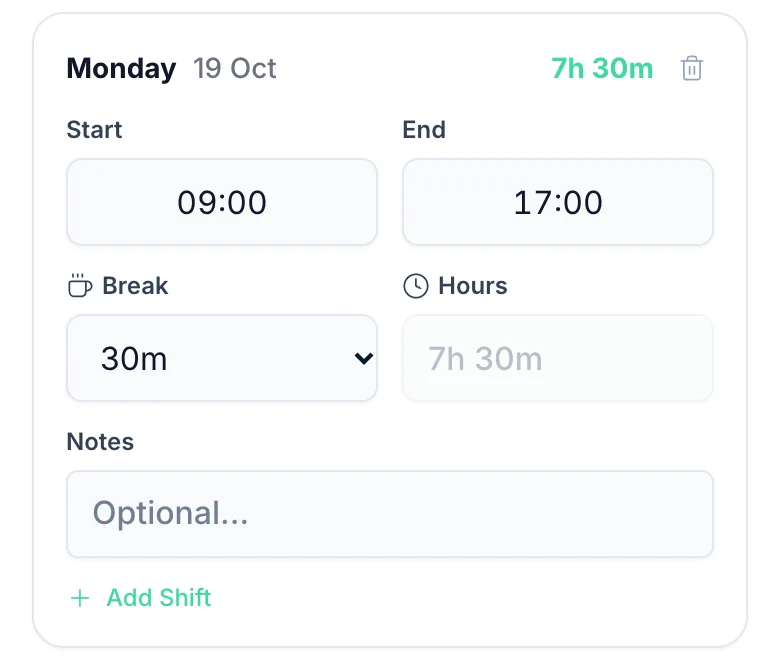
The timesheet app
One day of the TimeTally timesheet form on a phone: Monday 19 October, 09:00 to 17:00, a 30 minute break, 7h 30m, notes and Add Shift

Leave

Leave they book themselves

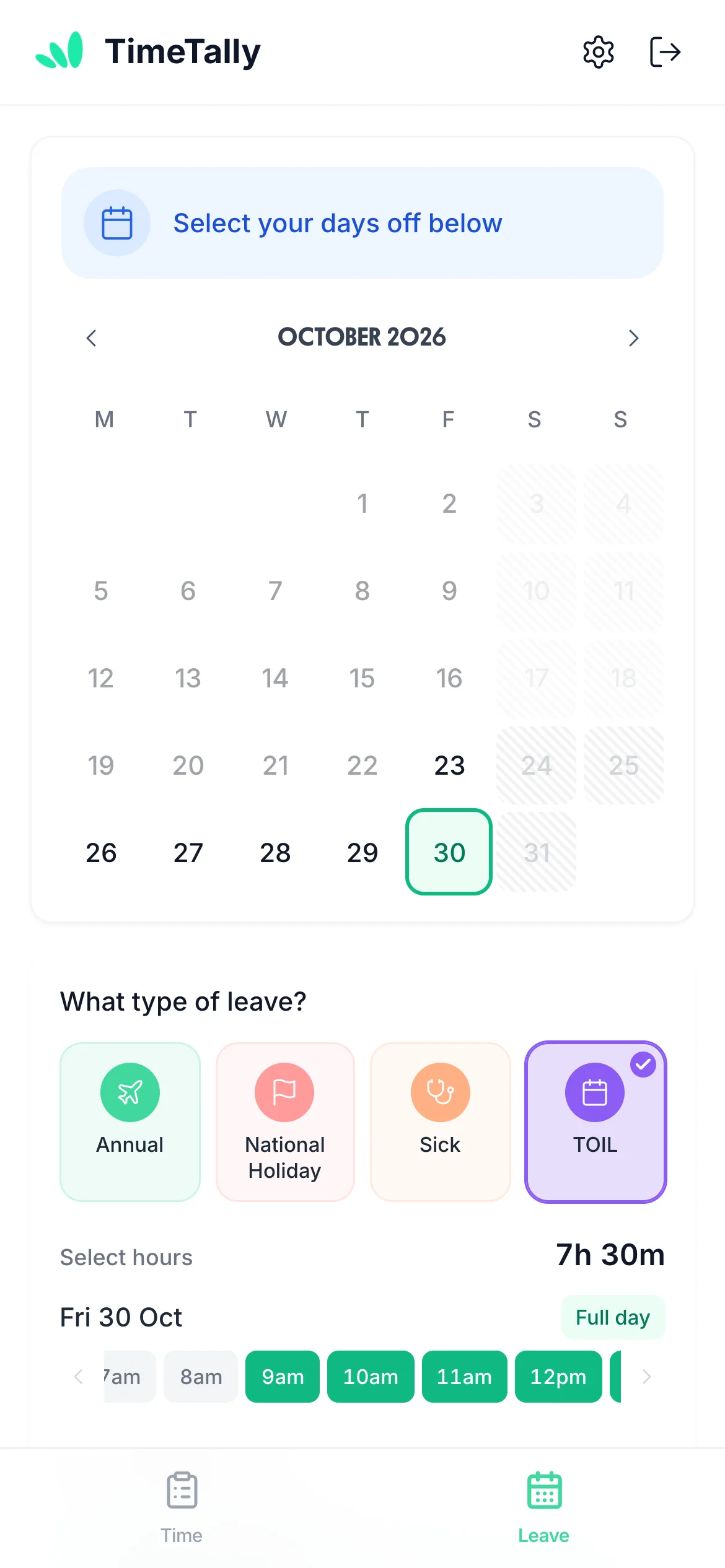
  • Tap the days, choose full days, mornings, afternoons or hours
  • The balance sits beside the calendar, and Check Future Balance looks ahead
  • Book TOIL from their TOIL balance, if you use TOIL
  • Cancel a pending request, or ask you to cancel approved leave
The holiday booking app
Booking TOIL in the TimeTally app on a phone: Friday 30 October picked, TOIL chosen as the leave type, 7h 30m for a full day

Rota

Shifts they sort out themselves

  • Their own published shifts, a week at a time
  • Request swap on any shift that hasn't started
  • Accept or decline a colleague's swap in the same tab
  • See who else is on that day, if you switch on Who's on
The staff rota app
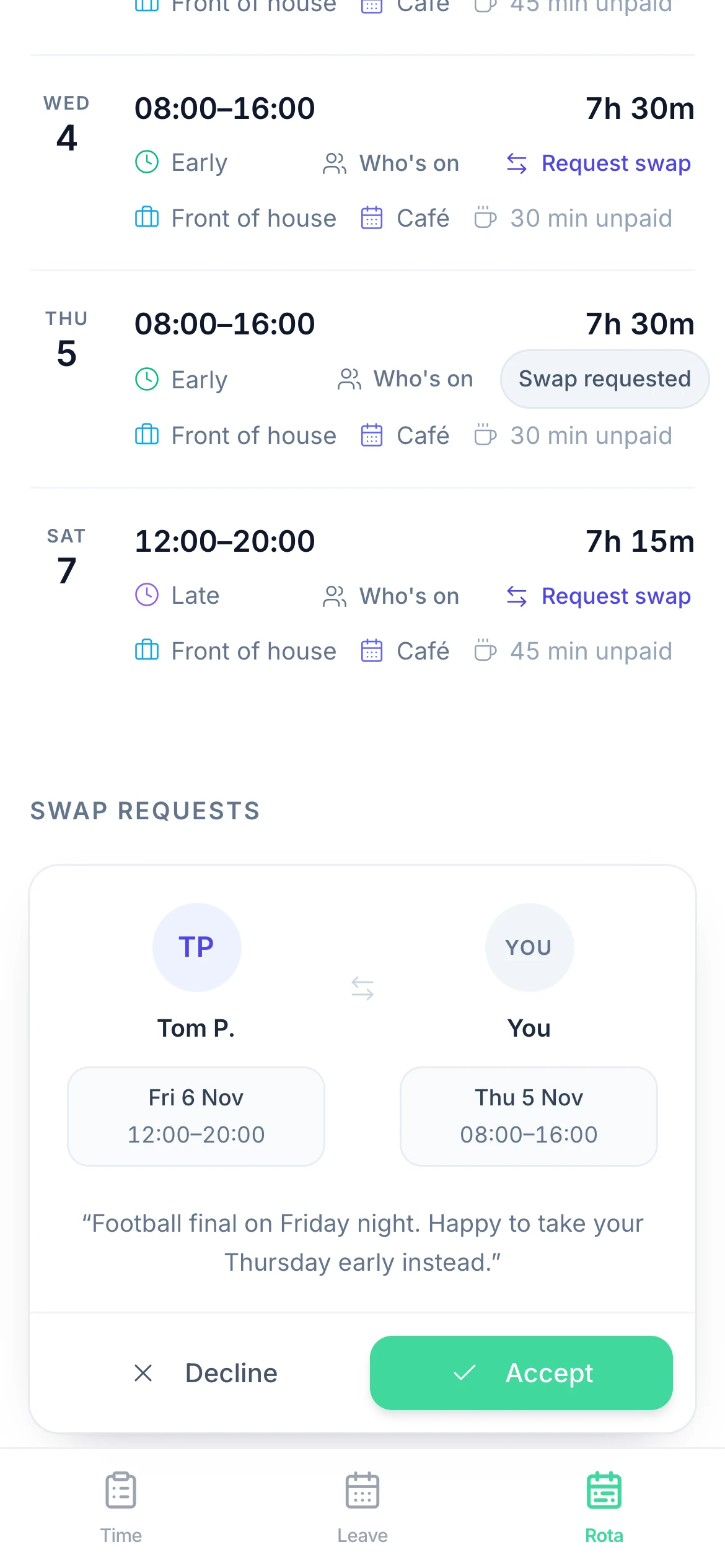
An employee's Rota tab in TimeTally on a phone: next week's shifts and a swap request from a colleague with Decline and Accept

Their Account, Their Choices

The gear at the top of the app opens their settings. Staff change their own password and can turn on two-step verification with an authenticator app. If you require it for everyone, they can't turn it off.

They pick which emails they get: timesheet approved, timesheet rejected, leave approved, leave rejected and rota published. If you let them, they also choose how they record time: clocking in and out, the timesheet form, or both.

Their name, email address and working hours stay with you, so nobody changes their own contract by accident. Staff see their hours, never their pay rate.

Staff change

  • Password
  • Two-step verification
  • Which emails they get
  • Clock in, timesheet form or both

You set

  • Name and email
  • Working week and hours
  • Leave allowance and last day
  • Pay rate (they never see it)
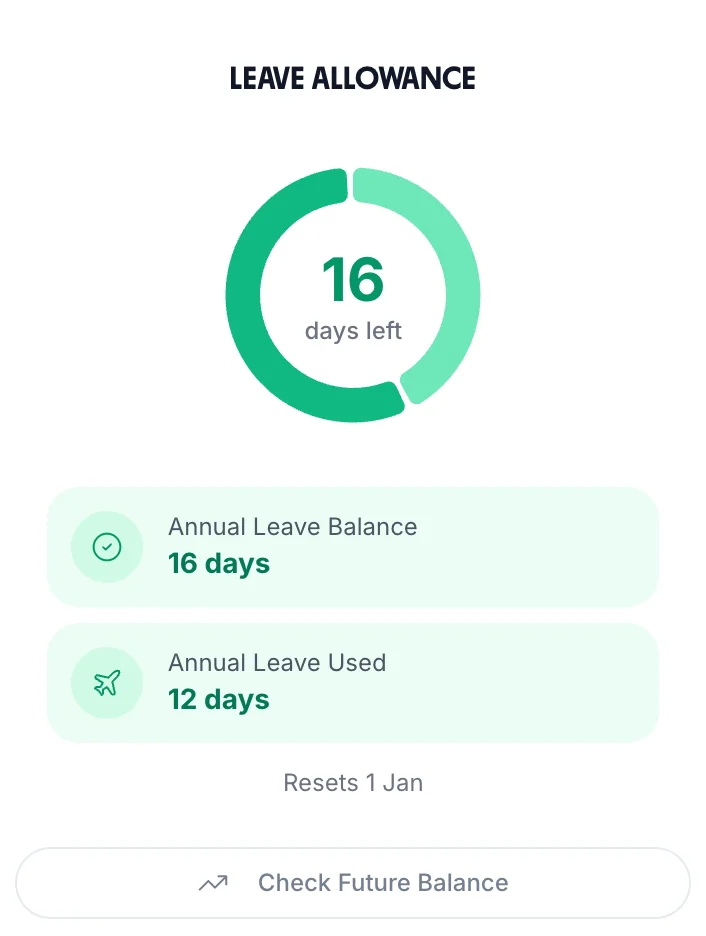
The leave allowance card staff see in TimeTally: 16 days left, 12 used, resets 1 January, and Check Future Balance

Getting Your Team Onto The App

  1. Add them

    Type them in or import a CSV of your staff. Give each person their working week and leave allowance once.

  2. They get an invite

    Send each person an invite email. Or share a join link: people who use it wait until a manager approves them.

  3. They sign in on their phone

    With their email and a password, or with Google or Apple, in the free app or a phone browser.

An Employee Self-Service App For Shifts, Not A Payslip Portal

TimeTally covers the rota, leave and hours. If you need staff to download payslips or sign documents, keep the system that does that.

In the staff app

  • Rota, swaps and who's on
  • Holiday, sick days and TOIL, with their balances
  • Clocking in, timesheets and submitting the week
  • Emails when you decide, and rota emails

Not in the staff app

  • Payslips, P60s and expenses
  • Documents, policies and announcements
  • Addresses, bank details and emergency contacts
  • Push notifications (it emails) or availability

Loved by UK small businesses

Real reviews from TimeTally customers

TimeTally has been excellent for our business… The system has saved us a significant amount of administration time.
Jordan IngoeCLI Manchester
Setup was dead simple and the team just got on with it. Got everyone up and running in an afternoon with no help needed. Does everything we need for timesheets and holidays without the faff.
S.M.
Has completely changed how I handle timesheets. Used to dread it every week — now it takes me minutes. Really easy to get around and my staff picked it up straight away.
J.T.
Started using it just for rotas but quickly realised it does loads more. The timesheets and leave management are great, and it even handles TOIL and overtime which I wasn't expecting. Use it for everything now.
R.K.

Employee Self-Service App Pricing

The staff app is free to download. The account is one price per employee, with the rota, leave and timesheets all included.

  • 14-day free trial, no card needed
  • Free staff app on iPhone and Android
  • No setup fee, cancel any time
£3/employee/month

After a 14-day free trial, no card needed to start. Billed monthly. A team of 15 is £45 a month.

Rota, shift swaps and who's on
Leave booking, balances and TOIL
Clocking in and timesheets
Emails to staff when you decide
Free staff app on iPhone and Android
Start free

Support that answers

A real person replies within 24 hours. No ticket queues, no bots.

UK GDPR compliant

A UK company, ICO regulated. Your data encrypted and never sold.

Employee Self-Service: Questions Owners Ask

What is an employee self-service app?

An employee self-service app lets staff do the everyday jobs that would otherwise go through a manager: checking their shifts, booking holiday, seeing their balance and recording their hours. In TimeTally staff do these in the Rota, Leave and Time tabs of a free phone app, and managers approve what needs approving.

What can employees do themselves in TimeTally?

They can see their published shifts and ask a colleague to swap, book leave and see their balance before they ask, book TOIL from their TOIL balance, clock in and out or fill in a timesheet, and submit the week. They can cancel a pending leave request, ask to cancel approved leave, and take a timesheet back while it is still waiting. They choose which emails they get and can turn on two-step verification.

Can employees update their own personal details?

Not in TimeTally. Staff can change their password, turn on two-step verification and choose their emails, but their name, email address and working hours are set by you. TimeTally doesn't keep addresses, phone numbers, bank details or emergency contacts, so there is nothing of that kind to update.

Can staff see their payslips in the app?

No. TimeTally doesn't run payroll, so there are no payslips or P60s in it. Approved hours leave TimeTally as a CSV file for your payroll, or as a wages journal in Xero or QuickBooks, and payslips come from your payroll software. Staff see their hours in TimeTally, not their pay rate.

How are staff told about decisions?

By email. Staff get an email when you approve or reject their leave or their timesheet, when you publish the rota and choose to tell them, and, if you turn them on, reminders about a late timesheet. Each person can turn the decision and rota emails off. TimeTally doesn't send push notifications. Shift swap requests wait in the Rota tab.

Do staff have to install an app?

No. The TimeTally app is free on iPhone and Android, but everything also works in a phone or computer browser with the same account. Staff sign in with their email and password, or with Google or Apple.

How much does the employee self-service app cost?

£3 per employee per month after a 14-day free trial with no card, and the staff app is free to download. The price covers the rota, leave, timesheets and clocking in, so a team of 15 is £45 a month. Managers are free while they don't record their own hours.

Still have a question? See all FAQs →

Book a demo

Let Your Team Serve Themselves

Add your team in the trial, publish a week, and see how many questions stop coming your way.

Download on the App StoreGet it on Google Play

14-day free trial · No card needed · £3 per employee a month