
Rota Planning
Rota PlannerSchedule shifts and manage your teamTime & Attendance
Time TrackingTimesheets, clocking in, and moreView all features One plan · £3 per employee per month
Jibble vs TimeTally
Looking for a Jibble alternative? Jibble is a free time clock, and a good one. TimeTally costs £3 per employee a month because it runs the week around the clock-in: the rota staff clock in against, overtime and TOIL, holidays by UK rules and wages ready for payroll.
Only on Jibble
Jibble
Free for unlimited users
Only on TimeTally
TimeTally
£3 per employee a month
Each side lists what that product is sold on, not what the other lacks. Jibble from jibble.io, checked 3 November 2026.
Jibble costs nothing for any number of people, and we won't pretend otherwise. TimeTally is £3 per employee a month on one plan. The question is whether your team needs a rota, overtime rules and UK holiday worked out, or just a record of when people clocked in.
| A month for | 10 staff | 20 staff | 30 staff | 50 staff |
|---|---|---|---|---|
| Jibblefree forever, unlimited users | £0 | £0 | £0 | £0 |
| TimeTallyrota, clock-in, timesheets, holidays | £30 | £60 | £90 | £150 |
| TimeTally with GPS+£1 per employee | £40 | £80 | £120 | £200 |
£3
per employee a month
£0
free forever, unlimited users
Example, 20 staff: Jibble is free. TimeTally is £60 a month, or £80 with the GPS check. Managers who don't record their own hours aren't billed. Jibble's price from its help centre, checked 3 November 2026.
Jibble lists more ways to clock in than TimeTally does, and its ticks are here. TimeTally lists the jobs around the clock-in: the rota, the overtime, the holiday rules and the payroll journal.
| Feature | TimeTally | Jibble |
|---|---|---|
| Priceper month | £3 per employeeGPS check +£1 each | FreeUnlimited users, no card |
| Clock in on a phone | Yes: iPhone, Android or the websiteGPS check at the job's location | Yes: Phone, web, desktop, ChromeGPS, geofences, offline |
| Shared kiosk, face recognition | No: Not offeredEach person clocks in on their own phone | Yes: Kiosk with face, QR, NFC or PIN |
| A shift rota you publish | Yes: Templates, copy forward, swapsStaff are emailed their shifts | Coming soonIts scheduling page, Nov 2026 |
| Timesheet approval | Yes: Approve or reject each week | Yes: Approve pay period timesheets |
| Overtime | Yes: Day, week or month thresholdsRates, extra levels, per person | Yes: Overtime worked out |
| Time off in lieu (TOIL) | Yes: From overtime, with a limit and expiry | Not listed |
| Holiday | Yes: UK bank holidays by nation, pro-rata12.07% for hours-based staff | Yes: Policies, accruals, carry-overMulti-level approvals |
| Payroll | Yes: Xero or QuickBooks journal, CSV | Yes: Xero, QuickBooks, Deel and more |
| Screenshots and activity tracking | No: Not offered | Yes: Listed |
| Client invoices | No: Not offered | Yes: From tracked time |
Jibble from its home page, help centre and product pages, checked 3 November 2026. “Not listed” means its pages don't mention it, not that it can't.
The week around the clock
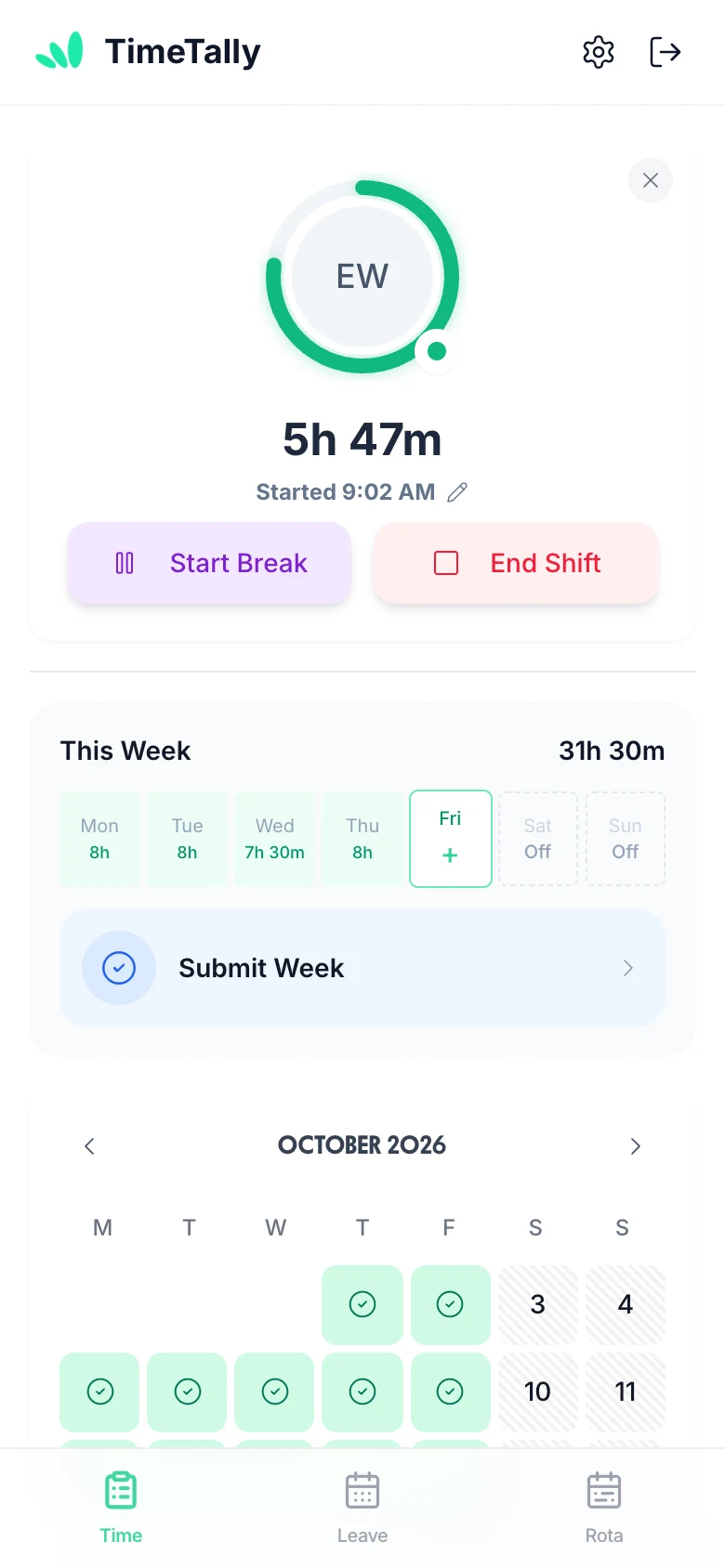
Jibble's scheduling page says “Coming soon!”. In TimeTally the rota, the clock-in and the timesheet are one week, so staff clock in against the shift you planned and you approve hours you can check. More on the clock-in app and the time tracking pages.
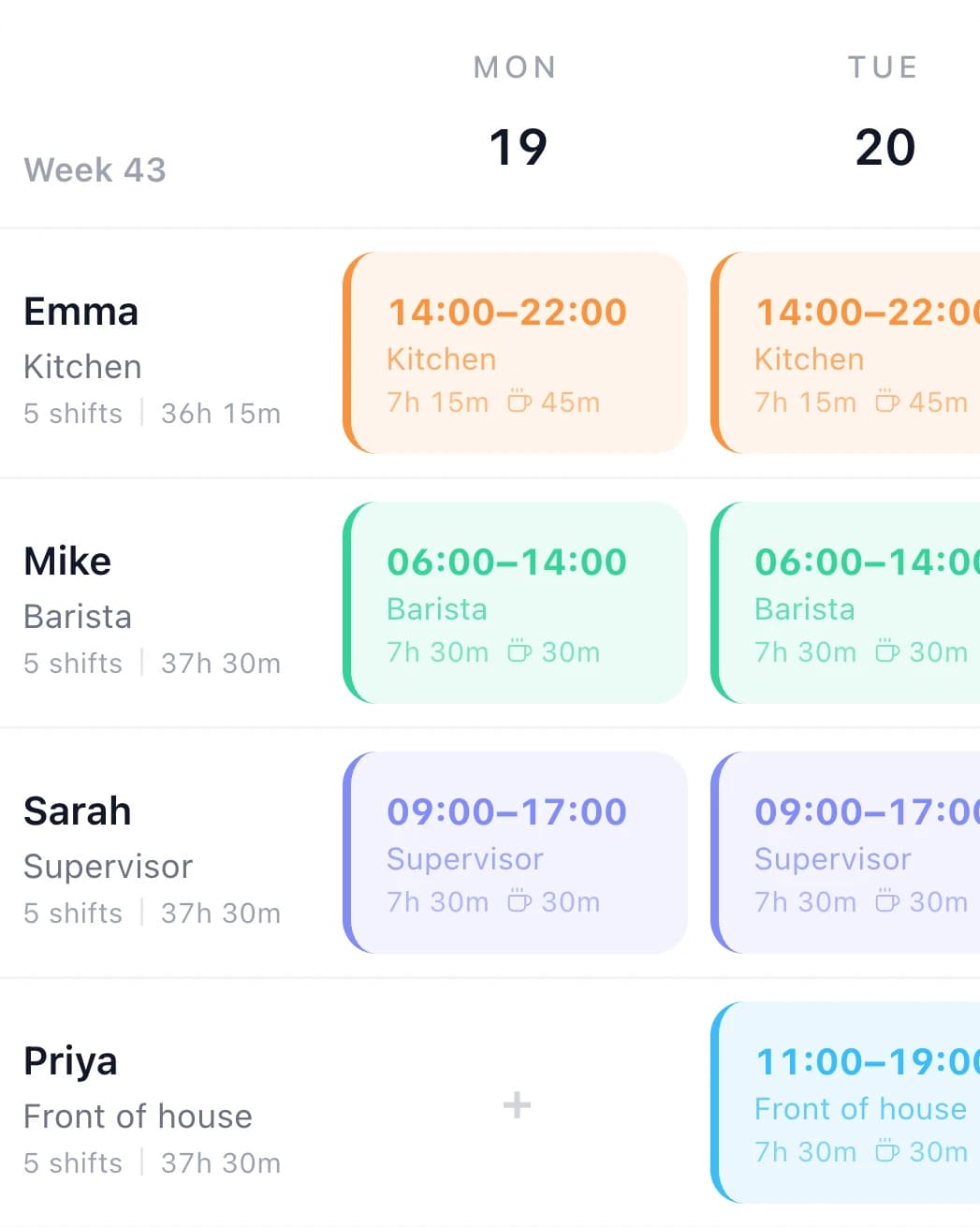
Build it from shift templates or copy a week forward, then publish. Staff are emailed their shifts.
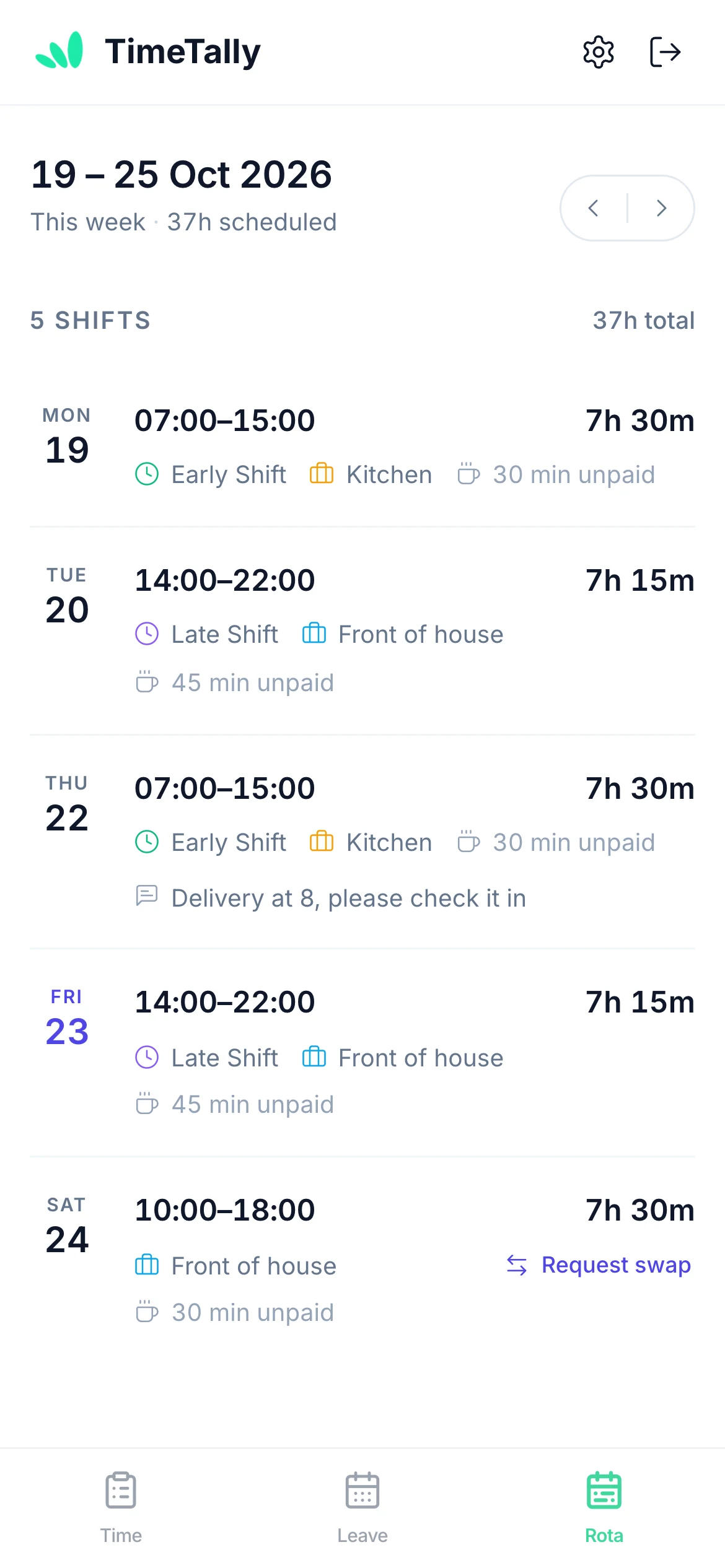
Their week sits in the app, with breaks and your notes. They can ask a colleague to swap a shift.
Tap Start Shift within 15 minutes of the rota time and the shift starts at the rota time. Later than that, it asks which to use.
At the end of the week the timesheet shows how far the hours came in over or under the rostered shifts, overtime is worked out by your rules, and approved wages go to Xero or QuickBooks as one journal.
Both are fair choices. It depends on whether you need a clock, or the week around it.
Record when people clock in, freeJibble
Run the rota, the hours and the holidaysTimeTally
Real reviews from TimeTally customers
TimeTally has been excellent for our business… The system has saved us a significant amount of administration time.
 Jordan IngoeCLI Manchester
Setup was dead simple and the team just got on with it. Got everyone up and running in an afternoon with no help needed. Does everything we need for timesheets and holidays without the faff.
Has completely changed how I handle timesheets. Used to dread it every week — now it takes me minutes. Really easy to get around and my staff picked it up straight away.
Started using it just for rotas but quickly realised it does loads more. The timesheets and leave management are great, and it even handles TOIL and overtime which I wasn't expecting. Use it for everything now.
Its site says so: "free forever for unlimited users", with GPS, facial recognition, geofencing, kiosk clocking and time off at no cost, and no credit card. Its old pricing address now goes to the home page (checked 3 November 2026). TimeTally isn't free: it costs £3 per employee a month after a 14-day free trial.
Only if you need what the £3 pays for. Jibble is built as a time clock, and its employee scheduling page says shift scheduling is coming soon. TimeTally gives you a rota you publish to staff phones, overtime rules and TOIL, holiday worked out by UK rules, and wages sent to Xero or QuickBooks as one journal. If all you need is to see when people clock in and out, Jibble may be all you need.
No. In TimeTally each person clocks in on their own phone with the free iPhone or Android app, or on the website. There is no shared tablet, no face recognition and no NFC or QR clocking. You can add a GPS check (£1 per employee a month) that records where they clocked in and compares it with the job's location.
Its feature list has "Work Schedules" (set work schedules to stay aligned), and its employee scheduling page describes open shifts and publishing under the words "Coming soon!" (checked 3 November 2026). TimeTally's rota is live today: shift templates, copy a week forward, swaps between colleagues, rota rules that warn about hours and cost, and staff emailed when you publish.
Each person's bank holidays follow their nation (England, Wales, Scotland or Northern Ireland) and can be paid from the allowance, on top of it or unpaid. Starters, leavers and part-timers get a pro-rata allowance, rounded up to the half day. Staff on variable hours build up 12.07% of the hours on each approved timesheet, and overtime can be banked as TOIL with a limit and an expiry.
£60 a month, or £80 with the GPS check. Managers who don't record their own hours aren't billed. It's billed monthly with no setup fee and no contract, and the first 14 days are free with no card.
Jibble lets you download reports as XLS or CSV. Start the TimeTally trial, upload your staff from a CSV or Excel file and choose whether invites go out now or later. Set each person's yearly allowance and type in the holiday they have left, save your usual shifts as templates and publish the first week. Staff download the app and clock in from the day you pick.
Publish next week's rota, let the team clock in against it and approve the hours. See pricing.
No credit card required • £3 per employee a month • Cancel anytime