For teams of 25, 100 or several hundred

Rota, leave and timesheets for larger teams

Tell us about your teamWe'll show you TimeTally on your own setup and build your account for you. A person replies within 24 hours, Monday to Friday.Free setup · a person replies within 24h

Managers who see only their own people. A rota for each site. Hours, overtime and holiday worked out the same way for everyone, ready for payroll. And people behind it: we set your account up with you, the assistant answers questions in the app, and a person replies within 24 hours on weekdays.

Drawn as an example.

Built for mid-size and large UK businesses

What changes when a team gets bigger

Ten people can share one spreadsheet and one manager. Fifty or five hundred can't. These are the four things that break first, and what TimeTally does about each.

  1. TodayEvery manager can see every person, and every person's pay.

    In TimeTally

    Each manager sees only the people they look after.

    Pick a department, a site or named people for each manager. Pay and settings are hidden from them unless you allow them.

  2. TodayEach site keeps its own spreadsheet, and nobody has the whole picture.

    In TimeTally

    One account, a rota for each site, one set of rules.

    Build and publish each schedule on its own; the leave, the overtime rules and the payroll export stay in one place.

  3. TodayPayroll waits on the last few timesheets every month.

    In TimeTally

    Reminders go out, and approved hours are ready to export.

    Timesheets run weekly, every two, three or four weeks, or monthly, due on the date you choose, with reminder emails before and after.

  4. TodayRolling out a new system to eighty people sounds like a project.

    In TimeTally

    We set it up with you, and the videos train everyone else.

    Send us your spreadsheets and we build the account. Managers and staff each get short how-to videos, and the assistant answers questions in the app.

Managers and permissions

Every manager sees their own people, and nothing more

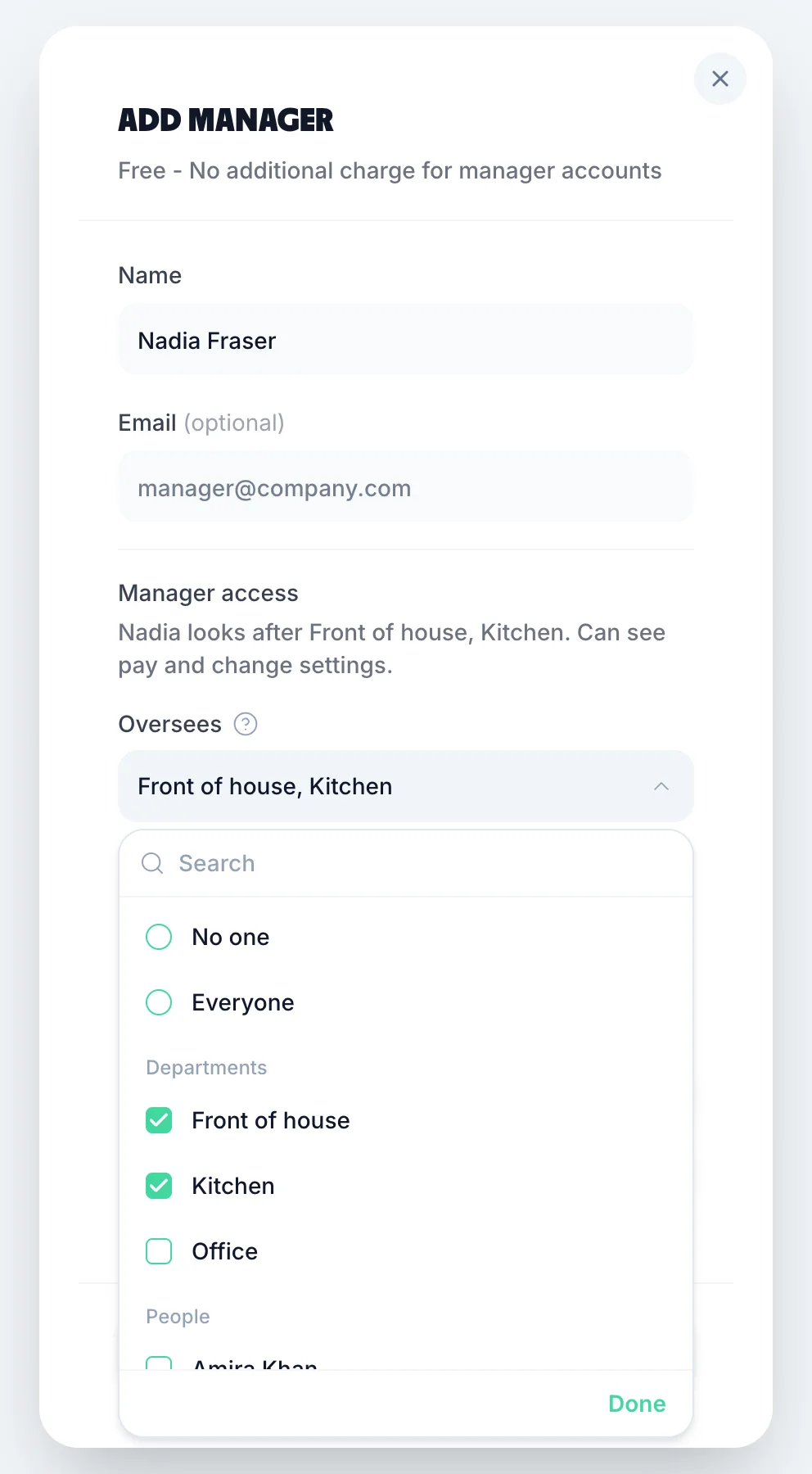
Who a manager looks after is one rule. It decides whose rota they edit, whose timesheets and holiday they approve, and whose emails reach them.

Add manager in TimeTally: Nadia Fraser, with the summary Nadia looks after Front of house, Kitchen, can see pay and change settings, and the Oversees list open with No one, Everyone, the departments Front of house and Kitchen ticked and Office not, then people
  • OverseesEveryone, some departments, named people, or no one
  • Allow them to see payHourly rates, salaries and pay totals
  • Allow them to change settingsOrganisation settings, the team and billing
  • Allow them to submitTheir own timesheets and leave. Only then do they cost a seat
  • Can also see on the rotaOther teams, to view only, without being able to change their shifts
  • Project managers approve their daysDays on a project go to its project managers; other days to the usual manager
  • The words each switch has in TimeTally. Staff can never change their own pay or leave terms.

Several sites, shared devices, staff without email

The awkward parts of a bigger workforce are handled in the app, not with workarounds: each site's rota, clocking in on site, a shared tablet, and people who never had a work email.

Two people in hi-vis on a building site looking at a tablet
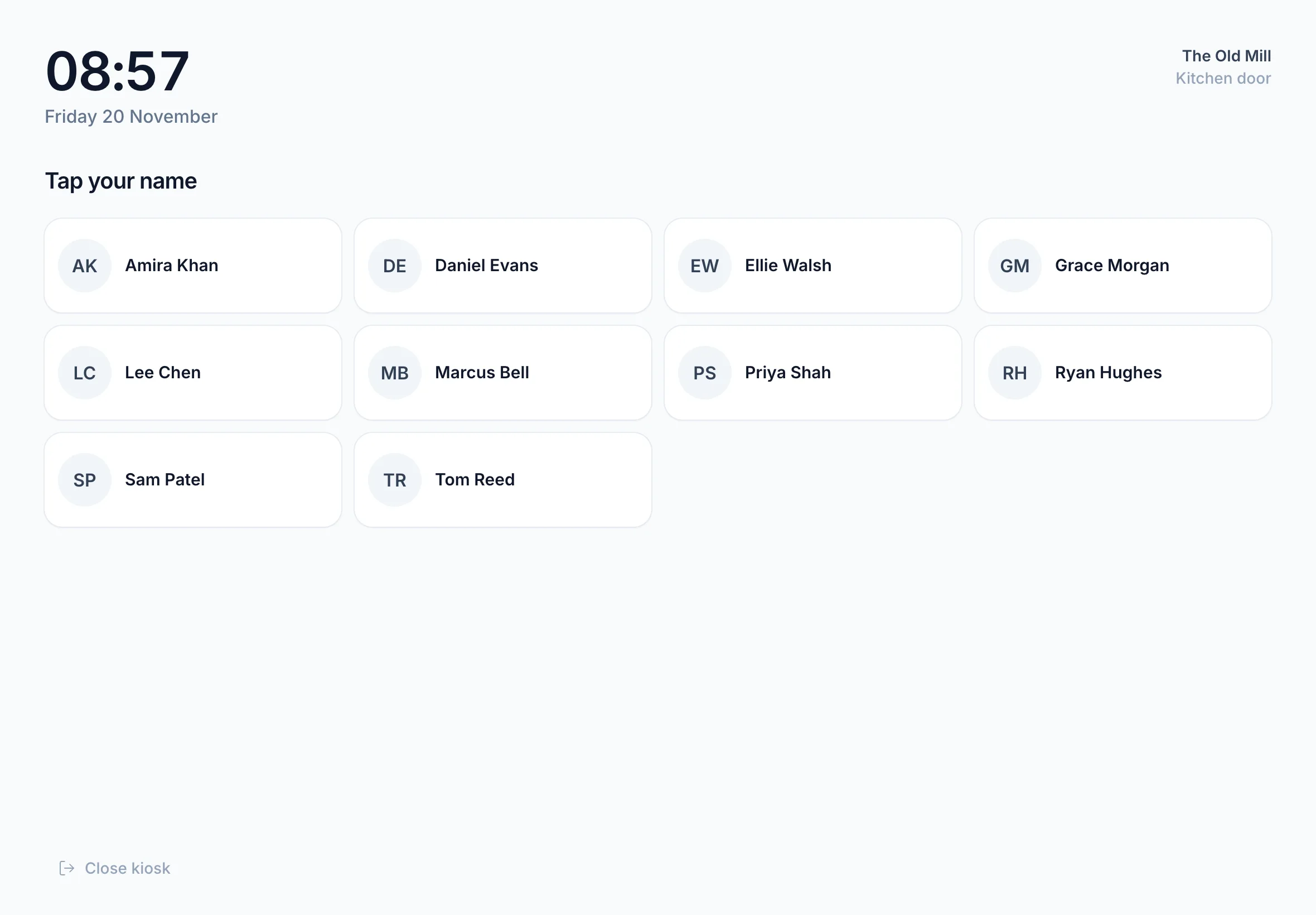
TimeTally's kiosk on a tablet: 08:57, Friday 20 November, The Old Mill, Kitchen door, and Tap your name above a grid of ten staff names
The kiosk on a shared tablet. Made-up staff.
  • A rota for each site

    As many schedules as you run, each published on its own. The rota email goes only to that schedule's staff, and when you republish, only to the people whose shifts changed.

  • Clock in where the work is

    GPS clock-in at each job's own location, or at the places a person works. £1 extra per employee a month, only if you turn it on.

  • A kiosk at the door

    One shared tablet: staff tap their name, type their 4-digit PIN and clock in or out. Turn on kiosk mode and the tablet only opens the kiosk.

  • No email? No problem

    Staff without a work email sign in with a username and a one-time password. Print their sign-in slips and hand them out on the first day.

Payroll and HR rules that hold up at scale

One set of rules for everyone, with the exceptions written down person by person, so the figures payroll gets don't depend on which manager approved them. Read more on our payroll integrations and enterprise timesheet software pages.

  1. Payroll

    Approved pay to Xero or QuickBooks

    Sent as a journal, or a CSV file for any other payroll software, with each person's payroll number.

  2. Pay

    Hourly and salaried, side by side

    A salary covers normal hours and paid leave; overtime and on-top project pay are added from the same rules.

  3. Overtime

    Rules that fit how you really pay

    After hours a day, week or month, outside set times, or per person; multipliers or fixed rates, and TOIL with limits.

  4. Holiday

    Allowances that work themselves out

    Upfront, monthly, daily or by hours worked; part-time and part-year pro-rata; carry-over and bank holidays per person.

  5. Policies

    Every rule in one PDF

    See your rules lists everything your account follows, ready to check against your own staff handbook.

  6. Records

    Who changed what on someone's leave

    The leave History panel lists every change for admins, newest first. Approved hours and leave stay on file.

Support for larger teams

You won't be left to work it out alone

Moving a whole company onto a new system is the part people dread. So we do the setup with you, and there's help at every hour after that.

  • We set up your account for you

    Send us your staff list, holiday balances and rota. We build the account: people, managers and what they see, leave rules, bank holidays, overtime. Nobody is emailed until you're ready. No setup fee.

    How setup works
  • Instant answers in the app

    Ask TimeTally, the assistant on the website, answers how-to questions at any hour from TimeTally's own guide and your setup. It can import your spreadsheets, and nothing changes until you press its button.

    More about support
  • A person within 24 hours

    Email support@timetally.org or use the form below and a person replies within 24 hours, Monday to Friday. When the assistant isn't sure, it offers to send your question to us.

    Contact us
  • Videos for managers and staff

    Short how-to videos of the real app: building a rota, setting up leave, overtime and payroll for managers; clocking in, timesheets and booking time off for staff.

    Watch the tutorials

Want to see it first? Book a 30-minute call and we'll walk through TimeTally with your own setup in mind.

The same price per person at any size

£3 per employee a month, with the rota, holiday, clocking in, timesheets and payroll exports included. GPS clock-in is £1 more per employee if you want it.

  • Managers cost nothing unless they record their own time
  • No setup fee, even when we set it up for you
  • Billed monthly, no contract, cancel any time
  • Archived staff aren't billed
See full pricing
A month, before VAT, without GPS.

What UK businesses say about TimeTally

Real reviews from TimeTally customers

TimeTally has been excellent for our business… The system has saved us a significant amount of administration time.
Jordan IngoeCLI Manchester
Setup was dead simple and the team just got on with it. Got everyone up and running in an afternoon with no help needed. Does everything we need for timesheets and holidays without the faff.
S.M.
Has completely changed how I handle timesheets. Used to dread it every week — now it takes me minutes. Really easy to get around and my staff picked it up straight away.
J.T.
Started using it just for rotas but quickly realised it does loads more. The timesheets and leave management are great, and it even handles TOIL and overtime which I wasn't expecting. Use it for everything now.
R.K.

Talk to us about your team

A few lines about how your teams work today is enough. A person reads every message.

  1. We reply within 24 hours, Monday to Friday, with answers to what you asked.
  2. A call if you want one. We show you TimeTally with your own sites, managers and rules in mind.
  3. We set up your account. Send your spreadsheets; we build it and you check it before anyone is invited.

Rather pick a time yourself? Book a 30-minute call. Or email support@timetally.org.

What would you like help with?
Company size
What would you use? Optional

A person replies within 24 hours, Monday to Friday. Nothing is set up or charged until you say so.

Questions larger teams ask

What operations, HR and finance people ask before moving a bigger team onto TimeTally.

Book a Demo

Still have a question? See all FAQs

Is TimeTally suitable for large businesses?

Yes, if your teams work shifts, record hours or book holiday. Larger businesses use it with departments, managers who see only their own people, a rota for each site, kiosks for shared devices and payroll exports. Hundreds of UK businesses use TimeTally, most of them small and mid-size, so if you're unsure whether it fits, book a call and we'll tell you honestly.

How many employees can TimeTally handle?

There's no cap on the number of people. You pay £3 per employee a month, so the price grows with the team and nothing else changes. Large staff lists can be imported from a spreadsheet instead of added one by one.

Can managers only see their own department or site?

Yes. For each manager you choose who they look after: everyone, some departments, named people, or no one. That decides whose timesheets and leave they approve, whose rota they edit and whose emails they get. You also decide whether each manager can see pay and change settings, and you can let a manager see other people on the rota without being able to change their shifts.

Can you set up our account for us?

Yes, at no cost. Send us your staff list and anything else you have (holiday balances, a rota, pay rules) and we build the account with you. Nobody is invited or emailed until you choose to invite them. Tell us about your company with the form on this page.

How much does TimeTally cost for 100 employees?

£300 a month: 100 employees at £3 each. GPS clock-in is £1 more per employee if you turn it on. Managers cost nothing unless they record their own time. There's no setup fee and no contract: it's billed monthly and you can cancel any time.

Does TimeTally work with our payroll?

Approved pay can go to Xero or QuickBooks Online as a journal, or download as a CSV file that any payroll software can read, with each person's payroll number. TimeTally works out hours, overtime and holiday pay; your payroll software still works out tax, NI and payslips.

Can staff without a work email use TimeTally?

Yes. Anyone can sign in with a username and a one-time password instead of an email, and you can print sign-in slips to hand out. On a shared tablet, kiosk mode lets staff clock in with their name and a 4-digit PIN.

Where is our data stored?

In the European Economic Area, in Ireland. Our GDPR and privacy pages explain how it is handled and how to ask for a copy or deletion.

How do we train our managers and staff?

Each person gets the how-to videos for their role, inside the app and on our tutorials page. Managers can also ask the assistant in the app at any hour, book a call with us, or email us and a person replies within 24 hours, Monday to Friday.

Bring your whole team onto one system

Tell us about your company and we'll set TimeTally up with you, or start a free trial and look around first.

No setup fee · £3 per employee a month · Cancel any time