

Split shifts are one shift
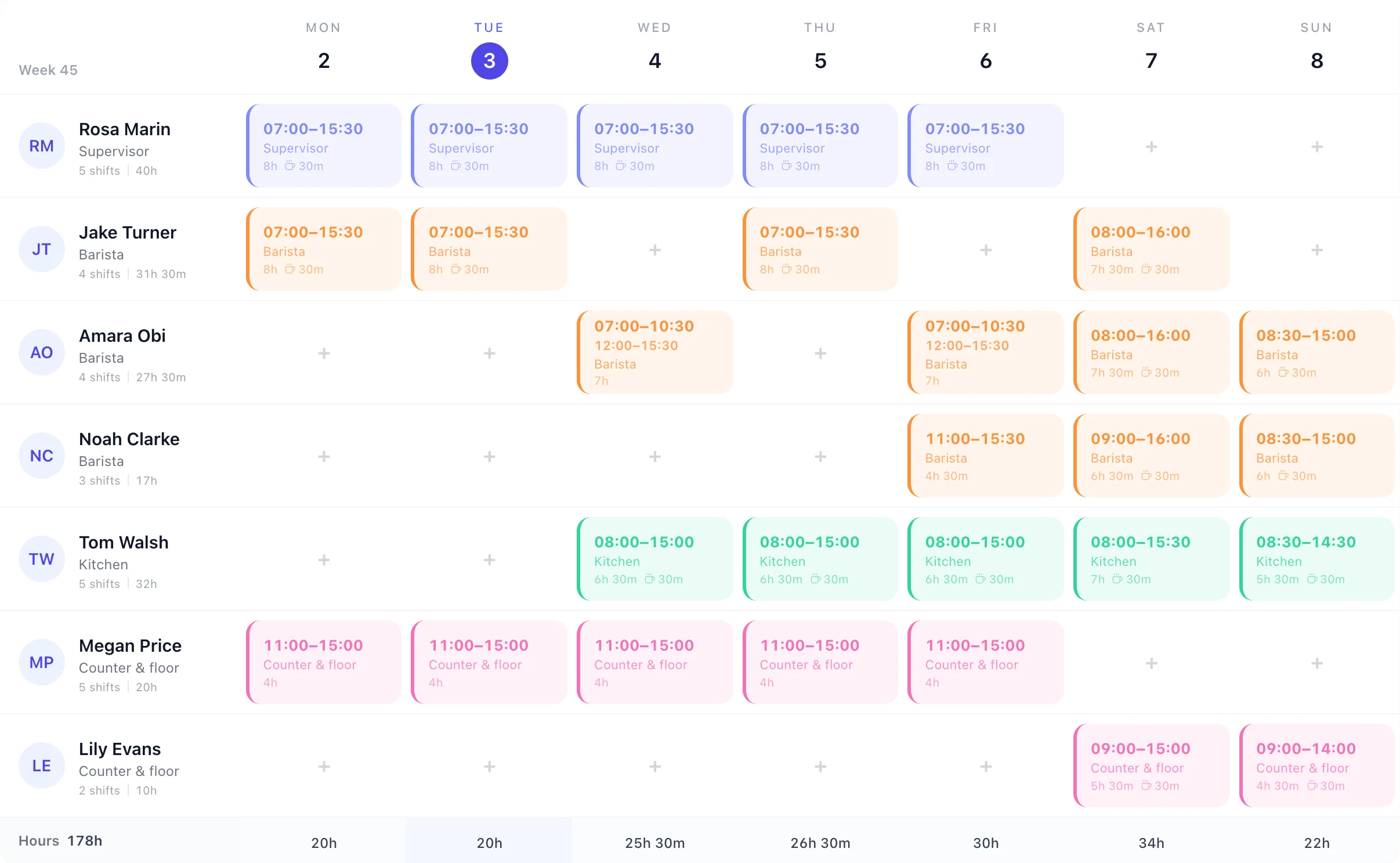
Add a second time slot to the shift (07:00–10:30, then 12:00–15:30) and the gap between them isn't paid or counted. Save it as a shift template if it comes round every week.
For cafés, coffee shops and tea rooms
TimeTally is café rota software for UK cafés and coffee shops. Baristas, kitchen and counter staff go on one week grid, split shifts for breakfast and lunch included, with each person's hours and the day's total as you build it. Holiday shows on the same grid, and your team sees, swaps and books from their phones.
A café's day
A café's staff rota is built around two rushes. This is Wednesday from the rota above: two people to open, the kitchen from eight, lunch cover from eleven, and a barista who comes back for lunch.
Rosa Supervisor
Opens up, 30m break
Amara Barista
Breakfast, then lunch: one shift, two time slots
Tom Kitchen
Kitchen from 8
Megan Counter & floor
The lunch rush, no break
Drawn from Wednesday on the rota above. On the rota itself, Amara's day is one card with both times on it.
Add a second time slot to the shift (07:00–10:30, then 12:00–15:30) and the gap between them isn't paid or counted. Save it as a shift template if it comes round every week.
Each person's shifts and hours sit under their name, and the Hours row totals each day, so a quiet Tuesday and a busy Saturday are easy to compare.
Most cafés run the same week with small changes. Build it once, then spend your Sunday evening on the changes, not the whole rota.
Save a normal week as a template and apply it for up to 13 weeks, or to the same week of every month. Saturday's brunch shifts come with it.
Save Earlies, Lates and Brunch as shift templates with their times, break and role, then drop them onto the grid.
Give each role its standard break, such as 30 minutes for a barista, and change it on any one shift. Hours shown are paid hours.
Approved and pending holiday sits on the rota on its days, so August's cover is planned before anyone is short.
New to rotas in an app? The online rota planner shows the grid step by step.
Saturday staff
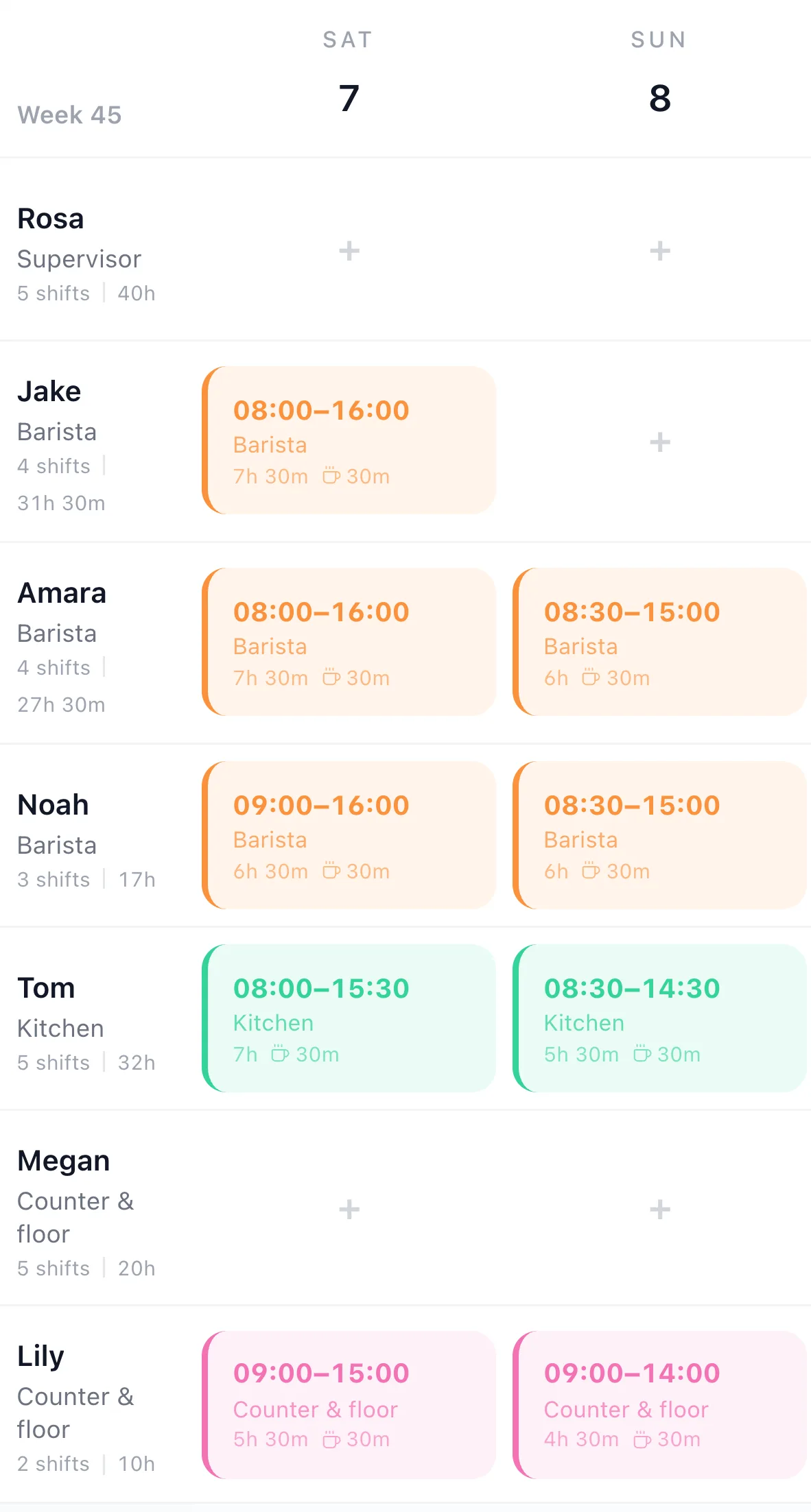
Plenty of cafés run their weekends on students and sixth-formers. They go on the rota like anyone else: Lily works Saturday 09:00–15:00 and Sunday 09:00–14:00, 10 hours in the week, with a 30-minute break on each.
TimeTally doesn't know anyone's age, so it has no young-worker rules built in. Under-18s can work at most 8 hours a day and 40 a week, with 30 minutes' break once they've worked 4 hours 30 minutes. What it can do is warn you: add a rota rule for that person and you'll see it before you publish a week that breaks it.
Rota rules for Lily
Shown above the grid, and again when you press Publish: publish anyway, or go back and fix it.
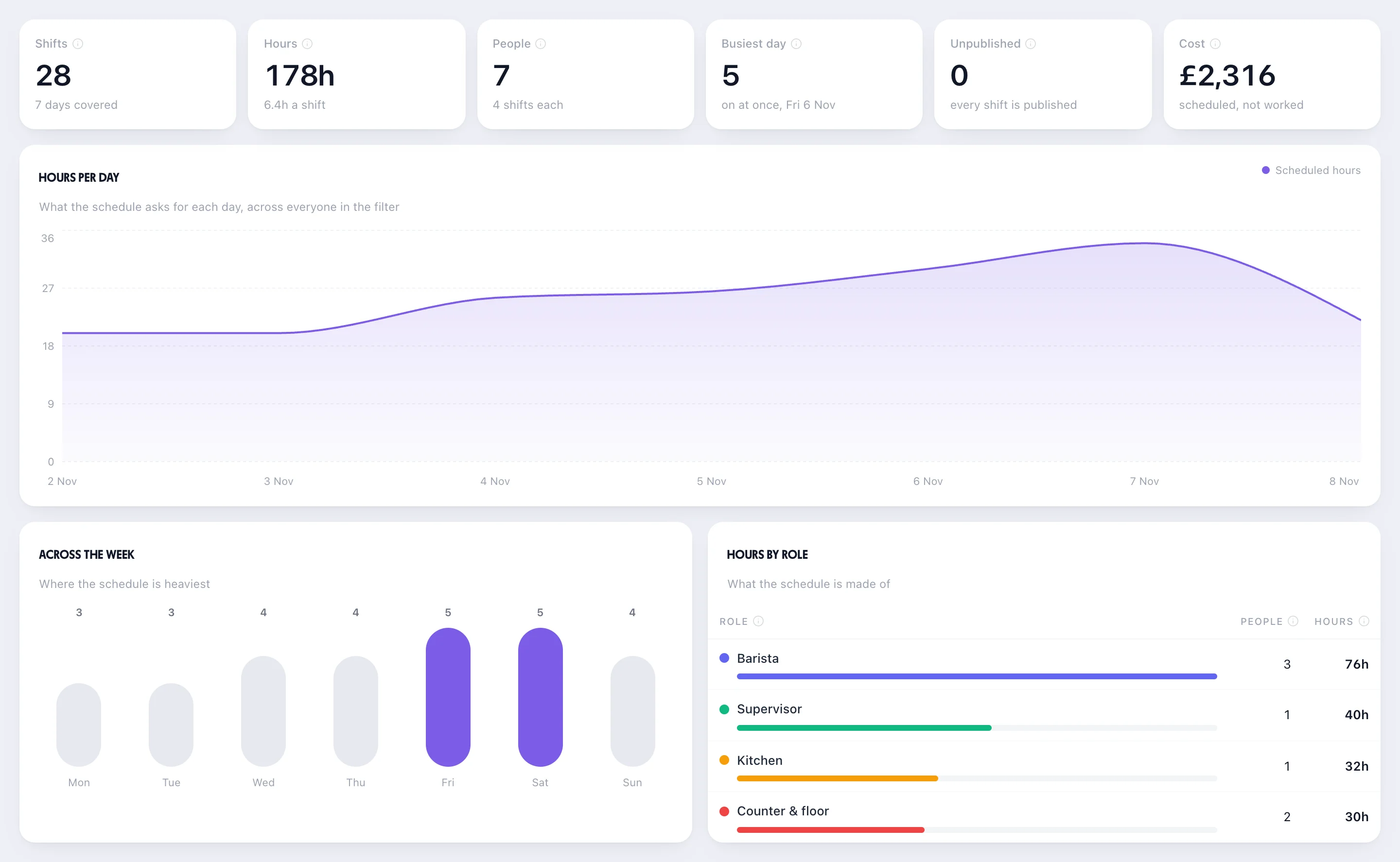
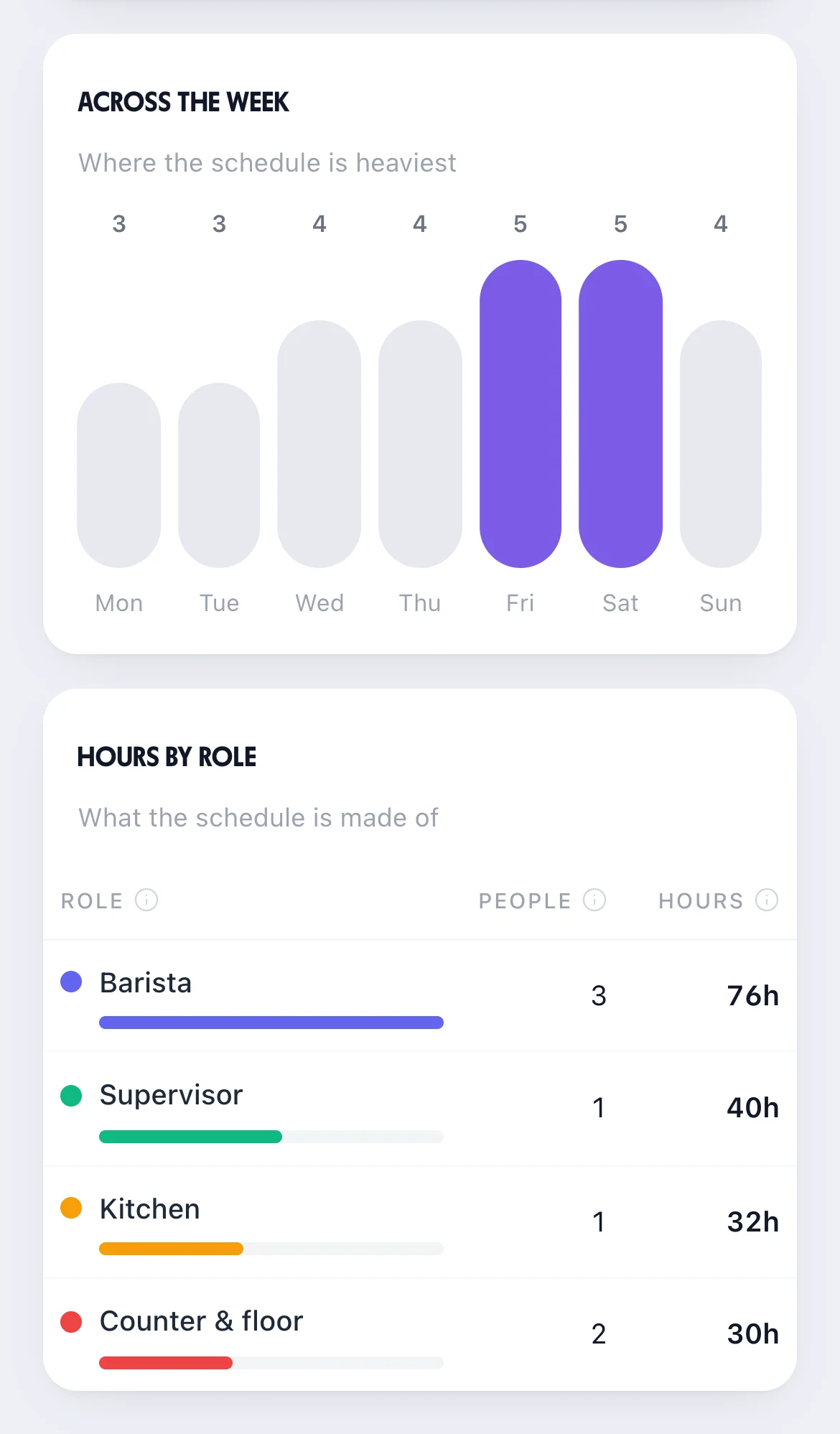
With pay switched on, the rota adds a Cost row under the hours, from each person's hourly rate. Its Reports & Analytics shows the week's scheduled cost, the busiest days and the hours each role takes: for this café, £2,316 and 178 hours, with Friday and Saturday the heaviest.
Add a rule to be warned when a day or the week goes over a cost you set. It doesn't read your till, so the takings side is yours. More in rota labour costs.
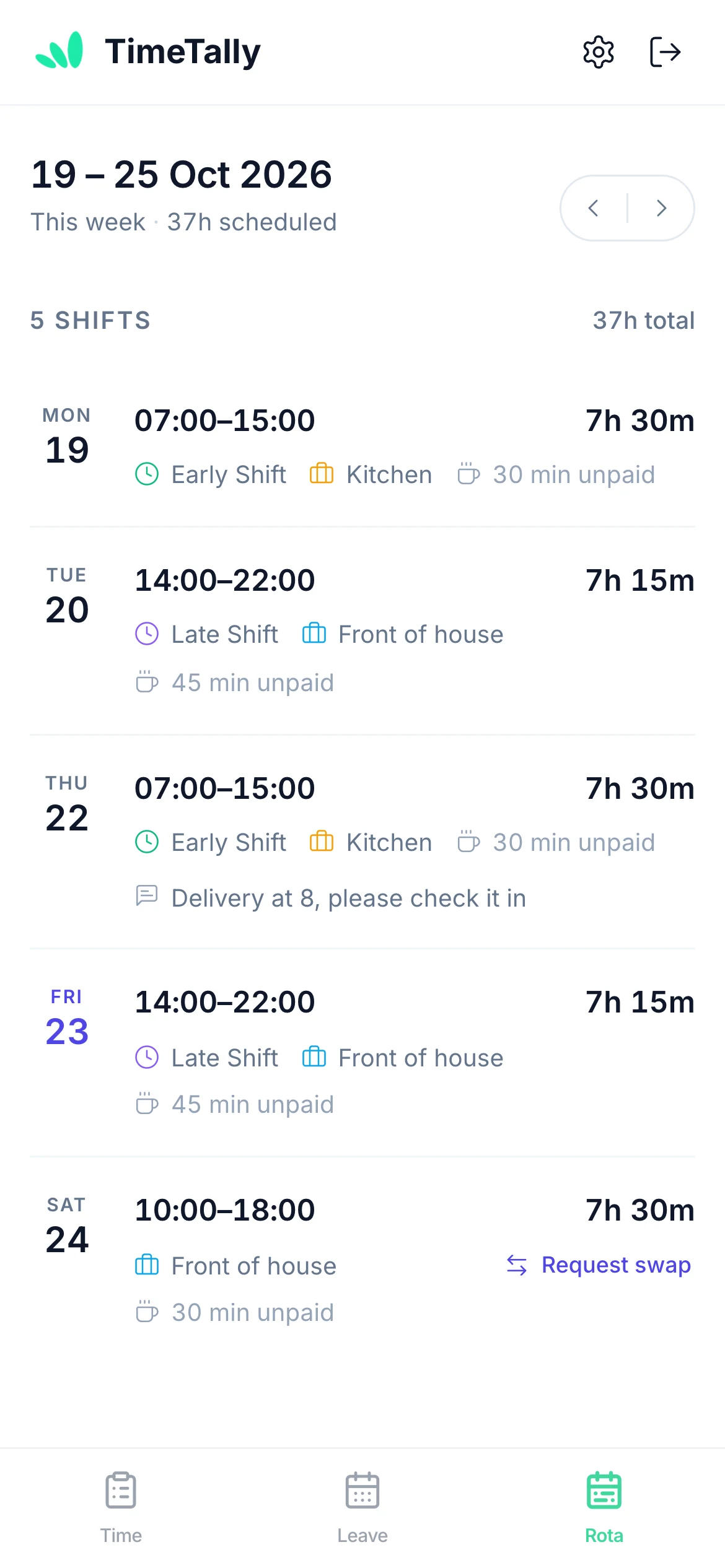
Staff use the free TimeTally app for iPhone and Android, or a browser. No group chat screenshots, no photo of the paper rota by the coffee machine.
Each person sees their own shifts with times, role and break. You can email the week when you publish; change it later and only the people affected are emailed again. There are no push notifications.
A barista asks a colleague to swap, the colleague accepts, then you approve, and the rota changes. Swaps are on unless you turn them off.
They see their balance, pick the days and send the request. It waits on the rota for you to approve.
Staff clock in and out on their phone, you approve the week, and the hours go to Xero, QuickBooks or a CSV file for payroll.
More on the staff side: the staff rota app and the shift swap app.
Real reviews from TimeTally customers
TimeTally has been excellent for our business… The system has saved us a significant amount of administration time.
 Jordan IngoeCLI Manchester
Setup was dead simple and the team just got on with it. Got everyone up and running in an afternoon with no help needed. Does everything we need for timesheets and holidays without the faff.
Has completely changed how I handle timesheets. Used to dread it every week — now it takes me minutes. Really easy to get around and my staff picked it up straight away.
Started using it just for rotas but quickly realised it does loads more. The timesheets and leave management are great, and it even handles TOIL and overtime which I wasn't expecting. Use it for everything now.
It's a rota, holiday and timesheet app for your team. Better to know where it stops before your trial.
Running a restaurant, pub or hotel too? See hospitality rota software, pub and restaurant timesheets and hospitality timesheet software. Bake your own bread from 3am? See the bakery staff rota.
£3 per employee a month for the rota, holiday tracking, clock-in and timesheets together. No setup fee, no contract.
What café owners and managers ask before they move the rota off the back-room wall.
Still have a question? See all FAQs
Café rota software plans who works which shift and shares it with your team. In TimeTally your baristas, kitchen and counter staff go on one week grid, each role in its own colour, with the hours for each person and each day. A breakfast-and-lunch split shift is one shift with two time slots. Staff see their shifts on their phones, swap them and book holiday, and it's £3 per employee a month.
Yes. A split shift is one shift with two time slots, such as 07:00–10:30 and 12:00–15:30, with the gap between them unpaid. It shows as one card on the rota with both times, and the hours count only the time worked. You can save it as a shift template if it comes round every week.
You can put them on the rota like anyone else, but TimeTally doesn't know anyone's age and has no young-worker rules built in. What you can do is add a rota rule for that person, such as hours going over 8 a day or 40 a week, and the rota warns you before you publish a week that breaks it. Breaks for young workers (30 minutes after 4 hours 30 minutes) are yours to set on the shift.
Yes, if you can see pay. The rota adds a Cost row under the Hours row, from each person's hourly rate, and the rota's Reports & Analytics shows the week's scheduled cost, the busiest days and the hours by role. You can also add a rule that warns you when a day or the week goes over a cost you set. It doesn't connect to your till or EPOS, so it doesn't compare cost with takings.
No. TimeTally plans shifts, records hours and tracks holiday; it doesn't share out tips or run a tronc. Approved hours export to Xero, QuickBooks or a CSV file for payroll, where tips are usually handled.
In the free TimeTally app for iPhone and Android, or in a browser. Once you publish a week, each person sees their own shifts with times, role and break, and you can email them the week. If you change a published week, only the people whose shifts changed are emailed again. There are no push notifications.
TimeTally is £3 per employee a month, with no setup fee and no contract. A café of seven (a supervisor, three baristas, a cook and two counter staff) is £21 a month, which also covers holiday tracking, clock-in and timesheets. There's a 14-day free trial and no card is needed.
Try TimeTally free for 14 days. Put your baristas, kitchen and counter staff on one grid, save your usual week, and publish it to their phones. It's the same rota planner hundreds of UK businesses use, at £3 per employee a month.
14-day free trial · No credit card needed · Cancel anytime