Staff rotas for UK day nurseries and pre-schools

Rota Software for Nurseries

Nursery rota software for day nurseries, pre-schools and childcare settings in the UK. Cover a 07:30 to 18:00 day with early, middle and late shifts, keep a separate rota for each room, and publish the week to your staff's phones. Approved holiday and sickness show on the same grid, so you see who is off before you publish. It is the same staff rota software as the rest of TimeTally, at £3 per employee per month with holiday tracking and timesheets included.

Week of 16 June

All departments
Publish Rota Published
Employee
Mon16
Tue17
Wed18
Thu19
Fri20
Sat21
Sun22
AR

Amelia

Kitchen

Open

Open

Evening

Close

Open

JK

James

Front of House

Close

Early

Mid

Open

Open

Early

PS

Priya

Kitchen

Leave

Mid

Close

Open

Early

MP

Maya

Front of House

Early

Close

Leave

Mid

Close

TW

Tom

Bar

Open

Open

Mid

Open

Close

Templates

Open
Close
Mid
Early
Evening

Rota Published!

Your team has been notified

Shift Templates

New Template New Template

Open

09:00–17:00

Close

12:00–20:00

Mid

10:00–18:00

Early

06:00–14:00

Evening

17:00–22:00

New

New Template

Evening

Start

17:00

End

22:00
Save Template Saved!

Shift Swap Request

Awaiting your approval

JK

James K.

Open · Thu

PS

Priya S.

Early · Sat

Approve Approved!

Shifts published!

Week of 16 Jun

Swap approved

James ↔ Priya

Evening added

Wed · 17:00–22:00

9:41

16 Jun – 22 Jun

this week · 40h

Mon

16

Tue

17

Wed

18

Thu

19

Fri

20

Sat

21

Sun

22

This week

40h total

Mon, 16 Jun

09:00–17:00

8h

Open

Tue, 17 Jun

09:00–17:00

8h

Open

Wed, 18 Jun

Today

17:00–22:00

8h

Evening

Thu, 19 Jun

12:00–20:00

8h

Close

Fri, 20 Jun

09:00–17:00

8h

Open

“The app is simple to use, reliable, and makes managing holidays, absences, and staff records straightforward. The system has saved us a significant amount of administration time.”

CLI ManchesterJordan Ingoe, CLI Manchester

See how nurseries plan their staff rota with TimeTally

Build next week's rota, staff clock in against the shifts you assigned, and approved leave feeds straight back into the plan. One system, no re-keying between them.

Free nursery rota template: build your staff rota online

A nursery rota template you fill in on this page. It opens with four job roles (room leader, nursery practitioner, apprentice and cook) and a row for each, so swap in your own team. Tap a day and choose Use a shift template to add Early 07:30–15:30, Middle 08:30–16:30, Late 10:00–18:00 or Morning 07:30–13:00. Each person's hours add up as you go, and the rota flags less than 11 hours between shifts, more than six hours without a 20-minute break, and weeks over 48 hours.

Building it is free and needs no account. Printing or downloading it needs a free account (a 14-day trial, no card), and signing up carries the rota into TimeTally.

Build the nursery staff rota by dragging shifts onto the grid

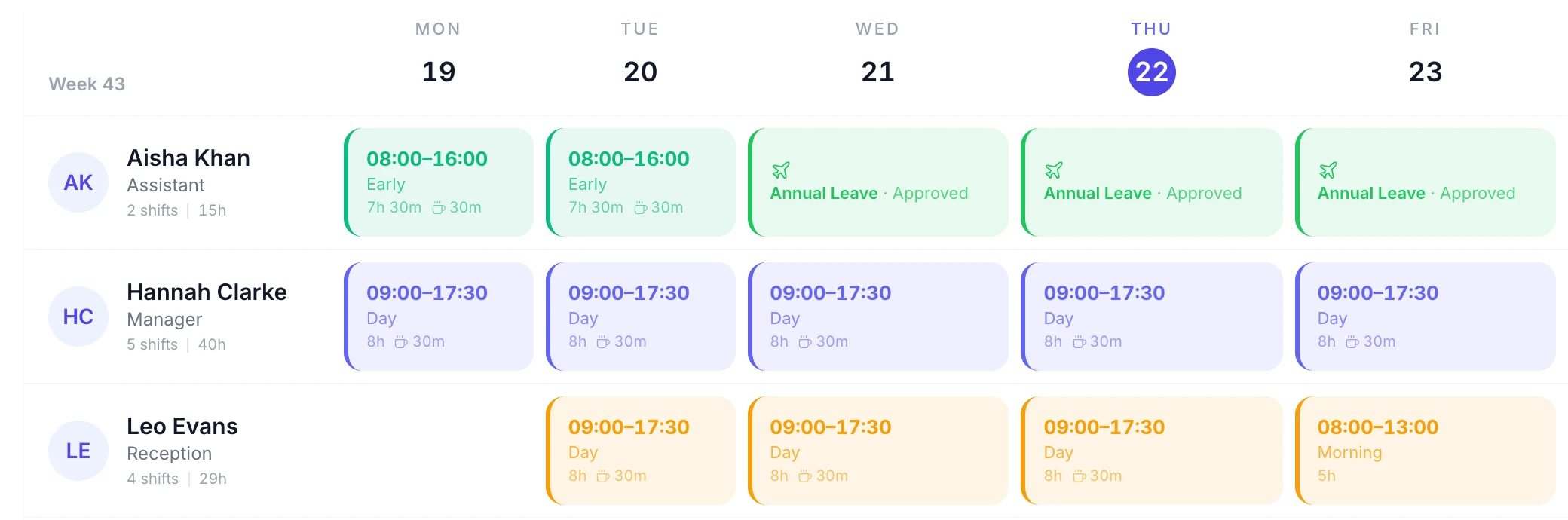
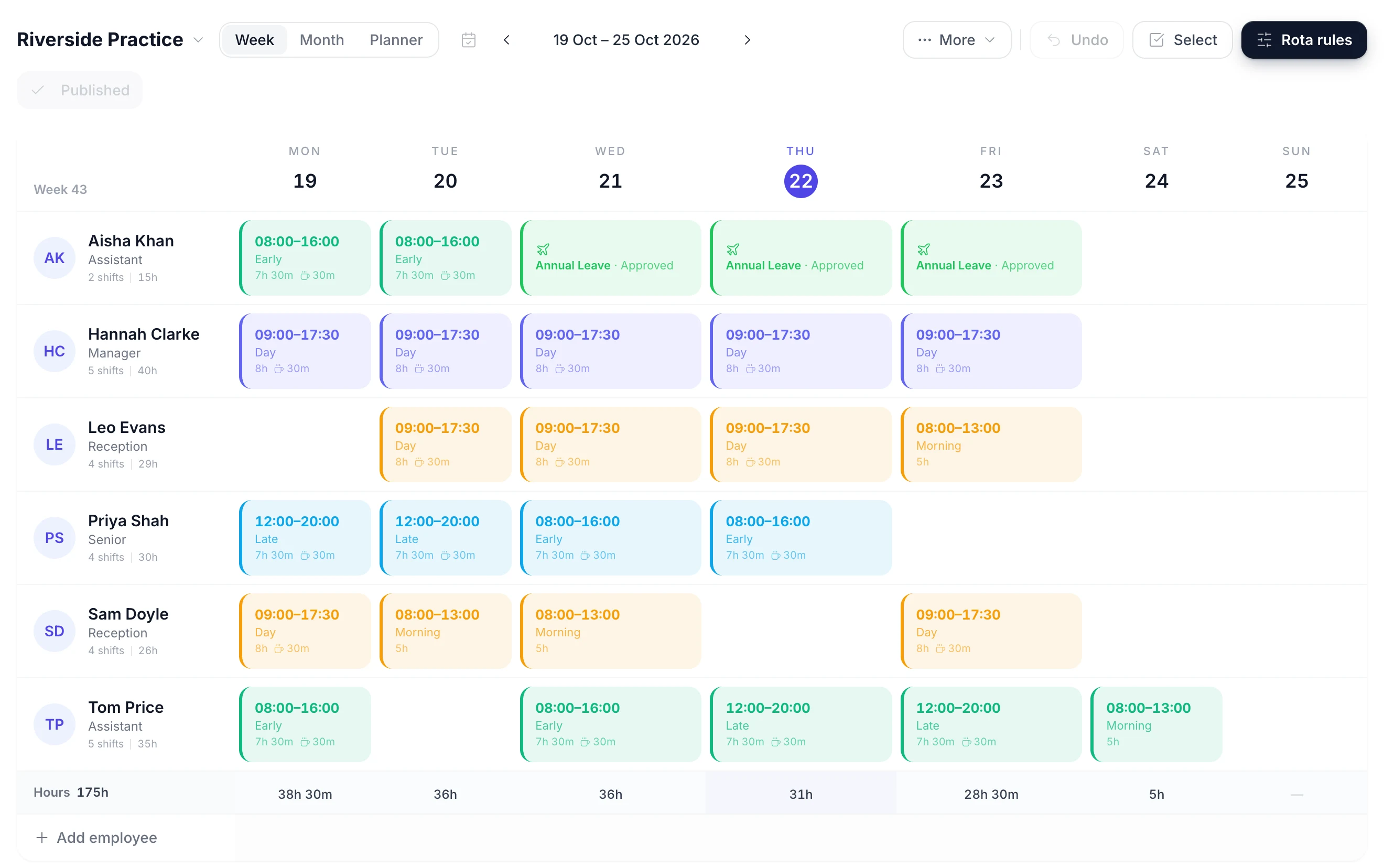
The rota is a week grid: one row per member of staff and one column per day. Click an empty cell to give someone a shift. Drag a shift to another day when a practitioner swaps their college day, or onto another name when someone else is covering. Copy last week forward and change only what is different, rather than retyping the whole room.

A week of the rota with a row per person, coloured shift blocks on the days they work and an hours total under each day
  • Click a cell to add a shift

    Tap an empty day to put a practitioner on it, or drag a shift to another day or another person

  • See who is in another room

    Someone already rostered on another room's rota that day shows that room's name in their cell

  • Paid hours under every day

    An Hours row totals each day and the week, with the unpaid lunch break taken off

  • Publish the week when it is ready

    Until you publish, the week is a draft only managers see. Then you choose whether to email the team

Your Nursery Team Sees the Rota on Their Phones

Publish the week and every practitioner sees their own shifts in the TimeTally app for iPhone or Android, or in a browser: the day, the times and the role. Nobody needs to photograph the rota on the staff room wall or ask the manager which day they are on next week.

  • Publishing asks whether to email the team. Staff with rota emails on get one, and when you publish a week again only the people whose shifts changed are emailed. There are no push notifications.
  • A practitioner can propose a swap with a colleague or offer a shift away. The colleague accepts, then a manager approves before the rota changes.
  • Swaps are on by default and can be turned off for the whole nursery. Letting staff see who else is on with them is a separate setting, off by default.
  • The same app is where staff book holiday and fill in their timesheets, so they have one login for all three.
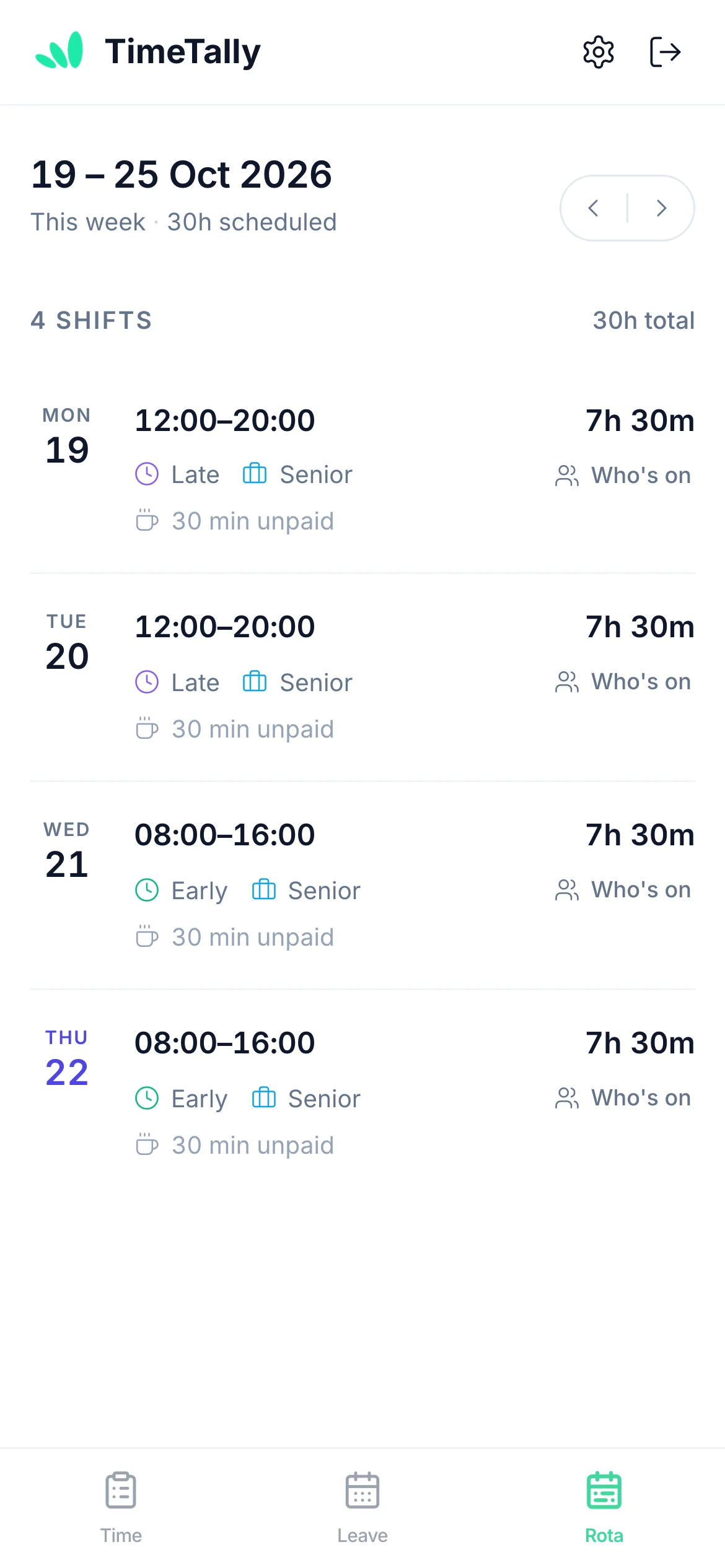
A member of staff viewing their upcoming shifts on their phone

Holiday and Sickness Show on Each Room's Rota

Holiday is booked in the same app as the rota, so it appears on the grid on the days it falls. You plan the room around who is actually in, not around a holiday spreadsheet kept somewhere else.

  • Approved and pending leave

    Each day of leave shows its type and whether it is approved or still pending, so a request waiting for you is visible while you plan
  • A check before you clash

    Putting a shift on a day someone has leave asks you to confirm first, so nobody is rostered on their day off by accident
  • Cover from the same room first

    Approving leave lists the shifts it leaves open and who is free for each, with people from that room listed before everyone else
  • Sickness recorded as it happens

    A manager can record sick leave for someone who rings in. It shows on the rota straight away, and you drag their shift onto whoever is covering
A rota week with approved annual leave and sick leave shown in place of shifts

Save your early, middle and late shifts as templates

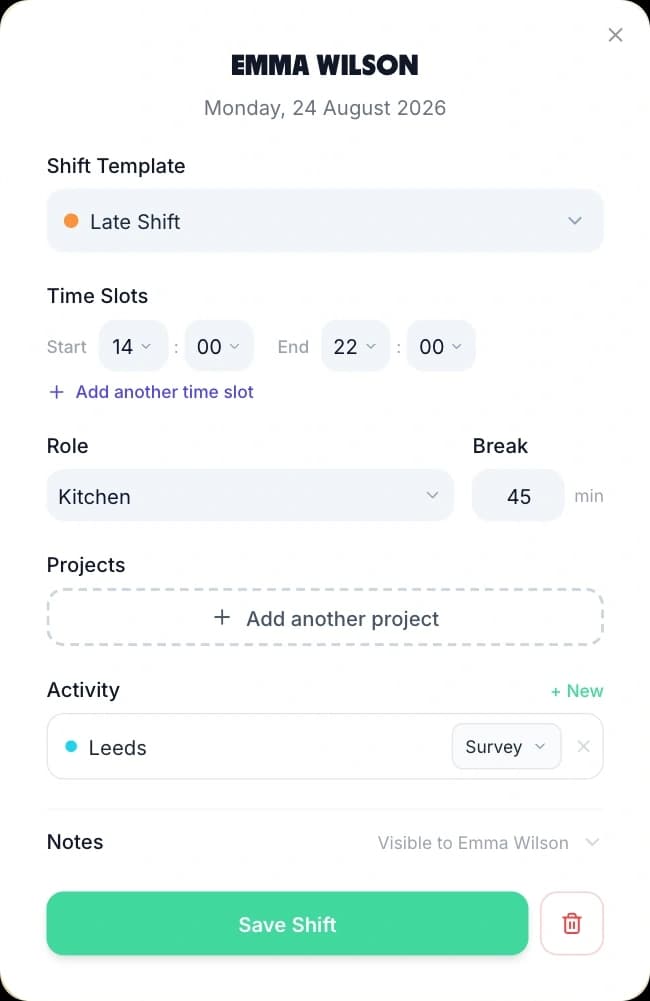
Most nurseries run the same few shifts all year. Save each one once, with its times, job role and unpaid lunch break, and it becomes a choice in the shift form. A room leader's Early 07:30–15:30 with an hour's lunch is 7 paid hours every time, with nobody working it out again.

Adding a shift from a saved template: the template picker, start and end times, role, break and a Save Shift button
  • A colour per shift

    Early, middle and late each get their own colour, so you can see the opening and closing cover without reading the times

  • Short shifts for part-timers

    A Morning 07:30–13:00 template with no unpaid break covers the breakfast-to-lunch rush

  • Term weeks and holiday weeks

    Save a whole week as a week template, for example one for term time and one for the school holidays, and drop it onto any future week

  • Copy a week forward

    Copy this week onto the following weeks in one go. Days that already have a shift are left as they are

What makes a nursery staff rota harder than most

A nursery has long opening hours, rooms that are staffed separately, a mostly part-time team and staff who are at college one day a week. Nursery staff scheduling software has to handle all four without turning the rota into a full-time job. For term-time holiday rules in more detail, see term-time leave management and the variable hours holiday guide.

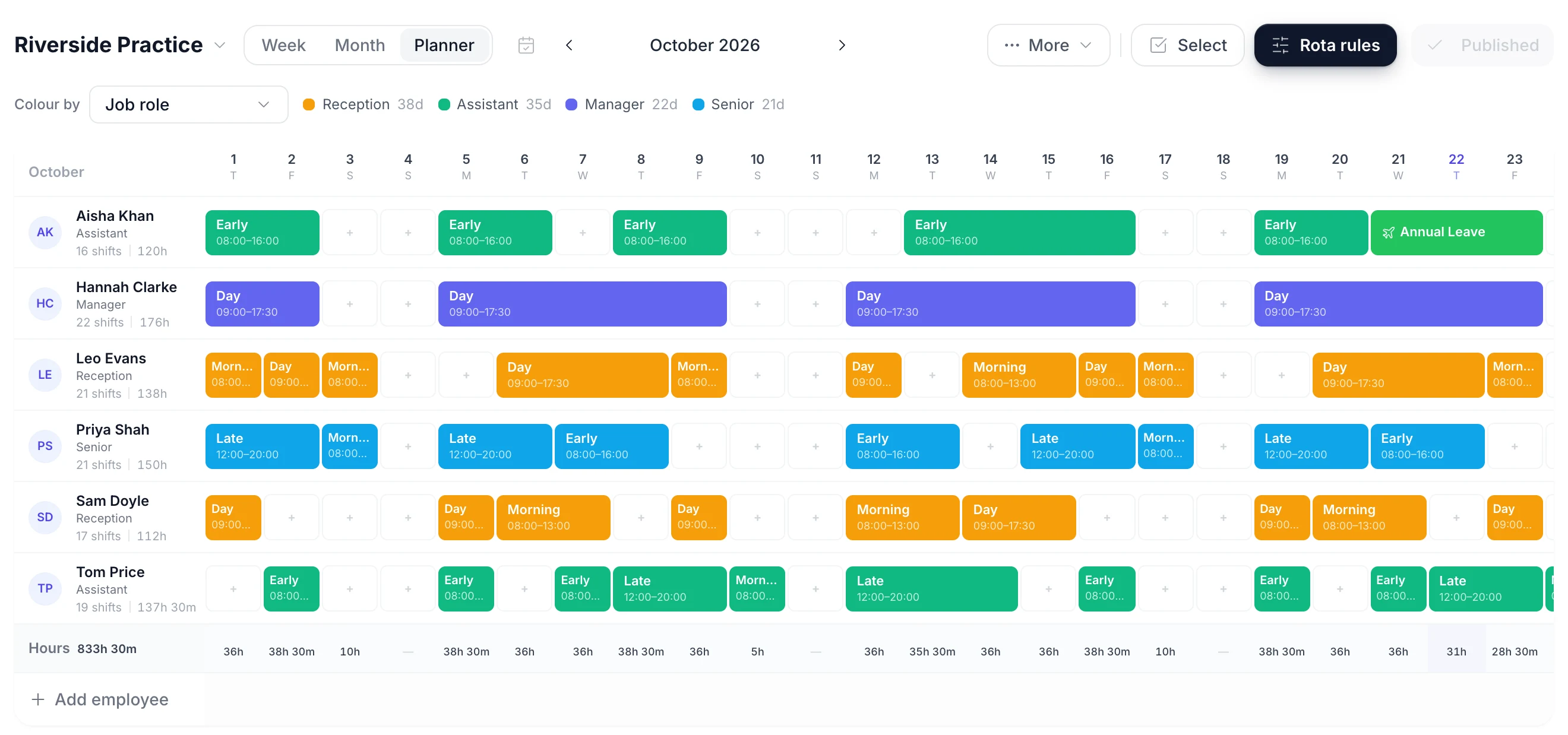
A month of the rota with each person's shifts and approved leave shown on the same grid
Hours

Covering a 07:30 to 18:00 day

A nursery is open longer than anyone works. The usual answer is staggered shifts: someone opens, someone covers the middle of the day, someone closes, and part-timers fill the busy hours.

  • Save Early, Middle, Late and Morning as shift templates and the stagger is a row of coloured blocks you can read at a glance
  • Each shift shows its start and end time on the grid, so you can check who is in at 07:30 and who is still there at 18:00
  • A staffing alert counts the people with a shift that day, not how many are in the building at 17:45, so the times still need reading
Rooms

A rota for each room

Baby room, toddler room and pre-school are staffed differently, so most nurseries plan them separately. TimeTally lets you name a rota per room and switch between them from one menu.

  • Each room's rota has its own member list, so a practitioner appears only in the rooms they work in
  • A floater can belong to several rooms, and a day they are already working in another room shows that room's name
  • Filter any room to one job role, such as room leaders, to check who is leading each day
Part-time

Part-time and term-time staff

Many nursery teams are mostly part-time, and some staff work term time only. The holiday side is where that usually goes wrong, so it sits in the same app as the rota.

  • A yearly allowance can be worked out from the days they work and the weeks a year they work, rounded up to the half day
  • With leave priced from the rota, a day off costs the paid hours of the shift they had that day
  • Bank holiday sync books a bank holiday only for the days a person actually works
Cover

Sickness and holiday cover

When a practitioner is off, the room still needs the same people. Approving the leave and finding the cover happen in one place.

  • Approve a leave request and TimeTally lists the shifts that person was rostered on for those days
  • Against each shift it lists who is free: no shift and no leave that day, pending requests included, with people from the same room first
  • Pick a name and the shift moves to them and the week is published. Nobody is emailed automatically

Two Settings to Choose When You Turn the Rota On

Most of the rota works without any setup. These two are worth a few minutes on the first day, because nurseries tend to want them set their own way.

Staffing alerts

Get a warning when a day has fewer staff than you need.

Set a minimum number of staff on shift per day, for one room's rota, for every rota, or for a department. A day below it shows as a red line above the grid, and the same warning appears when you press Publish.

It is a headcount, not a ratio. It counts the people with a shift that day, whatever their hours, and it knows nothing about how many children are booked in. You can still publish a week that is short; the warning makes sure you do it knowingly.

The same alerts can watch hours and wage cost, such as a room going over its weekly hours budget or anyone working more than 48 hours in a week.

Where hours come from

Pay from timesheets, or straight from the rota.

With timesheets on, hourly staff and apprentices clock in and out on their own phone or fill in a timesheet, and a manager approves it. Approved hours export to Xero, QuickBooks or a CSV file for payroll.

Many nurseries pay contracted staff for the shifts they were rostered on. With time tracking switched off, Pay from rota shifts (Settings, then Pay) uses the published rota as the hours record instead. Unpublished shifts, and shifts on a day of approved full-day leave, do not count.

How timesheets and clock-in work

Nursery and childcare rota examples

Three common shapes of childcare rota, and how each is built in TimeTally. Copy the approach rather than the times, which will depend on your opening hours. For a general grid you can print, the staff rota template is a free download.

A day nursery with three rooms

Baby room, toddler room and pre-school, open 07:30 to 18:00. Create three rotas and add each room's staff to its own. Save Early, Middle and Late as templates, and give room leaders their own job role and colour. Build each room's week, then filter to the room leader role to check every day has one. Put floaters on all three rotas: a day they are already in another room shows that room's name, so you cannot book them twice.

A term-time pre-school

Open mornings in term time only, with a small team on Morning shifts. Save a term-time week as a week template and apply it to each term week. Leave school holiday weeks empty. Give each person a yearly holiday allowance worked out from the weeks a year they work, so their holiday matches their contract rather than a full-time year.

Apprentices and college days

Apprentices are usually at college or training one day a week. Book that day on the rota first, before the room's shifts, so you plan around it. Give apprentices their own job role so you can filter to them. If an apprentice is under 18, young worker limits apply: normally no more than 8 hours a day or 40 hours a week, a 30-minute break after 4 and a half hours, and 12 hours off between working days. TimeTally does not check these for you.

Lunch breaks and handovers

Staggered start times are what keep a room covered while people take lunch. With Early at 07:30, Middle at 08:30 and Late at 10:00, the three lunch hours can be spread across the middle of the day. The unpaid break is saved on each shift template, so paid hours are right. The break time itself is not placed on the rota: who goes to lunch when is still arranged in the room.

Rotating patterns

Some nurseries rotate who opens and who closes, so nobody always does the 07:30 start. Our shift pattern calculator works out the dates for a rotating cycle. In TimeTally you build one week of each pattern, save them as week templates and apply them in turn. TimeTally does not generate a rotating pattern on its own.

When a spreadsheet is still fine

A small setting with one room, a fixed team and the same pattern every week can run on a printed grid. It usually stops working when there are several rooms, a lot of part-time staff, or a manager answering messages about who is on tomorrow. That is when a rota staff can check on their own phone saves more time than it takes to set up.

Ratios, records and limits

Staff to child ratios, records and what TimeTally will not do

A nursery rota is a ratio decision as much as a scheduling one. TimeTally helps you schedule the staff and keeps a record of who was rostered. Here is where its job ends and yours begins.

Ratios Stay Your Judgement

In England, the EYFS statutory framework sets minimum staff to child ratios by the age of the children, and different rules apply in Scotland, Wales and Northern Ireland. TimeTally holds no information about children, so it cannot check a ratio. Its staffing alert counts the people with a shift that day, for a room's rota or a department, and warns before you publish if the number is below the minimum you set. It does not know who is in the room at 17:30 and it never blocks a publish. Reading the times and the children booked in, and deciding whether each room is in ratio, stays with the manager.

It Is Not Nursery Management Software

TimeTally does not do child registers, parent invoicing, funded hours claims, learning journals, occupancy planning or parent messaging. It is the staff side: the rota, holiday and sickness, and timesheets. It works alongside whichever nursery management software you use for children and parents, and the two do not connect.

Qualifications, DBS and First Aid

The EYFS requires at least one person with a current paediatric first aid certificate on the premises whenever children are there. TimeTally does not store qualifications, first aid certificates, training or DBS checks, so it cannot tell you whether a first aider is on shift. Keep those records in your HR or nursery management system and check them against the rota.

The Record of Who Was Rostered

Every shift is stored against a named person with its date, times, job role and unpaid break. Publishing is recorded per rota and per week, and editing a published week marks it as having unpublished changes until you publish again. You can print the rota and export the hours. That gives you a history of who was rostered, but TimeTally is not an Ofsted evidence system.

Who Can See What

You can make a room leader a manager limited to their own department or named people. They approve leave and timesheets only for those people, and can only add, move or remove shifts for them. They can still see every room's rota. Pay can be hidden from them, which keeps hourly rates and the cost row off their screen.

What TimeTally Does Not Do

It does not build the rota for you: every shift is placed by a person. There is no availability form for staff to say which days they can work, and no open shifts for staff to claim. The rota in the app does not warn about rest gaps or young worker limits while you build; the 11-hour and 48-hour checks are only in the free rota maker on this page. Notifications are emails, not push notifications.

Simple, Transparent Pricing

One price for the whole product. GPS clock-in is £1 extra per employee. A nursery with 18 staff pays £54 a month.

£3/employee/month

Billed monthly. Cancel anytime.

A separate rota for every room
Early, middle and late shift templates
Shift swaps and cover suggestions
Holiday tracking and timesheets included
Get Started

No credit card required

In short

What is nursery rota software?

Nursery rota software plans which staff work which shifts in a day nursery or pre-school, and shares the rota with them. TimeTally does this for UK nurseries at £3 per employee per month. You save shifts such as Early 07:30–15:30, Middle 08:30–16:30 and Late 10:00–18:00 as templates and place them on a week grid, one row per person. Each room can have its own rota. Approved and pending holiday shows on the same grid. When you approve leave, TimeTally lists the shifts it leaves open and who is free to cover them. Staff see their published shifts on their phones and can propose swaps for a manager to approve. Holiday tracking and timesheets are included. It does not check staff to child ratios: a staffing alert can warn about headcount, but the ratio decision stays with the manager.

Price
£3 per employee a month
Rooms
A named rota per room
Staff
Shifts on their phones
Ratios
Headcount alert only
Includes
Holiday and timesheets

Frequently Asked Questions

How do you write a nursery staff rota?

A rota for nursery staff starts with your opening hours and the shifts that cover them, for example Early 07:30 to 15:30, Middle 08:30 to 16:30 and Late 10:00 to 18:00, plus a shorter Morning shift for part-timers. Put approved holiday, college days and training on the rota first, so you build around them. Then fill each room day by day, checking that every room has enough staff at opening, at lunch and at closing for the children booked in, and that a room leader is on each day. Finally, check each person's weekly hours against their contract and publish the rota so staff can see it. The free nursery rota template on this page starts with those four shifts and the four usual job roles, so you can build the first week without an account.

Can nursery rota software check staff to child ratios?

TimeTally does not. It has no record of children, their ages or attendance, so it cannot work out a ratio. What it can do is warn you about headcount. You can set an alert such as fewer than four staff on shift in a day, for the whole rota or for one department, and a day below it shows as a red line above the grid and again in a warning before you publish. It counts the people with a shift that day, not how many are in the room at a given time, and it warns rather than stops you publishing. Whether a room is in ratio stays your judgement, using the EYFS framework and the children you have booked in.

How do we handle holidays for term-time and part-time nursery staff?

Give each person their own yearly allowance. TimeTally can work it out from the full-time allowance, the share of a week they work and the number of weeks a year they work, and it rounds the result up to the half day. For example, 28 days for someone who works 3 days a week for 43 weeks a year comes to 16 days. You can also price a day off from the rota, so a day off costs the hours of the shift they had, and bank holiday sync books only the days each person works. The pro-rata holiday calculator and the part-time bank holiday calculator on this site show the same arithmetic if you want to check a figure.

Can nursery staff see the rota on their phones?

Yes. Once you publish a week, staff see their own shifts in the TimeTally app for iPhone or Android, or in any browser. Publishing asks whether to email the team; staff who have rota emails switched on get one, and when you publish a week again only the people whose shifts changed are emailed. There are no push notifications. Staff can also propose a swap or give a shift away: the colleague accepts, then a manager approves it. Whether staff can see who else is working with them is a setting, off by default.

Can we run a separate rota for each room?

Yes. Create a named rota for each room, such as Baby room, Toddler room and Pre-school, and add the staff who work in each. A practitioner who floats can belong to more than one. You switch rooms from a menu above the grid, and each room's week is published on its own. One limit to know: a person has one shift per day. Someone who moves from the toddler room to pre-school at lunchtime is one shift with two time blocks, on one room's rota.

Does TimeTally manage nursery staff records, training and safer recruitment?

Partly. TimeTally holds each person's details for rotas, holiday and pay: start and leaving dates, department, job role, working week, hourly rate and holiday allowance, plus every holiday, sickness absence and timesheet. It does not store qualifications, training records, paediatric first aid certificates, DBS checks or safer recruitment documents. Most nurseries keep those in their nursery management or HR system and use TimeTally for the rota, absences and hours.

Is TimeTally nursery management software?

No. It has no child registers, no parent invoicing, no funding claims and no learning journals. It covers the staff side: the rota, holiday and sickness, and timesheets for hourly staff. It works alongside whichever nursery management software you use for children and parents.

What does nursery rota software cost?

TimeTally is £3 per employee per month, with no setup fee and no minimum contract. A nursery with 18 staff pays £54 a month, and that covers the rota, holiday and sickness tracking and timesheets. GPS clock-in is an optional add-on at £1 per employee per month. There is a free 14-day trial and no card is needed to start it.

Still have a question? See all FAQs

Get next week's room rotas to your team today.

Try TimeTally free for 14 days. Build each room's week from your own shift templates, see holiday on the same grid, find cover when someone is off, and publish the rota to your staff's phones, with holiday tracking and timesheets included in the same £3.

No credit card required · Free 14-day trial · Cancel anytime