



The shifts you always use
Save Day, Late night and Saturday as shift templates with their times, role and break, and an optometrist's hour for lunch comes with the role.
For opticians and optometry practices
TimeTally is optician rota software for independent opticians and small groups. Optometrists, dispensing opticians, optical assistants and reception go on one week grid, late night and Saturday included, and it warns you before you publish a day with no optometrist in to test. Holiday sits on the same grid, and your team sees, swaps and books from their phones.
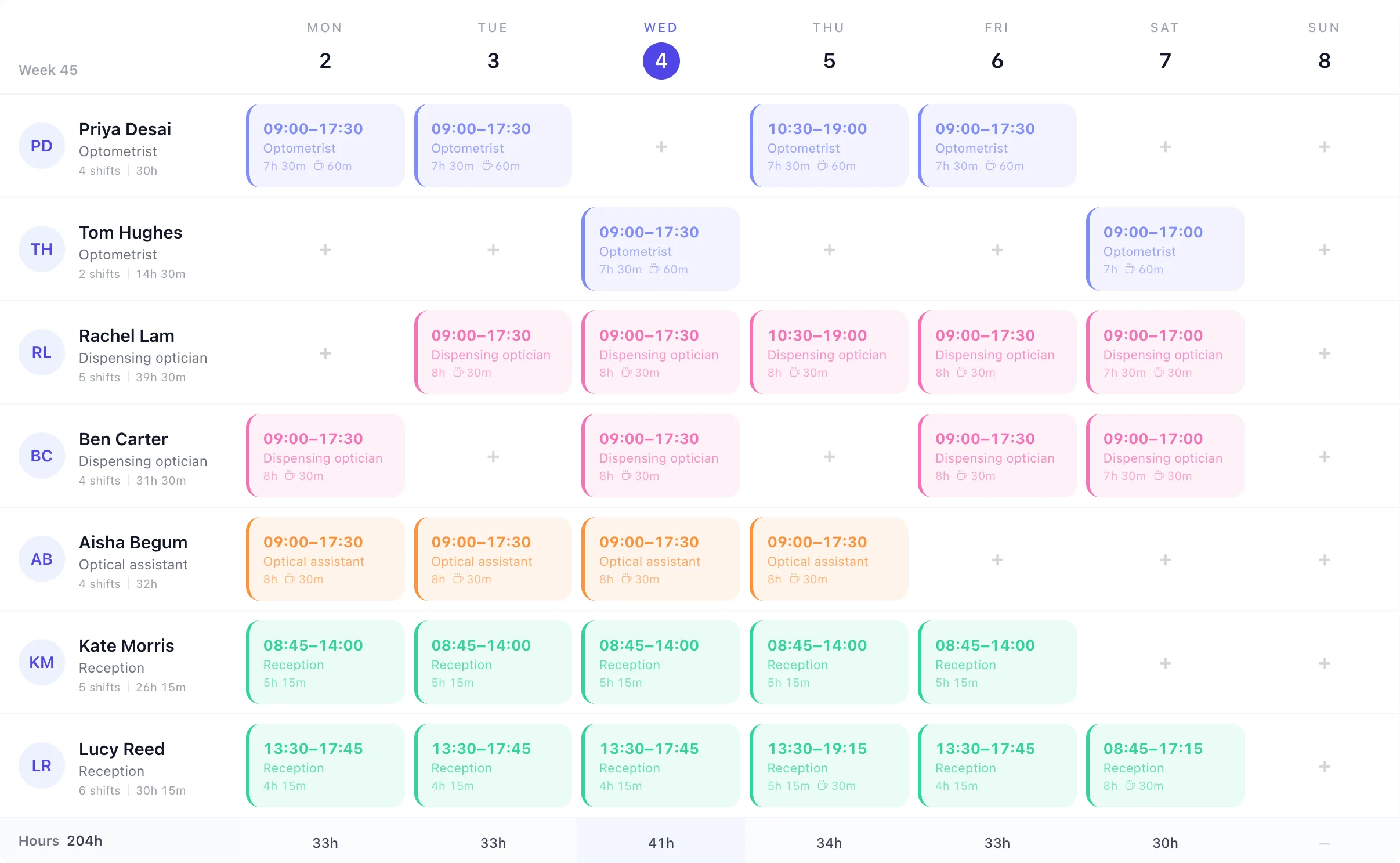
This is one practice's week in TimeTally: open six days, late on Thursday, two optometrists sharing the testing days and reception split into mornings and afternoons. Each person's shifts and hours sit beside their name, and the Hours row adds up each day.
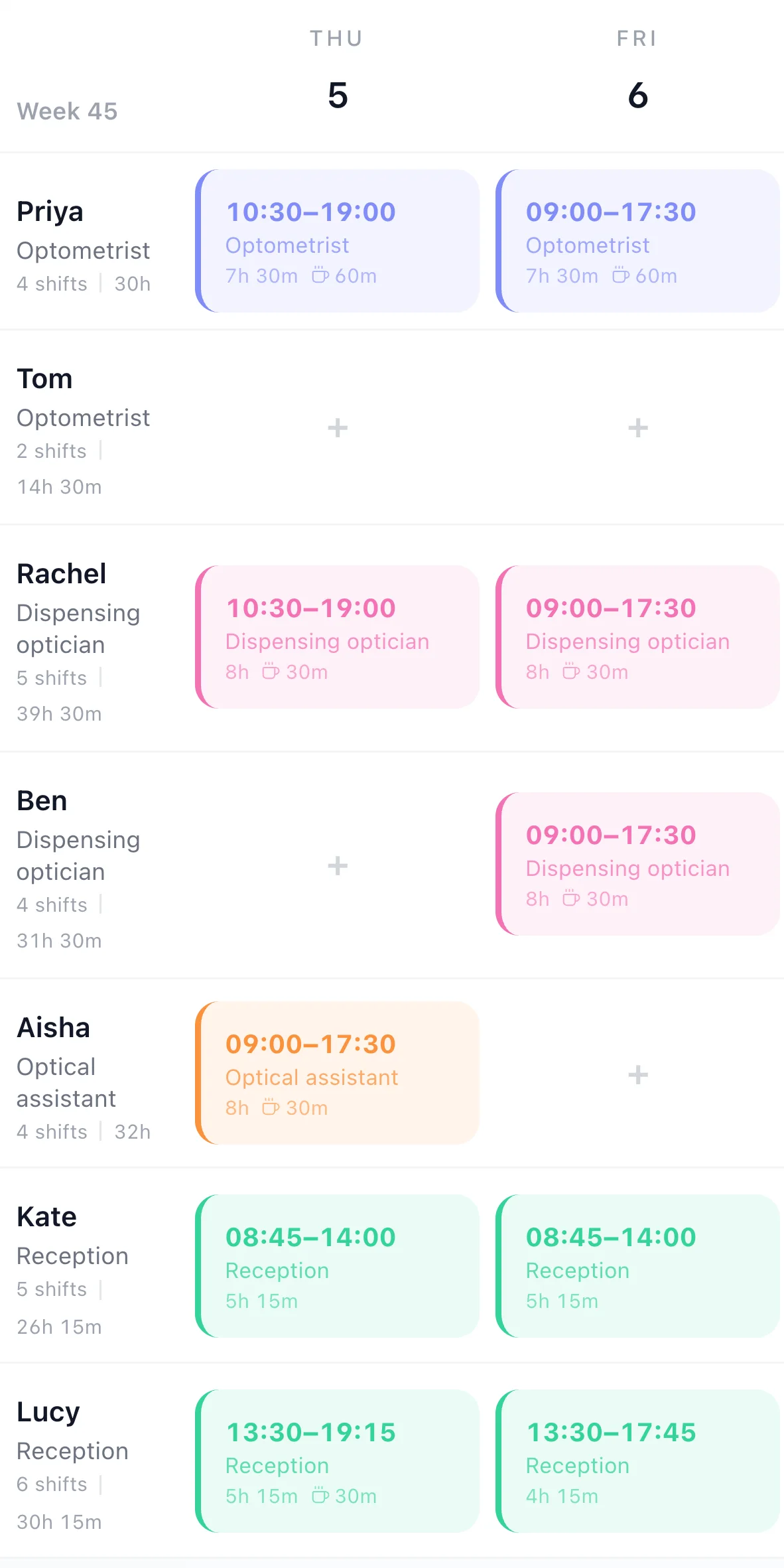
Save Day, Late night and Saturday as shift templates with their times, role and break, and an optometrist's hour for lunch comes with the role.
Save your usual week as a template and copy it forward for up to 13 weeks. Then change only what's different, such as a locum's day or a training afternoon.
Every row shows that person's shifts and hours for the week, so it's easy to see who did the last three Saturdays.
The testing room
A dispensing optician can fit glasses all day, but without an optometrist in, nobody can be tested. Put your optometrists in an Optometrists department and add one rota rule. A day without one is listed in red above the grid, and when you press Publish you're asked to go back and fix it or publish anyway.
The rule counts every day of a week you've built, so a day you're closed shows in the list too. It warns; it never stops you publishing.
Rota rules
The rule's settings as you choose them in Rota rules, written out.
Holiday is where an optometrist rota goes wrong: one week off and three clinic days need cover. TimeTally keeps the holiday and the rota in one place.
Approved and waiting holiday shows on the grid on the days it falls, so you see the gap before you build the week, not after.
Approving holiday lists the shifts it leaves open and who is free to take each one, starting with people on the same schedule.
Post a shift nobody is on as an open shift: your team says who can do it, and you choose. On the website now, and in the phone apps from their next update.
More on holiday: the staff holiday tracker.
See the staff rota app, or how to build the week in the rota planner.
Real reviews from TimeTally customers
TimeTally has been excellent for our business… The system has saved us a significant amount of administration time.
 Jordan IngoeCLI Manchester
Setup was dead simple and the team just got on with it. Got everyone up and running in an afternoon with no help needed. Does everything we need for timesheets and holidays without the faff.
Has completely changed how I handle timesheets. Used to dread it every week — now it takes me minutes. Really easy to get around and my staff picked it up straight away.
Started using it just for rotas but quickly realised it does loads more. The timesheets and leave management are great, and it even handles TOIL and overtime which I wasn't expecting. Use it for everything now.
It's the rota, holiday and timesheets for your team. Better to know where it stops before your trial.
Running a hospital team, a GP surgery or a dental practice? See healthcare rota software and dental practice rota software. More than one branch? Multi-site rota software.
£3 per employee a month for the rota, holiday, clocking in and timesheets together. No setup fee, no contract.
What practice managers ask before they move the rota off the staff room wall.
Still have a question? See all FAQs
Optician rota software plans who works which shift in an opticians and shares it with the team. In TimeTally your optometrists, dispensing opticians, optical assistants and reception go on one week grid, each role in its own colour, with late nights and Saturdays as shift templates. It can warn you before you publish a day with no optometrist in, shows holiday on the same grid, and staff see their shifts on their phones. It's £3 per employee a month.
Yes. Put your optometrists in an Optometrists department and add a rota rule: Staff on shift falls under 1 per day for that department. A day without one is listed above the grid, and when you press Publish you can go back and fix it or publish anyway. The rule counts every day of a week you've built, so a day you're closed, such as Sunday, is listed too.
No. TimeTally is the staff rota, not the appointment book. It doesn't book eye tests or contact lens checks, hold patient records, or link to your practice management system. It tells you who is in, so you can open the right clinic days in the system you already use.
Yes, as a person on your team, with their own shifts on the days they cover. They cost £3 a month while they're on the team, like anyone else. TimeTally doesn't find or book locums, pay their invoices or check their GOC registration.
Yes. Make a schedule for each practice. Someone can be on both, and once they have a shift at one practice that day, the other one shows it and can't give them a second. Each schedule is published on its own, and managers see only the people they manage.
In the free TimeTally app for iPhone and Android, or in a browser. Once you publish a week, each person sees their own shifts with times, role and break, and you can email them the week. They can ask a colleague to swap a shift, which you then approve, and book holiday from the same app. There are no push notifications.
TimeTally is £3 per employee a month, with no setup fee and no contract. A practice of seven (two optometrists, two dispensing opticians, an optical assistant and two receptionists) is £21 a month, which also covers holiday, clocking in and timesheets. There's a 14-day free trial and no card is needed.
Try TimeTally free for 14 days. Put your optometrists, dispensing opticians and reception on one grid, add the rule that watches for testing days, and publish it to their phones. It's the same rota planner hundreds of UK businesses use, at £3 per employee a month.
14-day free trial · No credit card needed · Cancel anytime