Staff rotas for UK hair salons, beauty salons and barbers

Rota Software for Salons

Salon rota software for hair salons, beauty salons and barbers in the UK. Plan the late nights and the Saturdays, keep juniors free on their college day, and publish the week to every stylist's phone. Holidays show on the same grid as the shifts, so you see who is off before the week goes out. It handles the staff side and works alongside your booking system. It is the same staff rota software behind every TimeTally account: £3 per stylist, therapist or receptionist a month, with holidays and timesheets in the same price.

Week of 16 June

All departments
Publish Rota Published
Employee
Mon16
Tue17
Wed18
Thu19
Fri20
Sat21
Sun22
AR

Amelia

Kitchen

Open

Open

Evening

Close

Open

JK

James

Front of House

Close

Early

Mid

Open

Open

Early

PS

Priya

Kitchen

Leave

Mid

Close

Open

Early

MP

Maya

Front of House

Early

Close

Leave

Mid

Close

TW

Tom

Bar

Open

Open

Mid

Open

Close

Templates

Open
Close
Mid
Early
Evening

Rota Published!

Your team has been notified

Shift Templates

New Template New Template

Open

09:00–17:00

Close

12:00–20:00

Mid

10:00–18:00

Early

06:00–14:00

Evening

17:00–22:00

New

New Template

Evening

Start

17:00

End

22:00
Save Template Saved!

Shift Swap Request

Awaiting your approval

JK

James K.

Open · Thu

PS

Priya S.

Early · Sat

Approve Approved!

Shifts published!

Week of 16 Jun

Swap approved

James ↔ Priya

Evening added

Wed · 17:00–22:00

9:41

16 Jun – 22 Jun

this week · 40h

Mon

16

Tue

17

Wed

18

Thu

19

Fri

20

Sat

21

Sun

22

This week

40h total

Mon, 16 Jun

09:00–17:00

8h

Open

Tue, 17 Jun

09:00–17:00

8h

Open

Wed, 18 Jun

Today

17:00–22:00

8h

Evening

Thu, 19 Jun

12:00–20:00

8h

Close

Fri, 20 Jun

09:00–17:00

8h

Open

“The app is simple to use, reliable, and makes managing holidays, absences, and staff records straightforward. The system has saved us a significant amount of administration time.”

CLI ManchesterJordan Ingoe, CLI Manchester

See how salons plan their staff rota with TimeTally

Build next week's rota, staff clock in against the shifts you assigned, and approved leave feeds straight back into the plan. One system, no re-keying between them.

Free salon rota template: plan your salon staff rota online

A salon rota template you fill in on this page. It opens with five job roles (senior stylist, stylist, junior, beauty therapist and receptionist) and a row for each person, so rename them to your team. Tap a day and choose Use a shift template to add Day 09:00–17:30, Late night 11:00–20:00, Saturday 08:30–17:00 or Half day 09:00–13:00. Each person's hours add up as you go. The rota flags less than 11 hours between shifts, more than six hours without a 20-minute break, and weeks over 48 hours.

Building it is free and needs no account. Printing or downloading it needs a free account (a 14-day trial, no card), and signing up carries the rota into TimeTally.

Build the hair salon rota by dragging shifts onto the week

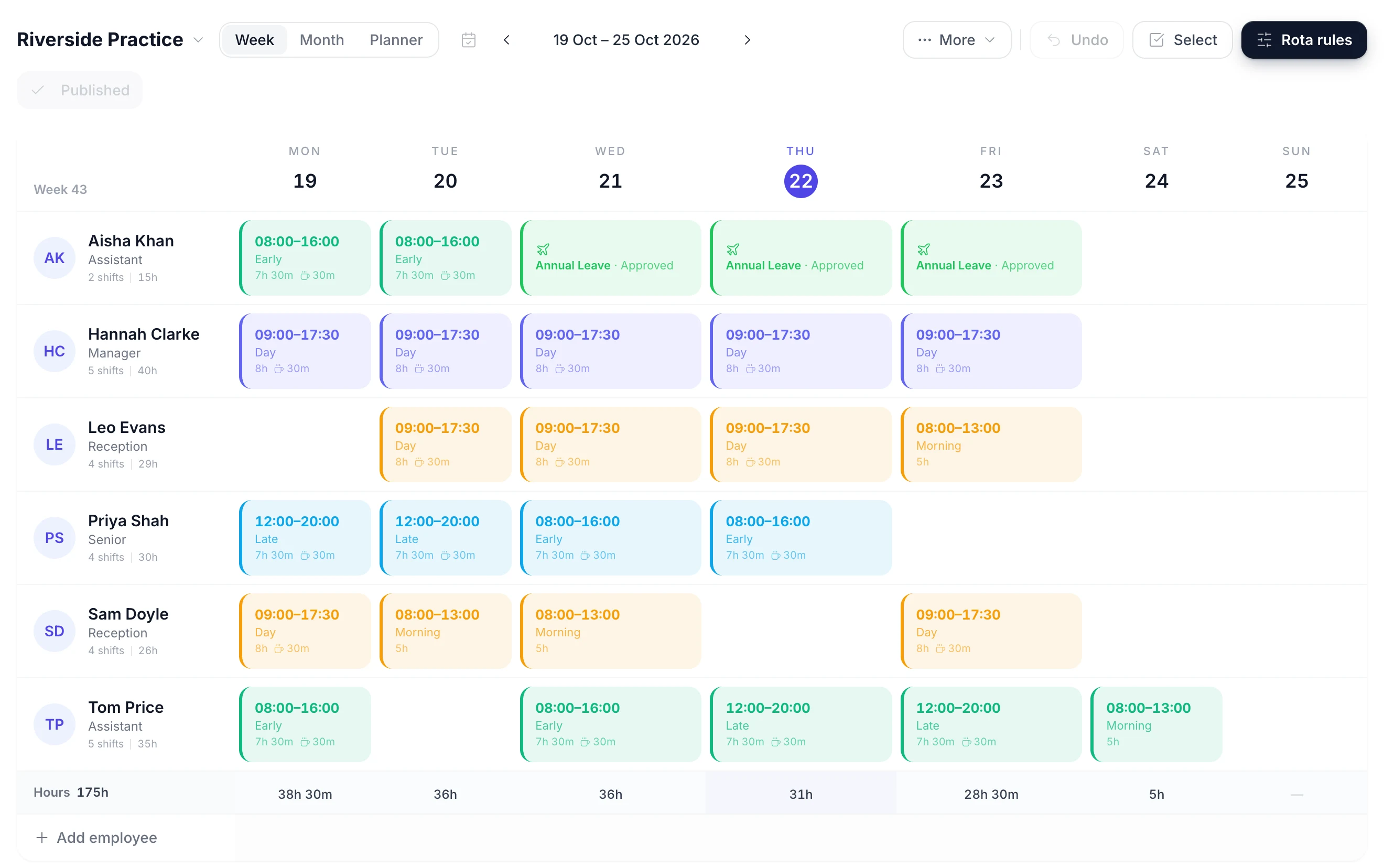
The rota is a week grid with one row per person and one column per day. Tap an empty cell to give a stylist a shift. Drag a shift to another day when someone swaps their day off, or onto another name when a colleague covers. Most salon weeks look like the week before, so copy it forward and change only the holidays and the Saturdays.

The rota week grid with a shift being dragged from one day to another
  • Tap a day to add a shift

    Tap an empty cell to put a stylist on a day, or drag a shift to another day or another person

  • Copy the week forward

    Copy a finished week onto the following weeks. Days that already have a shift are left alone

  • Paid hours under each day

    An Hours row adds up each day and the week, with each person's unpaid break taken off

  • Publish when the week is right

    The week is a draft only managers see until you publish it. Then you choose whether to email the team

Stylists See Their Shifts on Their Phones

Publish the week and every stylist, therapist and receptionist sees their own shifts in the TimeTally app for iPhone or Android, or in a browser. Each shift shows the day, the times and the job role. Nobody has to message the salon group chat to ask whether they are on the late night.

  • Publishing asks whether to email the team. Staff with rota emails on get one. When you publish a week again, only the people whose shifts changed are emailed. There are no push notifications.
  • Until you publish, the week is a draft only managers can see, so a half-planned Saturday never reaches the team.
  • Staff book holiday from the same app, and you approve it from yours. The rota, holidays and timesheets are one login for everyone.
  • Showing staff who else is in with them is a setting, and it is off by default.
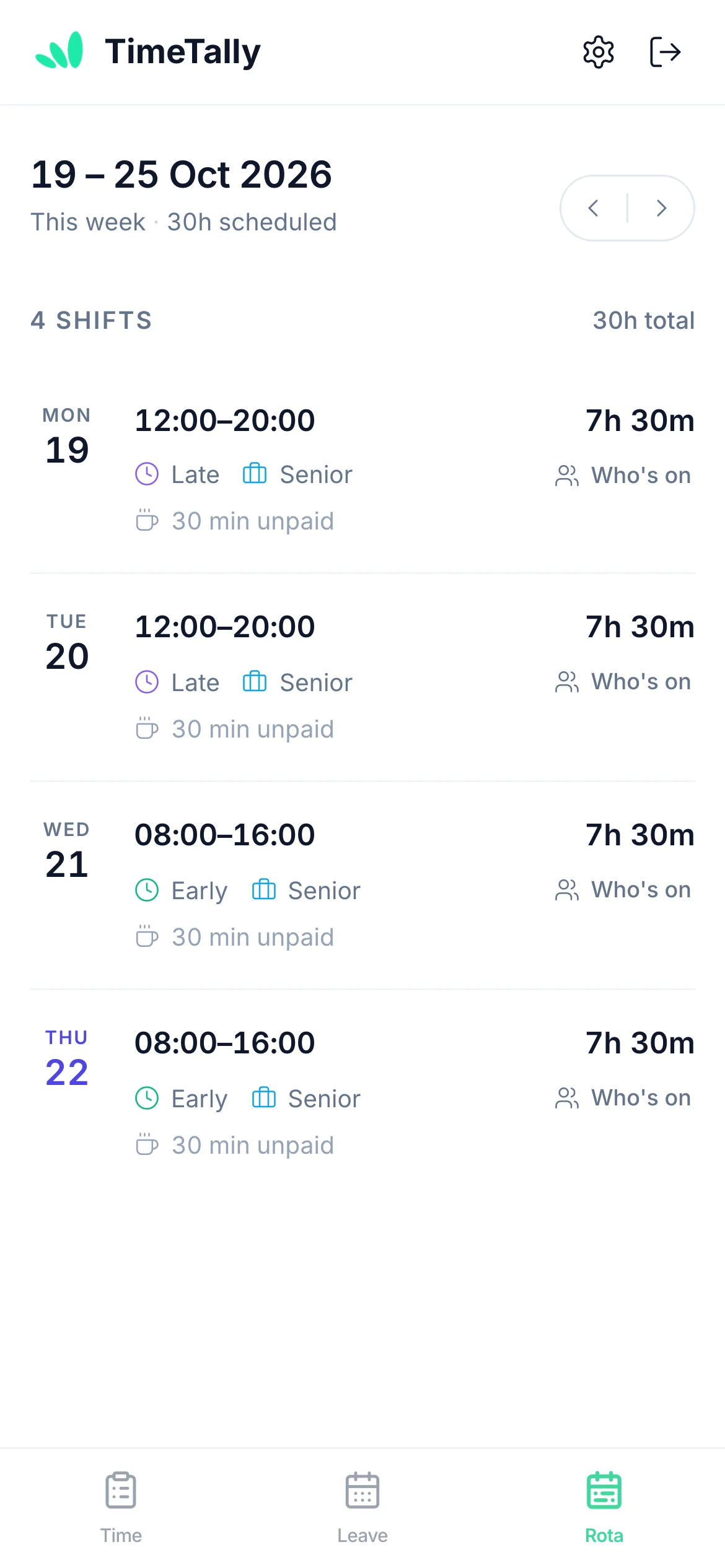
A member of staff viewing their upcoming shifts on their phone

Staff Swap Saturdays, and You Approve Each Swap

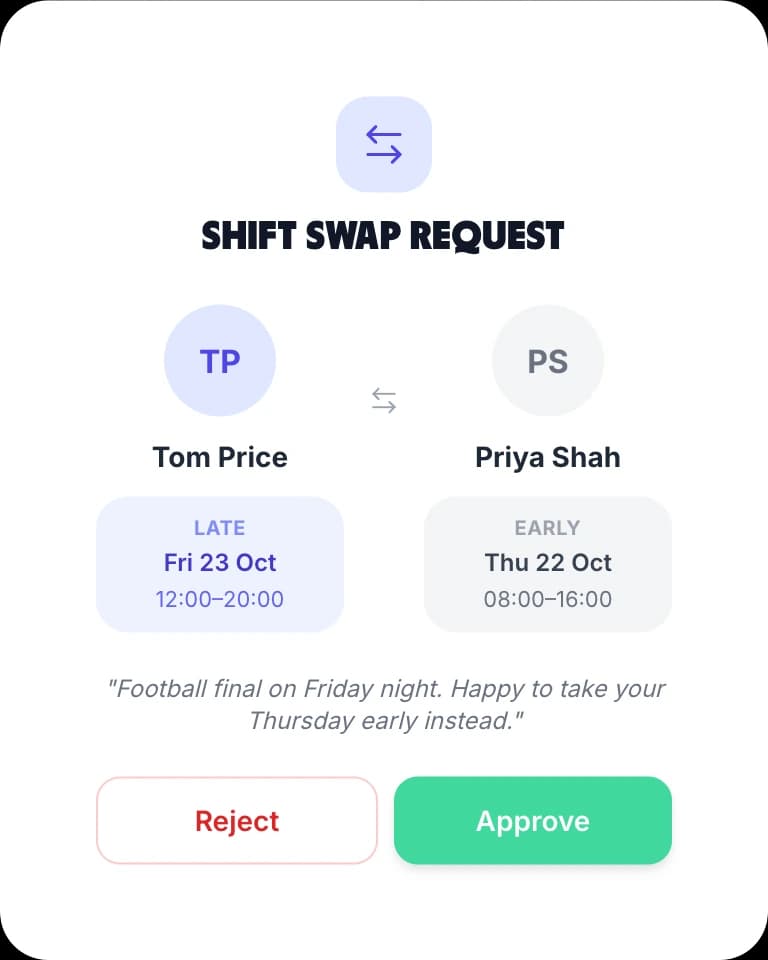
A stylist with a wedding on their Saturday can sort out their own cover. They pick a colleague and a shift in the app, the colleague accepts, and a manager approves it. The rota changes only when the manager says yes.

  • Swap a shift

    Trade a Saturday for a Tuesday with a named colleague. The manager sees both shifts before approving
  • Give a shift away

    Offer a shift to a colleague without taking one back, with the same accept and approve steps
  • Turn swaps off

    Swaps are on by default. Turn them off for the whole salon and the database stops new requests, not just the button
A shift swap request showing the two shifts being exchanged, with approve and reject buttons

Save your day, late night and Saturday shifts as templates

A salon runs the same few shifts every week. Save each one once and it becomes a chip you tap onto the grid. A template holds a name, the times, a colour, the unpaid break and the job role, so the paid hours are right as soon as the shift is placed.

The shift templates panel with a row of saved shifts, each in its own colour
  • A colour for the late night

    Give Late night 11:00 to 20:00 its own colour and you can count the late nights in a week without reading the times

  • Half days and split days

    Save a Half day 09:00 to 13:00, or a template with two time blocks for someone who comes back for the evening

  • Save a whole week

    A week template stores every shift in the week. Apply it to the weeks ahead, or to the same week of every month

  • The break comes with it

    The unpaid break is on the template, so a Day shift counts as 8 paid hours, not eight and a half

What salon rota software has to handle

A salon rota is built around the busy times: late nights, Saturdays and the weeks before Christmas. It also has to fit juniors at college, part-time stylists and reception cover for every opening hour. These are the four jobs it does most weeks. For holiday allowances and balances, see the staff holiday tracker.

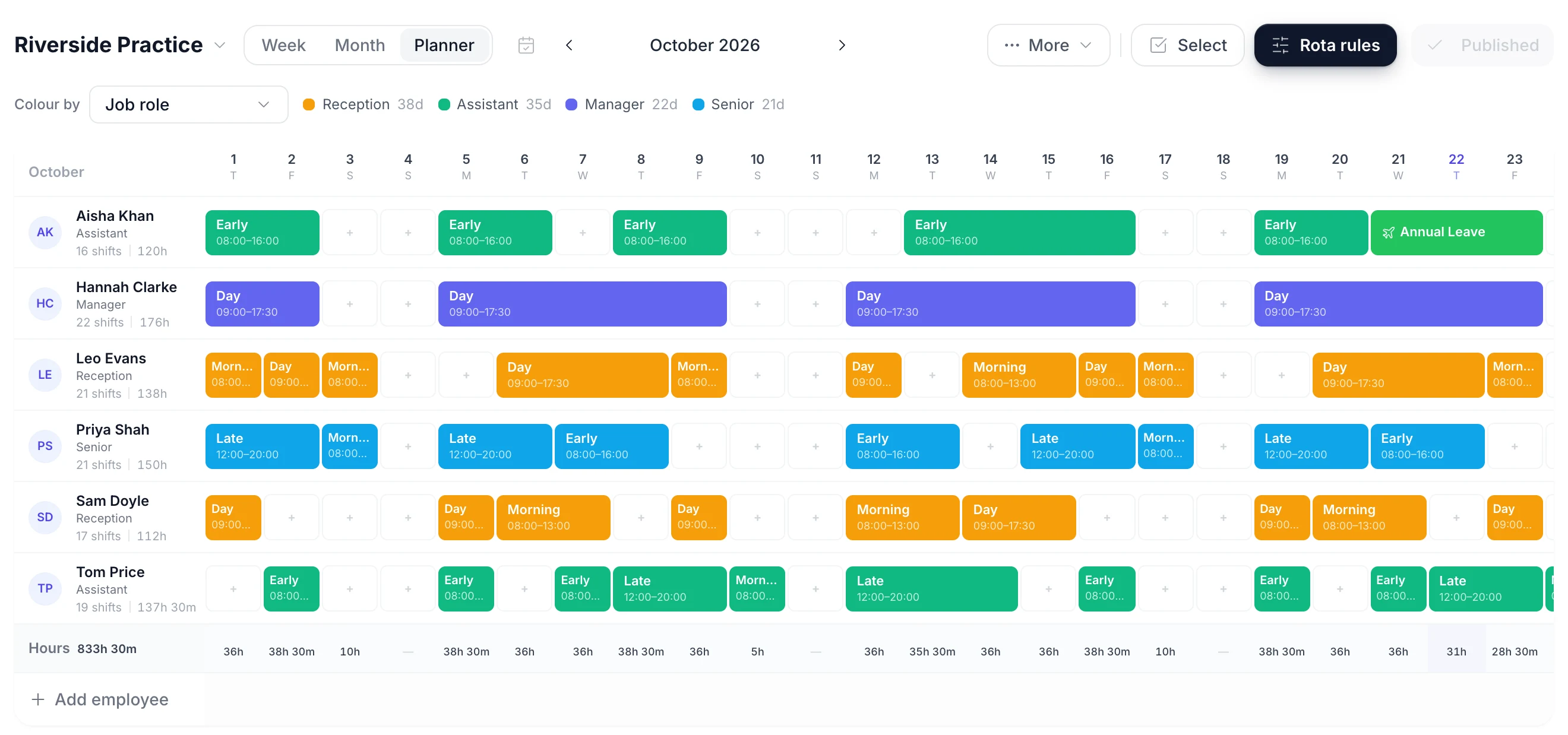
A month of the rota with each person's shifts and their booked holiday shown on the same rows
Late nights

Late nights and the working week

Most salons stay open late on a Thursday or Friday, and some open on a Sunday or close on a Monday. The late night is usually the shift nobody wants twice in a week.

  • Save Late night 11:00 to 20:00 as its own template with its own colour, so the late nights stand out on the week
  • Filter the week by job role to check that a senior stylist is in on every late night
  • Set a staffing alert for the number of people you need on a day. It warns before you publish and never blocks
Saturdays

Sharing out Saturdays

Saturday is the busiest day in most salons and the one most staff want off. A fair rota usually means a pattern: every other Saturday, or two in three.

  • Build the weeks of your Saturday pattern once and save each one as a week template
  • Apply a week template to several weeks ahead, or to the same week of every month
  • TimeTally does not share Saturdays out for you. You build the pattern, and it repeats what you saved
Juniors

Juniors, apprentices and college days

Juniors and apprentices are often at college one day a week, and some are under 18. Their week needs a gap on the college day and a check on their hours.

  • Leave the college day empty in your week templates, so copying weeks forward keeps it free
  • Set an hours alert for one named person, such as more than 8 hours in a day, and the rota warns you before you publish
  • There is no repeating day-off setting. The empty day in the template is how the college day is kept
Holidays

Stylist holidays on the rota

When a stylist is on holiday, their column in the booking system has to be blocked and their shifts covered. TimeTally puts the holiday on the rota as soon as it is booked.

  • Approved and pending holiday show on the grid, and putting a shift on a holiday day asks you to confirm
  • Approve a holiday request and TimeTally lists that person's shifts on those days, with the colleagues who are free to cover each one
  • Each person has a bank holiday setting, including No bank holidays for staff who work them

Two Settings to Check When a Salon Turns the Rota On

Most of TimeTally works without changing anything. These two settings are worth ten minutes on the first day, because salons open on Saturdays and often on bank holidays.

Staffing alerts

Get a warning when a Saturday has fewer people than you need.

Set an alert such as fewer than five staff on a day. Apply it to the whole rota or to one department, for example Hair or Beauty. A day below it shows as a red line above the grid, and again in a warning before you publish.

The alert counts the people with a shift that day. It does not check who is in at 17:30 or whether those people are stylists or receptionists. Filter the grid by job role to check that.

Alerts can also watch hours. Set one for a named person, such as a 17-year-old junior over 8 hours in a day, or for anyone over 48 hours in a week. Every alert warns and nothing blocks you from publishing.

Bank holidays

Set bank holidays for each person, including staff who work them.

Each person has a bank holiday calendar, such as England, Scotland, Wales or Northern Ireland, and a pay choice: paid on top of their allowance, paid from their allowance, or unpaid.

Bank holidays are booked only on the days that person works. A stylist who never works Mondays is not charged for Easter Monday.

If the salon opens on bank holidays and staff work them, set those people to No bank holidays. They then book their days off as normal holiday. The part-time bank holiday calculator works out a part-timer's share, and the bank holiday pay calculator covers what a worked bank holiday pays.

Salon staff rota examples and how each one is built

Three common salon setups, each described as the templates it needs and the order you build the week in. If you would rather sketch on a spreadsheet first, the staff rota template is a free download.

A four-chair hair salon with a Thursday late night

A senior stylist, two stylists, a junior and a receptionist, open Tuesday to Saturday. Use three templates: Day 09:00–17:30, Late night 11:00–20:00 and Saturday 08:30–17:00. Put the senior and one stylist on the Thursday late night and the receptionist on until 20:00 too. Leave the junior's college day empty. Save the finished week as a week template, then copy it forward and change only the holidays.

Beauty salon staff scheduling with therapists and reception

A hair and beauty salon often has therapists on different hours from the stylists, with treatment rooms booked by appointment. Create a Beauty department and a Hair department so you can filter the week to each one. Add Half day 09:00–13:00 for part-time therapists. Set a staffing alert on the Beauty department if you need at least two therapists on a Saturday.

A barber shop rota across two shops

Two barber shops with a shared Saturday team. Create a rota for each shop, each with its own staff list. Add a barber who works in both shops to both rotas, so they show on each. A person has one shift per day, so a barber who moves shops at lunchtime is one shift with two time blocks on one shop's rota. Publish each shop's week on its own.

Sharing Saturdays out over four weeks

With six staff and four needed every Saturday, each person can have one Saturday off in three. Build weeks one to three with a different pair off on Saturday, and save each as a week template. Apply them in turn to the weeks ahead. The month view then shows every Saturday at once, so you can see the pattern holds. TimeTally does not work the pattern out for you. The shift pattern calculator helps with the dates of a rolling cycle.

Juniors, apprentices and their hours

Under-18s can usually work no more than 8 hours a day and 40 hours a week. The Late night template is 8 hours 30 minutes paid, so it is too long for a 16 or 17-year-old junior as it stands. Give them a shorter template, and set an hours alert for that person so a long day is flagged before you publish. Apprentices have their own minimum wage rate. The minimum wage calculator shows the current rates.

When a paper rota is still fine

A salon with three people who always work the same days does not need rota software. A printed week on the staff room wall works. It stops working when part-timers, juniors at college, Saturday swaps and holiday requests all land on one manager. A rota staff can check on their own phone then saves time every week.

Booking systems, pay and limits

Booking software, chair renters and what TimeTally will not do

TimeTally covers the staff side of a salon: who is working, their holidays and their hours for pay. Here is where it stops, so you know before you sign up.

It Is Not Salon Booking Software

TimeTally has no client appointments, no online booking, no commission or retail sales tracking and no card payments. Keep your salon booking system for clients. TimeTally does not connect to it, so when a stylist's holiday is approved, block their column in the booking system yourself.

Self-Employed Stylists and Chair Renters

A chair renter is not your employee. You can still add them so the rota shows who is in, at the same £3 a month as anyone else. Turn leave and time tracking off for that one person in Settings, under Features. TimeTally does not collect chair rent, work out commission or decide anyone's employment status.

Hours and Pay for Hourly Staff

Juniors and receptionists on an hourly rate can fill in a timesheet or clock in and out on their phone. A manager approves the hours, and they export to Xero, QuickBooks or a CSV for your payroll. GPS clock-in is an optional add-on at £1 per employee a month. It checks the person is within a set distance of the salon, from 25 metres to 5 kilometres, at the moment they clock in. TimeTally does not run payroll.

Who Can See What

In a salon group, a branch manager can be limited to the people they look after. They can then add, move or remove shifts only for those people, though they can still see every rota. You can also hide pay from a manager, so the cost row and hourly rates stay off their screen.

The Record of Who Was Rostered

Every shift is saved against a named person with its date, times, job role and break. You can print the rota, and export the shift hours for a week or a month to CSV. Change a published week and the Publish button comes back on until you publish the change.

What TimeTally Does Not Do

It does not build the rota for you or share Saturdays out automatically. Staff cannot set their availability, and there are no open shifts to claim. There are no push notifications, only emails. The rota does not export to a phone calendar. The 11-hour rest and 48-hour checks are in the free rota maker on this page, not in the app; in the app, set an hours alert instead.

Simple, Transparent Pricing

One price for the whole product. GPS clock-in is £1 extra per employee. A salon with 9 staff pays £27 a month.

£3/employee/month

Billed monthly. Cancel anytime.

Day, late night and Saturday shift templates
Staff rota on every stylist's phone
Shift swaps you approve
Holiday tracking and timesheets included
Get Started

No credit card required

In short

What is salon rota software?

Salon rota software plans which stylists, therapists and receptionists work each day and shares the rota with them. TimeTally does this for UK hair salons, beauty salons and barbers at £3 per employee per month. You save shifts such as Day, Late night and Saturday as templates and tap them onto a week grid. Holidays show on the same grid. Staff see their shifts on their phones and can propose swaps for a manager to approve. Holiday tracking and timesheets are included. TimeTally handles the staff side only. It does not take client bookings, so it works alongside your salon booking system.

Price
£3 per employee a month
Shifts
Day, late night, Saturday templates
Staff
Rota on their own phones
Bookings
Not a client booking system
Includes
Holiday tracking and timesheets

Salon Rota Software FAQs

How do I manage staff rotas and shift scheduling through salon software?

Most salon software is built around client bookings, so the staff rota often ends up on paper or in a spreadsheet. A salon rota tool such as TimeTally handles the staff side. Add your team with their job roles, such as senior stylist, stylist, junior, beauty therapist and receptionist. Save the shifts you run as templates, for example Day 09:00 to 17:30, Late night 11:00 to 20:00 and Saturday 08:30 to 17:00. Tap each day to put people on, or copy last week forward and change what is different. Holidays show on the same grid. When the week is right, publish it and staff see their shifts in the TimeTally app or a browser. Keep using your booking system for appointments; TimeTally does not take client bookings.

How do I make a salon staff rota?

Start with your opening hours, including late nights and Saturdays, and the shifts that cover them. Put approved holidays and college days in first, so you build around them. Then fill each day so that every chair you take bookings for has a stylist, a senior is in on the busy days, and reception is covered from opening to close. Check each person's weekly hours against their contract, then share the rota with the team. The free salon rota template on this page starts with five salon job roles and four shift times, so you can build your first week without an account.

Can staff see the salon rota on their phone?

Yes. Once you publish a week, each member of staff sees their own shifts in the TimeTally app for iPhone or Android, or in any browser. Publishing asks whether to email the team. Staff with rota emails switched on get one, and when you publish a week again only the people whose shifts changed are emailed. There are no push notifications. Whether staff can see who else is working with them is a setting, and it is off by default.
Does TimeTally replace our salon booking software?

No. TimeTally has no client appointments, no online booking, no commission or retail sales tracking and no card payments. It covers the staff side of the salon: the rota, holidays and sickness, and hours for pay. Most salons use it alongside their booking system. The two are not connected, so when you approve a stylist's holiday in TimeTally you still block their column in your booking system yourself.

How do I share out Saturdays fairly?

Decide the pattern first, such as every other Saturday or two Saturdays in three, and agree it with the team. Then build the weeks of that pattern in TimeTally and save each one as a week template. You can apply a week template to several weeks ahead, or to the same week of every month. The month view shows who is in on each Saturday at a glance. TimeTally does not rotate Saturdays automatically: you build the pattern and it repeats the weeks you saved. Staff can also propose a swap with a colleague, and nothing changes until a manager approves it.

Can I add self-employed stylists or chair renters?

Yes. A chair renter is not your employee, but you can still put them on the rota so you and reception know who is in. They cost the same £3 a month as anyone else on your team. In Settings, under Features, you can turn leave and time tracking off for one person, so a chair renter only uses the rota. TimeTally does not collect chair rent, work out commission or record anyone's takings, and it does not decide whether someone is self-employed.

How are salon staff holidays handled?

Staff request holiday from their phone and a manager approves it, also from their phone. Each person has a holiday balance, and part-timers can have a pro-rata allowance. Approved and pending holidays show on the rota, and when you approve a request TimeTally lists the shifts that person was on and who is free to cover them. For bank holidays, each person has a calendar and a pay setting, and bank holidays are booked only on the days that person works. Staff who work bank holidays can be set to No bank holidays and book days off as normal holiday instead.

How do I keep a barber shop rota?

A barber shop rota works the same way as a salon rota. Save your opening and closing shifts as templates, put each barber on the days they work, and share Saturdays out with a pattern you save as week templates. If you have more than one shop, give each one its own rota and add a barber who covers both to each. Walk-in queues are not something TimeTally manages: it plans who is working, not which customer they see.

What does salon rota software cost?

TimeTally is £3 per employee per month, with no setup fee and no minimum contract. A salon with 9 staff pays £27 a month, and that covers the rota, holiday tracking and timesheets. GPS clock-in is an optional add-on at £1 per employee per month. There is a free 14-day trial and no card is needed to start it.

Still have a question? See all FAQs

Put next week's salon rota on every stylist's phone.

Try TimeTally free for 14 days. Build the week from your own day, late night and Saturday shifts, see holidays on the same grid, approve swaps, and publish it to your team. Holiday tracking and timesheets are included in the same £3.

No credit card required · Free 14-day trial · Cancel anytime