Staff rotas for UK veterinary practices

Rota Software for Vets

Vet rota software for UK veterinary practices, from a single surgery to a hospital with branches. Plan consulting days, ops days, late consults and Saturday mornings for vets, RVNs, patient care assistants and reception on one grid, and publish the week to their phones. Holiday and CPD days show on the same rota, so you see who is off before the list is booked. It is the same staff rota software that runs all of TimeTally, priced at £3 per employee per month, with holiday, CPD days and timesheets in the one subscription.

Week of 16 June

All departments
Publish Rota Published
Employee
Mon16
Tue17
Wed18
Thu19
Fri20
Sat21
Sun22
AR

Amelia

Kitchen

Open

Open

Evening

Close

Open

JK

James

Front of House

Close

Early

Mid

Open

Open

Early

PS

Priya

Kitchen

Leave

Mid

Close

Open

Early

MP

Maya

Front of House

Early

Close

Leave

Mid

Close

TW

Tom

Bar

Open

Open

Mid

Open

Close

Templates

Open
Close
Mid
Early
Evening

Rota Published!

Your team has been notified

Shift Templates

New Template New Template

Open

09:00–17:00

Close

12:00–20:00

Mid

10:00–18:00

Early

06:00–14:00

Evening

17:00–22:00

New

New Template

Evening

Start

17:00

End

22:00
Save Template Saved!

Shift Swap Request

Awaiting your approval

JK

James K.

Open · Thu

PS

Priya S.

Early · Sat

Approve Approved!

Shifts published!

Week of 16 Jun

Swap approved

James ↔ Priya

Evening added

Wed · 17:00–22:00

9:41

16 Jun – 22 Jun

this week · 40h

Mon

16

Tue

17

Wed

18

Thu

19

Fri

20

Sat

21

Sun

22

This week

40h total

Mon, 16 Jun

09:00–17:00

8h

Open

Tue, 17 Jun

09:00–17:00

8h

Open

Wed, 18 Jun

Today

17:00–22:00

8h

Evening

Thu, 19 Jun

12:00–20:00

8h

Close

Fri, 20 Jun

09:00–17:00

8h

Open

“The app is simple to use, reliable, and makes managing holidays, absences, and staff records straightforward. The system has saved us a significant amount of administration time.”

CLI ManchesterJordan Ingoe, CLI Manchester

See how a vet practice plans its staff rota with TimeTally

Build next week's rota, staff clock in against the shifts you assigned, and approved leave feeds straight back into the plan. One system, no re-keying between them.

Free vet rota template: build your veterinary practice rota online

A vet rota template you fill in on this page. It opens with four job roles (vet, veterinary nurse, patient care assistant and receptionist) and a row for two vets, two RVNs, a care assistant and a receptionist. Rename them to your own team. Tap a day and choose Use a shift template to add Day 08:00–18:00, Early 08:00–16:00, Late 11:00–19:00 or Saturday 09:00–13:00. Hours add up per person as you go, and the rota flags less than 11 hours between shifts, more than six hours without a 20-minute break, and weeks over 48 hours.

Building it is free and needs no account. Printing or downloading it needs a free account (a 14-day trial, no card), and signing up carries the rota into TimeTally.

Put vets, nurses and reception on one week grid

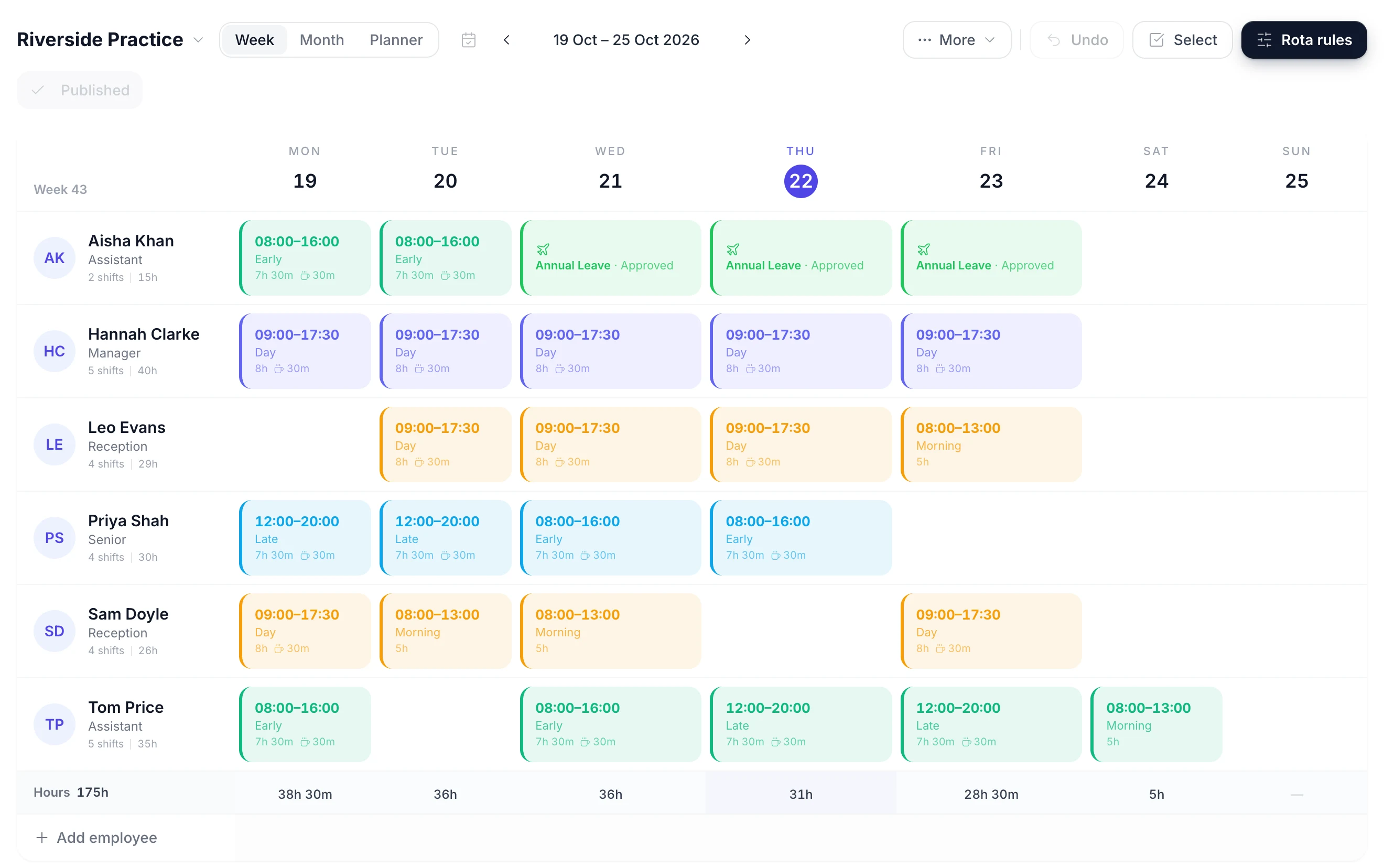
The rota is a week grid with a row for each member of the practice and a column for each day. Click an empty day to give someone a shift. Drag a shift to another day when a vet moves their day off, or onto another name when a colleague takes the ops list. Copy last week forward and change only the exceptions.

A week of the rota with a row per person, coloured shift blocks on the days they work and an hours total under each day
  • Click a day to add a shift

    Put a vet on a consulting day in one tap, or drag a shift onto the nurse who is covering it

  • See who is at another branch

    A vet already rostered at another branch that day shows that branch's rota name in their cell

  • Filter to vets or nurses

    Show one job role at a time to check each day has the vets and RVNs the list needs

  • Publish the week when it is ready

    The week is a draft only managers see until you publish it and choose whether to email the team

A Vets Rota App for the Whole Practice Team

Publish the week and every vet, nurse, care assistant and receptionist sees their own shifts in the TimeTally app for iPhone or Android, or in a browser. Each shift shows the day, the times and the role. Staff stop asking at the reception desk which Saturday they are on.

  • Publishing asks whether to email the team. Staff with rota emails on get one, and a week published again emails only the people whose shifts changed. There are no push notifications.
  • A vet can propose swapping a Saturday with a colleague or give a shift away. The colleague accepts, then a manager approves it.
  • Swaps are on by default and can be turned off. Showing staff who else is on with them is a separate setting, off by default.
  • Staff book holiday and CPD and fill in timesheets in the same app, with one login.
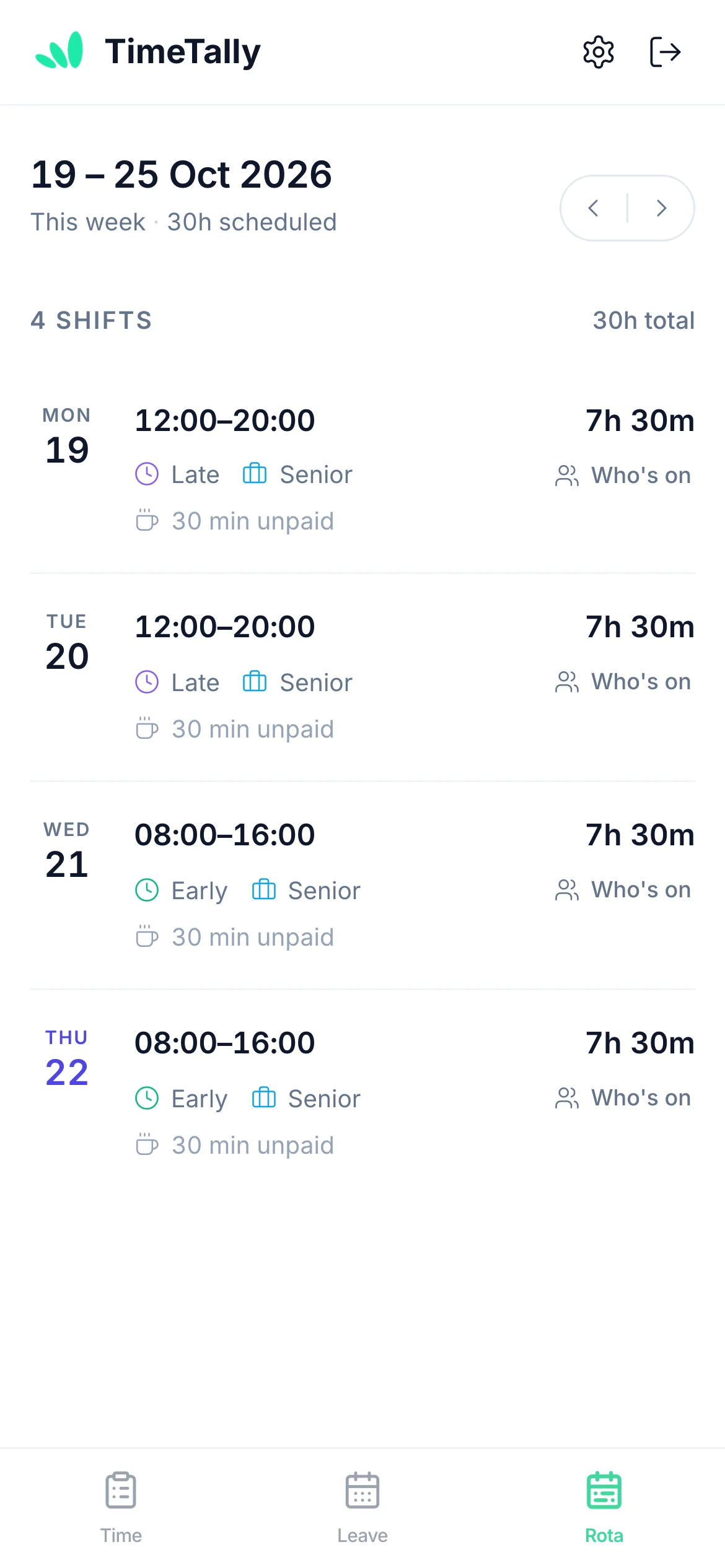
A member of the practice team viewing their upcoming shifts on their phone

Holiday and CPD Days on the Practice Rota

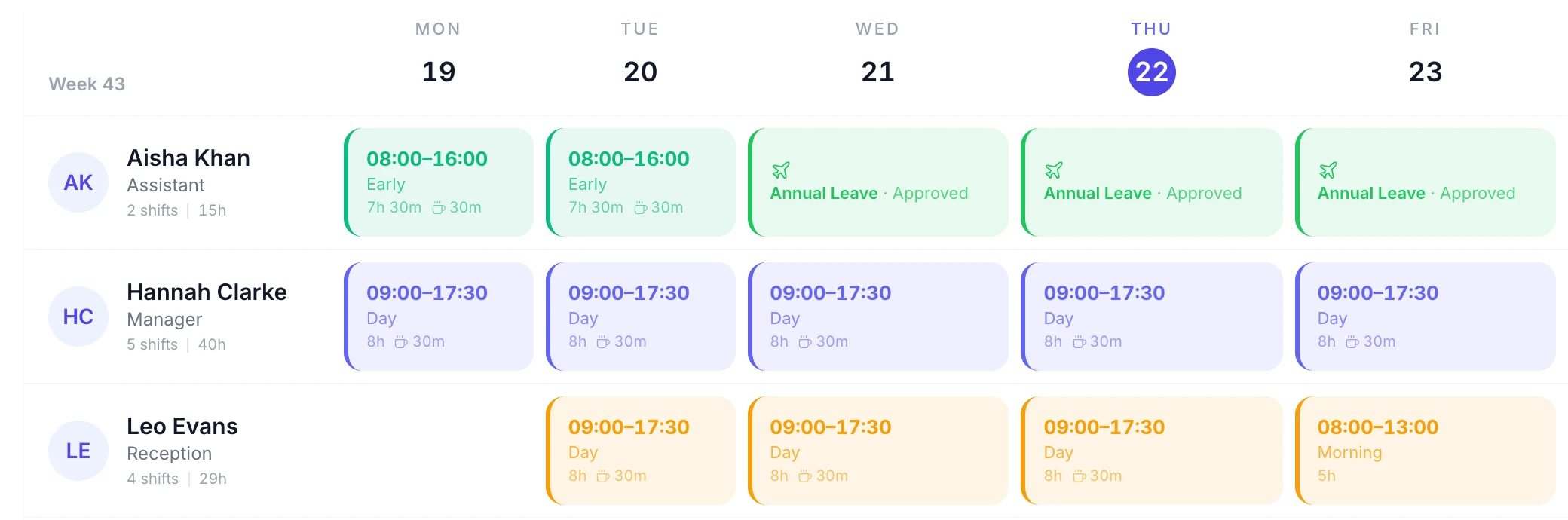
Leave is booked in the same app as the rota, so a vet's week off or a nurse's CPD day appears on the grid on the days it falls. You plan consults and ops lists around who is actually in.

  • Every type of leave, with its status

    Holiday, CPD, sickness and any type you add show their name and whether they are approved or still pending
  • A check before a clash

    Putting a shift on someone's day off asks you to confirm, so a vet is not booked onto a consulting list while on leave
  • Cover from the same branch first

    Approving leave lists the shifts it leaves open and who is free for each, with people on that branch's rota first
  • Sickness on the day

    Record sick leave when a nurse rings in. It shows on the rota at once, and you drag their shift to whoever covers
A rota week with approved annual leave and sick leave shown in place of shifts

Turn consulting days, lates and Saturday mornings into shift templates

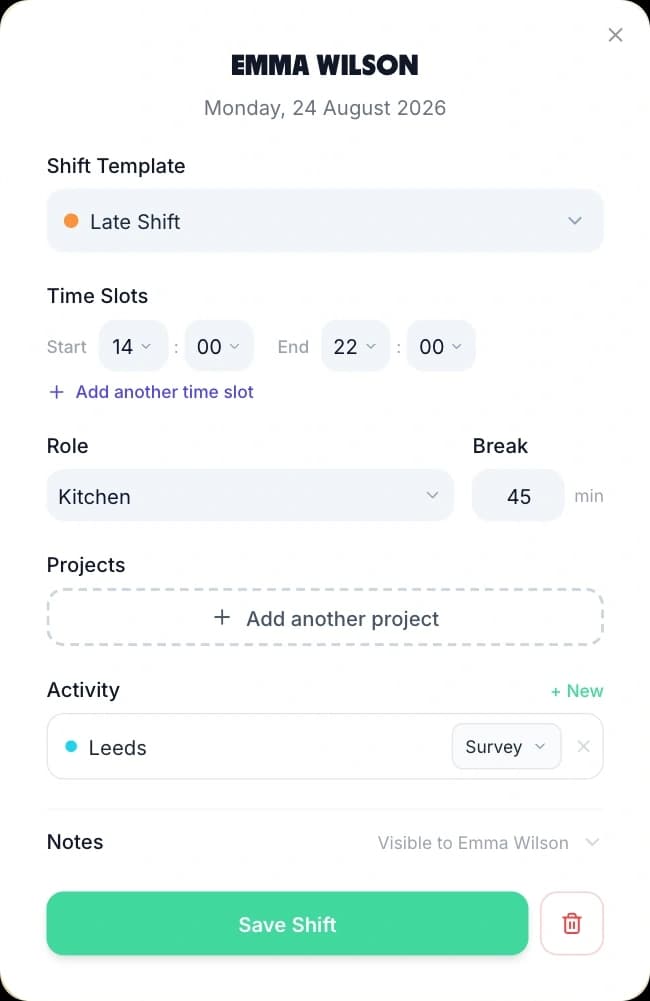
A practice runs the same few shifts most weeks. Save each one once with its times, job role and unpaid break, and it becomes a choice when you add a shift. A vet's Day 08:00–18:00 with an hour's lunch is 9 paid hours every time.

Adding a shift from a saved template: the template picker, start and end times, role, break and a Save Shift button
  • Early and late consults

    Early 08:00–16:00 and Late 11:00–19:00 overlap through the middle of the day, when the ops list and consults run together

  • Overnight templates

    A template can cross midnight, for a practice that keeps inpatients overnight or shows its own on-call on the rota

  • Saturday rotas

    Save one week for each Saturday team as a week template and apply them in turn, so the Saturday mornings share out fairly

  • Copy a week forward

    Copy this week onto the next few in one go. Days that already have a shift are left as they are

What vet rota software has to handle in a practice

A veterinary practice rota pairs vets with nurses on ops days, covers consults into the evening and on Saturdays, and often spans more than one site. Vet practice staff scheduling also has to fit part-time vets and locums. Here is how TimeTally handles each.

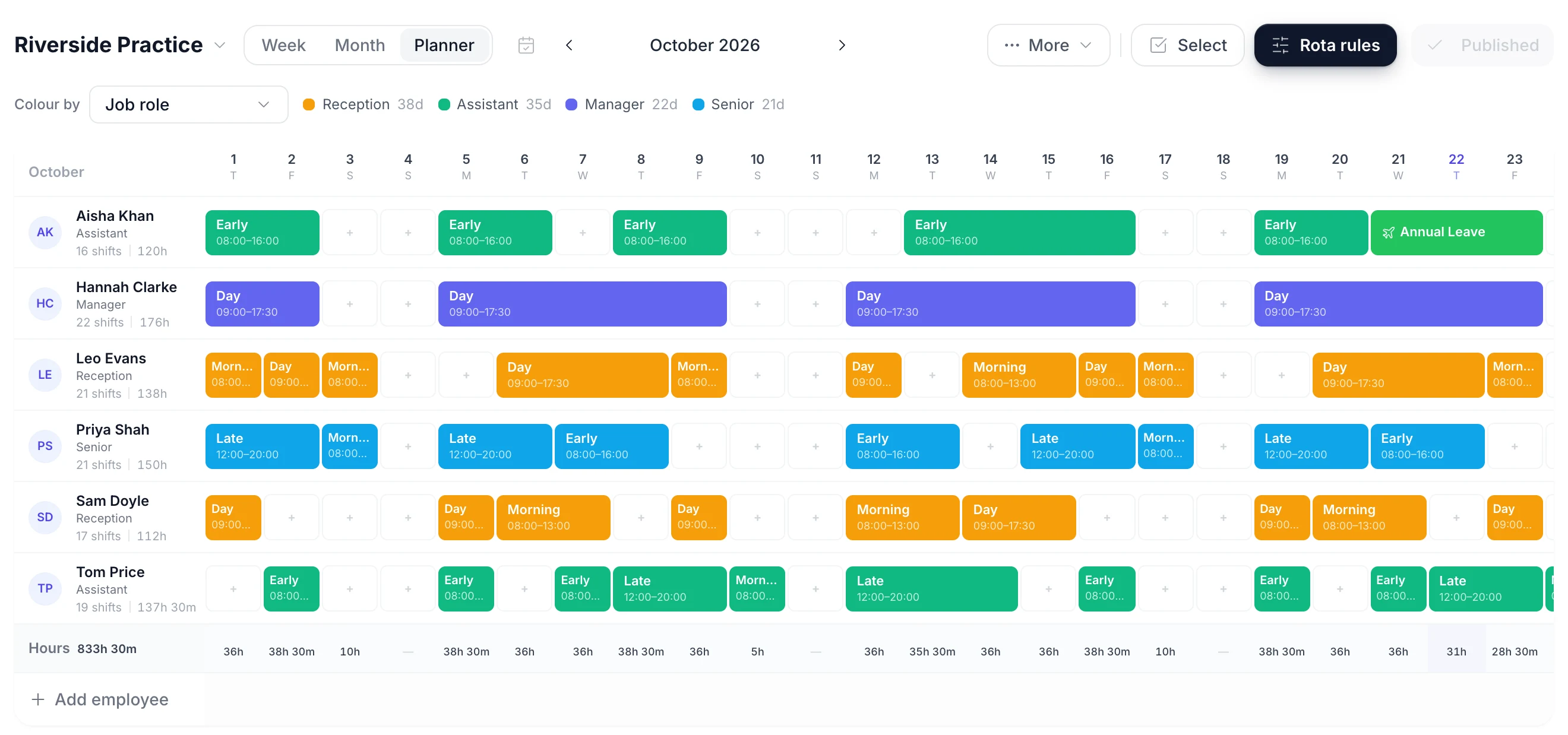
A month of the rota with each person's shifts and approved leave shown on the same grid
Ops days

A nurse for every vet on an ops day

An ops list needs a vet and at least one RVN for anaesthesia and theatre, plus someone on the consults that carry on alongside it. The rota has to show both at once.

  • Filter the week to the Veterinary nurse role and read each ops day against the vets doing surgery
  • Put nurses in their own department and a staffing alert can warn when fewer than two have a shift that day
  • The alert counts people with a shift that day, not who is in theatre at 10:00, and it never blocks a publish
Consulting hours

Consults from 08:00 to 19:00

Most practices consult longer than one person works, with evening appointments for owners after work and a Saturday morning surgery. Staggered starts cover the day.

  • Early 08:00 to 16:00 opens and Late 11:00 to 19:00 covers the evening consults
  • Saturday 09:00 to 13:00 is its own template with no unpaid break
  • A template can hold two time blocks, for a vet who consults in the morning and comes back for evening surgery
Branches

A rota for each branch surgery

A main hospital with one or two branch surgeries is common, and vets and nurses often move between them during the week. Each site needs its own rota and a view of who is where.

  • Name a rota per branch and add the staff who work there. Someone who covers two sites belongs to both
  • A day they already work at the other branch shows that branch's name, so you cannot book them twice
  • A branch manager can be limited to their own people: they change only those shifts, but can see every branch
Part-time and locums

Part-time vets and locum cover

Many vets work three or four days a week, and locums fill holiday and long-term gaps. Both need to sit on the same rota as everyone else.

  • A part-time vet's holiday can be worked out from the days they work: 28 days at 3 days a week is 17 days
  • Add a locum with just their name, no email or invite, and turn leave off for that one person
  • Each person on the rota is £3 a month. TimeTally does not pay locums or handle their invoices

CPD Days and Overtime: Two Things to Set Up First

The rota works without setup. These two settings decide how CPD and extra hours are counted, so set them before the first week goes out.

CPD leave

Give CPD its own yearly allowance.

Add a leave type called CPD (or Training) and choose Its own allowance, for example 5 days or 37.5 hours a year. It is kept apart from annual leave, so a congress day never comes out of someone's holiday.

Set a different figure for each person, such as more days for vets than for reception. The allowance resets each leave year and does not carry over. Choose whether CPD days are paid.

Staff request CPD days in the app, a manager approves them, and they show on the rota like holiday.

Hours, overtime and TOIL

Pay extra hours or give time back.

Hourly nurses, care assistants and reception clock in on their own phone or fill in a timesheet, and a manager approves it. Approved hours export to Xero, QuickBooks or a CSV file for payroll.

Overtime is counted by your rules. Turn on TOIL and overtime becomes time off in lieu at a rate you set, with an optional expiry. You can pay overtime instead for named people.

With time tracking off, Pay from rota shifts uses the published rota as the hours record instead. How TOIL works in TimeTally

Vet practice rota examples

Four common shapes of veterinary rota and how each is built in TimeTally. Take the structure and fit your consulting hours to it. For a blank grid to print, the staff rota template is a free download.

A small animal surgery with one site

Three vets, four RVNs, two care assistants and two receptionists, open 08:00 to 19:00 and Saturday mornings. One rota holds everyone. Each day has one vet consulting on Early, one on Late and one on the ops list on Day. Filter to the Veterinary nurse role to check two nurses are on each ops day, then check reception runs from 08:00 to the last consult.

A hospital with two branch surgeries

Create a rota for the hospital and one for each branch. Branch staff belong to their own branch; vets who consult at a branch two days a week belong to both. A day they are already at the hospital shows the hospital's rota name on the branch rota. Each branch manager is limited to their own people and publishes their own week.

A vet nurse rota built around ops days

Ops run Monday to Friday, with two nurses on theatre and one on consults. Save the nurse week as a week template and apply it to each week, then change only holiday and CPD weeks. Put nurses in a Nursing department and add a staffing alert for fewer than three nurses a day, so a short day shows as a red line before you publish.

Practices that run their own on-call

Save an On call 19:00–08:00 template and place it on the vet and nurse on call each night, so the whole team can see the week's cover. A vet who also works that day needs one shift with both time blocks. Its hours count in the Hours row like a worked shift. Standby payments are agreed and paid outside TimeTally; call-out hours entered on a timesheet count under your overtime rules.

A Saturday rota shared fairly

With one vet and one nurse needed each Saturday, a four-week cycle gives each pair one Saturday in four. Our shift pattern calculator works out the dates. In TimeTally you build one week of each pattern, save them as week templates and apply them in turn. TimeTally does not generate a rotating pattern on its own.

When a spreadsheet is still fine

A single-vet practice with a fixed team and the same week every week can run on a printed grid. It usually stops working once there are several vets, part-time nurses, a branch, or staff messaging to ask which Saturday they are on. At that point a rota staff can check on their own phone saves more time than it takes to set up.

Out-of-hours, records and limits

Out-of-hours, clinical records and what TimeTally will not do

TimeTally plans the practice team and keeps a record of who was rostered. Some parts of running a practice stay outside it.

No On-Call or Standby Feature

TimeTally has no on-call shift type, no standby rate and no call-out log. You can show on-call on the rota with an overnight template, but its hours count as shift hours, and standby payments are worked out outside TimeTally. Many practices pass out-of-hours work to a dedicated out-of-hours provider; if yours does, the rota only needs to cover opening hours.

It Is Not a Practice Management System

There are no appointments, consult lists, clinical records, client accounts or client billing. TimeTally is the staff side: the rota, holiday, CPD and sickness, and timesheets. It works alongside your practice management software, and the two do not connect.

CPD Hours and RCVS Records

The RCVS asks vets for 35 hours of CPD a year and RVNs for 15. TimeTally tracks the days or hours of leave taken for CPD against an allowance you set. It does not record what was learned or keep a CPD log, and it does not store RCVS registration, qualifications or training certificates.

Long Days and Rest Breaks

The Working Time Regulations give most workers 11 hours' rest between working days and an average week of no more than 48 hours unless they opt out. The free rota maker on this page flags both. The rota in the app does not check rest gaps or weekly limits while you build, so a late consult followed by an early start is yours to spot.

Who Can See What

You can make a head nurse or branch manager a manager limited to their own department or named people. They approve leave and timesheets only for those people, and can only add, move or remove shifts for them. They can still see every rota. Pay can be hidden from them, which keeps hourly rates and the cost row off their screen.

What TimeTally Does Not Do

It does not build the rota for you: every shift is placed by a person. There is no availability form for staff to say which days they can work, no open shifts for staff to claim, and the staffing alert counts heads rather than checking skills. It does not pay locums or handle their invoices. Notifications are emails, not push notifications.

Simple, Transparent Pricing

One price for the whole product. GPS clock-in is £1 extra per employee. A practice with 22 staff pays £66 a month.

£3/employee/month

Billed monthly. Cancel anytime.

A rota for every branch
Day, early, late and Saturday templates
CPD days with their own allowance
Holiday tracking and timesheets included
Get Started

No credit card required

In short

What is vet rota software?

Vet rota software plans which vets, veterinary nurses, care assistants and receptionists work which shifts, and shares the rota with them. TimeTally does this for UK veterinary practices at £3 per employee per month. You save shifts such as Day 08:00–18:00, Early 08:00–16:00, Late 11:00–19:00 and Saturday 09:00–13:00 as templates and place them on a week grid. Each branch can have its own rota. Holiday, CPD and sickness show on the same grid. When you approve leave, TimeTally lists the shifts it leaves open and who is free to cover. Staff see their shifts on their phones and can propose swaps for a manager to approve. Holiday tracking and timesheets are included. It has no on-call feature and does not replace your practice management system.

Price
£3 per employee a month
Branches
A named rota per site
CPD
Its own leave allowance
Staff
Shifts on their phones
On-call
Shown with a template only

Frequently Asked Questions

How do you build a vet practice rota?

Start with your opening hours and the shifts that cover them, for example Day 08:00 to 18:00, Early 08:00 to 16:00, Late 11:00 to 19:00 and a Saturday morning. Put booked holiday and CPD days on the rota first. Then place the vets: who is consulting, who is on the ops list and who covers evening surgery. Pair each operating vet with an RVN, add patient care assistants, and make sure reception is covered from opening to the last appointment. Check each person's weekly hours against their contract, then publish the rota so staff can see it. The free vet rota template on this page starts with those four shifts and the four usual job roles, so you can build a first week without an account.

Can we rota on-call and out-of-hours in TimeTally?

You can show it, but TimeTally has no on-call or standby feature. Save an overnight template such as On call 19:00 to 08:00 (templates can cross midnight) and place it on the rota so everyone can see who is on. Its hours count in the Hours row like any other shift, and TimeTally does not work out standby payments. A person has one shift per day, so a vet on a day shift who is also on call that night is one shift with two time blocks. If a call-out is entered on a timesheet, those hours count towards your overtime rules like any other hours. Many practices pass out-of-hours work to a dedicated out-of-hours provider, in which case the rota only needs to cover opening hours.

Can we track CPD days for vets and nurses?

Yes, as a leave type. Add a type called CPD, choose whether it is paid, and give it its own allowance, for example 5 days a year, booked in days or hours. It is kept apart from annual leave, resets each leave year and does not carry over. You can set a different figure for each person. CPD days are booked and approved like holiday and show on the rota on the days they fall. TimeTally tracks the time off, not the learning itself: CPD hours and records for the RCVS stay in your CPD record.

Can vets and nurses swap shifts?

Yes. A vet or nurse picks one of their published shifts in the app and proposes a swap with a colleague, or offers it to someone else. The colleague accepts, then a manager approves it before the rota changes. Swaps are on by default and can be turned off for the whole practice. Whether staff can see who else is working with them is a separate setting, off by default.

Can we run a separate rota for each branch?

Yes. Create a named rota for each site, such as the main hospital and each branch surgery, and add the staff who work at each. A vet who covers two branches can belong to both, and a day they are already working at one branch shows that branch's name on the other branch's rota. Each branch's week is published on its own. You can also limit a branch manager to their own department or named people, so they approve leave and change shifts only for them.

Can locum vets go on the rota?

Yes. Add a locum with just their name, without an email address, and they appear on the rota like anyone else. Add an email if you want them to see their shifts in the app. You can turn leave off for that one person, so they do not get a holiday allowance. Each person you add is £3 a month. TimeTally does not pay locums, take their invoices or track their day rate, so locum payments stay with your accounts team.

Does it work with our practice management software?

It works alongside it, but the two do not connect. TimeTally is the staff side of the practice: the rota, holiday, CPD and sickness, and timesheets. It has no appointments, no clinical records, no client accounts and no billing, so your practice management system stays the place for patients, owners and consults. Hours from TimeTally export to Xero, QuickBooks or a CSV file for payroll.

Is there a vets rota app for staff?

Yes. TimeTally is on the App Store and Google Play, and it also runs in any browser. Once you publish a week, vets, nurses, care assistants and reception see their own shifts in the app. Publishing asks whether to email the team, and when you publish a week again only the people whose shifts changed are emailed. There are no push notifications. The same app is where staff book holiday and CPD and fill in timesheets.

What does vet rota software cost?

TimeTally is £3 per employee per month, with no setup fee and no minimum contract. A practice with 22 staff pays £66 a month, and that covers the rota, holiday and CPD tracking and timesheets. GPS clock-in is an optional add-on at £1 per employee per month. There is a free 14-day trial and no card is needed to start it.

Still have a question? See all FAQs

Get next week's practice rota to every vet and nurse today.

Try TimeTally free for 14 days. Build each branch's week from your own shift templates, see holiday and CPD on the same grid, find cover when someone is off, and publish the rota to your team's phones, with holiday tracking and timesheets included in the same £3.

No credit card required · Free 14-day trial · Cancel anytime