
Reports & Analytics, in every plan

Timesheet Reporting Software for UK Teams

Start your free trial14 days free, no card. Your team's hours, leave and rota as reports from the first week. £3 per employee a month.14 days free · no card · £3 per employee

TimeTally is timesheet reporting software for UK teams that work in shifts. The hours your staff record become reports you can read in a minute: hours per day, overtime, hours by person and by project, and what the time cost. Leave and rota reports sit beside them, and every one downloads as a CSV.

Used by hundreds of UK businessesBook a Demo
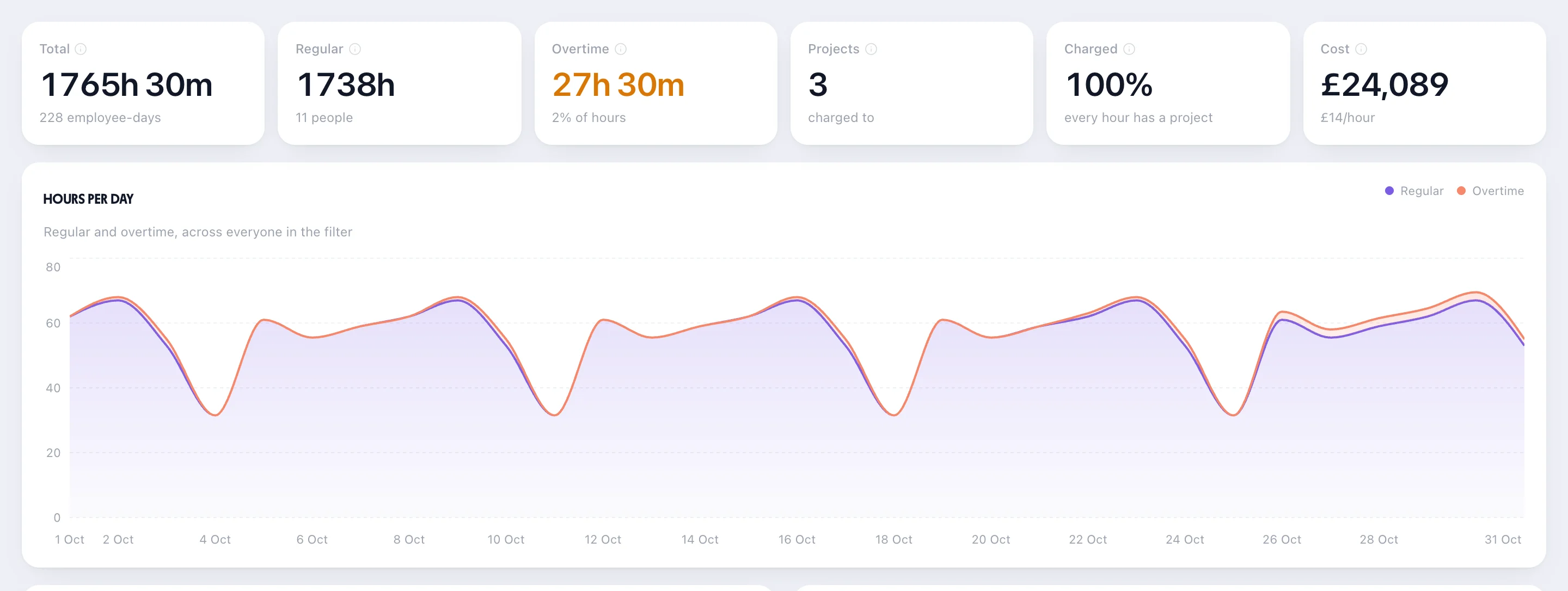
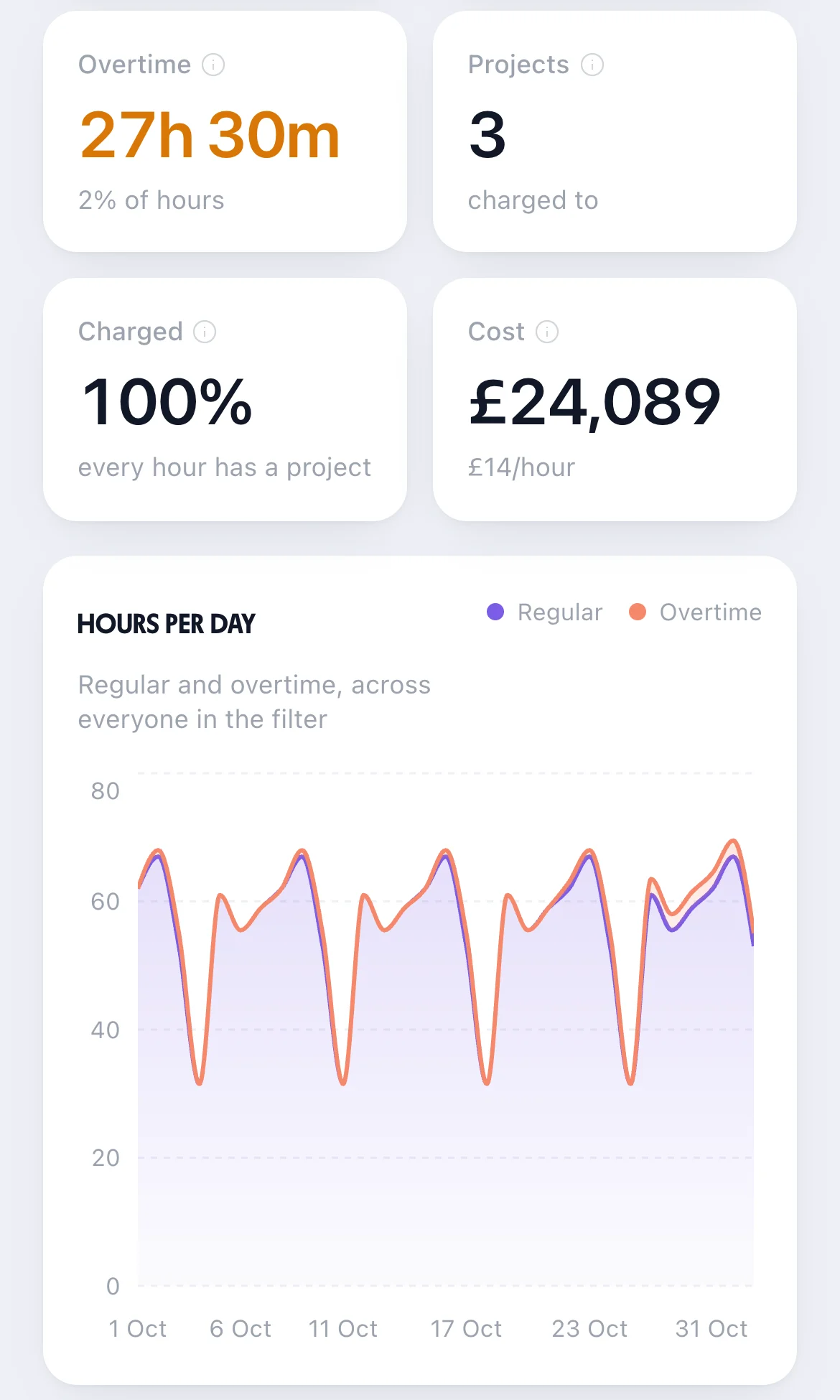
TimeTally's Overview report for October: Total 1765h 30m across 228 employee-days, Regular 1738h for 11 people, Overtime 27h 30m (2% of hours), 3 projects, 100% charged, Cost £24,089 at £14 an hour, and a chart of hours per day across the month with overtime on topThe same Overview report on a phone: Overtime 27h 30m, 3 projects, 100% charged, Cost £24,089, and the hours per day chart for October
The Overview report for a retailer's October: two shops and an online-orders warehouse, 11 people.

What you get

Timesheet reporting software with fifteen reports built in

There's no separate reporting tool to learn. Time Tracking, Time Off and Rota each have a Reports & Analytics button (on the rota it's under More), and each opens five reports about that part of your week.

Timesheet reports

Time Tracking → Reports & Analytics

  1. Overview Total, regular and overtime hours, hours per day, where the hours went and how they split by department, with the cost.
  2. Projects & jobs Hours by project and by client, the people and days on each job, what the time was spent doing and the overtime on each job.
  3. People Each person's days, average day, regular, overtime and total hours, how much reached a project, and their cost.
  4. Locations Hours by location and by project site, and how many clock-ins were inside a geofence or recorded offline.
  5. Clock times Typical start and finish, each person's working window, and every clocked day, flagged for 12h+ on site, no break, no clock-out, a split shift or overnight.


Leave reports

Time Off → Reports & Analytics

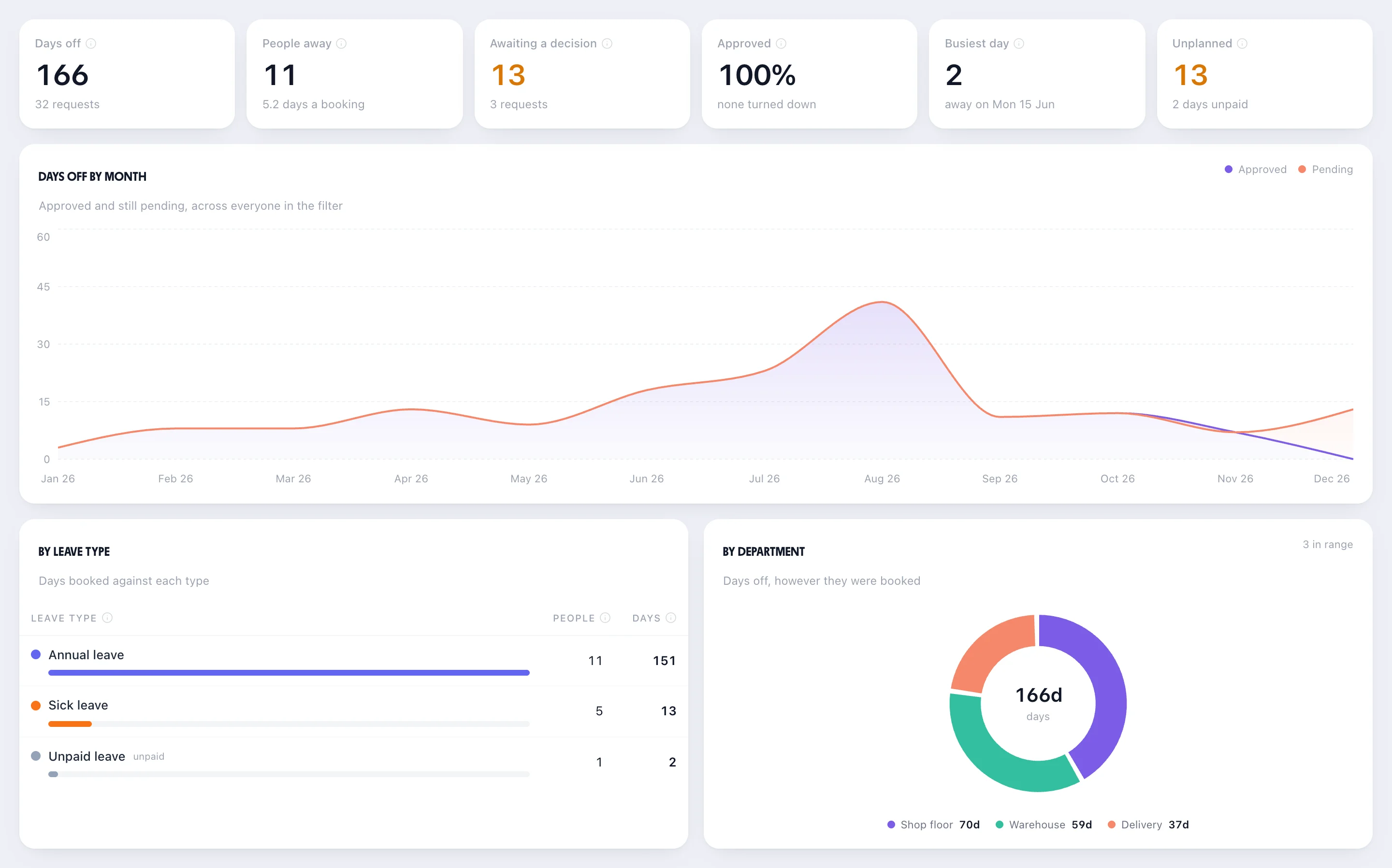
  1. Overview Days off, people away, requests awaiting a decision, the approval rate, the busiest day and unplanned days, by month, leave type and department.
  2. People & balances Each person's days off, requests, longest absence, notice, allowance, used and left; who is over their allowance and who has barely booked any.
  3. Leave types Each type, paid or unpaid, from the allowance or on top of it, with people, requests, average length and days pending.
  4. Patterns & absence Notice and time to decide, days off by weekday with Mondays and Fridays marked, unplanned absence by weekday, and Bradford Factor scores.
  5. Requests Every request: dates, person, leave type, days, status, notice, how long it took to decide, and the reason.

Rota reports

Rota → More → Reports & Analytics

  1. Overview Shifts, hours, people, the busiest day and unpublished shifts; hours per day, across the week and by role; the scheduled cost if you can see pay.
  2. People Each person's shifts, days, average shift, weekend shifts, longest run without a day off, short rests and hours.
  3. Coverage Days scheduled, typical cover, the thinnest day, days with one person on, when shifts start and the most people on at once each day.
  4. Roles & places Shifts, people, days and hours by role, location, schedule and shift template.
  5. Checks Rest under 11 hours between shifts, more than six days in a row, and shifts nobody can see yet.

A staff hours report for every person, in hours and minutes

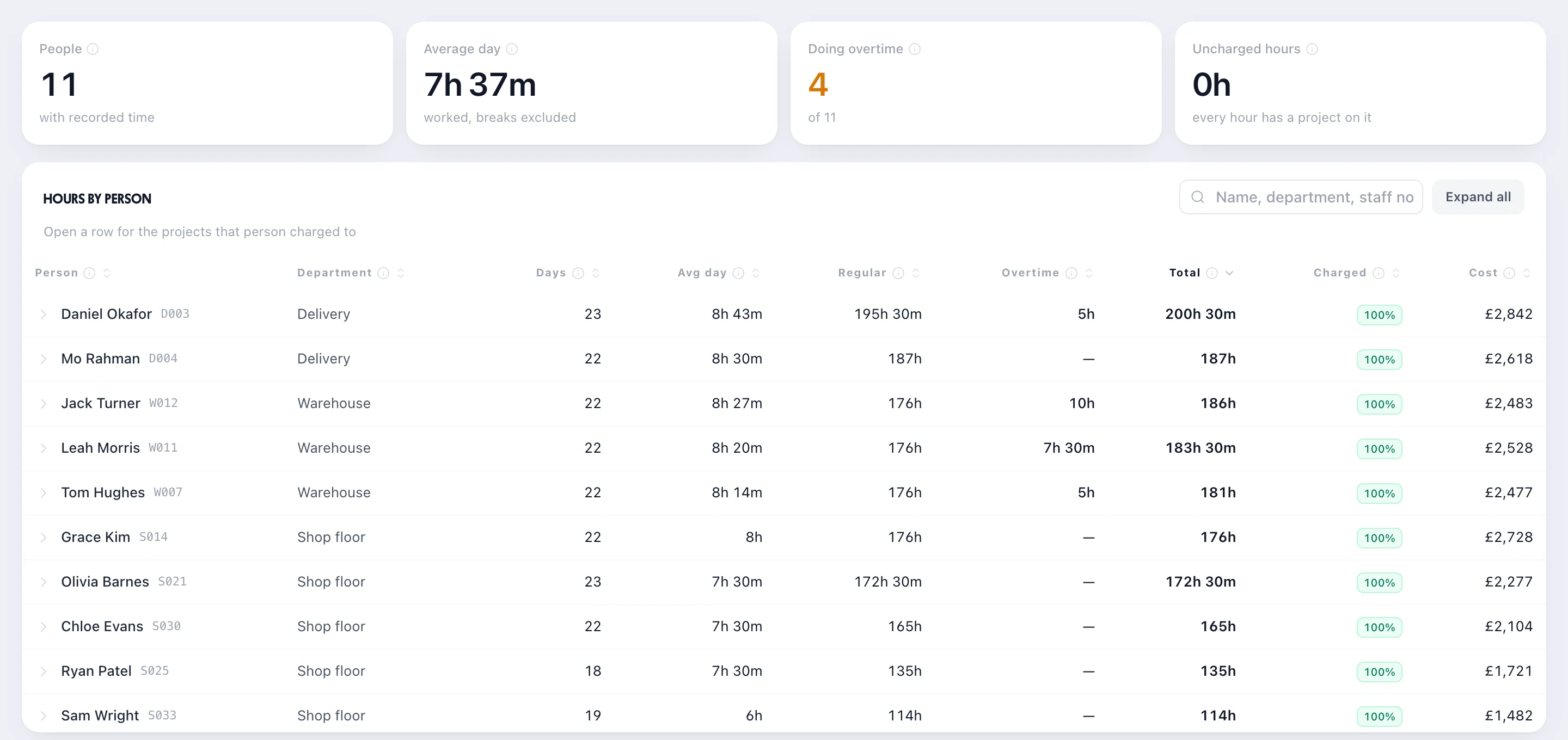
Time reporting starts with who worked what. The People report puts everyone on one table for the dates you pick, built from the timesheets they submitted. Drafts stay out until they're sent, so the figures are the ones you'll approve.

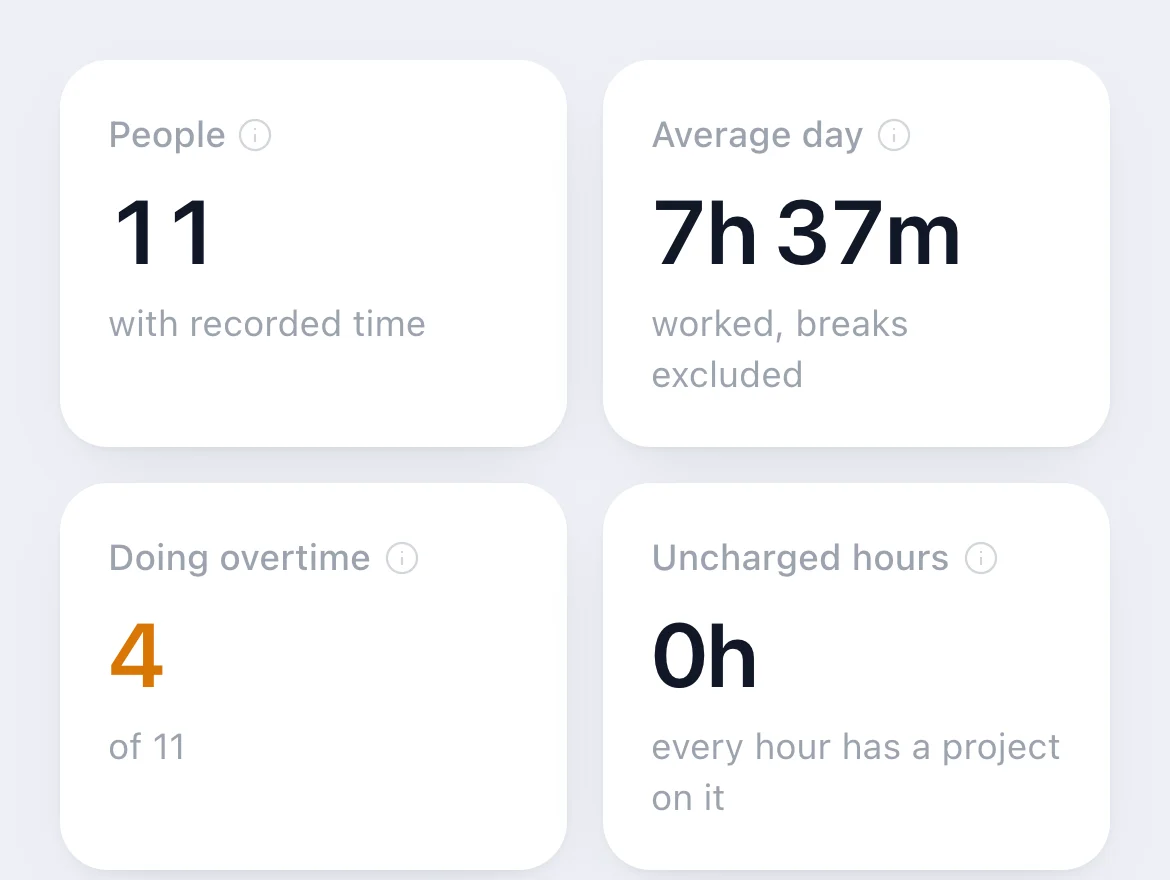
The People report: 11 people with recorded time, an average day of 7h 37m, 4 of 11 doing overtime, 0h uncharged, and a table of hours by person with department, days, average day, regular, overtime, total, charged and cost, led by Daniel Okafor with 200h 30mThe People report's tiles on a phone: 11 people, average day 7h 37m, 4 doing overtime, 0h uncharged
  1. Hours by person One row per person: department, days worked, average day, regular, overtime and total hours. Sort by any column, or search by name, department or staff number.

  2. Doing overtime 4 The tiles count who did overtime and how many hours went on no project, so the exceptions are the first thing you see.

  3. Charged 100% How much of each person's time reached a project. Open a row to see which projects, and the matrix underneath shows who worked on what.

  4. Cost £2,842 Hours times each person's hourly rate, with overtime at the rate you pay it. Managers who aren't allowed to see pay don't get this column.

Need the hours themselves recorded first? See staff timesheet software and time tracking with clock-in.

Time Off → Reports & Analytics

An annual leave report and a sick leave report, side by side

The year's leave at a glance

Days off by month, approved and still waiting, by leave type and by department. People & balances shows each person's allowance, what they've used and what's left, and flags anyone over their allowance or with hardly any booked.

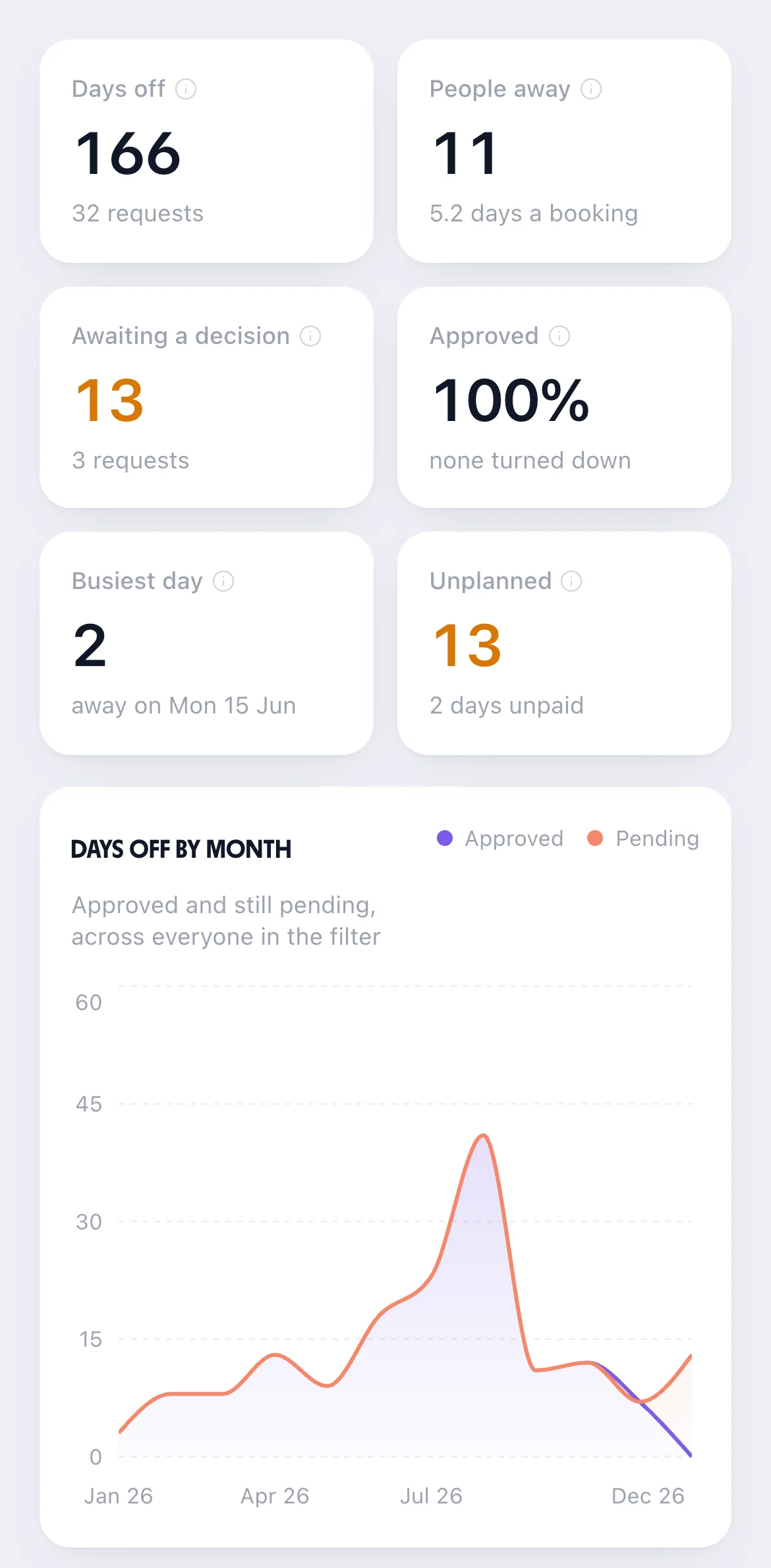
The leave Overview report for 2026: 166 days off from 32 requests, 11 people away, 13 days awaiting a decision, 100% approved, a busiest day of 2 people away, 13 unplanned days, a chart of days off by month peaking in August, and days by leave type and by departmentThe leave Overview report on a phone: 166 days off, 11 people away, 13 awaiting a decision, 100% approved, and days off by month

Sickness, scored and in context

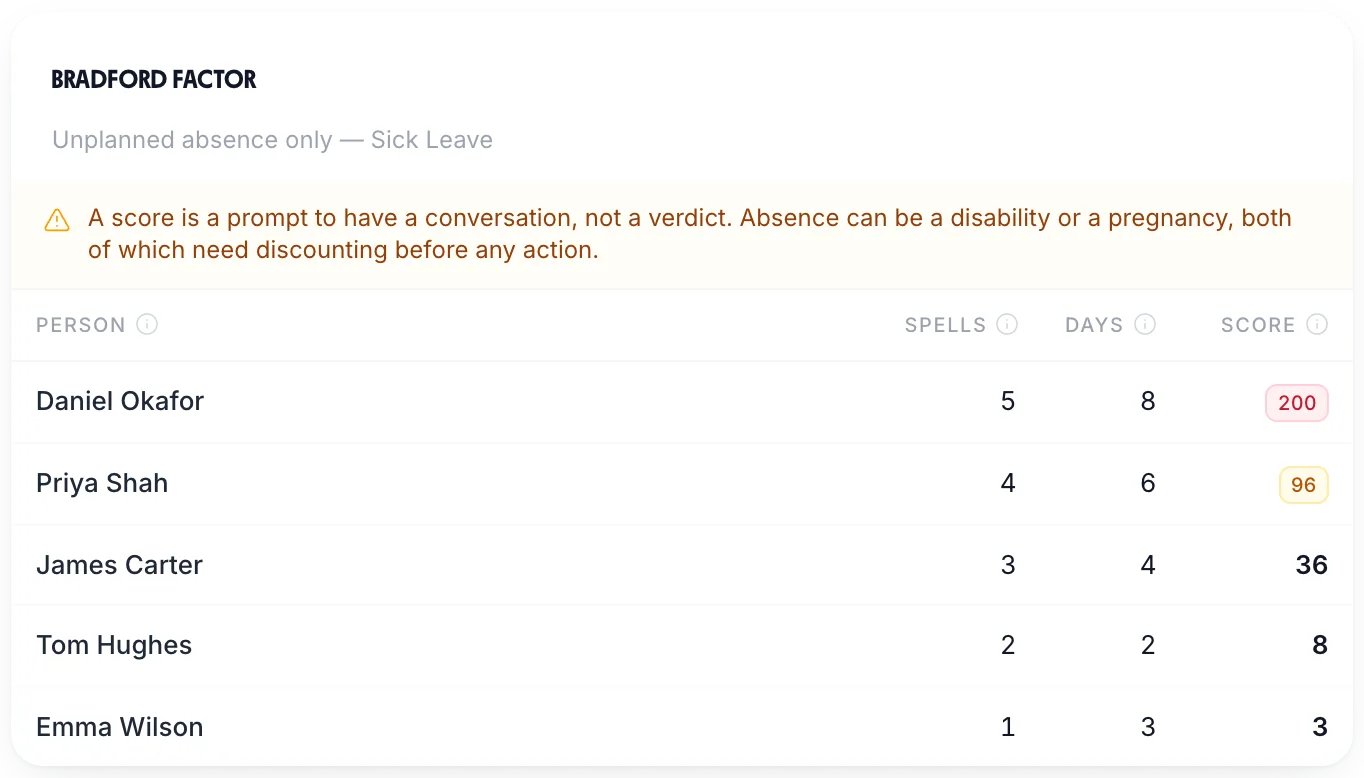
Sick leave counts as unplanned absence when its leave type's name says sick, absence, illness, unwell, compassion or emergency. Patterns & absence shows it by weekday, with Mondays and Fridays marked, and a Bradford Factor score for each person (spells² × days), amber from 50 and red from 200.

The Bradford Factor panel: unplanned absence only, sick leave, a reminder that a score is a prompt to have a conversation, not a verdict, and scores for five people from 200 down to 3

The panel says it on screen: a score is a prompt to have a conversation, not a verdict. Absence linked to a disability or a pregnancy needs discounting first.

More on the leave side: absence management software, the sick leave tracker and the annual leave calendar.

Rota → More → Reports & Analytics

Rota reports that look forward, not back

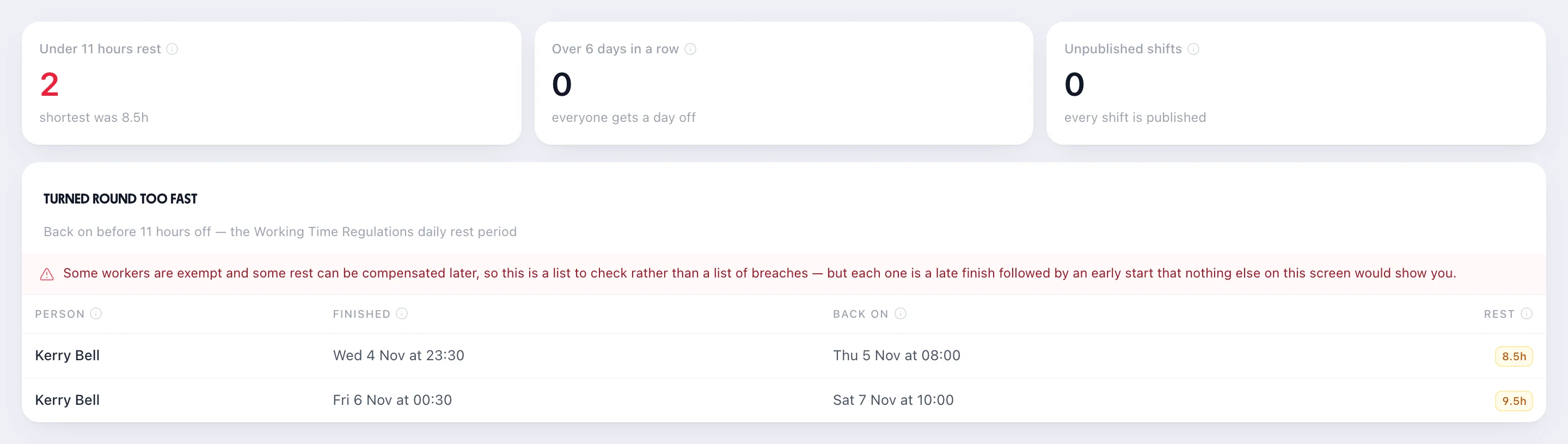
The rota's reports cover the weeks you've planned, published or not. Checks lists anyone back on shift with less than 11 hours' rest, anyone working more than six days in a row and any shift nobody can see yet. It calls them a list to check rather than a list of breaches, because some workers are exempt and some rest can be made up later.

Coverage shows when shifts start and the most people on at once each day; Overview gives the hours, and the scheduled cost if you can see pay. For wage cost before you publish, see rota labour costs.

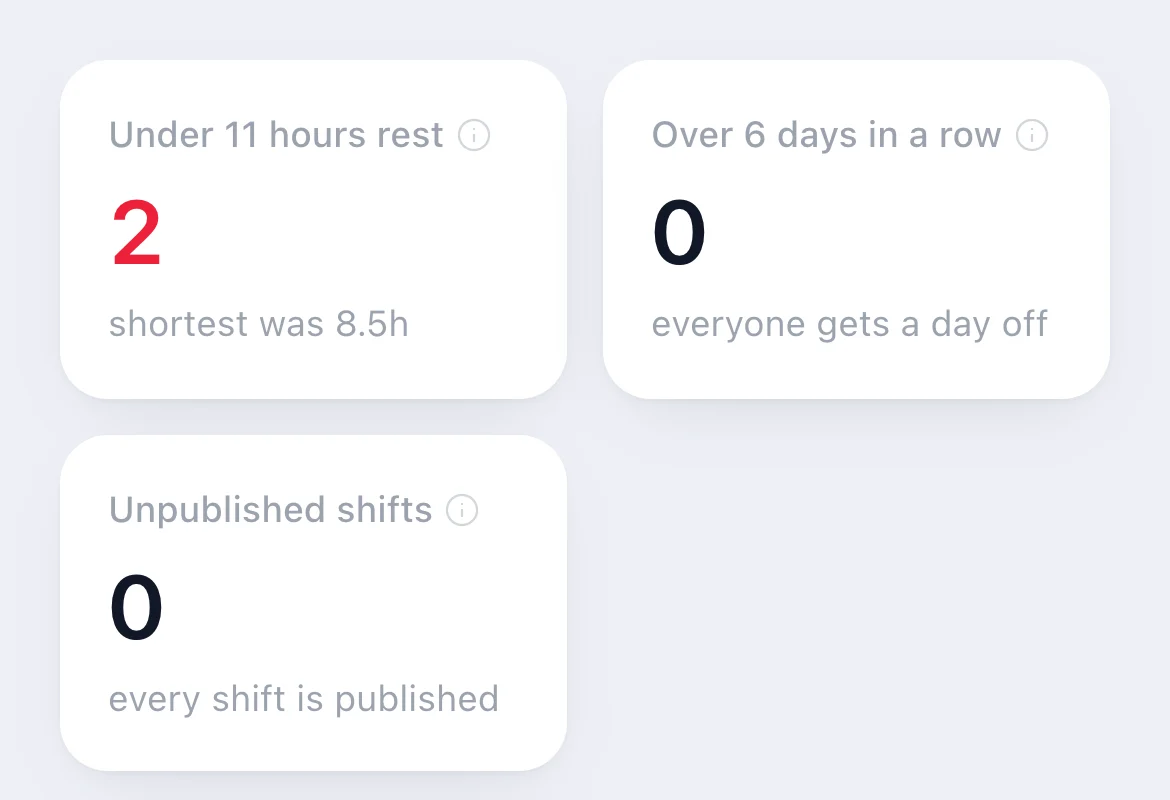
The rota Checks report: 2 people under 11 hours' rest, the shortest 8.5 hours, nobody over 6 days in a row, no unpublished shifts, and a Turned round too fast table showing Kerry Bell finishing at 23:30 on Wednesday and back at 08:00 on ThursdayThe rota Checks report's tiles on a phone: under 11 hours rest 2, shortest 8.5h; over 6 days in a row 0; unpublished shifts 0

Pick the dates, narrow the team, keep pay private

  • This week
  • Last week
  • This month
  • Last month
  • This quarter
  • Last quarter
  • This year
  • Last year
  • All time
  • Custom range

Any dates

Every report starts on a sensible range (this month for hours and the rota, this year for leave) and changes with one tap. Leave adds Next month and Next 3 months; the rota adds Next 2 weeks and Next 4 weeks. All time looks back six months for hours, a year for leave.

Filters that follow the report

Hours by department, project, person or location; leave by department, leave type, person or status; the rota by schedule, role, location, department or person. Exports follow the filter too.

Who sees what

Owners and admins open the reports; employees never do. A manager who looks after some departments sees only their people's hours and leave. Turn off a manager's pay access and every cost figure disappears, in the CSV files as well.

Every report downloads as a CSV

Each report screen has an Export CSV menu with the files below. They hold what you've filtered, open in Excel or Google Sheets with the £ sign intact, and load into Power BI. Detailed lines is the full one: a row per project line with date, person, staff number, department, project, job ID, site, activity, regular and overtime hours, clock in and out, break and the timesheet's status.

Payroll is its own export. Approved timesheets and leave go from Time Tracking's Export to Xero or QuickBooks as one journal, or to a CSV file with columns such as Regular Hours, Overtime Hours, Gross Pay, Approved By and Approved On. See timesheet payroll software.

Time Tracking

  • Detailed lines
  • Person × project
  • Projects summary
  • People summary
  • Locations summary
  • Clocked days
  • Working patterns

Time Off

  • Every day off
  • Requests
  • People and balances
  • Leave types
  • Daily coverage

Rota

  • Every shift
  • People summary
  • Daily coverage
  • Roles and locations
  • Rest breaches

Where TimeTally's reports stop

Fixed reports, filters and CSV files cover most small teams. If you need any of these, better to know before your trial.

  • No scheduled or emailed reports You open a report when you want it; nothing arrives in your inbox on a Monday.
  • No custom report builder The fifteen reports are set. For your own layout, export a CSV and build it in Excel or Power BI.
  • No PDF or Excel files from the reports Reports export as CSV, which Excel opens. The rota can be printed from its own menu.
  • No this-month-against-last-month view Pick one range at a time; export two CSVs to compare them.
  • No live who's-in-now report The manager's calendar marks who has clocked in today; the reports cover days already recorded.

Loved by UK small businesses

Real reviews from TimeTally customers

TimeTally has been excellent for our business… The system has saved us a significant amount of administration time.
Jordan IngoeCLI Manchester
Setup was dead simple and the team just got on with it. Got everyone up and running in an afternoon with no help needed. Does everything we need for timesheets and holidays without the faff.
S.M.
Has completely changed how I handle timesheets. Used to dread it every week — now it takes me minutes. Really easy to get around and my staff picked it up straight away.
J.T.
Started using it just for rotas but quickly realised it does loads more. The timesheets and leave management are great, and it even handles TOIL and overtime which I wasn't expecting. Use it for everything now.
R.K.

Reports included at £3 per employee a month

No reporting add-on and no higher plan. The same £3 covers timesheets, clock-in, leave, the rota and every report on this page.

  • 14-day free trial, no card needed
  • No setup fee, billed monthly, cancel any time
  • GPS clock-in optional at £1 per employee

10 staff£30a month

20 staff£60a month

40 staff£120a month

Start your free trial

Frequently Asked Questions

What owners and managers ask about TimeTally's reports before they try it.

Book a Demo

Still have a question? See all FAQs

What is timesheet reporting software?

Timesheet reporting software turns the hours your team records into reports: how many hours were worked, by whom, on what, how much was overtime and what it cost. In TimeTally the reports come from the timesheets staff submit (typed in or clocked on their phone), so there's nothing to copy into a spreadsheet first. Leave and rota reports sit beside them, and every report downloads as a CSV.

Which timesheet reports does TimeTally have?

Five, under Time Tracking → Reports & Analytics: Overview (total, regular and overtime hours, hours per day, by project and department, and cost), Projects & jobs (hours by project and client), People (hours by person), Locations (hours by place and geofence clock-ins) and Clock times (start and finish times, with days flagged for no break or no clock-out). Pick any date range and filter by department, project, person or location.

Can I export the reports to Excel?

Yes, as CSV files, which open in Excel, Google Sheets or Power BI. Each report screen has an Export CSV menu: seven files for timesheets (from Detailed lines, one row per project line, to a People summary), five for leave and five for the rota. They export what you've filtered, and the £ sign shows correctly in Excel. Payroll has its own export to Xero, QuickBooks or a CSV file.

Can TimeTally email me a report every week?

No. There are no scheduled or emailed reports and no custom report builder. You open the report screen, pick the dates (This week, Last month, a custom range and so on) and export a CSV if you need it somewhere else. Separately, TimeTally can email staff who haven't sent their timesheet, if you turn reminders on.

Does it have an annual leave report and a sick leave report?

Yes. Time Off → Reports & Analytics shows days off by month, leave type and department, each person's allowance, used and left, and every request. Sick leave is counted as unplanned absence when its leave type's name says sick, absence, illness, unwell, compassion or emergency, and the Patterns & absence tab shows unplanned absence by weekday and a Bradford Factor score for each person.

Who can see the reports, and can I hide pay?

Owners and admins open them; employees never see them. A manager who looks after only some departments or people sees only their people's timesheets and leave. If a manager isn't allowed to see pay, every Cost tile and column disappears, and their CSV files leave out the hourly rate and cost.

How much does TimeTally cost?

£3 per employee a month, and the reports are included: there's no reporting add-on. A team of 20 is £60 a month for timesheets, leave, the rota and every report. GPS clock-in is the one optional extra, at £1 per employee a month. There's a 14-day free trial and no card is needed.

See last month's hours as a report

Try TimeTally free for 14 days. Your team records its hours, you approve them, and the reports fill in as you go: hours, overtime, cost, leave and the rota. It's £3 per employee a month, with time tracking and leave included.

14-day free trial · No credit card needed · Cancel anytime