

For restaurants, cafés, cleaning and care teams

Split Shift Scheduling for UK Teams

Start your free trialPut this week's lunch and dinner splits on your team's phones tonight. 14 days free, no card, then £3 per employee a month.14 days free · no card · £3 per employee

TimeTally does split shift scheduling the simple way: one shift with two time slots. The rota shows both parts and adds up the hours, staff see both on their phone, and the timesheet records the evening as Shift 2 on the same day. The gap in the middle is never paid by mistake.

Used by hundreds of UK businessesBook a Demo

Mon 9 Nov · Sofia, front of house9h paid

11:00–15:00Lunch · 4hGapnot paid17:30–22:30Dinner · 5h

4h + 5h = 9h paid · 11h 30m from first start to last finish

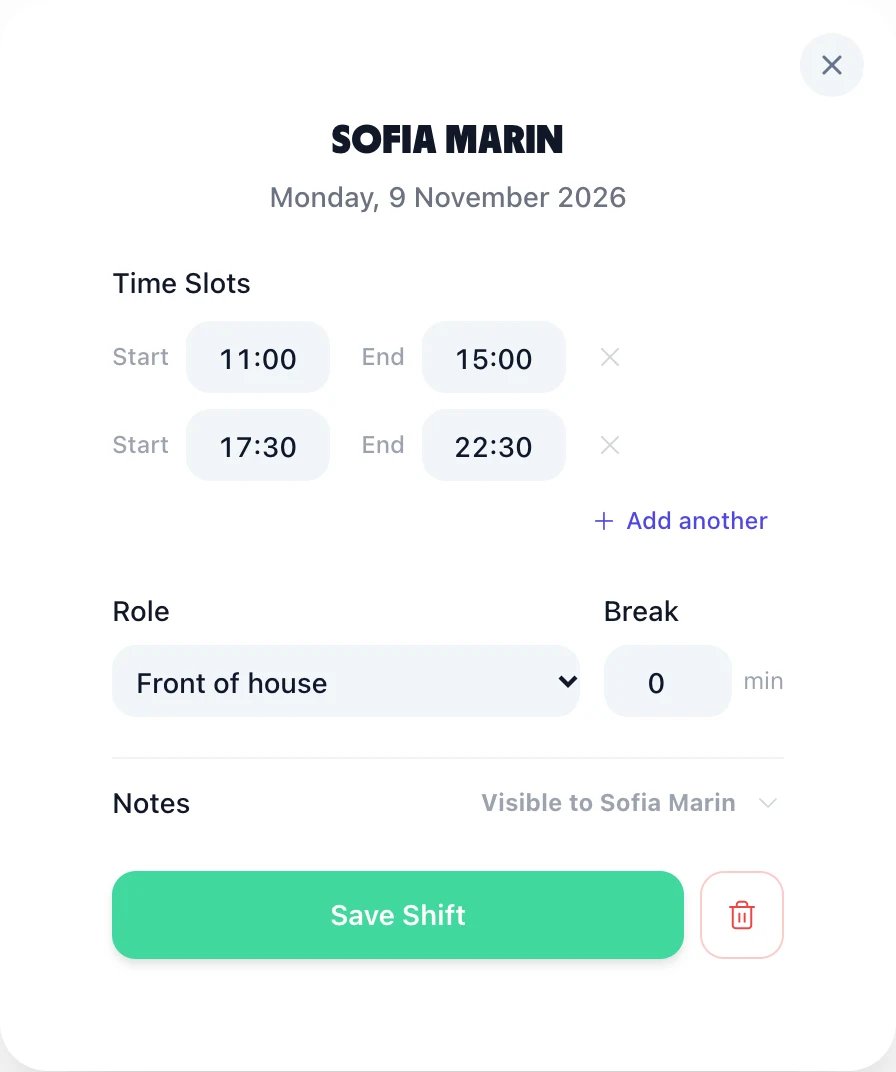
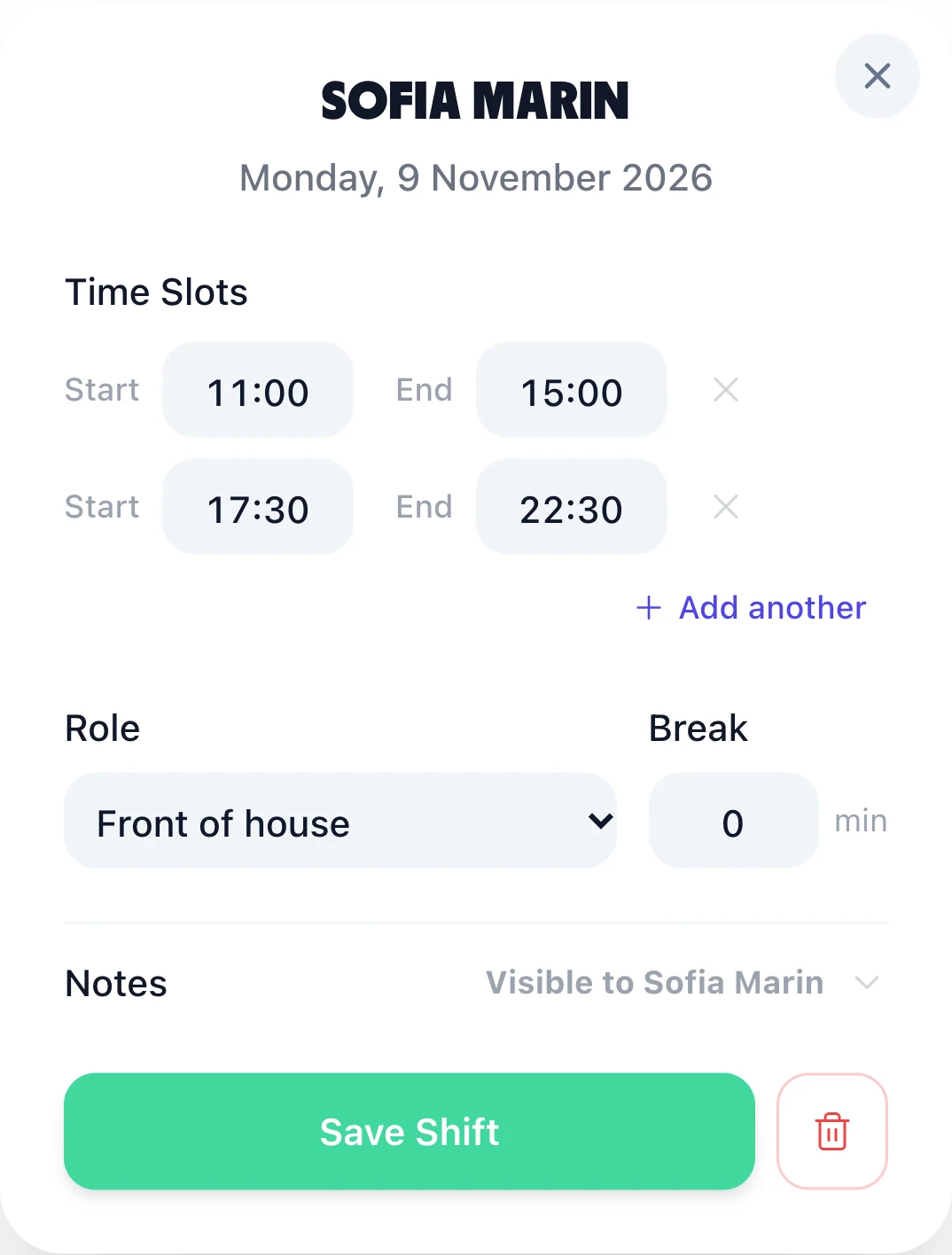
TimeTally's shift form for Sofia Marin on Monday 9 November 2026: two time slots, 11:00 to 15:00 and 17:30 to 22:30, Add another, role Front of house and a break of 0 minutes

Split shift scheduling on the rota

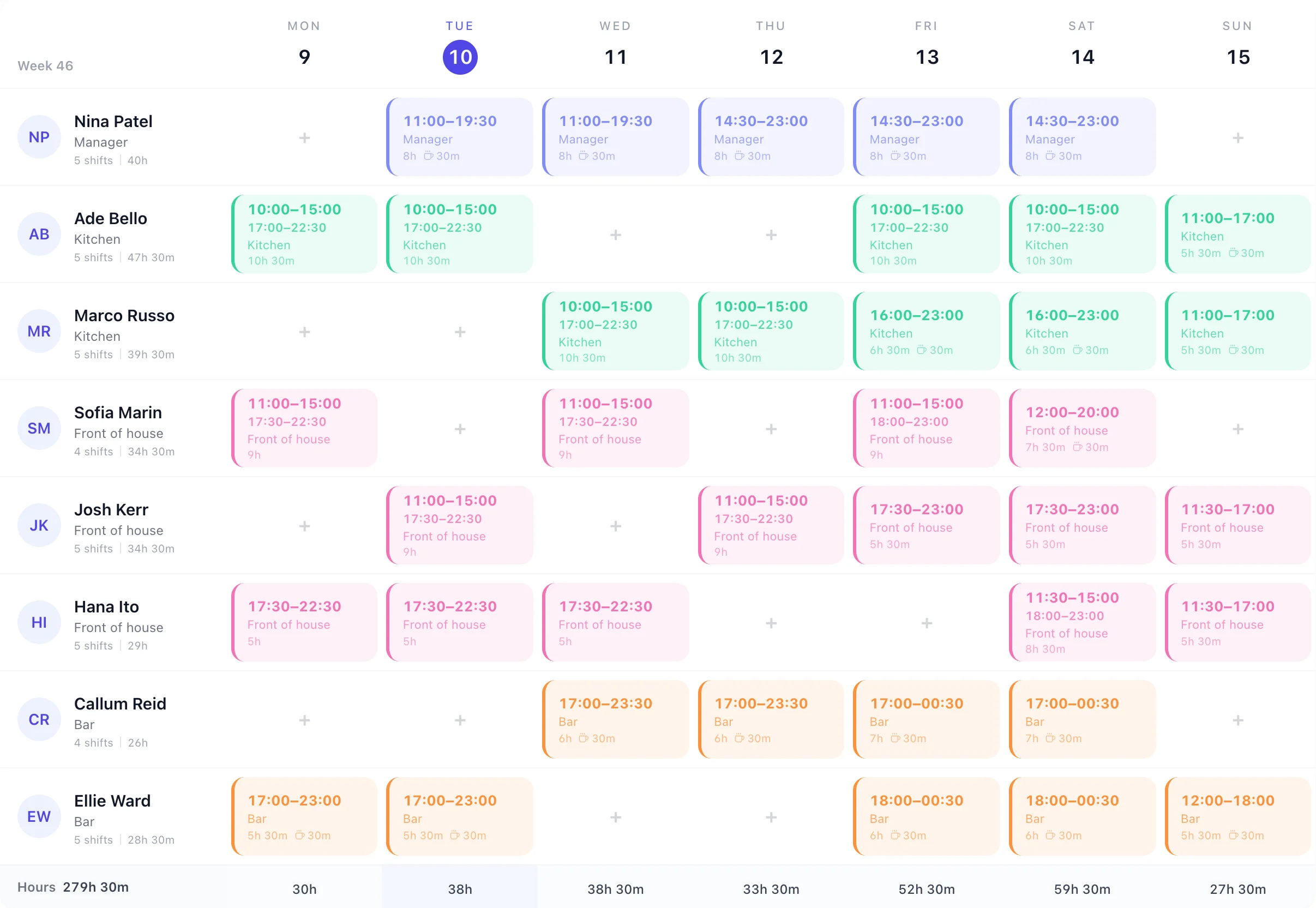
This is a restaurant's week in TimeTally. The kitchen and front of house work lunch and dinner with the afternoon off; the bar works evenings. A split shift shows both parts on one card, and the hours under it are the two parts added together, so a person's week total is the time they'll actually work.

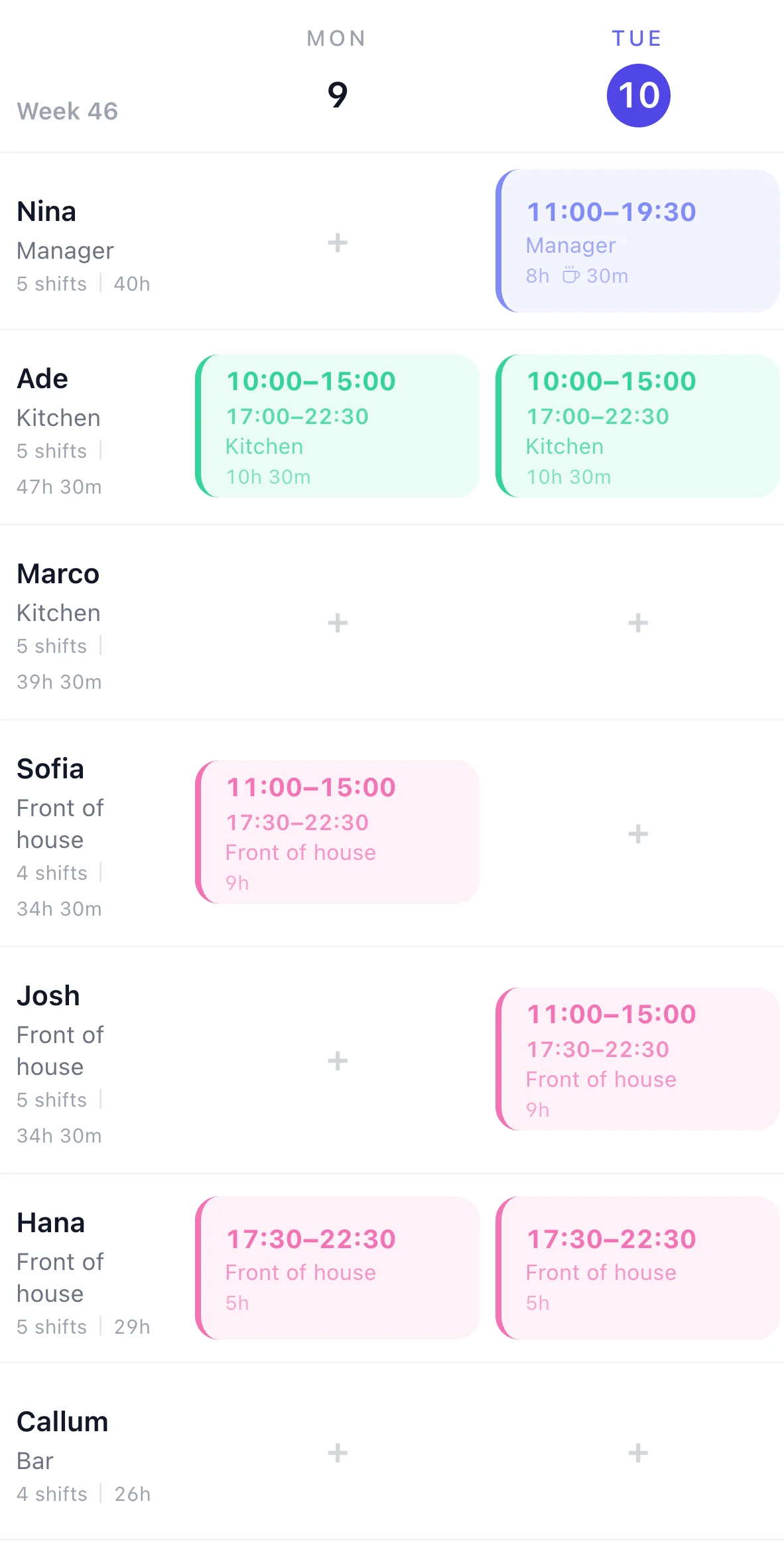
A restaurant's rota for week 46 in TimeTally: chefs Ade Bello and Marco Russo on 10:00 to 15:00 and 17:00 to 22:30 split shifts of 10h 30m, front of house Sofia Marin and Josh Kerr on 11:00 to 15:00 and 17:30 to 22:30 splits of 9h, Hana Ito on evenings, bar staff Callum Reid and Ellie Ward until 00:30 at the weekend, manager Nina Patel, and 279h 30m in the Hours rowThe same rota on a phone, Monday and Tuesday: Ade's 10:00 to 15:00 and 17:00 to 22:30 split on both days, Sofia's split on Monday, Josh's on Tuesday, Hana on evenings
The shift form with two time slots, 11:00 to 15:00 and 17:30 to 22:30, and Add another under themThe shift form on a phone with the same two time slots

Add a split shift in three steps

  1. Open the day. Click the person's day on the rota and type the first part, such as 11:00 to 15:00.
  2. Press Add another. Type the second part, 17:30 to 22:30. Add a third if the day needs one.
  3. Pick the role and save. The break box is one for the whole shift; the role's standard break fills it in and you can change it.

Using the same split every week? Save it as a shift template with both time slots, then build your usual week once and copy it forward for up to 13 weeks. More on building the week in the rota planner.

On the day

A split shift timesheet that adds up

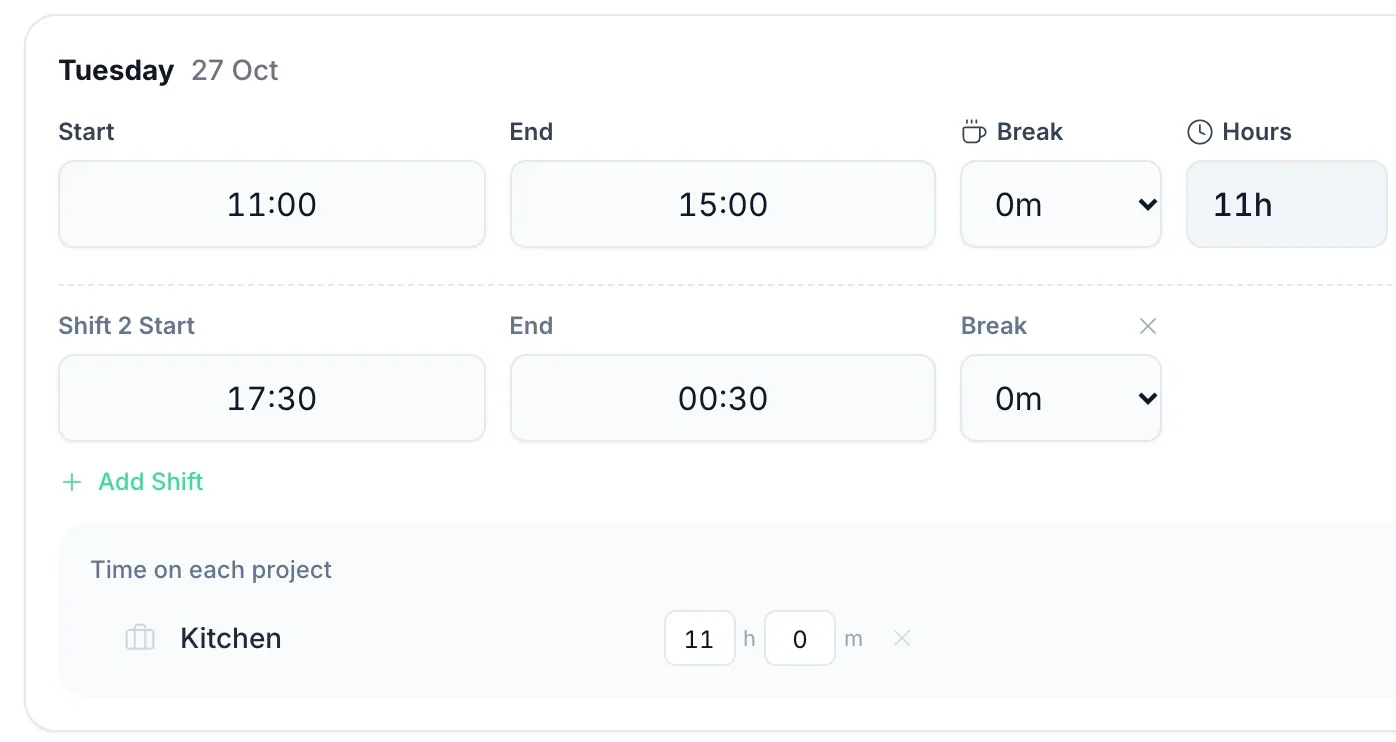
Split shifts go wrong on paper timesheets: two lines for one day, or one line from 11:00 to 22:30 that pays the afternoon off. In TimeTally the evening is Shift 2 on the same day.

  • + Add Shift under the day. Up to three shifts a day, each with its own start, end and break.
  • Late finishes are fine. Shift 2 can run from 17:30 to 00:30 and the day still counts 11h.
  • Overlaps are caught. Type a second shift that crosses the first and it says “Overlaps with Shift 1” and won't submit until it's fixed.
  • Clocking in works the same way. Clock out for the gap, clock in again for the evening, and the app shows “2nd shift today” with the hours already logged.
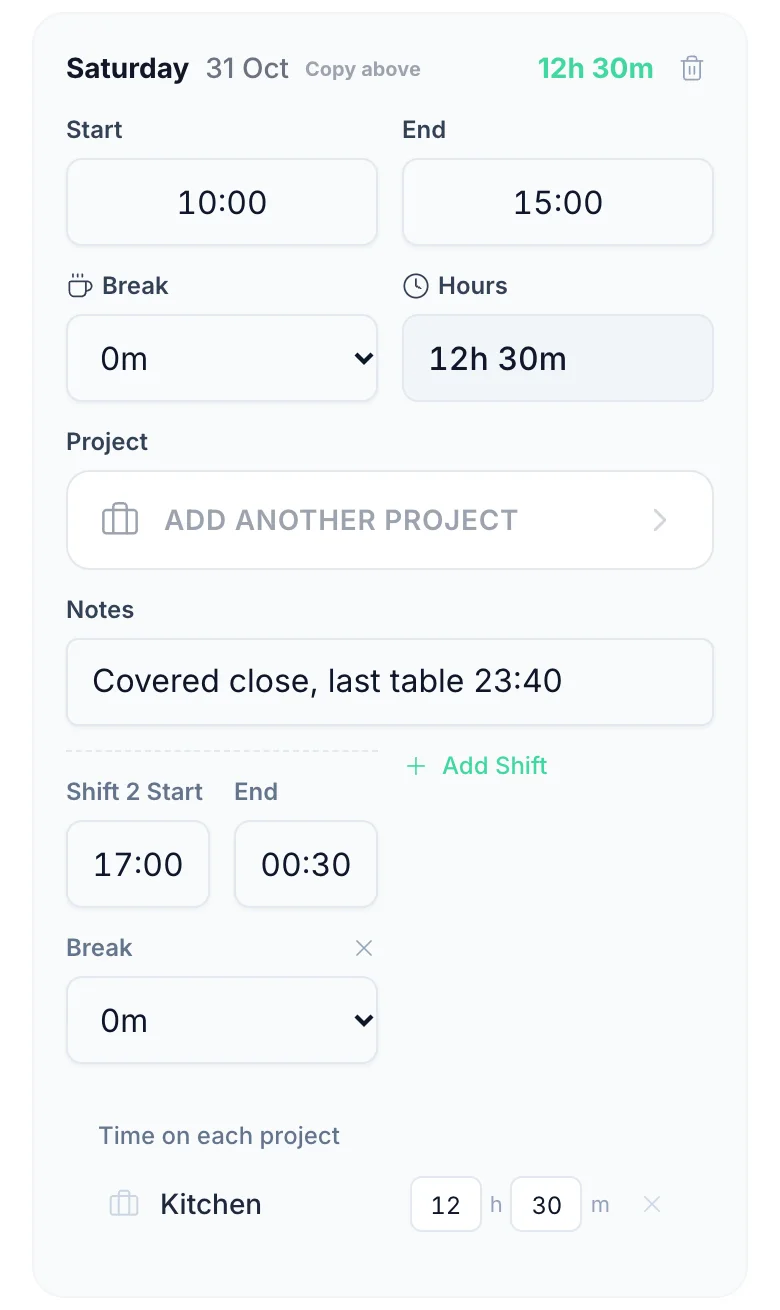
A timesheet day in TimeTally: Tuesday 27 October, 11:00 to 15:00, then Shift 2 from 17:30 to 00:30, both with a 0m break, 11h in Hours, and + Add Shift under themThe timesheet on a phone: Saturday 31 October, 10:00 to 15:00, Shift 2 from 17:00 to 00:30, 12h 30m, with the note Covered close, last table 23:40
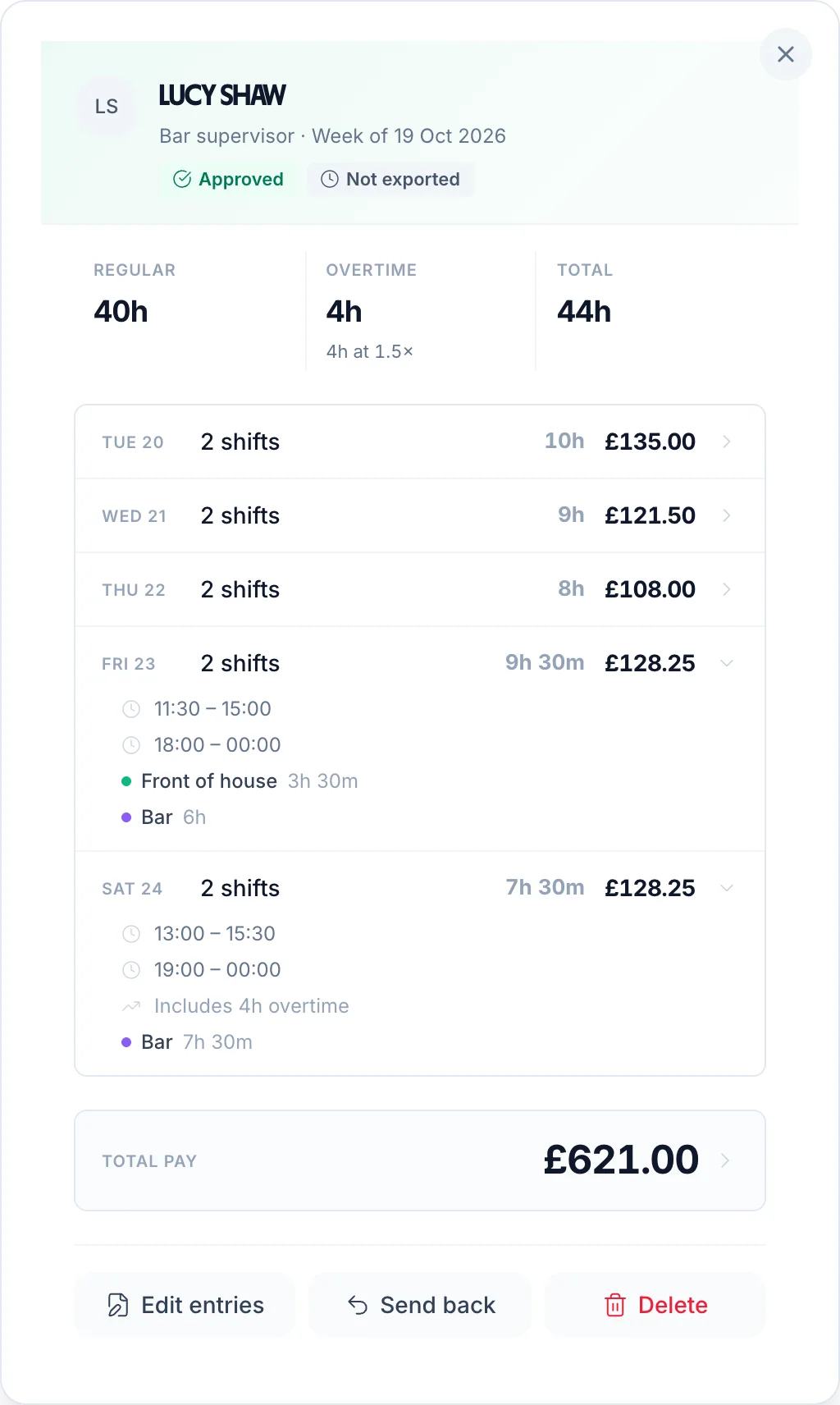
An approved timesheet for Lucy Shaw, bar supervisor, week of 19 October 2026: five days of 2 shifts each, Friday 11:30 to 15:00 and 18:00 to 00:00, Saturday 13:00 to 15:30 and 19:00 to 00:00 including 4h overtime, 40h regular, 4h overtime at 1.5x, 44h in total and £621.00 total pay

Pay the hours, not the afternoon off

When you approve the week, each day shows its shifts and what they pay. Here a bar supervisor worked five split days and went over 40 hours, so 4 hours are paid at 1.5×.

The day's hours
Every shift on the day added together, each less its own break. The gap never counts.
Overtime
Your daily or weekly overtime rules see the whole day, not just the first part, and the overtime is approved with the timesheet.
Payroll
Export approved timesheets to Xero or QuickBooks as a payroll journal, or as a CSV file for your payroll.
No split allowance
TimeTally doesn't add a premium for working a split. If you pay one, add it in payroll.

More on overtime: overtime tracking software.

See every split day, and how long it really was

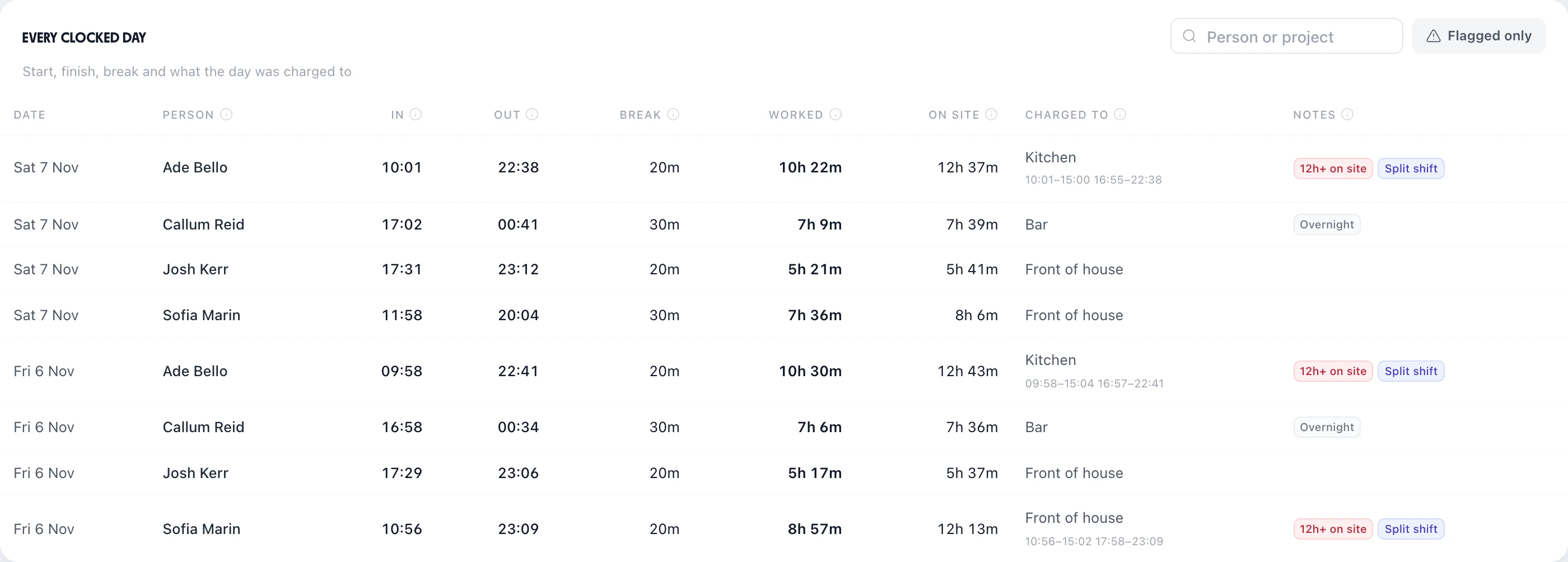
Reports & Analytics shows when people actually started and finished. A day clocked in two parts is marked Split shift, both parts are listed under it, and On site runs from the first clock-in to the last clock-out, so a long day is plain to see.

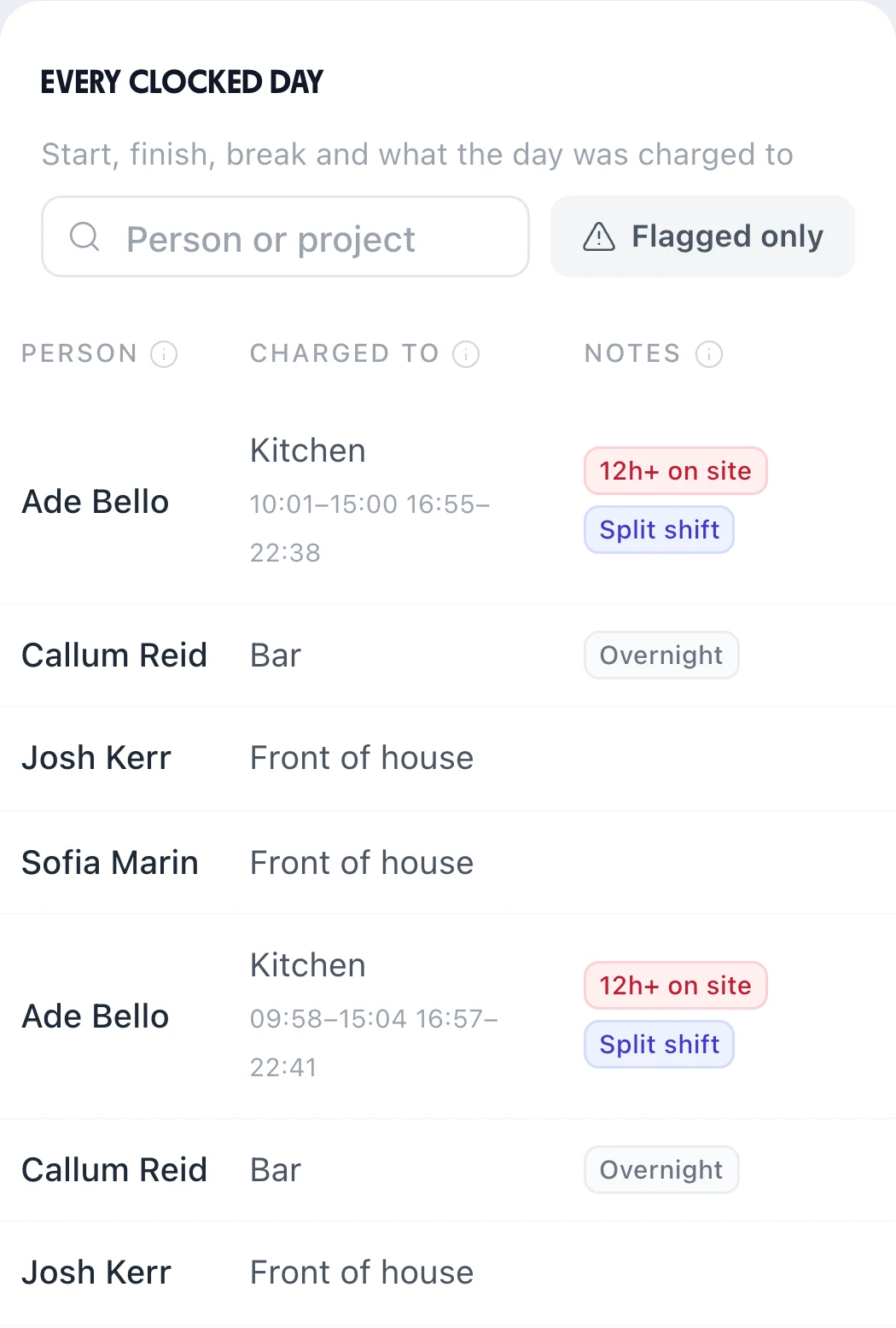
Reports and Analytics, Clock times, Every clocked day: Ade Bello in the kitchen on Saturday 7 November from 10:01 to 22:38, 10h 22m worked and 12h 37m on site, his two parts 10:01 to 15:00 and 16:55 to 22:38 listed, flagged 12h+ on site and Split shift; Callum Reid at the bar until 00:41 flagged OvernightThe same report on a phone: Ade Bello's two split days with both parts listed and the Split shift flag, Callum Reid's bar shifts flagged Overnight
Split shift

Any day with more than one clocked session, so you can share the splits out fairly.

12h+ on site

The gap counts towards the time someone is tied up, even though it isn't paid.

Under 11 hours rest

The rota's checks list anyone back on before 11 hours off, measured from the end of the evening part.

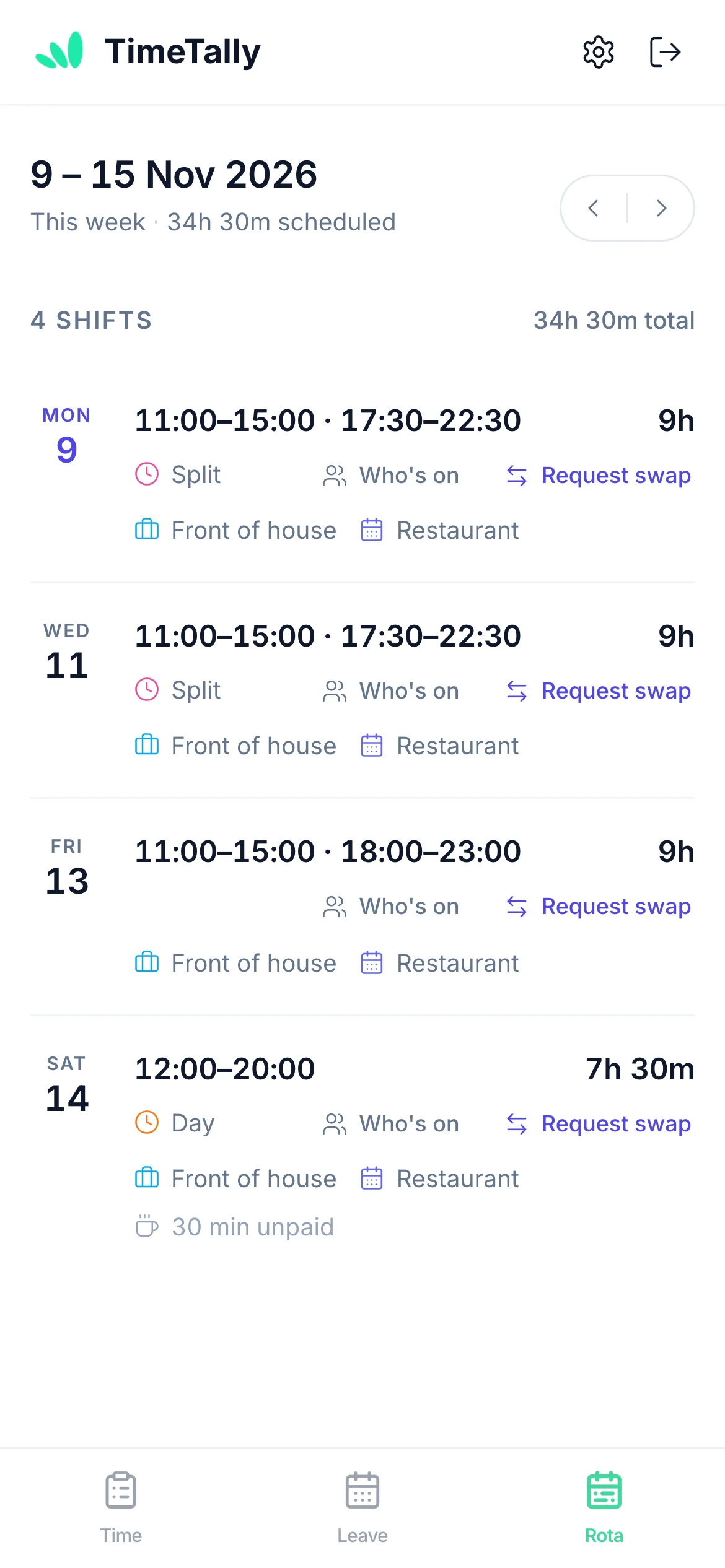
The staff app's Rota tab for 9 to 15 November 2026: Monday and Wednesday 11:00–15:00 · 17:30–22:30, 9h, Friday 11:00–15:00 · 18:00–23:00, Saturday 12:00 to 20:00 with a 30 min unpaid break, 34h 30m scheduled, with Who's on and Request swap on each shift

Both parts of the day on their phone

Once you publish the week, staff open the free TimeTally app on iPhone or Android, or a browser, and see each split on one line: 11:00–15:00 · 17:30–22:30, with the hours for the day.

  • The week's total at the top, so nobody has to add up two parts in their head.
  • Request swap swaps the whole shift, both parts, with a colleague who accepts; then you approve it.
  • An email when the week is published, if you send it. There are no push notifications.

See the staff rota app and shift swaps.

Who runs a split shift rota

Any team whose work comes in two rushes. The same rota does all of these; the pages below show each one's week.

  • 11:00–15:00 · 17:30–22:30

    Restaurants and pubs

    Lunch, a gap in the afternoon, then dinner service until close.

    Pubs and restaurants
  • 07:30–10:30 · 12:00–15:00

    Cafés

    The breakfast rush and the lunch rush, with the quiet hour between them off.

    Café rota software
  • 05:30–08:30 · 17:30–20:30

    Office cleaning

    Before the offices open and after they close, often at two different client sites.

    Cleaning rota software
  • 05:00–09:00 · 15:00–18:00

    Dairy farms

    Morning milking and afternoon milking, with the middle of the day free.

    Farm staff rota

Running a care team with a morning and an evening shift for the same person? See care home rota software.

Loved by UK small businesses

Real reviews from TimeTally customers

TimeTally has been excellent for our business… The system has saved us a significant amount of administration time.
Jordan IngoeCLI Manchester
Setup was dead simple and the team just got on with it. Got everyone up and running in an afternoon with no help needed. Does everything we need for timesheets and holidays without the faff.
S.M.
Has completely changed how I handle timesheets. Used to dread it every week — now it takes me minutes. Really easy to get around and my staff picked it up straight away.
J.T.
Started using it just for rotas but quickly realised it does loads more. The timesheets and leave management are great, and it even handles TOIL and overtime which I wasn't expecting. Use it for everything now.
R.K.

What TimeTally leaves to you

It plans, records and pays split shifts. The rules about them are still yours to decide, and it's better to know that before your trial.

For the law (the 11 hours' rest, whether the gap is working time, and the 20-minute break), read our guide to split shifts and UK law, and rest between shifts.

  • No split allowance It won't add a premium for a split day. Pay one through your payroll if your contracts say so.
  • No rest block It won't stop you rota-ing a 23:00 finish before an 08:00 start. The rota's checks list it afterwards.
  • No gap or span rules There's no minimum gap or longest day to set. You choose the times.
  • No automatic breaks Breaks are what's typed on the shift or the timesheet, or started and ended on the clock-in screen.

Split shifts come with the rota

£3 per employee a month for the rota, timesheets, clocking in and holiday together. No setup fee, no contract.

  • 14-day free trial, no card needed
  • Free iPhone and Android apps for the team
  • Billed monthly, cancel any time

A restaurant of eight

  1. Nina
  2. Ade
  3. Marco
  4. Sofia
  5. Josh
  6. Hana
  7. Callum
  8. Ellie

8 people × £3£24 a month

Start your free trial

Split shift scheduling: questions managers ask

What managers ask before they move split shifts off the paper rota.

Book a Demo

Still have a question? See all FAQs

What is split shift scheduling?

Split shift scheduling means planning a working day in two (or more) parts with unpaid time off in between, such as 11:00–15:00 and 17:30–22:30. In TimeTally a split shift is one shift with two time slots: the rota shows both parts on the person's row and counts the hours of both, staff see both on their phone, and the timesheet records the second part as Shift 2 on the same day. It's £3 per employee a month.

How do I put a split shift on the rota?

Click the person's day on the rota to open the shift form, type the first part's start and end, press Add another and type the second part. Pick their role and save. If you use the same split often, save it as a shift template with both time slots, and copy your week forward for up to 13 weeks.

Is the gap between the two parts paid?

Not in TimeTally: hours are worked out from the time slots and the timesheet's shifts, so the gap is never counted. Whether the gap has to be paid is a legal question. It doesn't, if the time is genuinely the worker's own, but read our guide to split shifts and UK law for when it might count as working time.

Can the second part of a split shift end after midnight?

Yes. On the timesheet, Shift 2 can run from 17:30 to 00:30 and the day's hours count it correctly. On the rota a shift can end after midnight too, such as a bar shift from 17:00 to 00:30.

Does TimeTally pay a split shift allowance?

No. There's no split shift allowance or premium in TimeTally, and no UK law requires one. It pays the hours worked at each person's rate, with overtime if you've set it up. If you pay staff something extra for working a split, add it in your payroll.

How is overtime worked out on a split shift day?

On the whole day. Every shift on the day is added together, each less its own break, so a 4-hour lunch and a 5-hour evening are a 9-hour day. Daily and weekly overtime rules count that total, and the overtime is approved with the timesheet.

Will it stop me rota-ing someone without enough rest?

No, it won't stop you. Reports & Analytics lists everyone back on before they've had 11 hours off, measured from the end of the evening part to the next start, so you can see who to move. Deciding is still your job: the rule itself is in our guide to rest between shifts.

How much does split shift scheduling cost?

Split shifts are part of the rota, not an add-on. TimeTally is £3 per employee a month for the rota, timesheets, clocking in and holiday together, so a restaurant of eight is £24 a month. No setup fee, no contract, and a 14-day free trial with no card.

Get this week's splits out tonight

Try TimeTally free for 14 days. Put your lunch and dinner splits on the rota, publish them to your team's phones, and pay the hours they work, not the gap. It's the same rota planner hundreds of UK businesses use, at £3 per employee a month.

14-day free trial · No credit card needed · Cancel anytime