Track employee hours in real-time with one-tap mobile clock-in, automatic calculations, and instant syncing across all devices. UK employers must keep adequate records of hours worked — TimeTally makes this effortless.
“TimeTally has been excellent for our business. The app is simple to use, reliable, and makes managing holidays, absences, and staff records straightforward. The system has saved us a significant amount of administration time and gives both managers and employees clear visibility of leave balances and requests. Highly recommended for any business looking for an easy-to-use workforce management solution.”

Jordan Ingoe, CLI Manchester
Click any feature to learn more.

14-day free trial · No credit card needed
60-second submission
Employees log a full week in under a minute on mobile — no forms, no paperwork
Automatic calculations
Total hours, overtime, and breaks calculated instantly — no manual maths or spreadsheets
Complete audit trail
Every entry timestamped and tracked — HMRC-compliant records under the Working Time Regulations
All the tools UK businesses need to track hours accurately and meet employer obligations under the Working Time Directive
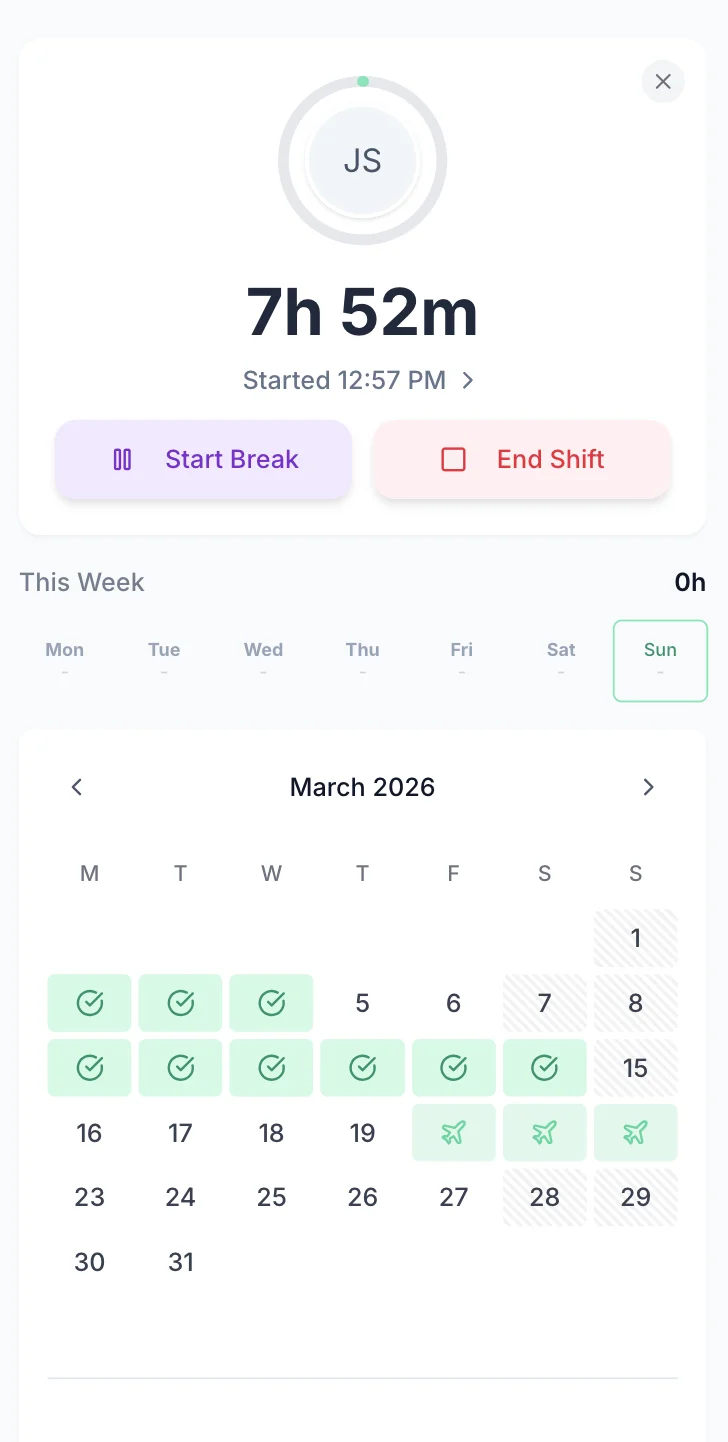
Employees open the clock-in app and tap Start Shift. The timer runs in the background, tracking hours, breaks, and overtime automatically. No forms to fill in, no end-of-week guessing. When the shift ends, tap End Shift and the hours are instantly logged.
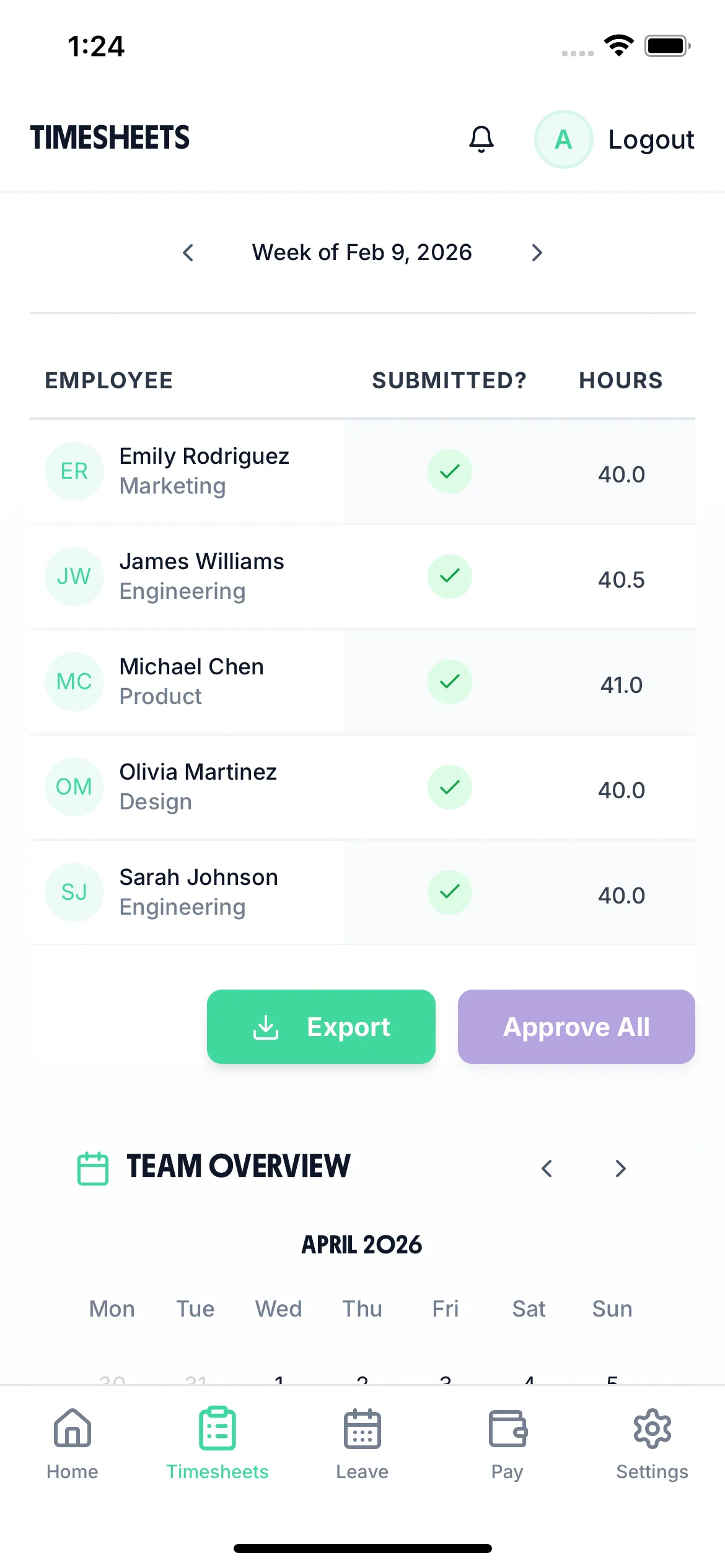
Managers get instant visibility into who has submitted hours, who still needs to, and total hours worked per employee. No more chasing time tracking or waiting until Friday to find out who worked what. Approve time tracking with one click.
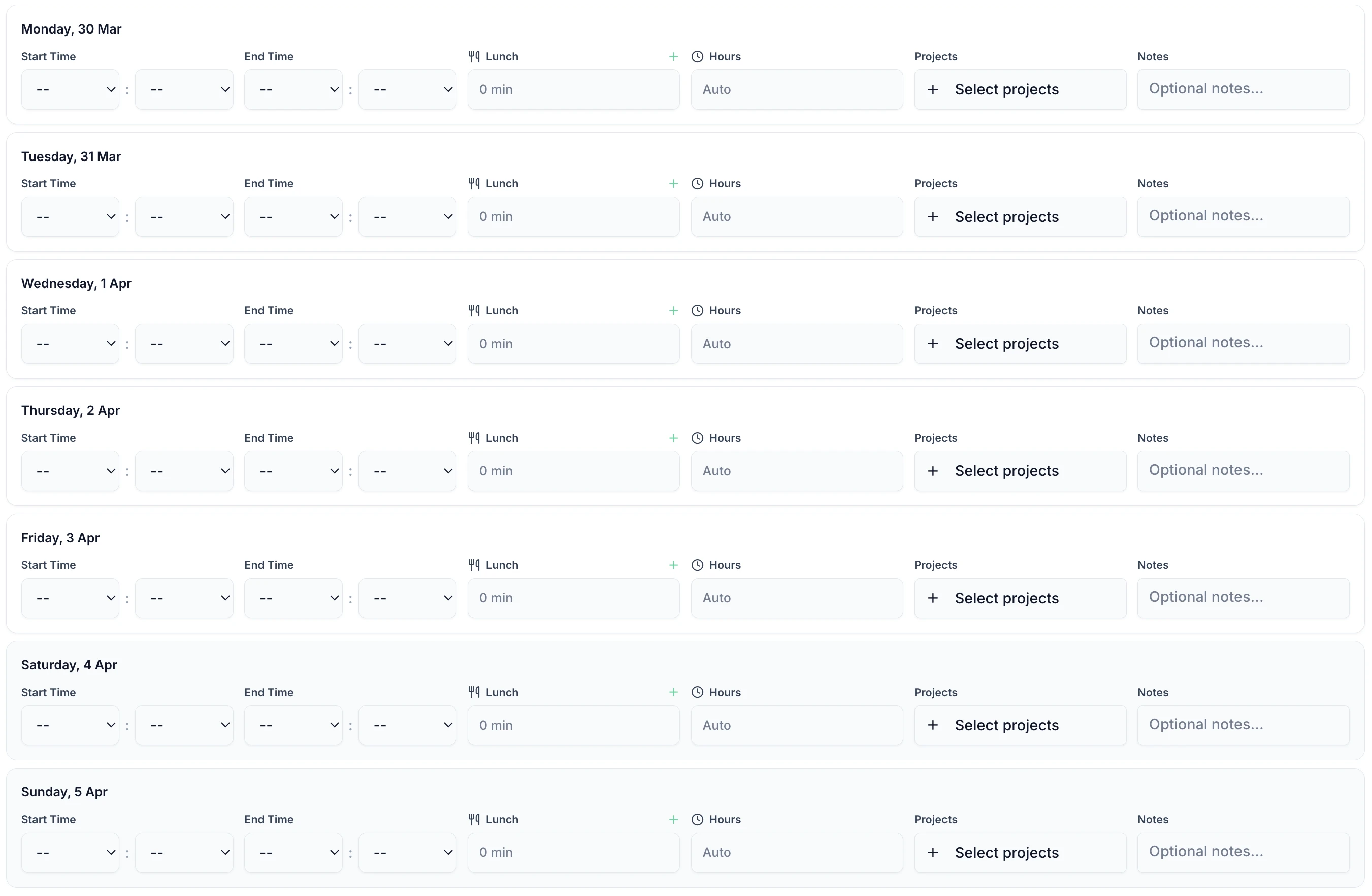
Employees log start time, end time, and breaks — total hours are calculated automatically. Add notes for context, track time across multiple projects, and submit the whole week in one go.
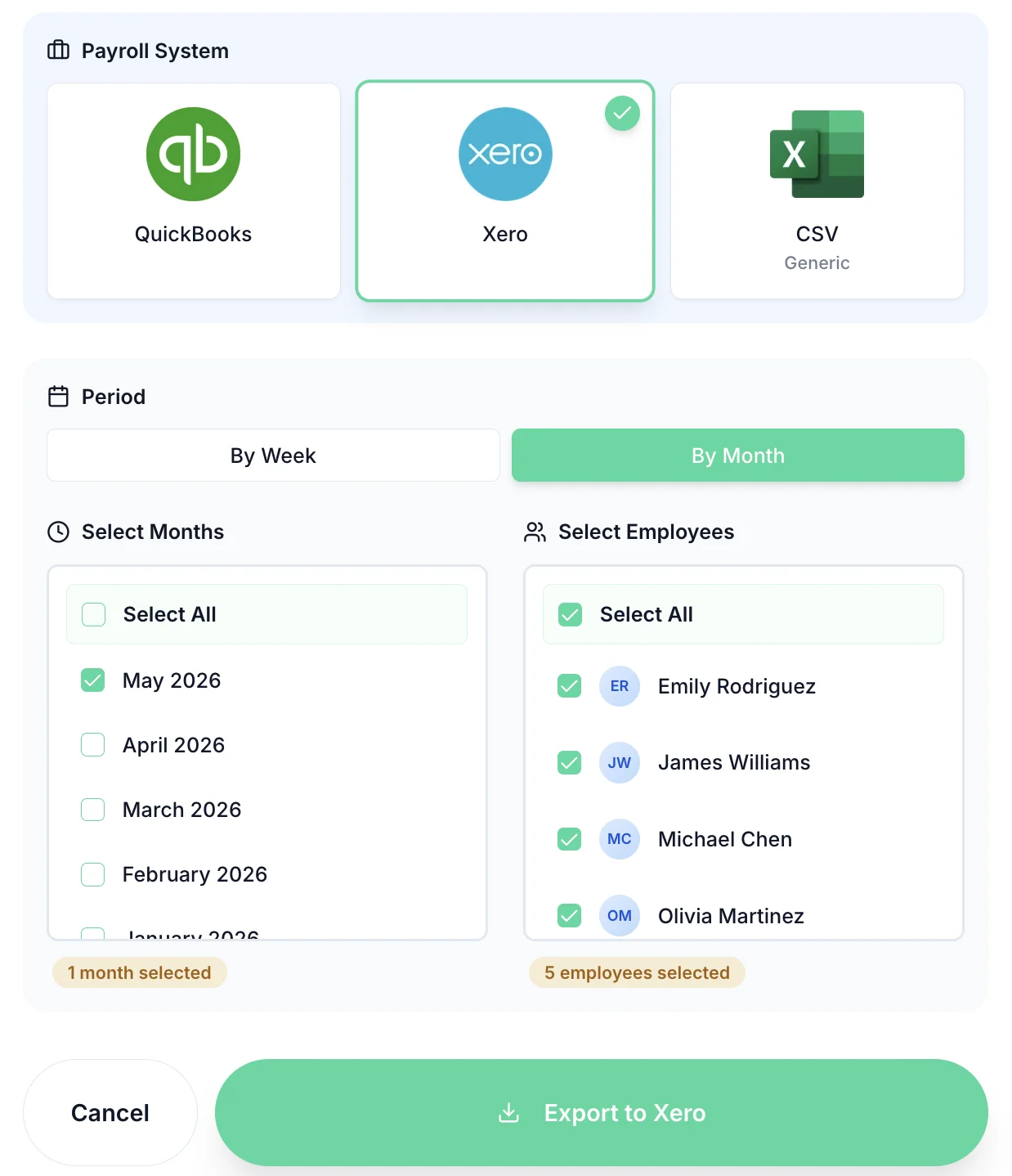
Once time tracking are approved, export hours directly to Xero, QuickBooks, or CSV. Select employees, choose the period, and export with one click. No more re-keying hours into payroll software.
Manual time tracking causes payroll errors, wastes admin hours, and leaves gaps in the records UK employers are legally required to keep under the Working Time Regulations 1998.
Employees log a full week in under a minute on mobile — no forms, no paperwork
Total hours, overtime, and breaks calculated instantly — no manual maths or spreadsheets
Every entry timestamped and tracked — HMRC-compliant records under the Working Time Regulations
All the tools UK businesses need to track hours accurately and meet employer obligations under the Working Time Directive
One-tap clock in from any smartphone. No hardware needed.
Track hours against specific projects or clients for accurate billing and resource allocation.
Managers approve time tracking with one tap. Employees get notified instantly.
Overtime calculated automatically based on your thresholds. Track against the 48-hour WTR limit.
Every entry timestamped and logged with notes. HMRC-compliant records under the Working Time Regulations 1998.
Changes sync instantly across all devices. Managers always see up-to-date hours.
From field-based teams to remote employees, TimeTally adapts to how your staff actually works — not how enterprise software assumes they do.
Remote time tracking works best when it's lightweight and trusted. TimeTally gives remote employees a one-tap start and stop on their phone or browser — no surveillance, no screen capture, just accurate hours that flow into the weekly timesheet and get approved by their manager.
Field workers can't submit timesheets at a desk. TimeTally's iOS app lets site-based, mobile, and field-service employees log their hours from wherever they are — works offline and syncs when back in signal. Managers see all submissions in real time without chasing.
Hourly time tracking must be precise — a missed minute repeated across 20 employees adds up fast. TimeTally records clock-in and clock-out to the minute, flags early finishes and late starts, and automatically calculates overtime once contracted hours are exceeded.
Variable-hours workers need a system that handles weeks with different hours rather than a fixed schedule. TimeTally tracks zero-hours time week by week, calculates holiday accrual using the 52-week average reference period, and keeps the records needed if pay entitlement is ever disputed.
Contractors need time tracked against specific projects or client codes for invoicing accuracy. TimeTally supports project-level time entries, manager or client approval of hours, and export to accounting software — giving both the contractor and the client a clear, signed-off record of time spent.
Hybrid teams need a consistent time tracking process whether staff are in the office or at home. TimeTally gives everyone the same submission experience — from any device — and gives managers a single view of hours regardless of where their team worked that day.
Real reviews from TimeTally customers
“Setup was dead simple and the team just got on with it. Got everyone up and running in an afternoon with no help needed. Does everything we need for timesheets and holidays without the faff.”
S.M.
“Has completely changed how I handle timesheets. Used to dread it every week — now it takes me minutes. Really easy to get around and my staff picked it up straight away.”
J.T.
“Started using it just for rotas but quickly realised it does loads more. The timesheets and leave management are great, and it even handles TOIL and overtime which I wasn't expecting. Use it for everything now.”
R.K.

Expert guides to help you track employee time effectively and stay compliant
UK working time rules, the 48-hour limit, and employer record-keeping obligations
Read guideBest practices for tracking time with distributed and mobile teams
Read guideExport tracked hours directly to Xero, QuickBooks, and other UK payroll systems
View integrationsThe Working Time Regulations 1998 impose specific obligations on UK employers to monitor working hours, rest breaks, and weekly limits. Inadequate time tracking exposes businesses to HMRC enforcement and employee claims.
Under the Working Time Regulations 1998, workers cannot be required to work more than an average of 48 hours per week, calculated over a 17-week reference period (or 52 weeks for certain sectors). This is an average, not an absolute weekly cap — some weeks can exceed 48 hours if others fall below. Employers must keep adequate records to demonstrate compliance. Breaching this limit can result in Health and Safety Executive enforcement action, including improvement notices and prosecution in serious cases.
Workers can opt out of the 48-hour limit by signing an opt-out agreement, but it must be voluntary and the worker can withdraw with seven days' notice (or longer if agreed). Employers cannot make opting out a condition of employment or subject workers to detriment for refusing. Despite opt-outs, employers must still keep time records. Tribunal cases frequently challenge whether opt-outs were truly voluntary — documented time tracking demonstrates you monitored hours even where opt-outs existed.
Night workers (those who regularly work at least three hours between 11pm and 6am) are subject to a stricter limit: an average of 8 hours in any 24-hour period, with no opt-out available. This applies across all industries. Night workers must also receive free health assessments. Employers in sectors with particularly hazardous night work face an absolute 8-hour limit per shift with no averaging. Detailed night shift time tracking is essential to demonstrate compliance.
Workers are entitled to a 20-minute uninterrupted rest break if working more than six hours in a day, plus 11 consecutive hours of rest between shifts, plus a 24-hour rest period each week (or 48 hours per fortnight). These are minimum entitlements — contracts can be more generous. Employers who fail to provide adequate rest face worker-initiated claims to employment tribunals. Time tracking systems must record break times to demonstrate rest break compliance, particularly for shift workers where break patterns vary.
The Health and Safety Executive enforces the Working Time Regulations through workplace inspections and can issue improvement notices requiring immediate action. HMRC also has enforcement powers, particularly where breaches affect National Minimum Wage compliance (e.g., unpaid hours pushing pay below NMW). Penalties include prosecution (fines up to £20,000 in magistrates' court, unlimited in crown court) and public naming. Adequate time tracking records are the primary defence against enforcement action.
The Working Time Regulations apply equally to mobile, remote, and office-based workers. Employers cannot avoid their obligations simply because workers are difficult to monitor. For drivers, separate EU drivers' hours rules apply. For remote workers, employers must implement systems that allow hours to be recorded accurately. This might include mobile time tracking apps with GPS verification. Tribunals are unsympathetic to employers who claim they "couldn't track" remote workers' hours.
Swipe to see more →
From the blog
HMRC Timesheet Requirements UK
What records UK employers must keep and penalties for non-compliance
How to Track Employee Hours Legally
UK legal requirements for time tracking and working time records
Working Time Regulations UK
48-hour week, mandatory rest breaks, and opt-out rules for employers
Automatic vs Manual Timesheets
Which approach is right for your business — and what the law requires
How to Manage Employee Timesheets
Practical guide to setting up and running an effective timesheet process
Best Timesheet Software UK 2026
Complete buyer's guide to timesheet software for UK businesses
