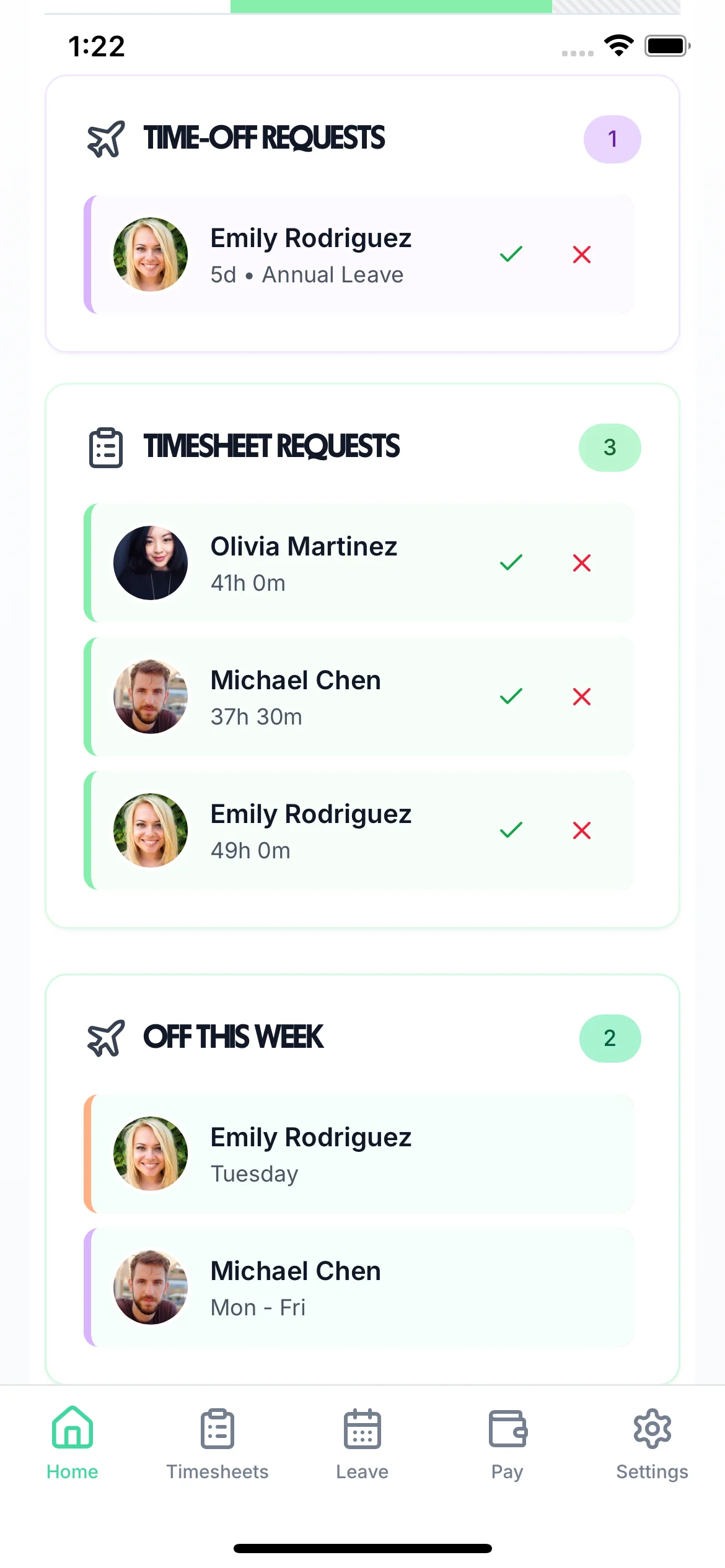
Stop tracking Time Off In Lieu on spreadsheets. TimeTally automatically accrues TOIL from approved overtime, lets employees request it like annual leave, and gives managers complete visibility over every balance — from calculation to sign-off.
Click any feature to learn more.

14-day free trial · No credit card needed
Time Off In Lieu sounds simple — but managing it manually across a team quickly leads to disputes, lost records, and employees taking time off they haven't actually earned. A proper leave management system that integrates TOIL with time tracking solves this cleanly.
Without a single source of truth, employees and managers disagree about how many hours are banked. Spreadsheets edited by multiple people become unreliable fast.
When time tracking and TOIL are in separate systems, approved overtime never makes it into the TOIL balance. Hours get lost and employees feel short-changed.
Without caps or expiry rules, employees accumulate months of TOIL. When they leave or take it all at once, it creates a serious operational and financial liability.
Managers can't plan cover if they don't know who has TOIL booked. Without a shared calendar view, approving TOIL in isolation leads to understaffing.
When a manager approves overtime in a timesheet, TimeTally calculates the TOIL earned and adds it to the employee's balance instantly. No manual entry. No separate spreadsheet. No arguments about what was agreed.
Set your TOIL rate — 1:1, 1.5:1, or 2:1 — to match your employment contracts. Different rates for weekdays, evenings, weekends, and bank holidays are all supported.
Prevent balances growing unchecked with configurable TOIL caps and expiry windows. Employees are automatically informed of upcoming expiry so time is used, not lost.
Every TOIL transaction — earned, requested, approved, and expired — is logged with a full audit trail. Export records for payroll or use alongside our free TOIL calculator.
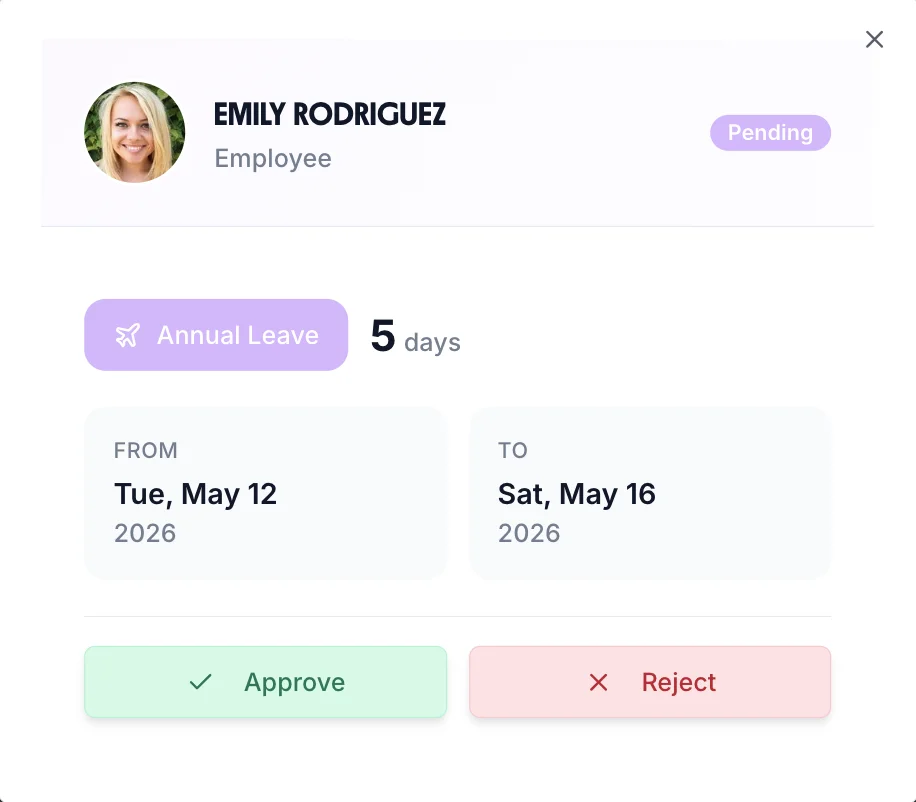
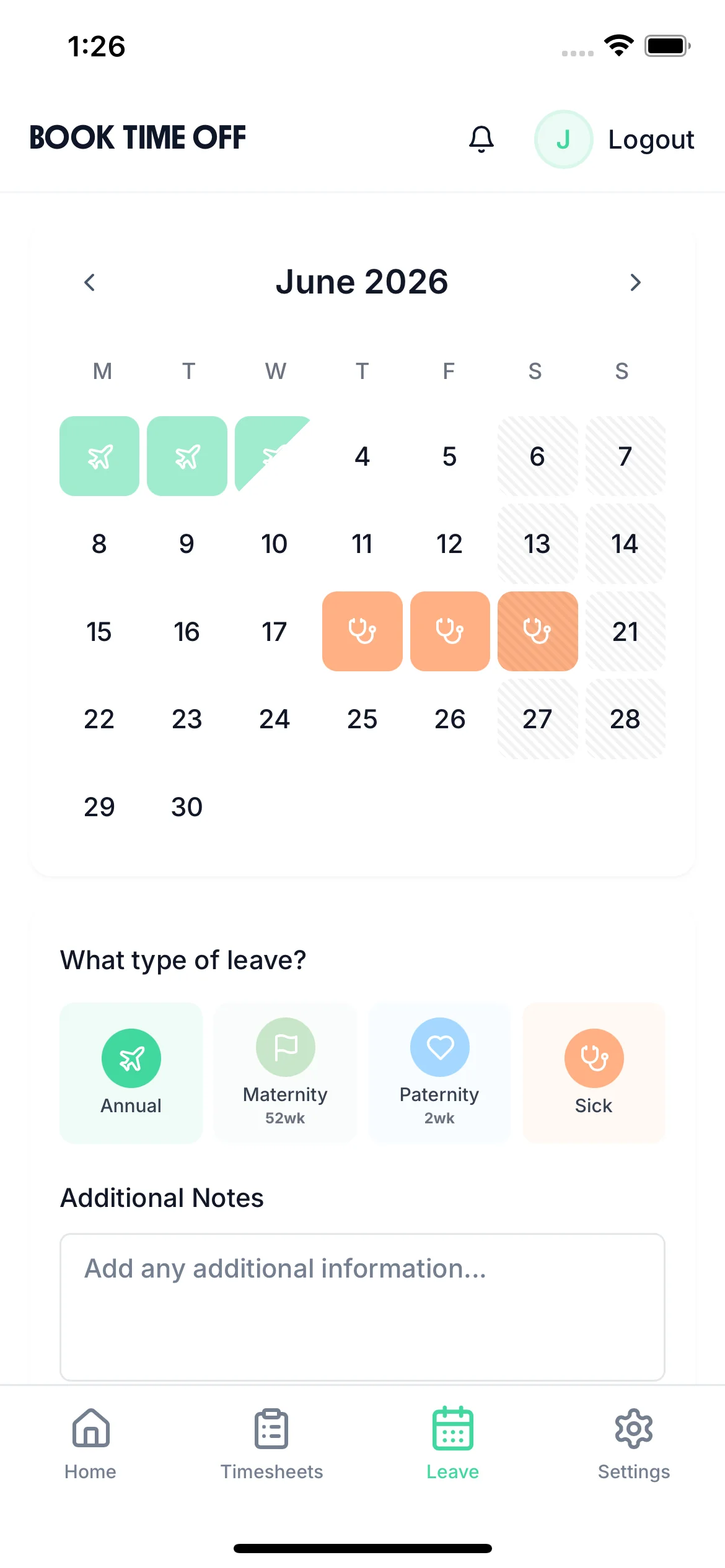
There's no separate system to learn. Employees request TOIL through the same flow as any other leave request— choose the TOIL leave type, select dates, and submit. Managers approve or decline with one tap, and the balance updates automatically.
Employees already know how to request annual leave, sick leave, and other absence types. TOIL uses the exact same process — no new app, no training required.
Employees can see their current TOIL balance when submitting a request. The system prevents them from requesting more than they have accrued, eliminating overdrafts before they happen.
Approved TOIL appears on the team calendar alongside annual leave and all other absence types — so managers can see coverage at a glance before approving.
Managers and admins can see every employee's TOIL balance, accrual history, and booked time in one place. No chasing for records. No back-and-forth about what's been approved. TOIL integrates with your rota so managers always see the full staffing picture before approving requests.
View each employee's TOIL balance, see how much was accrued this month, and identify balances at risk of expiry.
Export TOIL data via CSV or sync directly with Xero and QuickBooks for payroll and year-end reconciliations.
Configure accrual rate, maximum balance, and expiry window once — the system enforces them automatically for every employee.

The shared team calendar shows TOIL, annual leave, sick leave, and every other absence type in one colour-coded view. Managers can see immediately who is off and why — making cover planning straightforward.
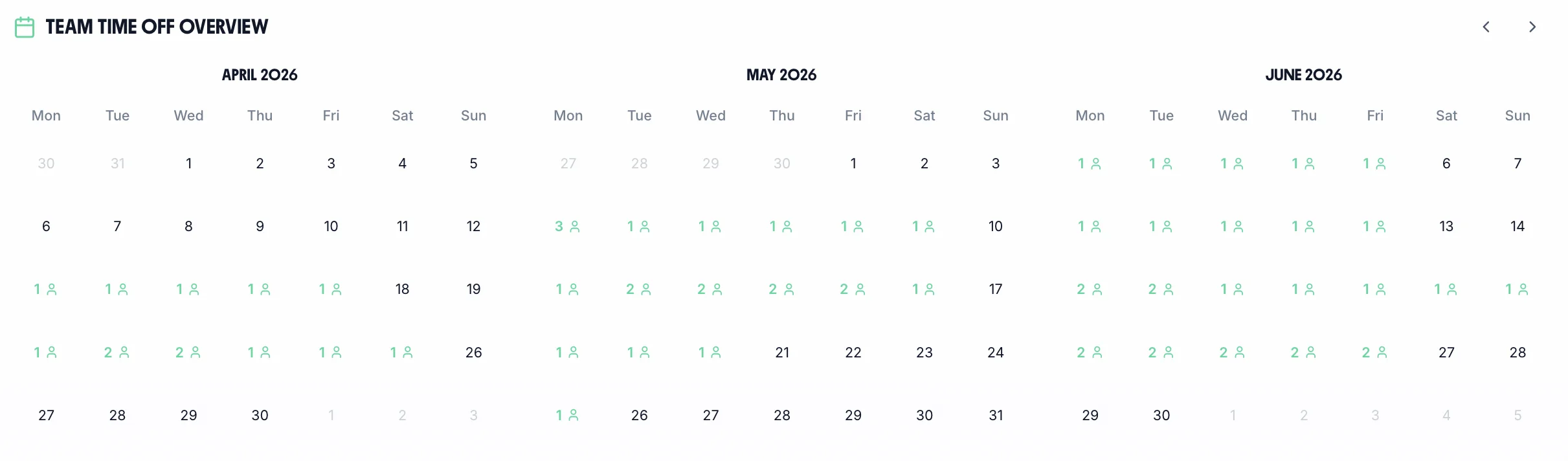
TOIL time off displays in its own colour on the team calendar so managers can distinguish it instantly from holiday and other absence types.
Managers can see the full team picture before approving TOIL requests, ensuring minimum staffing levels are maintained across every shift.
Employees can check their TOIL balance and submit requests from their phone at any time. The iOS app works as well on the shop floor as at a desk.
From accrual rules to expiry policies, TimeTally covers every aspect of a robust TOIL management system — included in your standard plan.
TOIL is calculated and credited the moment overtime is approved in a timesheet. No manual input needed — accrual is instant and accurate.
Set accrual rates (1:1, 1.5:1, 2:1), maximum balances, and expiry rules to match your employment contracts and TOIL policy exactly.
Managers approve or decline TOIL requests with a single tap — via the app or browser. Balance updates immediately on both sides.
All approved TOIL shows on the same team calendar as annual leave and sick leave — full picture, always visible.
Set TOIL to expire after a defined window. Employees are notified before balances lapse so time off is taken rather than wasted.
Every TOIL transaction is logged — earned, approved, rejected, expired. Export the full history for payroll, audits, or employment disputes.
Any business where employees regularly work beyond their contracted hours benefits from a proper TOIL system. TimeTally is used across a wide range of UK sectors.
Event overtime, late closings, and peak season surges make TOIL essential in pubs, restaurants, and hotels.
Learn moreShift overruns, on-call hours, and bank shifts all generate TOIL that needs accurate tracking.
Learn moreProject deadline pressure and weather delays lead to irregular overtime that TOIL can offset.
Learn moreShift-based overtime from production targets and machine downtime catch-ups is easily managed with TOIL.
Learn moreChristmas, Black Friday, and sale periods generate overtime that staff prefer to bank as TOIL rather than take as pay.
Learn moreExtended shifts, double coverage, and event work create TOIL obligations that are easily lost without a system.
Learn moreOne price. Every feature. TOIL management included.
Billed monthly. Cancel anytime.
Tools and guides to help you build and manage a clear TOIL policy.
Quickly calculate how much time off in lieu an employee has earned from overtime hours at any accrual rate.
Calculate nowEverything you need to know about the legal position, calculation methods, and best practice for TOIL in the UK.
Read the guideWhich is better for your business — time off in lieu or paying overtime? A practical comparison for UK employers.
Read the comparisonTime off in lieu rules are more detailed than most managers realise. Here's what the law actually says.
TOIL accrues on extra hours worked beyond an employee's contracted hours. Some employers only count hours worked above a minimum threshold. The definition of what qualifies must be set out clearly in the TOIL policy.
Best practice is to obtain prior manager approval before extra hours are worked. Retrospective approval creates disputes about whether the additional hours were authorised in the first place and whether TOIL is actually owed.
Employers should cap the maximum TOIL an employee can accumulate — for example, 2 days — to prevent large balance liabilities. Setting expiry dates ensures time off is taken promptly rather than accruing indefinitely.
There is no statutory right to TOIL instead of overtime pay — it is purely a contractual arrangement. Employers can choose to offer TOIL, overtime pay, or give employees the option to choose between the two.
TOIL is separate from statutory annual leave. Employers should define whether unused TOIL carries over at the end of the leave year or expires. There is no statutory obligation to carry TOIL over into the next year.
If an employee leaves with unused TOIL, whether it must be paid out depends on the contract wording. Good practice — and often the legally safest approach — is to pay out any outstanding TOIL balance on termination.
TOIL accrues on hours worked above contracted hours. For zero-hours workers, the policy must define what constitutes 'normal' hours before TOIL can begin to accrue — otherwise disputes about entitlement are likely.
Maintain a running TOIL balance for each employee showing when TOIL was earned, approved, and taken. Accurate records protect both employer and employee in the event of a dispute about hours worked or balances owed.
Swipe to see more →
TOIL rules vary by industry. TimeTally's flexible TOIL system adapts to your sector's shift patterns, callout schedules, and overtime policies.
Out-of-hours callouts, on-call activations, and shift extensions create significant TOIL entitlements in NHS and private healthcare settings. TimeTally tracks each callout, calculates TOIL accrued, and ensures balances are taken within clinical rota windows — not carried indefinitely.
Security operatives working 12-hour shifts, alarm response callouts, and extended post coverage quickly accumulate TOIL. TimeTally tracks TOIL separately from annual leave, enforces carryover caps, and gives security managers a real-time view of team balances when scheduling upcoming posts.
Reactive maintenance callouts and emergency cover create unpredictable TOIL entitlements across FM teams. TimeTally captures each callout automatically, calculates the TOIL owed, and gives team leaders a weekly balance report — so nothing falls through the cracks at month-end.
Late venue close times, private events, and seasonal peaks mean hospitality teams regularly work beyond their contracted hours. TimeTally's hospitality TOIL management lets staff log overtime against each event, managers approve TOIL claims on their phone, and balances reset at each leave year end.
Production deadlines, line breakdowns, and shift handover delays generate overtime that manufacturing workers expect to reclaim. TimeTally's manufacturing TOIL system integrates with shift schedules, tracks line-level TOIL separately from general overtime, and exports balances to payroll for accurate payout calculations.
Retail teams put in extra hours around product launches, sale events, and Christmas peaks — then need to take that time back in the quieter months. TimeTally's retail TOIL management tracks peak-season TOIL as it accrues and makes it easy for staff to book time off in lieu once the rush is over.
When a manager approves overtime in a timesheet, TimeTally automatically calculates the TOIL earned based on your configured accrual rate (1:1, 1.5:1, or 2:1). The hours are added to the employee's TOIL balance immediately, with no manual data entry required. Employees can see their balance at any time through the app.
Yes. TOIL appears as a leave type in the same leave request flow employees use for annual leave. They select the TOIL leave type, choose dates and hours, and submit. Managers receive a notification and can approve or reject with one tap. Everything appears on the team calendar alongside other leave.
Yes. You can configure TOIL balances to expire after a set number of months (for example, TOIL must be used within 3 months of accrual). You can also set a maximum accrual cap so balances never grow unmanageably large. Both settings are configurable per organisation.
TimeTally supports both. If your organisation tracks leave in days, TOIL accrual is expressed in days. If you track in hours (common in shift-based businesses), TOIL is tracked to the hour. You choose the unit that matches your payroll and employment contracts.
TimeTally gives you accurate records of each employee's TOIL balance at any point in time, including when they leave. What happens to unused TOIL on departure is governed by your TOIL policy — TimeTally provides the records you need to handle the calculation correctly.
Yes. The team calendar shows who is off on TOIL alongside all other leave types. Managers and admins can view individual TOIL balances, see historical accrual from approved overtime, and export TOIL data via CSV for payroll or reporting purposes.
Yes. TOIL is tracked as a completely separate leave type with its own balance. It does not reduce statutory annual leave entitlement, and employees can hold both simultaneously. The 28-day statutory holiday entitlement remains completely separate.
TOIL management is included in the standard TimeTally plan at £2 per employee per month. There is no add-on cost or separate pricing tier. The 14-day free trial gives you full access to TOIL tracking with no credit card required.
Real reviews from TimeTally customers
“Setup was dead simple and the team just got on with it. Got everyone up and running in an afternoon with no help needed. Does everything we need for timesheets and holidays without the faff.”
S.M.
“Has completely changed how I handle timesheets. Used to dread it every week — now it takes me minutes. Really easy to get around and my staff picked it up straight away.”
J.T.
“Started using it just for rotas but quickly realised it does loads more. The timesheets and leave management are great, and it even handles TOIL and overtime which I wasn't expecting. Use it for everything now.”
R.K.

